On-demand tool discovery for all your MCPs and per-subagent MCP controls to preserve context window.
Quick Install
Automated & IDE SetupCopy the AI prompt to install this server into Claude Code, Cursor, or another agent — or use 1-click editor setup below.
Manual Client & Custom JSON ConfigExpand JSON ▾
Client Config & Setup
Choose your client or environment
Target File:
💡 Paste the JSON block into your client's configuration file under mcpServers, then restart the application.
Documentation Overview
Agent MCP Gateway
A Model Context Protocol (MCP) gateway that aggregates multiple MCP servers and provides policy-based access control for agents and subagents. Solves Claude Code's MCP context window waste by enabling on-demand tool discovery instead of loading all tool definitions upfront.
Status
- ✅ M0: Foundation - Configuration, policy engine, audit logging,
list_serverstool - ✅ M1: Core - Proxy infrastructure,
get_server_tools,execute_tool, middleware, metrics, hot reload, OAuth support - 🚧 M2: Production - HTTP transport, health checks (planned)
- 🚧 M3: DX - Single-agent mode, config validation CLI, Docker (planned)
Current Version: M1-Core Complete (with OAuth)
Table of Contents
- Overview
- Installation
- Quick Start
- Command-Line Options
- Configuration File Discovery
- Configuration
- Usage
- Gateway Tools
- Security Considerations
- Troubleshooting
- Testing
- Development
- Architecture
- Future Features
- Documentation
- Contributing
- License
- Support
- Acknowledgments
Overview
The Problem
When multiple MCP servers are configured in development environments (Claude Code, Cursor, VS Code), all tool definitions from all servers load into every agent's and subagent's context window at startup:
- 5,000-50,000+ tokens consumed upfront
- 80-95% of loaded tools never used by individual agents
- Context needed for actual work gets wasted on unused tool definitions
The Solution
The Agent MCP Gateway acts as a single MCP server that proxies to multiple downstream MCP servers based on configurable per-agent rules:
- 3 gateway tools load at startup (~2k tokens)
- Agents discover and request specific tools on-demand
- 90%+ context reduction
- Policy-based access control per agent/subagent
How It Works
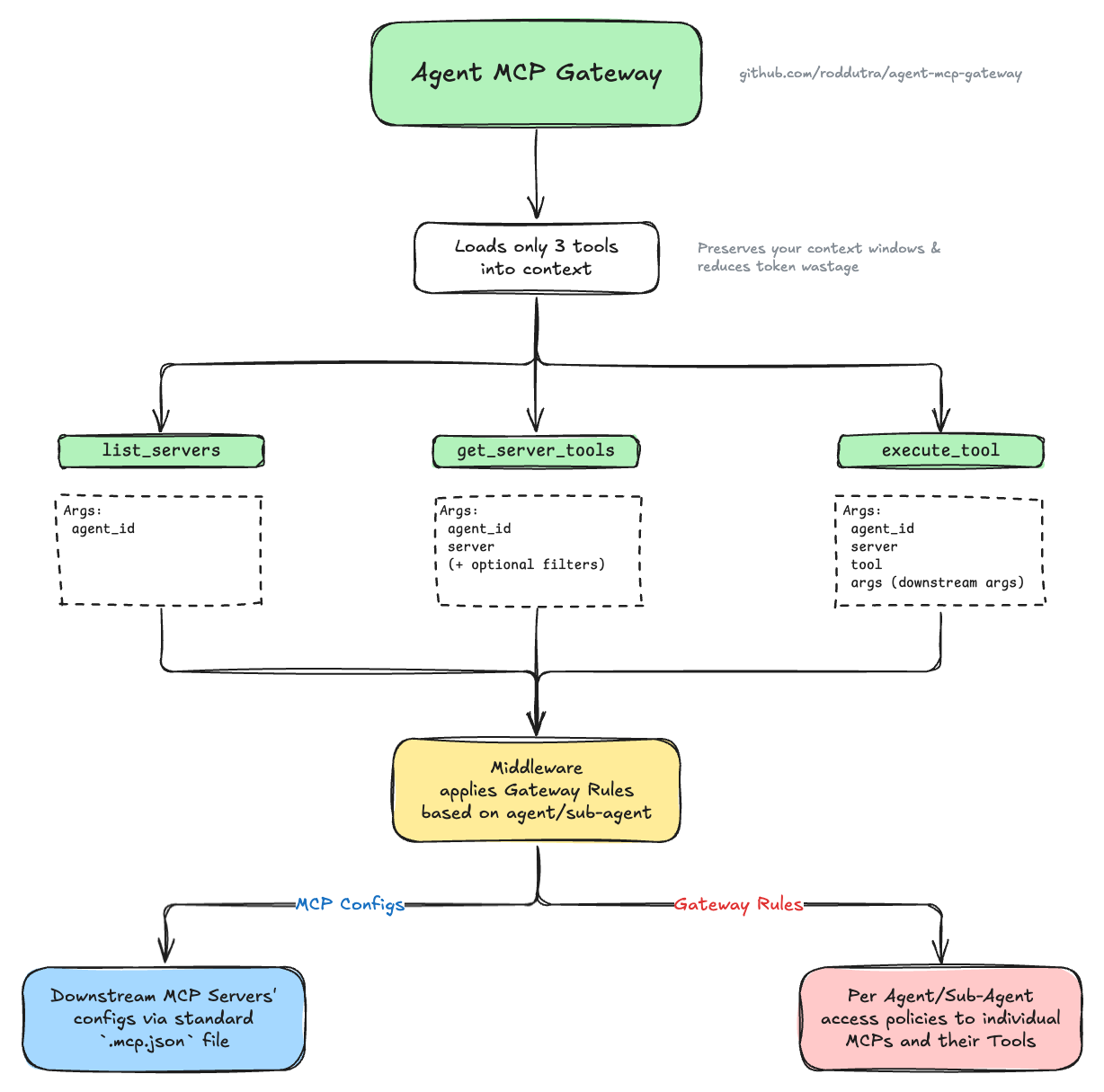
The gateway sits between agents and downstream MCP servers, exposing only 3 lightweight tools. When an agent needs specific functionality, it discovers available servers and tools through the gateway, which filters visibility based on policy rules - agents only see servers and tools they have access to. This reduces each agent's context window to only relevant tools, while the gateway handles proxying authorized requests to downstream servers.
View detailed diagram with examples → (includes downstream servers, tools, and gateway rules examples)
Key Features
- ✅ On-Demand Tool Discovery - Load tool definitions only when needed
- ✅ Per-Agent Access Control - Configure which servers/tools each agent can access
- ✅ Easy Agent Integration - Simple template to add gateway support to any agent (see guide)
- ✅ Deny-Before-Allow Policies - Explicit deny rules take precedence
- ✅ Wildcard Support - Pattern matching for tool names (
get_*,*_user) - ✅ Session Isolation - Concurrent requests don't interfere
- ✅ Transparent Proxying - Downstream servers unaware of gateway
- ✅ Audit Logging - All operations logged for monitoring
- ✅ Performance Metrics - Track latency and error rates per agent/operation
- ✅ Hot Configuration Reload - Update rules/servers without restart
- ✅ Thread-Safe Operations - Safe concurrent access during reloads
- ✅ Diagnostic Tools - Health monitoring via
get_gateway_status(debug mode only)
Installation
This generates two template files ready to customize:
mcp.json- Your downstream MCP servers (Brave, Postgres, etc.)mcp-gateway-rules.json- Per-agent access policies (who can use which servers/tools)
For local development: See Development section.
Quick Start
1. Configure Gateway Files
After running uvx agent-mcp-gateway --init (see Installation), edit the generated template files:
See Configuration section for detailed examples and Configuration File Discovery for alternative file locations.
2. Add Gateway to Your MCP Client
Claude Code CLI:
Manual configuration:
Note: The env variables are optional if using default config locations. See Environment Variables Reference for all options.
3. Configure Your Agents
The gateway's tool descriptions are self-documenting, but for proper access control you should configure how your agents identify themselves. Choose the approach that fits your use case:
Approach 1: Multi-Agent Mode (Recommended)
For different agents with different permissions, configure each agent to pass its identity.
Add this to your agent's system prompt (e.g., CLAUDE.md, .claude/agents/agent-name.md):
Replace YOUR_AGENT_NAME with your agent's identifier (e.g., "researcher", "backend", "admin").
Examples: See .claude/agents/researcher.md and .claude/agents/mcp-developer.md for complete configuration examples.
Approach 2: Single-Agent Mode
For simpler setups where all agents should have the same permissions, or when using MCP clients without system prompt configuration (e.g., Claude Desktop), configure a default agent using either method:
Option A: Environment Variable
Note: The agent specified (e.g., "developer") must exist in your .mcp-gateway-rules.json file with appropriate permissions.
Option B: "default" Agent in Rules
Note: Allowing all servers ("servers": ["*"]) without specifying tool restrictions grants access to all tools on all servers.
With either approach, agents can omit agent_id in tool calls - the gateway uses your configured default agent automatically.
Command-Line Options
Configuration File Discovery
The gateway searches for configuration files in this order:
MCP Server Config (.mcp.json)
GATEWAY_MCP_CONFIGenvironment variable (if set).mcp.jsonin current directory~/.config/agent-mcp-gateway/.mcp.json(home directory)./config/.mcp.json(fallback)
Gateway Rules (.mcp-gateway-rules.json)
GATEWAY_RULESenvironment variable (if set).mcp-gateway-rules.jsonin current directory~/.config/agent-mcp-gateway/.mcp-gateway-rules.json(home directory)./config/.mcp-gateway-rules.json(fallback)
Tip: Use agent-mcp-gateway --init to create the home directory configs on first run.
Configuration
The gateway requires two configuration files:
1. MCP Servers Configuration
File: mcp.json (searched in multiple locations)
Defines the downstream MCP servers the gateway will proxy to. Uses the standard MCP config format compatible with Claude Code and other coding agents:
Related MCP Servers
Reviews
No reviews yet — be the first to share how this listing worked for you.
Frequently Asked Questions about Agent MCP Gateway
AllMCPs Directory Badge
Showcase your server listing on GitHub or your project documentation. Embed this dynamic SVG badge to highlight official listing status and live engagement.
Badge Style:
Live Dynamic SVG Preview
Markdown (GitHub README)
[](https://allmcps.com/mcp/agent-mcp-gateway)HTML Embed
<a href="https://allmcps.com/mcp/agent-mcp-gateway"><img src="https://allmcps.com/api/badge/agent-mcp-gateway?style=directory" alt="Agent MCP Gateway on AllMCPs" /></a>