Agent Interop Runtime README
The full upstream README, mirrored here for reference. Install config, tool schemas, adoption signals, and an original overview live on the Agent Interop Runtime listing page.
Agent Interop Runtime
Your coding agents already know how to work, and this project helps them share a task while each one keeps its own identity, account, and working environment.
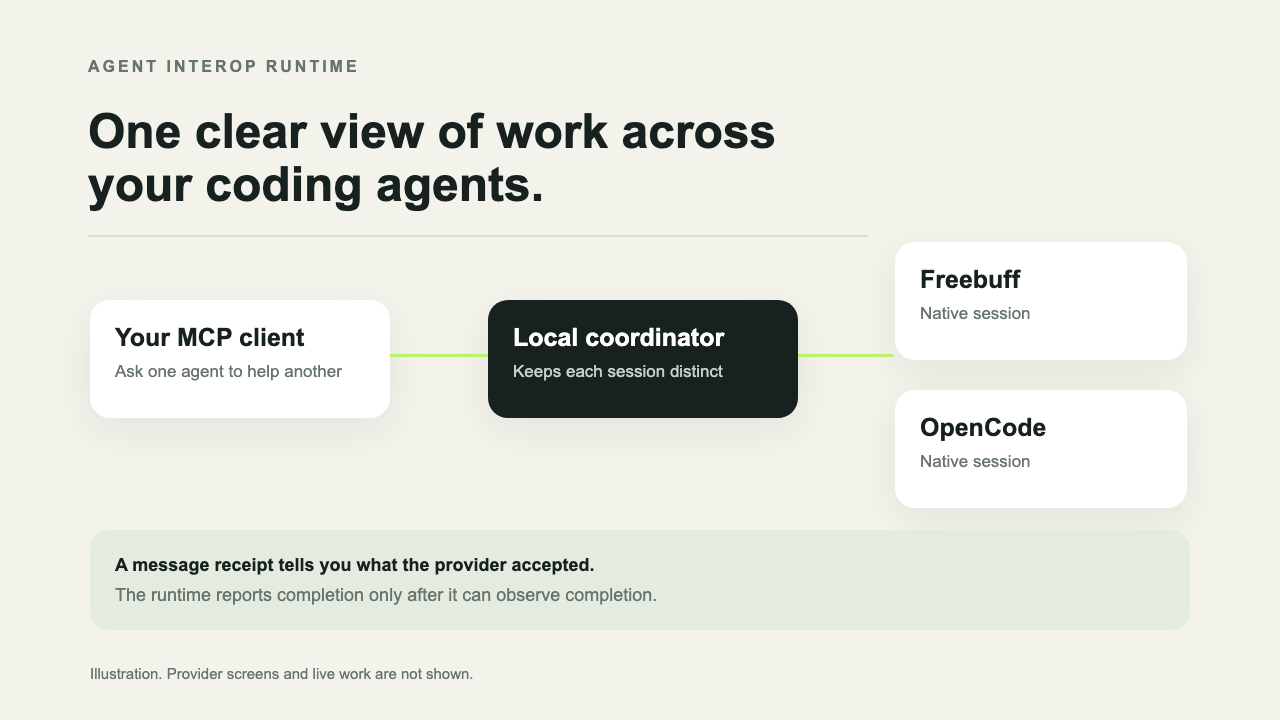
Connect a local MCP client to Agent Interop Runtime, and it will find the coding agents available on your computer so you can choose a session, send it work, follow its progress, and pass a result to another session. Each provider still uses its own account, permissions, history, and workspace access, so the runtime can coordinate the work without combining separate environments.
Think of it as a traffic desk for coding agents, because it shows which session received a task, records the updates that provider sends back, and keeps the result of each check in one place without creating a shared chat behind the scenes.
Watch the short illustrated tour
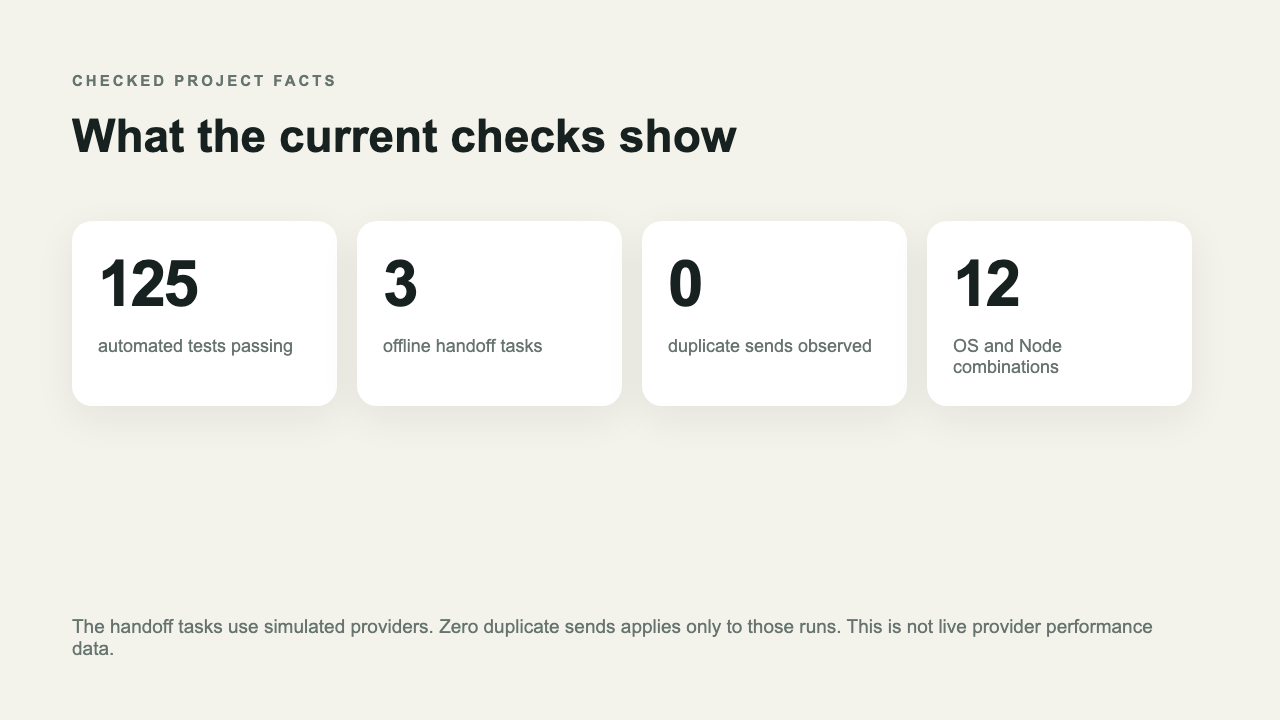
The pictures are illustrations, so they explain the workflow and available measurements but do not show a live provider session.
What happens when you send work
The runtime sends your message to the provider session you selected, and the receipt may confirm that the provider accepted it; however, acceptance only confirms delivery to the provider and does not mean the agent finished the task. The runtime reports completion only after it observes a result from that session.
The same rule applies when delivery is uncertain, because a network failure may happen after the provider has accepted your message but before the runtime receives confirmation. In that case the runtime marks delivery as unknown and does not silently send the prompt again, which avoids repeating work that may already be underway.
What it can do
Find supported provider sessions on your computer, so you can see which local tools are available before choosing where to send work.
Create or resume sessions when the selected provider supports those actions, and use the provider report to check which controls are available in your setup.
Send work, request cancellation, read progress, and collect a provider diff when the selected provider supports those features.
Keep shared work notes, handoffs, evidence, reviews, and cooperative resource claims so participating sessions can coordinate around the same task.
Run local checks inside a named workspace when you explicitly enable verification, and review the configured programs before trusting them with a project.
Read small text files inside an approved project folder, while common credential files are blocked, credential shaped text is redacted, and binary files are refused.
Provider features differ, so the doctor report shows what each installed provider can do; finding a provider alone does not confirm its sign in status or whether it is ready to accept work.
What it does not do
It does not merge provider accounts or histories, and each session remains subject to its provider's own settings.
It does not bypass a login, consent prompt, or permission request, so you must complete those steps through the provider itself.
It does not give an agent access to a provider that is not installed on your computer, nor does it replace the provider's own application.
It does not sandbox commands, because verification runs the programs you configure with the access available to your account, so use it only with work and commands you trust.
Resource claims coordinate agents that use this runtime, but they cannot stop another program from editing the same files outside the runtime.
Providers
Freebuff Desktop uses its local app connection, and writes require a current launch check before work is sent; Freebuff CLI instead uses a managed terminal session.
OpenCode uses its local server, which the runtime may start on loopback when needed, and requests that may change work are never replayed after an uncertain network result. Each session remains tied to the server that exposed it, so switching servers does not silently redirect existing work.
Codex uses the Codex app server, while Claude Code and Cursor use their supported Agent Client Protocol commands.
The available features depend on the provider version, local setup, and account state, and most protocol checks use simulated providers rather than live sessions. Check the provider on the target computer before relying on it for live work.
Current evidence
The repository test suite passes 125 checks, and the offline benchmark ran three simulated handoff tasks in which it observed zero duplicate provider sends. Those results describe only the recorded test runs, because the benchmark does not contact live agents, measure speed, or estimate provider cost.
GitHub CI checks three operating systems against four supported Node versions, for a total of twelve combinations.
Earlier local checks observed a response from Freebuff GLM 5.3 Flash, and OpenCode Big Pickle accepted a prompt, although completion was not observed in that session. These results apply only to those specific sessions, so they do not establish general provider support.
Install
Use Node 20 through Node 26, and install the released package with pnpm before running the provider check.
The latest published npm version is 0.3.2, while the source fixes described here are available in the repository; build from the repository if you want to try those changes before a newer package release is published.
Connect a local MCP client
Run the installer to inspect the local Codex entry, and use its write option when you want the runtime to update that entry for you.
The write option backs up the current file and preserves unrelated settings, but you should restart Codex after changing its configuration because installing the npm package alone does not edit your settings.
Other MCP clients can launch the same serve command through their local server configuration, and you should keep this connection on your own computer unless you have deliberately set up authenticated remote access.
Choose a smaller tool set
The full profile exposes every available tool, but agents may find a smaller profile easier to use when they need only a focused set of controls.
The minimal profile focuses on provider sessions, while Core adds shared work records and Freebuff exposes Freebuff specific controls; Legacy combines Core with older Freebuff tools, Full is the default, and read only mode is available with INTEROP_READ_ONLY=1.
Run checks
Read the provider guide, the plain language architecture guide, the compatibility notes, and troubleshooting for details about setup and supported behavior.
Safety, privacy
The local stdio server is the simplest setup, while HTTP mode binds to loopback by default and requires a bearer token. Remote access requires an explicit setting and network protection, because session identifiers do not replace authentication.
Project file reads stay inside the selected project folder, and common credential files are denied while text is checked against common credential patterns. These checks cannot detect every secret, so keep sensitive values out of files an agent can read.
Verification is off by default, but when enabled it runs configured programs without a shell and checks that the working folder stays inside the named workspace. Child programs are not sandboxed, so they retain the access granted by your account.
Help improve it
Use doctor before sending work, and when reporting a problem include the provider name, version, operating system, the action you tried, and whether the provider accepted the task or returned a completed result. Leave private prompts and credentials out of reports.
The project welcomes reproducible compatibility reports and code contributions, especially when they explain what happened on a specific provider version and computer.