decisionkit


Fast, cheap, closed-form decisions for coding agents, scripts and CI. You ask a question about a piece of text: yes/no, pick one of a list, rate it on a scale, or rank candidates. A specialized decision API answers with probabilities, not paragraphs.
decisionkit is provider-neutral. It talks to:
- Claude, with the Claude Code login you already have (
claude -p): no extra API key. Claude's probabilities are its own self-reported estimates, and it is slower (about 4 s per call). - OpenAI Decisions API (public beta),
POST api.openai.com/v1/decisions - Jev by TypeSafe AI,
POST api.typesafe.ai/v1/systemone, with a TypeSafe key - Jev via OpenRouter: the same Jev API at
POST openrouter.ai/api/v1/systemone, with an OpenRouter key and billed by OpenRouter
You can use it as a CLI, as a Claude Code plugin, or as an MCP server for Codex, Cursor, VS Code, Gemini CLI, Claude Desktop, Windsurf and Zed.
Requires Node.js ≥ 20 on your
PATH.
Quickstart (CLI, 1 minute)
npm i -g @adxtya21/decisionkit

# Have Claude Code? No API key needed:
export DECISIONKIT_PROVIDER=claude

# Or use a decision API (faster, real probabilities):
export DECISIONKIT_PROVIDER=openai DECISIONKIT_OPENAI_API_KEY=sk-...

echo "Clicking Export CSV returns HTTP 500 since v2.3" | decisionkit choice "What kind of issue is this?" bug feature refactor docs
# decisionkit: sent to OpenAI Decisions API (gpt-6-luna) · 852 ms · $0.000013   ← stderr
# bug 1                                                                       ← stdout
That output is from a real run. The npm package is @adxtya21/decisionkit; the command it installs is decisionkit.
See it work
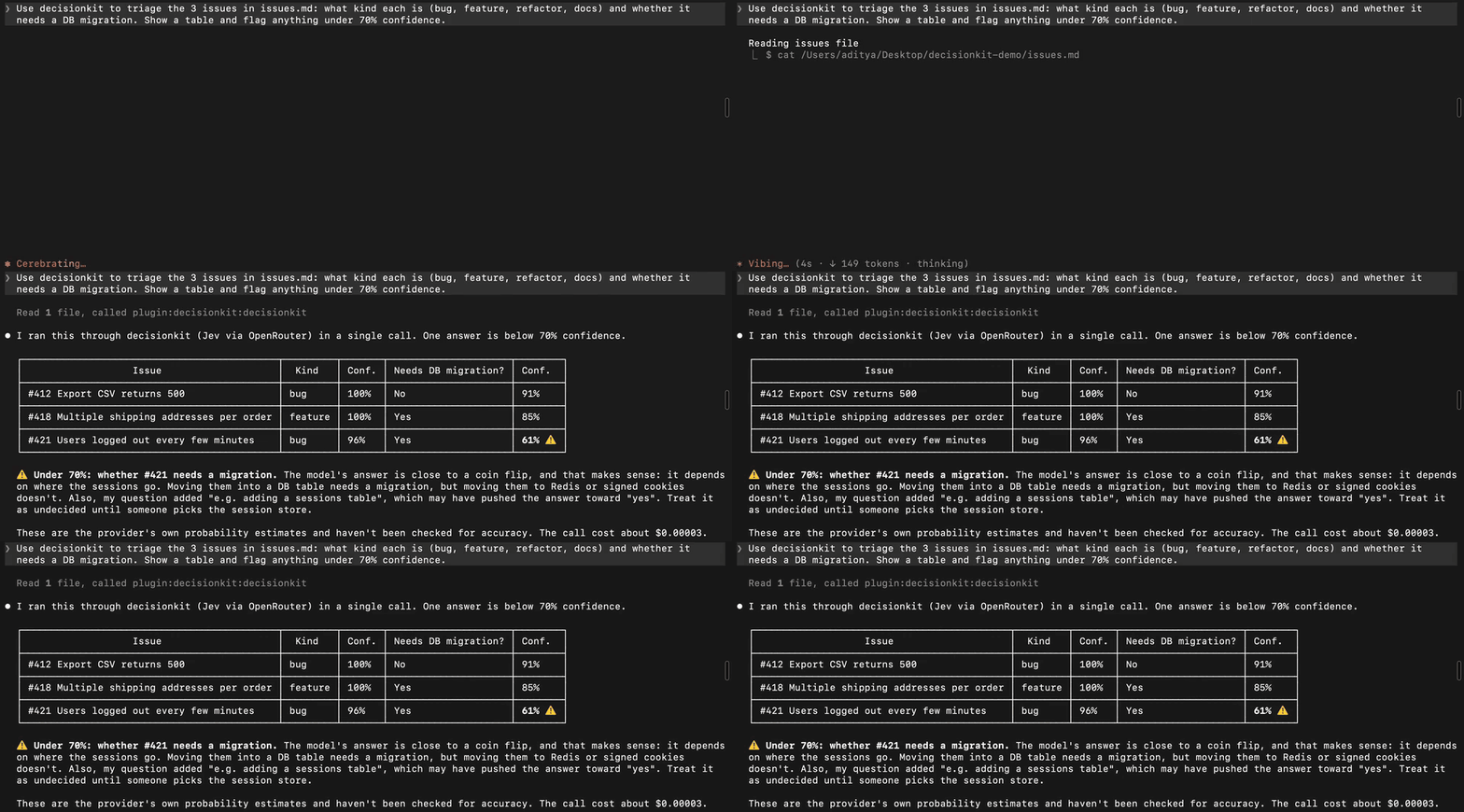
In Claude Code: Claude hands the triage of three issues to Jev in a single call, then flags the one answer it isn't sure about (61%). This is a real recording; Claude's thinking is sped up 10×.
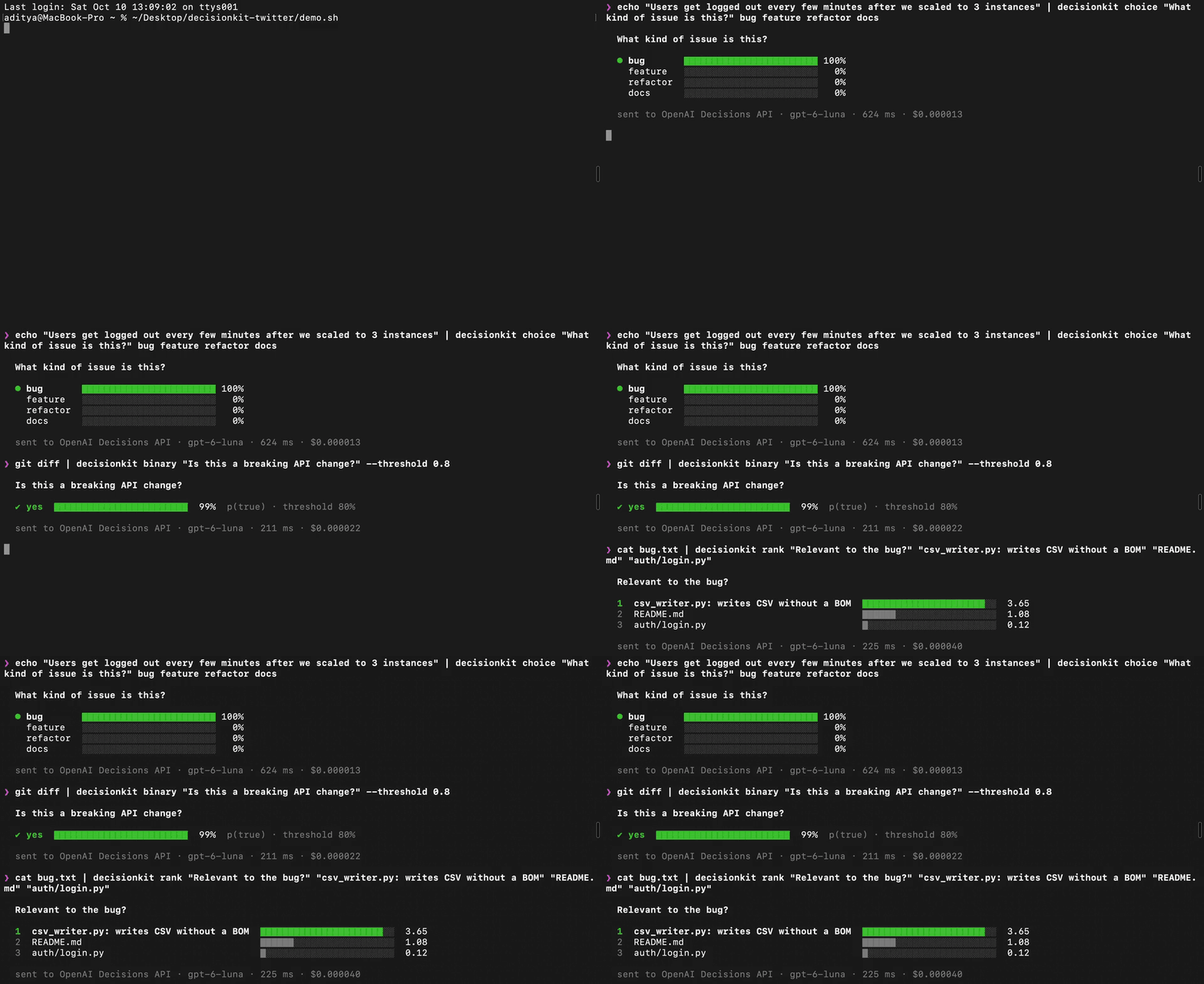
In your terminal: classify an issue, catch a breaking API change, rank the files behind a bug. This is a real recording at 1.5× speed.
🎬 Watch the 40-second launch video (with sound)
Why use it
From a 100-task benchmark (bench/RESULTS.md, 2026-10-10):
| Correct | Cost, 100 decisions | Median latency | |
|---|---|---|---|
| OpenAI Decisions API | 99/100 | $0.0028 | 135 ms |
| Jev via OpenRouter | 97/100 | $0.0018 | 524 ms |
| Claude Haiku 5.5, asked directly | 97/100 | $0.0045 | 1.8 s |
- Accuracy is a tie within noise. We don't claim the decision APIs are smarter.
- Speed and cost: they were 3–13x faster and up to 2.5x cheaper.
- Probabilities: only the decision APIs return a probability per answer, so you can act automatically when confident and route the rest to a human.
- Caveat: small sample, author-written tasks. Read the caveats in the results file.
What it sends, and to whom
Each decision sends the context and questions to the one provider you configured. The result names the provider and model, and the CLI prints them on stderr.
- Nothing is sent anywhere else, or automatically. Agents call decisionkit only when they choose to.
- Claude Code shows the exact payload in a permission prompt before each call. Some other clients auto-approve tools; check yours.
- Keep sensitive content out of
context. Don't send secrets, credentials, personal data or code you haven't cleared for a third party. The tool's description tells agents the same. - The
claudeprovider runs on your Claude Code login. It stripsANTHROPIC_API_KEYfrom its own process, so a key in your shell can't quietly move it off your subscription. It counts toward your plan's usage like any Claude Code request. - Only
DECISIONKIT_*variables are read. A bareOPENAI_API_KEYorOPENROUTER_API_KEYin your shell is never used, so you can't be billed on an account you didn't pick. - No prompt content is logged. The optional local usage log stores ids, timings, token counts and estimated cost only.
What you get back
| Question type | CLI | You get |
|---|---|---|
binary | decisionkit binary "<q>" | probability_true |
choice (2–255 options) | decisionkit choice "<q>" a b c | choice plus a probability per option |
score (2–10 levels, low → high) | decisionkit score "<q>" low mid high | expected_level (0-based, probability-weighted), most_likely, a probability per level |
rank (2–20 candidates) | decisionkit rank "<q>" x y z | Candidates sorted by score. Derived from one score per candidate, so treat close values as ties. |
What the results do and don't promise:
- Probabilities are estimates. They are the provider's own estimates and haven't been verified as calibrated for your task. Pick thresholds with your own labeled examples.
- No rationale. Neither provider returns one, and decisionkit never invents one.
- Provider-specific fields (such as
confidence) are kept undernative. - Errors are never answers. Failures, refusals and invalid provider responses always come back as errors (CLI exit code
2, MCPisError).
CLI: scripts and CI
decisionkit reads the text from stdin, or from --context "…". The outputs below are illustrative:
gh issue view 412 --json body -q .body | decisionkit choice "What kind of work item is this?" bug feature refactor docs
# bug 0.94

git diff origin/main | decisionkit binary "Does this diff break the public API?" --threshold 0.8 && echo "needs a major version bump"

decisionkit score "How severe is this incident?" SEV4 SEV3 SEV2 SEV1 --context "Checkout returns 500 for all users"
# SEV1 0.88 (expected 2.9)

cat bug.txt | decisionkit rank "How relevant is this file to the bug?" "csv_writer.py: formats rows" "README.md" "views.py: export endpoint"
- Exit codes follow
grep:0: true, or confident enough1: false, or below--threshold2: error (config, network, provider)
--threshold <p>:binary: true only ifp_true ≥ p(default 0.5).choice/score: exit1if the top probability is belowp.
- Two views:
- At a terminal you get a formatted view: probability bars, the winner highlighted, and a dim provider/latency/cost footer.
- When the output is piped or captured, it is the plain one-line format shown above, so scripts never see formatting.
- Force either with
--prettyor--plain.NO_COLOR=1turns off color.
- Other options:
--jsonprints the full result.--quiethides the stderr disclosure line.decisionkit statusshows the active provider, connectivity and usage totals.decisionkit --helplists everything.
- Plain
decisionkitwith no arguments runs as the MCP server for AI apps. - Cold starts: each CLI run is a new process with a fresh connection. That's about 0.85 s for OpenAI, versus 135 ms on a warm connection. For many decisions, put several questions in one call (MCP /
--jsonAPI), or keep the MCP server running.
Claude Code plugin
claude plugin marketplace add adityajha2005/decisionkit
claude plugin install decisionkit@decisionkit
Then run /plugin configure decisionkit@decisionkit in Claude Code, or add --config provider=openai --config openai_api_key=… to the install command. Pick a provider (required; there is no default) and paste that provider's key. Keys are masked and stored in your OS secure store, never in settings.json.
| Setting | Notes |
|---|---|
provider | claude (your Claude Code login, no key), jev, openrouter or openai |
typesafe_api_key / openrouter_api_key / openai_api_key | Only the selected provider's key is used |
model | Blank means the default: jev-latest, ~typesafe/jev-latest (OpenRouter) or gpt-6-luna |
timeout_ms | Total time per decision, including retries. Default 15000. |
usage_log | Local usage log (no prompt content). Default on. |
- Check it: run
/decisionkit:status, or ask Claude to call thestatustool. - Remove it:
claude plugin uninstall decisionkit@decisionkit. This also deletes the usage log. - Fewer prompts (optional): if you're comfortable sending context without a prompt each time, allow
mcp__plugin_decisionkit_decisionkit__decide(and…__status) inpermissions.allow. - Loaded up front: the plugin loads the tool up front (
alwaysLoad), which saved Claude a turn (about 1 s) on first use in our test.
Other AI apps (any model)
Install once, with a pinned version, so a new release never changes your tool silently:
npm i -g @adxtya21/decisionkit@0.4.0
decisionkit reads only these variables:
DECISIONKIT_PROVIDER:claude(no key; needs Claude Code installed and logged in),jev,openrouteroropenaiDECISIONKIT_TYPESAFE_API_KEY,DECISIONKIT_OPENROUTER_API_KEYorDECISIONKIT_OPENAI_API_KEY- Optional:
DECISIONKIT_MODEL,DECISIONKIT_TIMEOUT_MS,DECISIONKIT_USAGE_LOG
Keep the key in your shell profile and reference it from the client config. Writing it into a config file stores it in plaintext.
Codex CLI — ~/.codex/config.toml
Codex starts MCP servers with an empty environment, so forward the key explicitly with env_vars:
[mcp_servers.decisionkit]
command = "decisionkit"
env = { DECISIONKIT_PROVIDER = "openai" }
env_vars = ["DECISIONKIT_OPENAI_API_KEY"]
startup_timeout_sec = 30

# Optional. Interactive Codex asks before each call. Non-interactive `codex exec`
# blocks MCP calls that need approval, so pre-approve here if you script it
# (this sends context without a prompt).
# [mcp_servers.decisionkit.tools.decide]
# approval_mode = "approve"
Tested with codex-cli 0.157.1 (2026-10-10): tool discovery, the input schema and a decide call all work.
Cursor — ~/.cursor/mcp.json
{ "mcpServers": { "decisionkit": {
  "command": "decisionkit",
  "env": { "DECISIONKIT_PROVIDER": "openai", "DECISIONKIT_OPENAI_API_KEY": "${env:DECISIONKIT_OPENAI_API_KEY}" } } } }
VS Code / GitHub Copilot — .vscode/mcp.json
VS Code prompts for the key and stores it itself:
{
  "inputs": [{ "type": "promptString", "id": "dk-key", "description": "decisionkit provider API key", "password": true }],
  "servers": { "decisionkit": { "type": "stdio", "command": "decisionkit",
    "env": { "DECISIONKIT_PROVIDER": "openai", "DECISIONKIT_OPENAI_API_KEY": "${input:dk-key}" } } }
}
Gemini CLI — ~/.gemini/settings.json
Gemini CLI strips inherited variables whose names contain KEY, so list the key in env:
{ "mcpServers": { "decisionkit": { "command": "decisionkit",
  "env": { "DECISIONKIT_PROVIDER": "openai", "DECISIONKIT_OPENAI_API_KEY": "$DECISIONKIT_OPENAI_API_KEY" } } } }
Claude Desktop, Windsurf, Zed
- Claude Desktop (
claude_desktop_config.json, keymcpServers) and Zed (settings.json, keycontext_servers) take the key as plaintext inenv. A keychain-backed Claude Desktop bundle is planned. - Windsurf (
mcp_config.json, keymcpServers) supports${env:DECISIONKIT_OPENAI_API_KEY}.
Then ask your agent to call status. Its env_vars_seen field lists which DECISIONKIT_* names actually reached the server (names only, never values).
Example agent request
"Triage these five issues with decisionkit: bug, feature, refactor or docs? Flag anything under 70% probability for me to check."
{ "context": "Issue #412: Clicking 'Export CSV' on /reports returns HTTP 500 since v2.3…",
  "questions": [
    { "id": "kind", "type": "choice", "instructions": "What kind of work item is this?",
      "options": [{ "value": "bug" }, { "value": "feature" }, { "value": "refactor" }, { "value": "docs" }] },
    { "id": "needs_migration", "type": "binary", "instructions": "Does fixing this likely require a database migration?" } ] }
Put related questions about the same text in one call; they share a single round trip.
Cost, latency and limits
- Price per 1M input tokens, as of 2026-10-10:
- Jev: $0.042, directly or via OpenRouter. With OpenRouter, the cost OpenRouter reports is used instead.
- OpenAI Decisions: $0.10. This is a lower bound, since regional and long-context multipliers aren't modeled.
- Neither provider charges for output tokens.
- Latency:
- decisionkit itself adds about 0.25 ms per call.
- The MCP server opens the provider connection at startup, so its first call doesn't pay connection setup.
- Full breakdown: bench/RESULTS.md.
- Retries:
- Up to 3 attempts, only for rate limits, overloads and network errors.
Retry-Afteris honored, and nothing is retried pasttimeout_ms.- Every retry is billed.
- Limits: context and questions are validated before anything is sent: 1–16 questions, ≤ 255 options, 2–10 levels, 2–20 rank candidates.
Troubleshooting
| Symptom | Cause and fix |
|---|---|
config: … claude CLI is not on PATH | The claude provider needs Claude Code installed. Run claude once and log in. |
auth: … Not logged in (claude provider) | Run claude in a terminal and log in. |
config: No provider selected | Set DECISIONKIT_PROVIDER (jev, openrouter or openai), or the plugin's provider setting. |
config: … DECISIONKIT_OPENAI_API_KEY is not set | Set the DECISIONKIT_* key for the provider you picked. Bare OPENAI_API_KEY is ignored on purpose. |
auth: … HTTP 401 | The key doesn't belong to that provider. An OpenRouter key only works with openrouter; Jev's own API needs a TypeSafe key from console.typesafe.ai. |
quota: … HTTP 402 / insufficient_quota | Out of credits with that provider. |
timeout | No answer within DECISIONKIT_TIMEOUT_MS (default 15000). |
Server shows as failed in /mcp | Node.js ≥ 20 isn't on PATH. Claude Code's native installer doesn't include Node. |
| Works in a terminal but not in Codex | Codex starts servers with an empty environment, so add env_vars = ["DECISIONKIT_…_API_KEY"]. |
| Works in a terminal but not in Gemini CLI | Gemini strips *KEY* variables, so list the key in the server's env. |
codex exec says the tool "requires approval" | Pre-approve decide with approval_mode = "approve" (see the Codex section). |
decisionkit status (or the status tool) shows which settings reached the server and whether the provider is reachable.
Development
npm ci
npm run check      # typecheck + tests: unit, stdio MCP end-to-end, CLI end-to-end (mock provider, no keys)
npm run build      # bundles src/ into dist/server.mjs. dist/ is committed: plugin installs don't run npm install.
Benchmarks (keys in a local, gitignored .env):
DECISIONKIT_PROVIDER=openai node --env-file=.env bench/run.ts --tasks tasks-v2.jsonl
node --env-file=.env bench/run.ts --anthropic [--via-openrouter] --tasks tasks-v2.jsonl   # Haiku baseline
node bench/run.ts --claude --tasks tasks-v2.jsonl                                         # via claude -p
CONTRIBUTING.md: setup, PR checklist and the open to-do list.AGENTS.md: conventions and hard rules for anyone (human or agent) changing the code.docs/ARCHITECTURE.md: design, verified provider contracts, risk register.CHANGELOG.md: release history.
License
MIT. Not affiliated with TypeSafe AI, OpenAI or Anthropic.