AllMCPs
BrowseBestCategoriesStackCompareToolsGuidesBlog
Log in Submit MCP

Stay in the loop

Get new MCP servers and top picks in your inbox.

AllMCPs

The open directory for discovering and installing Model Context Protocol servers.

AllMCPs on GitHub (opens in a new tab)
Launched onTiny Startupstinystartups.com
Explore
  • Browse servers
  • Best MCP servers
  • Categories
  • MCP clients
  • Agent prompts
  • Stack Builder
  • Compare servers
  • Random discovery New
  • Submit a server
  • Pricing & Boost Boost
Learn
  • Guides hub
  • What is MCP?
  • Install guide
  • Build an MCP server
  • Deploy an MCP server
  • Security guide
  • Troubleshooting
  • MCP for SEO & AEO
  • Protocol versioning
  • Blog & updates
Tools
  • All developer tools
  • Config generator
  • Config validator
  • Config auditor
  • MCP playground
  • Token calculator
  • OpenAPI β†’ MCP
  • Badge generator
For agents
  • REST API docs
  • Trust & traffic Live
  • Remote MCP server SSE β†— (opens in a new tab)
  • llms.txt β†— (opens in a new tab)
  • Catalog JSON β†— (opens in a new tab)
Company
  • About
  • Advertise Sponsor
  • Contact
  • GitHub β†— (opens in a new tab)
  • Terms
  • Privacy
AllMCPs VerifiedAllMCPs VerifiedFeatured on Nick LaunchesFeatured on Nick LaunchesLaunch Llama NewsletterLaunch Llama NewsletterVerified DR - allmcps.comVerified DR - allmcps.comFeatured on SaaSGrowFeatured on SaaSGrowFeatured on Twelve ToolsFeatured on Twelve ToolsFeatured on Saaspa.geFeatured on Saaspa.geFeatured on Findly.toolsFeatured on Findly.toolsFeatured on Startup FameFeatured on Startup FameFeatured on LaunchKiwiFeatured on LaunchKiwiFeatured on ScrollLaunchFeatured on ScrollLaunchFeatured on DailyPingsFeatured on DailyPingsFazier badgeFazier badgeFeatured on NewTool.siteFeatured on NewTool.siteFeatured on saasfame.comFeatured on saasfame.comDR Checker - Domain RatingDR Checker - Domain RatingListed on Turbo0Listed on Turbo0Launched on LaunchBoard - Product Launch PlatformLaunched on LaunchBoard - Product Launch PlatformList on SimilarlabsList on Similarlabshttps://codetrendy.comhttps://codetrendy.comListed on DevTool.ioFeatured on BuildlistFeatured on BuildlistLaunched on Tiny StartupsFeatured on ShowMeBestAIFeatured on ShowMeBestAIFind us on LaunchZoneFind us on LaunchZoneAllMCPs VerifiedAllMCPs VerifiedFeatured on Nick LaunchesFeatured on Nick LaunchesLaunch Llama NewsletterLaunch Llama NewsletterVerified DR - allmcps.comVerified DR - allmcps.comFeatured on SaaSGrowFeatured on SaaSGrowFeatured on Twelve ToolsFeatured on Twelve ToolsFeatured on Saaspa.geFeatured on Saaspa.geFeatured on Findly.toolsFeatured on Findly.toolsFeatured on Startup FameFeatured on Startup FameFeatured on LaunchKiwiFeatured on LaunchKiwiFeatured on ScrollLaunchFeatured on ScrollLaunchFeatured on DailyPingsFeatured on DailyPingsFazier badgeFazier badgeFeatured on NewTool.siteFeatured on NewTool.siteFeatured on saasfame.comFeatured on saasfame.comDR Checker - Domain RatingDR Checker - Domain RatingListed on Turbo0Listed on Turbo0Launched on LaunchBoard - Product Launch PlatformLaunched on LaunchBoard - Product Launch PlatformList on SimilarlabsList on Similarlabshttps://codetrendy.comhttps://codetrendy.comListed on DevTool.ioFeatured on BuildlistFeatured on BuildlistLaunched on Tiny StartupsFeatured on ShowMeBestAIFeatured on ShowMeBestAIFind us on LaunchZoneFind us on LaunchZone
Β© 2026 Jackalope Digital LLC. All rights reserved.
  1. Home
  2. πŸ“Š Monitoring
  3. ActionsPulse
ActionsPulse logo
Health: ActiveRecent health check succeeded.Last checked 9/8/2026, 8:03:05 PM

ActionsPulse

User RatingsBe the first to rate and review this MCP server! Enrichment pendingWe haven’t run our AI enrichment pass on this listing yet, so the overview, use cases, and FAQ below may be sparse or missing. We work through the catalog over time β€” check back soon.
View Repository3 GitHub StarsTotal stargazers on GitHub for the source repository (3 stars).Visit Website

Real-time GitHub Actions observability: DORA Metrics, Cost Analysis, CI/CD Health dashboards.

Quick Install

Automated & IDE Setup

Copy the AI prompt to install this server into Claude Code, Cursor, or another agent β€” or use 1-click editor setup below.

Add to CursorAdd to VS Code
Manual Client & Custom JSON ConfigExpand JSON β–Ύ

Client Config & Setup

Remote HTTP
Choose your client or environment
Target File:~/Library/Application Support/Claude/claude_desktop_config.json
claude_desktop_config.json
{
  "mcpServers": {
    "actionspulse": {
      "url": "https://img.shields.io/badge/MCP-Available_on_Registry-00DC82?style=flat&logo=data:image/svg+xml;base64,PHN2ZyB4bWxucz0iaHR0cDovL3d3dy53My5vcmcvMjAwMC9zdmciIHdpZHRoPSIyNCIgaGVpZ2h0PSIyNCIgdmlld0JveD0iMCAwIDI0IDI0IiBmaWxsPSJub25lIiBzdHJva2U9IndoaXRlIiBzdHJva2Utd2lkdGg9IjIiIHN0cm9rZS1saW5lY2FwPSJyb3VuZCIgc3Ryb2tlLWxpbmVqb2luPSJyb3VuZCI+PHBhdGggZD0iTTEyIDJhMTAgMTAgMCAxIDAgMTAgMTBIMTJWMloiLz48cGF0aCBkPSJNMjEuMTggOC4wMmMtMS0yLjMtMi44NS00LjE1LTUuMTUtNS4xNSIvPjwvc3ZnPg==)](https://registry.modelcontextprotocol.io/?q=io.github.tsviz%2Factions-pulse"
    }
  }
}

πŸ’‘ Paste the JSON block into your client's configuration file under mcpServers, then restart the application.

Install Directory Badge Claim listing AlternativesπŸ“Š More in Monitoring

Documentation Overview

ActionsPulse πŸš€

Available on MCP Registry Docker Image Container Registry License: MIT

Real-time GitHub Actions observability through VS Code with GitHub Copilot

DORA Metrics β€’ Cost Analysis β€’ CI/CD Health β€’ Security Compliance

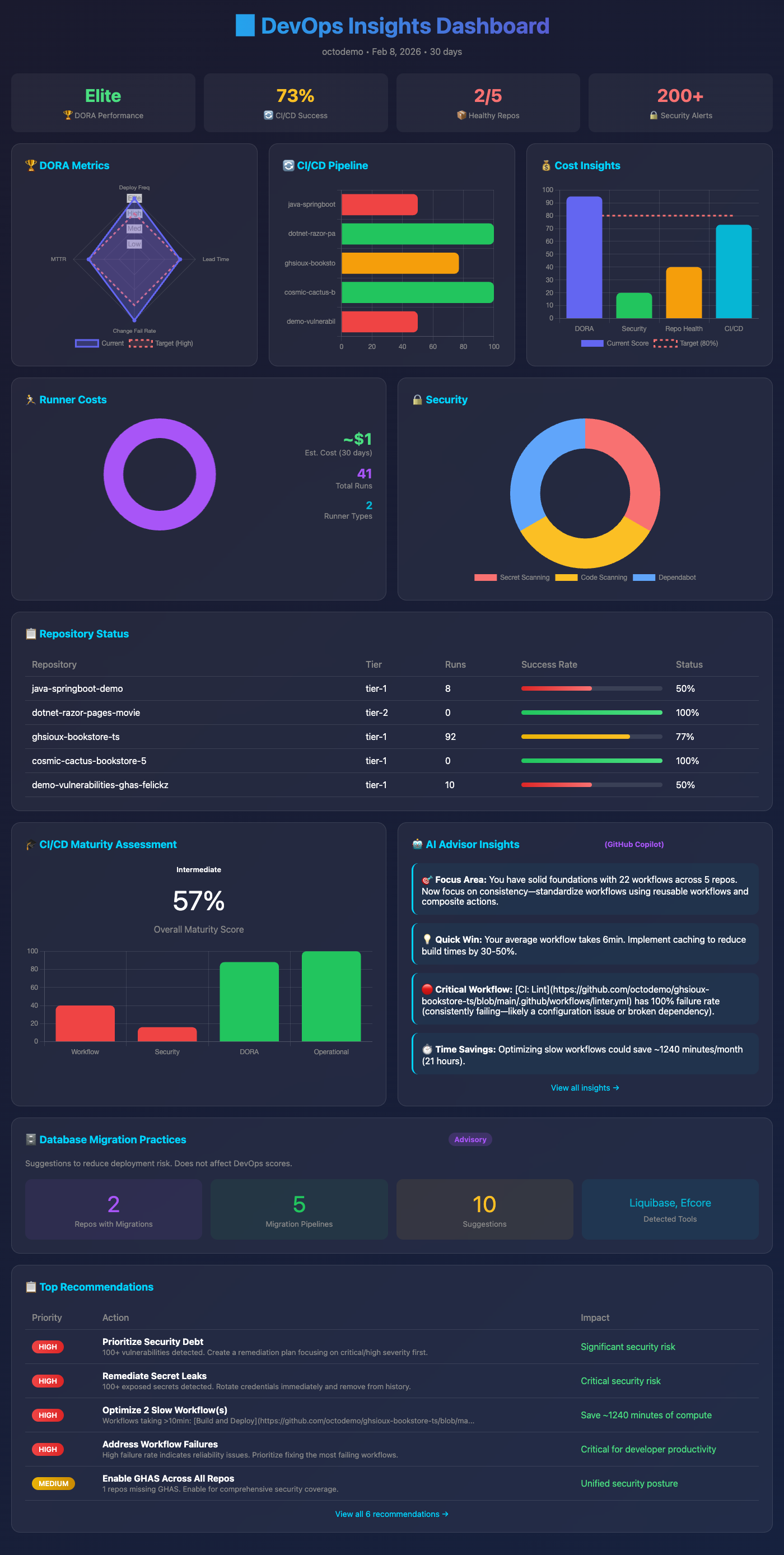
ActionsPulse Dashboard

☝️ This is an actual interactive HTML dashboard generated by ActionsPulse β€” see full tour below


✨ What is ActionsPulse?

ActionsPulse is an Agentic MCP Server that brings DevOps observability directly into your IDE. Ask GitHub Copilot questions like:

πŸ’¬ "Show me our DORA metrics for the last 30 days"
πŸ’¬ "Which workflows are costing us the most?"
πŸ’¬ "Generate a compliance report for SOC2"
πŸ’¬ "What's our deployment frequency this month?"

And get interactive visual dashboards with actionable insights.

🎯 Features

FeatureOrganizationEnterprise
πŸ“Š DORA Metricsβœ…βœ… Enhanced
⚑ Performance Analyticsβœ…βœ…
πŸ’° Cost Optimizationβœ…βœ… Cross-org
πŸƒ Runner Utilizationβœ… Self-hostedβœ… All runners
πŸ‘₯ Team Productivityβœ…βœ…
πŸ”’ Compliance Reportsβœ… (GHAS)βœ…
πŸ’Ύ Cache Analyticsβœ…βœ…
πŸŽ“ Maturity Assessmentβœ…βœ…

πŸ–ΌοΈ Dashboard Tour

ActionsPulse generates interactive HTML dashboards that you can open in any browser. Simply ask Copilot:

πŸ’¬ "Generate DevOps reports for my organization"

Or use the generate_devops_reports tool directly. Here's a complete tour of what you get:

πŸ“Š Dashboard Overview β€” Executive summary with all key metrics at a glance Dashboard Overview

The main dashboard provides:

  • 🎯 DevOps Maturity Score with visual gauge
  • πŸ“ˆ DORA Metrics summary (Deployment Frequency, Lead Time, Change Failure Rate, MTTR)
  • ⚑ CI/CD Pipeline health overview
  • πŸ’° Cost analysis highlights
  • πŸ”’ Security & compliance status
  • Quick navigation to detailed reports
πŸ“ˆ DORA Metrics β€” Industry-standard DevOps performance indicators DORA Metrics Dashboard
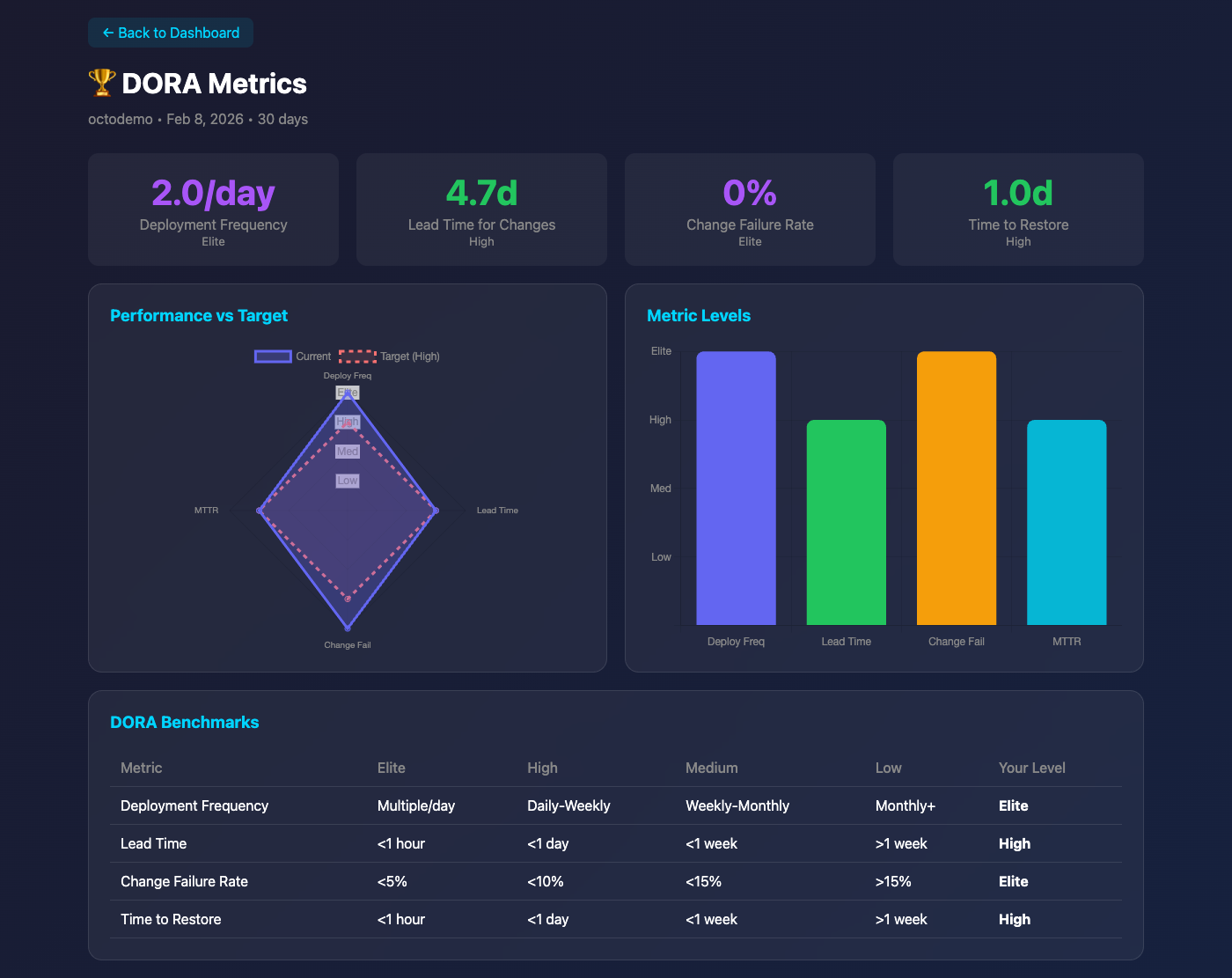
Track the four key DORA metrics:

  • Deployment Frequency β€” How often you ship to production
  • Lead Time for Changes β€” Time from commit to production
  • Change Failure Rate β€” Percentage of deployments causing failures
  • Mean Time to Restore β€” How quickly you recover from incidents

Each metric includes trend analysis and benchmarks against industry standards (Elite, High, Medium, Low performers).

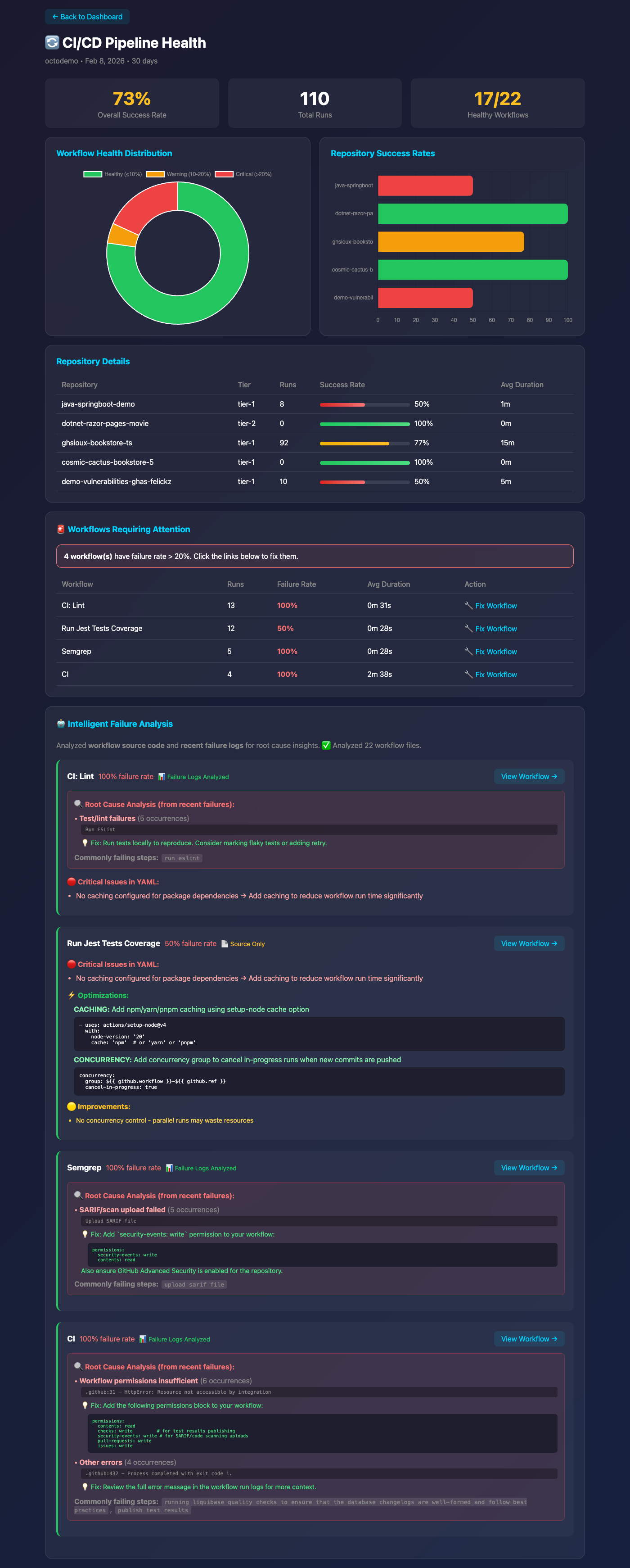
⚑ CI/CD Pipeline Health β€” Workflow performance and reliability CI/CD Health Dashboard

Deep dive into your CI/CD pipelines:

  • πŸ”„ Workflow success rates and trends
  • ⏱️ Average run times with P95/P99 latencies
  • 🚨 Failure analysis and common error patterns
  • πŸ“Š Per-repository and per-workflow breakdowns
  • πŸƒ Queue times and runner utilization
πŸ’° Cost Optimization β€” Runner costs and savings opportunities Cost Optimization Dashboard
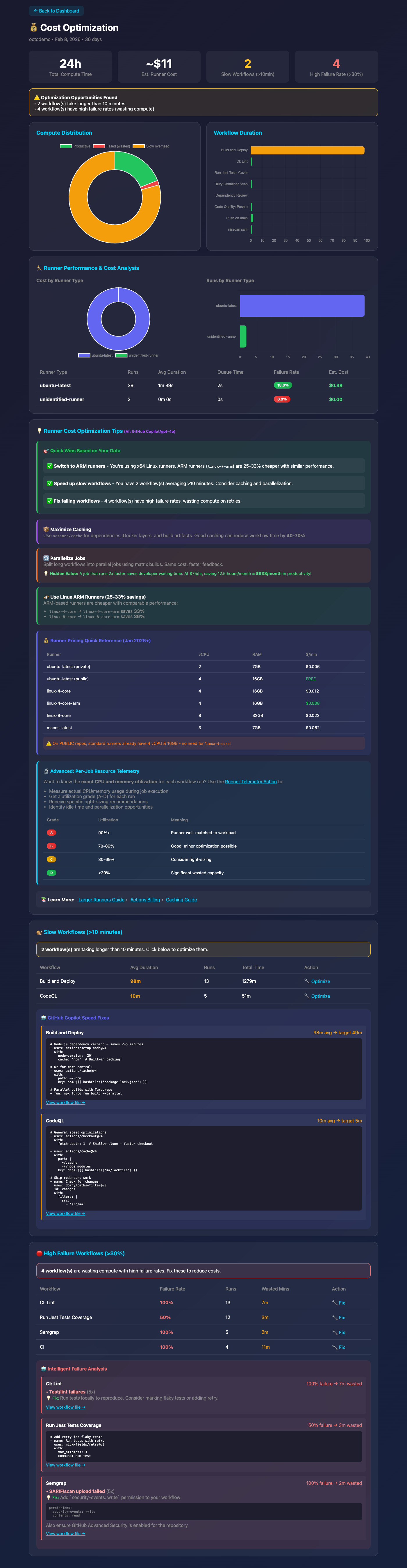
Understand and optimize your GitHub Actions spending:

  • πŸ’΅ Total costs by runner type (GitHub-hosted vs self-hosted)
  • πŸ“Š Cost breakdown by repository, workflow, and OS
  • 🎯 Actionable recommendations for cost savings
  • πŸ“ˆ Spending trends and projections
  • ⚑ Efficiency metrics (cost per workflow, cost per minute)
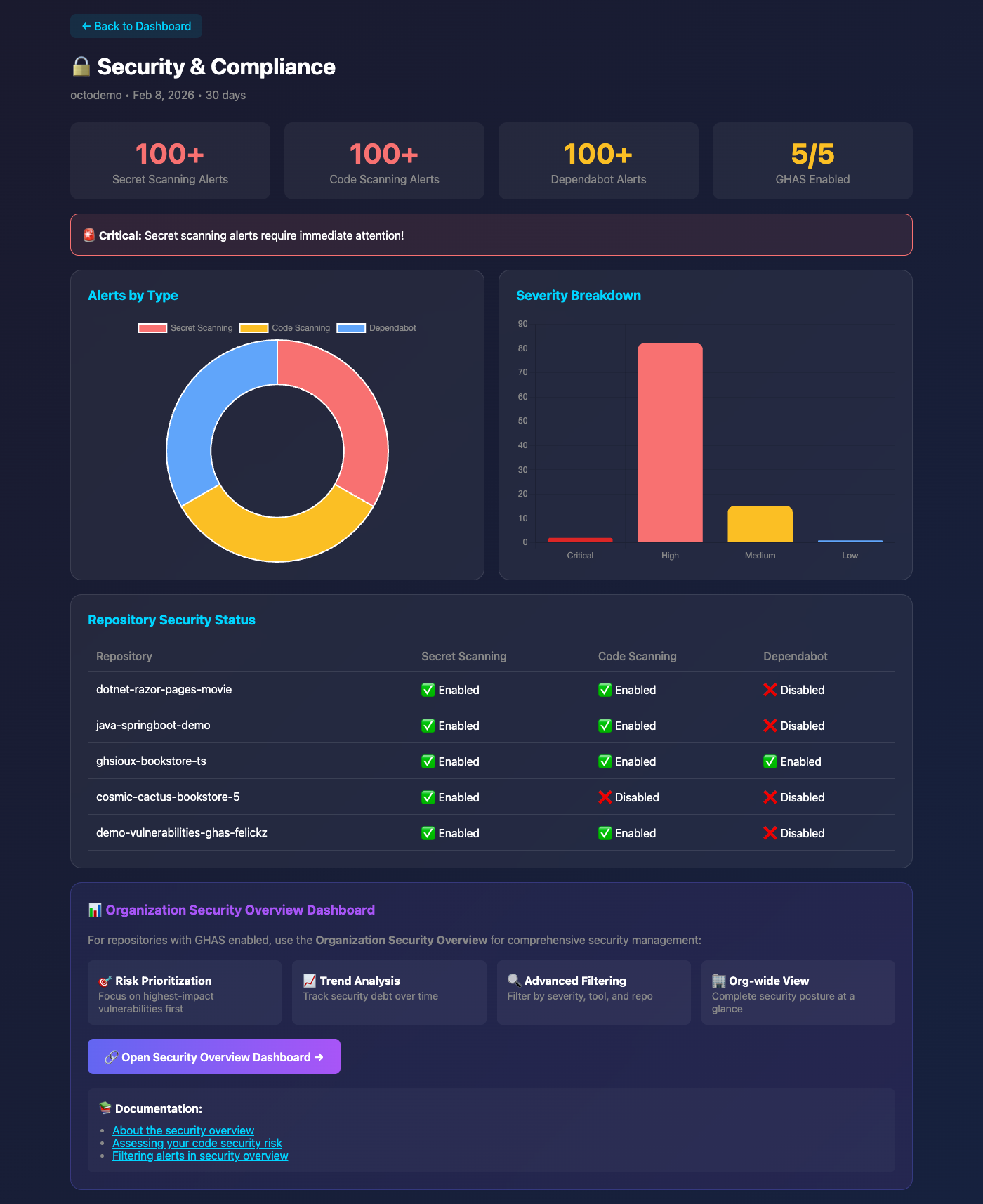
πŸ”’ Security & Compliance β€” Audit-ready compliance reports Security Dashboard

Stay compliant and secure:

  • βœ… Compliance framework coverage (SOC2, ISO27001, HIPAA, PCI-DSS)
  • πŸ” Secret scanning status and alerts
  • πŸ›‘οΈ Code scanning findings
  • πŸ“‹ Branch protection rule compliance
  • πŸ” GHAS (GitHub Advanced Security) feature adoption
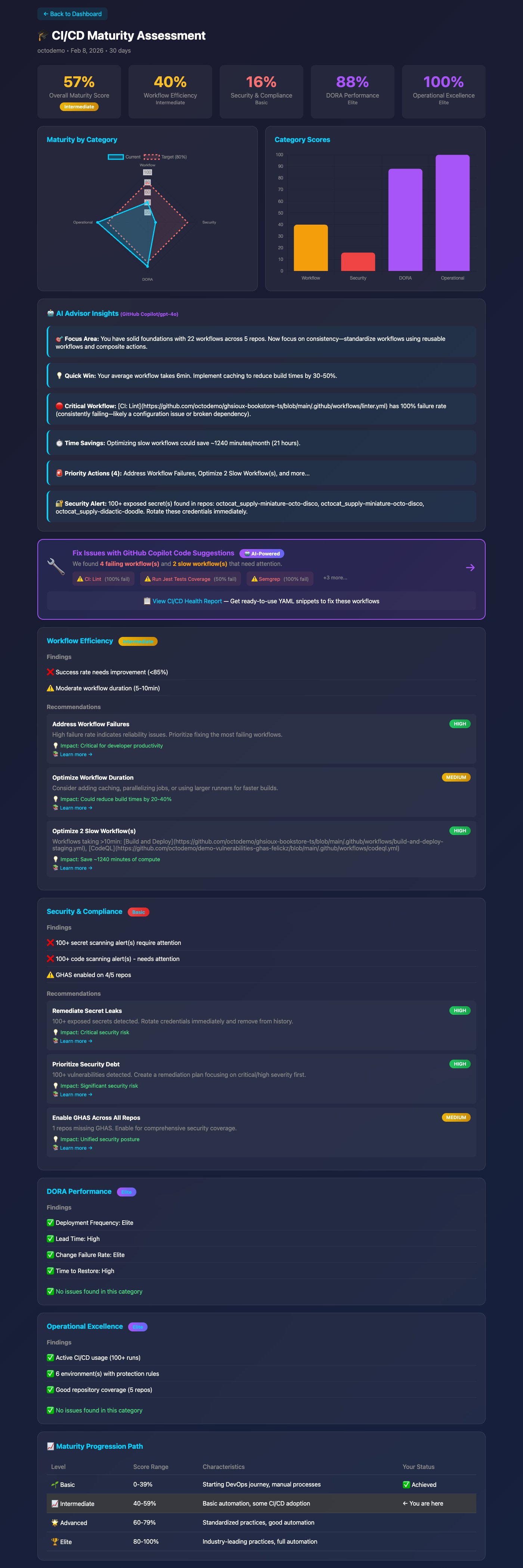
πŸŽ“ DevOps Maturity β€” Organizational capability assessment DevOps Maturity Dashboard

Assess your DevOps maturity level:

  • πŸ“Š Overall maturity score with visual gauge
  • 🎯 Category scores (CI/CD, Testing, Security, Monitoring, etc.)
  • πŸ“ˆ Improvement recommendations prioritized by impact
  • πŸ† Benchmark against industry standards
  • πŸ“‹ Actionable roadmap for advancement

πŸ’‘ How to generate these dashboards:

Code
# Ask Copilot in natural language:
"Generate DevOps reports for the last 30 days"

# Or invoke the tool directly:
#generate_devops_reports --timeframe 30d

Reports are saved to timestamped folders as standalone HTML files β€” share them with your team or embed in internal wikis!


πŸš€ Quick Start

Install from MCP Registry

ActionsPulse is published to the official MCP Registry as io.github.tsviz/actions-pulse.

🌐 Web UI (Recommended) β€” Use the MCP Registry UI for 1-click installation into VS Code or Cursor:

  1. Go to vemonet.github.io/mcp-registry
  2. Search for "actions-pulse"
  3. Click Install β†’ Select your client (VS Code, Cursor)
  4. Configure environment variables when prompted

Manual Docker Setup β€” Or follow the steps below to configure manually.

Prerequisites

  • βœ… Docker installed
  • βœ… GitHub Personal Access Token (fine-grained recommended)
  • βœ… VS Code with GitHub Copilot

1. Create a Fine-Grained Personal Access Token

  1. Go to GitHub Settings β†’ Developer Settings β†’ Personal Access Tokens β†’ Fine-grained tokens

  2. Click Generate new token

  3. Configure basic settings:

    • Token name: actions-pulse-mcp
    • Expiration: 90 days (or per your security policy)
    • Resource owner: Select your organization
    • Repository access: All repositories
  4. Set Repository permissions:

    PermissionAccessRequiredPurpose
    ActionsReadβœ… YesWorkflow runs, cache usage
    AdministrationReadβœ… YesBilling data, repo settings
    ContentsReadβœ… YesRead config files from devops-config repo
    Custom propertiesReadβœ… YesRead custom property values on repositories
    DeploymentsReadβœ… YesDeployment frequency, environments (DORA)
    DiscussionsReadπŸ”Ά OptionalCommunity engagement metrics
    EnvironmentsReadβœ… YesEnvironment protection rules
    IssuesReadβœ… YesIssue metrics, resolution times (DORA)
    Merge queuesReadπŸ”Ά OptionalMerge queue adoption and wait times
    MetadataReadβœ… YesBasic repo info (auto-granted)
    Pull requestsReadβœ… YesPR metrics, lead time, review times (DORA)
  5. Set Organization permissions:

    PermissionAccessRequiredPurpose
    Custom propertiesReadβœ… YesRead property definitions/schemas at org level
    Custom properties for organizationsReadβœ… YesRead property values assigned to repositories
  6. Set Organization permissions (continued):

    PermissionAccessRequiredPurpose
    MembersReadπŸ”Ά OptionalTeam membership for productivity metrics
    Self-hosted runnersReadπŸ”Ά OptionalRunner utilization metrics
    AdministrationReadβœ… YesOrg billing and settings
  7. Optional permissions (for compliance features, requires GitHub Advanced Security):

    PermissionAccessRequiredPurpose
    Secret scanning alertsRead❌ OptionalCompliance audit reports
    Code scanning alertsRead❌ OptionalCompliance audit reports
  8. Click Generate token and save it securely

Read the full README β†’View source on GitHub β†’

Related MCP Servers

View all in Monitoring View all alternatives
  • Netdata logoNetdata

    Real-time infrastructure monitoring with metrics, logs, alerts, and ML-based anomaly detection.

    πŸ“Š Monitoring0 views
    Compare vs Netdata β†’
  • ProjectPulse MCP logoProjectPulse MCP

    Monitor GitHub repo health, DORA metrics and CI signals from your AI assistant.

    πŸ“Š Monitoring0 views
    Compare vs ProjectPulse MCP β†’
  • GoldenAnalysis logoGoldenAnalysis

    Read-only cross-cutting analysis, metrics, and reporting across the Golden Suite.

    πŸ“Š Monitoring0 views
    Compare vs GoldenAnalysis β†’
  • Zwldarren Akshare One MCP logoZwldarren Akshare One MCP

    Provide access to Chinese stock market data including historical prices, real-time data, news, and…

    πŸ“Š Monitoring2 views
    Compare vs Zwldarren Akshare One MCP β†’

Reviews

No reviews yet β€” be the first to share how this listing worked for you.

Frequently Asked Questions about ActionsPulse

Add the following block to your claude_desktop_config.json under mcpServers: "mcpServers": { "actionspulse": { "command": "npx", "args": ["-y", "ActionsPulse"] } }

AllMCPs Directory Badge

Full Badge Customizer

Showcase your server listing on GitHub or your project documentation. Embed this dynamic SVG badge to highlight official listing status and live engagement.

Badge Style:
Live Dynamic SVG PreviewActionsPulse AllMCPs Directory Badge

Markdown (GitHub README)
[![AllMCPs](https://allmcps.com/api/badge/actionspulse?style=directory)](https://allmcps.com/mcp/actionspulse)
HTML Embed
<a href="https://allmcps.com/mcp/actionspulse"><img src="https://allmcps.com/api/badge/actionspulse?style=directory" alt="ActionsPulse on AllMCPs" /></a>

Technical Specs & Signals

CategoryπŸ“ŠMonitoring
More technical detailsExpand β–Ύ
TransportSSE (Remote)
RuntimeNode.js
Last updatedSep 7, 2026
Views0
Unique ViewsTotal visits recorded for this listing page on AllMCPs.
Installs0
Installs & Copy ActionsTotal times users copied install commands or configuration snippets for this server.
GitHub stars3
GitHub Star CountTotal stargazers on GitHub representing community popularity (3 stars).
37Quality signal: Fair Β· 37/100How this signal is calculated β–Ύ
Server availabilityNot measured

Not scored for repo-hosted servers β€” we can't reach the running server, only its GitHub page. Hosted MCP endpoints are health-checked live.

Verified ownership10/20
Documentation & tools16/30
Adoption & activity2/15
Community engagement0/10

A guidance signal from public completeness & health data β€” not a user rating. New listings start lower and rise as they add docs, get verified, and grow adoption. Signals we can't observe for a listing are skipped, not counted against it.

β˜… Spotlight Slot

Feature Your MCP Server

Get maximum visibility for your server across our directory, search results, and detail pages.

Spotlight Your Server

Own this project?

This directory is pre-filled from public sources. Claim via GitHub README, site badge, or DNS TXT to unlock edit access and the Official badge β€” proof is checked automatically, then reviewed by our team.

Free dofollow backlink: add your website and place the AllMCPs badge on it β€” no claim needed. We detect it automatically and keep it verified as long as the badge stays live.

Claim & get free dofollow

Share & Embed

Add our SVG badge (dark/light directory styles) or embeddable widget to your site.

Explore more

More in πŸ“Š Monitoring β†’Best MCP servers for Monitoring & Observability β†’Alternatives to ActionsPulse β†’Install in Claude DesktopInstall in CursorInstall in VS Code