Google Search Console MCP
by acamolese
Read-only Google Search Console data, URL inspection, indexing checks, sitemaps, and HTML SEO audit reports through MCP.
Install Google Search Console MCP
Pick your client, then add it in one click or paste the config.
~/Library/Application Support/Claude/claude_desktop_config.json{
"mcpServers": {
"acamolese-google-search-console-mcp": {
"command": "uvx",
"args": [
"mcp-google-search-console"
],
"env": {
"GSC_CLIENT_ID": "YOUR_VALUE_HERE",
"GSC_CLIENT_SECRET": "YOUR_VALUE_HERE",
"GSC_REFRESH_TOKEN": "YOUR_VALUE_HERE"
}
}
}
}
Settings → Developer → Edit Config, merge this into mcpServers, then fully quit and reopen Claude Desktop.
Values are written into the snippet above so you can paste it as is. They never leave your browser.
Automated check passed— started and listed 18 tools correctly ().
Overview
Use cases
- Analyze clicks, impressions, CTR, and average position
- Inspect URLs and identify indexing issues
- Review queries by page, country, device, or date
- List verified properties and submitted sitemaps
- Generate branded HTML SEO audit reports
Key features
- Read-only Google Search Console OAuth access
- Performance reports with query, page, country, device, and date dimensions
- URL inspection and indexing status checks
- Verified site and sitemap listing
- HTML SEO audits with Chart.js graphs and 30/60/90-day roadmaps
- Custom report branding with logos, fonts, and color palettes
Tools18
What Google Search Console MCP lets your agent do. Expand a tool for its parameters.
Security & health
What it can reach and how reliably it runs — from our own checks, not the maintainer’s claims.
Recent health check succeeded.
What it can do
From the 18 tools this server returned when we ran it; 18 declare their own safety hints.
Observed 2026-11-15 in an isolated sandbox. A description of reach, not a security audit.
Supply-chain signal
No high-severity advisories surfaced by our automated scan.
Scanned 15d ago via OSV.dev · mcp-google-search-console (PyPI)
Adoption & maintenance
Factual signals from GitHub, npm, and our automated checks — not a rating.
From the project README
Google Search Console MCP
English · Italiano




Eighteen read-only tools over the Google Search Console API, plus a deterministic white-label HTML audit report an agency can put its own name on and send to a client, in English or Italian.
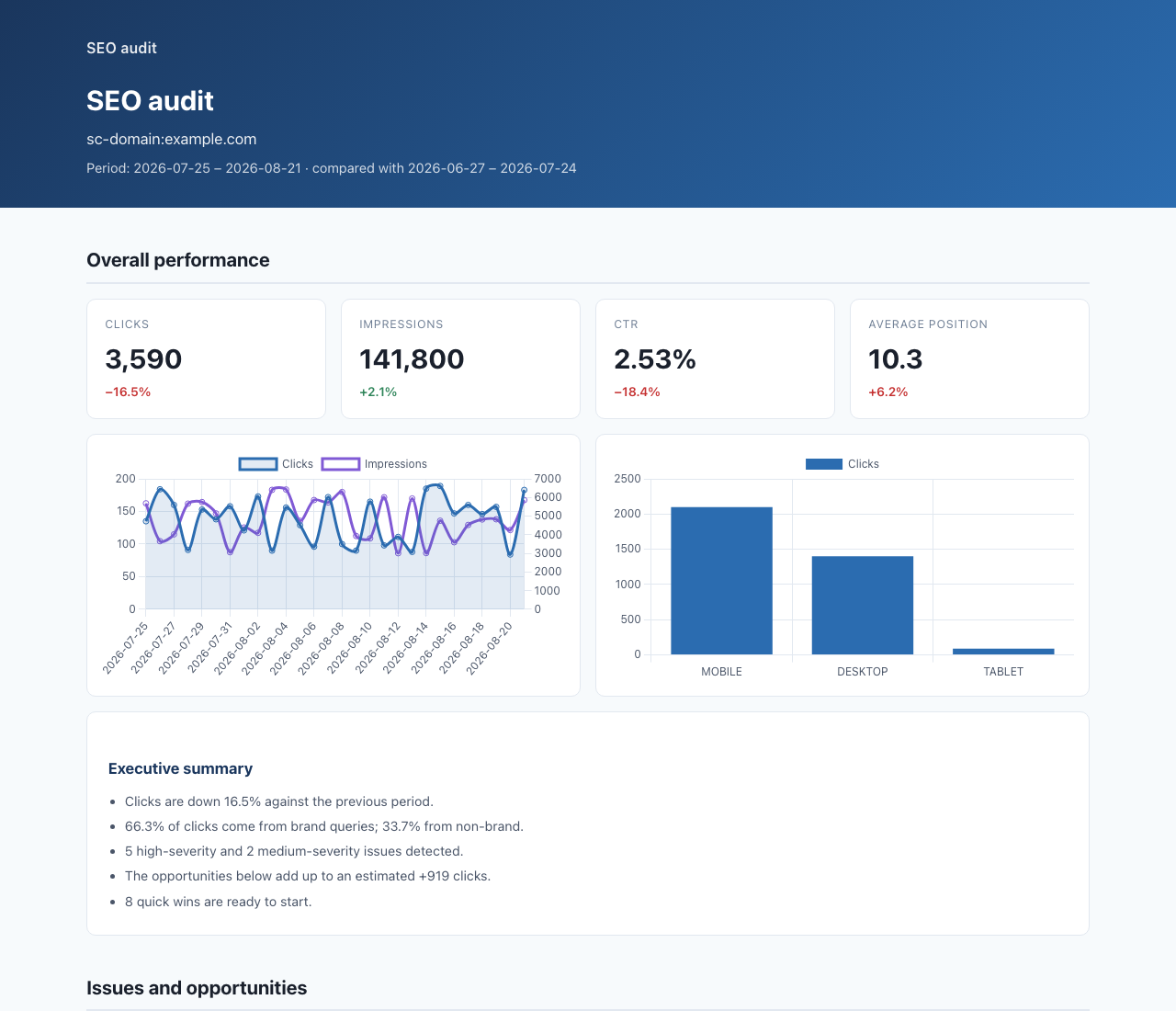
Regenerate that report from committed synthetic data, with no credentials:
python scripts/render_sample_report.py --lang en --open
What's new in 4.0
4.0 is about trust: every number the server reports now says what it is based on, and nothing incomplete is presented as a finding.
- Comparisons hold whole days. Search Console's latest days are partial for a
while, so a 7-day window ending today used to start 15-20% down against the week
before. Comparison tools now end rolling windows on the last day with final data
and report it as
data_through. - Year over year.
compare="year"on the overview, period comparison, traffic drops, alerts and the audit. Whole months map to the same months last year; other ranges move back 52 weeks so weekdays line up. - Filters everywhere. The analysis tools and
gsc_compare_periodsaccept the samefiltersandtypeasgsc_query: analyse/blog/, one country, mobile only, or Discover. - Brand vs non-brand, done properly. The new
gsc_brand_splittool, and the audit, compute the split over every query with server-side regex filters and report the clicks Google does not disclose as a third share. Brand terms match whole words only. - No more false alarms. Content decay compares complete months only. A page below a row limit is no longer reported as lost. A failed URL Inspection is no longer an indexing problem. Cannibalisation leaves out brand queries and queries one page clearly owns.
- A sounder report. One definition of a low CTR, thresholds per kind of row, inspection of the pages that lost clicks, a "pages in steady decline" section, a "how to read this report" section, translated verdicts, darker default colours and accessible charts and tables. The pagination advice no longer recommends canonicalising to page one.
Upgrading from 3.x: see the breaking changes at the top of the changelog.
Install
Claude Code
/plugin marketplace add acamolese/google-search-console-mcp
/plugin install google-search-console@acamolese
The plugin brings the MCP server, five skills (weekly review, cannibalisation check, indexing audit, content opportunities, white-label client audit) and a config prompt for the three credentials.
Claude Desktop
Download google-search-console.mcpb from the
latest release
and open it. It needs uv installed. Or edit the
config file directly:
{
  "mcpServers": {
    "google-search-console": {
      "command": "uvx",
      "args": ["mcp-google-search-console"],
      "env": {
        "GSC_CLIENT_ID": "...",
        "GSC_CLIENT_SECRET": "...",
        "GSC_REFRESH_TOKEN": "..."
      }
    }
  }
}
Cursor, Codex, Gemini CLI, Zed
Any MCP client takes the same three lines: command uvx, argument
mcp-google-search-console, and the three GSC_* environment variables.
# Codex
codex mcp add google-search-console -- uvx mcp-google-search-console

# Gemini CLI
gemini mcp add google-search-console uvx mcp-google-search-console
Docker
docker build -t mcp-gsc .
docker run --rm -p 127.0.0.1:8765:8765 \
  -e GSC_CLIENT_ID -e GSC_CLIENT_SECRET -e GSC_REFRESH_TOKEN \
  -v "$PWD/reports:/reports" mcp-gsc
The container speaks streamable HTTP on /mcp. It has no authentication of its
own: keep it on loopback or behind a reverse proxy.
Authentication
The OAuth scope is webmasters.readonly and nothing else. No tool in this server
can modify a property, a sitemap or anything else in Search Console.
Credentials are resolved in this order:
GSC_AUTH_MODEif set (oauth,service_account,adc)GSC_SERVICE_ACCOUNT_FILEorGSC_SERVICE_ACCOUNT_JSONGSC_CLIENT_ID+GSC_CLIENT_SECRET+GSC_REFRESH_TOKEN- A token file in
~/.config/mcp-google-search-console/ - Application Default Credentials
OAuth, once
-
In Google Cloud Console, enable the Google Search Console API and create an OAuth client of type Desktop app.
-
Export the client, or save the downloaded JSON as
~/.config/mcp-google-search-console/oauth_credentials.json:export GSC_CLIENT_ID="...apps.googleusercontent.com" export GSC_CLIENT_SECRET="..." uvx mcp-google-search-console auth -
The browser flow stores a token at
~/.config/mcp-google-search-console/token.jsonwith0600permissions. Secrets are never printed by default; add--print-envto also get the threeexportlines for a stateless setup.
On a headless machine, run auth --print-env on your laptop and copy the three
environment variables across. --no-browser prints the URL instead of opening one, but still
needs a local redirect.
Service account
Grant the service account's email read access to the property in Search Console, then point the server at the key:
export GSC_SERVICE_ACCOUNT_FILE=/path/to/key.json
# or, for a container:
export GSC_SERVICE_ACCOUNT_JSON='{"type":"service_account",...}'
Check it works
uvx mcp-google-search-console doctor
Prints the auth mode in use, when the token expires, how many properties the account can read, and the defaults every tool applies. Secrets are masked. Exits 1 when nothing resolves, which is the answer to most "the server won't start" reports.
Tools
| Tool | What it answers |
|---|---|
gsc_sites | Which properties can this account read, and in what exact format |
gsc_site_details | Permission level and type for one property |
gsc_query | The Search Analytics report, with filters, dimensions and pagination |
gsc_performance_overview | Is the site up or down, against the previous period or last year |
gsc_compare_periods | What changed between two periods, ranked by click delta |
gsc_quick_wins | Queries close enough to the top that a push would pay off |
gsc_ctr_gaps | Pages that rank but are not clicked |
gsc_cannibalization | Queries where several pages compete against each other |
gsc_traffic_drops | Pages that lost clicks, with a likely cause for each |
gsc_brand_split | Brand, non-brand and undisclosed clicks, month by month |
gsc_content_decay | Pages sliding down month after month |
gsc_alerts | What moved sharply enough to be worth a message today |
gsc_portfolio | Every property at a glance, worst first |
gsc_indexing_issues | Which of these URLs are indexed, and why not |
gsc_inspect_url | Full URL Inspection for one page |
gsc_sitemaps | Which sitemaps Google knows about, with errors and warnings |
gsc_doctor | What is configured, and does the API answer |
gsc_audit | The full HTML report |
Three prompts wrap the workflows that repeat: gsc_weekly_report,
gsc_indexing_audit, gsc_content_opportunities.
Why this server
| Here | Typical GSC MCP server | |
|---|---|---|
| Client-ready report | Self-contained HTML, English or Italian, white-label | none |
| Analysis | Cannibalisation, CTR gaps, decay, drop diagnosis, brand split, run server-side | raw rows, analysed by the model |
| Honesty | Truncation, skipped sections and anchors declared in every response | silent gaps |
| Thresholds | Adapt to the size of the property | fixed, or none |
| Dates | period="last_month", days=28, resolved server-side | explicit dates only |
| Freshness | gsc_query matches the UI; comparisons end on the last day with final data | windows that end on partial days |
| Auth | OAuth, service account, ADC | OAuth only |
| Output | TSV by default, roughly a third of the tokens of pretty JSON | json.dumps(indent=2) |
| Errors | Google's reason plus what to do about it | bare HTTP status |
| Tests | 350+, on both mcp majors, three operating systems | usually none |
Report customisation
Colours, logo, report name, brand terms and thresholds come from a JSON file.
Pass branding_path, or place it at
~/.config/mcp-google-search-console/branding.json to apply it everywhere:
{
  "brand_name": "Your Agency",
  "logo": "logo.png",
  "brand_terms": ["clientbrand", "client brand"],
  "colors": { "primary": "#2b6cb0", "primary_dark": "#1a365d" },
  "thresholds": { "min_impressions": 200 }
}
A local logo is base64-encoded into the document. A remote one is only kept if
allow_external_fonts is true, because the report is otherwise guaranteed to
contain no external URL at all: no CDN, no font service, nothing that phones home
when a client opens it.
brand_terms matters more than it looks. Without it, the first label of the
domain is used as the brand, which is wrong for abbreviations, holding companies
and invented names, and it silently mislabels the brand/non-brand split. The
report says when it had to guess.
Quotas and limits
Reviews
No reviews yet — be the first to share how it worked for you.
Frequently Asked Questions about Google Search Console MCP
Related MCP servers
Add a badge to your READMEShow it’s listed — live SVG, Markdown or HTML.
AllMCPs Directory Badge
Showcase your server listing on GitHub or your project documentation. Embed this dynamic SVG badge to highlight official listing status and live engagement.
[](https://allmcps.com/mcp/acamolese-google-search-console-mcp)<a href="https://allmcps.com/mcp/acamolese-google-search-console-mcp"><img src="https://allmcps.com/api/badge/acamolese-google-search-console-mcp?style=directory" alt="Google Search Console MCP on AllMCPs" /></a>