Architecting Production-Ready MCP Servers: Security, Transports, and Tool Design Patterns
TL;DR: Transitioning a Model Context Protocol (MCP) server from a local proof-of-concept to a production service requires careful architectural choices. This guide breaks down transport mechanics (stdio vs streamable HTTP/SSE), context window token optimization, zero-trust security perimeters against prompt injection, and practical TypeScript/Zod server implementations. Whether you are listing your tool on the AllMCPs directory or deploying internal enterprise tools, this guide lays out the engineering blueprint.
Understanding the MCP Server Runtime Model
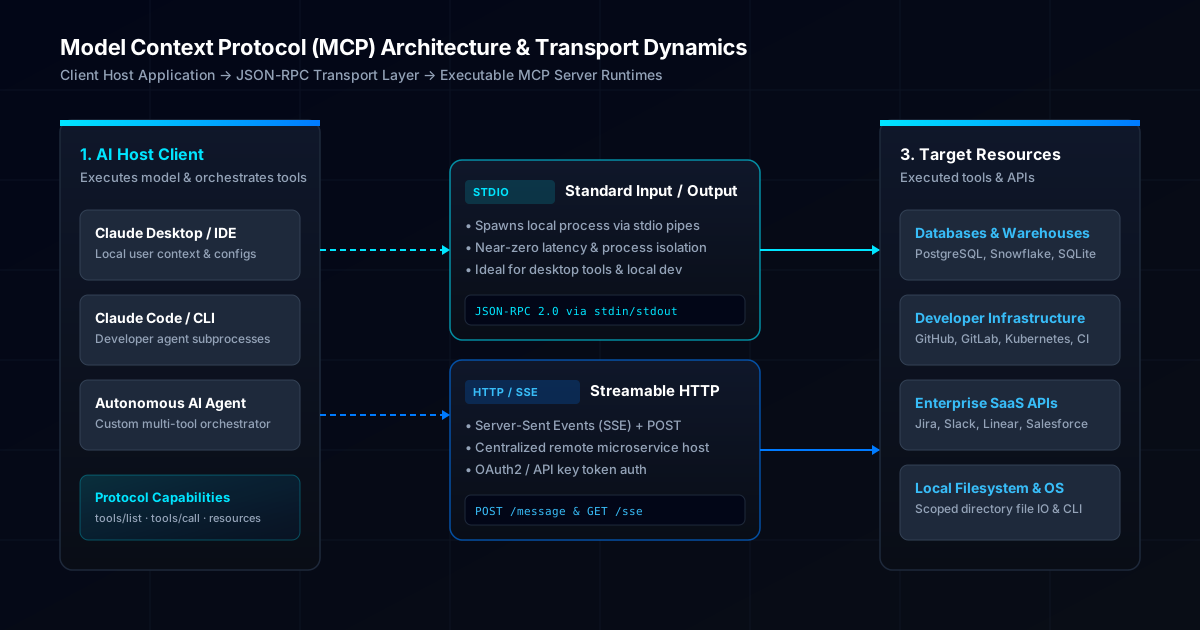
The Model Context Protocol operates on a client-server paradigm built atop JSON-RPC 2.0. The MCP Client (or Host application—such as Claude Desktop, Claude Code, or an autonomous agent framework) acts as the orchestrator. It manages conversation state, passes system prompts to the underlying Large Language Model (LLM), parses model-generated tool calls, and dispatches requests to registered MCP Servers.
An MCP Server is a lightweight process that exposes three fundamental primitives to the host:
- Tools: Executable functions that perform side-effects or retrieve dynamic data (e.g., querying a SQL database, creating a GitHub pull request, scanning a filesystem).
- Resources: Read-only data sources mapped to uniform resource identifiers (URIs) that provide contextual file or entity content directly into the model prompt.
- Prompts: Parameterized, reusable template blocks designed to guide user workflows.
{
  "jsonrpc": "2.0",
  "id": 42,
  "method": "tools/call",
  "params": {
    "name": "query_database",
    "arguments": {
      "table": "customer_subscriptions",
      "status": "active",
      "limit": 10
    }
  }
}
Because an MCP server sits directly between the LLM and your infrastructure, its design dictates both system safety and model effectiveness. The diagram below illustrates how client host applications communicate through the protocol transport layer to execute backend tools.
Evaluating Transports: Stdio vs Streamable HTTP and SSE
Choosing the right transport protocol determines how your MCP server process is initialized, authenticated, and scaled.
Standard Input Output (Stdio) Transport
In a stdio setup, the host application directly spawns the MCP server executable as a child process. Communication occurs over standard OS pipes (stdin for requests, stdout for responses, and stderr for application logging).
- Process Isolation: The server lifecycle is coupled 1-to-1 with the parent host application. When the host terminates, the subprocess exits.
- Security Surface: Zero network exposure. The process runs locally on the user machine or container, eliminating network transport eavesdropping and CORS vulnerabilities.
- Authentication: Handled implicitly by OS user permissions. No JWTs or API tokens are needed over the stdio channel itself.
- Latency: Sub-millisecond local process IPC latency.
# Example stdio client invocation configuration (claude_desktop_config.json)
{
  "mcpServers": {
    "postgres-analytics": {
      "command": "npx",
      "args": ["-y", "@modelcontextprotocol/server-postgres", "postgresql://localhost:5432/analytics"]
    }
  }
}
Server-Sent Events (SSE) and Streamable HTTP Transport
When building centralized enterprise microservices, multi-tenant tools, or serverless MCP endpoints, stdio subprocesses are insufficient. The SSE transport decouples the MCP server from the client process:
- The client establishes a persistent HTTP GET connection to
/sseto receive a stream of server-sent JSON-RPC messages and notifications. - The server responds with an initial endpoint URI event containing a unique session identifier.
- Subsequent client requests are delivered as HTTP POST requests to
/message?sessionId=<ID>.
| Transport Property | Stdio Transport | Streamable HTTP / SSE Transport |
|---|---|---|
| Deployment Model | Local subprocess / CLI executable | Distributed HTTP web server or container |
| Network Overhead | Zero (Kernel OS pipes) | HTTP/1.1 or HTTP/2 network transport |
| Multi-Tenancy | Single-user machine boundary | Multi-user with authorization tokens |
| Scaling Mechanism | Vertical local process resources | Horizontal auto-scaling (K8s, Cloud Run) |
| Best Used For | Developer tools, local file IO, desktop agents | Shared APIs, enterprise SaaS, cloud databases |
If you are publishing a public tool, listing both stdio and remote SSE installation options on your AllMCPs submission enables both desktop users and cloud agent builders to adopt your server easily. For details on fundamental protocol concepts, explore our introductory What is MCP guide.
Designing Tool Schemas for Context Window Efficiency
A common failure mode in custom MCP servers is unoptimized schema definitions. Every tool description and parameter schema registered by an MCP server is injected into the model context window during system prompt construction.
The Hidden Token Tax
If an MCP server exposes 15 tools, and each tool features a 500-word verbose JSON schema description, the host model consumes ~3,000 to 5,000 tokens on every single user turn before any conversational text is generated.
// ❌ BAD: Verbose, wasteful schema consuming excessive tokens
export opacity BadToolSchema = {
  name: "search_customer_records_by_id_or_email_v2",
  description: "This tool searches our internal enterprise relational database system to retrieve detailed customer record payload objects based on either a specific integer user ID or a valid string email address...",
  inputSchema: {
    type: "object",
    properties: {
      user_id: { type: "string", description: "The string representation of the integer user id..." },
      email_address: { type: "string", description: "The email address string..." }
    }
  }
};

// ✅ GOOD: Concise, crisp schema optimized for LLM function calling
export const OptimizedToolSchema = {
  name: "search_customers",
  description: "Find customer accounts by ID or email. Returns status and profile summary.",
  inputSchema: {
    type: "object",
    properties: {
      query: { type: "string", description: "User ID (numeric) or exact email address." },
      status: { type: "string", enum: ["active", "suspended", "all"], default: "active" }
    },
    required: ["query"]
  }
};
Key Schema Guidelines
- Name Concisely: Use short
snake_casenames (search_customersinstead ofexecute_customer_search_in_database). - Leverage Enums: Explicit enum arrays constrain the LLM decision space and eliminate invalid parameters.
- Return Structured JSON Summaries: Do not return 100KB raw SQL dumps to the host model. Truncate arrays, return high-level entity summaries, and allow the model to request paginated details using specific IDs.
For step-by-step code samples and template boilerplates, consult our interactive Guide to Building MCP Servers.
A Defense-in-Depth Security Framework
An MCP server grants an AI model real execution capabilities across your infrastructure. If an attacker injects malicious instructions into untrusted input (e.g., via a scraped webpage, email body, or database row), the model might inadvertently invoke an MCP tool with malicious parameters.
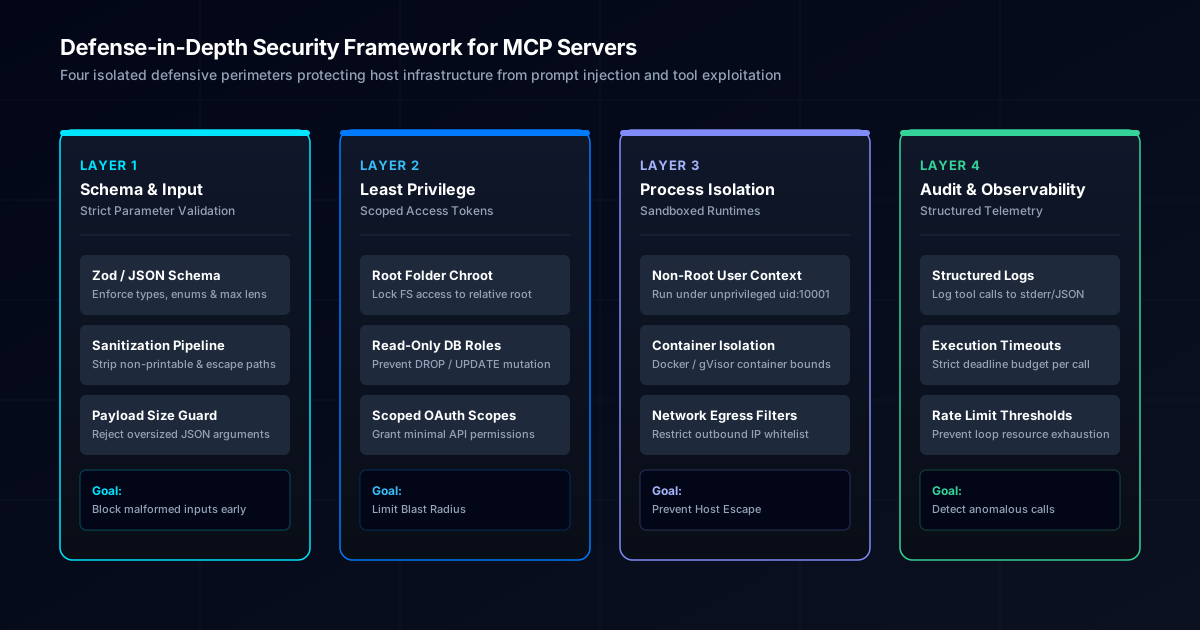
To prevent prompt injection and tool misuse, implement the four-tier security perimeter illustrated below:
1. Strict Schema & Input Validation
Never pass raw model strings directly to shell commands, filesystem calls, or unparameterized database drivers. Use schema libraries like Zod to enforce type bounds, path formats, and string lengths before handler execution.
import { z } from 'zod';

// Strict validation preventing directory traversal attacks
const ReadFileArgsSchema = z.object({
  filePath: z.string()
    .min(1)
    .max(255)
    .refine((path) => !path.includes('..'), {
      message: 'Path traversal sequences (..) are strictly prohibited.',
    }),
});
2. Least-Privilege Scoping & Chroot Boundaries
When building filesystem or database MCP servers:
- Chroot Root Paths: Ensure all file operations resolve within an explicit workspace boundary. Disallow absolute paths pointing to system directories like
/etc/passwdorC:\Windows. - Read-Only Database Roles: Connect the MCP server using a database user granted exclusively
SELECTpermissions on required tables. Never connect aspostgresorsa.
3. Container Sandboxing
For stdio servers distributed to end-users or run in cloud environments:
- Run the subprocess under an unprivileged OS user (
uid: 10001). - Package the server into a minimal Docker container with read-only root filesystems (
--read-only) and capped CPU/memory boundaries. - Filter outbound network connections using egress firewall rules or network namespaces.
4. Structured Telemetry & Audit Logging
Always write operational logs to stderr (in stdio mode) or a centralized logging platform (in SSE mode). Never print debug logs to standard output (stdout), as doing so corrupts the stdio JSON-RPC stream.
Include structural fields in every log event:
timestamp: ISO-8601 UTC stringtool: Invoked tool nameparams: Masked parameter summary (redacting tokens, passwords, and PII)duration_ms: Tool execution runtimestatus:successorerror
Production TypeScript Server Implementation
Below is a complete, production-ready TypeScript MCP server demonstrating schema validation, error boundaries, and structured logging using the official @modelcontextprotocol/sdk.
import { Server } from '@modelcontextprotocol/sdk/server/index.js';
import { StdioServerTransport } from '@modelcontextprotocol/sdk/server/stdio.js';
import {
  CallToolRequestSchema,
  ListToolsRequestSchema,
  ErrorCode,
  McpError,
} from '@modelcontextprotocol/sdk/types.js';
import { z } from 'zod';

// Input Validation Schema
const FetchMetricsSchema = z.object({
  serviceName: z.enum(['api-gateway', 'auth-service', 'payment-processor']),
  timeWindowHours: z.number().int().min(1).max(72).default(24),
});

// Initialize MCP Server Instance
const server = new Server(
  {
    name: 'metrics-mcp-server',
    version: '1.0.0',
  },
  {
    capabilities: {
      tools: {},
    },
  }
);

// Register Available Tools
server.setRequestHandler(ListToolsRequestSchema, async () => {
  return {
    tools: [
      {
        name: 'get_service_metrics',
        description: 'Retrieve operational latency and error rate metrics for core services.',
        inputSchema: {
          type: 'object',
          properties: {
            serviceName: {
              type: 'string',
              enum: ['api-gateway', 'auth-service', 'payment-processor'],
              description: 'Target microservice identifier.',
            },
            timeWindowHours: {
              type: 'number',
              description: 'Lookback window in hours (1-72). Default is 24.',
            },
          },
          required: ['serviceName'],
        },
      },
    ],
  };
});

// Tool Call Execution Handler
server.setRequestHandler(CallToolRequestSchema, async (request) => {
  const { name, arguments: args } = request.params;

  if (name !== 'get_service_metrics') {
    throw new McpError(ErrorCode.MethodNotFound, `Unknown tool requested: ${name}`);
  }

  // Validate Input Arguments
  const parseResult = FetchMetricsSchema.safeParse(args);
  if (!parseResult.success) {
    const errorDetails = parseResult.error.issues.map((i) => `${i.path.join('.')}: ${i.message}`).join(', ');
    throw new McpError(ErrorCode.InvalidParams, `Invalid tool arguments: ${errorDetails}`);
  }

  const { serviceName, timeWindowHours } = parseResult.data;
  const startTime = Date.now();

  try {
    // Log operational telemetry to stderr
    console.error(JSON.stringify({
      level: 'info',
      event: 'tool_execution_started',
      tool: name,
      serviceName,
      timeWindowHours,
    }));

    // Perform target logic (e.g. fetching metrics from monitoring provider)
    const metricsSummary = {
      service: serviceName,
      window: `${timeWindowHours}h`,
      p95_latency_ms: 142.5,
      error_rate_pct: 0.04,
      throughput_rpm: 12400,
    };

    return {
      content: [
        {
          type: 'text',
          text: JSON.stringify(metricsSummary, null, 2),
        },
      ],
    };
  } catch (err: unknown) {
    const errorMessage = err instanceof Error ? err.message : 'Internal execution failure';

    console.error(JSON.stringify({
      level: 'error',
      event: 'tool_execution_failed',
      tool: name,
      error: errorMessage,
      durationMs: Date.now() - startTime,
    }));

    return {
      isError: true,
      content: [
        {
          type: 'text',
          text: `Failed to fetch service metrics: ${errorMessage}`,
        },
      ],
    };
  }
});

// Start Stdio Transport
async function main() {
  const transport = new StdioServerTransport();
  await server.connect(transport);
  console.error('Metrics MCP Server initialized on stdio transport.');
}

main().catch((err) => {
  console.error('Fatal initialization error:', err);
  process.exit(1);
});
Production Deployment and Verification Checklist
Before publishing your MCP server or distributing it to team members, complete this operational readiness checklist:
- Stdio Stream Hygiene: Confirm that no raw
console.logstatements output to standard stdout. All operational logs and errors must route toconsole.error(stderr). - Schema Minimalization: Verify that tool descriptions are concise and input parameters use explicit types and enums to save model tokens.
- Error Boundaries: Ensure all async handlers wrap external calls in
try/catchblocks, returning structuredisError: trueresponses rather than crashing the process. - Verification Badges: Claim and verify your repository on the AllMCPs directory to receive verified status badges and reciprocal back-links. You can also generate dynamic status badges for your repo README using our Badge Generator tool.
- Comprehensive Documentation: Include a sample
mcpServersJSON block in your project README so users can copy-paste installation configs directly into Claude Desktop or custom agents.
Building the Future of Agent Infrastructure
Model Context Protocol is transforming AI agents from passive text generators into active, integrated software components. By adhering to clean transport abstraction, token-optimized schema design, and layered security controls, you build tools that perform reliably in production.
If you have built an MCP server, submit it to the AllMCPs directory to make it discoverable to thousands of developers and autonomous agent deployments worldwide.
For ongoing guides, directory updates, and protocol deep dives, subscribe to the AllMCPs Blog or browse our complete index of tools and servers on AllMCPs.