---
> **Works with AI agents.** xupersplit is an [MCP server](#mcp-server) too —
> point your assistant at one URL and it can create the split, add what everyone
> paid and tell you who owes whom. No account, no API key, nothing to install.
>
> ```
> claude mcp add --transport http xupersplit https://split.xuper.fun/api/mcp
> ```
## What it is
A clean, accountless expense splitter. The **secret link is the key** — anyone
with it can add expenses and settle up; no login required. Optional email
sign-in just makes your splits follow you across devices. Built as a one-prompt
project and grown from there.
## Features
- **No account needed.** The unguessable split link (122 bits of entropy) *is*
the capability. Sign-in is optional.
- **Flexible splitting** — equal, weighted shares, or exact amounts, with cent
rounding via the largest-remainder method.
- **Smart settlements** — the minimum set of "A pays B" transfers, with
**partial payments** ("pay all or part") and strike-through once settled.
- **Don't settle too early** — see who has opened the split and who's marked
themselves done; the pay dialog warns if someone hasn't weighed in yet.
- **Secure splits** *(optional, when signed in)* — bind participants to their
accounts: you can only edit your own payment details and enter your own
expenses. The creator picks who must log in, who can view, and how people join.
- **Multi-currency** — enter expenses in any currency with the rate **locked at
save** (Kittysplit-style); set a main currency per split. Includes **sats** —
run a whole split in bitcoin if you like.
- **Eight payment methods**, several with genuine one-tap prefill — [see below](#payments).
- **MCP server** — AI agents can run a whole split over
[Model Context Protocol](#mcp-server), with no account and no API key.
- **Six languages** — English, Svenska, Norsk, Dansk, Suomi, Íslenska
(auto-detected, switchable).
- **Privacy by design** — payment details can be wiped once everyone is square,
inactive splits are purged after 6 months, IP hashes deleted within a day,
CSV/JSON export, full GDPR policy.
- **Dark / light / system** theme, cookie-less analytics, discreet cookie notice.
## Payments
xupersplit stores each recipient's payment handle(s) and, wherever a payment
network exposes an **open, agreement-free** interface, turns the balance row
into a real one-tap payment — **prefilled with the exact amount**. No money ever
passes through xupersplit; it only builds the link/invoice/transaction the payer
approves in their own app.
| Method | Experience | How |
| --- | --- | --- |
| **Swish** 🇸🇪 | QR + app deep link, amount prefilled | Public `app.swish.nu` link + QR endpoint — no merchant contract |
| **Lightning** ⚡ | QR + `lightning:` link, **exact amount baked in** | LNURL-pay (LUD-16): a lightning address → BOLT11 invoice |
| **Ethereum / USDC** Ξ | **One-tap prefilled USDC** transfer | WalletConnect (Reown AppKit) — connect, pick chain, approve |
| **Solana / USDC** ◎ | **One-tap prefilled USDC** SPL transfer | WalletConnect (Reown AppKit) — Phantom/Solflare, recipient ATA auto-created |
| **Ethereum / Solana address** | Address QR + copy, ENS resolved | `0x…` / `name.eth` / base58 — for any wallet |
| **Revolut** | Clickable `revolut.me` profile link | Opens the recipient's profile to pay |
| **Vipps · MobilePay · IBAN** | Stored handle + copy button | No open P2P API — the payer finishes in their own app |
**Why the difference?** Swish exposes a genuinely open prefilled deep link and
QR endpoint; Lightning's LNURL and EVM/Solana over WalletConnect are open
protocols. Vipps
and MobilePay (now Vipps MobilePay) only offer amount-prefilled flows through
their **merchant** APIs — a business agreement that routes money to a company,
not person-to-person — so for those xupersplit does the honest thing and shows
the handle with a copy button. If they ever ship an open P2P deep link, wiring
it in is a small change. PRs welcome. 🤞
> **Crypto is irreversible.** Crypto methods show extra warnings, and **any**
> method warns (with a date) if the recipient's details were ever changed from
> what was first entered — anyone with the link can edit them.
## MCP server
xupersplit speaks [Model Context Protocol](https://modelcontextprotocol.io), so
an AI assistant can create a split, add what everyone paid and report who owes
whom — then hand you the link to share. Accountless like the rest of the app:
no sign-up, no API key.
```bash
claude mcp add --transport http xupersplit https://split.xuper.fun/api/mcp
```
Or point any MCP client at `https://split.xuper.fun/api/mcp` (Streamable HTTP;
stdio-only clients can bridge via `npx mcp-remote`). Self-hosted instances get
the same endpoint at their own `/api/mcp`.
It also works as a custom connector in **Claude** and **ChatGPT** on the web —
paste the endpoint, no authentication. ChatGPT needs developer mode switched on
first, or the option to add one isn't there at all. Step-by-step at
[/mcp](https://split.xuper.fun/mcp).
Eleven tools cover the whole lifecycle — `create_split`, `get_split`,
`add_expense`, `record_payment`, `update_entry`, `delete_entry`,
`add_participant`, `rename_participant`, `remove_participant`,
`set_payment_methods`, `update_split`. People are referred to by name and
amounts are plain decimals, so an agent never handles uuids or cents.
The server is a thin layer over the same RPCs and `money.ts` helpers the web app
uses, and it only ever holds the anonymous role — which is what keeps *secure*
splits (they need a signed-in `auth.uid()`) unreachable over MCP. Full details
at [/mcp](https://split.xuper.fun/mcp).
## Architecture
- **No service-role key in the app.** All data access goes through
`security definer` Postgres RPCs (`split_data`, `save_entry`,
`set_payment_methods`, …) where the secret split key in the URL is the
capability. RLS is deny-all on every table and direct grants are revoked — the
client only ever holds the public publishable key. Schema and every change
live in [`supabase/migrations/`](https://github.com/kanylbullen/xupersplit/blob/HEAD/supabase/migrations).
- **Next.js App Router** + server actions; the client is plain React, no state
library. Tailwind v4 with CSS-variable theming.
- **Thin, keyless API routes** proxy the open payment networks, all
same-origin-locked: `/api/swish-qr`, `/api/ln-invoice` (LNURL-pay),
`/api/ens` (viem), `/api/fx` (fiat + BTC, with provider fallback).
- **WalletConnect** is fully gated on a project id — absent, the EVM dialog
cleanly falls back to QR + copy.
- **Privacy & abuse controls** — settle-time payment wipe (opt-out), 6-month
purge of inactive splits, per-IP-hash + global create rate limits, and a
daily job that flags split-key enumeration attempts.
## Tech stack
Next.js 16 · React 19 · TypeScript · Tailwind CSS v4 · Supabase (Postgres,
Auth) · wagmi + viem + @solana/web3.js + Reown AppKit · Playwright · Vercel
## Run it locally
```bash
npm install
cp .env.example .env.local # add your own Supabase URL + anon key
npm run dev
```
`.env.local`:
```
NEXT_PUBLIC_SUPABASE_URL=https:// # xupersplit
**Split shared expenses without the fuss.** Create a split, share the link, and
let everyone add what they paid — balances and who-owes-whom are worked out
automatically, with one-tap payments straight from the balance view.
[**split.xuper.fun**](https://split.xuper.fun) · English · [Svenska](https://github.com/kanylbullen/xupersplit/blob/HEAD/README.sv.md)
[](https://github.com/kanylbullen/xupersplit/actions/workflows/ci.yml)
[](LICENSE)
[](https://registry.modelcontextprotocol.io/v0/servers?search=xupersplit)
[](https://split.xuper.fun)
Next.js 16 · Supabase · Tailwind v4 · wagmi/viem
# xupersplit
**Split shared expenses without the fuss.** Create a split, share the link, and
let everyone add what they paid — balances and who-owes-whom are worked out
automatically, with one-tap payments straight from the balance view.
[**split.xuper.fun**](https://split.xuper.fun) · English · [Svenska](https://github.com/kanylbullen/xupersplit/blob/HEAD/README.sv.md)
[](https://github.com/kanylbullen/xupersplit/actions/workflows/ci.yml)
[](LICENSE)
[](https://registry.modelcontextprotocol.io/v0/servers?search=xupersplit)
[](https://split.xuper.fun)
Next.js 16 · Supabase · Tailwind v4 · wagmi/viem

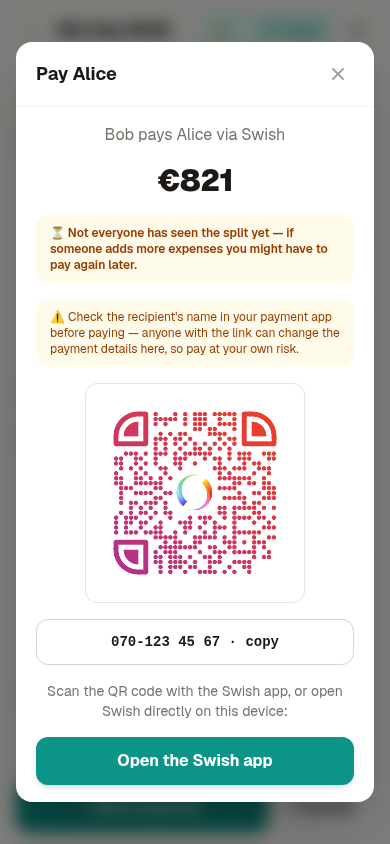
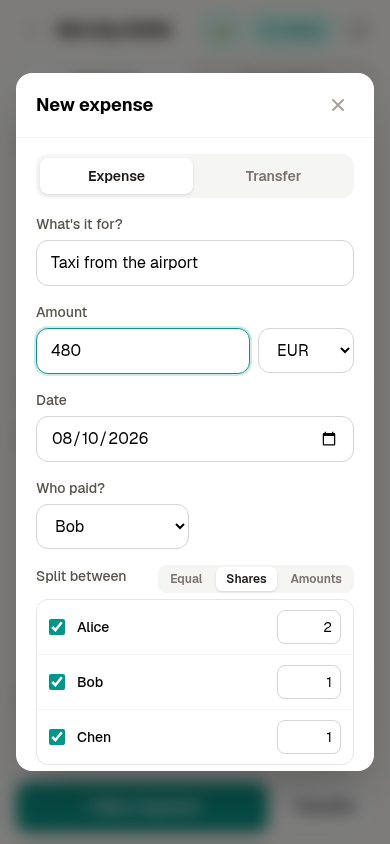 Create a split and see who owes whom · a Swish QR with the amount already in it · splitting by shares