# XAF Logic Explainer [Health: Active]
**Category:** 💻 Developer Tools
**Repository:** https://github.com/peopleworks/XAFLogicExplainer
**GitHub Stars:** 8
**Views:** 0
**Installs:** 0
**Upvotes:** 0
**Directory Page:** https://allmcps.com/mcp/xaf-logic-explainer
## Description
Query your DevExpress XAF app: entities, controllers, actions, rules, Model Editor.
## Claude Desktop Quick Installation
Heuristic fallback — verify the package name and runner against the repository README before running it. Uses `npx` (confidence: low):
```json
"mcpServers": {
"xaf-logic-explainer": {
"command": "npx",
"args": ["-y","xaf-logic-explainer"]
}
}
```
## Documentation & README
# XAF Logic Explainer
[](https://github.com/peopleworks/XAFLogicExplainer/actions/workflows/ci.yml)
[](LICENSE)
[](https://www.nuget.org/packages/XafLogicExplainer.Cli)
[](https://www.nuget.org/packages/XafLogicExplainer.Core)
[](https://www.nuget.org/packages/XafLogicExplainer.Mcp)
[](https://dotnet.microsoft.com/)
[](https://registry.modelcontextprotocol.io/v0/servers?search=xaf-logic-explainer)
[](https://codeguilds.dev/packages/xaf-logic-explainer)
[](https://glama.ai/mcp/servers/tnzvgbukeb)
[](https://www.devexpress.com/products/net/application_framework/)
[](https://github.com/peopleworks/XAFLogicExplainer/stargazers)
**Teach your AI coding agent what *your* XAF application actually does.**
**[See how it works →](https://peopleworks.github.io/XAFLogicExplainer/)**
Point it at an XAF module. It reads your entities, controllers, actions, business rules,
navigation and Model Editor customizations straight from source — and hands the result to
whatever agent you code with.
---
## Why this exists
DevExpress has done excellent work making AI agents fluent in XAF. Two pieces already exist,
and this is the third:
| Teaches the agent… | Tool |
| --- | --- |
| How XAF works in general | [DevExpress `agent-skills`](https://github.com/DevExpress/agent-skills) |
| What the official documentation says | [DevExpress Docs MCP Server](https://docs.devexpress.com/) |
| **What YOUR application does** | **XAF Logic Explainer** ← *you are here* |
An agent that has read every page of the XAF documentation still does not know that your `Invoice`
total is calculated from its lines, that `ApproveController` refuses to run when the period is
closed, or that three columns were hidden in the Model Editor and appear in no C# file at all. It
will confidently invent all three.
That gap is not solvable by better prompting. It is solvable by extraction.
**These tools compose.** Install the DevExpress skills for framework knowledge, use the Docs MCP
for the official reference, and use this for your own codebase. None of them replaces the others.
## What it extracts
Everything below is read as **syntax**, using Roslyn. Your project never has to compile, and this
tool never links against DevExpress assemblies:
- **Entities** — properties, types, associations, and the XAF attributes that give them meaning
(`[Association]`, `[Aggregated]`, `[RuleRequiredField]`, `[Appearance]`, `[ModelDefault]`, …).
Found **however your application declares them**: through an XPO base, through a `DbSet` in
any spelling a real project uses, through the type argument of a generic context base, and
through a base class that lives in a **referenced project**. An empty answer is a claim, so the
rule leans towards reading more — and what it still does not read is written down and asserted
rather than remembered.
- **Which ORM the application persists with** — decided by what the project itself declares, not by
what sits beside it. An EF Core cache next to an XPO application does not make it EF Core, and
the answer becomes a hard rule in the agent file.
- **The framework it targets** — in every spelling a project file uses, including the pre-SDK
`v4.8` that no modern reader looks for. On .NET Framework the agent file
gains a ground rule for what is genuinely unavailable there, which is narrower than most people
assume and stated that way.
- **Controllers and actions** — `SimpleAction`, `PopupWindowShowAction`, `SingleChoiceAction`,
their target criteria, and the handler code that runs when they fire.
- **Business rules** — validation attributes and code rules, with the conditions attached.
- **Module setup** — `ModuleUpdater` seed data and what gets created on first run.
- **Navigation** — the groups and items your users actually see.
- **Model Editor (`.xafml`)** — the customizations that exist *only* in XML and are invisible to
anyone reading your C#. Module and platform files are merged the way XAF merges them.
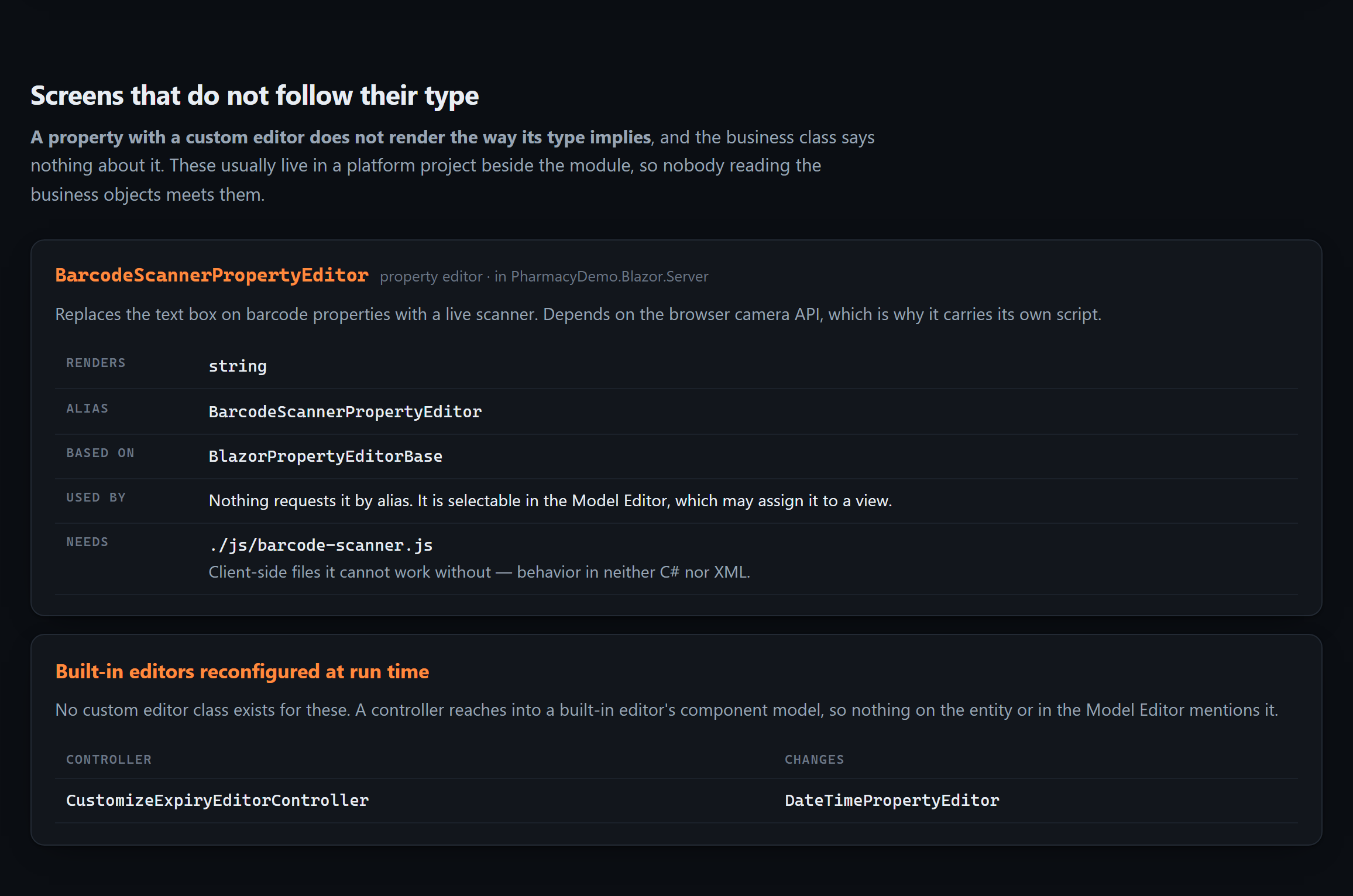
- **Custom property and list editors** — including the JavaScript they cannot work without, and
built-in editors reconfigured at run time through `View.CustomizeViewItemControl()`. These
live in the platform project *beside* the module, so nobody reading the business objects meets
them.
- **Version-gated migrations** — the `CurrentDBVersion < new Version(…)` blocks in your updater.
Each runs at most once for any database, and is the only explanation for data the current code
cannot account for.
- **Reports** — what each one is over, the filter inside its layout, its calculated fields and bound
expressions, and the parameters dialog it opens with, down to the `GetCriteria()` that turns the
answers into a filter. Read from designer code, from a `.repx`, or from the report's own
constructor.
- **Every screen, and what loads onto it** — see below.
These are the reason an agent that has read every business class can still be confidently wrong
about the application:
## What runs when you open this screen
Nothing in an XAF repository answers that, and both halves are missing for different reasons.
**The screens themselves are in no file.** XAF generates a list, a detail and a lookup view for
every business class, plus a list view for every collection, and the Model Editor stores only the
ones somebody changed. Grepping your source for `Patient_Prescriptions_ListView` finds nothing —
and that is not evidence it is missing.
**Which controllers run there is decided at run time**, by four conditions XAF ANDs together:
nesting, view type, object type and view id. Each is unrestricted when unset, so a controller that
sets none of them loads onto *every* screen you have.
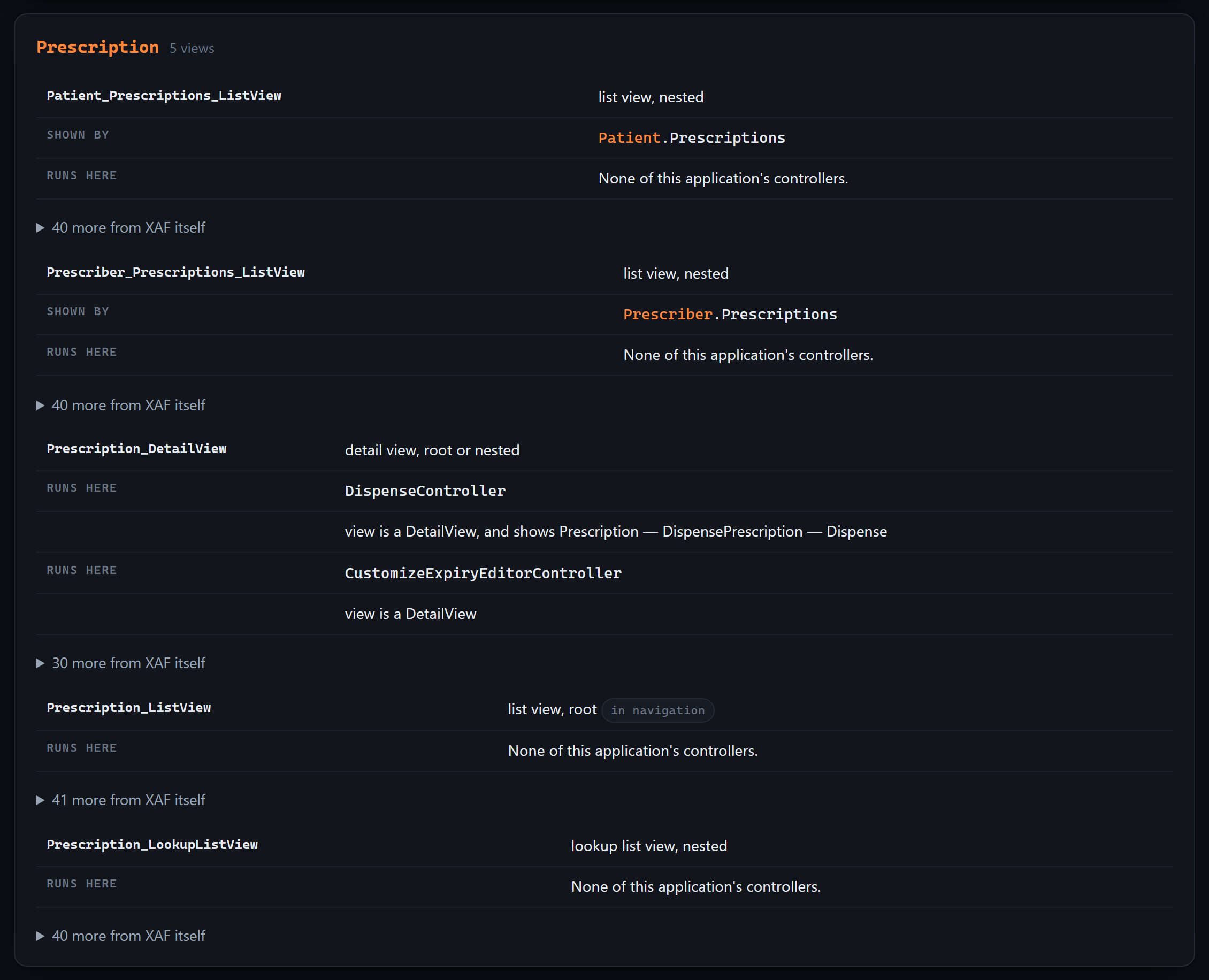
This reads all four the way `ViewController.IsFitToView` evaluates them, against a view inventory
built from the framework's own id generators — and records **why** each one matched, so the answer
can be checked rather than trusted:
Two layers, kept apart. What your team wrote gets the full treatment; what XAF provides is folded
away behind one line, because there is a great deal of it and it is not yours to change. With a
[ground-truth catalog](#optional-tell-your-code-apart-from-devexpresss) it is named too — scoped to
the modules you actually register, so a WinForms controller never appears on a Blazor screen.
What it will not claim: a controller listed here can still switch itself off through
`Active["reason"]`, which depends on the data and the user. This is what XAF **loads** onto a
screen, not what will necessarily do something — and anything it could not read from the source is
listed apart, with the reason, instead of being quietly treated as "runs everywhere".
## The reports are the test of whether you can trust any of this
Every other section here is a claim that we found something you could not see. This one is the
opposite, and it is the more useful half.
Reports V2 lets your users design reports at run time. Those are stored as **rows in your database**,
not as files — so no tool that reads a repository can see them, this one included. An application
with forty reports and none in its source is not unusual; it is what a successful reporting setup
looks like.
So the answer changes shape depending on what is knowable:
| Your application | What you are told |
| --- | --- |
| No `ReportsModuleV2` | *"these are all of them"* — nothing can appear at run time |
| Module registered, reports in source | *"this list is a **lower bound**"* |
| Module registered, none in source | *"the true number is **not zero but unknown**"* |
That last row is the common case, and it is where a confident tool does real damage. An agent told
"this application has no reports" will design as though none can exist — for an application whose
users built forty. `AGENTS.md` says it outright:
> The number is unknown, not zero — do not tell anyone this application has no reports.
The same rule governs the framework catalog. If the catalog on your machine describes DevExpress
26.1 and your application declares 23.2, every framework answer says so, with both numbers, rather
than being presented as certain.
**A tool that never says "I cannot see that" is not more capable. It is less checkable.**
## Quick start
```bash
dotnet tool install -g XafLogicExplainer.Cli
xaflogic agents --project "C:\MySolution\MyApp.Module"
```
That writes `AGENTS.md`, `CLAUDE.md` and `.github/copilot-instructions.md` at your solution root.
No account, no API key, no server. Your agent understands the application on its next question.
### What it writes, and why it is split in two
`AGENTS.md` is prepended to *every* request an agent makes in the repository, so its cost is paid
forever. Dumping 70 KB of entity detail there would crowd out the actual question. So the output is
tiered:
| | | |
| --- | --- | --- |
| `AGENTS.md` | ~11 KB | Always loaded: ground rules, complete inventories, conventions, recipes |
| `.xaflogic/*.md` | ~70 KB | Opened on demand: full properties, handler code, rule messages, `.xafml` |
The most valuable part is the smallest. `AGENTS.md` opens with **ground rules** — that this
application uses XPO and never EF Core, that the inventories are *complete* so anything absent
genuinely does not exist, and that some behavior lives in the Model Editor rather than in C#. Those
few paragraphs stop most of the confident invention agents produce about unfamiliar XAF codebases.
Existing files are never clobbered: generated text lives between markers, anything you wrote by
hand is preserved, and regenerating is byte-identical when nothing changed.
## Or let the agent ask questions directly
Generated files are a snapshot. The MCP server is a live connection — the agent queries your
application while you work on it, and cannot go stale.
```
/plugin marketplace add peopleworks/XAFLogicExplainer
/plugin install xaf-logic-explainer@peopleworks-xaf
```
That installs a skill and an MCP server in one step. For any other MCP client, either run it
straight from NuGet with no install:
```json
{
"mcpServers": {
"xaf": { "command": "dnx", "args": ["XafLogicExplainer.Mcp", "--yes"] }
}
}
```
…or point at the CLI if you already have it:
```json
{ "mcpServers": { "xaf": { "command": "xaflogic", "args": ["mcp"] } } }
```
Started from a solution directory it finds the XAF module by itself, so neither form needs a path.
| Tool | Answers |
| --- | --- |
| `xaf_overview` | What this application is, and the complete list of everything in it |
| `xaf_search` | Where a field, concept or business term is defined |
| `xaf_entity` | Every property, relationship, rule and calculation on one entity |
| `xaf_controller` | What an action does — including the C# that runs when it fires |
| `xaf_rules` | What the application validates, computes, hides and disables |
| `xaf_model` | Model Editor customizations, which exist in no C# file |
| `xaf_editors` | Custom editors, the JavaScript they need, and built-in editors changed at run time |
| `xaf_migrations` | What ran once against a live database, and the comment explaining why |
| `xaf_reports` | What each report is over, the filter inside it, and the dialog it opens with |
| `xaf_view` | Everything loaded onto one screen — which controllers activate, and why |
| `xaf_walkthrough` | **How one process works end to end** — what runs, in what order, and what it could not follow |
| `xaf_refresh` | Re-read the source (changes are detected automatically) |
Ask for something that isn't there and the answer is the useful one:
> There is no entity called 'PurchaseOrder' in this application.
> This is the complete list of 19 entities, extracted from the whole source tree: …
> If the user expects 'PurchaseOrder' to exist, it has not been created yet.
**Pair it with the official DevExpress skills.** `/plugin install dx-xaf@DevExpress-agent-skills`
teaches how XAF works; this teaches what your application does. An agent with only the first will
write correct XAF against entities you do not have.
## The same knowledge, for a person
An agent reads `AGENTS.md` or queries the MCP server. Someone who has just inherited a ten-year-old
XAF application needs the same facts arranged very differently:
```bash
xaflogic explain --project "C:\MySolution\MyApp.Module" --open
```
One HTML file. No server, no build step, no request to the network — it opens from an email
attachment on a machine with no internet, which is how handovers actually happen.
It draws **a map of your domain model** from the association attributes scattered across your
codebase. Most teams have never seen theirs: it exists in one person's head, which is exactly the
knowledge that leaves when they do.
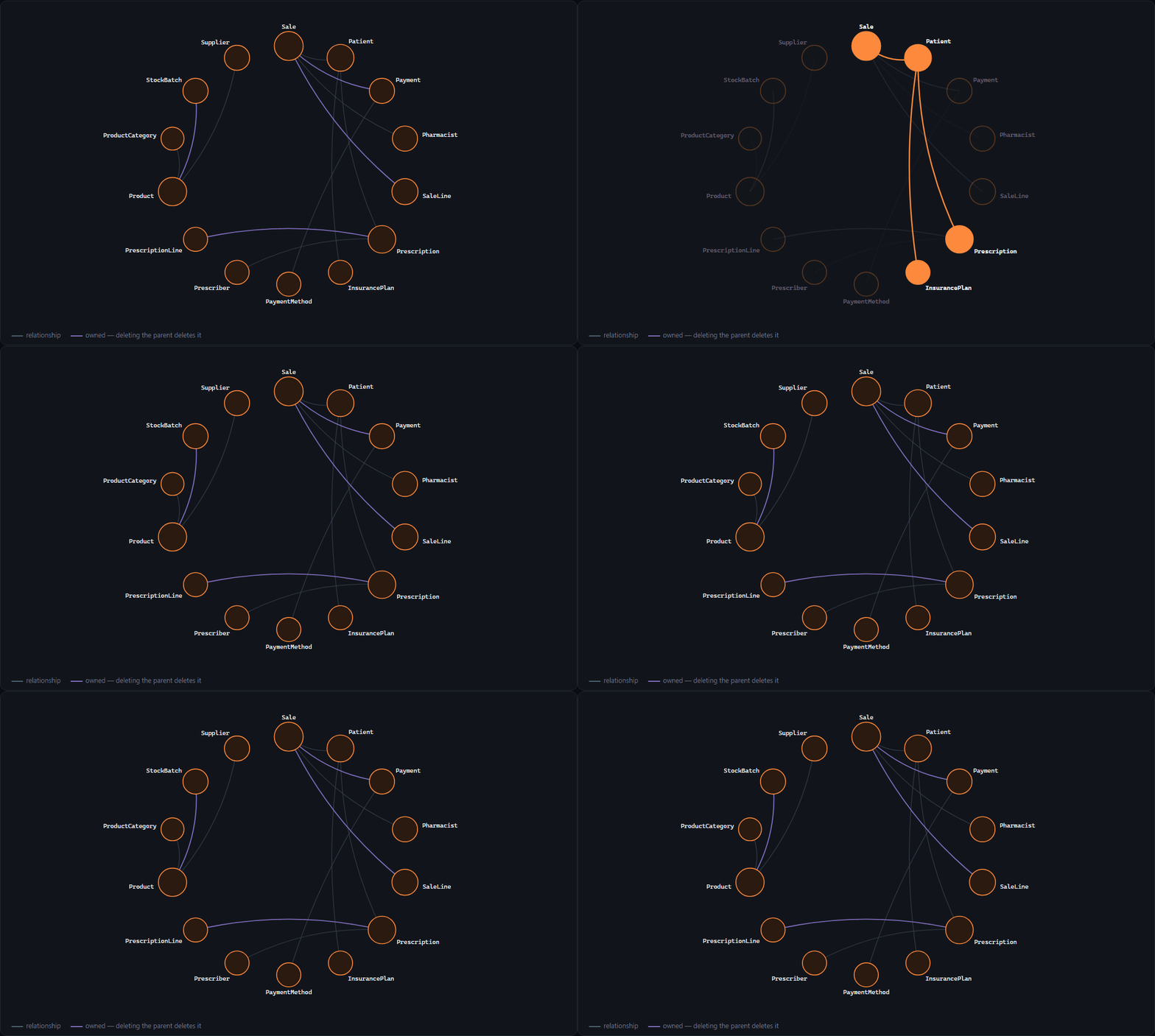
Real output, from the sample application in this repository. Hover an entity and everything it
does not touch fades; purple means deleting the parent deletes the child.
Alongside it: every entity and what each property is, every action with the code it runs,
validation with the message the user will actually see, and the Model Editor settings that appear
in no C# file.
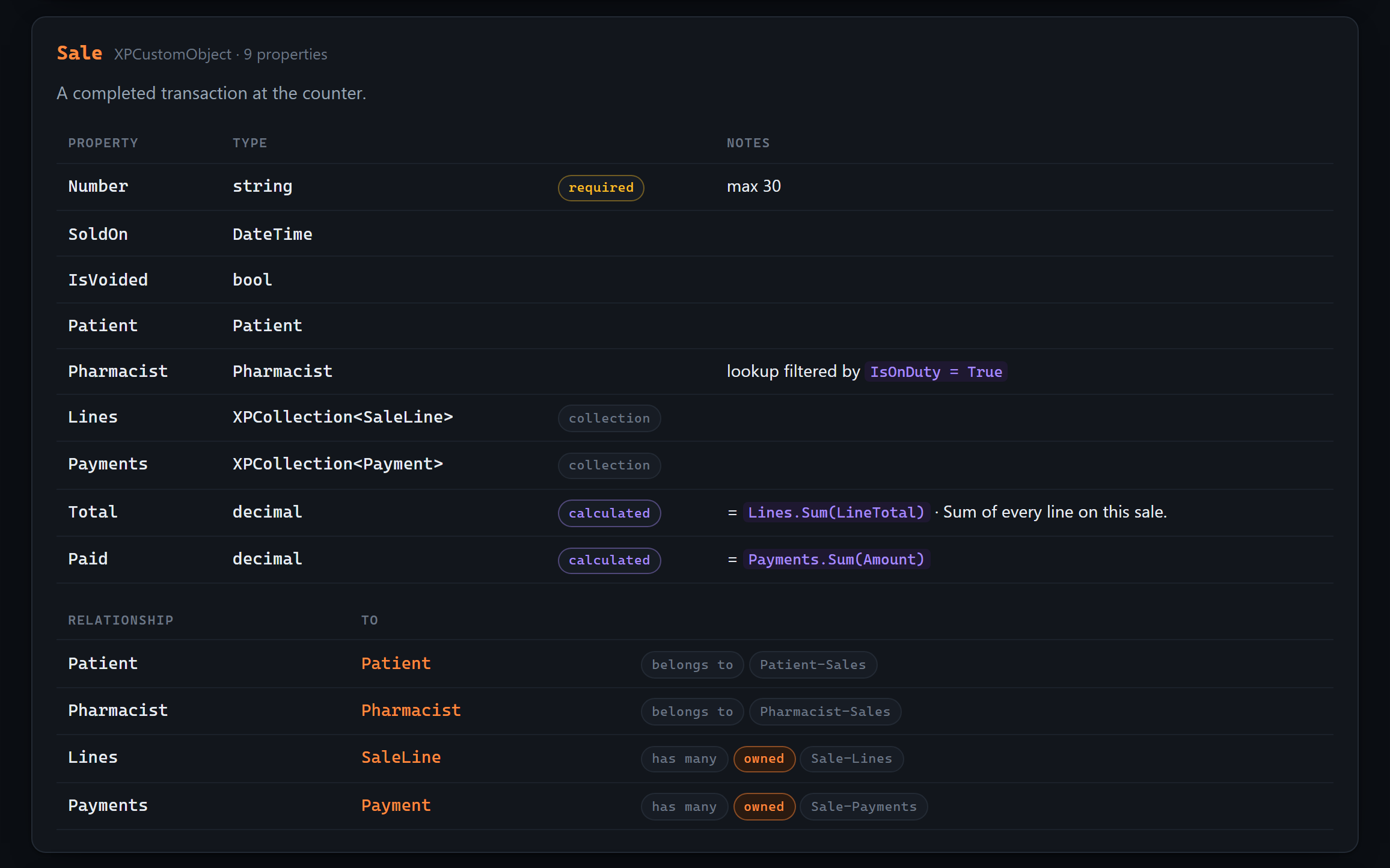
And **an index of every criteria expression in the application** — a dialect that is neither SQL
nor C#, gathered from attributes spread across the source and otherwise collected nowhere:
Try it on the sample without touching your own code:
```bash
xaflogic explain --project tests/XafLogicExplainer.Tests/Fixtures/DemoSolution/PharmacyDemo.Module --open
```
## The question one application cannot answer
You have delivered XAF applications to clients for ten years. Somewhere in there you already
modelled the class you are about to write again, and you cannot remember which project it was in.
```bash
xaflogic projects add --name pwLegalOffice --project "C:\Clients\Legal\pwLegalOffice.Module"
xaflogic projects add --name Presupuesto --project "C:\Clients\Budget\PWPresupuesto.Module"
xaflogic wiki --open
```
One HTML file over **all of them**, and a section that exists in no single-project tool:
- **Classes you modelled more than once** — with a property-by-property comparison, so you can see
which application models `Cliente` in the most detail before writing it a fourth time.
- **The layer you wrote yourself** — base classes carried from one application into another. Your
own framework, the one that was never written down. A base class is listed only when its own
source was read in one of the projects, so nothing is matched against a list of DevExpress type
names that would rot at the next release.
- **The same name, two shapes** — where `Total` is a `decimal` in one application and a `double`
in another. Nothing is broken; each one compiles. It is how a total ends up two cents out.
- **Names you keep** — the vocabulary of your applications, which nobody wrote down and everybody
who joins has to learn by reading code.
And a map of the whole estate, drawn from the same reading:
Real output, from the three sample client modules in this repository. Each class sits at the
average direction of the applications that model it, at a distance set by how much they agree — so
a class every application has falls to the centre. The middle is your common ground; the rim is the
work that belongs to one client.
Beside it, two more that only a corpus can produce: **which two of your projects are most alike**,
as a grid you can click to hold the page to just those two, and **the DevExpress releases your
estate is spread across** — with the one your framework catalog actually describes marked, so every
claim about DevExpress types says whether it was checked against the right release.
Everything in it is computed from what was read. There is no place in the page to put a sentence
somebody typed about the corpus, because a hand-written summary of nine applications is wrong the
day the tenth is added and nobody notices.
Filter by any project to see only what it has in common with the rest. And the honest part is on
the page too: two classes are matched **by name**, so the wiki tells you they share a name — the
comparison is what tells you whether they share an idea.
## The same knowledge, as a document
You arrive at an XAF project you have never seen and, half a day later, hand someone a document
about it. The last step is not this tool's. `xaflogic extract` writes Markdown, and
[mcpOffice](https://github.com/MBrekhof/mcpOffice) — an MCP server built on the DevExpress Office
File API — turns Markdown into `.docx` and `.docx` into PDF. With both servers connected, the agent
hands one to the other. There is no Word exporter here and there will not be one
([#28](https://github.com/peopleworks/XAFLogicExplainer/issues/28)): reading an XAF application
needs no DevExpress, and that stays true.
```bash
xaflogic extract --project "C:\MySolution\MyApp.Module"
# writes .xaflogic-output/MyApp_Full.md, and one file per section beside it
```
Then, to the agent:
> Turn `.xaflogic-output/MyApp_Entities.md` into a Word document with `word_create_from_markdown`,
> then `word_convert` it to PDF.
Hand over a section file rather than `_Full.md` when the reader is one audience: `_Entities.md` is
the data dictionary, `_BusinessRules.md` the rules, `_Controllers.md` what the buttons do.
`word_create_from_markdown` takes a `templatePath`, so headings, tables, header and footer can come
from your own `.dotx`.
Verified on the sample application in this repository: every heading becomes a Word heading and
appears in the document outline, the property tables become real tables, fenced C# becomes shaded
monospace, and lists, bold and inline code survive. Nothing in the generated Markdown is HTML, and
[a test](https://github.com/peopleworks/XAFLogicExplainer/blob/HEAD/tests/XafLogicExplainer.Tests/PortableMarkdownTests.cs) keeps it that way.
mcpOffice needs a DevExpress licence, because it writes Office files with DevExpress's API. If you
run an XAF application, you have one. Setup is in
[its usage guide](https://github.com/MBrekhof/mcpOffice/blob/main/docs/usage.md).
## Optional: tell your code apart from DevExpress's
Extraction reads your source without knowing anything about the framework it is written against,
which leaves one question unanswerable: is `DeleteObjectsViewController` something your team wrote,
or something DevExpress ships? Without an answer, generated documentation presents framework
behavior and your own logic as the same thing.
If you have a DevExpress licence:
```bash
xaflogic catalog build
```
That reads **your own installation** and records what XAF itself provides — attributes, controllers,
model interfaces and modules, with the official summaries and documentation links DevExpress ships.
On DevExpress 26.1 that is around 850 framework types.
If you also installed the DevExpress **source code** component, it records *where each framework
controller activates* — the four conditions XAF checks before running it. That cannot be read from
the assemblies: four out of five built-in controllers set their target inside a constructor. Pass
`--dx-sources ` if they are not beside your assemblies.
Extraction then picks it up automatically and can say things it otherwise could not:
- *"`ArchiveController` extends the built-in `DeleteObjectsViewController`"* — you are changing how
deletion works application-wide, not adding a feature beside it.
- *"`[AuditedByFinance]` is not an XAF or .NET attribute"* — your team invented it, so its meaning
lives in this codebase and in no documentation anywhere.
- *"32 framework controllers also load onto this screen"* — named, with what each one does, and
scoped to the modules your application actually registers, so a WinForms controller never appears
on a Blazor screen.
The catalog is written to `~/.xaflogic/catalog/`, **never into your repository**: it is derived from
licensed software. Everything works without it — it only sharpens the output. See
[NOTICE.md](https://github.com/peopleworks/XAFLogicExplainer/blob/HEAD/NOTICE.md).
### Commands
| Command | What it does |
| --- | --- |
| `agents` | **Write `AGENTS.md` / `CLAUDE.md` / Copilot instructions for your agent** |
| `mcp` | **Run as an MCP server so agents can query the app live** |
| `explain` | **Write a self-contained HTML page explaining the app to a person** |
| `wiki` | **Read every project together and say what they have in common** |
| `catalog` | Build the DevExpress ground-truth catalog (`build`, `status`) |
| `extract` | Read the project, write Markdown + JSON locally |
| `walkthrough` | **Trace one business process** — what runs, in what order, and what governs it |
| `diff` | Compare against the previous extraction and report what changed |
| `status` | Show the change-detection hash and whether a re-extract is needed |
| `watch` | Re-extract on file change, with debounce |
| `sync` | Extract and publish to a remote target |
| `chat` | Ask questions about the extracted project |
| `config` | Set defaults in `~/.xaflogic/config.json` |
| `projects` | Manage several XAF projects; most commands accept `--all` |
Documentation is generated in **English or Spanish** (`--lang en|es`).
Useful flags: `--orm auto\|xpo\|efcore`, `--lang en\|es`, `--enrich` (AI-generated business-logic
summaries per controller and action), `--force`, `--all`.
### Tracing one process
```bash
xaflogic walkthrough --from ApproveOrder # to the screen, or > process.md
xaflogic walkthrough --from ApproveOrder --depth 4 --out docs/approval.md
```
What runs, in what order, which entities it touches and which rules govern them — every step citing
`file:line`, with a Mermaid diagram **emitted from the trace itself, never drawn by a model.** Calls
the trace could not follow are listed rather than skipped, so an empty list means the path really is
complete. Add `--narrate` for prose over the steps; a paragraph that cannot name a real step is
dropped before you see it.
```bash
xaflogic walkthrough --from ApproveOrder --since # against the last extraction
```
`--since` re-walks the same process over a stored snapshot and reports what is different about
**this** process: a step added, a rule now governing it, a body rewritten, a branch gone, a call the
trace can no longer follow. No conversational agent can answer that, because none of them has a
yesterday.
`--enrich` and `--narrate` need a model, and **any of these is enough** — a key on the command line
wins, then the environment, then a PeopleWorks Copilot account if you happen to have one:
```bash
xaflogic extract --enrich --api-key sk-... # or any OpenAI-compatible endpoint:
xaflogic extract --enrich --api-key ... --ai-base-url http://localhost:11434/v1 --ai-model qwen2.5-coder
export OPENAI_API_KEY=sk-... # picked up with no configuration at all
export ANTHROPIC_API_KEY=sk-ant-...
```
Everything else in this tool runs with no key, no account and no network — the walkthrough
included, minus its prose.
Extraction is **incremental** — a SHA-256 over your `.cs` and `.xafml` files means an unchanged
project is a no-op. There is an MSBuild `.targets` file if you want it to run on build.
## Status
**v0.17.0.** The extraction engine is the mature part: it runs in production against real XAF
applications. The agent-facing surface is what is landing now, in the open.
| | |
| --- | --- |
| ✅ | Roslyn extraction — entities, controllers, rules, updater, navigation, `.xafml` |
| ✅ | XPO and EF Core, decided by what the project itself declares |
| ✅ | **Reads base classes from referenced projects**, so a shared framework library is not a blank page |
| ✅ | Target framework in every project-file spelling, and a .NET Framework ground rule in `AGENTS.md` |
| ✅ | **Custom property and list editors**, their client assets, and built-in editors reconfigured at run time |
| ✅ | **Version-gated data migrations** — what happened to databases that were not fresh |
| ✅ | Incremental change detection, diff reports, multi-project, watch mode |
| ✅ | **Walkthrough** — one process traced end to end, with a diagram emitted from the trace, the calls it could not follow, and `--since` |
| ✅ | AI enrichment of controllers and actions (`--enrich`) |
| ✅ | Blazor in-app help panel |
| ✅ | **`AGENTS.md` / `CLAUDE.md` / Copilot instructions** — zero infrastructure, works for everyone |
| ✅ | **`xaflogic explain`** — one self-contained HTML page, for a person rather than an agent |
| ✅ | **`xaflogic wiki`** — every project in one page, and what they have in common |
| ✅ | Pluggable publishing targets (`IDocumentationSink`) |
| ✅ | **MCP server** — 12 tools, live against your source |
| ✅ | **Installable Claude Code plugin** with skill and MCP server |
| ✅ | **576 tests** over synthetic XPO and EF Core fixtures — no DevExpress needed |
| ✅ | **DevExpress ground-truth catalog**, generated locally by licensees |
PeopleWorks Copilot, where this tool grew up, is now one sink among several rather than the
destination everything was built around. The outputs that matter most need no server at all.
## The long version
Why a third of an XAF application's behaviour lives outside its business classes, the four places
it hides, and what the extracted output actually looks like:
- **[Your coding agent knows XAF. It has never seen your application.](https://peopleworksgpt.com/your-coding-agent-knows-xaf-it-has-never-seen-your-application/)**
- **[Tu agente de código sabe XAF. Nunca ha visto tu aplicación.](https://peopleworks.com.do/2026/08/13/tu-agente-de-codigo-sabe-xaf-nunca-ha-visto-tu-aplicacion/)** — *en español*
Each is written in its own language rather than translated from the other. Sources in
[`docs/Blog/`](https://github.com/peopleworks/XAFLogicExplainer/blob/HEAD/docs/Blog/).
## Repository layout
```
src/
XafLogicExplainer.Core Roslyn extraction engine — no DevExpress reference
XafLogicExplainer.Mcp MCP server (ModelContextProtocol 2.1)
XafLogicExplainer.Cli the `xaflogic` command
XafLogicExplainer.CopilotSync PeopleWorks Copilot target + AI enrichment
XafLogicExplainer.DescriptionAnnotator generates missing [Description] attributes
XafLogicExplainer.Blazor in-app help panel for XAF Blazor apps
plugins/
xaf-logic-explainer the installable Claude Code plugin
```
Built on **.NET 10**.
Only `XafLogicExplainer.Blazor` references DevExpress packages; it needs the DevExpress NuGet feed
and a license to build. Everything else builds anywhere, which is why CI can verify it for free.
## Contributing
The single most valuable contribution is telling us **what the extractor missed**. XAF is enormous,
every codebase uses a different slice of it, and no single project exercises the whole framework.
There is an [extraction-gap issue template](https://github.com/peopleworks/XAFLogicExplainer/blob/HEAD/.github/ISSUE_TEMPLATE/extraction-gap.yml) for exactly
this: show the XAF pattern your project uses and what the tool failed to see.
See [CONTRIBUTING.md](https://github.com/peopleworks/XAFLogicExplainer/blob/HEAD/CONTRIBUTING.md). Bug reports, docs and translations are equally welcome.
## License
[MIT](https://github.com/peopleworks/XAFLogicExplainer/blob/HEAD/LICENSE). See [NOTICE.md](https://github.com/peopleworks/XAFLogicExplainer/blob/HEAD/NOTICE.md) for the relationship to DevExpress.
An independent community project — not affiliated with, endorsed by, or supported by
Developer Express Inc. It contains no DevExpress source code and needs no DevExpress license to
build or run. *DevExpress*, *XAF* and *eXpressApp Framework* are trademarks of Developer Express Inc.
Built by [Pedro Hernández](https://github.com/peopleworks) (PeopleWorks),
[Microsoft MVP for .NET](https://mvp.microsoft.com/en-US/mvp/profile/24060a02-dbc6-44ec-bca5-c213ff9835c5) —
for the DevExpress and XAF community.


 ## What runs when you open this screen
Nothing in an XAF repository answers that, and both halves are missing for different reasons.
**The screens themselves are in no file.** XAF generates a list, a detail and a lookup view for
every business class, plus a list view for every collection, and the Model Editor stores only the
ones somebody changed. Grepping your source for `Patient_Prescriptions_ListView` finds nothing —
and that is not evidence it is missing.
**Which controllers run there is decided at run time**, by four conditions XAF ANDs together:
nesting, view type, object type and view id. Each is unrestricted when unset, so a controller that
sets none of them loads onto *every* screen you have.
This reads all four the way `ViewController.IsFitToView` evaluates them, against a view inventory
built from the framework's own id generators — and records **why** each one matched, so the answer
can be checked rather than trusted:
## What runs when you open this screen
Nothing in an XAF repository answers that, and both halves are missing for different reasons.
**The screens themselves are in no file.** XAF generates a list, a detail and a lookup view for
every business class, plus a list view for every collection, and the Model Editor stores only the
ones somebody changed. Grepping your source for `Patient_Prescriptions_ListView` finds nothing —
and that is not evidence it is missing.
**Which controllers run there is decided at run time**, by four conditions XAF ANDs together:
nesting, view type, object type and view id. Each is unrestricted when unset, so a controller that
sets none of them loads onto *every* screen you have.
This reads all four the way `ViewController.IsFitToView` evaluates them, against a view inventory
built from the framework's own id generators — and records **why** each one matched, so the answer
can be checked rather than trusted:
 Two layers, kept apart. What your team wrote gets the full treatment; what XAF provides is folded
away behind one line, because there is a great deal of it and it is not yours to change. With a
[ground-truth catalog](#optional-tell-your-code-apart-from-devexpresss) it is named too — scoped to
the modules you actually register, so a WinForms controller never appears on a Blazor screen.
What it will not claim: a controller listed here can still switch itself off through
`Active["reason"]`, which depends on the data and the user. This is what XAF **loads** onto a
screen, not what will necessarily do something — and anything it could not read from the source is
listed apart, with the reason, instead of being quietly treated as "runs everywhere".
## The reports are the test of whether you can trust any of this
Every other section here is a claim that we found something you could not see. This one is the
opposite, and it is the more useful half.
Reports V2 lets your users design reports at run time. Those are stored as **rows in your database**,
not as files — so no tool that reads a repository can see them, this one included. An application
with forty reports and none in its source is not unusual; it is what a successful reporting setup
looks like.
So the answer changes shape depending on what is knowable:
| Your application | What you are told |
| --- | --- |
| No `ReportsModuleV2` | *"these are all of them"* — nothing can appear at run time |
| Module registered, reports in source | *"this list is a **lower bound**"* |
| Module registered, none in source | *"the true number is **not zero but unknown**"* |
That last row is the common case, and it is where a confident tool does real damage. An agent told
"this application has no reports" will design as though none can exist — for an application whose
users built forty. `AGENTS.md` says it outright:
> The number is unknown, not zero — do not tell anyone this application has no reports.
The same rule governs the framework catalog. If the catalog on your machine describes DevExpress
26.1 and your application declares 23.2, every framework answer says so, with both numbers, rather
than being presented as certain.
**A tool that never says "I cannot see that" is not more capable. It is less checkable.**
## Quick start
```bash
dotnet tool install -g XafLogicExplainer.Cli
xaflogic agents --project "C:\MySolution\MyApp.Module"
```
That writes `AGENTS.md`, `CLAUDE.md` and `.github/copilot-instructions.md` at your solution root.
No account, no API key, no server. Your agent understands the application on its next question.
### What it writes, and why it is split in two
`AGENTS.md` is prepended to *every* request an agent makes in the repository, so its cost is paid
forever. Dumping 70 KB of entity detail there would crowd out the actual question. So the output is
tiered:
Two layers, kept apart. What your team wrote gets the full treatment; what XAF provides is folded
away behind one line, because there is a great deal of it and it is not yours to change. With a
[ground-truth catalog](#optional-tell-your-code-apart-from-devexpresss) it is named too — scoped to
the modules you actually register, so a WinForms controller never appears on a Blazor screen.
What it will not claim: a controller listed here can still switch itself off through
`Active["reason"]`, which depends on the data and the user. This is what XAF **loads** onto a
screen, not what will necessarily do something — and anything it could not read from the source is
listed apart, with the reason, instead of being quietly treated as "runs everywhere".
## The reports are the test of whether you can trust any of this
Every other section here is a claim that we found something you could not see. This one is the
opposite, and it is the more useful half.
Reports V2 lets your users design reports at run time. Those are stored as **rows in your database**,
not as files — so no tool that reads a repository can see them, this one included. An application
with forty reports and none in its source is not unusual; it is what a successful reporting setup
looks like.
So the answer changes shape depending on what is knowable:
| Your application | What you are told |
| --- | --- |
| No `ReportsModuleV2` | *"these are all of them"* — nothing can appear at run time |
| Module registered, reports in source | *"this list is a **lower bound**"* |
| Module registered, none in source | *"the true number is **not zero but unknown**"* |
That last row is the common case, and it is where a confident tool does real damage. An agent told
"this application has no reports" will design as though none can exist — for an application whose
users built forty. `AGENTS.md` says it outright:
> The number is unknown, not zero — do not tell anyone this application has no reports.
The same rule governs the framework catalog. If the catalog on your machine describes DevExpress
26.1 and your application declares 23.2, every framework answer says so, with both numbers, rather
than being presented as certain.
**A tool that never says "I cannot see that" is not more capable. It is less checkable.**
## Quick start
```bash
dotnet tool install -g XafLogicExplainer.Cli
xaflogic agents --project "C:\MySolution\MyApp.Module"
```
That writes `AGENTS.md`, `CLAUDE.md` and `.github/copilot-instructions.md` at your solution root.
No account, no API key, no server. Your agent understands the application on its next question.
### What it writes, and why it is split in two
`AGENTS.md` is prepended to *every* request an agent makes in the repository, so its cost is paid
forever. Dumping 70 KB of entity detail there would crowd out the actual question. So the output is
tiered:

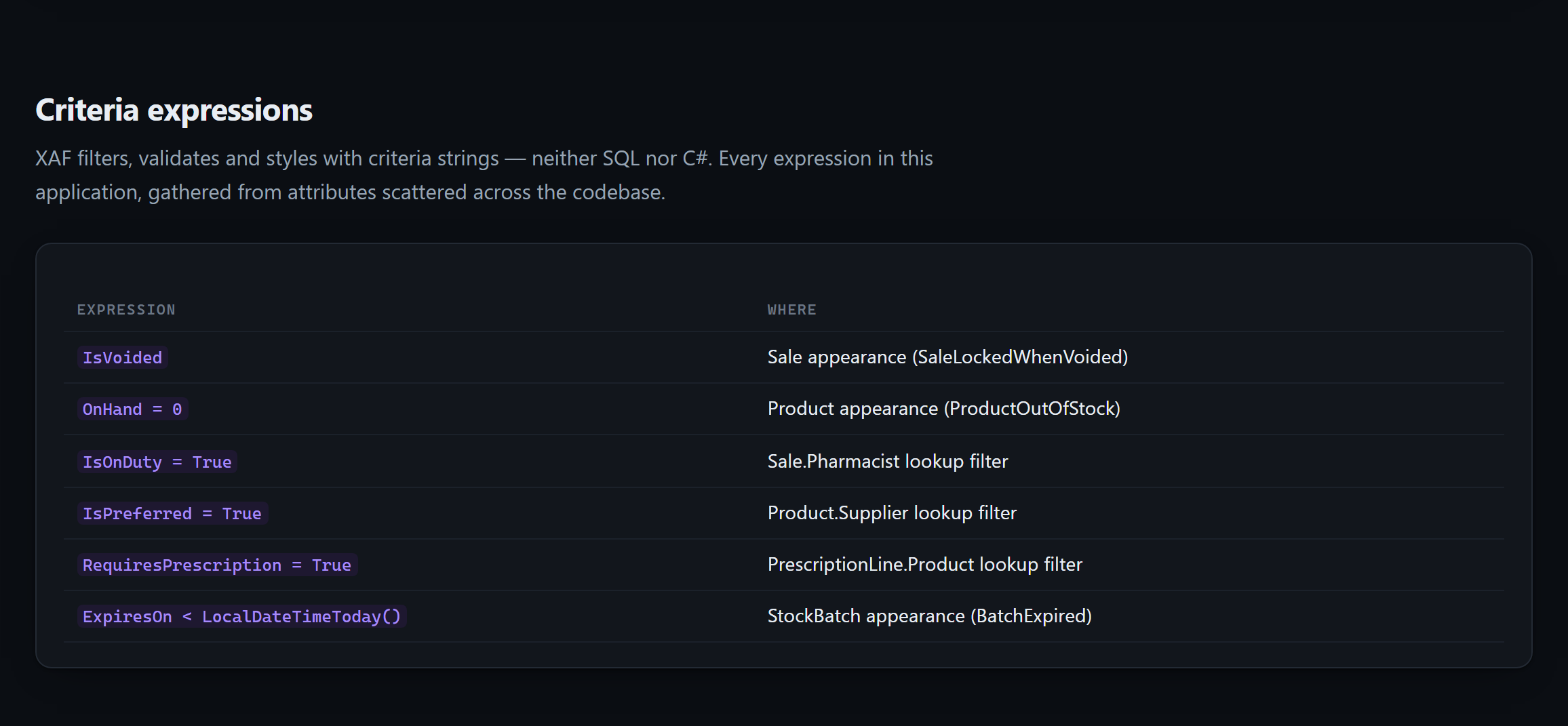
 And **an index of every criteria expression in the application** — a dialect that is neither SQL
nor C#, gathered from attributes spread across the source and otherwise collected nowhere:
And **an index of every criteria expression in the application** — a dialect that is neither SQL
nor C#, gathered from attributes spread across the source and otherwise collected nowhere:
 Try it on the sample without touching your own code:
```bash
xaflogic explain --project tests/XafLogicExplainer.Tests/Fixtures/DemoSolution/PharmacyDemo.Module --open
```
## The question one application cannot answer
You have delivered XAF applications to clients for ten years. Somewhere in there you already
modelled the class you are about to write again, and you cannot remember which project it was in.
```bash
xaflogic projects add --name pwLegalOffice --project "C:\Clients\Legal\pwLegalOffice.Module"
xaflogic projects add --name Presupuesto --project "C:\Clients\Budget\PWPresupuesto.Module"
xaflogic wiki --open
```
One HTML file over **all of them**, and a section that exists in no single-project tool:
- **Classes you modelled more than once** — with a property-by-property comparison, so you can see
which application models `Cliente` in the most detail before writing it a fourth time.
- **The layer you wrote yourself** — base classes carried from one application into another. Your
own framework, the one that was never written down. A base class is listed only when its own
source was read in one of the projects, so nothing is matched against a list of DevExpress type
names that would rot at the next release.
- **The same name, two shapes** — where `Total` is a `decimal` in one application and a `double`
in another. Nothing is broken; each one compiles. It is how a total ends up two cents out.
- **Names you keep** — the vocabulary of your applications, which nobody wrote down and everybody
who joins has to learn by reading code.
And a map of the whole estate, drawn from the same reading:
Try it on the sample without touching your own code:
```bash
xaflogic explain --project tests/XafLogicExplainer.Tests/Fixtures/DemoSolution/PharmacyDemo.Module --open
```
## The question one application cannot answer
You have delivered XAF applications to clients for ten years. Somewhere in there you already
modelled the class you are about to write again, and you cannot remember which project it was in.
```bash
xaflogic projects add --name pwLegalOffice --project "C:\Clients\Legal\pwLegalOffice.Module"
xaflogic projects add --name Presupuesto --project "C:\Clients\Budget\PWPresupuesto.Module"
xaflogic wiki --open
```
One HTML file over **all of them**, and a section that exists in no single-project tool:
- **Classes you modelled more than once** — with a property-by-property comparison, so you can see
which application models `Cliente` in the most detail before writing it a fourth time.
- **The layer you wrote yourself** — base classes carried from one application into another. Your
own framework, the one that was never written down. A base class is listed only when its own
source was read in one of the projects, so nothing is matched against a list of DevExpress type
names that would rot at the next release.
- **The same name, two shapes** — where `Total` is a `decimal` in one application and a `double`
in another. Nothing is broken; each one compiles. It is how a total ends up two cents out.
- **Names you keep** — the vocabulary of your applications, which nobody wrote down and everybody
who joins has to learn by reading code.
And a map of the whole estate, drawn from the same reading:
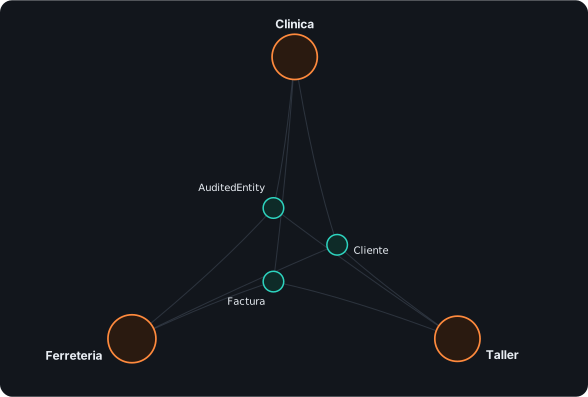 Real output, from the three sample client modules in this repository. Each class sits at the
average direction of the applications that model it, at a distance set by how much they agree — so
a class every application has falls to the centre. The middle is your common ground; the rim is the
work that belongs to one client.
Beside it, two more that only a corpus can produce: **which two of your projects are most alike**,
as a grid you can click to hold the page to just those two, and **the DevExpress releases your
estate is spread across** — with the one your framework catalog actually describes marked, so every
claim about DevExpress types says whether it was checked against the right release.
Everything in it is computed from what was read. There is no place in the page to put a sentence
somebody typed about the corpus, because a hand-written summary of nine applications is wrong the
day the tenth is added and nobody notices.
Filter by any project to see only what it has in common with the rest. And the honest part is on
the page too: two classes are matched **by name**, so the wiki tells you they share a name — the
comparison is what tells you whether they share an idea.
## The same knowledge, as a document
You arrive at an XAF project you have never seen and, half a day later, hand someone a document
about it. The last step is not this tool's. `xaflogic extract` writes Markdown, and
[mcpOffice](https://github.com/MBrekhof/mcpOffice) — an MCP server built on the DevExpress Office
File API — turns Markdown into `.docx` and `.docx` into PDF. With both servers connected, the agent
hands one to the other. There is no Word exporter here and there will not be one
([#28](https://github.com/peopleworks/XAFLogicExplainer/issues/28)): reading an XAF application
needs no DevExpress, and that stays true.
```bash
xaflogic extract --project "C:\MySolution\MyApp.Module"
# writes .xaflogic-output/MyApp_Full.md, and one file per section beside it
```
Then, to the agent:
> Turn `.xaflogic-output/MyApp_Entities.md` into a Word document with `word_create_from_markdown`,
> then `word_convert` it to PDF.
Hand over a section file rather than `_Full.md` when the reader is one audience: `_Entities.md` is
the data dictionary, `_BusinessRules.md` the rules, `_Controllers.md` what the buttons do.
`word_create_from_markdown` takes a `templatePath`, so headings, tables, header and footer can come
from your own `.dotx`.
Verified on the sample application in this repository: every heading becomes a Word heading and
appears in the document outline, the property tables become real tables, fenced C# becomes shaded
monospace, and lists, bold and inline code survive. Nothing in the generated Markdown is HTML, and
[a test](https://github.com/peopleworks/XAFLogicExplainer/blob/HEAD/tests/XafLogicExplainer.Tests/PortableMarkdownTests.cs) keeps it that way.
mcpOffice needs a DevExpress licence, because it writes Office files with DevExpress's API. If you
run an XAF application, you have one. Setup is in
[its usage guide](https://github.com/MBrekhof/mcpOffice/blob/main/docs/usage.md).
## Optional: tell your code apart from DevExpress's
Extraction reads your source without knowing anything about the framework it is written against,
which leaves one question unanswerable: is `DeleteObjectsViewController` something your team wrote,
or something DevExpress ships? Without an answer, generated documentation presents framework
behavior and your own logic as the same thing.
If you have a DevExpress licence:
```bash
xaflogic catalog build
```
That reads **your own installation** and records what XAF itself provides — attributes, controllers,
model interfaces and modules, with the official summaries and documentation links DevExpress ships.
On DevExpress 26.1 that is around 850 framework types.
If you also installed the DevExpress **source code** component, it records *where each framework
controller activates* — the four conditions XAF checks before running it. That cannot be read from
the assemblies: four out of five built-in controllers set their target inside a constructor. Pass
`--dx-sources
Real output, from the three sample client modules in this repository. Each class sits at the
average direction of the applications that model it, at a distance set by how much they agree — so
a class every application has falls to the centre. The middle is your common ground; the rim is the
work that belongs to one client.
Beside it, two more that only a corpus can produce: **which two of your projects are most alike**,
as a grid you can click to hold the page to just those two, and **the DevExpress releases your
estate is spread across** — with the one your framework catalog actually describes marked, so every
claim about DevExpress types says whether it was checked against the right release.
Everything in it is computed from what was read. There is no place in the page to put a sentence
somebody typed about the corpus, because a hand-written summary of nine applications is wrong the
day the tenth is added and nobody notices.
Filter by any project to see only what it has in common with the rest. And the honest part is on
the page too: two classes are matched **by name**, so the wiki tells you they share a name — the
comparison is what tells you whether they share an idea.
## The same knowledge, as a document
You arrive at an XAF project you have never seen and, half a day later, hand someone a document
about it. The last step is not this tool's. `xaflogic extract` writes Markdown, and
[mcpOffice](https://github.com/MBrekhof/mcpOffice) — an MCP server built on the DevExpress Office
File API — turns Markdown into `.docx` and `.docx` into PDF. With both servers connected, the agent
hands one to the other. There is no Word exporter here and there will not be one
([#28](https://github.com/peopleworks/XAFLogicExplainer/issues/28)): reading an XAF application
needs no DevExpress, and that stays true.
```bash
xaflogic extract --project "C:\MySolution\MyApp.Module"
# writes .xaflogic-output/MyApp_Full.md, and one file per section beside it
```
Then, to the agent:
> Turn `.xaflogic-output/MyApp_Entities.md` into a Word document with `word_create_from_markdown`,
> then `word_convert` it to PDF.
Hand over a section file rather than `_Full.md` when the reader is one audience: `_Entities.md` is
the data dictionary, `_BusinessRules.md` the rules, `_Controllers.md` what the buttons do.
`word_create_from_markdown` takes a `templatePath`, so headings, tables, header and footer can come
from your own `.dotx`.
Verified on the sample application in this repository: every heading becomes a Word heading and
appears in the document outline, the property tables become real tables, fenced C# becomes shaded
monospace, and lists, bold and inline code survive. Nothing in the generated Markdown is HTML, and
[a test](https://github.com/peopleworks/XAFLogicExplainer/blob/HEAD/tests/XafLogicExplainer.Tests/PortableMarkdownTests.cs) keeps it that way.
mcpOffice needs a DevExpress licence, because it writes Office files with DevExpress's API. If you
run an XAF application, you have one. Setup is in
[its usage guide](https://github.com/MBrekhof/mcpOffice/blob/main/docs/usage.md).
## Optional: tell your code apart from DevExpress's
Extraction reads your source without knowing anything about the framework it is written against,
which leaves one question unanswerable: is `DeleteObjectsViewController` something your team wrote,
or something DevExpress ships? Without an answer, generated documentation presents framework
behavior and your own logic as the same thing.
If you have a DevExpress licence:
```bash
xaflogic catalog build
```
That reads **your own installation** and records what XAF itself provides — attributes, controllers,
model interfaces and modules, with the official summaries and documentation links DevExpress ships.
On DevExpress 26.1 that is around 850 framework types.
If you also installed the DevExpress **source code** component, it records *where each framework
controller activates* — the four conditions XAF checks before running it. That cannot be read from
the assemblies: four out of five built-in controllers set their target inside a constructor. Pass
`--dx-sources