# Vivid MCP [Health: Active]

**Category:** 💻 Developer Tools  
**Repository:** https://github.com/vivid-money/vivid-mcp  
**GitHub Stars:** 9  
**Views:** 0  
**Installs:** 0  
**Upvotes:** 0  
**Directory Page:** https://allmcps.com/mcp/vivid-mcp

## Description
Open a Vivid Business account from your AI chat via MCP.

## Claude Desktop Quick Installation
Remote MCP endpoint (confidence: high). Install path detected from listing signals. Add as a URL/SSE server in your client:

```json
"mcpServers": {
  "vivid-mcp": {
    "url": "https://vivid.money"
  }
}
```

## Documentation & README

<div align="center">

# Vivid MCP

<a href="https://vivid.money" target="_blank" style="border-radius: 5px">
  <img src="https://raw.githubusercontent.com/vivid-money/vivid-mcp/HEAD/assets/logo.png" alt="Vivid" width="48" style="border-radius: 5px">
</a>


### Open a business account right from your AI chat

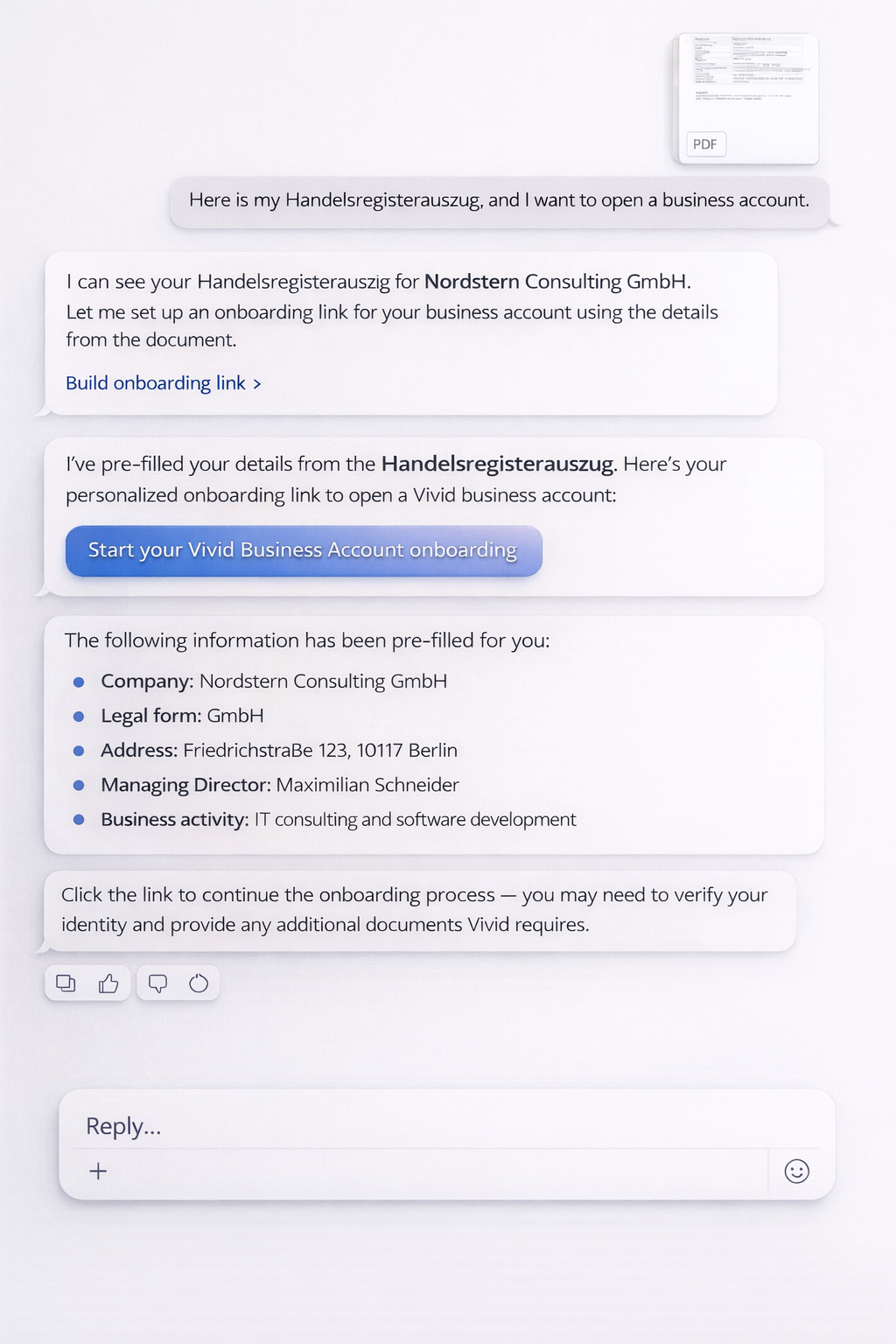
Tell your AI to open a Vivid Business account.<br>
Share your company details, and your account is ready — no tab switching required.

<br>

[![Claude](https://img.shields.io/badge/Claude-8B5CF6?style=for-the-badge&logoColor=white)](https://claude.ai)
[![ChatGPT](https://img.shields.io/badge/ChatGPT-10A37F?style=for-the-badge&logo=openai&logoColor=white)](https://chatgpt.com)
[![Cursor](https://img.shields.io/badge/Cursor-000000?style=for-the-badge&logoColor=white)](https://cursor.com)
[![MCP](https://img.shields.io/badge/MCP_Compatible-0969DA?style=for-the-badge)](https://modelcontextprotocol.io)

<br>

[**How it works**](#how-it-works) &nbsp;&middot;&nbsp; [**Get Started**](#get-started) &nbsp;&middot;&nbsp; [**Features**](#features) &nbsp;&middot;&nbsp; [**Skills**](#skills)

</div>

<br>

---

## <img src="https://github.com/user-attachments/assets/4fcccb85-ef01-4286-a681-71a741f97d57" width="20px"> How it works

<table>
<tr>
<td width="33%" align="center">

**1. Share your company info**

Upload registration documents or describe your business in chat

</td>
<td width="33%" align="center">

**2. AI handles the rest**

Details are extracted and your account is created automatically

</td>
<td width="33%" align="center">

**3. Account ready**

Everything is pre-filled. Verify your identity and start banking

</td>
</tr>
</table>

<br>

```
┌─────────────────────────────────────────────────────────────────────────────┐
│  AI Chat                                                                    │
├─────────────────────────────────────────────────────────────────────────────┤
│                                                                             │
│  You: 📎 Handelsregisterauszug_GmbH.pdf                                     │
│       I want to open a business account                                     │
│                                                                             │
│  AI:  I've read your document — Nordstern Consulting GmbH, Berlin.          │
│       Setting up your Vivid Business account with pre-filled details...     │
│                                                                             │
│       ✓ Your account is ready. Complete verification to start banking.     │
│                                                                             │
└─────────────────────────────────────────────────────────────────────────────┘
```

<div align="center">
<kbd><img src="https://raw.githubusercontent.com/vivid-money/vivid-mcp/HEAD/assets/demo.png" alt="Vivid MCP Demo" width="350"></kbd>


</div>

<br>

---

## 🚀 Get Started

> **MCP Server** &nbsp;&nbsp;`https://api.prime.vivid.money/mcp`
>
> No API key required. Works with any MCP-compatible client.

<br>

<details>
<summary><strong>Claude Connectors</strong></summary>

<br>

1. Go to [claude.ai/settings/connectors](https://claude.ai/settings/connectors)
2. Click **Add custom connector**
3. Paste:

```
https://api.prime.vivid.money/mcp
```

<br>
</details>

<details>
<summary><strong>ChatGPT Apps</strong></summary>

<br>

1. Open **Settings → Apps → Advanced**
2. Click **Create App**
3. Paste:

```
https://api.prime.vivid.money/mcp
```

<br>
</details>

<details>
<summary><strong>Cursor</strong></summary>

<br>

[![Install MCP Server](https://cursor.com/deeplink/mcp-install-dark.svg)](https://cursor.com/en-US/install-mcp?name=vivid-mcp&config=eyJ1cmwiOiJodHRwczovL2FwaS5wcmltZS52aXZpZC5tb25leS9tY3AifQ%3D%3D)

<br>
</details>

<details>
<summary><strong>Replit</strong></summary>

<br>

[![Add to Replit](https://replit.com/badge?caption=Add%20to%20Replit)](https://replit.com/integrations?mcp=eyJkaXNwbGF5TmFtZSI6IlZpdmlkIE1DUCBTZXJ2ZXIiLCJiYXNlVXJsIjoiaHR0cHM6Ly9hcGkucHJpbWUudml2aWQubW9uZXkvbWNwIn0=)

<br>
</details>

<details>
<summary><strong>Any MCP Client</strong></summary>

<br>

Add a remote HTTP MCP server with URL:
```
https://api.prime.vivid.money/mcp
```

| Protocol | Transport | Authentication |
|:---------|:----------|:---------------|
| Model Context Protocol | HTTPS (streamable) | Not required |

<br>
</details>

<br>

---

## Features

| Feature | Status |
|:--------|:------:|
| **Open a business account** | ✅ `Live` |
| Account balances | `Soon` |
| Transaction history | `Soon` |
| Card management | `Soon` |
| Spending insights | `Soon` |

<br>

---

## 🧩 Skills

This repository includes ready-to-use skills compatible with **Claude Code**, **OpenClaw**, and [**AgentSkills**](https://agentskills.io) standard.

```
skills/
└── business-account-opening/
    └── SKILL.md
```

> **Claude Code (marketplace)**
> ```
> /plugin marketplace add vivid-money/vivid-mcp
> /plugin install vivid-mcp@vivid-mcp
> ```
>
> **Claude Code (local)** — `claude --plugin-dir ./vivid-mcp`
>
> **OpenClaw** — `cp -r skills/business-account-opening ~/.openclaw/skills/`

<br>

---

<div align="center">

<br>

<a href="https://vivid.money" target="_blank">
    <kbd>
  <img src="https://raw.githubusercontent.com/vivid-money/vivid-mcp/HEAD/assets/logo.png" alt="Vivid" width="48" style="border-radius: 5px">
</kbd>
</a>

<br>

</div>