# vamoose [Health: Active]
**Category:** 💻 Developer Tools
**Repository:** https://github.com/dcadolph/vamoose
**GitHub Stars:** 0
**npm Downloads (last month):** 29
**Views:** 0
**Installs:** 0
**Upvotes:** 0
**Directory Page:** https://allmcps.com/mcp/vamoose
## Description
Calendar workflow engine for time off, approvals, and quick actions on any calendar backend.
## Claude Desktop Quick Installation
Remote MCP endpoint (confidence: high). Install path detected from listing signals. Add as a URL/SSE server in your client:
```json
"mcpServers": {
"vamoose": {
"url": "https://vamoose.dev"
}
}
```
## Documentation & README

vamoose
Calendar workflows, minus the tedium.




The moose does the paperwork. You go to the beach.
Four calendar backends behind one workflow engine that branches, approves, waits, recurs, and files real leave with your HR system, driven from your terminal, Claude, Slack, or a local dashboard, and authorable by an AI agent over MCP. Every run is recorded, and the daemon resumes exactly where it left off after a crash. Install with `brew install dcadolph/tap/vamoose`.
Calendar busywork is death by a thousand cuts: create the hold marked free, invite
your manager, Slack them for the yes, go back in and add the team one by one, add a
second blocked event so your own calendar says away, then file the leave in the HR
portal. vamoose turns those chores into **workflows** it runs for you and advances
in the background. Time off is the flagship workflow, and you can define your own.

## Two minutes to running
```sh
brew install dcadolph/tap/vamoose
vamoose login --provider google # sign in; Outlook and iCloud setup in docs
vamoose off next week --watch # hold the dates, invite your manager
vamoose daemon # advances the workflow when the manager accepts
vamoose app # or watch and run everything from a dashboard
```
That is the whole flow: the hold shows as free so it blocks nobody, your manager's
calendar accept is the approval, and the daemon notifies your team the moment it lands.
## How it works
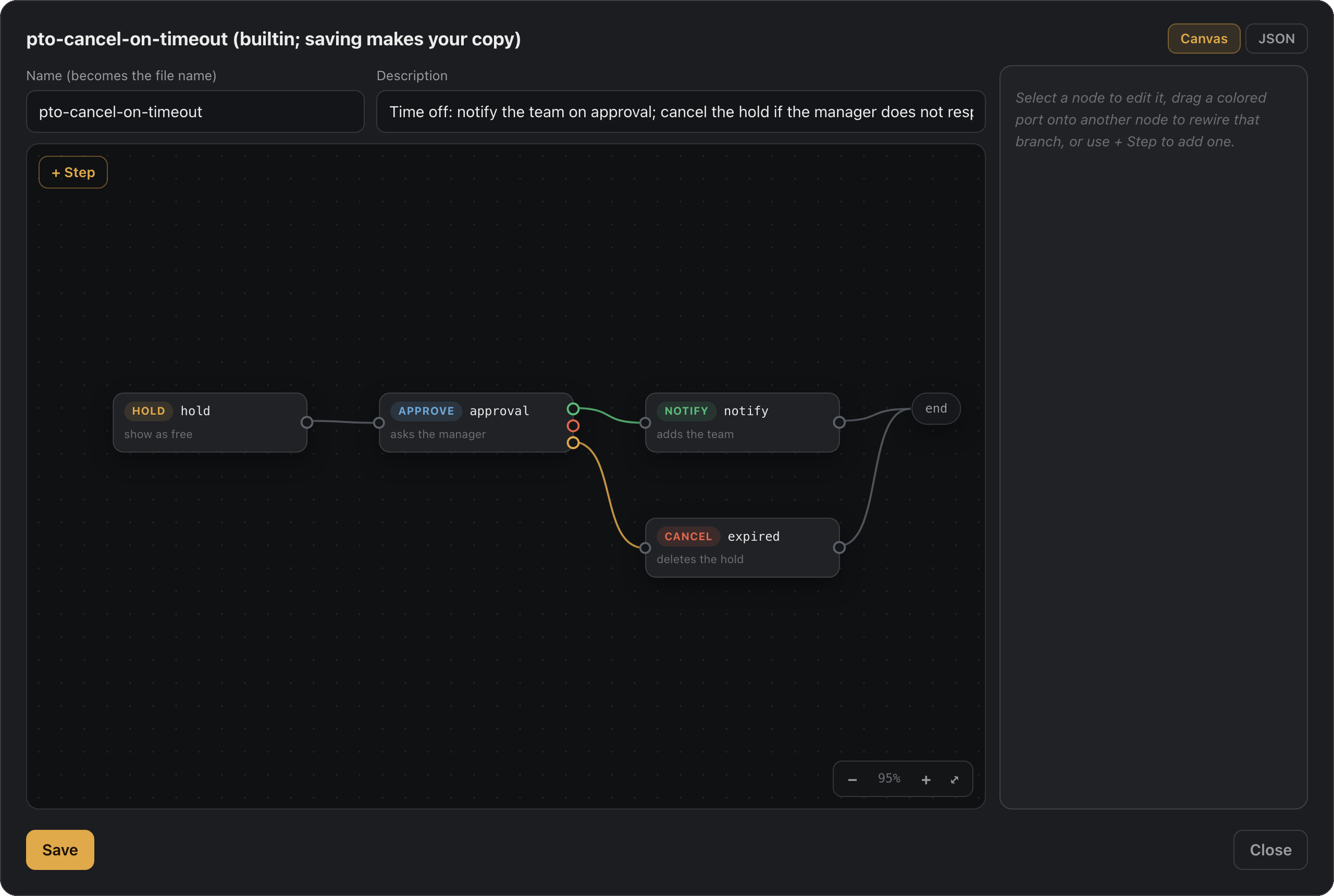
1. **Declare.** A workflow is ordered steps in JSON: create a hold, gate on approval,
branch on the outcome, wait, message a channel, file the leave. Time off ships built
in; author your own in a file, on the dashboard's workflow canvas, or through an AI
agent.
2. **Run.** Drive it from the terminal, Claude, Slack, or `vamoose app`, against
Microsoft Graph, Google, iCloud, or any CalDAV host. Same workflow, any backend.
3. **Advance.** The daemon moves runs forward on its own: your manager accepting the
invite is the approval signal (no separate approval product), timeouts and waits
fire on the clock, recurring schedules re-run, and every step lands in the run
history.
The built-in **pto** workflow is the flagship: hold shown **free**, manager approves by
accepting, team added as **optional attendees** so nobody's calendar gets blocked.
`request`, `check`, and `promote` are fronts over its steps. See [Workflows](#workflows).
Four backends ship behind one provider interface: Microsoft Graph (Outlook,
Microsoft 365, and Teams), Google Calendar, Apple iCloud, and any standard CalDAV host.
Pick one with `--provider` or the `VAMOOSE_PROVIDER` environment variable, and every
command works the same across them. Approval detection is the one exception: iCloud
sends invites but does not report accept/decline over CalDAV, so on iCloud you promote
by hand. See [providers](https://github.com/dcadolph/vamoose/blob/HEAD/docs/providers.md).
## Why not just calendar rules?
You can rig a version of this with one calendar's rules or a saved email. vamoose
earns its keep the moment you have more than one account:
- **One brain for every account.** The same workflows, commands, and setup whether
you are on Google, Outlook, or Microsoft 365. Learn it once, not once per client.
- **No rebuilding per client.** Native rules live inside one app and stop at its edge.
Define a workflow once and point it at any backend with `--provider`.
- **No drift.** Change your time-off flow in one place. Hand-built rules drift the day
you update Outlook and forget Gmail.
- **Workflows are files, not clicks.** JSON you can read, diff, share, version, and
dry-run, instead of a settings panel you rebuild by hand on every machine.
- **Runs where you already are.** The CLI, Claude, and Slack, not one vendor's web UI.
## Install
macOS and Linux:
```sh
brew install dcadolph/tap/vamoose
```
Windows:
```powershell
scoop bucket add vamoose https://github.com/dcadolph/scoop-vamoose
scoop install vamoose
```
Docker (for [hosting](https://github.com/dcadolph/vamoose/blob/HEAD/docs/hosting.md)):
```sh
docker run --rm ghcr.io/dcadolph/vamoose:latest version
```
Or with Go 1.26 or newer:
```sh
go install github.com/dcadolph/vamoose@latest
```
Zips and tarballs for every platform are on the
[releases page](https://github.com/dcadolph/vamoose/releases).
New to vamoose? The [Quickstart](https://github.com/dcadolph/vamoose/blob/HEAD/docs/quickstart.md) takes you from zero to a first approved
hold in a few minutes.
## Setup
Set one calendar backend and export its credentials, then run `vamoose doctor` to check the
setup. Every backend, including iCloud and any CalDAV host, is covered in [providers](https://github.com/dcadolph/vamoose/blob/HEAD/docs/providers.md).
### Microsoft 365 / Outlook
vamoose talks to Microsoft Graph as you, using the OAuth device-code flow.
1. Register an application in the Microsoft Entra admin center (single tenant is
fine). Enable **Allow public client flows** so device code works.
2. Grant these delegated permissions and admin consent:
- `User.Read`, `User.Read.All` (read your manager and their direct reports)
- `Calendars.ReadWrite` (create and update the hold)
- `MailboxSettings.ReadWrite` (reserved for the out-of-office reply)
- `offline_access` (stay signed in between runs)
3. Export the settings:
```sh
export VAMOOSE_CLIENT_ID=
export VAMOOSE_TENANT=
export VAMOOSE_TIMEZONE=America/Chicago
```
The first command opens a device-code prompt. Tokens are cached under your user
config directory and refreshed automatically after that. Run `vamoose whoami`
first to confirm auth and directory access before creating any holds.
### Google Calendar
For `--provider google`, create an OAuth **desktop app** client in the Google Cloud
console, enable the Google Calendar API, then sign in:
```sh
export VAMOOSE_PROVIDER=google
export VAMOOSE_GOOGLE_CLIENT_ID=
export VAMOOSE_GOOGLE_CLIENT_SECRET=
vamoose login
```
`login` opens your browser for consent on a local loopback address, then caches and
refreshes tokens after that. Two things catch people out. Consent is denied until you add
the signing-in account under Google Auth Platform, Audience, Test users. And while the app
sits in Testing status, Google expires its refresh tokens after seven days, so `login`
comes back around once a week. Both are covered step by step, with a troubleshooting
table, in [the Google guide](https://vamoose.dev/providers.html#google-calendar).
Google Calendar has no directory, so pass your approver with `--manager` and set your team
with `vamoose team set`.
### Apple iCloud
For `--provider icloud`, create an app-specific password at appleid.apple.com and export:
```sh
export VAMOOSE_PROVIDER=icloud
export VAMOOSE_ICLOUD_USERNAME=you@icloud.com
export VAMOOSE_ICLOUD_APP_PASSWORD=xxxx-xxxx-xxxx-xxxx
```
iCloud sends invites but does not report approvals over CalDAV. Recover them with the macOS
EventKit helper or a Slack Approve button, or promote by hand. See [providers](https://github.com/dcadolph/vamoose/blob/HEAD/docs/providers.md).
### Any CalDAV host
For `--provider caldav`, point at any standard CalDAV server, such as Fastmail or Nextcloud:
```sh
export VAMOOSE_PROVIDER=caldav
export VAMOOSE_CALDAV_URL=https://caldav.fastmail.com
export VAMOOSE_CALDAV_USERNAME=you@fastmail.com
export VAMOOSE_CALDAV_PASSWORD=xxxx-xxxx-xxxx-xxxx
```
### HR system, for balance and leave filing
Calendar setup is enough for holds, coverage, and approvals. Reading your remaining
balance with `vamoose balance`, and filing approved time off as real leave, both need an
HR system as well. Skip this section if you only want the calendar side.
Point at BambooHR directly:
```sh
export VAMOOSE_BAMBOOHR_SUBDOMAIN=
export VAMOOSE_BAMBOOHR_API_KEY=
export VAMOOSE_BAMBOOHR_EMPLOYEE_ID=
```
Or post to any HR system through a webhook:
```sh
export VAMOOSE_BALANCE_WEBHOOK_URL=https://hr.example.com/balance
export VAMOOSE_LEAVE_WEBHOOK_URL=https://hr.example.com/leave
export VAMOOSE_HRIS_EMPLOYEE_ID=
```
Without one of these, `vamoose balance` exits reporting that no HR system is configured.
Run `vamoose doctor` to see which parts are set.
## Usage
```sh
# Confirm auth and directory access work in your tenant.
vamoose whoami
# Create the hold and invite your manager. Manager is resolved from the directory.
vamoose request --start 2026-07-20 --end 2026-07-24 --subject "Out: beach week"
# Or request time off from a plain-language phrase. It reports the working days,
# skipping weekends and configured holidays.
vamoose off next week --subject "Out: beach week"
# Just the afternoon.
vamoose off tomorrow --half pm
# Who else is off that week, and what do you have left?
vamoose coverage next week
vamoose balance
# See whether your manager has approved.
vamoose check
# Once approved, fan out to the team as optional attendees.
vamoose promote
# Changed plans? Cancel the hold and notify everyone.
vamoose cancel
# Or let check promote the moment approval lands.
vamoose check --promote
# Hands-off: watch for approval and let the daemon auto-promote in the background.
vamoose off next week --watch
vamoose daemon
# Run the daemon unattended (prints a launchd or systemd manifest to install).
vamoose service
# See what every hold did and who approved it.
vamoose history
# Open the local dashboard: run workflows, author them, act on holds.
vamoose app
```
Times accept `YYYY-MM-DD` for all-day holds or RFC3339 for partial days. Pass
`--manager you@work.com` to skip directory lookup, or `--dry-run` on request to
preview without sending. `off` also accepts explicit `--start`/`--end`.
## Quick actions
Not everything needs approval:
```sh
# Block yourself out of office over a range, no approval or fanout.
vamoose away --start 2026-07-20 --end 2026-07-24
# Create a quick event, optionally inviting others.
vamoose event --start 2026-07-20T15:00:00Z --end 2026-07-20T15:30:00Z \
--subject "1:1" --attendees boss@work.com
```
## Workflows
A workflow is an ordered list of steps that vamoose runs and the daemon advances.
The request-approve-promote flow above is the built-in **pto** workflow. Run a
workflow by name, with a date phrase or explicit `--start`/`--end`:
```sh
vamoose run pto next week --watch
vamoose run notify-only next week
vamoose run away --start 2026-07-20 --end 2026-07-24
vamoose workflows # list the available workflows
```
Three workflows ship built in:
| Name | Steps | Use |
| ------------- | ------------------------------------ | ---------------------------------------- |
| `pto` | hold shown free, approve, notify | Time off that a manager approves. |
| `notify-only` | hold shown free, notify | Tell the team, no approval needed. |
| `away` | out-of-office block | Personal out of office, no fanout. |
Define your own by dropping a JSON file in `~/.config/vamoose/workflows/.json`.
A file there overrides a built-in of the same name.
```json
{
"name": "team-heads-up",
"description": "Hold shown free, tell the team, no approval.",
"steps": [
{ "verb": "hold", "showAs": "free" },
{ "verb": "notify", "team": "optional" }
]
}
```
Then `vamoose run team-heads-up next week`. Steps use these verbs:
- `hold` creates the event and invites the manager when an `approve` step follows.
- `approve` waits for the manager to accept the invite.
- `notify` adds the team as optional attendees.
- `away` marks you out of office with no attendees.
- `event` creates a plain event, with attendees from `--attendees`.
- `cancel` deletes the hold.
A workflow starts with exactly one creating step (`hold`, `away`, or `event`).
Approval waits on the manager that only a `hold` invites, so an `approve` step
needs a `hold`, and only `notify` may follow approval. With `--watch`, the hold is
recorded and `vamoose daemon` runs the remaining steps once the manager accepts.
## Defining your team
By default `promote` derives your team from the directory: your manager's direct
reports, minus you. That assumption breaks if you are the manager, your team is a
distribution list, or the directory is sparse. Set an explicit team instead:
```sh
vamoose team set alex@work.com jordan@work.com sam@work.com
vamoose team list # show the current team
vamoose team clear # revert to the directory
```
The list is stored as JSON under your user config directory
(`team.json`). When it is set, `promote` and `whoami` use it; when it is absent,
they fall back to the directory.
## Claude (MCP)
`vamoose mcp` speaks the Model Context Protocol over stdio, exposing the commands as
tools so Claude can book time off for you. Point an MCP client at the binary:
```json
{ "mcpServers": { "vamoose": { "command": "vamoose", "args": ["mcp"] } } }
```
Authenticate once first with `vamoose whoami`; the server reuses the cached token.
## Docs
These guides are also on the site at [vamoose.dev](https://vamoose.dev).
| Guide | What |
| ---------------------------------------- | ------------------------------------------------------------ |
| [Quickstart](https://github.com/dcadolph/vamoose/blob/HEAD/docs/quickstart.md) | Zero to a first approved hold in a few minutes. |
| [Concepts](https://github.com/dcadolph/vamoose/blob/HEAD/docs/concepts.md) | Holds, approval, workflows, and the three adapters. |
| [Commands](https://github.com/dcadolph/vamoose/blob/HEAD/docs/commands.md) | Every command, flag, and environment variable. |
| [Workflows](https://github.com/dcadolph/vamoose/blob/HEAD/docs/workflows.md) | Built-in and custom workflows: branching, delays, guards. |
| [Providers](https://github.com/dcadolph/vamoose/blob/HEAD/docs/providers.md) | Microsoft Graph, Google, iCloud, and CalDAV setup. |
| [Slack](https://github.com/dcadolph/vamoose/blob/HEAD/docs/slack.md) | Drive vamoose from Slack, with approval buttons. |
| [Claude](https://github.com/dcadolph/vamoose/blob/HEAD/docs/claude-guide.md) | The MCP server and the skill. |
| [Hosting](https://github.com/dcadolph/vamoose/blob/HEAD/docs/hosting.md) | Run it as a service, secrets encrypted at rest. |
| [Architecture](https://github.com/dcadolph/vamoose/blob/HEAD/docs/architecture.md) | Surfaces, core, and adapters. |
## Roadmap
- Live-prove per-user Slack against a real workspace, then drop its experimental label.
- A signed, notarized native desktop app wrapping the dashboard.
- Auto-promote via Graph change-notification webhooks instead of polling.
- Set the scheduled out-of-office auto-reply for the time-off window.
- More HR systems behind the leave seam, as users ask.
## More tools
- [kibble](https://github.com/dcadolph/kibble), test your README's install steps in a clean container
- [preen](https://github.com/dcadolph/preen), split a messy working tree into clean, atomic git commits
- [slop-chop](https://github.com/dcadolph/slop-chop), strip the AI tells out of your writing
- [whodar](https://github.com/kordloom/whodar), find who to talk to about X across your work tools
## License
MIT (see [LICENSE](https://github.com/dcadolph/vamoose/blob/HEAD/LICENSE)). Use it, change it, ship it, sell it. No conditions
beyond keeping the copyright notice.