# termada [Health: Active]
**Category:** 💻 Developer Tools
**Repository:** https://github.com/Islomzoda/termada
**GitHub Stars:** 4
**Views:** 0
**Installs:** 0
**Upvotes:** 0
**Directory Page:** https://allmcps.com/mcp/termada
## Description
Reliable, transparent terminal runtime between AI agents and the shell (local + SSH).
## Claude Desktop Quick Installation
Heuristic fallback — verify the package name and runner against the repository README before running it. Uses `npx` (confidence: low):
```json
"mcpServers": {
"termada": {
"command": "npx",
"args": ["-y","termada"]
}
}
```
## Documentation & README
Termada
Persistent, policy-controlled missions for AI agents operating real environments.



Termada is a single-binary, local-first runtime that sits between an AI agent and
the terminal, locally or over SSH. The agent talks to it over the
[Model Context Protocol](https://modelcontextprotocol.io) and gets a sturdy
toolset instead of a raw shell: bounded `exec_run` waits, persistent sessions
that keep `cwd`/env, async jobs with streamed output, PTY input for interactive
prompts, and structured results — while you watch and control active jobs from a
live dashboard with a job kill-switch and an approval queue. **Mission Control**
adds a durable goal, GPT/Codex-authored plan, runtime-verified steps, interruption
recovery, and an exportable evidence report around that execution.
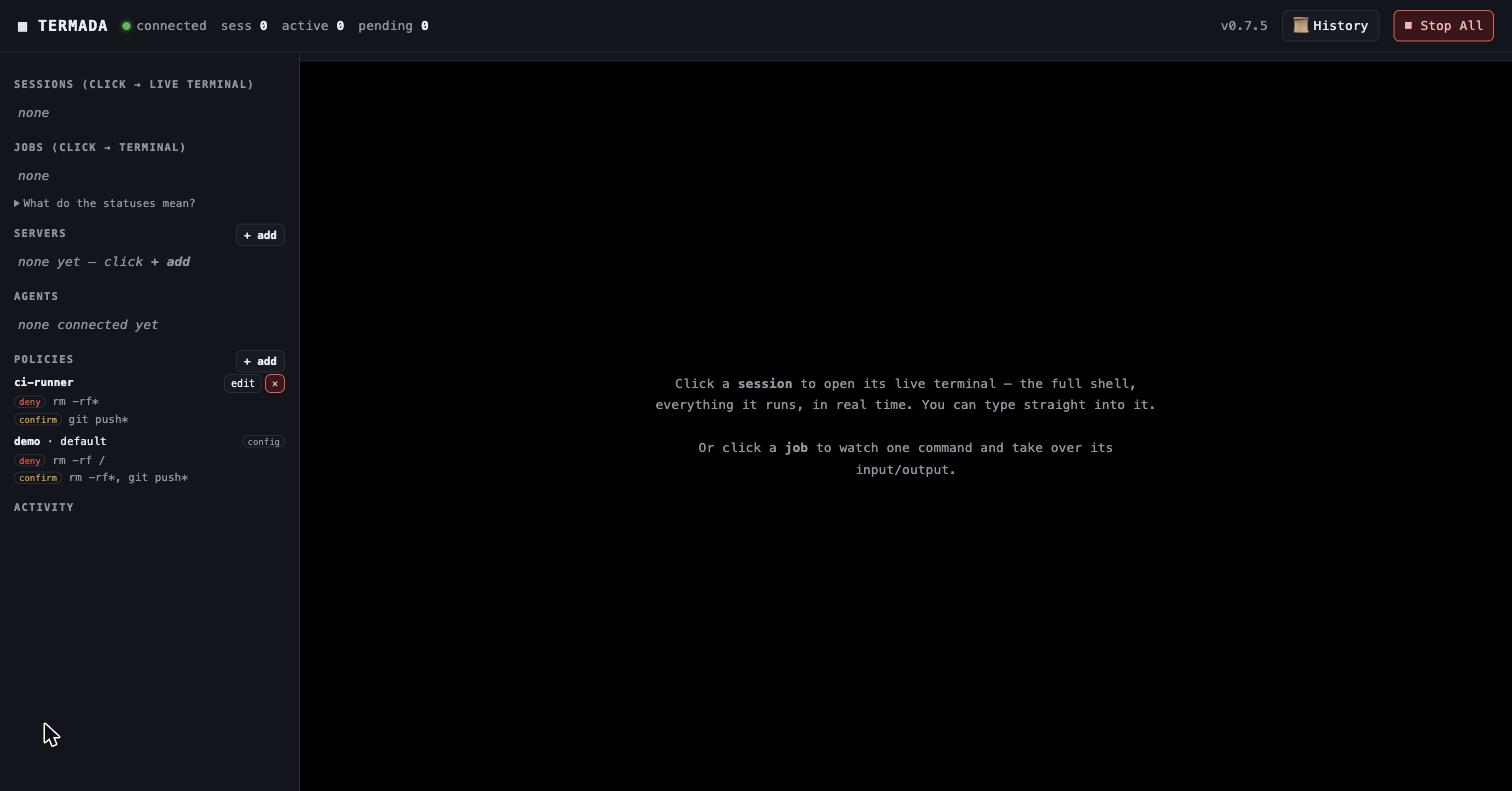
The live dashboard: every session is a real terminal you can watch and take over — block or pause the agent, type in yourself — beside the agent panel, policy management, a tamper-evident History, and a Stop-All active-job kill-switch.
---
## Why
Handing an AI agent a raw shell is fragile and opaque: a command blocks on a
prompt and the agent hangs; `cd` and exported env vanish between calls; long
builds flood the context window; and you can't see — let alone stop — what's
running. Termada replaces the raw shell with a runtime that is **reliable** for
the agent and **transparent** for you:
- **Reliable for the agent** — blocking `exec_run` calls use bounded wait budgets
and return structured output; sessions persist `cwd`/env; long jobs run async
and stream incrementally instead of dumping; interactive prompts are answerable.
- **Transparent for you** — one dashboard shows every agent and every session as
a real terminal; controlled actions matched by `confirm` wait for your approval; one
button installs a short-lived action admission barrier, requests cancellation
of active gateway executions, signals active engine jobs and closes forwards;
remote/provider effects still require terminal verification or reconciliation.
- **Accountable as a mission** — an agent's plan, real commands, approval
decisions, verification jobs, outcome, and audit anchors stay together. A plan
step cannot pass without a real mission job that Termada observed exiting with
code zero.
## Mission Control
For a concrete operational outcome, Codex or another MCP agent starts with
`mission_create(goal, plan)`. Termada allocates a dedicated persistent session;
normal `exec_*` calls keep using the same policy, approval, PTY/SSH and audit
paths. The agent attaches each successful `job_id` with `mission_update`, then
exports `mission_report`.
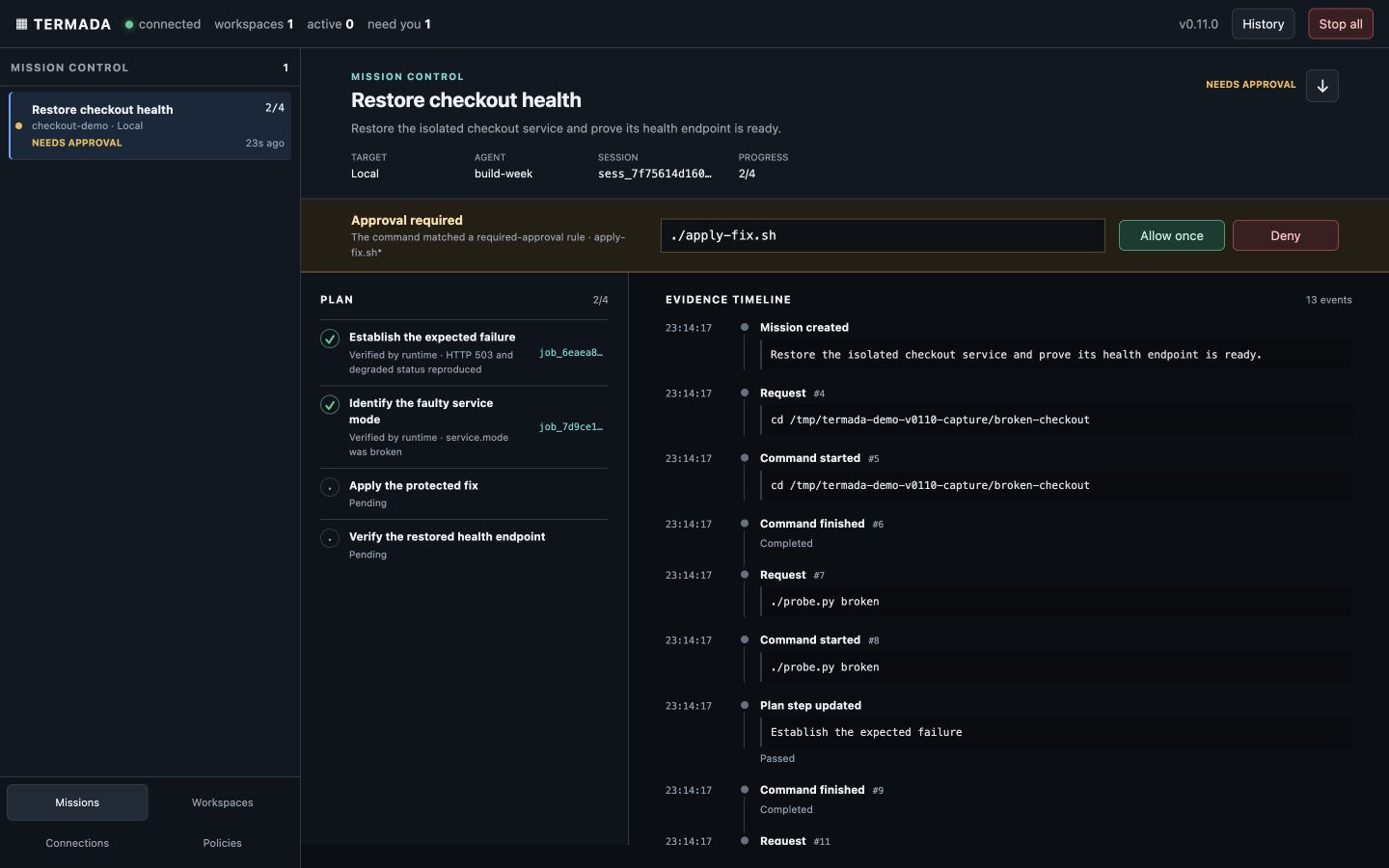
The report separates runtime-observed evidence from agent notes, includes exact
audit sequence/hash anchors, and returns a SHA-256 recorded in the audit. If the
daemon restarts, a non-terminal mission becomes `interrupted`; `mission_resume`
creates a fresh session attempt instead of pretending PTY state survived.
Run the isolated real-execution demo:
```bash
./demo/mission-control/run.sh
```
It starts a broken loopback HTTP service and a separate demo daemon. The
protected repair genuinely changes service state and waits for a human approval;
the final probe must observe HTTP 200. See
[`demo/mission-control`](https://github.com/Islomzoda/termada/blob/HEAD/demo/mission-control/README.md) and the
[`2:40 demo script`](https://github.com/Islomzoda/termada/blob/HEAD/docs/build-week/DEMO_SCRIPT.md).
## Features
**Execution engine**
- Persistent-shell sessions over a PTY that keep `cwd`, env, and venv between commands.
- Async jobs: `exec_start` → `job_id`; poll incrementally by a stable cursor, with sequential bounded pages, a full status state machine and structured errors.
- Answer interactive prompts (`exec_write`, with secret redaction). Local PTY
jobs support process-group signals/kill; remote SSH interrupt/kill requests
are best-effort Ctrl-C, not a guaranteed force-kill.
- Clean output: stateful ANSI/VT stripping, CR-collapse, bounded retention, best-effort secret redaction.
**Live control & observability**
- A long-lived daemon with a control plane over a Unix socket; `serve --stdio` is a thin shim that proxies MCP to it — so **multiple agents share one daemon and one dashboard**.
- Web dashboard where **each session renders as a real terminal** (xterm.js, streamed over SSE) with **operator take-over**: type into a job's PTY, hold the agent's input, or pause its output.
- Workspace labels, bounded state bootstrap, cursor-resumable live updates,
English controls and responsive desktop/mobile navigation.
- Approval queue, activity feed, policy/server management, and a **Stop-All**
cancellation barrier for admitted actions, active engine jobs and forwards.
- A TUI (`termada top`) and a full inspection CLI.
- Synchronously recorded, hash-chained, best-effort-redacted audit log. `termada audit verify` verifies the continuous chain across rotated segments.
**Mission Control**
- Durable, owner-scoped missions with a goal, up to 24 plan steps, dedicated
session, multiple resume attempts, bounded evidence timeline and terminal
outcome.
- Runtime enforcement for passed steps (`job_id` from a mission session,
`status=exited`, `exit_code=0`) and refusal to succeed while jobs remain active.
- Mission-first desktop/mobile dashboard with pinned approval, stale/offline
states, compact plan/evidence views and Markdown report download.
**Security**
- Policy engine: every argv word is shell-quoted; allow / deny / confirm matching sees leading assignments, absolute paths, Darwin case variants, known wrappers and explicit shell payloads. Shell scripts/stdin/interactive shells and ambiguous compound commands fail closed when deny/confirm rules exist. The structured policy additionally matches authenticated principal, tenant, typed action/resource/context, risk and reversibility. Every controlled action that resolves to `confirm` parks in the durable operator queue, times out to deny, and can execute only when the caller retries the exact approved action id.
- One canonical gateway covers every public side-effect route: current-policy
recheck, one-use approval consume, atomic budget authorization, durable intent,
provider outcome and explicit `outcome_unknown` reconciliation state.
- Policy-owned budgets cover operations, runtime, monetary amount, tool/model
cost, production changes and post-outcome failures at exact global, tenant,
principal or recipient scopes.
- age-encrypted vault (no CGO); vault APIs never return secret values to agents.
Values are injected daemon-side and registered for best-effort output
redaction.
- Per-agent quotas and owner isolation for jobs, sessions, session-scoped remote
file operations and forwards. Sessions and pending confirmations are capped
at 32 per owner and 128 total; live forwards at 16 per owner and 64 total.
Local host paths remain a shared OS/filesystem boundary. Set
`security.identity_mode: strict` in production: every configured agent must
have an existing assigned policy and authenticate with either a unique strong
static token or an explicitly enabled, offline-verified short-lived
`agent_identity` JWT. Tokenless, unknown and policyless callers fail closed.
A strict policy without structured rules also denies every command that lacks
an explicit legacy `allow` match; deny/confirm gates take precedence.
`development` retains self-asserted ids for trusted local clients and is the
compatibility default for older configs that omit the field.
- Optional `security.run_as` drops local shell processes to a dedicated uid and
disables daemon-privileged local file tools and daemon-environment inheritance;
use commands inside that dropped session for local file access. Remote SFTP
remains available.
- Every TCP `/api/*` request and `/metrics` requires either the dashboard token
or an enabled, pinned-JWKS-verified human JWT. Operator-only Unix-socket routes
similarly require either a verified human JWT or the separate `cli.token` used
by the local CLI.
- Optional pinned-JWKS operator identity binds subject, tenant, roles,
delegation and verified MFA to approvals; policy can require role quorum,
distinct approvers and requester exclusion. Optional Ed25519 audit anchoring
exports signed fsynced chain heads through a durable HTTPS outbox.
**Remote & fleet**
- Persistent **remote SSH sessions** with reconnect — a dropped link is
re-dialled as a fresh shell so the session can serve new commands. The
authorized name, host, port, user, tags and keyed vault-reference binding stay
pinned, so inventory edits cannot retarget an approved or live session. Prior
cwd/env are lost; an in-flight job becomes `orphaned`, and its uncontrolled
remote process may still continue. Verify remote state before retrying it.
- `fleet_run` across servers by name or tag with best-effort-redacted,
structured per-server results. Commands must be non-empty argv arrays and run
under a shared daemon-wide ceiling of five concurrent fleet targets; a call
may request less. One call matches at most 256 targets and returns at most
2 MiB of aggregate result text. SSH uses vault creds, ssh-agent, or on-disk keys, with
serialized, fsynced TOFU host-key pinning that fails closed on a malformed
`known_hosts` file.
- Owner-scoped local-to-remote port forwards. Opening one is policy-gated and
rolled back unless its start audit record is durable; listeners are
loopback-only and bounded to 64 simultaneous connections per forward.
**Operations**
- Crash recovery (jobs persist; running jobs come back as `orphaned`), bounded local-FS snapshots/undo, desktop notifications and outbound-only Telegram notifications.
- A typed adapter SDK provides durable
`prepare → execute → verify → compensate/reconcile` phases, provider
idempotency keys, secret-free receipts and restart recovery. Generic shell and
plugin effects remain opaque unless a concrete provider adapter defines and
proves its semantic invariants.
- Out-of-process plugins exposed to agents as `.`. Plugins are
trusted executables, not a security sandbox; calls are policy-gated and do not
start unless their start audit record is durable.
- `termada update` — bounded self-update from GitHub releases on Unix (mandatory SHA-256 verification, optional Ed25519-signed checksums, exact-member extraction, atomic replace). Windows reports an explicit manual-install path because a running `.exe` cannot be replaced atomically.
> **Not yet:** a native Windows ConPTY runtime (cross-compiles today, but PTY and
> signals are stubs) and code-signing / notarization.
## Install
**One line, no Go needed** — downloads a prebuilt macOS or Linux `amd64`/`arm64`
binary (SHA-256 verified) to `~/.local/bin`:
```bash
curl -fsSL https://raw.githubusercontent.com/Islomzoda/termada/main/install.sh | sh
```
Pin a version with `TERMADA_VERSION=vX.Y.Z`, or change the location with
`TERMADA_BIN_DIR=~/bin`. If `~/.local/bin` isn't on your `PATH`, the installer
prints the one line to add.
Other ways — Docker, Homebrew, packages, source
```bash
# Docker (current published image: linux/amd64). Keep the published port on
# host loopback; the image binds 0.0.0.0 only inside its network namespace:
docker run --rm --platform linux/amd64 -p 127.0.0.1:7717:7717 ghcr.io/islomzoda/termada
# Persistent container state runs as uid/gid 10001. A fresh named volume is
# initialized with the image's ownership:
docker run --rm --platform linux/amd64 -p 127.0.0.1:7717:7717 \
--mount type=volume,src=termada-data,dst=/home/termada/.config/termada \
ghcr.io/islomzoda/termada
# Homebrew:
brew install Islomzoda/tap/termada
# From source (needs Go 1.26.5+):
TERMADA_FROM_SOURCE=1 ./install.sh
# or: go build -o ~/.local/bin/termada ./cmd/termada
```
The Docker command starts the daemon directly; open the tokenized URL printed in
its logs. The native CLI commands below apply when the binary is installed on the
host.
Releases also ship `.deb`, `.rpm`, and manual Windows archives on the
[releases page](https://github.com/Islomzoda/termada/releases). The Windows
binary cross-compiles, but native PTY execution still awaits a ConPTY backend.
Install as a Claude Code plugin
This repo is also a Claude Code plugin marketplace — it bundles the MCP server
config and the usage skill (you still need the `termada` binary on `PATH`):
```text
/plugin marketplace add Islomzoda/termada
/plugin install termada@termada
```