# telemem [Health: Active]
**Category:** 🧠 Knowledge & Memory
**Repository:** https://github.com/TeleAI-UAGI/telemem
**GitHub Stars:** 492
**Views:** 0
**Installs:** 0
**Upvotes:** 0
**Directory Page:** https://allmcps.com/mcp/telemem
## Description
Long-term and multimodal memory for AI agents - character-aware, mem0-compatible, fully-local option
## Claude Desktop Quick Installation
Install path detected from listing signals. Uses `uvx` (confidence: high):
```json
"mcpServers": {
"telemem": {
"command": "uvx",
"args": ["telemem"]
}
}
```
## Documentation & README

TeleMem: Building Long-Term and Multimodal Memory for Agentic AI






**If you find this project helpful, please give us a ⭐️ on GitHub for the latest update.**
_🤝 Contributions welcome! Feel free to open an issue or submit a pull request._
---
TeleMem is an agent memory management layer that can be used as **a high-performance drop-in replacement for [Mem0](https://mem0.ai/)** with one line of code (`import telemem as mem0`), deeply optimized for complex scenarios involving **multi-turn dialogues**, **character modeling**, **long-term information storage**, and **semantic retrieval**.
Through its unique **context-aware enhancement mechanism**, TeleMem provides conversational AI with core infrastructure offering **higher accuracy**, **faster performance**, and **stronger character memory capabilities**.
Building upon this foundation, TeleMem implements **video understanding, multimodal reasoning, and visual question answering** capabilities. Through a complete pipeline of video frame extraction, caption generation, and vector database construction, AI Agents can effortlessly **store, retrieve, and reason over video content** just like handling text memories.
The ultimate goal of the TeleMem project is to _use an agent's hindsight to improve its foresight_.
**TeleMem, where memory lives on and intelligence grows strong.**
### Why TeleMem?
- 🎭 **Character memory done right** — the only open-source memory layer that automatically builds **isolated, per-character memory profiles**, built for role-play, companion AI, NPCs, and multi-persona assistants.
- 🎬 **Memory for video, not just text** — a full video → frames → captions → vector DB pipeline with **ReAct-style multi-step video QA**.
- 🏠 **Fully local by default** — runs end-to-end on your hardware (Qwen + FAISS); no cloud service, no paid tier, no data leaving your machine.
- 🔌 **mem0-compatible API** — `add()` / `search()` accept the same arguments and return the same `{"results": [...]}` shapes, so existing Mem0 code keeps working.
---
## 📢 Latest Updates
- **[2026-08-15] 🎉 TeleMem [v1.10.0](https://github.com/TeleAI-UAGI/telemem/releases/tag/v1.10.0) adds first-class [DeepSeek Harness](https://github.com/deepseek-ai/deepseek-harness) support: an opt-in Cordis/MCP patch starts TeleMem with `uvx`, registers all 8 memory tools under `mcp__telemem__*`, and securely forwards provider configuration. See the [MCP server docs](https://github.com/TeleAI-UAGI/telemem/blob/HEAD/docs/MCP.md#deepseek-harness).**
- **[2026-08-06] 🎉 TeleMem [v1.9.0](https://github.com/TeleAI-UAGI/telemem/releases/tag/v1.9.0) is on the latest MCP standard: migrated to the official [MCP Python SDK v2](https://github.com/modelcontextprotocol/python-sdk) (spec 2026-07-28) — all 8 tools now declare titles, behavior annotations, and structured output, while staying compatible with older MCP clients. See the [MCP server docs](https://github.com/TeleAI-UAGI/telemem/blob/HEAD/docs/MCP.md).**
- **[2026-07-11] 🎉 TeleMem [v1.8.0](https://github.com/TeleAI-UAGI/telemem/releases/tag/v1.8.0) — the "claims = contracts" release: character-memory extraction fix, `infer=False`/`prompt`/`memory_type` now fully honored, offline contract test suite, telemetry disabled by default, and a [multi-NPC demo](https://github.com/TeleAI-UAGI/telemem/blob/HEAD/examples/multi_npc.py)!**
- **[2026-06-12] 🎉 TeleMem [v1.7.1](https://github.com/TeleAI-UAGI/telemem/releases/tag/v1.7.1) is live on the [official MCP registry](https://registry.modelcontextprotocol.io) — run the memory server with zero install: `uvx telemem`! Also new: [evaluation principles](https://teleai-uagi.github.io/telemem/evaluation/) and a LongMemEval harness with built-in baselines.**
- **[2026-06-12] 🎉 TeleMem is now on PyPI: `pip install telemem`! [v1.6.0](https://github.com/TeleAI-UAGI/telemem/releases/tag/v1.6.0) adds Ollama/DeepSeek/Kimi configs, LangChain & LlamaIndex examples, and a [documentation site](https://teleai-uagi.github.io/telemem/).**
- **[2026-06-12] 🎉 TeleMem [v1.5.0](https://github.com/TeleAI-UAGI/telemem/releases/tag/v1.5.0) has been released: true mem0 drop-in API, lightweight core install, and CI!**
- **[2026-06-11] 🎉 TeleMem [v1.4.0](https://github.com/TeleAI-UAGI/telemem/releases/tag/v1.4.0) has been released with [MCP support](https://github.com/TeleAI-UAGI/telemem/blob/HEAD/docs/MCP.md)!**
- **[2026-01-28] 🎉 TeleMem [v1.3.0](https://github.com/TeleAI-UAGI/telemem/releases/tag/v1.3.0) has been released!**
- **[2026-01-22] 🎉 TeleMem [Tech Report](https://arxiv.org/abs/2601.06037) has been updated to its 4th version!**
- **[2026-01-13] 🎉 TeleMem [Tech Report](https://arxiv.org/abs/2601.06037) has been released on arXiv!**
- **[2026-01-09] 🎉 TeleMem [v1.2.0](https://github.com/TeleAI-UAGI/telemem/releases/tag/v1.2.0) has been released!**
- **[2025-12-31] 🎉 TeleMem [v1.1.0](https://github.com/TeleAI-UAGI/telemem/releases/tag/v1.1.0) has been released!**
- **[2025-12-05] 🎉 TeleMem [v1.0.0](https://github.com/TeleAI-UAGI/telemem/releases/tag/v1.0.0) has been released!**
---
## 🔥 Research Highlights
* **Significantly improved memory accuracy**: Achieved **86.33%** accuracy on the ZH-4O Chinese multi-character long-dialogue benchmark, **19% higher** than Mem0.
* **Doubled speed performance**: Millisecond-level semantic retrieval enabled by efficient buffering and batch writing.
* **Greatly reduced token cost**: Optimized token usage delivers the same performance with significantly lower LLM overhead.
* **Precise character memory preservation**: Automatically builds independent memory profiles for each character, eliminating confusion.
* **Automated Video Processing Pipeline**: From raw video → frame extraction → caption generation → vector database, fully automated
* **ReAct-Style Video QA**: Multi-step reasoning + tool calling for precise video content understanding
---
## 📌 Table of Contents
* [Project Introduction](#project-introduction)
* [TeleMem vs Mem0: Core Advantages](#telemem-vs-mem0-core-advantages)
* [Experimental Results](#experimental-results)
* [Quick Start](#quick-start)
* [Project Structure](#project-structure)
* [Core Functions](#core-functions)
* [Multimodal Extensions](#multimodal-extensions)
* [MCP Server](#mcp-server)
* [Framework Integrations](#framework-integrations)
* [Data Storage Explanation](#data-storage)
* [Telemetry & Privacy](#telemetry--privacy)
* [Development and Contribution](#development-and-contribution)
* [Acknowledgements](#acknowledgements)
* [Citation](#-citation)
---
## Project Introduction
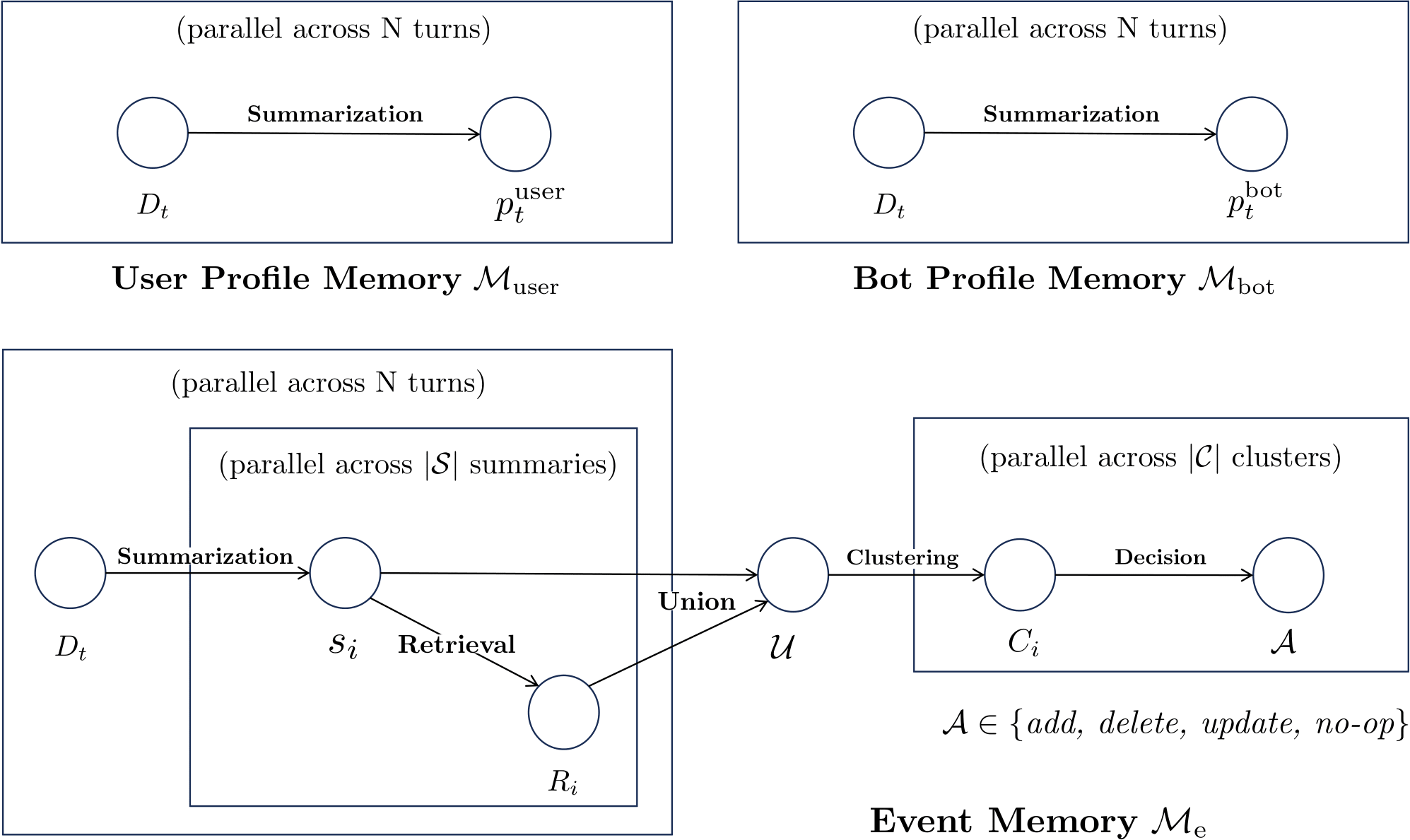
TeleMem enables conversational AI to maintain stable, natural, and continuous worldviews and character settings during long-term interactions through a deeply optimized pipeline of **character-aware summarization → semantic clustering deduplication → efficient storage → precise retrieval**.
```mermaid
flowchart LR
A["Dialogue
messages"] --> B["Character-aware
summarization
(global + per-character)"]
B --> C["Embedding +
similar-memory
retrieval"]
C --> D["Write buffer
(batch flush)"]
D --> E["LLM semantic
clustering & fusion"]
E --> F[("FAISS index +
JSON metadata")]
Q["Query"] --> S["Vector search
+ rerank"]
F --> S
S --> R["results"]
```
### Features
- **Automatic memory extraction**: Extracts and structures key facts from dialogues.
- **Semantic clustering & deduplication**: Uses LLMs to semantically merge similar memories, reducing conflicts and improving consistency.
- **Character-profiled memory management**: Builds independent memory archives for each character in a dialogue, ensuring precise isolation and personalized management.
- **Efficient asynchronous writing**: Employs a buffer + batch-flush mechanism for high-performance, stable persistence.
- **Precise semantic retrieval**: Combines **FAISS + JSON dual storage** for fast recall and human-readable auditability.
### Applicable Scenarios
* Multi-character virtual agent systems
* Long-memory AI assistants (e.g., customer service, companionship, creative co-pilots)
* Complex narrative/world-building in virtual environments
* Dialogue scenarios with strong contextual dependencies
* Video content QA and reasoning
* Multimodal agent memory management
* Long video understanding and information retrieval
---
## TeleMem vs Mem0: Core Advantages
TeleMem deeply refactors Mem0 to address **characterization**, **long-term memory**, and **high performance**. Key differences:
| Capability Dimension | Mem0 | TeleMem |
| -------------------------- | --------------------------- | ------------------------------------------------------------ |
| Multi-character separation | ❌ Not supported | ✅ Automatically creates **independent memory profiles** per character |
| Summary quality | Basic summarization | ✅ **Context-aware + character-focused prompts** covering key entities, actions, and timestamps |
| Deduplication mechanism | Vector similarity filtering | ✅ **LLM-based semantic clustering**: merges similar memories via LLM |
| Write performance | Streaming, single writes | ✅ **Batch flush + concurrency**: 2–3× faster writes |
| Storage format | SQLite / vector DB | ✅ **FAISS + JSON metadata dual-write**: fast retrieval + human-readable |
| Multimodal Capability | Single image to text only | ✅ **Video Multimodal Memory**: Full video processing pipeline + ReAct multi-step reasoning QA |
---
## Experimental Results
### Dataset
We evaluate the ZH-4O Chinese long-character dialogue dataset constructed in the paper [MOOM: Maintenance, Organization and Optimization of Memory in Ultra-Long Role-Playing Dialogues](https://arxiv.org/abs/2509.11860):
- Average dialogue length: **600 turns per conversation**
- Scenarios: daily interactions, plot progression, evolving character relationships
Memory capability was assessed via QA benchmarks, e.g.:
```json
{
"question": "What is Zhao Qi's nickname for Bai Yulan? A Xiaobai B Xiaoyu C Lanlan D Yuyu",
"answer": "A"
},
{
"question": "What is the relationship between Zhao Qi and Bai Yulan? A Classmates B Teacher and student C Enemies D Neighbors",
"answer": "B"
}
```
### Experimental Configuration
- LLM: [Qwen3-8B](https://huggingface.co/Qwen/Qwen3-8B) (thinking mode disabled)
- Embedding model: [Qwen3-Embedding-8B](https://huggingface.co/Qwen/Qwen3-Embedding-8B)
- Metric: QA accuracy
| Method | Overall(%) |
|:--------------------------------------------------------- |:---------- |
| RAG | 62.45 |
| _[Mem0](https://github.com/mem0ai/mem0)_ | _70.20_ |
| [MOOM](https://github.com/cows21/MOOM-Roleplay-Dialogue) | 72.60 |
| [A-mem](https://github.com/agiresearch/A-mem) | 73.78 |
| [Memobase](https://github.com/memodb-io/memobase) | 76.78 |
| **[TeleMem](https://github.com/TeleAI-UAGI/TeleMem)** | **86.33** |
---
## Quick Start
### Installation
```shell
pip install telemem # core (text memory)
pip install "telemem[mcp]" # + MCP server
pip install "telemem[video]" # + video/multimodal pipeline
pip install "telemem[all]" # everything
```
### Development Environment
Using [uv](https://docs.astral.sh/uv/) (recommended — creates `.venv` from the committed `uv.lock` for a reproducible environment):
```shell
uv sync --all-extras # install TeleMem (editable) + all extras, incl. MCP
uv run python examples/quickstart.py
```
Or with conda + pip:
```shell
# Create and activate virtual environment
conda create -n telemem python=3.10
conda activate telemem
# Install from source (editable), with the extras you need
pip install -e ".[all]"
```
### Example
Set your OpenAI API key:
```shell
export OPENAI_API_KEY="your-openai-api-key"
```
```python
# python examples/quickstart.py
import telemem as mem0
memory = mem0.Memory()
messages = [
{"role": "user", "content": "Jordan, did you take the subway to work again today?"},
{"role": "assistant", "content": "Yes, James. The subway is much faster than driving. I leave at 7 o'clock and it's just not crowded."},
{"role": "user", "content": "Jordan, I want to try taking the subway too. Can you tell me which station is closest?"},
{"role": "assistant", "content": "Of course, James. You take Line 2 to Civic Center Station, exit from Exit A, and walk 5 minutes to the company."}
]
memory.add(messages=messages, user_id="Jordan")
results = memory.search("What transportation did Jordan use to go to work today?", user_id="Jordan")
for hit in results["results"]: # same result shape as mem0
print(hit["memory"])
```
`Memory()` uses the default provider settings inherited from `mem0ai`. To use the repository's local Qwen + FAISS configuration, load `config/config.yaml` explicitly:
```python
from telemem.utils import load_config
import telemem as mem0
config = load_config("config/config.yaml")
memory = mem0.Memory(config=config)
```
The runnable examples also honor the same configuration through `TELEMEM_CONFIG`:
```shell
TELEMEM_CONFIG=config/config.yaml python examples/quickstart.py
```
### Using MiniMax as the LLM Provider
TeleMem supports [MiniMax](https://api.minimax.io) as an LLM backend via its OpenAI-compatible API.
A ready-to-use example config is provided at `config/config.minimax.yaml`.
```shell
export MINIMAX_API_KEY="your-minimax-api-key"
export OPENAI_API_KEY="your-openai-api-key" # still needed for embeddings
```
```python
from telemem.utils import load_config
import telemem as mem0
config = load_config("config/config.minimax.yaml")
memory = mem0.Memory(config=config)
```
Key points for MiniMax usage:
- **LLM**: MiniMax M3 (1M context, default) via `https://api.minimax.io/v1`; MiniMax M2.7 (204,800 context) is also available. MiniMax-M3 accepts text, image and video input and supports adaptive thinking; MiniMax-M2.7 is text-only with always-on thinking
- **Regional endpoints**: use `https://api.minimax.io/v1` (global) or `https://api.minimaxi.com/v1` (China) as `openai_base_url`
- **Temperature**: must be in **(0.0, 1.0]** — set explicitly (e.g. `0.7`) to avoid out-of-range errors
- **Embeddings**: MiniMax does not provide a public embedding API; configure a separate embedder (e.g. `text-embedding-3-small`) in the `embedder` section
### More LLM Providers
TeleMem works with **any OpenAI-compatible endpoint**. Ready-to-use config examples ship in `config/`:
| Provider | Config file | LLM | Embeddings | Notes |
| -------- | ----------- | --- | ---------- | ----- |
| **Ollama** (fully local) | [`config.ollama.yaml`](https://github.com/TeleAI-UAGI/telemem/blob/HEAD/config/config.ollama.yaml) | any local model (e.g. `qwen3:8b`) | `nomic-embed-text`, local | **No API key, no cloud** — everything runs on your machine |
| **DeepSeek** | [`config.deepseek.yaml`](https://github.com/TeleAI-UAGI/telemem/blob/HEAD/config/config.deepseek.yaml) | `deepseek-chat` / `deepseek-reasoner` | external (e.g. OpenAI) | `DEEPSEEK_API_KEY` + `OPENAI_API_KEY` |
| **Moonshot (Kimi)** | [`config.moonshot.yaml`](https://github.com/TeleAI-UAGI/telemem/blob/HEAD/config/config.moonshot.yaml) | `kimi-k2-0905-preview` | external (e.g. OpenAI) | `.cn` and `.ai` endpoints supported |
| **MiniMax** | [`config.minimax.yaml`](https://github.com/TeleAI-UAGI/telemem/blob/HEAD/config/config.minimax.yaml) | `MiniMax-M3` | external (e.g. OpenAI) | see section above |
```shell
TELEMEM_CONFIG=config/config.ollama.yaml python examples/quickstart.py # 100% local memory
```
---
## Project Structure
Expand/Collapse Directory Structure
```
telemem/
├── assets/ # Documentation assets and figures
├── baselines/ # Baseline implementations for comparative evaluation
│ ├── RAG # Retrieval-Augmented Generation baseline
│ ├── MemoBase # MemoBase memory management system
│ ├── MOOM # MOOM dual-branch narrative memory framework
│ ├── A-mem # A-mem agent memory baseline
│ └── Mem0 # Mem0 baseline implementation
├── config/
│ ├── config.yaml # TeleMem default configuration
│ └── config.minimax.yaml # MiniMax provider example configuration
├── data/ # Small sample datasets for evaluation or demonstration
├── examples/ # Code examples and tutorial demos
│ ├── quickstart.py # Quick start
│ ├── quickstart_mm.py # Quick start (multimodal)
│ ├── mcp_client.py # Quick start over MCP (stdio client)
│ ├── mcp_config.json # MCP config snippet for Claude Desktop / Cursor
│ └── deepseek-harness.cordis.yml # DeepSeek Harness memory patch
├── docs/
│ ├── MCP.md # MCP server reference
│ └── TeleMem_Tech_Report.pdf
├── telemem/ # Telemem code
│ └── mcp/ # Model Context Protocol server
├── tests/ # Telemem test
├── README.md # English README
├── README-ZH.md # Chinese README
└── pyproject.toml # Python environment
```
---
## Core Functions
### Add Memory (add)
The `add()` method injects one or more dialogue turns into the memory system.
```python
def add(
self,
messages,
*,
user_id: Optional[str] = None,
agent_id: Optional[str] = None,
run_id: Optional[str] = None,
metadata: Optional[Dict[str, Any]] = None,
infer: bool = True,
memory_type: Optional[str] = None,
prompt: Optional[str] = None,
batch: bool = False,
)
```
#### 🔎 Parameter Description
| Parameter | Type | Required | Description |
| ------------- | ------------------------------- | -------- | ------------------------------------------------------------ |
| `messages` | `str` or `List[Dict[str, str]]` | ✅ Yes | A single statement, or a list of dialogue messages with `role` (`user`/`assistant`) and `content` |
| `user_id` | `Optional[str]` | ❌ No | Character/user to attribute the memory to; TeleMem keeps an **independent memory profile per `user_id`**. Omit it to store shared conversation-event memories |
| `agent_id` / `run_id` | `Optional[str]` | ❌ No | Additional mem0-compatible scopes (e.g. one `run_id` per session) |
| `metadata` | `Optional[Dict[str, Any]]` | ❌ No | Arbitrary metadata stored with each memory |
| `infer` | `bool` | ❌ No | Extract salient facts with the LLM (default: `True`); `False` stores message contents verbatim with no LLM call |
| `memory_type` | `Optional[str]` | ❌ No | Pass `"procedural_memory"` to create procedural memories via mem0's pipeline; omit for conversational memories |
| `prompt` | `Optional[str]` | ❌ No | Custom extraction prompt (replaces the optimized default as the system prompt) |
| `batch` | `bool` | ❌ No | Route through the high-throughput batched pipeline (`add_batch`) |
**Returns** the mem0-compatible shape: `{"results": [{"id": "...", "memory": "...", "event": "ADD"}, ...]}`
#### 🔁 Internal Workflow of `add()`
1. **Message preprocessing**: Merge consecutive messages from the same speaker; normalize turn structure.
2. **Multi-perspective summarization**:
- Global event summary
- Character 1’s perspective (actions, preferences, relationships)
- Character 2’s perspective
3. **Vectorization & similarity search**: Generate embeddings and retrieve existing similar memories.
4. **Batch processing**: When buffer threshold is reached, invoke LLM to **semantically merge** similar memories.
5. **Persistence**: Dual-write to **FAISS (for retrieval)** and **JSON (for metadata)**.
> 🎭 **Multi-character demo**: [examples/multi_npc.py](https://github.com/TeleAI-UAGI/telemem/blob/HEAD/examples/multi_npc.py) runs five tavern
> NPCs through one scene — a single `add_batch(scene, user_id=[...])` call gives each NPC a
> private memory profile plus a shared `"events"` world-state, and each NPC then recalls the
> scene from their own perspective.
---
### Search Memory (search)
Performs semantic vector-based retrieval of relevant memories with context-aware recall.
```python
def search(
self,
query: str,
*,
user_id: Optional[str] = None,
agent_id: Optional[str] = None,
run_id: Optional[str] = None,
limit: int = 100,
filters: Optional[Dict[str, Any]] = None,
threshold: Optional[float] = None,
rerank: bool = True,
)
```
#### 🔎 Parameter Description
| Parameter | Type | Required | Description |
| ----------- | ------------------ | -------- | ------------------------------------------------- |
| `query` | `str` | ✅ Yes | Natural language query |
| `user_id` | `Optional[str]` | ❌ No | Character/user profile to search. The shared event memories (pseudo-user `"events"`) are always searched as well |
| `agent_id` / `run_id` | `Optional[str]` | ❌ No | Additional mem0-compatible scope filters |
| `limit` | `int` | ❌ No | Max number of results (default: 100) |
| `threshold` | `Optional[float]` | ❌ No | Similarity threshold (0–1; auto-tuned if omitted) |
| `filters` | `Dict[str, Any]` | ❌ No | Custom filters (e.g., by character, time range) |
| `rerank` | `bool` | ❌ No | Whether to rerank results (default: `True`) |
**Returns** the mem0-compatible shape: `{"results": [{"id": "...", "memory": "...", "score": ..., ...}, ...]}`
> 🔍 Search is based on FAISS vector retrieval, supporting millisecond-level responses.
---
## Multimodal Extensions
Beyond text memory, TeleMem further extends multimodal capabilities. Drawing inspiration from [Deep Video Discovery](https://github.com/microsoft/DeepVideoDiscovery)'s Agentic Search and Tool Use approach, we implemented two core methods in the TeleMemory class to support intelligent storage and semantic retrieval of video content.
| Method | Description |
|------|----------|
| `add_mm()` | Process video into retrievable memory (frame extraction → caption generation → vector database) |
| `search_mm()` | Query video content using natural language, supporting ReAct-style multi-step reasoning |
### Add Multimodal Memory (add_mm)
```python
def add_mm(
self,
video_path: str,
output_dir: str,
clip_secs: int | None = None,
emb_dim: int | None = None,
subtitle_path: str | None = None,
)
```
#### 🔎 Parameter Description
| Parameter | Type | Required | Description |
|--------|------|----------|------|
| video_path | str | ✅ Yes | Source video file path, e.g., `"video/3EQLFHRHpag.mp4"` |
| output_dir | str | ✅ Yes | Root output directory. Artifacts are written under `frames/`, `captions/`, and `vdb/` subdirectories |
| clip_secs | int | ❌ No | Reserved parameter; clip length is currently read from `config.vlm["CLIP_SECS"]` |
| emb_dim | int | ❌ No | Embedding dimension, reads from config by default |
| subtitle_path | str | ❌ No | Subtitle file path (.srt), optional |
#### 🔁 add_mm() Internal Flow
1. **Frame Extraction**: `decode_video_to_frames` - Decodes video to JPEG frames at configured FPS
2. **Caption Generation**: `process_video` - Uses VLM (e.g., Qwen3-Omni) to generate detailed descriptions for each clip
3. **Vector Database Construction**: `init_single_video_db` - Generates embeddings for semantic retrieval
> 💡 **Smart Caching**: If the target file for a stage already exists, that stage is automatically skipped to save computational resources.
#### Return Value Example
```python
{
"output_dir": "/abs/path/to/output_dir"
}
```
---
### Search Multimodal Memory (search_mm)
```python
def search_mm(
self,
question: str,
output_dir: str,
max_iterations: int = 15,
)
```
#### 🔎 Parameter Description
| Parameter | Type | Required | Description |
|--------|------|----------|------|
| question | str | ✅ Yes | Question string (supports A/B/C/D multiple choice format) |
| output_dir | str | ✅ Yes | The same root output directory used by `add_mm`; it must contain exactly one `captions/*/captions.json` and one `vdb/*/*_vdb.json` |
| max_iterations | int | ❌ No | Maximum MMCoreAgent reasoning iterations (default 15) |
#### 🛠️ ReAct-Style Reasoning Tools
`search_mm` internally uses `MMCoreAgent`, employing a THINK → ACTION → OBSERVATION loop with three specialized tools:
| Tool Name | Function |
|--------|------|
| `global_browse_tool` | Get global overview of video events and themes |
| `clip_search_tool` | Search for specific content using semantic queries |
| `frame_inspect_tool` | Inspect frame details within a specific time range |
---
### Multimodal Example
Run the multimodal demo:
```bash
python examples/quickstart_mm.py
```
On the first run, frames, captions and VDB JSON will be generated under the chosen `output_dir`. The repository ships a small sample video; generating captions and the video database still requires configured VLM and embedding services unless you already have these artifacts locally.
Complete code example:
```python
import telemem as mem0
from pathlib import Path
from telemem.mm_utils.core import extract_choice_from_msg
# Initialize
memory = mem0.Memory()
# Define paths
repo_root = Path(__file__).resolve().parents[1]
video_path = repo_root / "data" / "samples" / "video" / "3EQLFHRHpag.mp4"
video_name = video_path.stem
output_dir = video_path.parent
# Step 1: Add video to memory (auto-processing)
vdb_json_path = output_dir / "vdb" / video_name / f"{video_name}_vdb.json"
if not vdb_json_path.exists():
result = memory.add_mm(
video_path=str(video_path),
output_dir=str(output_dir),
)
print(f"Video processing complete: {result}")
else:
print(f"VDB already exists: {vdb_json_path}")
# Step 2: Query video content
question = """The problems people encounter in the video are caused by what?
(A) Catastrophic weather.
(B) Global warming.
(C) Financial crisis.
(D) Oil crisis.
"""
messages = memory.search_mm(
question=question,
output_dir=str(output_dir),
max_iterations=15,
)
# Extract final answer
answer = extract_choice_from_msg(messages)
print(f"Answer: ({answer})")
```
---
## MCP Server
[](https://mcpvault.io/servers/telemem/health?utm_source=external_badge&utm_medium=referral&utm_campaign=mcp_health_report)
TeleMem ships a [Model Context Protocol](https://modelcontextprotocol.io) (MCP) server, so any MCP-compatible client — Claude Desktop, Claude Code, Cursor, custom agents — can use TeleMem as its long-term memory.
```shell
pip install telemem
telemem-mcp # stdio (default)
telemem-mcp --transport streamable-http # Streamable HTTP on :8421
TELEMEM_CONFIG=config/config.yaml telemem-mcp # custom TeleMem config
uvx telemem # zero-install run (stdio)
```
Built on the official MCP Python SDK v2, the server implements the current MCP
specification (2026-07-28) while remaining compatible with older clients; every tool
declares titles, behavior annotations (read-only/destructive hints), and structured output.
The server exposes eight tools: `add_memory`, `search_memories`, `get_memories`, `get_memory`, `update_memory`, `delete_memory`, `delete_all_memories`, and `memory_history`. Calls without an explicit scope default to `TELEMEM_DEFAULT_USER_ID` (`telemem-mcp`); destructive bulk deletion always requires an explicit scope.
Claude Desktop / Cursor configuration ([examples/mcp_config.json](https://github.com/TeleAI-UAGI/telemem/blob/HEAD/examples/mcp_config.json)):
```json
{
"mcpServers": {
"telemem": {
"command": "telemem-mcp",
"env": {
"TELEMEM_CONFIG": "/absolute/path/to/config/config.yaml",
"OPENAI_API_KEY": "sk-..."
}
}
}
}
```
Or drive it programmatically over stdio — the quickstart flow as MCP tool calls:
```shell
python examples/mcp_client.py
```
See [docs/MCP.md](https://github.com/TeleAI-UAGI/telemem/blob/HEAD/docs/MCP.md) for the full tool reference, transports, and client setup.
---
## Framework Integrations
TeleMem drops into any agent framework with the same two calls — `search()` before answering, `add()` after each exchange:
| Framework | Example | Install |
| --------- | ------- | ------- |
| **LangChain** | [examples/langchain_memory.py](https://github.com/TeleAI-UAGI/telemem/blob/HEAD/examples/langchain_memory.py) | `pip install langchain-core langchain-openai` |
| **LlamaIndex** | [examples/llamaindex_memory.py](https://github.com/TeleAI-UAGI/telemem/blob/HEAD/examples/llamaindex_memory.py) | `pip install llama-index-llms-openai` |
| **Claude Desktop / Cursor / any MCP client** | [MCP Server](#mcp-server) | `pip install "telemem[mcp]"` |
Because TeleMem is mem0 API-compatible, any framework adapter written for Mem0's OSS client also works — point it at `telemem.Memory` instead.
---
## Data Storage
### Text Memory Storage
TeleMem automatically creates a structured storage layout under `./faiss_db/`, organized by session and character:
```
faiss_db/
├── session_001_events.index
├── session_001_events_meta.json
├── session_001_person_1.index
├── session_001_person_1_meta.json
├── session_001_person_2.index
└── session_001_person_2_meta.json
```
### 📄 Metadata Example (_meta.json)
```json
{
"summary": "Characters discussed the upcoming action plan.",
"sample_id": "session_001",
"round_index": 3,
"timestamp": "2024-01-01T00:00:00Z",
"user": "Jordan" // Only present in person_*.json
}
```
> All memories include summary, round number, timestamp, and character, facilitating auditing and debugging.
------
### Multimodal Memory Storage
TeleMem generates video-related storage files in the `.data/samples/video/` directory:
```
video/
├── frames/
│ └── /
│ └── frames/
│ ├── frame_000001_n0.00.jpg
│ ├── frame_000002_n0.50.jpg
│ └── ...
├── captions/
│ └── /
│ ├── captions.json # Clip descriptions + subject registry
│ └── ckpt/ # Checkpoint for resume
│ ├── 0_10.json
│ └── 10_20.json
└── vdb/
└── /
└── _vdb.json # Semantic retrieval vector database
```
#### 📄 captions.json Structure
```json
{
"0_10": {
"caption": "The narrator discusses climate data, showing melting glaciers..."
},
"10_20": {
"caption": "Scene shifts to coastal communities affected by rising sea levels..."
},
"subject_registry": {
"narrator": {
"name": "narrator",
"appearance": ["professional attire"],
"identity": ["climate scientist"],
"first_seen": "00:00:00"
}
}
}
```
------
## Telemetry & Privacy
TeleMem itself collects no telemetry. The underlying `mem0ai` library ships
anonymized PostHog usage telemetry, which TeleMem **disables by default**
(`import telemem` sets `MEM0_TELEMETRY=False` unless you have already set it).
To opt back in:
```bash
export MEM0_TELEMETRY=true
```
------
## Development and Contribution
* Issues and pull requests are welcome — see the [Contributing Guide](https://github.com/TeleAI-UAGI/telemem/blob/HEAD/CONTRIBUTING.md) to get started.
* Changes between releases are tracked in the [Changelog](https://github.com/TeleAI-UAGI/telemem/blob/HEAD/CHANGELOG.md).
* CI runs the offline test suite (`uv run pytest tests/ -q`) on Python 3.10–3.12 for every PR.
* Chinese documentation: [README-ZH.md](https://github.com/TeleAI-UAGI/telemem/blob/HEAD/README-ZH.md)
---
## License
[Apache 2.0 License](https://github.com/TeleAI-UAGI/telemem/blob/HEAD/LICENSE)
---
## Acknowledgements
TeleMem’s development has been deeply inspired by open-source communities and cutting-edge research. We extend our sincere gratitude to the following projects and teams:
- **[Mem0](https://github.com/mem0ai/mem0)**
- **[Memobase](https://github.com/memodb-io/memobase)**
- **[MOOM](https://github.com/cows21/MOOM-Roleplay-Dialogue)**
- **[DVD](https://github.com/microsoft/DeepVideoDiscovery)**
- **[Memento](https://github.com/Agent-on-the-Fly/Memento)**
- **[Momento-Skills](https://github.com/Memento-Teams/Memento-Skills)**
---
## 📑 Citation
If you find TeleMem useful to your research or development, please cite our arXiv paper:
> Chunliang Chen, Ming Guan, Xiao Lin, Jiaxu Li, Luxi Lin, Qiyi Wang, Xiangyu Chen, Jixiang Luo, Changzhi Sun, Dell Zhang, Xuelong Li. **TeleMem: Building Long-Term and Multimodal Memory for Agentic AI.** arXiv:2601.06037, 2026. https://arxiv.org/abs/2601.06037
```bibtex
@article{chen2026telemem,
title = {TeleMem: Building Long-Term and Multimodal Memory for Agentic AI},
author = {Chen, Chunliang and Guan, Ming and Lin, Xiao and Li, Jiaxu and Lin, Luxi and Wang, Qiyi and Chen, Xiangyu and Luo, Jixiang and Sun, Changzhi and Zhang, Dell and Li, Xuelong},
journal = {arXiv preprint arXiv:2601.06037},
year = {2026},
url = {https://arxiv.org/abs/2601.06037}
}
```
Citation metadata is also available in [CITATION.cff](https://github.com/TeleAI-UAGI/telemem/blob/HEAD/CITATION.cff) (GitHub's "Cite this repository" button).
---
**If you find this project helpful, please give it a ⭐️ — starring also keeps updates in your GitHub feed.**
Made with ❤️ by [Bloo-Mind AI Ltd](https://www.bloo-mind.ai/) and the Ubiquitous AGI team at TeleAI.
mcp-name: io.github.TeleAI-UAGI/telemem