# spresh-mcp [Health: Active]
**Category:** 🌐 Social Media
**Repository:** https://github.com/PrashantBtkl/spresh-mcp
**GitHub Stars:** 1
**Views:** 0
**Installs:** 0
**Upvotes:** 0
**Directory Page:** https://allmcps.com/mcp/spresh-mcp
## Description
Search Facebook ads, decode competitor creative strategy, and track brand ad history.
## Tools
Capabilities this server exposes over MCP:
- **ad_search** — Search Facebook ads by keyword, niche, or industry
- **ad_search_expand_query** — Expand a search query to surface more relevant ads
- **ad_get** — Fetch full details for a specific ad
- **ad_get_analysis** — Retrieve saved AI analysis for an ad
- **ad_analyze** — Run AI analysis on any ad
- **ad_analyze_batch** — Analyze multiple ads in one call
- **ad_chat** — Chat with Claude about an ad's creative strategy
- **brand_search** — Search for brands in SpreshApp
- **brand_get_overview** — Get a brand's full profile and stats
- **brand_get_status** — Get the current tracking status for a brand
- **brand_get_ad_history** — Get historical ad volume data for a brand
- **brand_list_active_ads** — List all ads a brand is currently running
- **brand_follow** — Start tracking a brand
- **search_ads** — Search your saved ad library
- **get_folder_ads** — Get ads from a specific folder
- **list_folders** — List all your saved folders
- **get_tags** — List tags used across your library
- **get_pages** — List saved Facebook pages
## Claude Desktop Quick Installation
Install path detected from listing signals. Uses `npx` (confidence: high):
```json
"mcpServers": {
"spresh-mcp": {
"command": "npx",
"args": ["-y","spreshapp-mcp"]
}
}
```
## Documentation & README

spreshapp-mcp
MCP server that connects Claude to SpreshApp's Facebook ad intelligence platform.



---
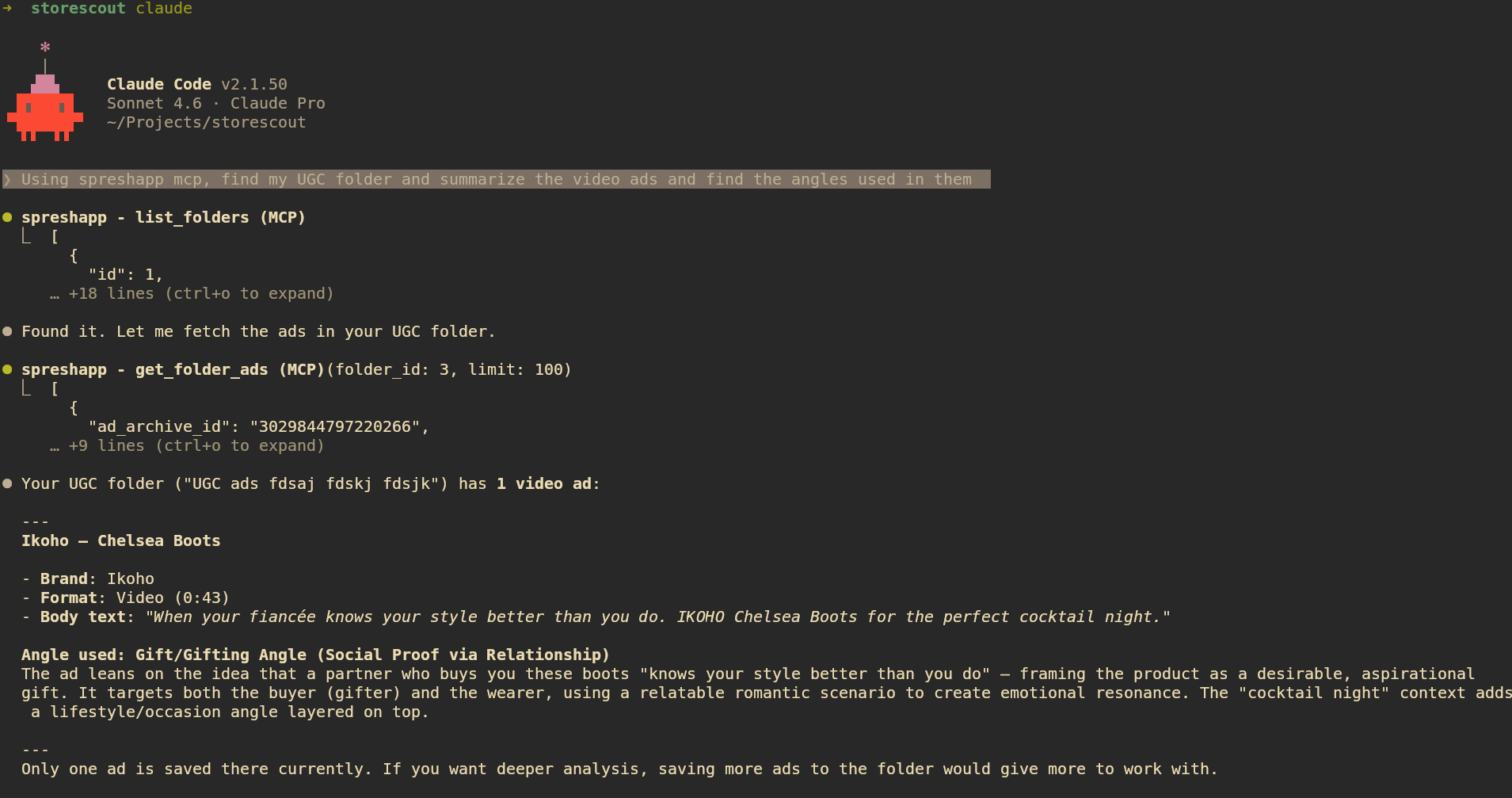
Ask Claude to research competitors, decode winning ad angles, track brand ad history, and analyze your saved ad library, all directly from your Claude Desktop or Claude Code session.
## Requirements
- Node.js >= 20
- A [SpreshApp](https://spreshapp.com) account
## Setup
### Claude Desktop
Add this to your `claude_desktop_config.json` (macOS: `~/Library/Application Support/Claude/claude_desktop_config.json`):
```json
{
"mcpServers": {
"spreshapp": {
"command": "npx",
"args": ["-y", "spreshapp-mcp"]
}
}
}
```
Restart Claude Desktop after saving.
### Claude Code
```bash
claude mcp add spreshapp -- npx -y spreshapp-mcp
```
### VS Code (with MCP extension)
```json
{
"mcp": {
"servers": {
"spreshapp": {
"command": "npx",
"args": ["-y", "spreshapp-mcp"]
}
}
}
}
```
## Authentication
Authenticate once before starting the MCP server:
```bash
npx -y spreshapp-mcp login
```
This opens your browser to log in with your SpreshApp account (OAuth 2.0 with PKCE). After login, credentials are saved to `~/.spreshapp/credentials.json` (file mode 600) and refreshed automatically before each session.
For headless or remote agent environments, use a SpreshApp API key from the dashboard instead of browser OAuth:
```bash
npx -y spreshapp-mcp login --no-browser
```
This prints setup instructions for the user and agent. The user can create or copy a key at [spreshapp.com/app/api-access](https://spreshapp.com/app/api-access). Keys start with `sk_sprs_`.
Set the key in the MCP server environment:
```bash
SPRESHAPP_API_KEY=sk_sprs_... npx -y spreshapp-mcp
```
OAuth token variables are still supported for advanced setups: `SPRESHAPP_ACCESS_TOKEN`, `SPRESHAPP_REFRESH_TOKEN`, `SPRESHAPP_CLIENT_ID`, and `SPRESHAPP_TOKEN_EXPIRES_AT`.
Check auth status:
```bash
npx -y spreshapp-mcp status
```
To log in again:
```bash
npx -y spreshapp-mcp logout
npx -y spreshapp-mcp login
```
## Available Tools
### Ad tools
| Tool | Description |
|------|-------------|
| `ad_search` | Search Facebook ads by keyword, niche, or industry |
| `ad_search_expand_query` | Expand a search query to surface more relevant ads |
| `ad_get` | Fetch full details for a specific ad |
| `ad_get_analysis` | Retrieve saved AI analysis for an ad |
| `ad_analyze` | Run AI analysis on any ad |
| `ad_analyze_batch` | Analyze multiple ads in one call |
| `ad_chat` | Chat with Claude about an ad's creative strategy |
### Brand tools
| Tool | Description |
|------|-------------|
| `brand_search` | Search for brands in SpreshApp |
| `brand_get_overview` | Get a brand's full profile and stats |
| `brand_get_status` | Get the current tracking status for a brand |
| `brand_get_ad_history` | Get historical ad volume data for a brand |
| `brand_list_active_ads` | List all ads a brand is currently running |
| `brand_follow` | Start tracking a brand |
### Library tools
| Tool | Description |
|------|-------------|
| `search_ads` | Search your saved ad library |
| `get_folder_ads` | Get ads from a specific folder |
| `list_folders` | List all your saved folders |
| `get_tags` | List tags used across your library |
| `get_pages` | List saved Facebook pages |
## Example prompts
```
Find 10 high-performing Facebook video ads in the fitness niche and summarize the angles used.
```
```
Research Nike's current Facebook ad strategy, how many ads are they running and what are the themes?
```
```
Open my "Inspiration" folder and identify the top 3 creative hooks.
```
```
Track the brand glossier.com and show me their ad history over the last 30 days.
```
## Troubleshooting
| Symptom | Fix |
|---------|-----|
| Browser did not open | Copy the URL printed to the terminal and open it manually |
| "Authentication expired" error | Delete `~/.spreshapp/credentials.json` and re-run |
| "Not subscribed to any plan" | Visit [spreshapp.com/pricing](https://spreshapp.com/pricing) |
| "Daily limit reached" | Quota resets at midnight UTC, or upgrade your plan |
| "Feature not available" | Your current plan does not include this tool, upgrade at [spreshapp.com/pricing](https://spreshapp.com/pricing) |
## License
UNLICENSED — proprietary software. See [spreshapp.com](https://spreshapp.com) for terms.