# Sleepwalker [Health: Active]
**Category:** 💻 Developer Tools
**Repository:** https://github.com/followanton/sleepwalker
**GitHub Stars:** 25
**npm Downloads (last month):** 47
**Views:** 0
**Installs:** 0
**Upvotes:** 0
**Directory Page:** https://allmcps.com/mcp/sleepwalker
## Description
AI Visibility and Content Intelligence tools for Claude and MCP-compatible agents.
## Claude Desktop Quick Installation
Install path detected from listing signals. Uses `npx` (confidence: high):
```json
"mcpServers": {
"sleepwalker": {
"command": "npx",
"args": ["-y","@sleepwalkerai/cli"]
}
}
```
## Documentation & README




AI Visibility and Content Intelligence for agents, products, and teams.
Run AI-search checks, inspect citations, score content, and save every result in one workspace.
Website ·
App ·
Docs ·
MCP ·
API ·
CLI ·
Cookbook
---
Sleepwalker helps teams understand how AI systems talk about a brand and what content needs to change. It combines two connected workflows:
- **AI Visibility**: run prompts across ChatGPT, Perplexity, Grok, and Gemini; capture full answers, citations, competitors, and mention types.
- **Content Intelligence**: serialize public pages, discover demand, score content depth and freshness, and return practical recommendations.
You can run the same work from the hosted app, the public API, MCP clients, or the CLI. Results stay connected, so a run started by an agent can be reviewed later in the app or queried from code.
This repository is the public developer surface for Sleepwalker: CLI package, API examples, MCP setup notes, and short guides. The hosted engine, app source, database schema, provider integrations, and billing systems are private.
## Quickstart
Try the CLI without an account first. `okf export` is free and open source. It runs on your machine, fetches a page, and writes an agent-ready markdown bundle to a local folder. No API key, no credits:
```bash
npx -y @sleepwalkerai/cli okf export https://www.sleepwalker.ai
```
One command exports both concepts: the page content and the technical
snapshot of what AI crawlers see. Narrow it with `--content` or
`--technical`. Both concepts are described in the next section.
For everything else, install the CLI:
```bash
npm install -g @sleepwalkerai/cli
sleepwalker init
```
Create an API key in the [Sleepwalker app](https://app.sleepwalker.ai), then run your first visibility check:
```bash
sleepwalker auth key set sw_api_live_...
sleepwalker doctor
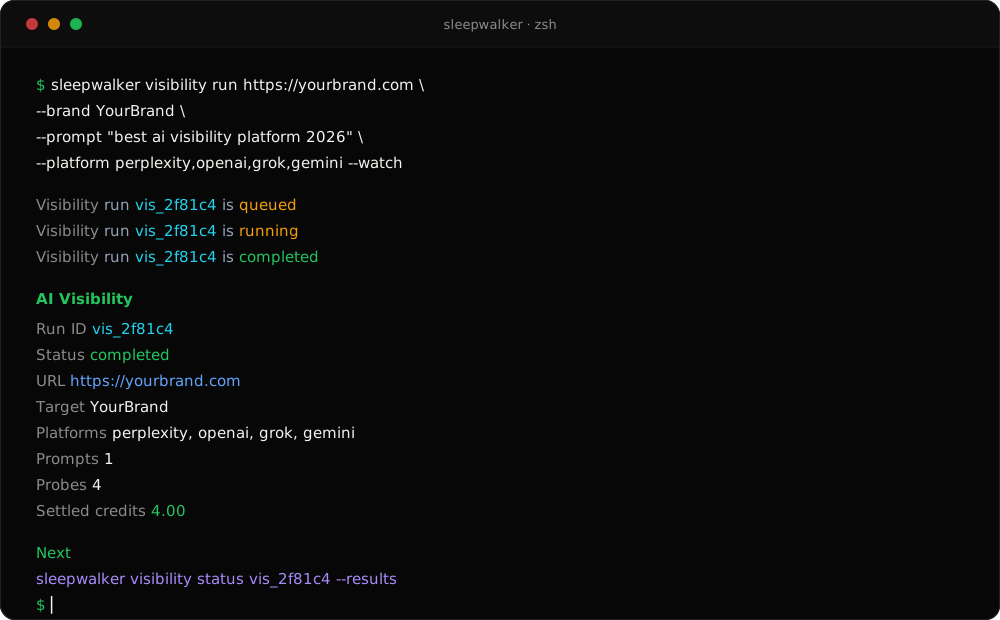
sleepwalker visibility run https://yourbrand.com \
--brand YourBrand \
--prompt "best ai visibility platform 2026" \
--platform perplexity,openai,grok,gemini \
--watch
```
## The free OKF export: content and technical
One command turns any public page into an [Open Knowledge Format](https://github.com/GoogleCloudPlatform/knowledge-catalog/tree/main/okf) bundle: a folder of plain markdown files with YAML frontmatter that any AI agent can read directly. OKF is an open format published in Google Cloud's knowledge-catalog repo. The export runs entirely on your machine and is free for everyone: no account, no API key, no credits.
```text
sleepwalker.ai-okf/
├── index.md navigation and okf_version
├── log.md how and when the bundle was generated
├── home.md the content concept
└── home-technical.md the technical snapshot
```
Both concepts ship by default. `--content` exports only the content concept,
`--technical` exports only the snapshot.
**The content concept** is the page as a reader sees it: clean markdown with headings, paragraphs, lists, and links, plus the title, description, canonical URL, and timestamp in the frontmatter. Use it to hand pages to agents, prompts, and retrieval pipelines without HTML noise.
**The technical snapshot** is the page as an AI crawler sees it. Most AI crawlers do not run JavaScript, so the snapshot reads only the served HTML plus the response itself: the redirect chain and HTML size, curated HTTP headers, the html lang attribute, meta and title tags, canonical, icon and feed links, headings, hreflang, social tags, head scripts, every JSON-LD block, a microdata and RDFa summary, links, images, and the robots directives the page and response carry (meta robots and X-Robots-Tag). Use it to audit what ChatGPT, Claude, Perplexity, and Gemini can actually read on your pages.
One excerpt shows why this matters. A client-side rendered page often exports like this:
```text
## Structured data
JSON-LD: none found. AI crawlers get no schema.org data from this page as served.
```
Everything is reported, nothing is judged: the export quotes what the page serves and leaves conclusions to you. Duplicate titles and canonicals are preserved on purpose, because they are findings. The only network request is the page fetch itself. Flags, caps, and the full section list live in [`docs/cli.md`](https://github.com/followanton/sleepwalker/blob/HEAD/docs/cli.md).
Want to see the shape of the data first? Open [`docs/responses.md`](https://github.com/followanton/sleepwalker/blob/HEAD/docs/responses.md) for full example outputs from serialization, prompt suggestions, AI Visibility, Content Intelligence, and report lookup.
## What you can build
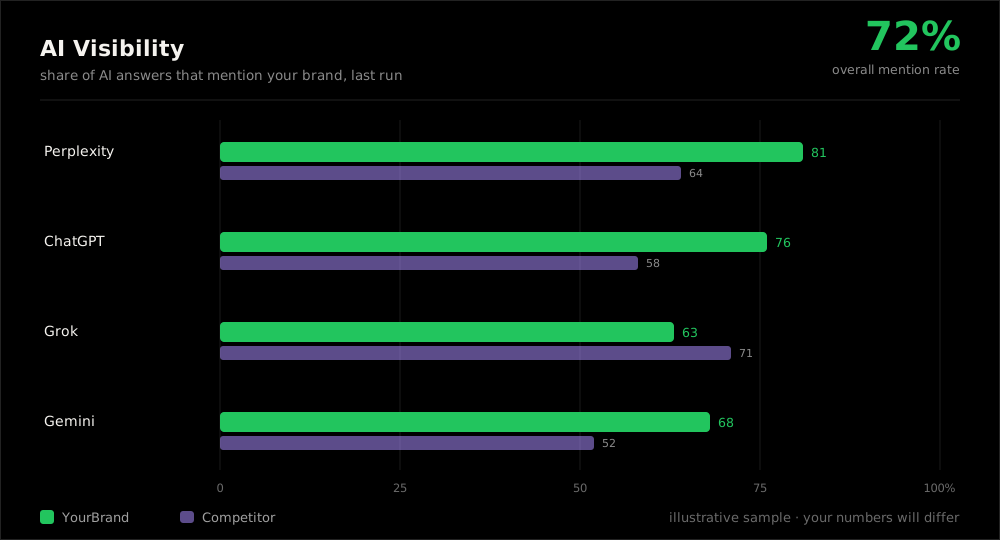
- **AI search (GEO) monitoring**: set up prompt tracking for specific URLs across ChatGPT, Perplexity, Grok, and Gemini.
- **Agent workflows**: give MCP clients such as Claude access to LLM answers, cited domains, competitor performance, and content trends.
- **Product integrations**: use the API from internal tools, client portals, reporting pipelines, or automated QA checks.
- **Content review**: inspect what a page says, which trends it misses, and what to fix first.
- **Free page export**: turn any public page into agent-ready markdown with `okf export`. Open source, runs locally, no account needed.
- **Free technical snapshot**: every `okf export` also captures the page's technical layer as served, including meta tags, structured data, headers, and robots directives. `--technical` exports it alone.
- **Custom workflows**: combine Sleepwalker with other MCP servers to build your own skills and automations.
## Access paths
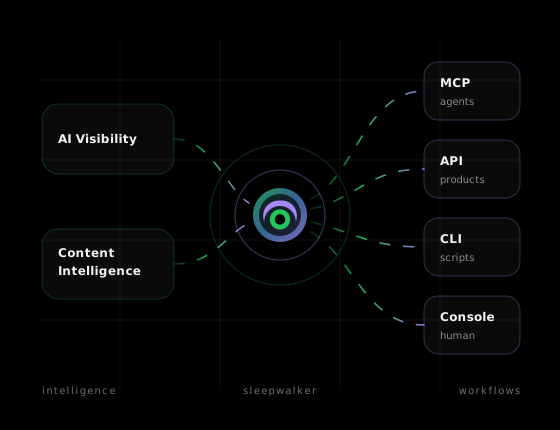
| Surface | Best for | Entry point |
|---|---|---|
| App | Human review, credits, keys, and full result views | [app.sleepwalker.ai](https://app.sleepwalker.ai) |
| API | Scripts, products, scheduled jobs, and reporting workflows | [API docs](https://www.sleepwalker.ai/docs/api/) |
| MCP | Claude and other MCP-capable agents | [MCP setup](https://www.sleepwalker.ai/docs/mcp/) |
| CLI | Terminal workflows and automation | [CLI docs](https://www.sleepwalker.ai/docs/cli/) |
## Run Sleepwalker from anywhere
**CLI**
```bash
sleepwalker visibility run https://yourbrand.com \
--brand YourBrand \
--prompt "best ai visibility platform 2026" \
--platform perplexity,openai,grok,gemini \
--watch
```
**API**
```bash
curl -s https://api.sleepwalker.ai/v1/visibility/runs \
-H "Authorization: Bearer $SLEEPWALKER_API_KEY" \
-H "Content-Type: application/json" \
-d '{
"url": "https://yourbrand.com",
"target_entity": "YourBrand",
"prompts": ["best ai visibility platform 2026"],
"platforms": ["perplexity","openai","grok","gemini"]
}'
```
**MCP**
```text
https://mcp.sleepwalker.ai/mcp
```
Ask an MCP-capable client: `Check how YourBrand appears across AI search this week.`
**App**
Open [app.sleepwalker.ai](https://app.sleepwalker.ai) for the visual workflow, saved results, credits, and keys.
## Developer resources
| Path | What it shows |
|---|---|
| [`docs/agents.md`](https://github.com/followanton/sleepwalker/blob/HEAD/docs/agents.md) | MCP tool catalog and agent workflow walkthrough |
| [`docs/concepts.md`](https://github.com/followanton/sleepwalker/blob/HEAD/docs/concepts.md) | Runs, probes, serialization, scoring, credits |
| [`docs/cli.md`](https://github.com/followanton/sleepwalker/blob/HEAD/docs/cli.md) | CLI usage, including the free local `okf export` |
| [`docs/cookbook.md`](https://github.com/followanton/sleepwalker/blob/HEAD/docs/cookbook.md) | Runnable workflows, including CI checks |
| [`docs/responses.md`](https://github.com/followanton/sleepwalker/blob/HEAD/docs/responses.md) | Full example outputs for the main Sleepwalker actions |
| [`mcp/server.json`](https://github.com/followanton/sleepwalker/blob/HEAD/mcp/server.json) | Remote MCP server manifest |
| [`mcp/tools.json`](https://github.com/followanton/sleepwalker/blob/HEAD/mcp/tools.json) | Public MCP tool catalog, scopes, and credit behavior |
| [`examples/api/curl`](https://github.com/followanton/sleepwalker/blob/HEAD/examples/api/curl) | One-call examples for public API actions |
| [`examples/api/javascript`](https://github.com/followanton/sleepwalker/blob/HEAD/examples/api/javascript) | Raw `fetch` plus a zero-dependency client helper |
| [`examples/api/python`](https://github.com/followanton/sleepwalker/blob/HEAD/examples/api/python) | `urllib` examples plus a small client class |
| [`examples/mcp`](https://github.com/followanton/sleepwalker/blob/HEAD/examples/mcp) | OAuth and bearer-token setup notes |
## Credits
Sleepwalker is pay as you go. Reads, lists, and status polling are normally unmetered. Actions that run work, such as visibility checks, content scoring, and serialization, use prepaid credits. `okf export` is the exception: it runs locally and is always free. Details live in [docs/credits.md](https://github.com/followanton/sleepwalker/blob/HEAD/docs/credits.md) and the hosted [billing docs](https://www.sleepwalker.ai/docs/billing/credits/).
## Repository boundary
This repository is intentionally small.
| Public here | Private in Sleepwalker |
|---|---|
| CLI, examples, setup notes, short docs | Hosted engine and app source |
| Public API request shapes | MCP server implementation |
| MCP client connection examples | Database schema and billing internals |
| Product-level credit behavior | Provider integrations and routing |
Do not commit real keys. Use environment variables or the CLI key store:
```bash
export SLEEPWALKER_API_KEY=sw_api_live_...
```
## Links
- Website: [sleepwalker.ai](https://www.sleepwalker.ai/)
- App: [app.sleepwalker.ai](https://app.sleepwalker.ai)
- Docs: [sleepwalker.ai/docs](https://www.sleepwalker.ai/docs/)
- npm: [@sleepwalkerai/cli](https://www.npmjs.com/package/@sleepwalkerai/cli)
- Security policy: [SECURITY.md](https://github.com/followanton/sleepwalker/blob/HEAD/SECURITY.md)
- Contributing: [CONTRIBUTING.md](https://github.com/followanton/sleepwalker/blob/HEAD/CONTRIBUTING.md)
- License: [MIT](https://github.com/followanton/sleepwalker/blob/HEAD/LICENSE)