# Skills Anywhere
**Category:** 💻 Developer Tools
**Repository:** https://github.com/noteflowai/dsh-skills-anywhere
**Views:** 0
**Installs:** 0
**Upvotes:** 0
**Directory Page:** https://allmcps.com/mcp/skills-anywhere
## Description
Every Agent Skill installed for any coding agent, plus GitHub skill repos, as MCP tools/resources.
## Claude Desktop Quick Installation
Heuristic fallback — verify the package name and runner against the repository README before running it. Uses `npx` (confidence: low):
```json
"mcpServers": {
"skills-anywhere": {
"command": "npx",
"args": ["-y","skills-anywhere"]
}
}
```
## Documentation & README
# dsh-skills-anywhere
**Discover and load skills across your tools.** Collect [Agent Skills](https://agentskills.io)
from local directories and configured Git sources into one catalog, available
through a live [DeepSeek Harness](https://github.com/deepseek-ai/deepseek-harness)
(`dsh`) provider or a local stdio MCP server.
English | [中文](https://github.com/noteflowai/dsh-skills-anywhere/blob/HEAD/README.zh.md)
[](https://github.com/noteflowai/dsh-skills-anywhere/actions/workflows/ci.yml)
[](https://www.npmjs.com/package/dsh-skills-anywhere)
[](https://github.com/topics/dsh-plugin)
[](https://scorecard.dev/viewer/?uri=github.com/noteflowai/dsh-skills-anywhere)
[](https://glama.ai/mcp/servers/noteflowai/dsh-skills-anywhere)
[](LICENSE)
## Check a skill before moving it
Find missing supporting files in the installed folder, then review bundle changes
before loading it through MCP. [Browser folder check](https://huggingface.co/spaces/glayguo/dsh-skills-anywhere#resources) · [Three pinned public examples](https://github.com/noteflowai/dsh-skills-anywhere/blob/HEAD/examples/resource-portability/README.md).
```sh
npx dsh-skills-anywhere@0.16.0 check path/to/SKILL.md --resources --json
```
Add `--fail-on-resource-issues` to gate CI. This checks local Markdown link targets;
it does not inspect prose dependencies or execute the skill. [Scope and tutorial](https://github.com/noteflowai/dsh-skills-anywhere/blob/HEAD/docs/RESOURCES.md).
**[First review, no clone required](https://github.com/noteflowai/dsh-skills-anywhere/blob/HEAD/docs/first-resource-check.md)** — Find one missing skill reference, restore it, and verify the CI gate.
## Start with your workflow
| Need | Workflow |
| --- | --- |
| Reuse skills across agent tools | Collect local and Git sources, then load on demand through dsh or local MCP |
| Review changes before loading | Compare instructions and directory manifests; require the reviewed content hash |
| Check which instructions reached an agent | Save MCP load receipts alongside tool calls and task evaluations |
## Quick start
Requires Node.js 22.19+ or 24+. The CLI and local MCP server work independently;
Git sources also require Git.
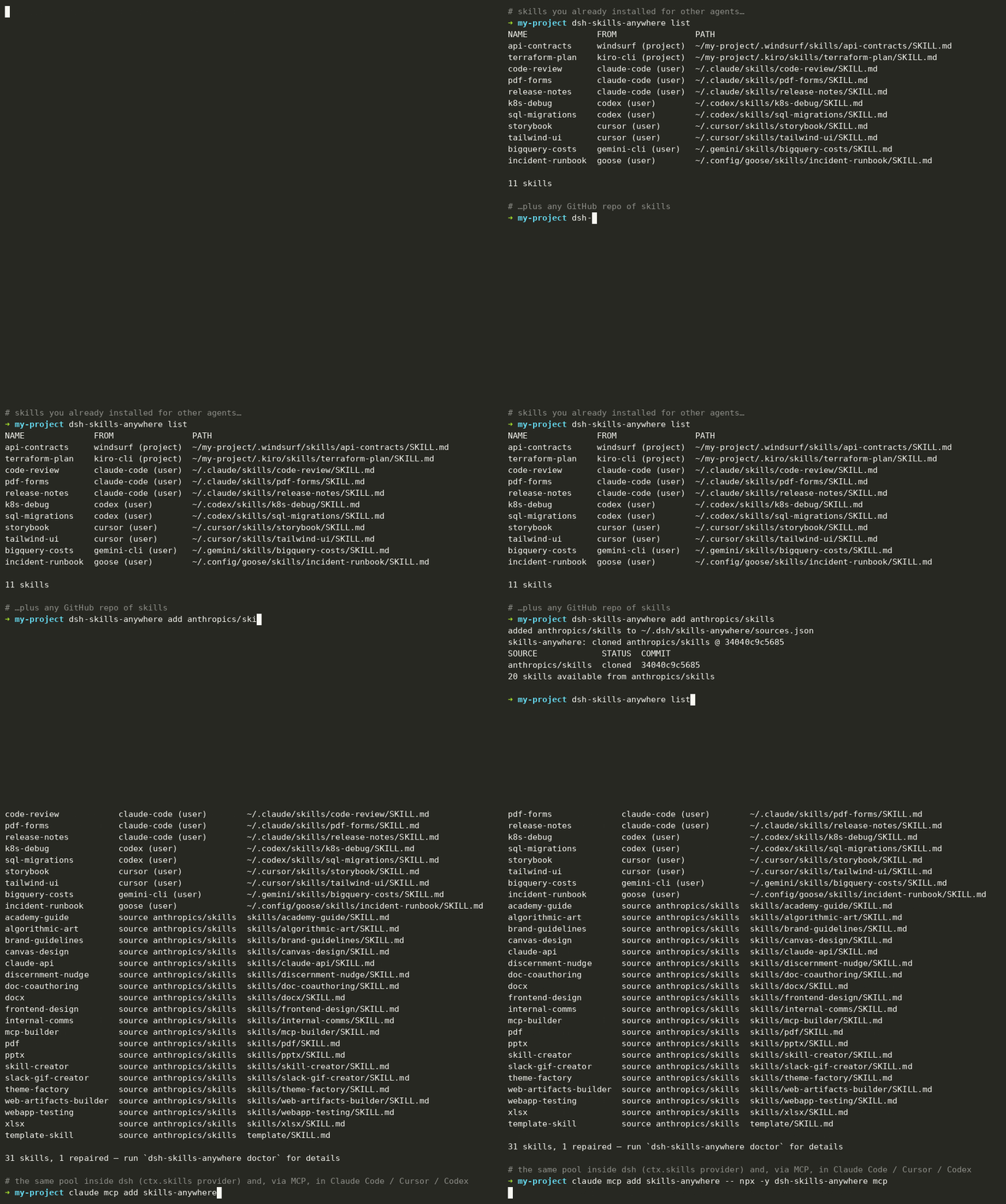
Inspect discovered skills:
```sh
npx dsh-skills-anywhere list
```
For an MCP client, use the [local server configuration](#use-as-an-mcp-server).
For DeepSeek Harness, install into your chosen profile:
```sh
dsh plugin --profile web add dsh-skills-anywhere
```
Start dsh and load with its `skill` tool or `/skill-name`. To add a Git source,
run `npx dsh-skills-anywhere add anthropics/skills`.
[Installation details](#installation-details-and-discovery-example) cover release
archives, source checkouts and dsh version requirements.
**Check skills in CI.** Any repository that keeps `SKILL.md` files can add the
GitHub Action (0.14.0 and later). Rejected files, repairs and hidden
characters appear as pull request annotations, with a job summary and a JSON
report:
```yaml
- uses: actions/checkout@3d3c42e5aac5ba805825da76410c181273ba90b1 # v7.0.1
- uses: noteflowai/dsh-skills-anywhere@v0.14.0
with:
fail-on-repair: true
fail-on-hidden-characters: true
```
[Inputs, outputs and scope](https://github.com/noteflowai/dsh-skills-anywhere/blob/HEAD/docs/CHECKING.md#use-in-github-actions). No model key
or DeepSeek Harness installation is needed.
## Try it in your browser
The homepage opens with an authored resource check. Choose a skill folder to check your own links, then **Save result image** for a shareable summary of counts and scope. Images omit file names; the JSON report retains the paths needed for review.
**[Try the interactive Hugging Face playground](https://huggingface.co/spaces/glayguo/dsh-skills-anywhere)** — explore an example workspace, resolve name clashes, and search beyond the catalog budget. No installation or model API needed. [How it works](https://github.com/noteflowai/dsh-skills-anywhere/blob/HEAD/docs/HUGGINGFACE.md).
Inspect skill instructions, compare directory manifests and share catalog views.
Keyboard navigation preserves the selected row and catalog settings. Files
opened for local review stay in the browser.
**Bring your own `SKILL.md`.** Compare the provider's strict and lenient parsing
locally: inspect repairs, invocation settings and a downloadable check report.
Your file stays in the browser. The same checks are available in the
[command line and CI](https://github.com/noteflowai/dsh-skills-anywhere/blob/HEAD/docs/CHECKING.md), with file hashes and actionable exit codes.
Reports enumerate recognized source URLs, full-commit address forms and
author-declared tools. Referenced content, script behavior and client
compatibility require separate verification.
[](https://huggingface.co/spaces/glayguo/dsh-skills-anywhere)
## How the catalog works
Clients can use different project, user and plugin directories for `SKILL.md`
files. Skills Anywhere discovers configured sources in place and makes the
resulting catalog available through dsh or an MCP client configured to connect
to its local server. Directory definitions describe discovery paths; the
[compatibility matrix](https://github.com/noteflowai/dsh-skills-anywhere/blob/HEAD/docs/MCP-COMPATIBILITY.md) records tested protocol
connections separately.
Inside dsh, it registers one extra provider on the built-in `ctx.skills` registry, so the model's normal `skill` tool and `/name` invocation simply see more skills:
- **Predefined agent directories.** Project and user paths for Claude Code, Codex, Cursor, Gemini CLI, GitHub Copilot, Windsurf, Kiro, Goose, Cline, Kimi CLI, Letta Code and other entries in the [directory registry](https://github.com/noteflowai/dsh-skills-anywhere/blob/HEAD/src/agents.ts). Over MCP this includes the shared `.agents/skills` convention, so a client that does not read it itself (Claude Code, for example) still sees skills installed there.
- **Claude Code plugin marketplaces.** The skills nested inside `~/.claude/plugins/marketplaces/*/plugins/*/skills/*`, including the official Anthropic marketplace.
- **Configured Git sources.** Select a skill repository, subdirectory, branch, tag or commit. The provider maintains a local checkout and records its resolved commit in a lock file.
- **Local files read in place.** Existing skills are re-read when loaded, without copying them into each client's directory. Git sources use the managed cache described below.
The **catalog budget** controls how many skill summaries enter the model's
session catalog: up to 50 by default. Other eligible skills remain searchable
through `find_skills` and can be loaded on demand. `/name` invocation is unchanged.
The same pool is available **outside dsh** through `dsh-skills-anywhere mcp`.
Configured [MCP](https://modelcontextprotocol.io) clients can discover and open
skills through tools and `skill://` resources. Client support for tool calls,
resources and the skill's own instructions determines the available workflow.
The provider **deduplicates** symlinked and byte-identical entries, supports
documented frontmatter **repairs**, and **renames** conflicting names such as
`discord/configure` and `telegram/configure`. The CLI reports the published
catalog, skipped entries and the reason for each change.
## Inspect skill delivery
Successful MCP `open_skill` calls return a receipt identifying the delivered
instruction body, original SKILL.md and optional bundle. Attach it to a tool
span to review delivered versions alongside task results. The receipt records
delivery; instruction following and permission enforcement are separate checks.
[Receipt contract](https://github.com/noteflowai/dsh-skills-anywhere/blob/HEAD/docs/LOAD-RECEIPTS.md) ·
[EvalArc Trace Workbench](https://noteflowai.github.io/evalarc/trace-workbench/index.html).
## Example: review robot evidence
Load a Microduck frame-review skill through MCP, then have your agent verify
its recorded joint facts with Robot Reel before writing a review.
[Interactive skill example](https://huggingface.co/spaces/glayguo/dsh-skills-anywhere)
(select **04 Review robot evidence**) · [Local walkthrough](https://github.com/noteflowai/dsh-skills-anywhere/blob/HEAD/docs/PHYSICAL_AI.md) ·
[Reusable skill](https://github.com/noteflowai/dsh-skills-anywhere/blob/HEAD/examples/robot-reel-review/SKILL.md).
The browser shows the instructions; your agent's own execution tool runs the
read-only verifier. No new simulation or GPU is needed.
## Review once, load the same file
MCP `open_skill` returns the original file's SHA-256. Supply
`expected_sha256` from `check --json` or an earlier open to reject a changed
`SKILL.md` before its instructions are returned. Fresh author opt-outs apply
immediately, even while discovery is cached. [Exact-file workflow](https://github.com/noteflowai/dsh-skills-anywhere/blob/HEAD/docs/VERIFIED-LOADS.md).
**MCP protocol support:** the local stdio command negotiates legacy initialization
and the 2026-07-28 protocol opening. Four SDK configurations and the installed
npm archive are checked over real subprocess connections.
[Compatibility matrix and embedding migration](https://github.com/noteflowai/dsh-skills-anywhere/blob/HEAD/docs/MCP-COMPATIBILITY.md).
**Review the whole skill directory.** Generate a file manifest with
`bundle /path/to/skill --json`, compare added/removed/changed resources, and
require `expected_bundle_sha256` when opening through MCP. The
[interactive bundle comparison](https://huggingface.co/spaces/glayguo/dsh-skills-anywhere)
shows a script change behind unchanged instructions and compares your own
manifests locally. [Directory review and limits](https://github.com/noteflowai/dsh-skills-anywhere/blob/HEAD/docs/BUNDLES.md).
The digest covers recorded paths and file contents within that directory.
External dependencies and execution permissions need separate review; files
can change after loading.
[](https://huggingface.co/spaces/glayguo/dsh-skills-anywhere)
## Installation details and discovery example
Published on [npm](https://www.npmjs.com/package/dsh-skills-anywhere) with build provenance;
each [GitHub release](https://github.com/noteflowai/dsh-skills-anywhere/releases) also includes the same tarball.
Example discovery output is shown below. Paths and counts depend on the local
installation and configured sources:
```
$ npx dsh-skills-anywhere list
NAME FROM PATH
discord-access claude plugin discord @ claude-plugins-official ~/.claude/plugins/marketplaces/.../discord/skills/access/SKILL.md
frontend-design claude plugin frontend-design @ claude-plugins-official ~/.claude/plugins/marketplaces/.../frontend-design/skills/frontend-design/SKILL.md
skill-creator claude plugin skill-creator @ claude-plugins-official ~/.claude/plugins/marketplaces/.../skill-creator/skills/skill-creator/SKILL.md
...
31 skills, 6 renamed — run `dsh-skills-anywhere doctor` for details
```
Install from a git checkout or a release tarball instead of npm
Every [GitHub release](https://github.com/noteflowai/dsh-skills-anywhere/releases) carries a prebuilt tarball, and both `dsh plugin add` and `npx` accept its URL directly (`https://github.com/noteflowai/dsh-skills-anywhere/releases/download/v0.16.0/dsh-skills-anywhere-0.16.0.tgz`). If you want an unreleased commit:
```sh
dsh plugin --profile web add github:noteflowai/dsh-skills-anywhere
```
A git install ships sources, so pnpm has to run this package's `prepare` build. pnpm 10+ refuses until you allow it: the first `add` fails and prints the exact key to allow. Copy that key (it includes the commit) into the profile's `pnpm-workspace.yaml` and run the `add` again.
```yaml
# $DSH_HOME/profiles/web/pnpm-workspace.yaml
allowBuilds:
'dsh-skills-anywhere@https://codeload.github.com/noteflowai/dsh-skills-anywhere/tar.gz/': true
```
Pin a commit (`github:noteflowai/dsh-skills-anywhere#`) if you want the install to be reproducible.
Requirements
- DeepSeek Harness `0.1.5-rc.1` or newer (the suite runs against `0.1.5-rc.1` and `0.1.5-rc.2`), any profile that mounts `@deepseek-ai/dsh-skill` (the shipped `web`, `acp`, `headless` and `sdk` profiles all do)
- Node.js 22.19+ or 24+
- `git` on `PATH` for git sources (everything else works without it)
## What gets discovered
| Where | Example | dsh source label | Default rank |
|---|---|---|---|
| Another agent's **project** skills | `/.claude/skills/*`, `/.cursor/skills/*` | `anywhere-project` | 250 |
| Another agent's **user** skills | `~/.codex/skills/*`, `~/.cursor/skills/*` | `anywhere-user` | 550 |
| **Claude Code plugin marketplaces** and the installed-plugin cache | `~/.claude/plugins/marketplaces/*/plugins/*/skills/*` | `anywhere-claude-plugins` | 580 |
| **Git sources** | `anthropics/skills`, `vercel-labs/agent-skills/skills` | `anywhere-source` | 700 |
Lower rank wins a duplicate name inside the dsh registry. The built-in dsh roots
keep their ranks (`.dsh/skills` 100, `.agents/skills` 200, `~/.dsh/skills` 400,
`~/.agents/skills` 500). Precedence follows these values across sources; for
example, an agent's project entry at rank 250 precedes a dsh user entry at 400.
Inside dsh, the built-in `.agents/skills` and `.dsh/skills` roots are not scanned again.
The standalone MCP server has no built-in provider beside it, so it also serves the
shared `.agents/skills` and `~/.agents/skills` (the default location for Codex, Amp,
Goose, Zed and Letta Code) at those same ranks, 200 and 500. Embedders of
`createSkillsAnywhereServer` can pass `sharedDirs: false` or exclude the `agents` id.
Run `npx dsh-skills-anywhere agents` for the full agent table and which directories exist on your machine.
### Skill format
The provider reads directories containing `SKILL.md` and dsh's flat `.md`
form, using the [Agent Skills format](https://agentskills.io/specification).
It parses `name`, `description`, `disable-model-invocation` and `user-invocable`,
and retains `license`, `compatibility`, `allowed-tools` and `metadata`.
`compatibility` and `allowed-tools` carry the author's declarations; the client
controls runtime requirements and tool permissions. Unknown fields, including
`argument-hint` and `context`, are preserved under `metadata.frontmatter`.
Preserving them does not implement the originating client's behavior.
`scripts/`, `references/` and `assets/` are exposed through the skill's resource
directory for the consuming client to use.
In the default **lenient** mode a missing name falls back to the directory, an invalid name is normalised to kebab-case, and a missing description is derived from the first paragraph. Each repair is recorded and shown by `doctor`. Set `lenient: false` to match the strict behaviour of the built-in provider.
## Git sources
```sh
npx dsh-skills-anywhere add anthropics/skills # default branch
npx dsh-skills-anywhere add anthropics/skills@v1.0.0 # tag or branch
npx dsh-skills-anywhere add vercel-labs/agent-skills/skills # sub-directory
npx dsh-skills-anywhere add https://github.com/o/r/tree/main/dir # GitHub tree URL
npx dsh-skills-anywhere add git@gitlab.com:group/skills.git # any git URL
npx dsh-skills-anywhere add ./local/skills-repo --project # local repo, project-scoped
npx dsh-skills-anywhere add o/r --ref 3f2a9c1 --rank 300 # pin a commit, set precedence
```
Sources come from three places, merged in this order: the plugin `config.sources`, the user file `~/.dsh/skills-anywhere/sources.json`, and the project file `/.dsh/skills-anywhere.json` (commit it to share skills with your team). The CLI edits the last two.
Each repository uses a local checkout at
`~/.dsh/skills-anywhere/cache///` (`@` when a
branch, tag or commit is set). Background synchronization runs at startup,
every `syncIntervalMs` (6 hours by default), and when source configuration changes.
Resolved commits are recorded in `~/.dsh/skills-anywhere/lock.json`.
Discovery reads the available cache. A failed refresh retains an existing
checkout; a source that has never synchronized contributes no cached skills.
Successful changes invalidate the catalog without making discovery wait for
network synchronization.
## Catalog budget and the `find_skills` / `open_skill` tools
dsh publishes every model-invocable skill's name and description into the session, on every request. With marketplaces and a few git sources that is hundreds of lines of context. The provider therefore ranks its skills and marks only the first `catalog.limit` (default 50) as model-invocable; the remainder is published with model invocation off, which keeps it out of the catalog but still loadable by you with `/name`.
Two tools, registered by the `dsh-skills-anywhere/tools` row, make the hidden part reachable for the model:
- **`find_skills(query, limit?)`** searches every skill by keyword (name, description, `whenToUse`, origin), catalog or not, and says which matches are listed.
- **`open_skill(name)`** loads any skill by exact name, including ones the budget hid. Skills whose own frontmatter says `disable-model-invocation: true` are still refused, exactly as the built-in `skill` tool does.
```yaml
- id: skills-anywhere
config:
catalog:
limit: 30 # 0 = unlimited (old behaviour)
pin: [frontend-design] # always listed
hide: [example-skill] # never listed, still searchable and /name-invocable
- id: skills-anywhere-tools
config:
findLimit: 10
```
Author-disabled skills never count against the budget. Which skills stay listed follows the precedence order below, so project-level skills win over user-level, which win over marketplaces and git sources. The tools row needs the tool runtime (`ctx.tools`); in a profile without one it stays pending and the provider works alone.
## CLI
**Check before committing.** Run `npx -y dsh-skills-anywhere@0.16.0 check
skills/example/SKILL.md --fail-on-repair`. The same parser used in the playground
provides batch file checks, JSON reports with file hashes, and CI exit codes.
Checks read only the named files. In GitHub Actions, `uses: noteflowai/dsh-skills-anywhere`
selects every tracked `SKILL.md` and annotates the results.
[Commands, GitHub Action and scope](https://github.com/noteflowai/dsh-skills-anywhere/blob/HEAD/docs/CHECKING.md).
```
dsh-skills-anywhere list [--all] [--json] Skills the provider publishes (--all shows hidden duplicates)
dsh-skills-anywhere agents [--json] Agent directory definitions and paths found here
dsh-skills-anywhere sources [--json] Configured git sources and their synced commits
dsh-skills-anywhere add [--ref] [--path] [--rank] [--project]
dsh-skills-anywhere remove [--project]
dsh-skills-anywhere sync [--force] [--json] Clone or refresh every source now
dsh-skills-anywhere doctor [--json] Repaired, skipped, renamed and duplicate skills, with reasons
dsh-skills-anywhere check [--json] Explicit local files; strict parser gate by default
dsh-skills-anywhere mcp Serve skills to configured clients over stdio MCP
dsh-skills-anywhere route prepare [--json] Typed choice request over installed, openable skills
dsh-skills-anywhere route apply --request --response [--min-confidence ] [--json]
```
### Validate a recorded skill pick
When a classifier, an LLM or a person picks a skill for a task, `route` checks
that pick against the skills installed here. `route prepare` ranks every
discovered skill with the same keyword search as `find_skills`, drops skills
that `open_skill` would refuse, and only then keeps the first 8 as a typed
choice request (`skills-anywhere-route-request-1`). The reserved `_none` option
means "no listed skill fits" and can never be a skill name. Each candidate
records its origin, SKILL.md path and content hash. Your decider writes a
response; `route apply` reads it as untrusted data and reports exactly one
outcome. Nothing is loaded, executed or sent over the network.
```sh
dsh-skills-anywhere route prepare "fill pdf forms" --json > req.json
# Your decider writes resp.json, for example:
# {"choice": "pdf-forms", "confidence": 0.86, "model": "example"}
dsh-skills-anywhere route apply --request req.json --response resp.json --min-confidence 0.7
```
| Outcome | Exit | Meaning |
| --- | --- | --- |
| `selected` | 0 | Confidence meets the threshold; prints the skill's name, origin and SKILL.md path to open |
| `no_match` | 0 | The decider chose `_none` at or above the threshold |
| `abstain` | 0 | No confidence reported, or below `--min-confidence` |
| `stale` | 1 | Since prepare, the chosen skill was deleted, stopped being openable, or its SKILL.md path or content hash changed (edited, or another origin took over the name). Run prepare again |
| `invalid_input` | 2 | Unreadable or non-JSON file, wrong request schema, a choice outside the options, or a confidence that is not a number from 0 to 1 |
An invalid `--min-confidence`, or `--request`/`--response`/`--min-confidence`
on another command, also exits 2. The default of 0.7 is an uncalibrated
placeholder, so pick a threshold from your own decider's held-out results.
`--json` prints `skills-anywhere-route-result-1` with the outcome, choice,
confidence, threshold and `model` (provenance only); other response keys are
ignored. Request files contain absolute paths from this machine.
All commands accept `--cwd `. For `check`, it resolves the named files; other
commands use it to pick the project. `check --lenient` accepts provider repairs;
`--fail-on-repair` rejects any reported repair in the selected mode.
`--fail-on-hidden-characters` rejects files with invisible or direction-changing
characters, which every report lists as `hiddenCharacters`.
The CLI uses the same parsing code as the plugin and never needs dsh running.
## Use as an MCP server
`dsh-skills-anywhere mcp` starts a local
[Model Context Protocol](https://modelcontextprotocol.io) server over stdio.
It exposes the same configured sources, deduplication and naming rules through
the following tools. Connect a compatible client using its MCP configuration:
| Tool | What it does |
| --- | --- |
| `list_skills` | Browse every model-invocable skill with its description and origin (`limit`, `offset`) |
| `find_skills` | Keyword search across names, descriptions and origins |
| `open_skill` | Load one skill's instructions plus the directory its scripts and references live in |
Skills are also exposed as `skill://` resources with completion for clients
that support resource references. The MCP tools and resources exclude skills
whose frontmatter sets `disable-model-invocation: true`. The server runs
independently of dsh.
The examples below show client configuration. Automated connection checks cover
the four SDK configurations and installed package in the
[compatibility matrix](https://github.com/noteflowai/dsh-skills-anywhere/blob/HEAD/docs/MCP-COMPATIBILITY.md); application-specific behavior
depends on the client version and its support for tools and resources.
**Claude Code** (as a plugin; this repo doubles as a plugin marketplace)
```sh
claude plugin marketplace add noteflowai/dsh-skills-anywhere
claude plugin install dsh-skills-anywhere@noteflowai
```
Or register the bare server instead: `claude mcp add skills-anywhere -- npx -y dsh-skills-anywhere mcp`. Either way, restart Claude Code once so it connects.
**Cursor** (`.cursor/mcp.json` or `~/.cursor/mcp.json`)
```json
{ "mcpServers": { "skills-anywhere": { "command": "npx", "args": ["-y", "dsh-skills-anywhere", "mcp"] } } }
```
**Codex** (`~/.codex/config.toml`)
```toml
[mcp_servers.skills-anywhere]
command = "npx"
args = ["-y", "dsh-skills-anywhere", "mcp"]
```
The [MCP registry](https://registry.modelcontextprotocol.io) identifier is
`io.github.noteflowai/dsh-skills-anywhere`. The repository also includes
[Agent Plugin](https://agent-plugins.org) manifests (`plugin.json` and `mcp.json`)
for clients that support that format. Follow your client's installation flow.
Add `--cwd ` when the client starts the server outside your project.
Configured Git sources sync in the background at startup. To embed the server,
`import { createSkillsAnywhereServer } from 'dsh-skills-anywhere/mcp'` returns
the `McpServer` and provider; see the
[transport and migration guide](https://github.com/noteflowai/dsh-skills-anywhere/blob/HEAD/docs/MCP-COMPATIBILITY.md#embedding-the-server).
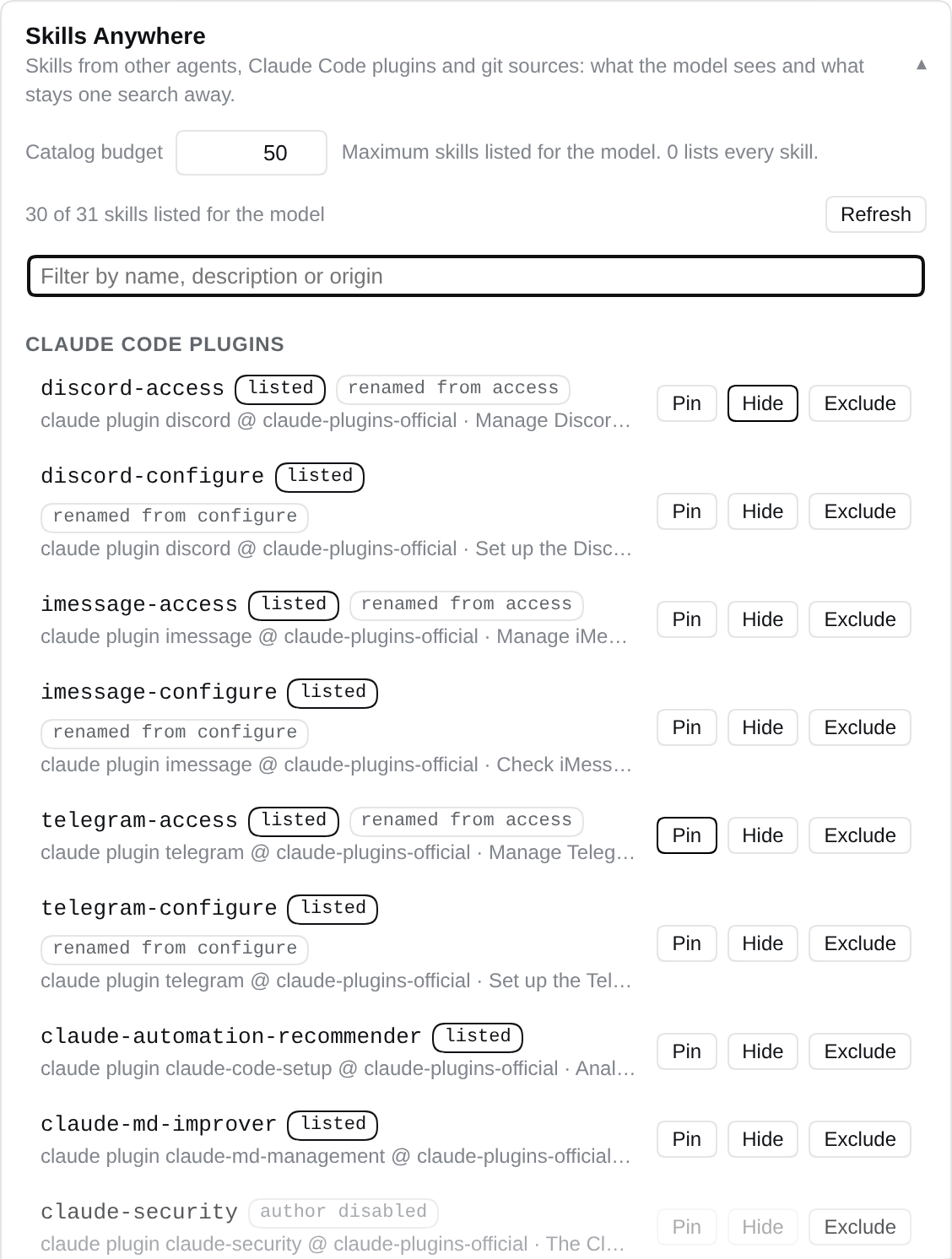
## Browse and toggle skills in the dsh web UI
In `dsh web`, open **Settings → Plugins → Plugin configuration**. The **Skills Anywhere** card lists every skill the provider found, grouped by where it lives (agent directories, Claude Code plugins, git sources), with its catalog state — *listed* for the model, *not listed* (kept out by the budget or by you) or *author disabled* — and the name it was renamed to when it collided. Each row offers **Pin** (always listed), **Hide** (out of the model catalog, still `/name`- and `find_skills`-reachable) and **Exclude** (dropped from the provider); the catalog budget is editable in place, and a filter box searches names, descriptions and origins.