
Prevent TransactionTooLargeException crashes. For good.
A modern Android framework for safely transporting large Serializable objects between components, without the crashes.







TransactionTooLargeException crashes. For good.A modern Android framework for safely transporting large Serializable objects between components, without the crashes.
 |
|  |
---
## ⚙️ How It Works
[](https://www.youtube.com/watch?v=4Nl9zlcbwU4)
The Shuttle framework takes its name from cargo transportation in the freight industry. Moving and storage companies experience scenarios where large moving trucks cannot transport cargo the entire way to the destination (warehouses, houses, et cetera). These scenarios might occur from road restrictions, trucks being overweight from large cargo, and more. As a result, companies use small Shuttle vans to transport smaller cargo groups on multiple trips to deliver the entire shipment.
After the delivery is complete, employees remove the cargo remnants from the shuttle vans and trucks. This clean-up task is one of the last steps for the job.
The Shuttle framework takes its roots in these scenarios:
- creating a smaller cargo bundle object to use in successfully delivering the data to the destination
- shuttling the corresponding large cargo to a warehouse and storing it for pickup
- linking the smaller cargo with the larger cargo by an identifier
- providing a single source of truth (Shuttle interface) to use for transporting cargo
- providing convenience functions to remove cargo (automatically or on-demand)
Shuttle applies this same logic to Android's binder transaction limit:
```
┌─────────────────────────────────────────────────────────────┐
│ Source Component │
│ 1. Large Serializable -> stored in Warehouse (Room/DB) │
│ 2. Small cargo ID -> passed in Intent/Bundle │
└──────────────────────────────┬──────────────────────────────┘
│ (tiny binder transaction)
┌──────────────────────────────▼──────────────────────────────┐
│ Destination Component │
│ 3. Cargo ID received -> retrieved from Warehouse │
│ 4. Large Serializable -> delivered via Kotlin Channel │
│ 5. Cleanup -> cargo removed from Warehouse automatically │
└─────────────────────────────────────────────────────────────┘
```
---
## Requirements
| Requirement | Minimum |
|---|---|
| Android min SDK | 26 |
| Kotlin | 2.2.10 |
| AGP (Android Gradle Plugin) | 8.0+ |
| KSP | Required only when using `@ShuttleCargo` |
| Java | 21 |
---
## 🚀 Quick Start
### 1. Add Dependencies
**`settings.gradle.kts`** — apply the Shuttle Gradle plugin so the `@ShuttleCargo` annotation processor is wired into your build:
`@ShuttleCargo` annotates the cargo class you want to transport between screens. At build time, the annotation processor generates the serialization code Shuttle needs to store and retrieve cargo, without any manual `Serializable` boilerplate.
```kotlin
pluginManagement {
plugins {
id("com.grarcht.shuttle.cargo") version "4.0.0"
}
}
```
The Shuttle Cargo Gradle plugin configures KSP and registers the Shuttle compiler plugin automatically. Without it, `@ShuttleCargo`-annotated classes will not generate the required serialization glue code.
**`build.gradle.kts`:**
```kotlin
plugins {
id("com.grarcht.shuttle.cargo")
}
dependencies {
implementation(platform("com.grarcht.shuttle:shuttle-bom:4.0.0"))
implementation("com.grarcht.shuttle:framework")
implementation("com.grarcht.shuttle:framework-integrations-persistence")
implementation("com.grarcht.shuttle:framework-integrations-extensions-room")
implementation("com.grarcht.shuttle:framework-addons-navigation-component") // Optional
// Annotation-based API — use @ShuttleCargo to own the serialization contract
implementation("com.grarcht.shuttle:framework-annotations")
ksp("com.grarcht.shuttle:framework-annotations-processor")
}
```
**Version Catalog (`libs.versions.toml`):**
```toml
[versions]
shuttle = "4.0.0"
[plugins]
shuttle-cargo = { id = "com.grarcht.shuttle.cargo", version.ref = "shuttle" }
[libraries]
shuttle-bom = { group = "com.grarcht.shuttle", name = "shuttle-bom", version.ref = "shuttle" }
shuttle-framework = { group = "com.grarcht.shuttle", name = "framework" }
shuttle-persistence = { group = "com.grarcht.shuttle", name = "framework-integrations-persistence" }
shuttle-room = { group = "com.grarcht.shuttle", name = "framework-integrations-extensions-room" }
shuttle-navigation = { group = "com.grarcht.shuttle", name = "framework-addons-navigation-component" }
shuttle-annotations = { group = "com.grarcht.shuttle", name = "framework-annotations" }
shuttle-annotations-processor = { group = "com.grarcht.shuttle", name = "framework-annotations-processor" }
```
### 2. Initialize Shuttle
Wire `CargoShuttle` once as a singleton. With Hilt:
```kotlin
@Provides @Singleton
fun provideShuttle(facade: ShuttleFacade, warehouse: ShuttleWarehouse): Shuttle =
CargoShuttle(facade, warehouse)
@Provides @Singleton
fun provideShuttleFacade(
@ApplicationContext context: Context,
warehouse: ShuttleWarehouse
): ShuttleFacade = ShuttleCargoFacade(context as Application, warehouse)
@Provides @Singleton
fun provideShuttleWarehouse(
dao: ShuttleDataAccessObject,
factory: ShuttleDataModelFactory,
@ApplicationContext context: Context,
gateway: ShuttleFileSystemGateway
): ShuttleWarehouse = ShuttleRepository(dao, factory, context.filesDir.absolutePath, gateway)
```
The `ShuttleDataAccessObject` comes from `ShuttleRoomDataDb.getInstance(ShuttleRoomDbConfig(context)).shuttleDataAccessObject`. Inject `Shuttle` wherever you need to transport data.
### 3. Ship Your First Cargo
```kotlin
// Source: transport a large Serializable via Intent
shuttle.intentCargoWith(context, DestinationActivity::class.java)
.transport(cargoId, myLargeSerializable)
.cleanShuttleOnReturnTo(SourceFragment::class.java, DestinationActivity::class.java, cargoId)
.deliver(context)
```
```kotlin
// Destination: pick up the cargo
lifecycleScope.launch {
getShuttleChannel()
.consumeAsFlow()
.collectLatest { result ->
when (result) {
is ShuttlePickupCargoResult.Success<*> -> render(result.data as MyModel)
is ShuttlePickupCargoResult.Error<*> -> showError()
ShuttlePickupCargoResult.Loading -> showLoading()
}
}
}
```
That's it. No custom DB setup. No table management. No crash.
---
## 📦 Usage
The recommended entry point is the `Shuttle` interface with `CargoShuttle` as the implementation. It's a single source of truth for all cargo transport operations.
### Transport with Intents
**Source component:**
```kotlin
val cargoId = ImageMessageType.ImageData.value
shuttle.intentCargoWith(context, MVCSecondControllerActivity::class.java)
.transport(cargoId, imageModel)
.cleanShuttleOnReturnTo(
MVCFirstControllerFragment::class.java,
MVCSecondControllerActivity::class.java,
cargoId
)
.deliver(context)
```
> ℹ️ `cleanShuttleOnReturnTo` is important. It ensures cargo is purged from the Warehouse when it's no longer needed.
### Transport with the Navigation Component
**Source fragment:**
```kotlin
val cargoId = ImageMessageType.ImageData.value
navController.navigateWithShuttle(shuttle, R.id.MVVMNavSecondViewActivity)
?.logTag(LOG_TAG)
?.transport(cargoId, imageModel as Serializable)
?.cleanShuttleOnReturnTo(
MVVMNavFirstViewFragment::class.java,
MVVMNavSecondViewActivity::class.java,
cargoId
)
?.deliver()
```
### Pick Up Cargo at the Destination
**In a Fragment/Activity:**
```kotlin
lifecycleScope.launch {
getShuttleChannel()
.consumeAsFlow()
.collectLatest { result ->
when (result) {
ShuttlePickupCargoResult.Loading -> initLoadingView(view)
is ShuttlePickupCargoResult.Success<*> -> { showSuccessView(view, result.data as ImageModel); cancel() }
is ShuttlePickupCargoResult.Error<*> -> { showErrorView(view); cancel() }
}
}
}
```
**In a ViewModel:**
```kotlin
viewModelScope.launch {
shuttle.pickupCargo
|
---
## ⚙️ How It Works
[](https://www.youtube.com/watch?v=4Nl9zlcbwU4)
The Shuttle framework takes its name from cargo transportation in the freight industry. Moving and storage companies experience scenarios where large moving trucks cannot transport cargo the entire way to the destination (warehouses, houses, et cetera). These scenarios might occur from road restrictions, trucks being overweight from large cargo, and more. As a result, companies use small Shuttle vans to transport smaller cargo groups on multiple trips to deliver the entire shipment.
After the delivery is complete, employees remove the cargo remnants from the shuttle vans and trucks. This clean-up task is one of the last steps for the job.
The Shuttle framework takes its roots in these scenarios:
- creating a smaller cargo bundle object to use in successfully delivering the data to the destination
- shuttling the corresponding large cargo to a warehouse and storing it for pickup
- linking the smaller cargo with the larger cargo by an identifier
- providing a single source of truth (Shuttle interface) to use for transporting cargo
- providing convenience functions to remove cargo (automatically or on-demand)
Shuttle applies this same logic to Android's binder transaction limit:
```
┌─────────────────────────────────────────────────────────────┐
│ Source Component │
│ 1. Large Serializable -> stored in Warehouse (Room/DB) │
│ 2. Small cargo ID -> passed in Intent/Bundle │
└──────────────────────────────┬──────────────────────────────┘
│ (tiny binder transaction)
┌──────────────────────────────▼──────────────────────────────┐
│ Destination Component │
│ 3. Cargo ID received -> retrieved from Warehouse │
│ 4. Large Serializable -> delivered via Kotlin Channel │
│ 5. Cleanup -> cargo removed from Warehouse automatically │
└─────────────────────────────────────────────────────────────┘
```
---
## Requirements
| Requirement | Minimum |
|---|---|
| Android min SDK | 26 |
| Kotlin | 2.2.10 |
| AGP (Android Gradle Plugin) | 8.0+ |
| KSP | Required only when using `@ShuttleCargo` |
| Java | 21 |
---
## 🚀 Quick Start
### 1. Add Dependencies
**`settings.gradle.kts`** — apply the Shuttle Gradle plugin so the `@ShuttleCargo` annotation processor is wired into your build:
`@ShuttleCargo` annotates the cargo class you want to transport between screens. At build time, the annotation processor generates the serialization code Shuttle needs to store and retrieve cargo, without any manual `Serializable` boilerplate.
```kotlin
pluginManagement {
plugins {
id("com.grarcht.shuttle.cargo") version "4.0.0"
}
}
```
The Shuttle Cargo Gradle plugin configures KSP and registers the Shuttle compiler plugin automatically. Without it, `@ShuttleCargo`-annotated classes will not generate the required serialization glue code.
**`build.gradle.kts`:**
```kotlin
plugins {
id("com.grarcht.shuttle.cargo")
}
dependencies {
implementation(platform("com.grarcht.shuttle:shuttle-bom:4.0.0"))
implementation("com.grarcht.shuttle:framework")
implementation("com.grarcht.shuttle:framework-integrations-persistence")
implementation("com.grarcht.shuttle:framework-integrations-extensions-room")
implementation("com.grarcht.shuttle:framework-addons-navigation-component") // Optional
// Annotation-based API — use @ShuttleCargo to own the serialization contract
implementation("com.grarcht.shuttle:framework-annotations")
ksp("com.grarcht.shuttle:framework-annotations-processor")
}
```
**Version Catalog (`libs.versions.toml`):**
```toml
[versions]
shuttle = "4.0.0"
[plugins]
shuttle-cargo = { id = "com.grarcht.shuttle.cargo", version.ref = "shuttle" }
[libraries]
shuttle-bom = { group = "com.grarcht.shuttle", name = "shuttle-bom", version.ref = "shuttle" }
shuttle-framework = { group = "com.grarcht.shuttle", name = "framework" }
shuttle-persistence = { group = "com.grarcht.shuttle", name = "framework-integrations-persistence" }
shuttle-room = { group = "com.grarcht.shuttle", name = "framework-integrations-extensions-room" }
shuttle-navigation = { group = "com.grarcht.shuttle", name = "framework-addons-navigation-component" }
shuttle-annotations = { group = "com.grarcht.shuttle", name = "framework-annotations" }
shuttle-annotations-processor = { group = "com.grarcht.shuttle", name = "framework-annotations-processor" }
```
### 2. Initialize Shuttle
Wire `CargoShuttle` once as a singleton. With Hilt:
```kotlin
@Provides @Singleton
fun provideShuttle(facade: ShuttleFacade, warehouse: ShuttleWarehouse): Shuttle =
CargoShuttle(facade, warehouse)
@Provides @Singleton
fun provideShuttleFacade(
@ApplicationContext context: Context,
warehouse: ShuttleWarehouse
): ShuttleFacade = ShuttleCargoFacade(context as Application, warehouse)
@Provides @Singleton
fun provideShuttleWarehouse(
dao: ShuttleDataAccessObject,
factory: ShuttleDataModelFactory,
@ApplicationContext context: Context,
gateway: ShuttleFileSystemGateway
): ShuttleWarehouse = ShuttleRepository(dao, factory, context.filesDir.absolutePath, gateway)
```
The `ShuttleDataAccessObject` comes from `ShuttleRoomDataDb.getInstance(ShuttleRoomDbConfig(context)).shuttleDataAccessObject`. Inject `Shuttle` wherever you need to transport data.
### 3. Ship Your First Cargo
```kotlin
// Source: transport a large Serializable via Intent
shuttle.intentCargoWith(context, DestinationActivity::class.java)
.transport(cargoId, myLargeSerializable)
.cleanShuttleOnReturnTo(SourceFragment::class.java, DestinationActivity::class.java, cargoId)
.deliver(context)
```
```kotlin
// Destination: pick up the cargo
lifecycleScope.launch {
getShuttleChannel()
.consumeAsFlow()
.collectLatest { result ->
when (result) {
is ShuttlePickupCargoResult.Success<*> -> render(result.data as MyModel)
is ShuttlePickupCargoResult.Error<*> -> showError()
ShuttlePickupCargoResult.Loading -> showLoading()
}
}
}
```
That's it. No custom DB setup. No table management. No crash.
---
## 📦 Usage
The recommended entry point is the `Shuttle` interface with `CargoShuttle` as the implementation. It's a single source of truth for all cargo transport operations.
### Transport with Intents
**Source component:**
```kotlin
val cargoId = ImageMessageType.ImageData.value
shuttle.intentCargoWith(context, MVCSecondControllerActivity::class.java)
.transport(cargoId, imageModel)
.cleanShuttleOnReturnTo(
MVCFirstControllerFragment::class.java,
MVCSecondControllerActivity::class.java,
cargoId
)
.deliver(context)
```
> ℹ️ `cleanShuttleOnReturnTo` is important. It ensures cargo is purged from the Warehouse when it's no longer needed.
### Transport with the Navigation Component
**Source fragment:**
```kotlin
val cargoId = ImageMessageType.ImageData.value
navController.navigateWithShuttle(shuttle, R.id.MVVMNavSecondViewActivity)
?.logTag(LOG_TAG)
?.transport(cargoId, imageModel as Serializable)
?.cleanShuttleOnReturnTo(
MVVMNavFirstViewFragment::class.java,
MVVMNavSecondViewActivity::class.java,
cargoId
)
?.deliver()
```
### Pick Up Cargo at the Destination
**In a Fragment/Activity:**
```kotlin
lifecycleScope.launch {
getShuttleChannel()
.consumeAsFlow()
.collectLatest { result ->
when (result) {
ShuttlePickupCargoResult.Loading -> initLoadingView(view)
is ShuttlePickupCargoResult.Success<*> -> { showSuccessView(view, result.data as ImageModel); cancel() }
is ShuttlePickupCargoResult.Error<*> -> { showErrorView(view); cancel() }
}
}
}
```
**In a ViewModel:**
```kotlin
viewModelScope.launch {
shuttle.pickupCargo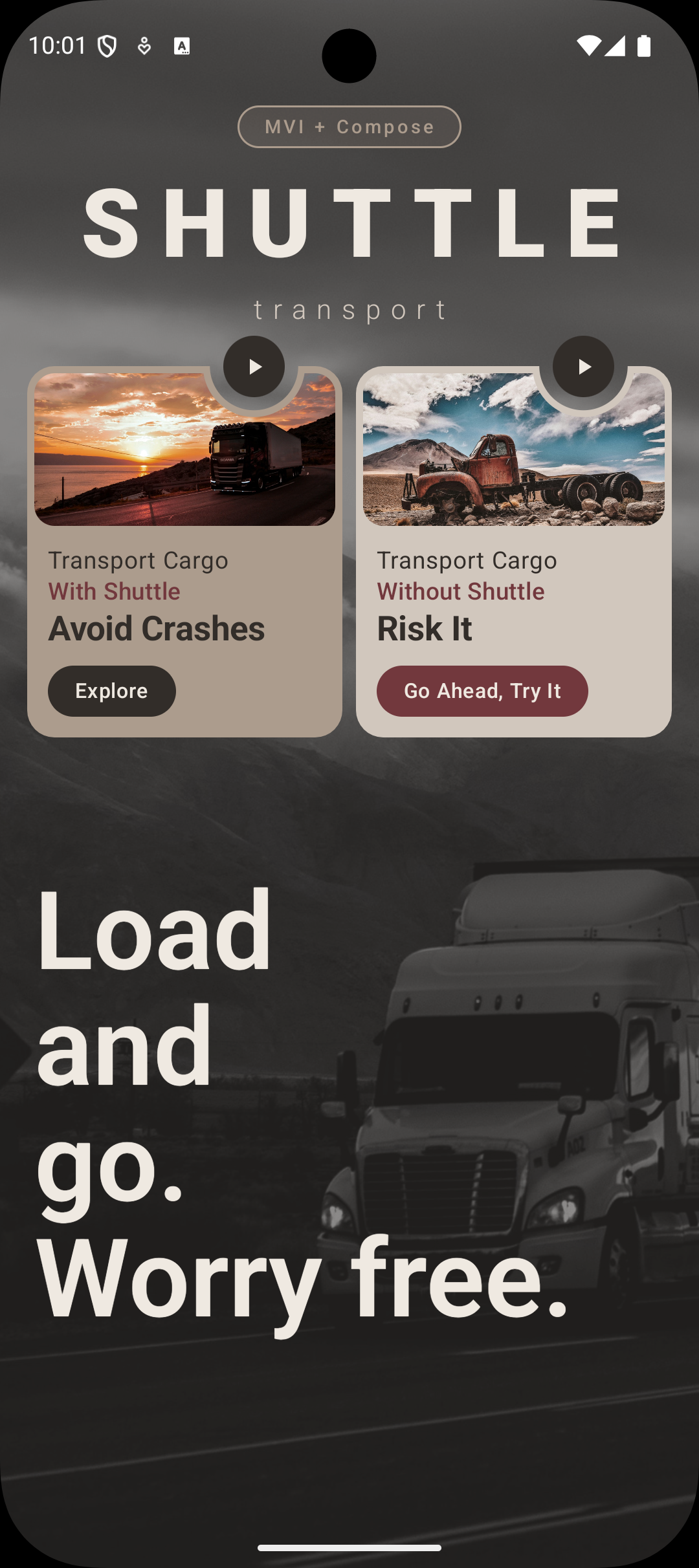 |
|  |
### Flow 2: Navigate Normally ❌
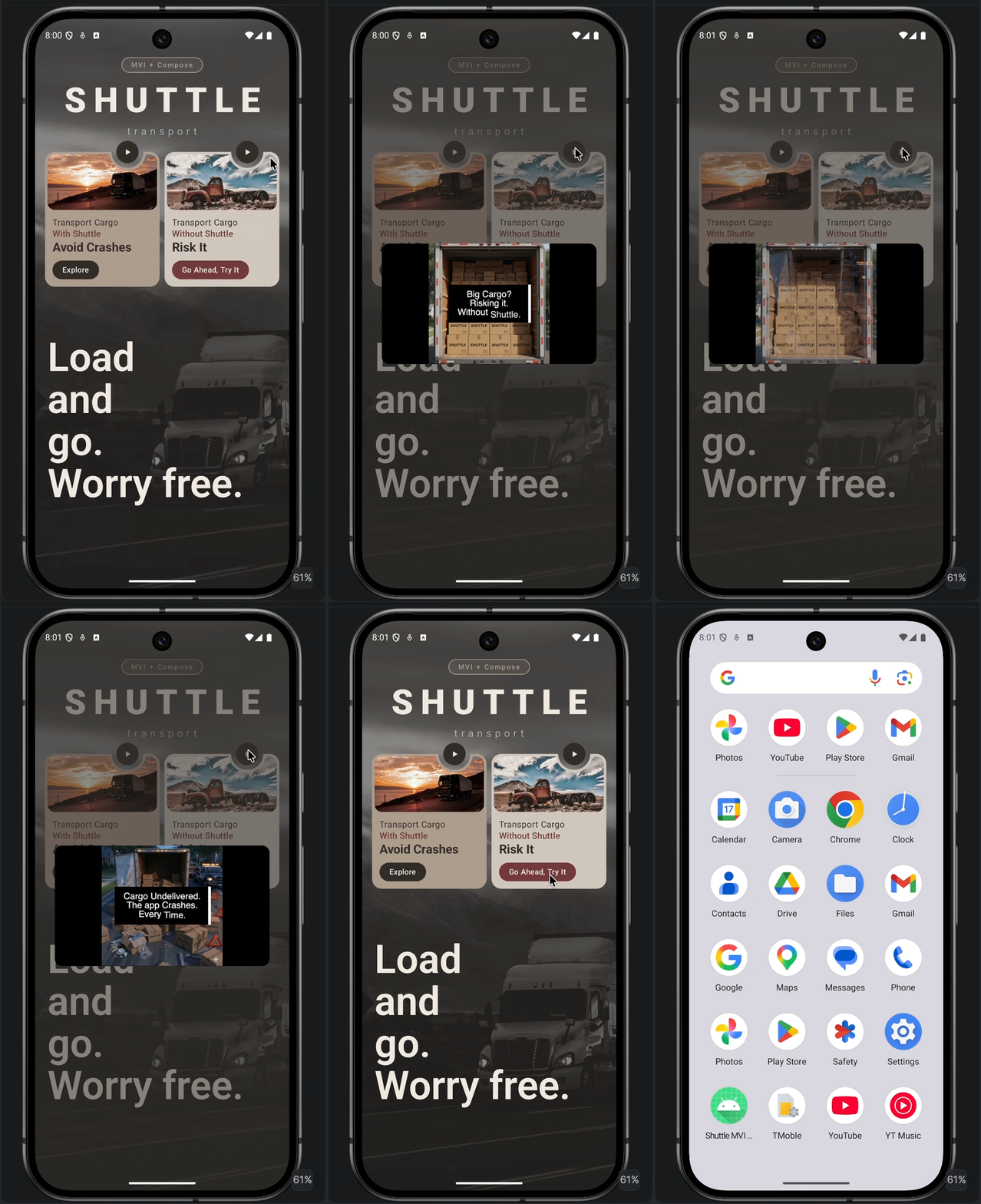
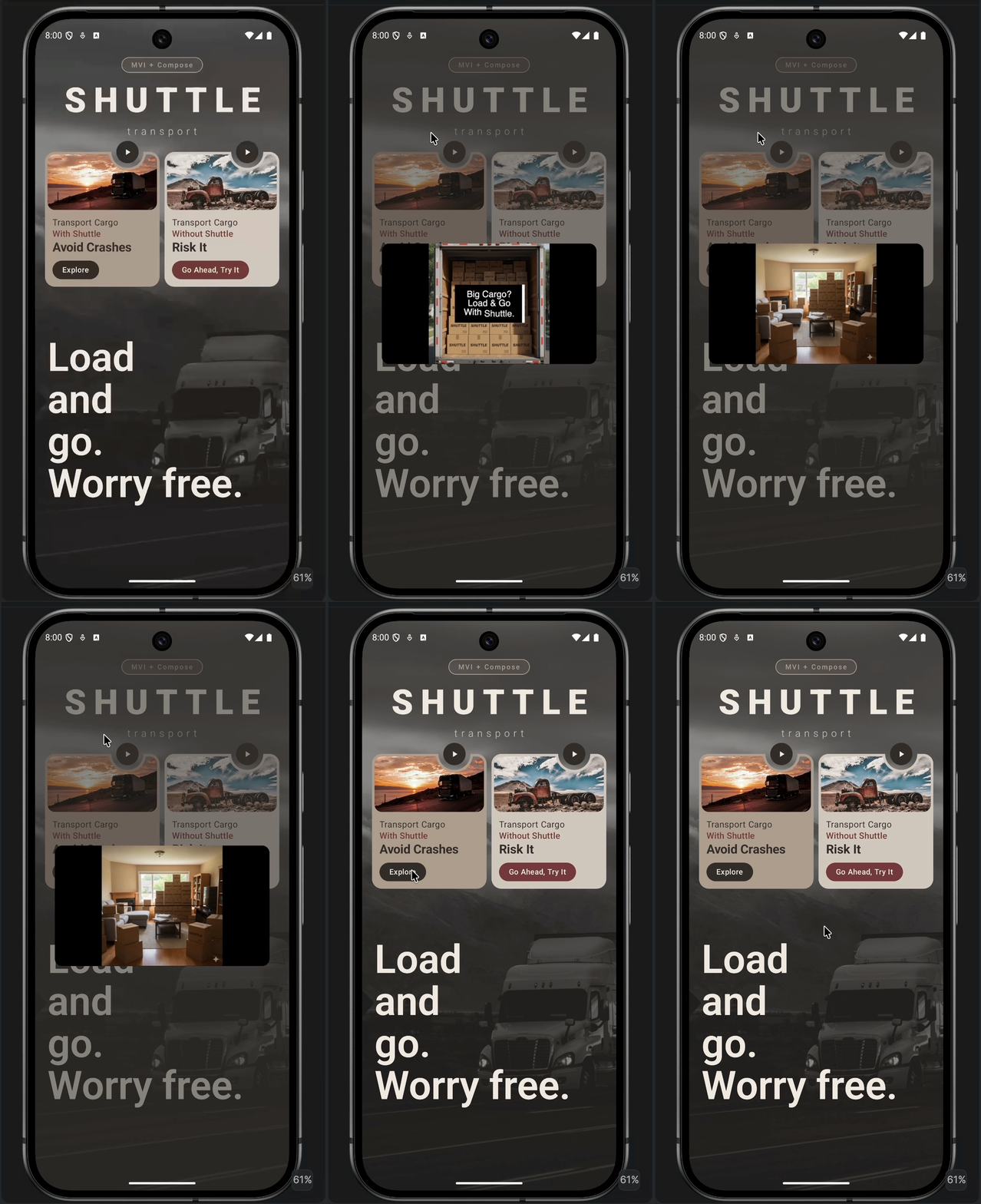
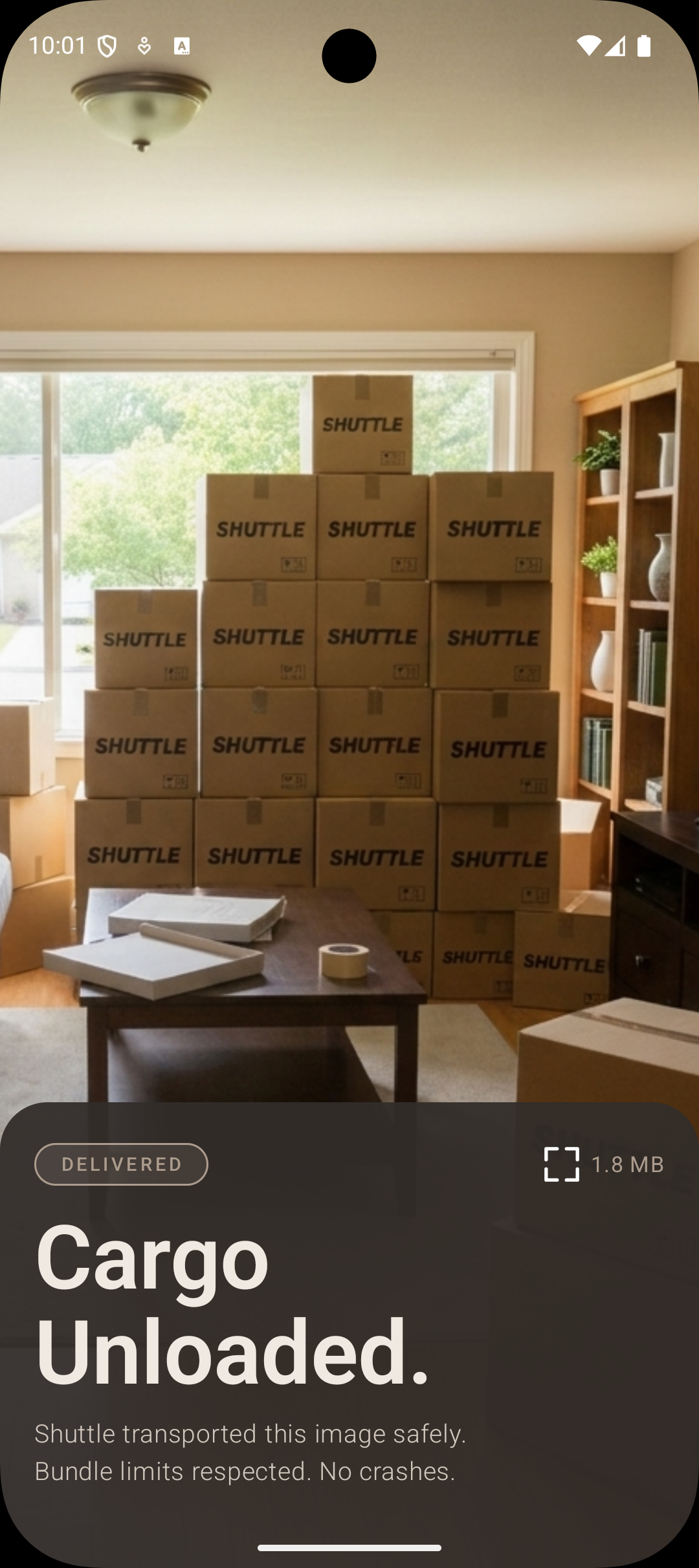
Tap **"Navigate Normally"** -> app crashes with `TransactionTooLargeException`.
| Main Menu | After Crash |
|---|--------------------------------------------------------------------------------|
| |
|
### Flow 2: Navigate Normally ❌
Tap **"Navigate Normally"** -> app crashes with `TransactionTooLargeException`.
| Main Menu | After Crash |
|---|--------------------------------------------------------------------------------|
| |  |
> ℹ️ For image loading in production, use [Glide](https://github.com/bumptech/glide) or [Coil](https://github.com/coil-kt/coil). The demo uses raw image data intentionally to trigger the crash condition.
---
## ⚠️ Heads Up: Know the Tradeoffs
**Other `Parcelable` objects in the same `Intent` can still crash your app.** Shuttle protects the `Serializable` payload. It doesn't protect unrelated Parcelable data you're also passing.
**`Serializable` is slower than `Parcelable`.** Parcelable is optimized for IPC and faster to load, but it's unsafe for disk storage. Google recommends serialization for persistence, which is why Shuttle uses it. The LCE state pattern (loading state) gives your UI the hook it needs to handle the slightly longer load time gracefully.
These are documented tradeoffs, not bugs. Architecture is always about weighing options. This one is worth it.
---
## 🤖 AI
### Model Context Protocol (MCP)
The [Model Context Protocol](https://modelcontextprotocol.io) is an open standard that lets AI assistants connect to external tools and data sources. Rather than relying solely on training data, an MCP-enabled assistant can call live tools the moment you need them, generating accurate boilerplate, analysing your actual code, and returning up-to-date documentation without ever leaving your editor.
Shuttle publishes an MCP server to the [MCP Registry](https://registry.modelcontextprotocol.io), which means any developer can point their MCP-compatible editor at it and get Shuttle expertise inside their own project, without cloning or opening this repo. Your AI assistant can scaffold a complete Shuttle integration with ready-to-paste Kotlin boilerplate for Hilt, Koin, or manual wiring; detect `TransactionTooLargeException` risk in any Kotlin or Java snippet you paste; and retrieve the authoritative Shuttle spec on demand, covering core concepts, setup, transport, pickup, cleanup, and annotations.
For teams, this is the governance multiplier that code review alone cannot be. Every developer, regardless of experience level or editor preference, gets the same accurate, up-to-date guidance on integration patterns and risk from day one.
See the [MCP README file](https://github.com/grarcht/Shuttle/blob/HEAD/mcp/README.md) for the full list of supported editors and the verification checklist.
---
## 🤝 Contributing
Pull requests are welcome. Check the [Contributing Guide](https://github.com/grarcht/Shuttle/blob/HEAD/CONTRIBUTING.md) and [Code of Conduct](https://github.com/grarcht/Shuttle/blob/HEAD/CODE_OF_CONDUCT.md) before opening one.
1. Fork the repo
2. Create a feature branch: `git checkout -b feature/my-feature`
3. Commit your changes: `git commit -m 'Add: my feature'`
4. Push the branch: `git push origin feature/my-feature`
5. Open a Pull Request
For bugs and feature requests, [open an issue](https://github.com/grarcht/Shuttle/issues).
---
## 📄 License
MIT. See [LICENSE.md](https://github.com/grarcht/Shuttle/blob/HEAD/LICENSE.md) for full terms.
Copyright © 2023 Craft & Graft LLC · GRARCHT ™ 2021
---
|
> ℹ️ For image loading in production, use [Glide](https://github.com/bumptech/glide) or [Coil](https://github.com/coil-kt/coil). The demo uses raw image data intentionally to trigger the crash condition.
---
## ⚠️ Heads Up: Know the Tradeoffs
**Other `Parcelable` objects in the same `Intent` can still crash your app.** Shuttle protects the `Serializable` payload. It doesn't protect unrelated Parcelable data you're also passing.
**`Serializable` is slower than `Parcelable`.** Parcelable is optimized for IPC and faster to load, but it's unsafe for disk storage. Google recommends serialization for persistence, which is why Shuttle uses it. The LCE state pattern (loading state) gives your UI the hook it needs to handle the slightly longer load time gracefully.
These are documented tradeoffs, not bugs. Architecture is always about weighing options. This one is worth it.
---
## 🤖 AI
### Model Context Protocol (MCP)
The [Model Context Protocol](https://modelcontextprotocol.io) is an open standard that lets AI assistants connect to external tools and data sources. Rather than relying solely on training data, an MCP-enabled assistant can call live tools the moment you need them, generating accurate boilerplate, analysing your actual code, and returning up-to-date documentation without ever leaving your editor.
Shuttle publishes an MCP server to the [MCP Registry](https://registry.modelcontextprotocol.io), which means any developer can point their MCP-compatible editor at it and get Shuttle expertise inside their own project, without cloning or opening this repo. Your AI assistant can scaffold a complete Shuttle integration with ready-to-paste Kotlin boilerplate for Hilt, Koin, or manual wiring; detect `TransactionTooLargeException` risk in any Kotlin or Java snippet you paste; and retrieve the authoritative Shuttle spec on demand, covering core concepts, setup, transport, pickup, cleanup, and annotations.
For teams, this is the governance multiplier that code review alone cannot be. Every developer, regardless of experience level or editor preference, gets the same accurate, up-to-date guidance on integration patterns and risk from day one.
See the [MCP README file](https://github.com/grarcht/Shuttle/blob/HEAD/mcp/README.md) for the full list of supported editors and the verification checklist.
---
## 🤝 Contributing
Pull requests are welcome. Check the [Contributing Guide](https://github.com/grarcht/Shuttle/blob/HEAD/CONTRIBUTING.md) and [Code of Conduct](https://github.com/grarcht/Shuttle/blob/HEAD/CODE_OF_CONDUCT.md) before opening one.
1. Fork the repo
2. Create a feature branch: `git checkout -b feature/my-feature`
3. Commit your changes: `git commit -m 'Add: my feature'`
4. Push the branch: `git push origin feature/my-feature`
5. Open a Pull Request
For bugs and feature requests, [open an issue](https://github.com/grarcht/Shuttle/issues).
---
## 📄 License
MIT. See [LICENSE.md](https://github.com/grarcht/Shuttle/blob/HEAD/LICENSE.md) for full terms.
Copyright © 2023 Craft & Graft LLC · GRARCHT ™ 2021
---