# secrets-le [Health: Active]
**Category:** 🔒 Security
**Repository:** https://github.com/nolindnaidoo/secrets-le
**GitHub Stars:** 1
**Views:** 0
**Installs:** 0
**Upvotes:** 0
**Directory Page:** https://allmcps.com/mcp/secrets-le
## Description
Detect hardcoded secrets in source and config. Reports masked previews, never the values.
## Claude Desktop Quick Installation
Install path detected from listing signals. Uses `npx` (confidence: high):
```json
"mcpServers": {
"secrets-le": {
"command": "npx",
"args": ["-y","secrets-le-mcp"]
}
}
```
## Documentation & README

Secrets-LE: Zero Hassle Secret Detection
Find hardcoded credentials across your workspace, then redact them in place
API keys, tokens, passwords, private keys — 100% local, nothing leaves your machine




---
> **Useful?** A star or rating is how other developers find it —
> [★ GitHub](https://github.com/nolindnaidoo/secrets-le) ·
> [★ Open VSX](https://open-vsx.org/extension/OffensiveEdge/secrets-le/reviews) ·
> [★ Marketplace](https://marketplace.visualstudio.com/items?itemName=nolindnaidoo.secrets-le&ssr=false#review-details)
## What it does
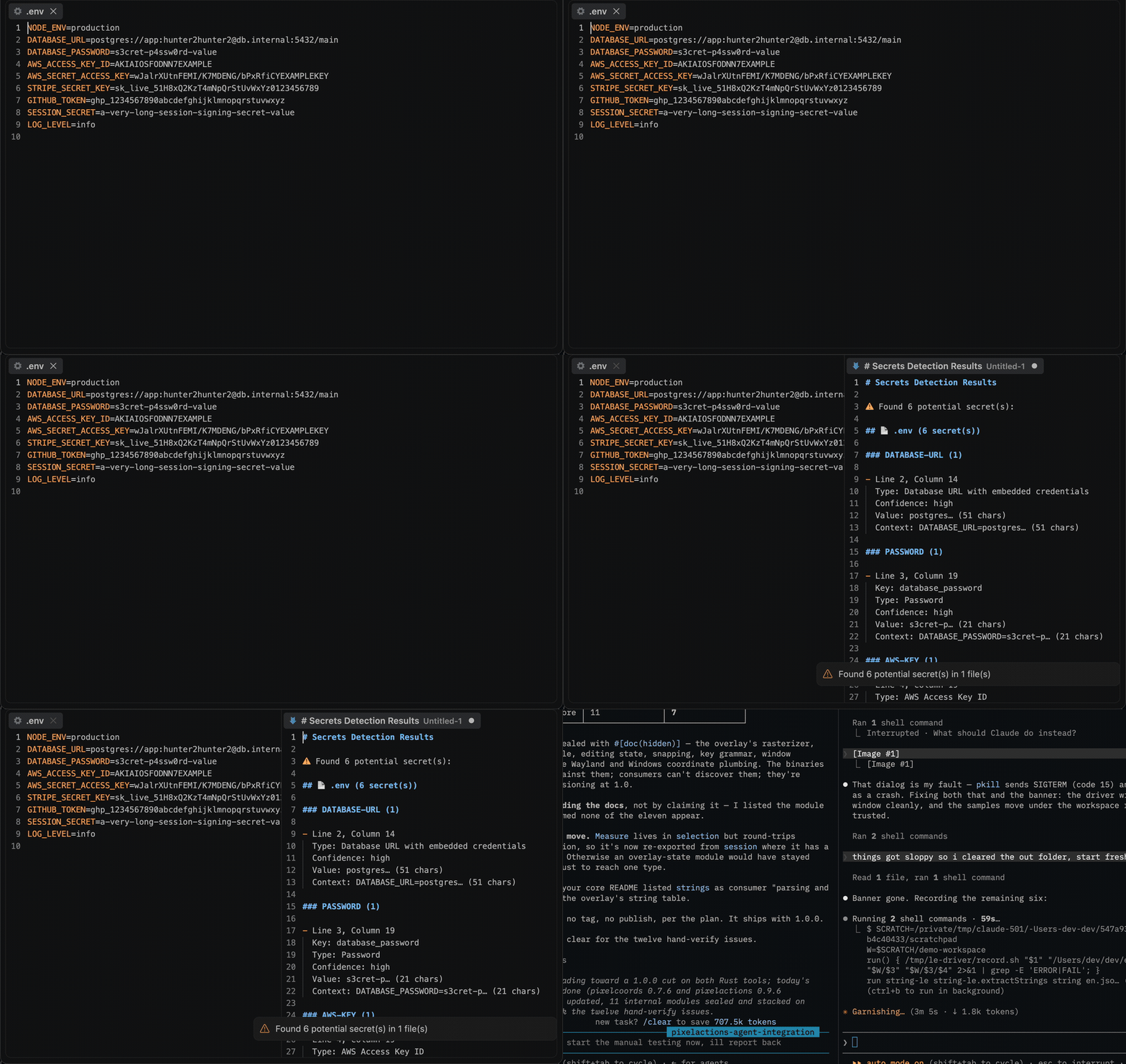
Open a workspace, press `Ctrl+Alt+S` (`Cmd+Alt+S` on Mac), and every detected secret lands in a results document — grouped by file, with line/column positions pointing at the value itself. Run `Secrets-LE: Sanitize Secrets` to replace the secrets in the active file with a placeholder. Works in VS Code and in VS Code–based editors like Cursor and VSCodium (installable from Open VSX).
Detection is regex-based over the full text of each file, so it works on any text format — code, configs, `.env` files, YAML, JSON, logs. It is a pre-commit safety net, not a guarantee: a scanner built on patterns can miss secrets and can flag non-secrets. Review the results.
## Install
| Where | What you get | Install |
|---|---|---|
| **VS Code** | Detection and in-place sanitising, in your editor | [Marketplace](https://marketplace.visualstudio.com/items?itemName=nolindnaidoo.secrets-le) |
| **Cursor, VSCodium, Windsurf** | The same extension | [Open VSX](https://open-vsx.org/extension/OffensiveEdge/secrets-le) |
| **A terminal or a CI step** | The same run over a whole tree, with exit codes | `cargo install secrets-le` · [crates.io](https://crates.io/crates/secrets-le) |
| **Any MCP agent, via Node** | `detect_secrets` over stdio | `npx secrets-le-mcp` · [npm](https://www.npmjs.com/package/secrets-le-mcp) |
| **Zed** | The MCP server as a context server | [add it by hand](https://zed.dev/docs/ai/mcp) *(no listing yet)* |
## Use it from an AI agent
The same engine runs as an [MCP](https://modelcontextprotocol.io) server, so an agent can call it directly instead of you running a command.
| Editor | How |
|---|---|
| **VS Code** 1.101+ | Nothing to install — the extension registers `detect_secrets` with agent mode |
| **Zed** | No listing yet — [add the MCP server by hand](https://zed.dev/docs/ai/mcp) |
| **Claude Code** | `claude mcp add secrets-le -- npx -y secrets-le-mcp` |
| **Cursor, Windsurf, anything else** | point it at `npx secrets-le-mcp` |
```
detect_secrets(content, sensitivity?, includeApiKeys?, includePasswords?, includeTokens?, includePrivateKeys?, maxResults?)
```
Reports each finding by type, confidence, key name and 1-based position. **Values are never returned** — previews are truncated and length-annotated, and the context line has the secret masked out, so a finding can be located without the credential leaving the machine it was found on.
The server takes content and returns data — it reads no files and makes no network requests of its own. Published as [`secrets-le-mcp`](https://www.npmjs.com/package/secrets-le-mcp) on npm and as `io.github.nolindnaidoo/secrets-le` in the [MCP registry](https://registry.modelcontextprotocol.io).
Configuring it by hand — any host with an MCP config file
Most hosts read a JSON config. Add one entry:
```json
{
"mcpServers": {
"secrets-le": {
"command": "npx",
"args": ["-y", "secrets-le-mcp"]
}
}
}
```
`-y` skips the install prompt on first run. Pin a version if you would rather not track releases — `secrets-le-mcp@2.3.1`.
Prefer not to go through `npx` on every launch? Install it once and point at the binary instead:
```bash
npm install -g secrets-le-mcp
```
```json
{
"mcpServers": {
"secrets-le": { "command": "secrets-le-mcp" }
}
}
```
It speaks MCP over stdio and needs no environment variables, no API key and no configuration of its own. To check it before wiring it into anything:
```bash
echo '{"jsonrpc":"2.0","id":1,"method":"tools/list"}' | npx -y secrets-le-mcp
```
That prints the tool list and exits — if you see `detect_secrets`, the server works.
## The CLI
The same detection runs from a terminal or a CI step: a Rust CLI in
[`crate/`](https://github.com/nolindnaidoo/secrets-le/blob/HEAD/crate/README.md), sharing one pattern table with the extension
— [`crate/signatures/patterns.toml`](https://github.com/nolindnaidoo/secrets-le/blob/HEAD/crate/signatures/patterns.toml) —
so the two can never disagree about what counts as a credential.
```bash
secrets-le . # scan a tree
secrets-le --sensitivity high . # only high-confidence findings
secrets-le --no-ignore --hidden . # reach .env and everything git ignores
secrets-le mcp # the same detection over MCP on stdio
```
The exit code is the answer: **0 nothing found · 1 findings · 2 the
question was malformed** — so `secrets-le .` is a CI step as it stands.
**It never prints a credential.** A scanner's output goes into a CI log,
which is archived, often world-readable, and outlives the secret; a
scanner that printed what it found would disclose it more widely than
the commit would have. Previews are capped at eight characters *and* at
half the value's length, context lines are masked, and there is no flag
that changes either. The extension is the half that can *fix* what it
finds; the binary only reports.
## What gets detected
Thirty-four patterns, in `crate/signatures/patterns.toml` — the one table
both frontends load.
| Category | Types |
|---|---|
| Named issuers | Anthropic `sk-ant-`, OpenAI `sk-`/`sk-proj-`, GitHub `ghp_`/`github_pat_`, GitLab, Slack `xox?-`, Stripe `sk_live_`/`sk_test_`, Google `AIza…`, SendGrid, Mailgun, Sentry, npm, PyPI, Docker Hub, HashiCorp Vault, Terraform Cloud, Supabase, Shopify, Square, Azure SAS |
| Cloud credentials | AWS Access Key IDs (`AKIA…`, no key name needed), AWS Secret Access Keys, Azure account keys, GCP/Google Cloud keys |
| Tokens | Generic tokens, bearer tokens, access/refresh tokens, OAuth tokens, JWTs (key-based or bare `eyJ…` form) |
| Passwords | `password`/`passwd`/`pwd` values, including compound keys (`DATABASE_PASSWORD`) |
| Private keys | Multi-line PEM blocks — RSA/EC, OpenSSH, PGP |
| Connection data | Database URLs with embedded `user:pass@` credentials, connection strings, session IDs, cookies |
Key-based patterns accept quoted and unquoted keys, so JSON (`"apiKey": "…"`), YAML (`api_key: …`), env (`API_KEY=…`), and code (`apiKey = '…'`) all match.
**Intentional non-detections**: template placeholders (`${VAR}`, `{{var}}`, ``, `xxxxxxxx`), version numbers and hostnames that merely look dotted (`1.2.3` is not a JWT), GCP project ids (identifiers, not credentials), and database URLs without embedded credentials.
**Known limitations**: detection is pattern-based — obfuscated, split, or unconventionally named secrets are missed; JWTs whose header isn't standard base64 JSON (`eyJ…`) are missed; a high-entropy string without a recognizable key name or prefix is not reported.
## Commands
| Command | Description |
|---|---|
| `Secrets-LE: Detect Secrets` (`Ctrl+Alt+S` / `Cmd+Alt+S`) | Scan the workspace and open a results document |
| `Secrets-LE: Sanitize Secrets` | Replace detected secrets in the active file (asks for confirmation first) |
| `Secrets-LE: Open Settings` | Open Secrets-LE settings |
| `Secrets-LE: Help` | Built-in documentation |
## Settings
| Setting | Default | Description |
|---|---|---|
| `secrets-le.detection.sensitivity` | `medium` | `low` reports everything, `medium` drops low-confidence matches, `high` keeps only high-confidence ones |
| `secrets-le.detection.includeApiKeys` | `true` | Detect API keys and cloud credentials |
| `secrets-le.detection.includePasswords` | `true` | Detect passwords |
| `secrets-le.detection.includeTokens` | `true` | Detect tokens and JWTs |
| `secrets-le.detection.includePrivateKeys` | `true` | Detect PEM private-key blocks |
| `secrets-le.sanitization.replaceWith` | `***REDACTED***` | Replacement text used by Sanitize |
| `secrets-le.workspace.scanPatterns` | `["**/*"]` | Glob patterns to scan |
| `secrets-le.workspace.scanExcludes` | node_modules, .git, dist, … | Glob patterns to skip |
| `secrets-le.workspace.scanMaxFiles` | `10000` | Cap on files scanned per run |
| `secrets-le.safety.enabled` | `true` | Guardrails for very large files |
| `secrets-le.safety.fileSizeWarnBytes` | `1000000` | Skip/refuse files above this size |
| `secrets-le.dedupeEnabled` | `false` | Collapse identical value+type detections in results |
| `secrets-le.copyToClipboardEnabled` | `false` | Also copy results to the clipboard |
| `secrets-le.openResultsSideBySide` | `true` | Open results beside the current editor |
| `secrets-le.notificationsLevel` | `important` | `all` = every notification, `important` = warnings + errors, `silent` = errors only |
| `secrets-le.statusBar.enabled` | `true` | Show the status bar item |
| `secrets-le.telemetryEnabled` | `false` | Local-only event log (see Privacy) |
## Languages
Twelve languages besides English:
German · Spanish · French · Indonesian · Italian · Japanese · Korean ·
Portuguese (Brazil) · Russian · Ukrainian · Vietnamese · Chinese (Simplified)
Both halves are covered — the manifest (command titles, setting names and
descriptions) and everything shown while the extension runs (notifications,
the status bar, quick-picks and prompts). The extension follows VS Code's
display language, so it matches whatever the editor is already set to; no
setting of its own.
## Privacy & security
- **No network access.** The extension never sends data anywhere. The `telemetryEnabled` setting only writes events to a local Output Channel you can inspect (`Secrets-LE Telemetry`).
- **The MCP server never returns a secret.** Its output goes to whatever model called it, so previews are truncated and length-annotated and the surrounding context line is masked, using the same `utils/mask` helpers as the report. There is no argument that turns this off, and the bundle gate fails the build if a value ever appears in a response — verified by making the tool leak on purpose and watching the gate catch it.
- Error notifications redact home directories and credential-shaped fragments before display.
- Sanitize always asks for confirmation before editing your file, and edits are normal undo-able document edits.
## Documentation
| What | Where |
|---|---|
| What the tool is allowed to say — scope, output contract, refusals, non-goals | [`crate/SPEC.md`](https://github.com/nolindnaidoo/secrets-le/blob/HEAD/crate/SPEC.md) |
| How the extension is built and held together — architecture, invariants, toolchain, release | [AGENTS.md](https://github.com/nolindnaidoo/secrets-le/blob/HEAD/AGENTS.md) |
| How the CLI is built and held together | [`crate/AGENTS.md`](https://github.com/nolindnaidoo/secrets-le/blob/HEAD/crate/AGENTS.md) |
| What changed | [CHANGELOG.md](https://github.com/nolindnaidoo/secrets-le/blob/HEAD/CHANGELOG.md) · [`crate/CHANGELOG.md`](https://github.com/nolindnaidoo/secrets-le/blob/HEAD/crate/CHANGELOG.md) |
| The tool's page, and the other fifteen | [letools.dev/tools/secrets-le](https://letools.dev/tools/secrets-le) |
## Performance
| Input | Size | Found | Time | Rate | Scan speed |
| --- | --- | --- | --- | --- | --- |
| Source with credentials | 1.97 MB | 40,000 | 132.32 ms | 302,301/sec | 14.9 MB/s |
| Clean source | 1.92 MB | 0 | 70.88 ms | — | 27.2 MB/s |
| Env file | 0.60 MB | 0 | 21.88 ms | — | 27.4 MB/s |
Median of 7 runs after warmup, on Apple M5 Pro, 24 GB RAM, Node 24.3.0. Inputs are generated
by `scripts/benchmark.ts` rather than checked in, so the sizes above are
exactly what was measured. Reproduce with `bun run benchmark`.
These are machine-specific and are not asserted in CI — a benchmark that gates
a build only tells you how busy the runner was.
## Testing
| Metric | Coverage |
| --- | --- |
| Statements | 91.03% |
| Branches | 79.75% |
| Functions | 95.90% |
| Lines | 91.89% |
248 test cases across 15 files, plus an integration suite that runs
in a real VS Code extension host and an end-to-end test that installs the
built `.vsix` into a clean profile.
Generated from a real run — `coverage/coverage-summary.json` and
`coverage/test-results.json` — by `scripts/coverage-readme.js`; CI fails if
this section drifts. Reproduce with `bun run test:coverage`, and the case
count is the one vitest prints.
## More from the LE family
Sixteen single-purpose tools for the work in front of every model. Each ships
a Rust CLI and an MCP server. One page: **[letools.dev](https://letools.dev)**
**Get it out**
- **[String-LE](https://letools.dev/tools/string-le)** — Extract every string in a codebase, with its position, so a person can read them
- **[Numbers-LE](https://letools.dev/tools/numbers-le)** — Extract every hardcoded number in a codebase, so a person can check them
- **[Units-LE](https://letools.dev/tools/units-le)** — Extract every quantity with its unit, normalized, and refuse the ambiguous ones by name
- **[Dates-LE](https://letools.dev/tools/dates-le)** — Extract every date and timestamp, and the exact instant each one resolves to
- **[IDs-LE](https://letools.dev/tools/ids-le)** — Extract every UUID, ULID, NanoID, ObjectId and Snowflake, and decode the time inside
- **[IPs-LE](https://letools.dev/tools/ips-le)** — Extract every IP address, CIDR block and MAC, normalized and classified by scope
- **[URLs-LE](https://letools.dev/tools/urls-le)** — Extract every URL in a codebase, with its protocol and exact position
- **[Paths-LE](https://letools.dev/tools/paths-le)** — Extract every file path in a codebase, and say whether it still points at anything
- **[Colors-LE](https://letools.dev/tools/colors-le)** — Extract every color in a codebase, and say which ones are not in your palette
**Check it**
- **[Regex-LE](https://letools.dev/tools/regex-le)** — Find every regex in a codebase, and report which can be driven into catastrophic backtracking
- **[Versions-LE](https://letools.dev/tools/versions-le)** — Find where one dependency is constrained differently across a repository's manifests
- **[i18n-LE](https://letools.dev/tools/i18n-le)** — Identify the i18n library a project uses, then audit its catalogs by that library's rules
- **[Scrape-LE](https://letools.dev/tools/scrape-le)** — Check whether a page is scrapeable before the scraper is written, and say when it cannot tell
**Guard it**
- **[Secrets-LE](https://letools.dev/tools/secrets-le)** — Find hardcoded credentials in a codebase, and never print one into the report
- **[EnvSync-LE](https://letools.dev/tools/envsync-le)** — Compare the dotenv files in a tree, and say which keys are missing from which
- **[Unicode-LE](https://letools.dev/tools/unicode-le)** — Find the Unicode that hides meaning — bidi controls, invisibles, homoglyphs, mixed scripts
Each stands on its own: no shared crate, no published core. Where two of them
agree, it is because the same answer was right twice.
**Contact** — [nolindnaidoo.com](https://nolindnaidoo.com) · [GitHub](https://github.com/nolindnaidoo) · [LinkedIn](https://www.linkedin.com/in/nolindnaidoo/)
## Also by nolindnaidoo
**Rust** — pixelcoords and pixelactions are one loop: pixelcoords answers
*where*, pixelactions *acts* there. Their own tools, their own voice — not
part of the LE family.
- **[pixelcoords](https://github.com/nolindnaidoo/pixelcoords)** — Freeze your screen, mark regions, get pixel-exact coordinates and crops
[pixelcoords.dev](https://pixelcoords.dev) · [crates.io](https://crates.io/crates/pixelcoords) · [docs.rs](https://docs.rs/pixelcoords)
- **[pixelactions](https://github.com/nolindnaidoo/pixelactions)** — Consume human-verified coordinates, perform the interaction, confirm it landed
[pixelactions.dev](https://pixelactions.dev) · [crates.io](https://crates.io/crates/pixelactions) · [docs.rs](https://docs.rs/pixelactions)
## License
MIT © [nolindnaidoo](https://github.com/nolindnaidoo)