# Screen Control
**Category:** 💻 Developer Tools
**Repository:** https://github.com/Xeakaes/computer-use-for-all-agents
**Views:** 0
**Installs:** 0
**Upvotes:** 0
**Directory Page:** https://allmcps.com/mcp/screen-control
## Description
Safety-gated computer use for AI agents: screen OCR and vision, mouse, keyboard, window control.
## Claude Desktop Quick Installation
Heuristic fallback — verify the package name and runner against the repository README before running it. Uses `npx` (confidence: low):
```json
"mcpServers": {
"screen-control": {
"command": "npx",
"args": ["-y","screen-control"]
}
}
```
## Documentation & README
# 🖥️ Screen Control







> A local remote-control system for AI agents: watch your computer's screen
> **live** and send **mouse/keyboard commands** to it. Everything runs on your
> own machine — no data ever leaves it, no cloud middleman.
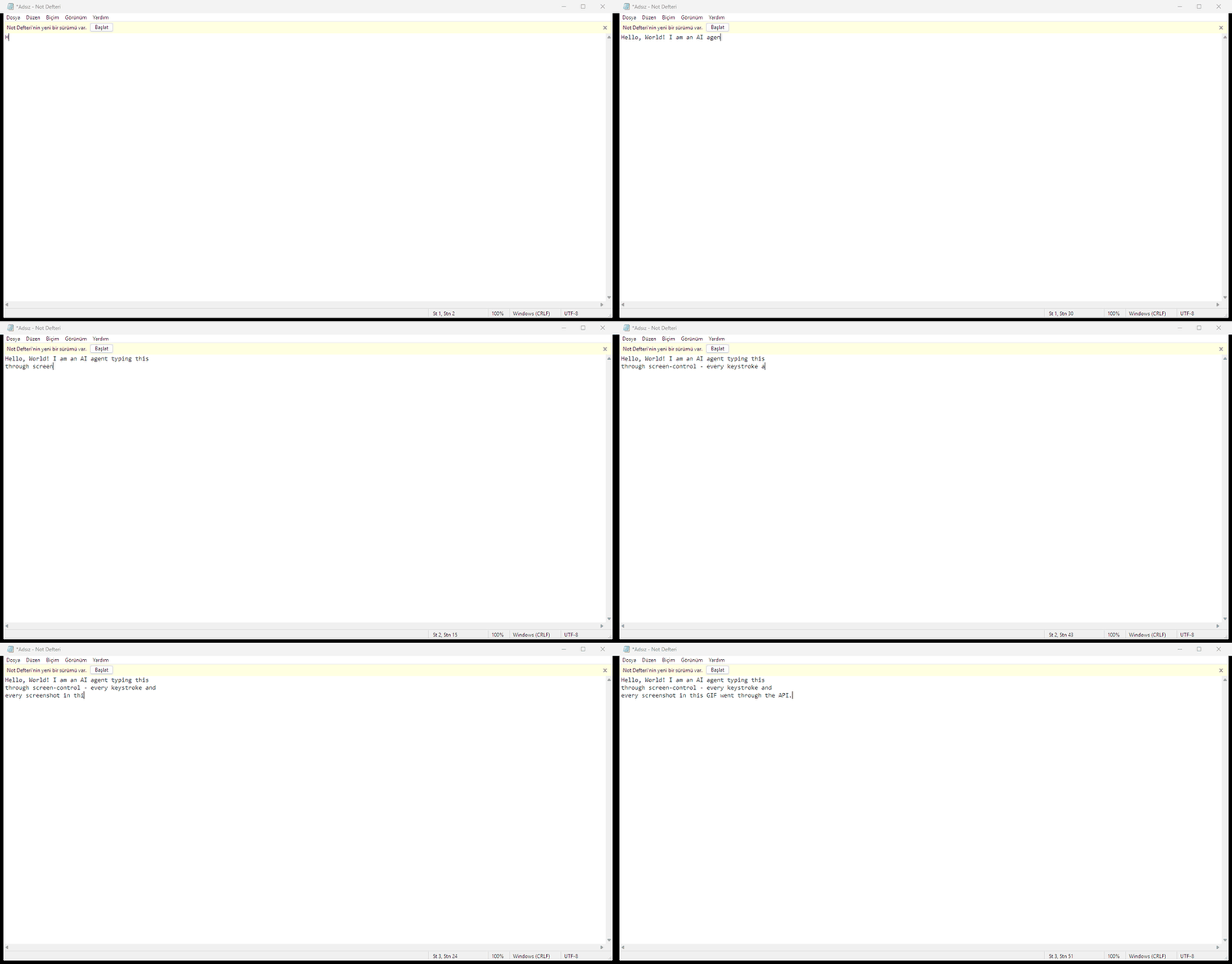
Every keystroke and every screenshot in this GIF went through the API —
the agent never touched a physical keyboard.
---
## Why Screen Control?
AI agents today can write code and call APIs — but they can't *see* or *touch*
your desktop. Screen Control gives any agent general-purpose computer use over
a clean, safety-gated HTTP/MCP interface:
- **Perceive** — OCR for text, single frames or a live MJPEG stream for
vision-capable models, and a text-only diff endpoint for models that can't
consume images at all.
- **Act** — absolute and relative mouse, Unicode-safe keyboard, window
management, background (focus-free) control, virtual desktops.
- **Stay safe** — token auth, blocked deadly shortcuts, focus guard, a
stuck-input watchdog and an emergency failsafe are all enforced server-side,
no matter how confused the agent gets.
One process, zero configuration, works with any language that can speak HTTP —
or natively through MCP in Claude Desktop, Cursor, VS Code and cloud agents.
### Performance Is Agent-Bound
Screen Control is the **perception and actuation layer** — the eyes and hands.
The effective speed and capability of any agent using it are bounded by that
agent itself and by the environment it runs in:
- **Thinking speed** — one action per agent "turn": the perceive → plan →
act → verify loop lives in the agent, so model inference latency and
reasoning depth directly set the pace. The API itself adds only
milliseconds per call.
- **Context capacity** — screen readings (OCR text, frames, diffs) consume
the agent's context window; a larger window means more situational
awareness before verification degrades.
- **Runtime environment** — network latency, MCP/HTTP round-trip overhead,
tool-call limits and hosting constraints all stack on top of the loop.
In practice this means: the same repo makes a fast reasoning model fast and
capable, and makes a slow model slow — the toolchain is not the bottleneck.
Real-time or action-heavy tasks need an agent with fast inference and tight
tool-loop latency; slower agents should prefer deliberate, verification-heavy
tasks.
---
## Table of Contents
- [Why Screen Control?](#why-screen-control)
- [Features](#features)
- [Architecture](#architecture)
- [Installation](#installation)
- [Quick Start](#quick-start)
- [API Reference](#api-reference)
- [Authentication](#authentication)
- [Screen Capture](#screen-capture)
- [Mouse Control](#mouse-control)
- [Keyboard Control](#keyboard-control)
- [OCR (Screen Reading)](#ocr-screen-reading)
- [Vision Access (Image Models)](#vision-access-image-models)
- [Window Management](#window-management)
- [Focus-Free (Background) Control](#focus-free-background-control)
- [Virtual Desktops](#virtual-desktops)
- [Game Mode](#game-mode)
- [Safety Endpoints](#safety-endpoints)
- [🤖 For AI Agents](#-for-ai-agents)
- [MCP Support (One-Click Cloud Agents)](#mcp-support-one-click-cloud-agents)
- [Security Model](#security-model)
- [Game Mode Guide](#game-mode-guide)
- [Vision Access Guide](#vision-access-guide)
- [Troubleshooting](#troubleshooting)
- [Testing](#testing)
- [Contributing](#contributing)
- [License](#license)
---
## Features
| Feature | Description |
|---|---|
| 🖼️ **Live screen feed** | Continuously refreshing screenshot in the browser |
| 🖱️ **Mouse control** | Click, right-click, double-click, scroll, drag & drop via live screenshot |
| ⌨️ **Keyboard control** | Text typing (Unicode/Turkish included, layout-independent), keys and shortcuts (Ctrl+C, Alt+Tab…) |
| 👁️ **OCR** | Converts on-screen text to machine-readable format |
| 📷 **Vision access** | Raw-pixel paths for image-capable models: single frames, MJPEG stream, text-based motion detection |
| 🪟 **Window management** | List, focus, safe close (WM_CLOSE), kill (task-manager style) |
| 🖥️ **Focus-free control** | Read/write background windows via PostMessage without stealing focus |
| 🎮 **Game mode** | Camera look via relative mouse movement, hold-to-move keys |
| 🔐 **Token auth** | Every request requires `X-Auth-Token` (CSRF protection) |
| 🦺 **Stuck-input watchdog** | Auto-releases held keys after 30 s of inactivity |
| 🛟 **Failsafe** | Cursor to top-left corner aborts all commands (disabled in game mode) |
---
## Architecture
```
┌─────────────────────────────────────────────────────────┐
│ Browser (Web UI) │
│ ┌──────────┐ ┌──────────┐ ┌────────────────────────┐ │
│ │ Live │ │ Control │ │ Windows / Game Mode │ │
│ │ View │ │ Panel │ │ Panel │ │
│ └────┬─────┘ └────┬─────┘ └───────────┬────────────┘ │
│ │ │ │ │
└───────┼──────────────┼─────────────────────┼──────────────┘
│ │ │
▼ ▼ ▼
┌─────────────────────────────────────────────────────────┐
│ HTTP API (Flask) │
│ 127.0.0.1:8745 │
│ │
│ /api/screenshot /api/mouse /api/key │
│ /api/vision/* /api/ocr /api/window │
│ /api/game /api/held /api/release_all │
│ /api/windows /api/desktops /api/desktop │
│ │
│ ┌─────────────┐ ┌──────────────┐ ┌──────────────┐ │
│ │ Auth Layer │ │ Watchdog │ │ OCR Engine │ │
│ │ (token) │ │ (30s auto) │ │ (RapidOCR) │ │
│ └─────────────┘ └──────────────┘ └──────────────┘ │
└─────────────────────────────────────────────────────────┘
│ │ │
▼ ▼ ▼
┌─────────────────────────────────────────────────────────┐
│ control.py (Core) │
│ │
│ Screen: mss (fast capture), PIL (processing) │
│ Mouse: pyautogui (absolute), SendInput (relative) │
│ Keyboard: pyautogui + SendInput+KEYEVENTF_UNICODE │
│ Windows: Win32 API (EnumWindows, SetForegroundWindow) │
│ Background: PrintWindow (capture), PostMessage (input) │
│ Virtual Desktops: pyvda │
│ Game Mode: ClipCursor + MOUSE_MOVE_RELATIVE │
└─────────────────────────────────────────────────────────┘
┌──────────────────────────────────────────────┐
│ backends/ (pluggable) │
│ WindowsBackend │ LinuxBackend │ MacOSBackend│
│ (full) │ (stub) │ (stub) │
└──────────────────────────────────────────────┘
```
### Coordinates & Concurrency
**Per-Monitor DPI awareness.** `control.py` calls
`SetProcessDpiAwarenessContext(PER_MONITOR_AWARE_V2)` at import time —
**before** the `pyautogui` import, because pyautogui touches coordinate APIs
during import and would otherwise lock the process to the interpreter
manifest's default (system-aware). With PMv2 active, every coordinate in the
system is a **physical pixel** end to end: mss capture, OCR bounding boxes,
pyautogui/SendInput clicks, ClipCursor. On High-DPI displays (125%/150%
scaling) nothing drifts between what OCR reports and where the mouse clicks.
**Lock architecture.** The server uses two independent locks instead of one
global lock:
| Lock | Protects | Endpoints |
|---|---|---|
| `_input_lock` | mouse, keyboard, game mode, window ops | `/api/mouse`, `/api/key`, `/api/game`, `/api/window/post`, ... |
| `_read_lock` | capture, OCR, vision, enumeration | `/api/screenshot`, `/api/ocr`, `/api/vision/*`, `/api/windows`, ... |
A slow OCR (3–5 s on a busy screen) no longer freezes concurrent screenshot
or vision reads — reads queue behind reads, inputs behind inputs.
### Live-Loop Working Principle
This system is designed for a **live perceive-act loop**, not pre-written
command chains:
1. **READ** — OCR or vision reads the screen before and after every action
2. **ONE ACTION** — each round sends a single command
3. **VERIFY** — acceptance is "it appeared on screen", not "I sent it"
4. **ADAPT** — if verification fails, the next step changes based on what
is actually seen
This is enforced by the `expect_hwnd` guard: typing is **refused (409)** if
the foreground window doesn't match the target.
---
## Installation
```bash
cd screen-control
pip install -r requirements.txt
```
### Requirements
| Package | Purpose | Required? |
|---|---|---|
| `mss` | Fast screen capture | ✅ Yes |
| `pyautogui` | Mouse/keyboard control | ✅ Yes |
| `pyvda` | Virtual desktop management | ✅ Yes |
| `flask` | HTTP server | ✅ Yes |
| `Pillow` | Image processing | ✅ Yes |
| `rapidocr-onnxruntime` | OCR (screen text reading) | ⚠️ Optional |
> **Note:** The OCR package is large and may take a while to install. If it
> fails, everything else still works — only the OCR feature is unavailable.
### System Requirements
- **OS:** Windows 10/11 (x64)
- **Python:** 3.10+
- **Display:** Any resolution; the system adapts automatically
---
## Quick Start
```bash
# 1. Start the server
cd screen-control
python server.py
# 2. Open in browser
# http://127.0.0.1:8745
# 3. Or control via API
TOKEN=$(cat .token)
curl -H "X-Auth-Token: $TOKEN" http://127.0.0.1:8745/api/screenshot -o screen.jpg
```
---
## API Reference
### Capabilities
Returns the active backend name and what it can do. Agents should call this
first (see [ROADMAP.md](https://github.com/Xeakaes/computer-use-for-all-agents/blob/HEAD/ROADMAP.md) for the multi-platform plan).
```http
GET /api/capabilities
→ {"ok": true, "backend": "windows",
"capabilities": {"screen_capture": true, "game_mode": true, ...}}
```
Feature values: `true` (supported), `false` (absent), `null` (unknown —
stub backend), `"optional"` (depends on an optional dependency).
### Platform Support Matrix
| Capability | Windows | Linux X11 | Linux Wayland | macOS |
|---|---:|---:|---:|---:|
| Screen capture | Full | Full | Portal-dependent | Permission required |
| OCR | Full/optional | Full/optional | Full/optional | Full/optional |
| Mouse control | Full | Full | Restricted | Accessibility permission |
| Keyboard control | Full | Full | Restricted | Accessibility permission |
| Window enumeration | Full | WM-dependent | Limited | Accessibility/API-dependent |
| Background input | Strong | WM/app-dependent | Usually unavailable | Limited |
| Virtual desktops | Supported | DE/WM-dependent | DE/WM-dependent | Spaces-specific |
| Game mode | Supported | Experimental | Limited | Experimental |
> Linux and macOS backends are currently **fail-closed stubs**: every
> operation returns `BACKEND_UNAVAILABLE` (501) until implemented
> (ROADMAP Phases 5–7). Windows is the reference backend.
### Authentication
Every request **must** include the `X-Auth-Token` header. The token is
generated on each server start and written to `.token`.
```bash
TOKEN=$(cat .token)
```
| Code | Meaning |
|---|---|
| 401 | Missing or invalid token |
| 415 | POST without `Content-Type: application/json` |
**Token bootstrap** (for the bundled web UI):
```http
GET /token
→ {"ok": true, "token": "abc123..."}
```
> The `/token` endpoint is safe: Same-Origin Policy prevents foreign pages
> from reading it.
---
### Screen Capture
#### `GET /api/screenshot`
Returns a JPEG screenshot.
| Parameter | Type | Default | Description |
|---|---|---|---|
| `monitor` | int | 1 | Monitor index |
| `region` | string | — | `x,y,w,h` sub-region |
```bash
curl -H "X-Auth-Token: $TOKEN" -o screen.jpg http://127.0.0.1:8745/api/screenshot
curl -H "X-Auth-Token: $TOKEN" "http://127.0.0.1:8745/api/screenshot?region=0,0,800,600"
```
#### `GET /api/info`
Returns screen dimensions and system state.
```json
{"ok": true, "width": 1920, "height": 1080, "ocr_available": true,
"failsafe": true, "game_mode": false}
```
---
### Mouse Control
#### `POST /api/mouse`
| action | Required params | Optional params | Description |
|---|---|---|---|
| `move` | `x`, `y` | `duration` (default 0.15) | Move cursor to absolute position |
| `click` | `x`, `y` | `button` (left/right), `clicks` (default 1) | Click at position |
| `scroll` | `clicks` | `x`, `y` | Scroll wheel (positive=up) |
| `drag` | `x1`, `y1`, `x`, `y` | `duration`, `button` | Drag between two points |
| `down` | `button` (default "left") | — | Press and hold mouse button |
| `up` | `button` (default "left") | — | Release held mouse button |
```bash
# Click at center of screen
curl -X POST http://127.0.0.1:8745/api/mouse -H "X-Auth-Token: $TOKEN" \
-H "Content-Type: application/json" \
-d '{"action":"click","x":960,"y":540,"button":"left"}'
# Right-click
curl -X POST http://127.0.0.1:8745/api/mouse -H "X-Auth-Token: $TOKEN" \
-H "Content-Type: application/json" \
-d '{"action":"click","button":"right","x":960,"y":540}'
# Scroll down
curl -X POST http://127.0.0.1:8745/api/mouse -H "X-Auth-Token: $TOKEN" \
-H "Content-Type: application/json" \
-d '{"action":"scroll","clicks":-3}'
```
---
### Keyboard Control
#### `POST /api/key`
| action | Required params | Description |
|---|---|---|
| `press` | `key` | Press and release a key |
| `down` | `key` | Hold a key down (tracked for watchdog) |
| `up` | `key` | Release a held key |
| `hotkey` | `keys` (array) | Key combination (e.g. `["ctrl","c"]`) |
| `type` | `text` | Type text (Unicode, layout-independent) |
| Optional param | Default | Description |
|---|---|---|
| `expect_hwnd` | — | Window handle to verify focus (409 if mismatch) |
| `interval` | 0.03 | Delay between characters for `type` |
```bash
# Press Enter
curl -X POST http://127.0.0.1:8745/api/key -H "X-Auth-Token: $TOKEN" \
-H "Content-Type: application/json" -d '{"action":"press","key":"enter"}'
# Ctrl+C
curl -X POST http://127.0.0.1:8745/api/key -H "X-Auth-Token: $TOKEN" \
-H "Content-Type: application/json" -d '{"action":"hotkey","keys":["ctrl","c"]}'
# Type text (Turkish characters supported)
curl -X POST http://127.0.0.1:8745/api/key -H "X-Auth-Token: $TOKEN" \
-H "Content-Type: application/json" -d '{"action":"type","text":"Merhaba dünya"}'
# Hold W key down (for walking in games)
curl -X POST http://127.0.0.1:8745/api/key -H "X-Auth-Token: $TOKEN" \
-H "Content-Type: application/json" -d '{"action":"down","key":"w"}'
```
---
### OCR (Screen Reading)
#### `POST /api/ocr`
Converts on-screen text to machine-readable format.
| Param | Type | Default | Description |
|---|---|---|---|
| `region` | array | — | `[x, y, w, h]` sub-region (faster) |
```json
{
"ok": true,
"text": "Hello World\nFile Edit View",
"lines": ["Hello World", "File Edit View"],
"items": [
{"text": "Hello World", "x": 960, "y": 40},
{"text": "File Edit View", "x": 100, "y": 15}
]
}
```
```bash
# Full screen OCR
curl -X POST http://127.0.0.1:8745/api/ocr -H "X-Auth-Token: $TOKEN" \
-H "Content-Type: application/json" -d '{}'
# Region-only (faster, ~10x for small regions)
curl -X POST http://127.0.0.1:8745/api/ocr -H "X-Auth-Token: $TOKEN" \
-H "Content-Type: application/json" -d '{"region":[0,0,800,100]}'
```
---
### Vision Access (Image Models)
Three endpoints for models that can consume images:
| Endpoint | Description |
|---|---|
| `GET /api/vision/frame` | Single JPEG frame (raw or base64) |
| `GET /api/stream` | MJPEG live stream |
| `POST /api/vision/diff` | Text-based motion detection (no vision needed) |
#### `GET /api/vision/frame`
| Param | Default | Description |
|---|---|---|
| `scale` | 1.0 | Downscale factor (0.5 = half size) |
| `gray` | 0 | 1 for greyscale |
| `quality` | 80 | JPEG quality (20-95) |
| `format` | — | `base64` for JSON response |
| `region` | — | `x,y,w,h` sub-region |
```bash
# Half-size greyscale frame as base64 (for text-only models)
curl "http://127.0.0.1:8745/api/vision/frame?scale=0.5&gray=1&format=base64" \
-H "X-Auth-Token: $TOKEN"
```
#### `GET /api/stream`
MJPEG live stream. Drop into `![]() ` or consume frame-by-frame.
| Param | Default | Description |
|---|---|---|
| `fps` | 10 | Frames per second (1-30) |
| `quality` | 70 | JPEG quality |
| `scale` | 1.0 | Downscale factor |
| `region` | — | `x,y,w,h` sub-region |
#### `POST /api/vision/diff`
Text-based motion detection — **no vision model required**.
| Body | Description |
|---|---|
| `{}` | Compare against last stored frame |
| `{"grab":"gray"}` | Store current frame for next comparison |
| `{"b64_prev":"..."}` | Compare against provided previous frame |
```json
{
"ok": true,
"changed": true,
"changed_pct": 12.5,
"bbox": [100, 200, 400, 350],
"tiles": [
{"row": 2, "col": 4, "pct": 35.2, "center": [1000, 390]}
]
}
```
---
### Window Management
#### `GET /api/windows`
List all visible windows.
```json
{
"ok": true,
"windows": [
{
"hwnd": 123456,
"title": "My Application",
"process": "app.exe",
"pid": 7890,
"focused": true,
"rect": [0, 0, 1920, 1080],
"desktop": 1
}
]
}
```
#### `POST /api/window`
| action | Required | Optional | Description |
|---|---|---|---|
| `focus` | `hwnd` | — | Bring window to foreground |
| `close` | `hwnd` | `expect_title`, `expect_process` | Safe close via WM_CLOSE |
| `kill` | `hwnd`, `pid` | — | Force kill (task-manager style) |
| `topmost` | `hwnd` | — | Set always-on-top |
| `untopmost` | `hwnd` | — | Remove always-on-top |
| `maximize` | `hwnd` | — | Maximise window |
```bash
# Focus a window
curl -X POST http://127.0.0.1:8745/api/window -H "X-Auth-Token: $TOKEN" \
-H "Content-Type: application/json" -d '{"hwnd":12345,"action":"focus"}'
# Safe close (with title verification)
curl -X POST http://127.0.0.1:8745/api/window -H "X-Auth-Token: $TOKEN" \
-H "Content-Type: application/json" \
-d '{"action":"close","hwnd":12345,"expect_title":"Notepad"}'
# Kill process
curl -X POST http://127.0.0.1:8745/api/window -H "X-Auth-Token: $TOKEN" \
-H "Content-Type: application/json" -d '{"action":"kill","hwnd":12345,"pid":7890}'
```
---
### Focus-Free (Background) Control
Read and control windows **without stealing focus** — the user keeps working
on their main desktop.
#### `GET /api/window/capture`
Capture a window via PrintWindow (works even on another virtual desktop).
| Param | Description |
|---|---|
| `hwnd` (required) | Window handle |
| `client` | 1 = client area only |
| `ocr` | 1 = return OCR text instead of image |
```bash
# Capture window as PNG
curl "http://127.0.0.1:8745/api/window/capture?hwnd=12345" \
-H "X-Auth-Token: $TOKEN" -o window.png
# Capture + OCR in one call
curl "http://127.0.0.1:8745/api/window/capture?hwnd=12345&ocr=1" \
-H "X-Auth-Token: $TOKEN"
```
#### `POST /api/window/post`
Send input to a window, choosing the delivery path automatically.
| action | Description |
|---|---|
| `type` | Type text (Unicode-safe) |
| `key` | Send a key press |
| `hotkey` | Send a key combination |
| `click` | Click at client coordinates |
| `scroll` | Scroll the window |
| `drag` | Drag inside the window |
Optional `mode` parameter controls routing:
| mode | Behavior |
|---|---|
| `auto` (default) | Decided by input-mode probe (see below) |
| `background` | Force PostMessage path (window keeps focus/z-order) |
| `focused` | Force focus + SendInput path |
```bash
# Type into a background Notepad
curl -X POST http://127.0.0.1:8745/api/window/post -H "X-Auth-Token: $TOKEN" \
-H "Content-Type: application/json" \
-d '{"hwnd":12345,"action":"type","text":"Hello from background!"}'
```
Routing rules (`mode=auto`):
- **`postmessage`** — classic Win32 app: background PostMessage, no focus change.
- **`uia`** — WinUI/UWP/XAML surface (single DirectX canvas, no Win32 child
controls): posted messages are silently swallowed, so the window is focused
and the action is replayed through SendInput (client coords converted to
screen). This is the documented fallback for modern apps.
- **`focused`** — window is already foreground: focused SendInput path.
- **`invalid`** — HTTP 409; not a reachable top-level window.
#### `GET /api/window/input-mode`
Classify how a window receives input **before** posting to it. Returns one of
`focused` | `postmessage` | `uia` | `invalid`.
```bash
curl "http://127.0.0.1:8745/api/window/input-mode?hwnd=12345" \
-H "X-Auth-Token: $TOKEN"
```
> **WinUI note:** New Notepad (and other XAML-hosted apps) has no classic
> child Edit control to post to — the whole UI is one DirectX surface.
> `input-mode` reports `uia` for these; `/api/window/post` then automatically
> uses the focused SendInput path. `/api/window/children` remains useful for
> classic apps with real child controls.
#### `GET /api/window/children`
List child controls of a window (class name + title + hwnd).
```bash
curl "http://127.0.0.1:8745/api/window/children?hwnd=12345" -H "X-Auth-Token: $TOKEN"
```
---
### Virtual Desktops
#### `GET /api/desktops`
List all virtual desktops.
#### `POST /api/desktop`
| action | Params | Description |
|---|---|---|
| `switch` | `number` | Switch to desktop N |
| `create` | — | Create a new desktop |
```bash
curl http://127.0.0.1:8745/api/desktops -H "X-Auth-Token: $TOKEN"
curl -X POST http://127.0.0.1:8745/api/desktop -H "X-Auth-Token: $TOKEN" \
-H "Content-Type: application/json" -d '{"action":"switch","number":2}'
```
---
### Game Mode
| action | Params | Description |
|---|---|---|
| `start` | `sensitivity` (default 12) | Lock cursor to center, enable game input |
| `move` | `dx`, `dy`, `sensitivity` | Rotate camera (relative mouse) |
| `stop` | — | Release cursor + all held input |
| `heartbeat` | — | Keep-alive for long holds |
```bash
# Start game mode
curl -X POST http://127.0.0.1:8745/api/game -H "X-Auth-Token: $TOKEN" \
-H "Content-Type: application/json" -d '{"action":"start","sensitivity":12}'
# Look right
curl -X POST http://127.0.0.1:8745/api/game -H "X-Auth-Token: $TOKEN" \
-H "Content-Type: application/json" -d '{"action":"move","dx":50,"dy":0}'
# Hold W to walk forward
curl -X POST http://127.0.0.1:8745/api/key -H "X-Auth-Token: $TOKEN" \
-H "Content-Type: application/json" -d '{"action":"down","key":"w"}'
# ... later ...
curl -X POST http://127.0.0.1:8745/api/key -H "X-Auth-Token: $TOKEN" \
-H "Content-Type: application/json" -d '{"action":"up","key":"w"}'
# Stop game mode
curl -X POST http://127.0.0.1:8745/api/game -H "X-Auth-Token: $TOKEN" \
-H "Content-Type: application/json" -d '{"action":"stop"}'
```
---
### Safety Endpoints
#### `GET /api/held`
Returns currently held keys/buttons and watchdog status.
```json
{
"ok": true,
"keys": ["w", "shift"],
"buttons": ["left"],
"game_mode": true,
"idle_seconds": 5.2,
"watchdog_count": 0,
"last_watchdog": null
}
```
#### `POST /api/release_all`
Emergency: release **everything** (held keys, mouse buttons, game-mode cursor
lock).
```bash
curl -X POST http://127.0.0.1:8745/api/release_all -H "X-Auth-Token: $TOKEN" \
-H "Content-Type: application/json" -d '{}'
```
---
---
## 🤖 For AI Agents
A dedicated, comprehensive guide for AI agents (LLMs, vision models, automation
frameworks) is available in **[AGENT_GUIDE.md](https://github.com/Xeakaes/computer-use-for-all-agents/blob/HEAD/AGENT_GUIDE.md)**.
It covers:
- Perceive-act loop (read → plan → act → verify)
- Focus guard (`expect_hwnd`) to prevent wrong-window accidents
- App automation and game control workflows
- Vision access for image-capable models
- Text-based motion detection
- Bandwidth optimization
- Complete curl examples
---
## MCP Support (One-Click Cloud Agents)
**Model Context Protocol (MCP)** turns this project into a plug-and-play
toolbox for any MCP-capable agent: Claude Desktop, Claude Code, Cursor,
VS Code Copilot Agent mode, custom cloud agents — no custom glue code,
no curl scripts. The agent discovers and calls the tools natively.
### How it works
```
MCP agent (cloud or desktop)
│ MCP protocol (stdio or streamable-HTTP)
▼
mcp_server.py ← thin wrapper: tools → HTTP calls, token auto-read
│ REST + X-Auth-Token (localhost only)
▼
server.py ← the single source of truth:
auth, locks, watchdog, focus guard, all safety rules
```
`mcp_server.py` adds **no new powers** — every safety mechanism
(auth token, input/read locks, watchdog, Alt+F4 block, focus guard,
failsafe) stays enforced by `server.py`.
### Setup
```bash
pip install mcp # optional dependency (see requirements.txt)
python server.py # start the REST server first (it writes .token)
```
The MCP server auto-reads the token from `.token` (or the
`SCREEN_CONTROL_TOKEN` env var) — zero configuration.
### Desktop agents (stdio transport)
Claude Desktop — `claude_desktop_config.json`:
```json
{
"mcpServers": {
"screen-control": {
"command": "python",
"args": ["C:/path/to/screen-control/mcp_server.py"]
}
}
}
```
Claude Code: `claude mcp add screen-control -- python C:/path/to/screen-control/mcp_server.py`
Cursor / VS Code: add the same entry to their MCP config files.
### Remote / cloud agents (streamable-HTTP transport)
```bash
python mcp_server.py --http --port 8751
# MCP endpoint: http://127.0.0.1:8751/mcp
```
The HTTP transport is **token-protected**: every request must carry the
`X-Auth-Token` header (same token as the REST server). Query-string tokens
(`?token=...`) are **rejected by design** — URLs leak into proxy/tunnel
logs, browser history and shared links, and this token grants full desktop
control. Clients that cannot send custom headers should run a local stdio
`mcp_server.py` instead. Only `GET /health` is open, for liveness probes.
DNS-rebinding protection is disabled on this transport deliberately —
tunneled requests arrive with a foreign `Host` header, and the rebinding
threat is already covered by the token guard.
For a cloud agent, expose it through a tunnel:
```bash
cloudflared tunnel --url http://127.0.0.1:8751
# → prints a https://.trycloudflare.com URL
```
Then configure the agent's MCP connection with `/mcp` plus the
token from `.token` as a header (`X-Auth-Token`).
### Headerless connectors (scoped keys)
For clients that cannot send custom headers (e.g. web connectors that only
take an endpoint URL), create a **scoped API key** — a persistent, optionally
time-limited credential — and embed it in the URL path:
```bash
# Create a 24-hour scoped key (requires the server to be running)
curl -X POST http://127.0.0.1:8745/api/keys -H "X-Auth-Token: $TOKEN" \
-H "Content-Type: application/json" \
-d '{"action":"create","name":"spark","expires_in_hours":24}'
# Connector endpoint becomes:
# https:///mcp/
```
Design guarantees (SC-06):
- The **master session token is refused in URLs** (403) — only scoped keys
may travel there
- Scoped keys **expire automatically**; expired keys authenticate nothing
- Scoped keys are **revocable by name** at any moment via `POST /api/keys`
(`{"action":"revoke","name":"spark"}`) — revocation takes effect
immediately on every endpoint
- The `.apikeys` file stores only SHA-256 hashes, never raw keys
> ⚠️ A tunnel exposes PC control to the internet. Keep the token secret,
> prefer short-lived tunnels and scoped keys for headerless connectors,
> and stop the server when not in use.
### One-Command Startup (launcher + auto-tunnel)
`start-server.bat` automates the whole cloud setup and prints everything
your cloud agent needs, ready to paste:
1. Downloads `cloudflared.exe` if missing (portable, no admin required)
2. Stops leftover instances from a previous run
3. Starts the REST server (port 8745) and the MCP HTTP server (port 8751)
4. Waits until both are healthy (`/token` and `/health` probes)
5. Starts a cloudflared quick tunnel, extracts its public URL from
`tunnel.log`, and prints the summary:
```
============================================================
ALL SYSTEMS RUNNING
============================================================
Local REST API : http://127.0.0.1:8745
Local MCP : http://127.0.0.1:8751/mcp
Public MCP URL : https://.trycloudflare.com/mcp
------------------------------------------------------------
PASTE INTO YOUR CLOUD AGENT (MCP connector settings)
------------------------------------------------------------
Endpoint : https://.trycloudflare.com/mcp
Header : X-Auth-Token:
URL form : https://.trycloudflare.com/mcp?token=
(only if the connector cannot send headers)
------------------------------------------------------------
```
`stop-server.bat` stops all three (REST, MCP, tunnel) in one go.
### Available tools (16)
| Category | Tools |
|---|---|
| Perception | `get_info`, `ocr_screen`, `screenshot` (real image block for vision models), `motion_diff` |
| Mouse / keyboard | `mouse`, `keyboard` (with `expect_hwnd`), `get_held`, `release_all` |
| Windows | `list_windows`, `focus_window`, `window_children`, `window_input_mode`, `window_post`, `window_capture_ocr`, `close_window` |
| Game mode | `game` (start / move / stop / heartbeat) |
### Which transport for whom
| Consumer | Transport | Command |
|---|---|---|
| Claude Desktop / Cursor / VS Code (local) | stdio | `python mcp_server.py` |
| Claude Code | stdio | `claude mcp add ...` (above) |
| Cloud / remote agents | streamable-HTTP | `start-server.bat` (recommended) or `python mcp_server.py --http --port 8751` + `cloudflared tunnel --url http://127.0.0.1:8751` |
> **Note:** This project targets MCP Python SDK 2.x (`MCPServer` API).
> With SDK 1.x, replace the import with `from mcp.server.fastmcp import FastMCP, Image`
> and `MCPServer` with `FastMCP`.
---
## Security Model
### Threat: Malicious Web Pages (CSRF)
Even bound to `127.0.0.1`, a malicious page in the browser can trigger
non-preflighted requests (text/plain fetch, HTML form POST) to localhost.
The browser blocks the **response** but not the **request** — the server
would still execute the command.
**Mitigation:** Every request requires `X-Auth-Token`. A foreign page
cannot read this token (Same-Origin Policy), so it cannot authenticate.
Additional layers:
- POST requests **must** use `Content-Type: application/json` (415 otherwise)
- This blocks form-encoded and text-plain POSTs even if the token leaked
- **Host header trust (DNS rebinding):** when bound to loopback, requests
carrying a non-loopback `Host` header are refused with `421` — a
rebinding page that resolves its domain to `127.0.0.1` cannot read
`/token` or call the API
- `/token` and `/` responses carry `Cache-Control: no-store` so the
credential is never persisted by browsers or proxies
### Threat: Stuck Keys / Game Mode Lock
In game mode, `ClipCursor` pins the cursor to a 2×2 box — the classic
pyautogui failsafe (cursor to top-left) **does not work**.
**Mitigations:**
1. **Physical `Esc` / `Alt+Tab`** — real hardware input; this API cannot
block it, and it always works
2. `POST /api/release_all` — instant release of everything
3. **Watchdog (automatic)** — 30 s of server-side inactivity with held input
triggers automatic release
### Threat: Wrong Window Typing
**Mitigations:**
- `expect_hwnd` guard on `/api/key` — if the foreground window doesn't
match, typing is refused with 409
- The focused path of `/api/window/post` verifies the focus **after** the
focus switch and **before** any synthetic input (409 on mismatch) —
input is never replayed into whatever window happens to be foreground
- `focus_window()` raises on failure instead of silently returning
### Threat: Dangerous Key Combos
**Mitigation:** Blocked at the API level (403) on **every delivery path** —
the direct `/api/key` route, the background `/api/window/post` route
(PostMessage), and the focused fallback route share one safety policy
(`control._assert_allowed`):
- `Alt+F4` — the only banned Alt combo (Alt+Tab, Alt+menu are legitimate)
- Win key — prevents Start menu, task switching
- `Ctrl+Alt+Del` — system security screen
- `Shift+Delete` style — prevents permanent deletion
### Threat: Killing System Processes
**Mitigations:**
- The process name is resolved **from the PID directly** (Win32 toolhelp
snapshot), not from the visible-window inventory — windowless/background
system processes get the same protection as visible ones
- Critical system processes are blacklisted (default-deny for unknown PIDs):
`winlogon.exe`, `csrss.exe`, `smss.exe`, `services.exe`, `lsass.exe`,
`svchost.exe`, `system`, `registry`, `dwm.exe`
- Optional `expect_process` confirmation: a mismatch aborts the kill with
`409` — protects against killing a newly-reused PID
### Threat: Resource Exhaustion (rogue agent / DoS)
A token-holding but misbehaving client should not be able to exhaust memory
or starve the input lock.
**Mitigations:**
- `MAX_CONTENT_LENGTH` = 1 MB — oversized request bodies are rejected (413)
- `region` width/height/area and `scale` are bounded (400 otherwise)
- `text` payloads are capped at 10,000 characters per input call
- MJPEG streams are capped at 10 concurrent clients (429 beyond that)
- Pillow decompression-bomb limit is set for client-supplied images
### Network Access
The server binds to `127.0.0.1` by default. To expose it to the network:
```bash
python server.py --host 0.0.0.0 # ⚠️ anyone on the network can control this machine
```
---
## Game Mode Guide
### Setup
```bash
# 1. Focus the game window
curl -X POST http://127.0.0.1:8745/api/window -H "X-Auth-Token: $TOKEN" \
-H "Content-Type: application/json" -d '{"hwnd":GAME_HWND,"action":"focus"}'
# 2. Start game mode
curl -X POST http://127.0.0.1:8745/api/game -H "X-Auth-Token: $TOKEN" \
-H "Content-Type: application/json" -d '{"action":"start","sensitivity":12}'
```
### Camera Look
```bash
# Look right
curl -X POST http://127.0.0.1:8745/api/game -H "X-Auth-Token: $TOKEN" \
-H "Content-Type: application/json" -d '{"action":"move","dx":50,"dy":0}'
# Look down
curl -X POST http://127.0.0.1:8745/api/game -H "X-Auth-Token: $TOKEN" \
-H "Content-Type: application/json" -d '{"action":"move","dx":0,"dy":30}'
```
### Movement
```bash
# Walk forward (hold W)
curl -X POST http://127.0.0.1:8745/api/key -H "X-Auth-Token: $TOKEN" \
-H "Content-Type: application/json" -d '{"action":"down","key":"w"}'
# ... walk for a while ...
# Release W
curl -X POST http://127.0.0.1:8745/api/key -H "X-Auth-Token: $TOKEN" \
-H "Content-Type: application/json" -d '{"action":"up","key":"w"}'
```
### Minecraft-Specific
```bash
# Place block (right-click)
curl -X POST http://127.0.0.1:8745/api/mouse -H "X-Auth-Token: $TOKEN" \
-H "Content-Type: application/json" \
-d '{"action":"click","button":"right","x":960,"y":540}'
# Break block (hold left-click)
curl -X POST http://127.0.0.1:8745/api/mouse -H "X-Auth-Token: $TOKEN" \
-H "Content-Type: application/json" -d '{"action":"down","button":"left"}'
# ... after breaking ...
curl -X POST http://127.0.0.1:8745/api/mouse -H "X-Auth-Token: $TOKEN" \
-H "Content-Type: application/json" -d '{"action":"up","button":"left"}'
# Select hotbar slot
curl -X POST http://127.0.0.1:8745/api/key -H "X-Auth-Token: $TOKEN" \
-H "Content-Type: application/json" -d '{"action":"press","key":"1"}'
# Open inventory
curl -X POST http://127.0.0.1:8745/api/key -H "X-Auth-Token: $TOKEN" \
-H "Content-Type: application/json" -d '{"action":"press","key":"e"}'
```
### Suitability
| Game Type | Suitable? | Notes |
|---|---|---|
| Minecraft (building) | ✅ Yes | Place blocks, walk, mine |
| Minecraft (PvP) | ❌ No | Too slow for fast combat |
| Turn-based games | ✅ Yes | Ample time for read→act→verify |
| RPG / adventure | ✅ Yes | Inventory, dialogue, exploration |
| Fast FPS | ❌ No | Reaction time insufficient |
| Puzzle games | ✅ Yes | Click-based, read-heavy |
---
## Vision Access Guide
### For Image-Capable Models
If the consuming model can process images, use the vision endpoints directly:
```
GET /api/vision/frame?scale=0.5&gray=1&quality=70
```
This returns a single JPEG that the model can analyze for:
- Game HUD elements (health, mana, inventory)
- On-screen text (menus, chat, tooltips)
- Visual scene understanding (blocks, entities, terrain)
### For Text-Only Models
Use the diff endpoint for motion detection without vision:
```
POST /api/vision/diff {"grab":"gray"} → first call: stores frame
POST /api/vision/diff → subsequent calls: returns diff
```
The response tells you **where** things changed (tile coordinates) and **how
much** (percentage), which is sufficient for:
- Detecting that an action had an effect
- Locating moving elements on screen
- Tracking animation state changes
### Bandwidth Optimization
| Approach | Payload | Use Case |
|---|---|---|
| `scale=1.0, gray=0` | ~500 KB | Full detail |
| `scale=0.5, gray=1` | ~50 KB | Good for most vision models |
| `scale=0.25, gray=1` | ~10 KB | Maximum compression |
| `diff` (text) | ~1 KB | Text-only agents |
| `region=...` | Variable | Focus on specific area |
---
## Troubleshooting
### "OCR engine not installed"
```bash
pip install rapidocr-onnxruntime
```
### Server won't start (port in use)
```bash
# Find the process using port 8745
netstat -ano | findstr ":8745"
# Kill it
taskkill /PID /F
```
### "Focus mismatch" (409) when typing
The foreground window changed between the focus call and the type call.
Solution: always pass `expect_hwnd` and verify focus before typing.
### Window not found
The window may have been closed or may be a system window that
`EnumWindows` doesn't expose. Try:
```bash
curl http://127.0.0.1:8745/api/windows -H "X-Auth-Token: $TOKEN"
```
### Game mode cursor stuck
Use `POST /api/release_all` or press `Esc` / `Alt+Tab` physically.
### High OCR latency
OCR on a full 1920×1080 screen can take from a few seconds up to ~30 s
depending on your CPU and on-screen complexity. Use a region — small crops
are typically 10× faster:
```json
{"region": [0, 0, 800, 100]}
```
### Turkish characters not appearing
The system uses `SendInput + KEYEVENTF_UNICODE` which is layout-independent.
If characters still don't appear, the target app may not support Unicode
input — try `POST /api/window/post` with `action: "type"` instead.
---
## Project Structure
```
screen-control/
├── server.py # Flask HTTP server + all API endpoints
├── core/ # PlatformBackend interface + standardized errors
│ ├── backends.py # Abstract backend + lazy discovery
│ └── errors.py # ApiError envelope + error codes
├── backends/ # OS implementations behind PlatformBackend
│ ├── windows.py # Reference backend (moved from control.py)
│ ├── linux.py # Fail-closed stub (ROADMAP Phase 5)
│ ├── macos.py # Fail-closed stub (ROADMAP Phase 7)
│ ├── fake.py # In-memory backend for tests
│ └── forbidden.py # Shared blocked-key policy
├── control.py # Compatibility shim re-exporting backends.windows
├── tests/unit/ # Offline unit + integration tests (no real input)
├── mcp_server.py # MCP server (stdio + streamable-HTTP) — thin wrapper over the API
├── sdk/
│ └── screen_control.py # Python SDK client (pip-installable style)
├── index.html # Bundled web UI (live view + control panels)
├── docs/images/ # README assets (demo GIF captured by the API itself)
├── requirements.txt # Python dependencies
├── start-server.bat # One command: REST + MCP + cloud tunnel (Windows)
├── stop-server.bat # Stop all three processes
├── test-security.py # Security + game-mode test suite (34 checks)
├── test-game.py # Live game-mechanics test (app launch → draw → safe close)
├── test-endtoend.py # End-to-end test: open Notepad → type → save → verify
├── .github/workflows/ # CI: runs the security suite on every push
├── AGENT_GUIDE.md # AI agent integration guide (separate from this file)
├── README.md # This file
└── .token # Auto-generated auth token (gitignored)
```
---
## Testing
### Prerequisites
The server must be running:
```bash
cd screen-control
python server.py
```
### Security test suite
Tests authentication, blocked key combos, window management, safe close,
critical process protection, and game mode — all non-destructive.
```bash
cd screen-control
python test-security.py
```
Expected output:
```
== Token Authentication ==
✓ Missing token -> 401
✓ Wrong token -> 401
✓ Correct token -> 200
✓ Non-JSON POST -> 415
== Blocked Key Combos ==
✓ Alt+F4 blocked (403)
✓ Win key blocked (403)
✓ Win+D blocked (403)
✓ Delete blocked (403)
== Window List ==
✓ Windows list requires GET
✓ Window list is non-empty — 8 windows
✓ Exactly one focused window
== Safe Close Verification ==
✓ Wrong title aborts close
== Critical Process Protection ==
✓ System process (pid 4) rejected (403)
✓ pid 0 rejected (403)
== Game Mode ==
✓ Game mode started
✓ Relative camera look
✓ Game mode stopped
== Watchdog (dry run) ==
✓ Held state returns ok
✓ Watchdog count reported
========================================
RESULT: 19 passed, 0 failed
```
### Live game-mechanics test
Launches a real application (mspaint or notepad), performs hold-to-draw
game mechanics, verifies via pixel analysis, then safely closes with
"Don't Save" dialog handling.
```bash
cd screen-control
python test-game.py
```
> **Note:** This test launches a real application. It handles cleanup
> automatically (sends WM_CLOSE and clicks "Don't Save" if a dialog appears).
---
## Contributing
1. Fork the repository
2. Create a feature branch
3. Make your changes
4. Test on a Windows machine
5. Submit a pull request
### Code Style
- **Python:** PEP 8, type hints, docstrings on all public functions
- **Docstrings:** English, Google style
- **Error messages:** English, descriptive
- **Comments:** English, explain *why* not *what*
---
## License
MIT License. See [LICENSE](https://github.com/Xeakaes/computer-use-for-all-agents/blob/HEAD/LICENSE) for details.
---
*Built with ❤️ for local automation and AI agent research.*
` or consume frame-by-frame.
| Param | Default | Description |
|---|---|---|
| `fps` | 10 | Frames per second (1-30) |
| `quality` | 70 | JPEG quality |
| `scale` | 1.0 | Downscale factor |
| `region` | — | `x,y,w,h` sub-region |
#### `POST /api/vision/diff`
Text-based motion detection — **no vision model required**.
| Body | Description |
|---|---|
| `{}` | Compare against last stored frame |
| `{"grab":"gray"}` | Store current frame for next comparison |
| `{"b64_prev":"..."}` | Compare against provided previous frame |
```json
{
"ok": true,
"changed": true,
"changed_pct": 12.5,
"bbox": [100, 200, 400, 350],
"tiles": [
{"row": 2, "col": 4, "pct": 35.2, "center": [1000, 390]}
]
}
```
---
### Window Management
#### `GET /api/windows`
List all visible windows.
```json
{
"ok": true,
"windows": [
{
"hwnd": 123456,
"title": "My Application",
"process": "app.exe",
"pid": 7890,
"focused": true,
"rect": [0, 0, 1920, 1080],
"desktop": 1
}
]
}
```
#### `POST /api/window`
| action | Required | Optional | Description |
|---|---|---|---|
| `focus` | `hwnd` | — | Bring window to foreground |
| `close` | `hwnd` | `expect_title`, `expect_process` | Safe close via WM_CLOSE |
| `kill` | `hwnd`, `pid` | — | Force kill (task-manager style) |
| `topmost` | `hwnd` | — | Set always-on-top |
| `untopmost` | `hwnd` | — | Remove always-on-top |
| `maximize` | `hwnd` | — | Maximise window |
```bash
# Focus a window
curl -X POST http://127.0.0.1:8745/api/window -H "X-Auth-Token: $TOKEN" \
-H "Content-Type: application/json" -d '{"hwnd":12345,"action":"focus"}'
# Safe close (with title verification)
curl -X POST http://127.0.0.1:8745/api/window -H "X-Auth-Token: $TOKEN" \
-H "Content-Type: application/json" \
-d '{"action":"close","hwnd":12345,"expect_title":"Notepad"}'
# Kill process
curl -X POST http://127.0.0.1:8745/api/window -H "X-Auth-Token: $TOKEN" \
-H "Content-Type: application/json" -d '{"action":"kill","hwnd":12345,"pid":7890}'
```
---
### Focus-Free (Background) Control
Read and control windows **without stealing focus** — the user keeps working
on their main desktop.
#### `GET /api/window/capture`
Capture a window via PrintWindow (works even on another virtual desktop).
| Param | Description |
|---|---|
| `hwnd` (required) | Window handle |
| `client` | 1 = client area only |
| `ocr` | 1 = return OCR text instead of image |
```bash
# Capture window as PNG
curl "http://127.0.0.1:8745/api/window/capture?hwnd=12345" \
-H "X-Auth-Token: $TOKEN" -o window.png
# Capture + OCR in one call
curl "http://127.0.0.1:8745/api/window/capture?hwnd=12345&ocr=1" \
-H "X-Auth-Token: $TOKEN"
```
#### `POST /api/window/post`
Send input to a window, choosing the delivery path automatically.
| action | Description |
|---|---|
| `type` | Type text (Unicode-safe) |
| `key` | Send a key press |
| `hotkey` | Send a key combination |
| `click` | Click at client coordinates |
| `scroll` | Scroll the window |
| `drag` | Drag inside the window |
Optional `mode` parameter controls routing:
| mode | Behavior |
|---|---|
| `auto` (default) | Decided by input-mode probe (see below) |
| `background` | Force PostMessage path (window keeps focus/z-order) |
| `focused` | Force focus + SendInput path |
```bash
# Type into a background Notepad
curl -X POST http://127.0.0.1:8745/api/window/post -H "X-Auth-Token: $TOKEN" \
-H "Content-Type: application/json" \
-d '{"hwnd":12345,"action":"type","text":"Hello from background!"}'
```
Routing rules (`mode=auto`):
- **`postmessage`** — classic Win32 app: background PostMessage, no focus change.
- **`uia`** — WinUI/UWP/XAML surface (single DirectX canvas, no Win32 child
controls): posted messages are silently swallowed, so the window is focused
and the action is replayed through SendInput (client coords converted to
screen). This is the documented fallback for modern apps.
- **`focused`** — window is already foreground: focused SendInput path.
- **`invalid`** — HTTP 409; not a reachable top-level window.
#### `GET /api/window/input-mode`
Classify how a window receives input **before** posting to it. Returns one of
`focused` | `postmessage` | `uia` | `invalid`.
```bash
curl "http://127.0.0.1:8745/api/window/input-mode?hwnd=12345" \
-H "X-Auth-Token: $TOKEN"
```
> **WinUI note:** New Notepad (and other XAML-hosted apps) has no classic
> child Edit control to post to — the whole UI is one DirectX surface.
> `input-mode` reports `uia` for these; `/api/window/post` then automatically
> uses the focused SendInput path. `/api/window/children` remains useful for
> classic apps with real child controls.
#### `GET /api/window/children`
List child controls of a window (class name + title + hwnd).
```bash
curl "http://127.0.0.1:8745/api/window/children?hwnd=12345" -H "X-Auth-Token: $TOKEN"
```
---
### Virtual Desktops
#### `GET /api/desktops`
List all virtual desktops.
#### `POST /api/desktop`
| action | Params | Description |
|---|---|---|
| `switch` | `number` | Switch to desktop N |
| `create` | — | Create a new desktop |
```bash
curl http://127.0.0.1:8745/api/desktops -H "X-Auth-Token: $TOKEN"
curl -X POST http://127.0.0.1:8745/api/desktop -H "X-Auth-Token: $TOKEN" \
-H "Content-Type: application/json" -d '{"action":"switch","number":2}'
```
---
### Game Mode
| action | Params | Description |
|---|---|---|
| `start` | `sensitivity` (default 12) | Lock cursor to center, enable game input |
| `move` | `dx`, `dy`, `sensitivity` | Rotate camera (relative mouse) |
| `stop` | — | Release cursor + all held input |
| `heartbeat` | — | Keep-alive for long holds |
```bash
# Start game mode
curl -X POST http://127.0.0.1:8745/api/game -H "X-Auth-Token: $TOKEN" \
-H "Content-Type: application/json" -d '{"action":"start","sensitivity":12}'
# Look right
curl -X POST http://127.0.0.1:8745/api/game -H "X-Auth-Token: $TOKEN" \
-H "Content-Type: application/json" -d '{"action":"move","dx":50,"dy":0}'
# Hold W to walk forward
curl -X POST http://127.0.0.1:8745/api/key -H "X-Auth-Token: $TOKEN" \
-H "Content-Type: application/json" -d '{"action":"down","key":"w"}'
# ... later ...
curl -X POST http://127.0.0.1:8745/api/key -H "X-Auth-Token: $TOKEN" \
-H "Content-Type: application/json" -d '{"action":"up","key":"w"}'
# Stop game mode
curl -X POST http://127.0.0.1:8745/api/game -H "X-Auth-Token: $TOKEN" \
-H "Content-Type: application/json" -d '{"action":"stop"}'
```
---
### Safety Endpoints
#### `GET /api/held`
Returns currently held keys/buttons and watchdog status.
```json
{
"ok": true,
"keys": ["w", "shift"],
"buttons": ["left"],
"game_mode": true,
"idle_seconds": 5.2,
"watchdog_count": 0,
"last_watchdog": null
}
```
#### `POST /api/release_all`
Emergency: release **everything** (held keys, mouse buttons, game-mode cursor
lock).
```bash
curl -X POST http://127.0.0.1:8745/api/release_all -H "X-Auth-Token: $TOKEN" \
-H "Content-Type: application/json" -d '{}'
```
---
---
## 🤖 For AI Agents
A dedicated, comprehensive guide for AI agents (LLMs, vision models, automation
frameworks) is available in **[AGENT_GUIDE.md](https://github.com/Xeakaes/computer-use-for-all-agents/blob/HEAD/AGENT_GUIDE.md)**.
It covers:
- Perceive-act loop (read → plan → act → verify)
- Focus guard (`expect_hwnd`) to prevent wrong-window accidents
- App automation and game control workflows
- Vision access for image-capable models
- Text-based motion detection
- Bandwidth optimization
- Complete curl examples
---
## MCP Support (One-Click Cloud Agents)
**Model Context Protocol (MCP)** turns this project into a plug-and-play
toolbox for any MCP-capable agent: Claude Desktop, Claude Code, Cursor,
VS Code Copilot Agent mode, custom cloud agents — no custom glue code,
no curl scripts. The agent discovers and calls the tools natively.
### How it works
```
MCP agent (cloud or desktop)
│ MCP protocol (stdio or streamable-HTTP)
▼
mcp_server.py ← thin wrapper: tools → HTTP calls, token auto-read
│ REST + X-Auth-Token (localhost only)
▼
server.py ← the single source of truth:
auth, locks, watchdog, focus guard, all safety rules
```
`mcp_server.py` adds **no new powers** — every safety mechanism
(auth token, input/read locks, watchdog, Alt+F4 block, focus guard,
failsafe) stays enforced by `server.py`.
### Setup
```bash
pip install mcp # optional dependency (see requirements.txt)
python server.py # start the REST server first (it writes .token)
```
The MCP server auto-reads the token from `.token` (or the
`SCREEN_CONTROL_TOKEN` env var) — zero configuration.
### Desktop agents (stdio transport)
Claude Desktop — `claude_desktop_config.json`:
```json
{
"mcpServers": {
"screen-control": {
"command": "python",
"args": ["C:/path/to/screen-control/mcp_server.py"]
}
}
}
```
Claude Code: `claude mcp add screen-control -- python C:/path/to/screen-control/mcp_server.py`
Cursor / VS Code: add the same entry to their MCP config files.
### Remote / cloud agents (streamable-HTTP transport)
```bash
python mcp_server.py --http --port 8751
# MCP endpoint: http://127.0.0.1:8751/mcp
```
The HTTP transport is **token-protected**: every request must carry the
`X-Auth-Token` header (same token as the REST server). Query-string tokens
(`?token=...`) are **rejected by design** — URLs leak into proxy/tunnel
logs, browser history and shared links, and this token grants full desktop
control. Clients that cannot send custom headers should run a local stdio
`mcp_server.py` instead. Only `GET /health` is open, for liveness probes.
DNS-rebinding protection is disabled on this transport deliberately —
tunneled requests arrive with a foreign `Host` header, and the rebinding
threat is already covered by the token guard.
For a cloud agent, expose it through a tunnel:
```bash
cloudflared tunnel --url http://127.0.0.1:8751
# → prints a https://.trycloudflare.com URL
```
Then configure the agent's MCP connection with `/mcp` plus the
token from `.token` as a header (`X-Auth-Token`).
### Headerless connectors (scoped keys)
For clients that cannot send custom headers (e.g. web connectors that only
take an endpoint URL), create a **scoped API key** — a persistent, optionally
time-limited credential — and embed it in the URL path:
```bash
# Create a 24-hour scoped key (requires the server to be running)
curl -X POST http://127.0.0.1:8745/api/keys -H "X-Auth-Token: $TOKEN" \
-H "Content-Type: application/json" \
-d '{"action":"create","name":"spark","expires_in_hours":24}'
# Connector endpoint becomes:
# https:///mcp/
```
Design guarantees (SC-06):
- The **master session token is refused in URLs** (403) — only scoped keys
may travel there
- Scoped keys **expire automatically**; expired keys authenticate nothing
- Scoped keys are **revocable by name** at any moment via `POST /api/keys`
(`{"action":"revoke","name":"spark"}`) — revocation takes effect
immediately on every endpoint
- The `.apikeys` file stores only SHA-256 hashes, never raw keys
> ⚠️ A tunnel exposes PC control to the internet. Keep the token secret,
> prefer short-lived tunnels and scoped keys for headerless connectors,
> and stop the server when not in use.
### One-Command Startup (launcher + auto-tunnel)
`start-server.bat` automates the whole cloud setup and prints everything
your cloud agent needs, ready to paste:
1. Downloads `cloudflared.exe` if missing (portable, no admin required)
2. Stops leftover instances from a previous run
3. Starts the REST server (port 8745) and the MCP HTTP server (port 8751)
4. Waits until both are healthy (`/token` and `/health` probes)
5. Starts a cloudflared quick tunnel, extracts its public URL from
`tunnel.log`, and prints the summary:
```
============================================================
ALL SYSTEMS RUNNING
============================================================
Local REST API : http://127.0.0.1:8745
Local MCP : http://127.0.0.1:8751/mcp
Public MCP URL : https://.trycloudflare.com/mcp
------------------------------------------------------------
PASTE INTO YOUR CLOUD AGENT (MCP connector settings)
------------------------------------------------------------
Endpoint : https://.trycloudflare.com/mcp
Header : X-Auth-Token:
URL form : https://.trycloudflare.com/mcp?token=
(only if the connector cannot send headers)
------------------------------------------------------------
```
`stop-server.bat` stops all three (REST, MCP, tunnel) in one go.
### Available tools (16)
| Category | Tools |
|---|---|
| Perception | `get_info`, `ocr_screen`, `screenshot` (real image block for vision models), `motion_diff` |
| Mouse / keyboard | `mouse`, `keyboard` (with `expect_hwnd`), `get_held`, `release_all` |
| Windows | `list_windows`, `focus_window`, `window_children`, `window_input_mode`, `window_post`, `window_capture_ocr`, `close_window` |
| Game mode | `game` (start / move / stop / heartbeat) |
### Which transport for whom
| Consumer | Transport | Command |
|---|---|---|
| Claude Desktop / Cursor / VS Code (local) | stdio | `python mcp_server.py` |
| Claude Code | stdio | `claude mcp add ...` (above) |
| Cloud / remote agents | streamable-HTTP | `start-server.bat` (recommended) or `python mcp_server.py --http --port 8751` + `cloudflared tunnel --url http://127.0.0.1:8751` |
> **Note:** This project targets MCP Python SDK 2.x (`MCPServer` API).
> With SDK 1.x, replace the import with `from mcp.server.fastmcp import FastMCP, Image`
> and `MCPServer` with `FastMCP`.
---
## Security Model
### Threat: Malicious Web Pages (CSRF)
Even bound to `127.0.0.1`, a malicious page in the browser can trigger
non-preflighted requests (text/plain fetch, HTML form POST) to localhost.
The browser blocks the **response** but not the **request** — the server
would still execute the command.
**Mitigation:** Every request requires `X-Auth-Token`. A foreign page
cannot read this token (Same-Origin Policy), so it cannot authenticate.
Additional layers:
- POST requests **must** use `Content-Type: application/json` (415 otherwise)
- This blocks form-encoded and text-plain POSTs even if the token leaked
- **Host header trust (DNS rebinding):** when bound to loopback, requests
carrying a non-loopback `Host` header are refused with `421` — a
rebinding page that resolves its domain to `127.0.0.1` cannot read
`/token` or call the API
- `/token` and `/` responses carry `Cache-Control: no-store` so the
credential is never persisted by browsers or proxies
### Threat: Stuck Keys / Game Mode Lock
In game mode, `ClipCursor` pins the cursor to a 2×2 box — the classic
pyautogui failsafe (cursor to top-left) **does not work**.
**Mitigations:**
1. **Physical `Esc` / `Alt+Tab`** — real hardware input; this API cannot
block it, and it always works
2. `POST /api/release_all` — instant release of everything
3. **Watchdog (automatic)** — 30 s of server-side inactivity with held input
triggers automatic release
### Threat: Wrong Window Typing
**Mitigations:**
- `expect_hwnd` guard on `/api/key` — if the foreground window doesn't
match, typing is refused with 409
- The focused path of `/api/window/post` verifies the focus **after** the
focus switch and **before** any synthetic input (409 on mismatch) —
input is never replayed into whatever window happens to be foreground
- `focus_window()` raises on failure instead of silently returning
### Threat: Dangerous Key Combos
**Mitigation:** Blocked at the API level (403) on **every delivery path** —
the direct `/api/key` route, the background `/api/window/post` route
(PostMessage), and the focused fallback route share one safety policy
(`control._assert_allowed`):
- `Alt+F4` — the only banned Alt combo (Alt+Tab, Alt+menu are legitimate)
- Win key — prevents Start menu, task switching
- `Ctrl+Alt+Del` — system security screen
- `Shift+Delete` style — prevents permanent deletion
### Threat: Killing System Processes
**Mitigations:**
- The process name is resolved **from the PID directly** (Win32 toolhelp
snapshot), not from the visible-window inventory — windowless/background
system processes get the same protection as visible ones
- Critical system processes are blacklisted (default-deny for unknown PIDs):
`winlogon.exe`, `csrss.exe`, `smss.exe`, `services.exe`, `lsass.exe`,
`svchost.exe`, `system`, `registry`, `dwm.exe`
- Optional `expect_process` confirmation: a mismatch aborts the kill with
`409` — protects against killing a newly-reused PID
### Threat: Resource Exhaustion (rogue agent / DoS)
A token-holding but misbehaving client should not be able to exhaust memory
or starve the input lock.
**Mitigations:**
- `MAX_CONTENT_LENGTH` = 1 MB — oversized request bodies are rejected (413)
- `region` width/height/area and `scale` are bounded (400 otherwise)
- `text` payloads are capped at 10,000 characters per input call
- MJPEG streams are capped at 10 concurrent clients (429 beyond that)
- Pillow decompression-bomb limit is set for client-supplied images
### Network Access
The server binds to `127.0.0.1` by default. To expose it to the network:
```bash
python server.py --host 0.0.0.0 # ⚠️ anyone on the network can control this machine
```
---
## Game Mode Guide
### Setup
```bash
# 1. Focus the game window
curl -X POST http://127.0.0.1:8745/api/window -H "X-Auth-Token: $TOKEN" \
-H "Content-Type: application/json" -d '{"hwnd":GAME_HWND,"action":"focus"}'
# 2. Start game mode
curl -X POST http://127.0.0.1:8745/api/game -H "X-Auth-Token: $TOKEN" \
-H "Content-Type: application/json" -d '{"action":"start","sensitivity":12}'
```
### Camera Look
```bash
# Look right
curl -X POST http://127.0.0.1:8745/api/game -H "X-Auth-Token: $TOKEN" \
-H "Content-Type: application/json" -d '{"action":"move","dx":50,"dy":0}'
# Look down
curl -X POST http://127.0.0.1:8745/api/game -H "X-Auth-Token: $TOKEN" \
-H "Content-Type: application/json" -d '{"action":"move","dx":0,"dy":30}'
```
### Movement
```bash
# Walk forward (hold W)
curl -X POST http://127.0.0.1:8745/api/key -H "X-Auth-Token: $TOKEN" \
-H "Content-Type: application/json" -d '{"action":"down","key":"w"}'
# ... walk for a while ...
# Release W
curl -X POST http://127.0.0.1:8745/api/key -H "X-Auth-Token: $TOKEN" \
-H "Content-Type: application/json" -d '{"action":"up","key":"w"}'
```
### Minecraft-Specific
```bash
# Place block (right-click)
curl -X POST http://127.0.0.1:8745/api/mouse -H "X-Auth-Token: $TOKEN" \
-H "Content-Type: application/json" \
-d '{"action":"click","button":"right","x":960,"y":540}'
# Break block (hold left-click)
curl -X POST http://127.0.0.1:8745/api/mouse -H "X-Auth-Token: $TOKEN" \
-H "Content-Type: application/json" -d '{"action":"down","button":"left"}'
# ... after breaking ...
curl -X POST http://127.0.0.1:8745/api/mouse -H "X-Auth-Token: $TOKEN" \
-H "Content-Type: application/json" -d '{"action":"up","button":"left"}'
# Select hotbar slot
curl -X POST http://127.0.0.1:8745/api/key -H "X-Auth-Token: $TOKEN" \
-H "Content-Type: application/json" -d '{"action":"press","key":"1"}'
# Open inventory
curl -X POST http://127.0.0.1:8745/api/key -H "X-Auth-Token: $TOKEN" \
-H "Content-Type: application/json" -d '{"action":"press","key":"e"}'
```
### Suitability
| Game Type | Suitable? | Notes |
|---|---|---|
| Minecraft (building) | ✅ Yes | Place blocks, walk, mine |
| Minecraft (PvP) | ❌ No | Too slow for fast combat |
| Turn-based games | ✅ Yes | Ample time for read→act→verify |
| RPG / adventure | ✅ Yes | Inventory, dialogue, exploration |
| Fast FPS | ❌ No | Reaction time insufficient |
| Puzzle games | ✅ Yes | Click-based, read-heavy |
---
## Vision Access Guide
### For Image-Capable Models
If the consuming model can process images, use the vision endpoints directly:
```
GET /api/vision/frame?scale=0.5&gray=1&quality=70
```
This returns a single JPEG that the model can analyze for:
- Game HUD elements (health, mana, inventory)
- On-screen text (menus, chat, tooltips)
- Visual scene understanding (blocks, entities, terrain)
### For Text-Only Models
Use the diff endpoint for motion detection without vision:
```
POST /api/vision/diff {"grab":"gray"} → first call: stores frame
POST /api/vision/diff → subsequent calls: returns diff
```
The response tells you **where** things changed (tile coordinates) and **how
much** (percentage), which is sufficient for:
- Detecting that an action had an effect
- Locating moving elements on screen
- Tracking animation state changes
### Bandwidth Optimization
| Approach | Payload | Use Case |
|---|---|---|
| `scale=1.0, gray=0` | ~500 KB | Full detail |
| `scale=0.5, gray=1` | ~50 KB | Good for most vision models |
| `scale=0.25, gray=1` | ~10 KB | Maximum compression |
| `diff` (text) | ~1 KB | Text-only agents |
| `region=...` | Variable | Focus on specific area |
---
## Troubleshooting
### "OCR engine not installed"
```bash
pip install rapidocr-onnxruntime
```
### Server won't start (port in use)
```bash
# Find the process using port 8745
netstat -ano | findstr ":8745"
# Kill it
taskkill /PID /F
```
### "Focus mismatch" (409) when typing
The foreground window changed between the focus call and the type call.
Solution: always pass `expect_hwnd` and verify focus before typing.
### Window not found
The window may have been closed or may be a system window that
`EnumWindows` doesn't expose. Try:
```bash
curl http://127.0.0.1:8745/api/windows -H "X-Auth-Token: $TOKEN"
```
### Game mode cursor stuck
Use `POST /api/release_all` or press `Esc` / `Alt+Tab` physically.
### High OCR latency
OCR on a full 1920×1080 screen can take from a few seconds up to ~30 s
depending on your CPU and on-screen complexity. Use a region — small crops
are typically 10× faster:
```json
{"region": [0, 0, 800, 100]}
```
### Turkish characters not appearing
The system uses `SendInput + KEYEVENTF_UNICODE` which is layout-independent.
If characters still don't appear, the target app may not support Unicode
input — try `POST /api/window/post` with `action: "type"` instead.
---
## Project Structure
```
screen-control/
├── server.py # Flask HTTP server + all API endpoints
├── core/ # PlatformBackend interface + standardized errors
│ ├── backends.py # Abstract backend + lazy discovery
│ └── errors.py # ApiError envelope + error codes
├── backends/ # OS implementations behind PlatformBackend
│ ├── windows.py # Reference backend (moved from control.py)
│ ├── linux.py # Fail-closed stub (ROADMAP Phase 5)
│ ├── macos.py # Fail-closed stub (ROADMAP Phase 7)
│ ├── fake.py # In-memory backend for tests
│ └── forbidden.py # Shared blocked-key policy
├── control.py # Compatibility shim re-exporting backends.windows
├── tests/unit/ # Offline unit + integration tests (no real input)
├── mcp_server.py # MCP server (stdio + streamable-HTTP) — thin wrapper over the API
├── sdk/
│ └── screen_control.py # Python SDK client (pip-installable style)
├── index.html # Bundled web UI (live view + control panels)
├── docs/images/ # README assets (demo GIF captured by the API itself)
├── requirements.txt # Python dependencies
├── start-server.bat # One command: REST + MCP + cloud tunnel (Windows)
├── stop-server.bat # Stop all three processes
├── test-security.py # Security + game-mode test suite (34 checks)
├── test-game.py # Live game-mechanics test (app launch → draw → safe close)
├── test-endtoend.py # End-to-end test: open Notepad → type → save → verify
├── .github/workflows/ # CI: runs the security suite on every push
├── AGENT_GUIDE.md # AI agent integration guide (separate from this file)
├── README.md # This file
└── .token # Auto-generated auth token (gitignored)
```
---
## Testing
### Prerequisites
The server must be running:
```bash
cd screen-control
python server.py
```
### Security test suite
Tests authentication, blocked key combos, window management, safe close,
critical process protection, and game mode — all non-destructive.
```bash
cd screen-control
python test-security.py
```
Expected output:
```
== Token Authentication ==
✓ Missing token -> 401
✓ Wrong token -> 401
✓ Correct token -> 200
✓ Non-JSON POST -> 415
== Blocked Key Combos ==
✓ Alt+F4 blocked (403)
✓ Win key blocked (403)
✓ Win+D blocked (403)
✓ Delete blocked (403)
== Window List ==
✓ Windows list requires GET
✓ Window list is non-empty — 8 windows
✓ Exactly one focused window
== Safe Close Verification ==
✓ Wrong title aborts close
== Critical Process Protection ==
✓ System process (pid 4) rejected (403)
✓ pid 0 rejected (403)
== Game Mode ==
✓ Game mode started
✓ Relative camera look
✓ Game mode stopped
== Watchdog (dry run) ==
✓ Held state returns ok
✓ Watchdog count reported
========================================
RESULT: 19 passed, 0 failed
```
### Live game-mechanics test
Launches a real application (mspaint or notepad), performs hold-to-draw
game mechanics, verifies via pixel analysis, then safely closes with
"Don't Save" dialog handling.
```bash
cd screen-control
python test-game.py
```
> **Note:** This test launches a real application. It handles cleanup
> automatically (sends WM_CLOSE and clicks "Don't Save" if a dialog appears).
---
## Contributing
1. Fork the repository
2. Create a feature branch
3. Make your changes
4. Test on a Windows machine
5. Submit a pull request
### Code Style
- **Python:** PEP 8, type hints, docstrings on all public functions
- **Docstrings:** English, Google style
- **Error messages:** English, descriptive
- **Comments:** English, explain *why* not *what*
---
## License
MIT License. See [LICENSE](https://github.com/Xeakaes/computer-use-for-all-agents/blob/HEAD/LICENSE) for details.
---
*Built with ❤️ for local automation and AI agent research.*