# robinhood-for-agents [Health: Active]
**Category:** 💰 Finance & Fintech
**Repository:** https://github.com/kevin1chun/robinhood-for-agents
**GitHub Stars:** 70
**npm Downloads (last month):** 645
**Views:** 0
**Installs:** 0
**Upvotes:** 0
**Directory Page:** https://allmcps.com/mcp/robinhood-for-agents
## Description
AI-native Robinhood trading interface — MCP server + TypeScript client
## Tools
Capabilities this server exposes over MCP:
- **robinhood_browser_login** — Authenticate via Chrome browser
- **robinhood_check_session** — Probe the cached session: `logged_in` / `expired` / `unknown` / `not_authenticated
- **robinhood_get_accounts** — List all brokerage accounts
- **robinhood_get_account** — Account details and profile
- **robinhood_get_portfolio** — Portfolio: positions, P&L, equity, cash, buying power
- **robinhood_get_equity_positions** — Raw equity positions (shares, avg price)
- **robinhood_get_equity_tax_lots** — Open tax lots for one equity holding (cost basis, term, open date)
- **robinhood_get_equity_quotes** — Stock quotes and fundamentals
- **robinhood_get_equity_fundamentals** — Fundamentals: float, shares outstanding, valuation, profile
- **robinhood_get_equity_historicals** — OHLCV bars over a time range
- **robinhood_get_equity_technical_indicators** — RSI, MACD, Bollinger, moving averages, ATR, VWAP, … (computed)
- **robinhood_get_short_interest** — Daily short-interest estimate (% of float, with bounds)
- **robinhood_get_equity_price_book** — Level-2 price book (bid/ask depth)
- **robinhood_get_equity_tradability** — Tradability flags (fractional, short-selling, per-account type)
- **robinhood_get_equity_news** — News and analyst ratings
- **robinhood_get_earnings_results** — Earnings for a symbol (EPS estimate vs. actual)
- **robinhood_get_earnings_calendar** — Market-wide earnings calendar for a day window
- **robinhood_search** — Search stocks/ETFs, crypto pairs, or indexes
- **robinhood_get_movers** — Market movers and popular stocks
- **robinhood_get_market_hours** — Market hours for a date: is it a trading day, when each session opens/closes
- **robinhood_get_indexes** — Market index instruments (SPX, NDX, VIX, …) with ids
- **robinhood_get_index_quotes** — Current values for index instrument ids
- **robinhood_get_option_chains** — Option chains for an underlying (expirations, chain ids)
- **robinhood_get_option_instruments** — Option contracts of a chain (filter by expiration, strike, type)
- **robinhood_get_option_quotes** — Option market data with greeks
- **robinhood_get_option_positions** — Per-leg option positions
- **robinhood_get_option_orders** — Option order history
- **robinhood_get_option_historicals** — OHLC bars for option contracts
- **robinhood_get_crypto_quotes** — Crypto quotes
- **robinhood_get_crypto_positions** — Crypto holdings
- **robinhood_get_crypto_historicals** — Crypto OHLCV history
- **robinhood_get_currency_pairs** — Tradable crypto pairs
- **robinhood_review_equity_order** — Simulate a stock order before placing (price-collar check, live quote)
- **robinhood_review_option_order** — Simulate an option order before placing (per-leg data, collateral)
- **robinhood_preview_crypto_order** — Preview a crypto order before placing (quote-based estimate)
- **robinhood_place_equity_order** — Place stock orders (market/limit/stop_market/stop_limit, incl. `sell_short`)
- **robinhood_place_option_order** — Place option orders (1–4 legs by option id)
- **robinhood_place_crypto_order** — Place crypto orders
- **robinhood_get_equity_orders** — Stock order history (filter by id, symbol, state)
- **robinhood_get_crypto_orders** — Crypto order history (filter by id, symbol, state)
- **robinhood_cancel_equity_order** — Cancel a stock order
- **robinhood_cancel_option_order** — Cancel an option order
- **robinhood_cancel_crypto_order** — Cancel a crypto order
- **robinhood_get_watchlists** — List your own watchlists (with list ids)
- **robinhood_get_watchlist_items** — Items of a watchlist (enriched with symbols)
- **robinhood_get_popular_watchlists** — Robinhood-curated lists to follow
- **robinhood_get_option_watchlist** — Your options watchlist — single-leg option contracts
- **robinhood_create_watchlist** — Create a new watchlist (confirm first)
- **robinhood_update_watchlist** — Rename / re-describe a watchlist (confirm first)
- **robinhood_add_to_watchlist** — Add symbols / indexes / crypto to a list (confirm first)
- **robinhood_remove_from_watchlist** — Remove items from a list (confirm first)
- **robinhood_follow_watchlist** — Follow a Robinhood-curated list (confirm first)
- **robinhood_unfollow_watchlist** — Unfollow a curated list (confirm first)
- **robinhood_add_option_to_watchlist** — Add long single-leg option contracts to the options watchlist (confirm first)
- **robinhood_remove_option_from_watchlist** — Remove single-leg option contracts from the options watchlist (confirm first)
- **robinhood_get_scans** — List your saved scanners (screeners)
- **robinhood_get_scanner_filter_specs** — Filter vocabulary for building scans (RSI/MACD/fundamentals/…)
- **robinhood_get_realized_pnl** — Realized P&L over a window, bucketed (computed FIFO; equity + crypto)
- **robinhood_get_pnl_trade_history** — Per-trade realized P&L (computed FIFO; equity + crypto)
- **robinhood_official_login** — Sign in to Robinhood's hosted MCP (browser)
## Claude Desktop Quick Installation
Install path detected from listing signals. Uses `bunx` (confidence: high):
```json
"mcpServers": {
"robinhood-for-agents": {
"command": "bunx",
"args": ["robinhood-for-agents"]
}
}
```
## Documentation & README
# robinhood-for-agents
[](https://github.com/kevin1chun/robinhood-for-agents/actions/workflows/ci.yml)
[](https://www.npmjs.com/package/robinhood-for-agents)
[](https://clawhub.ai/kevin1chun/robinhood-for-agents)
[](LICENSE)
[](https://buymeacoffee.com/kevin1chun)
An MCP server that lets your AI agent read and trade your Robinhood account, in one of two modes:
- **Standard mode (default):** Robinhood's official hosted Trading MCP, 77 tools; orders reach your Agentic account.
- **Web mode:** the unofficial web API robinhood.com uses, 59 tools, every brokerage account.
Also included: a TypeScript client library (82 async methods) and a trading skill for agent apps that support skills. Works with Claude Code, Codex, Cursor, Antigravity, Hermes, and any other MCP client; OpenClaw uses the skill.
## Quick start
1. Run the installer. Needs [Bun](https://bun.sh/) v1.3+.
```bash
bunx robinhood-for-agents install
```
It detects your agent apps and asks which to configure and whether to add web mode, then registers the server with a generated `ROBINHOOD_TOKEN_KEY` (reused on re-runs) and copies the trading skill into each app that supports skills. Manual setup instead: `npx -y add-mcp "bunx robinhood-for-agents" -g -n robinhood-for-agents --env "ROBINHOOD_TOKEN_KEY=<32-byte base64 key>"` plus `npx skills add kevin1chun/robinhood-for-agents`.
Other clients:
OpenClaw
Web mode only: the skill calls the client library through `bun`, with no MCP server. `bunx robinhood-for-agents install` covers it when `~/.openclaw` exists (as "OpenClaw (skill only)": the skill plus `robinhood-for-agents` in `~/.openclaw/workspace`). Alternative:
```bash
clawhub install robinhood-for-agents
```
Hermes
Add to `~/.hermes/config.yaml`, keeping the entries for the modes you use, then run `/reload-mcp`:
```yaml
mcp_servers:
robinhood-for-agents:
command: "bunx"
args: ["robinhood-for-agents"]
env:
ROBINHOOD_TOKEN_KEY: ""
robinhood-web:
command: "bunx"
args: ["robinhood-for-agents", "--mode", "web"]
```
2. Restart the app and ask your agent to "log in to Robinhood"; approve once in the browser. Then prompt it: "show my portfolio".
## Choosing a mode
Use standard mode unless you need something only web mode has. It is the surface Robinhood supports for agents: the 76 official tools, with Robinhood's own titles, descriptions, schemas, and annotations, each call relayed unchanged to `agent.robinhood.com/mcp/trading`. Orders reach your Agentic account only; other accounts are read-only. Web mode trades that for reach: it calls the web API robinhood.com itself uses, serves every brokerage account, and backs the client library, but Robinhood does not sanction it for agents.
25 tools exist only in standard mode, 8 only in web mode; the Mode column in [Tools](#tools) says which, and [docs/MODES.md](https://github.com/kevin1chun/robinhood-for-agents/blob/HEAD/docs/MODES.md) has the full comparison. To run both, register both entries, `robinhood-for-agents` and `robinhood-web`. Tool names match, so your agent tells them apart by entry; the credentials are separate.
## Install
Prerequisites: [Bun](https://bun.sh/) v1.3+ and a Robinhood account. Standard mode needs `ROBINHOOD_TOKEN_KEY` (the installer sets it), and its sign-in opens your browser with the macOS `open` command. Web mode needs Google Chrome for login (`playwright-core`, `channel: "chrome"`; no bundled browser, Brave/Chromium fallback, or `BROWSER_PATH` override).
### Setup commands
```bash
bunx robinhood-for-agents install # pick apps, register the server, copy the skill; -y takes every detected app, standard mode only
bunx robinhood-for-agents login # web-mode Chrome login outside an MCP client
bunx robinhood-for-agents login --export # also writes ./tokens.enc for Docker
```
`install` registers entries through the [add-mcp](https://github.com/neondatabase/add-mcp) library (supported apps: `npx add-mcp list-agents`) and copies the skill with the [skills](https://github.com/vercel-labs/skills) CLI. It overwrites existing `robinhood-for-agents`/`robinhood-web` entries and keeps the `ROBINHOOD_TOKEN_KEY` already in them.
### From source
```bash
git clone https://github.com/kevin1chun/robinhood-for-agents.git
cd robinhood-for-agents
bun install
bun bin/robinhood-for-agents.ts # standard mode; add --mode web for web mode
```
To register a checkout, pass `"bun run /path/to/checkout/bin/robinhood-for-agents.ts"` as the add-mcp target in the manual setup line.
**What each client gets:**
| Feature | Claude Code | Codex | OpenClaw | Cursor | Antigravity | Hermes | Other MCP |
|---------|:-----------:|:-----:|:--------:|:------:|:-----------:|:------:|:---------:|
| MCP tools (both modes) | Yes | Yes | — | Yes | Yes | Yes | Yes |
| Trading skill | Yes | Yes | Yes | Yes | Yes | — | — |
| ClawHub install | — | — | Yes | — | — | — | — |
| `install` setup | Yes | Yes | Yes | Yes | Yes | — | [add-mcp list](https://github.com/neondatabase/add-mcp) |
| Browser auth | Yes | Yes | Yes | Yes | Yes | Yes | Yes |
## Sign in
- **Standard:** ask your agent to run `robinhood_official_login`, then approve once in the browser it opens. The browser must reach the server's `127.0.0.1` callback. Until then, every standard-mode tool answers an error naming the login tool. The credential is stored as `official-mcp.enc` (AES-256-GCM under `ROBINHOOD_TOKEN_KEY`), never in the keychain.
- **Web:** say "setup robinhood" or call `robinhood_browser_login`, then log in to Robinhood in Chrome with your credentials and MFA. The token capture is a passive network intercept that never touches the page. The session is cached in the OS keychain (or the encrypted file named by `ROBINHOOD_TOKENS_FILE`) and renews a day before expiry and on any 401; a long idle gap lapses it and needs a new login. `robinhood_check_session` probes the API and answers `logged_in`, `expired`, `unknown`, or `not_authenticated`.
- Storage, rotation, and failure modes: [docs/SECURITY.md](https://github.com/kevin1chun/robinhood-for-agents/blob/HEAD/docs/SECURITY.md). Mechanics: [docs/ARCHITECTURE.md](https://github.com/kevin1chun/robinhood-for-agents/blob/HEAD/docs/ARCHITECTURE.md#authentication).
## What you can do
> "Buy 1 50-delta SPX call expiring tomorrow"
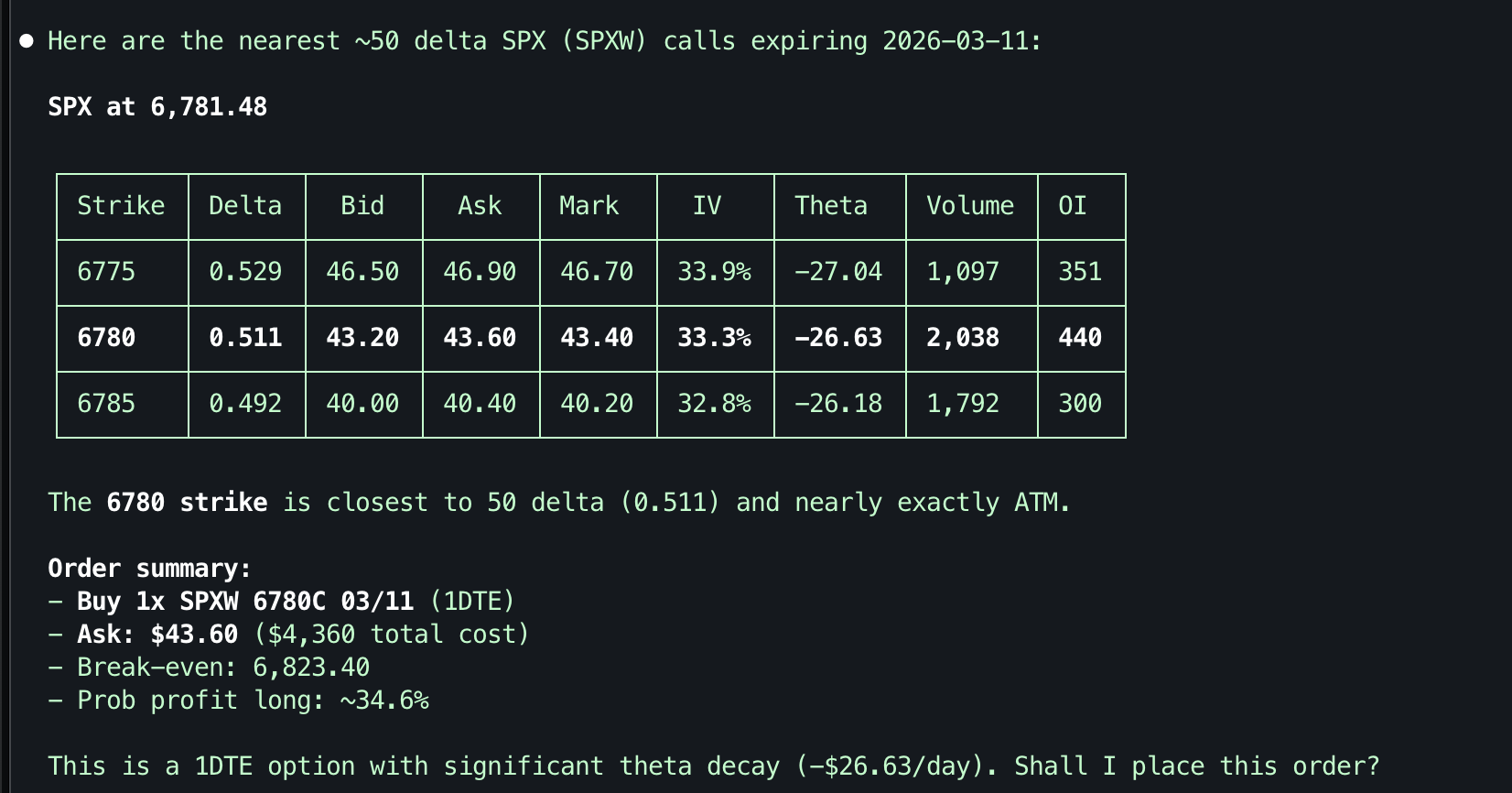
The `robinhood-for-agents` skill (Claude Code and OpenClaw; `clawhub install robinhood-for-agents` from [ClawHub](https://clawhub.ai/kevin1chun/robinhood-for-agents)) adds guided workflows. With Claude Code it drives whichever MCP entry you registered, so standard-only tools need `robinhood-for-agents`; standalone it uses the client library, which is web mode only.
| Domain | Example Triggers |
|--------|-----------------|
| Setup | "setup robinhood", "connect to robinhood" |
| Portfolio | "show my portfolio", "my holdings" |
| Research | "research AAPL", "analyze TSLA" |
| Trading | "buy 10 AAPL", "sell my position" |
| Options | "show AAPL options", "SPX calls" |
In `skills/robinhood-for-agents/`, `SKILL.md` routes to domain files (`portfolio.md`, `trade.md`, …) and the `client-api.md` reference, loaded on demand. More examples: [docs/USE_CASES.md](https://github.com/kevin1chun/robinhood-for-agents/blob/HEAD/docs/USE_CASES.md).
## Tools
Names and input schemas are the official ones, prefixed `robinhood_` ([parity table](https://github.com/kevin1chun/robinhood-for-agents/blob/HEAD/docs/official-mcp-tools.md#parity)). In standard mode each tool also carries Robinhood's title, description, output schema, and annotations verbatim from [`docs/official-mcp-tools.json`](https://github.com/kevin1chun/robinhood-for-agents/blob/HEAD/docs/official-mcp-tools.json). The hosted server's rate limit: [measured here](https://github.com/kevin1chun/robinhood-for-agents/blob/HEAD/docs/official-mcp-tools.md#measured-rate-limit). **Mode**: `standard` or `web` = only in that mode; `both` = both modes.
| Tool | Mode | Description |
|------|------|-------------|
| `robinhood_browser_login` | web | Authenticate via Chrome browser |
| `robinhood_check_session` | web | Probe the cached session: `logged_in` / `expired` / `unknown` / `not_authenticated` |
| `robinhood_get_accounts` | both | List all brokerage accounts |
| `robinhood_get_account` | web | Account details and profile |
| `robinhood_get_portfolio` | both | Portfolio: positions, P&L, equity, cash, buying power |
| `robinhood_get_equity_positions` | both | Raw equity positions (shares, avg price) |
| `robinhood_get_equity_tax_lots` | both | Open tax lots for one equity holding (cost basis, term, open date) |
| `robinhood_get_equity_quotes` | both | Stock quotes and fundamentals |
| `robinhood_get_equity_fundamentals` | both | Fundamentals: float, shares outstanding, valuation, profile |
| `robinhood_get_equity_historicals` | both | OHLCV bars over a time range |
| `robinhood_get_equity_technical_indicators` | both | RSI, MACD, Bollinger, moving averages, ATR, VWAP, … (computed) |
| `robinhood_get_short_interest` | web | Daily short-interest estimate (% of float, with bounds) |
| `robinhood_get_equity_price_book` | both | Level-2 price book (bid/ask depth) |
| `robinhood_get_equity_tradability` | both | Tradability flags (fractional, short-selling, per-account type) |
| `robinhood_get_equity_news` | web | News and analyst ratings |
| `robinhood_get_earnings_results` | both | Earnings for a symbol (EPS estimate vs. actual) |
| `robinhood_get_earnings_calendar` | both | Market-wide earnings calendar for a day window |
| `robinhood_search` | both | Search stocks/ETFs, crypto pairs, or indexes |
| `robinhood_get_movers` | web | Market movers and popular stocks |
| `robinhood_get_market_hours` | web | Market hours for a date: is it a trading day, when each session opens/closes |
| `robinhood_get_indexes` | both | Market index instruments (SPX, NDX, VIX, …) with ids |
| `robinhood_get_index_quotes` | both | Current values for index instrument ids |
| `robinhood_get_option_chains` | both | Option chains for an underlying (expirations, chain ids) |
| `robinhood_get_option_instruments` | both | Option contracts of a chain (filter by expiration, strike, type) |
| `robinhood_get_option_quotes` | both | Option market data with greeks |
| `robinhood_get_option_positions` | both | Per-leg option positions |
| `robinhood_get_option_orders` | both | Option order history |
| `robinhood_get_option_historicals` | both | OHLC bars for option contracts |
| `robinhood_get_crypto_quotes` | both | Crypto quotes |
| `robinhood_get_crypto_positions` | both | Crypto holdings |
| `robinhood_get_crypto_historicals` | web | Crypto OHLCV history |
| `robinhood_get_currency_pairs` | both | Tradable crypto pairs |
| `robinhood_review_equity_order` | both | Simulate a stock order before placing (price-collar check, live quote) |
| `robinhood_review_option_order` | both | Simulate an option order before placing (per-leg data, collateral) |
| `robinhood_preview_crypto_order` | both | Preview a crypto order before placing (quote-based estimate) |
| `robinhood_place_equity_order` | both | Place stock orders (market/limit/stop_market/stop_limit, incl. `sell_short`) |
| `robinhood_place_option_order` | both | Place option orders (1–4 legs by option id) |
| `robinhood_place_crypto_order` | both | Place crypto orders |
| `robinhood_get_equity_orders` | both | Stock order history (filter by id, symbol, state) |
| `robinhood_get_crypto_orders` | both | Crypto order history (filter by id, symbol, state) |
| `robinhood_cancel_equity_order` | both | Cancel a stock order |
| `robinhood_cancel_option_order` | both | Cancel an option order |
| `robinhood_cancel_crypto_order` | both | Cancel a crypto order |
| `robinhood_get_watchlists` | both | List your own watchlists (with list ids) |
| `robinhood_get_watchlist_items` | both | Items of a watchlist (enriched with symbols) |
| `robinhood_get_popular_watchlists` | both | Robinhood-curated lists to follow |
| `robinhood_get_option_watchlist` | both | Your options watchlist — single-leg option contracts |
| `robinhood_create_watchlist` | both | Create a new watchlist (confirm first) |
| `robinhood_update_watchlist` | both | Rename / re-describe a watchlist (confirm first) |
| `robinhood_add_to_watchlist` | both | Add symbols / indexes / crypto to a list (confirm first) |
| `robinhood_remove_from_watchlist` | both | Remove items from a list (confirm first) |
| `robinhood_follow_watchlist` | both | Follow a Robinhood-curated list (confirm first) |
| `robinhood_unfollow_watchlist` | both | Unfollow a curated list (confirm first) |
| `robinhood_add_option_to_watchlist` | both | Add long single-leg option contracts to the options watchlist (confirm first) |
| `robinhood_remove_option_from_watchlist` | both | Remove single-leg option contracts from the options watchlist (confirm first) |
| `robinhood_get_scans` | both | List your saved scanners (screeners) |
| `robinhood_get_scanner_filter_specs` | both | Filter vocabulary for building scans (RSI/MACD/fundamentals/…) |
| `robinhood_get_realized_pnl` | both | Realized P&L over a window, bucketed (computed FIFO; equity + crypto) |
| `robinhood_get_pnl_trade_history` | both | Per-trade realized P&L (computed FIFO; equity + crypto) |
| `robinhood_official_login` | standard | Sign in to Robinhood's hosted MCP (browser) |
| `robinhood_cancel_option_exercise`, `robinhood_create_alert`, `robinhood_create_scan`, `robinhood_delete_alert`, `robinhood_exercise_option`, `robinhood_get_alert_log`, `robinhood_get_alerts`, `robinhood_get_crypto_account_onboarding_info`, `robinhood_get_equity_analyst_ratings`, `robinhood_get_financials`, `robinhood_get_index_historicals`, `robinhood_get_limited_margin_upgrade_info`, `robinhood_get_option_level_upgrade_info`, `robinhood_get_politician_trades`, `robinhood_get_scanner_datapoints`, `robinhood_get_sec_filing`, `robinhood_get_sec_filing_facts`, `robinhood_get_sec_filing_facts_catalog`, `robinhood_get_sec_filing_index`, `robinhood_mark_alerts_read`, `robinhood_preview_scan`, `robinhood_run_scan`, `robinhood_update_alert`, `robinhood_update_scan_config`, `robinhood_update_scan_filters` | standard | No web endpoint: option exercise, alerts, scanner writes and datapoints, financials, SEC filings, politician trades, index historicals, onboarding and upgrade info |
## Placing orders
Both modes run **review → confirm → place**. `robinhood_review_equity_order` simulates the order (live quote plus Robinhood's price collar) and places nothing. Show the result, get explicit confirmation, then call `robinhood_place_equity_order`. The client-side checks below run in web mode only; standard mode relays the call for Robinhood to validate.
**Side** — `buy`, `sell`, or `sell_short`:
| Intent | Side | Notes |
|---|---|---|
| Open / add to a long | `buy` | Fractional shares supported |
| Close a long | `sell` | Only sells shares you hold |
| **Open a short** | `sell_short` | Margin-enabled account, whole shares only |
| **Cover a short** | `buy` | No separate cover side exists |
`sell` only closes a long; selling shares you don't hold fails with `Not enough shares to sell.` `sell_short` carries unlimited loss, so confirm the user meant a short. Shorts also need `gfd` and the regular or extended session, not the 24 Hour Market.
**Trading session** — `market_hours` defaults to `regular_hours`, as in the official tool:
| Value | Window | Executes |
|---|---|---|
| `regular_hours` | 09:30–16:00 ET | All order types |
| `extended_hours` | Pre / post-market | Limit orders only |
| `all_day_hours` | 24 Hour Market (overnight) | Limit orders only |
An order tagged to the wrong session queues for the next open instead of executing, which looks like success. Name the session outside regular hours; `robinhood_get_market_hours` says which is live. See [`examples/short-selling.ts`](https://github.com/kevin1chun/robinhood-for-agents/blob/HEAD/examples/short-selling.ts), [`trade.md`](https://github.com/kevin1chun/robinhood-for-agents/blob/HEAD/skills/robinhood-for-agents/trade.md), and [docs/ARCHITECTURE.md](https://github.com/kevin1chun/robinhood-for-agents/blob/HEAD/docs/ARCHITECTURE.md#trading-sessions).
## Client library
```typescript
import { RobinhoodClient } from "robinhood-for-agents";
const client = new RobinhoodClient();
await client.restoreSession();
const quotes = await client.getQuotes("AAPL");
const portfolio = await client.buildHoldings();
```
Web mode only; there is no client-library path to the hosted MCP. All 82 methods are async, and account-scoped ones take `accountNumber`. Reference, including `EncryptedFileTokenStore` and direct-`accessToken` construction: [`client-api.md`](https://github.com/kevin1chun/robinhood-for-agents/blob/HEAD/skills/robinhood-for-agents/client-api.md).
## Docker and headless
Without a keychain or browser, both modes keep their credential in an encrypted file under `ROBINHOOD_TOKEN_KEY` and sign in on the host.
- **Standard:** `official-mcp.enc` lives beside `ROBINHOOD_TOKENS_FILE`, so mount the directory, not the file ([docs/DOCKER.md](https://github.com/kevin1chun/robinhood-for-agents/blob/HEAD/docs/DOCKER.md#standard-mode)).
- **Web:** run `bunx robinhood-for-agents login --export` on the host. It exports `./tokens.enc`, copies the key to the clipboard, and prints the env vars, including `ROBINHOOD_MODE=web` ([docs/DOCKER.md](https://github.com/kevin1chun/robinhood-for-agents/blob/HEAD/docs/DOCKER.md#web-mode)).
Keep the mount read-write and use one process per token file: refresh tokens are single-use, and a failed write-back logs `CRITICAL` to stderr and strands the container on restart. Encryption stops casual disk access, not an agent with shell access that can read the key, so run only agents you trust ([docs/SECURITY.md](https://github.com/kevin1chun/robinhood-for-agents/blob/HEAD/docs/SECURITY.md)).
## Safety
- Fund transfers, bank operations, and bulk cancel are absent by design, not gated.
- Every order is confirmed with the user; the skill enforces review → confirm → place.
- Account, symbol, side, and order type are explicit; `time_in_force` and `market_hours` default to `gfd` and `regular_hours`, as in the official tools.
- A short needs the explicit `sell_short` side, so a mis-parsed "sell" can never open one.
- Order writes resolve the symbol by exact match, never a fuzzy search.
- Standard-mode orders are relayed to Robinhood's hosted MCP and reach the Agentic account only.
- The standard-mode credential lives only in an encrypted file; web-mode tokens live in the OS keychain or an AES-256-GCM file.
- No real PII in this repo; examples use placeholders like `"ACCOUNT_ID"`.
- Risk matrix: [docs/ACCESS_CONTROLS.md](https://github.com/kevin1chun/robinhood-for-agents/blob/HEAD/docs/ACCESS_CONTROLS.md). Threat model: [docs/SECURITY.md](https://github.com/kevin1chun/robinhood-for-agents/blob/HEAD/docs/SECURITY.md). Multi-agent identity and gateway auth: [docs/AGENT-IDENTITY.md](https://github.com/kevin1chun/robinhood-for-agents/blob/HEAD/docs/AGENT-IDENTITY.md), [docs/GATEWAY-AUTH.md](https://github.com/kevin1chun/robinhood-for-agents/blob/HEAD/docs/GATEWAY-AUTH.md).
## Development
```bash
bun install
bun run typecheck # tsc --noEmit
bun run check # Biome lint + format
npx vitest run # all tests — vitest, not `bun test`
```
Integration tests (read-only, real API, not in CI): `bunx robinhood-for-agents login`, then `bun run test:integration`. Design: [docs/ARCHITECTURE.md](https://github.com/kevin1chun/robinhood-for-agents/blob/HEAD/docs/ARCHITECTURE.md). Adding tools and skills: [docs/CONTRIBUTING.md](https://github.com/kevin1chun/robinhood-for-agents/blob/HEAD/docs/CONTRIBUTING.md).
## Disclaimer
This project is **not affiliated with, endorsed by, or sponsored by Robinhood Markets, Inc.** "Robinhood" is a trademark of Robinhood Markets, Inc. This software interacts with Robinhood's services through publicly accessible interfaces but is an independent, third-party tool.
**USE AT YOUR OWN RISK.** This software enables AI agents to read data from and place orders on your Robinhood brokerage account. Automated and AI-assisted trading carries inherent risks, including but not limited to:
- Unintended order execution due to AI misinterpretation
- Financial losses from erroneous trades
- Stale or inaccurate market data
- Software bugs or unexpected behavior
You are solely responsible for all activity on your brokerage account, whether initiated manually or through this software. The authors and contributors assume no liability for any financial losses, damages, or other consequences arising from the use of this software. Review all AI-proposed actions before confirming, and never grant unsupervised trading authority to any automated system.
This software is provided "as is" without warranty of any kind. See [LICENSE](https://github.com/kevin1chun/robinhood-for-agents/blob/HEAD/LICENSE) for full terms.
## A note from the maintainer
I'm a solo developer. I built this for myself, I use it every day, and I keep it up to date so anyone else can share the joy of it. If it saves you time or makes trading more fun, a coffee helps me keep pace with changes to Robinhood's API and official MCP, and keep adding new tools:
 A star on the repo helps too, and issues and pull requests are always welcome.
## License
MIT — see [LICENSE](https://github.com/kevin1chun/robinhood-for-agents/blob/HEAD/LICENSE).
A star on the repo helps too, and issues and pull requests are always welcome.
## License
MIT — see [LICENSE](https://github.com/kevin1chun/robinhood-for-agents/blob/HEAD/LICENSE).