# Rebase
**Category:** 🗄️ Databases
**Repository:** https://github.com/rebasepro/rebase
**Views:** 0
**Installs:** 0
**Upvotes:** 0
**Directory Page:** https://allmcps.com/mcp/rebase
## Description
Schema, database, document, user and dev-server tools for a Rebase backend project.
## Claude Desktop Quick Installation
Heuristic fallback — verify the package name and runner against the repository README before running it. Uses `npx` (confidence: low):
```json
"mcpServers": {
"rebase": {
"command": "npx",
"args": ["-y","rebase"]
}
}
```
## Documentation & README

Rebase
The Open-Source Backend-as-a-Service for Postgres — with the Admin Panel that comes with it
Point it at a database and get a working backend in minutes.
REST, auth, storage, realtime and backups over your own Postgres — then add a
schema-driven admin panel, or don't.
Own your data, own your code. The absolute easiest way to build on PostgreSQL.
Public beta. The API you write against can change in a minor,
with a changelog entry. Your data cannot break quietly.
What that promise rests on, and
which subsystems are ready
Live Demo •
Documentation •
Features •
Discord


---
## What is Rebase?
Rebase is a **developer-first**, open-source backend-as-a-service built on **PostgreSQL** — authentication, S3-compatible storage, realtime, backups and auto-generated REST APIs over a database you own. It is **self-hosted** and agent-native, with a built-in MCP server for AI-assisted development.
The admin panel is the **second layer of the same definition**: add collection definitions and you get a schema-driven back-office built from them, extensible with your own **React** components, serverless functions, and scripts.
### Adopt only what you want
Three modes, same packages, wired differently — see [MODULAR-ARCHITECTURE.md](https://github.com/rebasepro/rebase/blob/HEAD/docs/MODULAR-ARCHITECTURE.md).
| Mode | You get | Comparable to |
| --- | --- | --- |
| **BaaS** | REST + auth + storage + realtime + backups over your database. No config files, no UI, no React in the dependency tree. | Supabase |
| **CMS** | BaaS + a schema-driven admin UI built from your collection definitions. | Payload, Directus |
| **Full** | CMS + Studio (SQL editor, schema visualizer, RLS editor, logs, API explorer). | Supabase + Payload |
### ✨ Key Highlights
- 🔓 **No Vendor Lock-in** — Self-host anywhere. Full control over your infrastructure, code, and database.
- 🧱 **Modular** — Start as a pure API and add the admin panel later, or never. Nothing is bundled that you didn't ask for.
- ⚡ **Instant Setup** — `pnpm dlx @rebasepro/cli init` scaffolds a complete project in seconds.
- 🗄️ **PostgreSQL First** — First-class Postgres support with Drizzle ORM, schema introspection, and automatic migrations.
- 🔒 **Secure by Default** — Authorization is Postgres RLS, not application code. Tables without row-level security aren't served.
- 🧩 **Radical Extensibility** — Not constrained to pre-built widgets. If you can build it in React, you can build it in Rebase.
- 🎨 **Premium UI** — Fast, accessible design system built on Tailwind CSS v4 and Radix UI.
- 🤖 **AI-Ready** — MCP server for AI-assisted database management, plus data enhancement and insights plugins.
---
## ⚡ Quick Start
Scaffold a complete, self-hosted Rebase application connected to your database:
```bash
pnpm dlx @rebasepro/cli init my-rebase-app
cd my-rebase-app
pnpm install
pnpm run dev
```
That is the whole first run — no database to install, no schema step. With no
`DATABASE_URL` set, `rebase dev` starts a managed PostgreSQL (PGlite) that lives
in the project directory, generates the schema from your collections, and creates
the tables at boot.
**Read the URLs from its output.** `rebase dev` picks a free port per project
rather than fixed ones, so they differ between projects. `PORT` and
`VITE_API_URL` in `.env` apply to `rebase start`, not here.
Useful flags: `--yes` (required when there is no terminal to prompt, such as CI),
`--headless` (see below), `--template `, and `--install` / `--no-install`
on `init`; `--docker` on `dev` to use the compose Postgres in this project
instead, and `--no-db` to start nothing — set `DATABASE_URL` yourself.
**To use your own Postgres instead:** uncomment `DATABASE_URL` in `.env` and run
`pnpm run dev` again. Nothing else changes — a `DATABASE_URL` that is set is
never touched, and one pointing anywhere other than this machine is left alone
entirely.
### Just want the API?
Rebase is modular — take only the parts you want:
```bash
pnpm dlx @rebasepro/cli init my-api --headless
```
That scaffolds a headless backend: REST, auth, storage, realtime and backups over
your database, with **no collection files and no UI**. Tables are served
automatically, derived from your schema at boot — change the schema with a
migration and the API follows. No React anywhere in the dependency tree.
A fresh headless project has no tables yet, so `/api/data/*` answers
`404 NO_COLLECTIONS` until you create some. Point it at a database that already
has tables, or add them with a migration, and they appear.
The three adoption modes — BaaS (like Supabase), CMS (like Payload/Directus), and
both together — are described in [MODULAR-ARCHITECTURE.md](https://github.com/rebasepro/rebase/blob/HEAD/docs/MODULAR-ARCHITECTURE.md).
---
## Features
### 🏓 Full Admin Panel & CMS
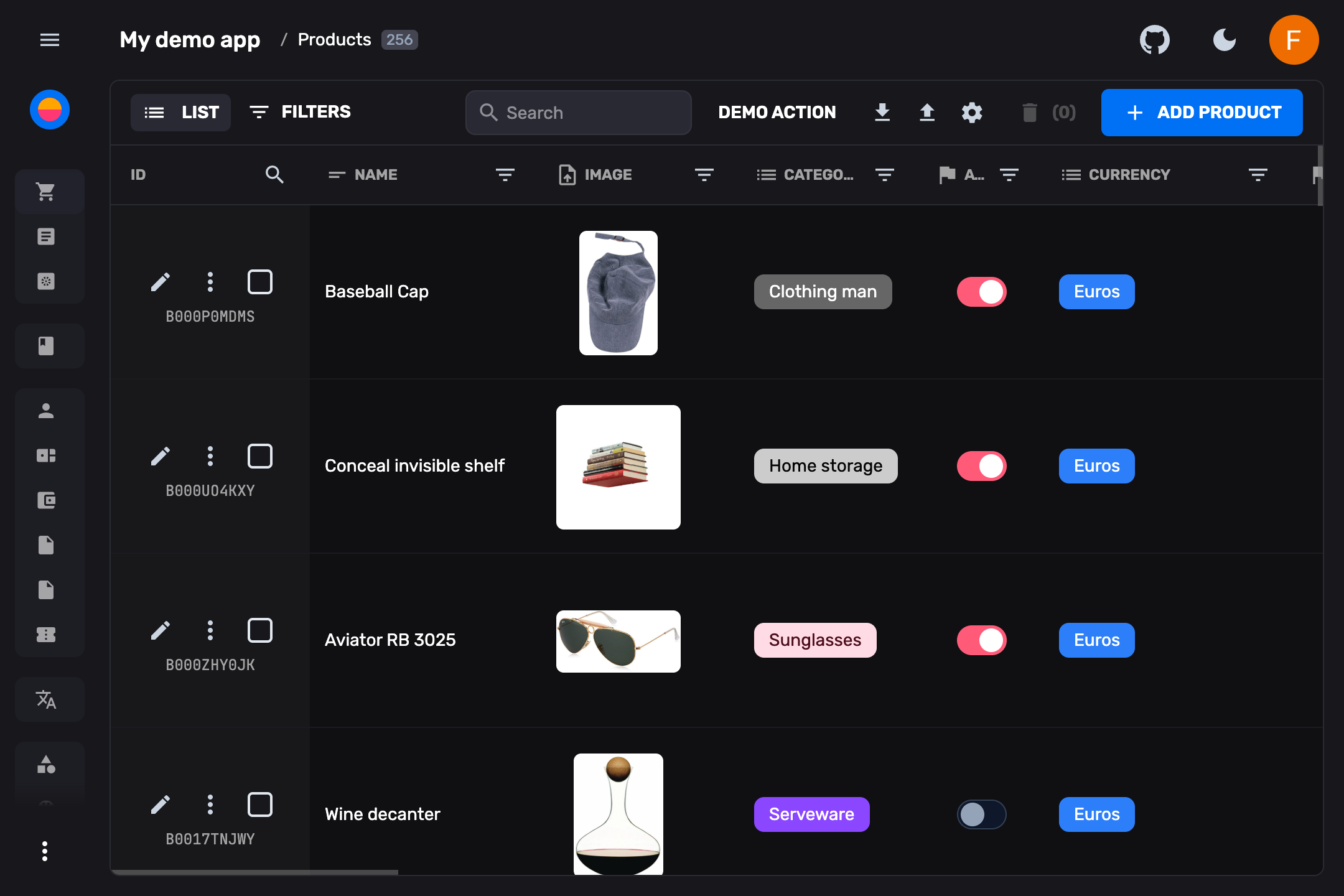
An incredibly fast, windowed spreadsheet view to manage your database with inline editing, real-time updates, filtering, sorting, and text search. Switch between multiple view modes:
- **Spreadsheet table** — Inline editing, column reordering, drag-and-drop
- **Card grid** — Visual overview with image previews
- **List view** — Compact, scannable layout
- **Kanban board** — Cards grouped into columns by a property, dragged between them
- **Custom views** — Build any React component as a collection view
### 🔒 Typed Schema & Database Migrations
Define your data models using pure TypeScript collections. Rebase automatically generates your Drizzle ORM schema, handles PostgreSQL migrations, and keeps your live database perfectly in sync using built-in tooling like `rebase doctor`.
### 💾 Backups & Restore
First-class database backups for self-hosted Postgres, built on `pg_dump` / `pg_restore`:
- `rebase db backup --out ` — compressed, custom-format dumps
- `rebase db restore ` — confirmation-gated, with `--create-db` / `--target-db` to restore into a fresh database
- **Scheduled backups** via the built-in cron system, uploading to your configured storage backend with retention pruning
- **Studio Backups panel** — browse and download backups from the admin UI
See **[docs/backups.md](https://github.com/rebasepro/rebase/blob/HEAD/docs/backups.md)** for the full guide, including security and PITR notes.
### 🔐 Authentication & Access Control
Built-in authentication with multiple providers:
- **Email/Password** — With password reset flow
- **OAuth** — Google, Apple, GitHub, GitLab, Bitbucket, Microsoft, Facebook, LinkedIn, Discord, Slack, Spotify and X
- **Magic link and one-time codes** — Passwordless sign-in by email
- **MFA** — TOTP second factor with recovery codes
- **Anonymous** — For guest access, opt-in
- **Captcha and API keys** — Bot protection on sign-up and the routes that send mail; scoped keys for scripts and agents
Granular **role-based access control (RBAC)** with customizable permissions per collection, field, and action.
### 📦 S3-Compatible Storage
Native S3-compatible file storage with:
- Drag-and-drop uploads with progress tracking
- Automatic image resizing and optimization
- File metadata management
- Storage browser in Studio
### 🛠️ Studio — Developer Toolbox
A full developer environment built into the admin panel — SQL and JS editors, RLS policies, a schema visualizer, database branches, backups, request logs, cron jobs, a storage browser, an API explorer and API keys. **[What each tool does →](https://rebase.pro/docs/studio)**
### 🔌 Realtime Engine
A full WebSocket engine built into every Rebase backend:
- **Live data subscriptions** — Subscribe to collection queries or individual entities. Changes propagate instantly with RLS-aware security.
- **Broadcast channels** — Send typed messages between connected clients. Build chat, notifications, or collaborative features.
- **Presence tracking** — Track who's online, sync user state across clients (typing indicators, cursor positions, online status).
- **Auto-reconnect** — Exponential backoff, automatic resubscription, and token refresh on reconnect.
### 📴 Offline & Local-First Sync
Opt in with `offline: true` and the client SDK keeps a local database of rows instead of a cache of responses:
- **Reads survive a dropped connection** — filters, sorting and pagination are evaluated against the local rows, so lists keep rendering.
- **Writes apply instantly** — a write made offline lands locally, queues, and replays in order when the connection returns. One the server rejects is rolled back.
- **Live queries** — `observe()` emits from the local database before any request, and re-emits on local writes, replays, rollbacks, realtime events, and changes from other tabs.
### ⚡ Extensible API & Edge Functions
Drop custom Hono routes or scheduled tasks into the `functions/` and `crons/` directories. Rebase auto-loads them with database access and JWT authentication middleware injected automatically.
### 🧬 SDK Generator
Auto-generate fully typed **TypeScript SDKs** from your collection definitions. Use them in any frontend, script, or service to interact with your Rebase backend with complete type safety.
```bash
pnpm dlx @rebasepro/cli generate-sdk
```
### 🤖 MCP Server
A built-in **Model Context Protocol** server that enables AI assistants to:
- Query and manage your database schema
- Create, read, update, and delete documents
- Manage users and roles
- Introspect your data model
### 🔍 Schema Inference & Introspection
Point Rebase at an existing PostgreSQL database and automatically generate collection definitions from your tables — including types, relations, validation constraints, and more.
### 📥📤 Import & Export
Import data from **CSV, JSON, and Excel** with an intuitive field mapper. Export your data in multiple formats with configurable column selection.
### 🧩 Plugins
Extend the admin experience with first-party plugins:
- **Data Enhancement** — AI-powered field suggestions and auto-fill
- **Insights** — Analytics dashboards and usage metrics
### 📜 Standalone Scripting
Write standalone data manipulation scripts that connect directly to your running backend using the `@rebasepro/client` SDK. The CLI persists the dev server URL to `.rebase-dev-url` for zero-config local development.
### 🧩 Custom Views & React Extensibility
Build entirely custom views — dashboards, previews, charts — and drop them into the main navigation or as entity-level tabs. Use built-in hooks to interact with Rebase's internal state.
---
## 🛠️ Core Technologies
Built entirely on modern, battle-tested web standards:
| Technology | What we use it for |
|---|---|
| 💙 **TypeScript 6** | End-to-end type safety |
| ⚛️ **React 19** | Component-driven UI |
| 🌊 **Tailwind CSS v4** | Utility-first styling |
| 🔌 **WebSockets** | Real-time synchronization |
| 🗄️ **Drizzle ORM** | Type-safe SQL migrations and queries |
| 🧱 **Radix UI** | Accessible UI primitives |
| 📝 **ProseMirror** | Rich text editing engine |
| 🌐 **Hono** | Ultrafast HTTP server framework |
---
## 📦 Packages
Rebase is structured as a modular monorepo — install only the layers you need:
| Package | Description |
|---|---|
| `@rebasepro/types` | Core TypeScript type definitions |
| `@rebasepro/cms-types` | The `admin` block — presentation types, declared as an augmentation so a headless project pays nothing |
| `@rebasepro/utils` | Shared utility functions |
| `@rebasepro/common` | Common modules shared across packages |
| `@rebasepro/forms` | Lightweight form management library |
| `@rebasepro/ui` | Standalone React component library (Tailwind + Radix) |
| `@rebasepro/app` | Core app logic, controllers, and the auth/login views |
| `@rebasepro/client` | Client-side data access layer |
| `@rebasepro/firebase` | Firebase/Firestore client adapter |
| `@rebasepro/server` | Server framework and middleware (Hono) |
| `@rebasepro/server-postgres` | PostgreSQL server adapter with Drizzle |
| `@rebasepro/server-mongo` | MongoDB server adapter |
| `@rebasepro/cms` | Full admin panel interface |
| `@rebasepro/studio` | SQL editor, RLS editor, schema visualizer, API explorer |
| `@rebasepro/cli` | CLI for project scaffolding and management |
| `@rebasepro/codegen` | TypeScript SDK code generation |
| `@rebasepro/mcp` | MCP server for AI integrations |
| `@rebasepro/inference` | Database schema introspection and inference |
| `@rebasepro/rls-check` | Static audit of a database's row-level security |
| `@rebasepro/plugin-ai` | AI-powered data enhancement plugin |
| `@rebasepro/plugin-insights` | Analytics and insights plugin |
### ESM only
Every `@rebasepro/*` package ships ES modules and nothing else — `"type":
"module"`, no CommonJS build, no `require()` entry point. A CommonJS project
reaches them with a dynamic `await import()`; `require("@rebasepro/client")`
throws `ERR_REQUIRE_ESM`. This is stated here because the failure names the
loader rather than the decision, and because it is not recoverable by
configuration: there is no dual build to fall back to.
Node 22.22 is the floor, from [`.nvmrc`](https://github.com/rebasepro/rebase/blob/HEAD/.nvmrc) and enforced by
`pnpm check:floors`.
### Versioning
Rebase is `0.x`: the authored TypeScript API can still change in a minor, and
every such change is in the [changelog](https://github.com/rebasepro/rebase/blob/HEAD/CHANGELOG.md).
Separately, a small set of contracts is versioned and enforced — the bundle
format, the bundle↔runtime contract, the auth schema version, and the hash
identifying which collection schema a generated SDK was built against. These are
stamped into built artifacts and live databases, checked at boot, and fail with
a specific message rather than degrading. They are also the only things Rebase
Cloud depends on, which is what lets a project move between self-hosting and the
cloud. See **[docs/compatibility.md](https://github.com/rebasepro/rebase/blob/HEAD/docs/compatibility.md)**.
---
## 🎨 Standalone UI Library
Rebase exposes its design system as a completely independent library. Fully typed, accessible, and customizable via Tailwind CSS v4:
```bash
pnpm add @rebasepro/ui
```
---
## Demo
Explore a live interactive sandbox with all features — data resets periodically:
**👉 [demo.rebase.pro](https://demo.rebase.pro)**
---
## 🤖 AI Coding Assistants & Agent Support
Rebase is designed from the ground up to be **AI-agent ready**. When developing a Rebase project using AI coding assistants (like Cursor, Windsurf, or Copilot):
### 1. Built-in Agent Guidelines (`ai-instructions.md`)
Every project scaffolded with `rebase init` carries its agent rules in `ai-instructions.md`, plus a short pointer file for each assistant that reads its own — `AGENTS.md`, `CLAUDE.md`, `.cursorrules`, `.windsurfrules` and `.github/copilot-instructions.md`. Each pointer names `ai-instructions.md` and the `rebase skills install --agent ` command for that assistant. The rules cover:
- Using the **Rebase SDK** instead of raw SQL / direct Drizzle queries against application tables (which skip validation, hooks and row-level security).
- Applying a collection change: while `pnpm dev` runs, saving the collection file is the whole step; `db:push` is for what boot leaves alone, and production uses `db:generate` then `db:migrate`.
- Guarding custom functions, and what an agent must never do — deploy, edit `.env`, or hand-edit generated files.
### 2. Built-in MCP Server
`rebase init` writes `.mcp.json`, so Claude Code, Cursor and any other MCP client can drive the project the moment it is scaffolded:
```json
{
"mcpServers": {
"rebase": {
"command": "npx",
"args": ["-y", "@rebasepro/mcp"],
"env": {
"REBASE_PROJECT_DIR": "."
}
}
}
}
```
It speaks MCP over stdio and needs no login: while `rebase dev` is running it reads the backend URL and service key from `.rebase/state.json`. Write tools are refused against anything that is not on the loopback interface, which is the single most valuable thing in the package.
[**Setup, the tool list, and what the server can reach →**](https://rebase.pro/docs/ai/mcp) — copy-paste blocks for Claude Code, Cursor, Gemini CLI, Codex and Kiro, and the credential model to read before pointing an assistant at a database you care about.
### 3. Troubleshooting Database Permissions in Studio
If your AI coding agent or database role permissions cause a `permission denied for table ` error when executing queries in the **Rebase Studio SQL Editor**:
- Add `DISABLE_DB_ROLE_SWITCHING=true` to your `.env` file.
- This forces the SQL Editor queries to execute under the default connection owner user (e.g. `rebase`) rather than trying to perform a PostgreSQL role switch to a non-existent database-level role.
---
## Contributing
Bug fixes, features and documentation are all welcome.
**[CONTRIBUTING.md](https://github.com/rebasepro/rebase/blob/HEAD/CONTRIBUTING.md)** is the whole path: clone, install, start
the database, run the app, and the one command — `pnpm ci:static` — that runs
what CI runs. It also covers commits and the changelog rule, and how to run one
package's tests.
Two more worth knowing before a first pull request:
- **[.agent/workflows/coding-standards.md](https://github.com/rebasepro/rebase/blob/HEAD/.agent/workflows/coding-standards.md)** —
the engineering rules this codebase is held to, and the reasons behind them.
No `as any`, no dynamic `require`, no polling on a realtime framework, no
hidden dunder properties on data objects. Written for an AI agent, and exactly
as binding on a person.
- **[docs/gates.md](https://github.com/rebasepro/rebase/blob/HEAD/docs/gates.md)** — every automated check, what it protects,
and how to bank its baseline when it has one.
---
## Who builds Rebase?
Built and maintained by [Camberi](https://camberi.com?utm_source=rebase&utm_medium=referral&utm_campaign=built-by), a product engineering studio in Madrid and Munich that also builds for clients.
---
## Support & Community
- 📖 [Documentation](https://rebase.pro/docs)
- 💬 [Discord Community](https://discord.gg/fxy7xsQm3m)
- 🐛 [GitHub Issues](https://github.com/rebasepro/rebase/issues)
- 📝 [Changelog](https://github.com/rebasepro/rebase/blob/HEAD/CHANGELOG.md)
---
## ⭐ Star Us
If you find Rebase useful, please consider giving us a star on GitHub — it helps more developers discover the project!
---
## License
Rebase is open-source and licensed under the **MIT License**.
See the full [License](https://github.com/rebasepro/rebase/blob/main/LICENSE) for details.