# reading-plus-ai/mcp-server-data-exploration [Health: Active]
**Category:** 🧮 Data Science Tools
**Repository:** https://github.com/reading-plus-ai/mcp-server-data-exploration
**GitHub Stars:** 544
**Views:** 2
**Installs:** 0
**Upvotes:** 0
**Directory Page:** https://allmcps.com/mcp/reading-plus-ai-mcp-server-data-exploration
## Description
Enables autonomous data exploration on .csv-based datasets, providing intelligent insights with minimal effort.
## Tools
Capabilities this server exposes over MCP:
- **csv_path**
- **df_name**
- **script**
## Claude Desktop Quick Installation
Install path detected from listing signals. Uses `uvx` (confidence: high):
```json
"mcpServers": {
"mcp-server-data-exploration": {
"command": "uvx",
"args": ["--directory","/Users/username/src/mcp-server-ds","run","mcp-server-ds"]
}
}
```
## Documentation & README
# MCP Server for Data Exploration
MCP Server is a versatile tool designed for interactive data exploration.
Your personal Data Scientist assistant, turning complex datasets into clear, actionable insights.
 ## 🚀 Try it Out
1. **Download Claude Desktop**
- Get it [here](https://claude.ai/download)
2. **Install and Set Up**
- On macOS, run the following command in your terminal:
```bash
python setup.py
```
3. **Load Templates and Tools**
- Once the server is running, wait for the prompt template and tools to load in Claude Desktop.
4. **Start Exploring**
- Select the explore-data prompt template from MCP
- Begin your conversation by providing the required inputs:
- `csv_path`: Local path to the CSV file
- `topic`: The topic of exploration (e.g., "Weather patterns in New York" or "Housing prices in California")
## Examples
These are examples of how you can use MCP Server to explore data without any human intervention.
### Case 1: California Real Estate Listing Prices
- Kaggle Dataset: [USA Real Estate Dataset](https://www.kaggle.com/datasets/ahmedshahriarsakib/usa-real-estate-dataset)
- Size: 2,226,382 entries (178.9 MB)
- Topic: Housing price trends in California
[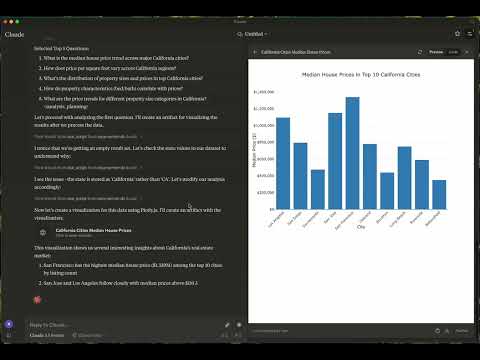](https://www.youtube.com/watch?v=RQZbeuaH9Ys)
- [Data Exploration Summary](https://claude.site/artifacts/058a1593-7a14-40df-bf09-28b8c4531137)
### Case 2: Weather in London
- Kaggle Dataset: [2M+ Daily Weather History UK](https://www.kaggle.com/datasets/jakewright/2m-daily-weather-history-uk/data)
- Size: 2,836,186 entries (169.3 MB)
- Topic: Weather in London
- Report: [View Report](https://claude.site/artifacts/601ea9c1-a00e-472e-9271-3efafb8edede)
- Graphs:
- [London Temperature Trends](https://claude.site/artifacts/9a25bc1e-d0cf-498a-833c-5179547ee268)
## 🚀 Try it Out
1. **Download Claude Desktop**
- Get it [here](https://claude.ai/download)
2. **Install and Set Up**
- On macOS, run the following command in your terminal:
```bash
python setup.py
```
3. **Load Templates and Tools**
- Once the server is running, wait for the prompt template and tools to load in Claude Desktop.
4. **Start Exploring**
- Select the explore-data prompt template from MCP
- Begin your conversation by providing the required inputs:
- `csv_path`: Local path to the CSV file
- `topic`: The topic of exploration (e.g., "Weather patterns in New York" or "Housing prices in California")
## Examples
These are examples of how you can use MCP Server to explore data without any human intervention.
### Case 1: California Real Estate Listing Prices
- Kaggle Dataset: [USA Real Estate Dataset](https://www.kaggle.com/datasets/ahmedshahriarsakib/usa-real-estate-dataset)
- Size: 2,226,382 entries (178.9 MB)
- Topic: Housing price trends in California
[](https://www.youtube.com/watch?v=RQZbeuaH9Ys)
- [Data Exploration Summary](https://claude.site/artifacts/058a1593-7a14-40df-bf09-28b8c4531137)
### Case 2: Weather in London
- Kaggle Dataset: [2M+ Daily Weather History UK](https://www.kaggle.com/datasets/jakewright/2m-daily-weather-history-uk/data)
- Size: 2,836,186 entries (169.3 MB)
- Topic: Weather in London
- Report: [View Report](https://claude.site/artifacts/601ea9c1-a00e-472e-9271-3efafb8edede)
- Graphs:
- [London Temperature Trends](https://claude.site/artifacts/9a25bc1e-d0cf-498a-833c-5179547ee268)
 - [Temperature-Humidity Relationship by Season](https://claude.site/artifacts/32a3371c-698d-48e3-b94e-f7e88ce8093d)
 - [Wind Direction Pattern by Season](https://claude.site/artifacts/32a3371c-698d-48e3-b94e-f7e88ce8093d)
 ## 📦 Components
### Prompts
- **explore-data**: Tailored for data exploration tasks
### Tools
1. **load-csv**
- Function: Loads a CSV file into a DataFrame
- Arguments:
- `csv_path` (string, required): Path to the CSV file
- `df_name` (string, optional): Name for the DataFrame. Defaults to df_1, df_2, etc., if not provided
2. **run-script**
- Function: Executes a Python script
- Arguments:
- `script` (string, required): The script to execute
## ⚙️ Modifying the Server
### Claude Desktop Configurations
- macOS: `~/Library/Application\ Support/Claude/claude_desktop_config.json`
- Windows: `%APPDATA%/Claude/claude_desktop_config.json`
### Development (Unpublished Servers)
```json
"mcpServers": {
"mcp-server-ds": {
"command": "uv",
"args": [
"--directory",
"/Users/username/src/mcp-server-ds",
"run",
"mcp-server-ds"
]
}
}
```
### Published Servers
```json
"mcpServers": {
"mcp-server-ds": {
"command": "uvx",
"args": [
"mcp-server-ds"
]
}
}
```
## 🛠️ Development
### Building and Publishing
1. **Sync Dependencies**
```bash
uv sync
```
2. **Build Distributions**
```bash
uv build
```
Generates source and wheel distributions in the dist/ directory.
3. **Publish to PyPI**
```bash
uv publish
```
## 🤝 Contributing
Contributions are welcome! Whether you're fixing bugs, adding features, or improving documentation, your help makes this project better.
### Reporting Issues
If you encounter bugs or have suggestions, open an issue in the issues section. Include:
- Steps to reproduce (if applicable)
- Expected vs. actual behavior
- Screenshots or error logs (if relevant)
## 📜 License
This project is licensed under the MIT License.
See the LICENSE file for details.
## 💬 Get in Touch
Questions? Feedback? Open an issue or reach out to the maintainers. Let's make this project awesome together!
## About
This is an open source project run by [ReadingPlus.AI LLC](https://readingplus.ai). and open to contributions from the entire community.
## 📦 Components
### Prompts
- **explore-data**: Tailored for data exploration tasks
### Tools
1. **load-csv**
- Function: Loads a CSV file into a DataFrame
- Arguments:
- `csv_path` (string, required): Path to the CSV file
- `df_name` (string, optional): Name for the DataFrame. Defaults to df_1, df_2, etc., if not provided
2. **run-script**
- Function: Executes a Python script
- Arguments:
- `script` (string, required): The script to execute
## ⚙️ Modifying the Server
### Claude Desktop Configurations
- macOS: `~/Library/Application\ Support/Claude/claude_desktop_config.json`
- Windows: `%APPDATA%/Claude/claude_desktop_config.json`
### Development (Unpublished Servers)
```json
"mcpServers": {
"mcp-server-ds": {
"command": "uv",
"args": [
"--directory",
"/Users/username/src/mcp-server-ds",
"run",
"mcp-server-ds"
]
}
}
```
### Published Servers
```json
"mcpServers": {
"mcp-server-ds": {
"command": "uvx",
"args": [
"mcp-server-ds"
]
}
}
```
## 🛠️ Development
### Building and Publishing
1. **Sync Dependencies**
```bash
uv sync
```
2. **Build Distributions**
```bash
uv build
```
Generates source and wheel distributions in the dist/ directory.
3. **Publish to PyPI**
```bash
uv publish
```
## 🤝 Contributing
Contributions are welcome! Whether you're fixing bugs, adding features, or improving documentation, your help makes this project better.
### Reporting Issues
If you encounter bugs or have suggestions, open an issue in the issues section. Include:
- Steps to reproduce (if applicable)
- Expected vs. actual behavior
- Screenshots or error logs (if relevant)
## 📜 License
This project is licensed under the MIT License.
See the LICENSE file for details.
## 💬 Get in Touch
Questions? Feedback? Open an issue or reach out to the maintainers. Let's make this project awesome together!
## About
This is an open source project run by [ReadingPlus.AI LLC](https://readingplus.ai). and open to contributions from the entire community.