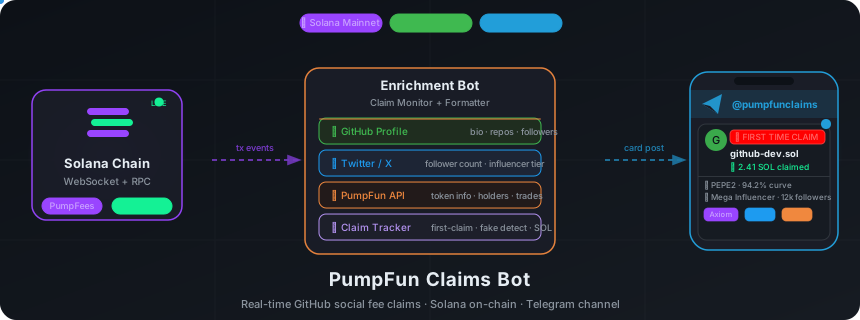








Read-only Telegram channel feed that broadcasts PumpFun on-chain activity — GitHub social fee claims, token graduations, and more. Posts rich, intelligence-enriched cards to a Telegram channel in real time.
Website · Live Channel · MCP Server · Deploy Guide · Contributing
--- > **Looking for interactive monitoring?** The [telegram-bot](https://github.com/nirholas/telegram-bot) supports watch management, group chats, REST API, SSE streaming, and webhooks. Use this channel-bot for simple broadcast-only channels. ## Features ### Feed Types | Feed | Description | Toggle | |------|-------------|--------| | **GitHub Social Fee Claims** | GitHub devs claiming PumpFun social fee PDA rewards | `FEED_CLAIMS` | | **Token Graduations** | Tokens graduating from bonding curve to PumpAMM | `FEED_GRADUATIONS` | ### Claim Intelligence Every GitHub social fee claim card includes: | Feature | Description | |---------|-------------| | **🟢 Credibility Score** | Deterministic 0-100 verdict (Strong/Moderate/Caution/High Risk) synthesised from every trust signal, with a transparent ±factor breakdown | | **📊 Dev Track Record** | Persistent per-developer reputation — a repeat dev's prior tokens and their average credibility, so a serial fee-farmer whose newest coin looks clean is exposed on sight | | **🚨 First-Time Alert** | `🚨🚨🚨 FIRST TIME CLAIM` banner when a GitHub user claims for the first time ever | | **⚠️ Fake Claim Detection** | Detects when `claim_social_fee_pda` instruction is called but no fees are actually paid out | | **📊 Claim Counter** | Sequential claim number tracked persistently across restarts | | **💹 Lifetime SOL** | Total SOL claimed from the PDA over all time | | **👤 GitHub Profile** | Username, bio, repos, followers, account age, location, blog | | **𝕏 Social Links** | Twitter/X profile with follower counts (from GitHub profile) | | **🏅 Influencer Badge** | Tier-based badge for high-follower GitHub/X accounts | | **📈 Token Intel** | Graduated/bonding curve status, curve progress %, created age, reply count | | **🔗 Token Socials** | Twitter, Telegram, website links from token metadata | | **🏷️ Token Flags** | NSFW, banned, cashback status indicators | | **⚠️ Trust Signals** | Warnings for new GitHub accounts (< 30 days), zero repos, fake claims | | **🔗 Trading Links** | Axiom, GMGN, Padre links with affiliate codes | | **️ Token Image** | Token image or GitHub avatar as photo card | ### Graduation Cards Rich graduation cards include creator profile, top holders analysis, 24h trading volume, dev wallet activity, pool liquidity, and bundle detection. ### Influencer Tier System Combines GitHub and X/Twitter follower data to classify claimers: | Tier | Badge | X Followers | GitHub Followers | |------|-------|-------------|------------------| | **Mega** | 🔥🔥 MEGA INFLUENCER | ≥ 100K | ≥ 10K | | **Influencer** | 🔥 Influencer | ≥ 10K | ≥ 1K | | **Notable** | ⭐ Notable | ≥ 1K | ≥ 100 | Either threshold triggers the tier — a user with 50K X followers and 50 GitHub followers still qualifies as **Influencer**. ### Credibility Score & Dev Track Record Every claim card leads with a **deterministic 0-100 credibility verdict** synthesised from the trust signals the bot already gathers, plus the claiming dev's **persistent track record** across prior tokens. The score is deterministic and transparent — same inputs always produce the same number, no model call, and every point is attributed to a named factor shown under the headline: | Tier | Badge | Score | |------|-------|-------| | **Strong** | 🟢 | 75-100 | | **Moderate** | 🟡 | 55-74 | | **Caution** | 🟠 | 35-54 | | **High Risk** | 🔴 | 0-34 | Scoring starts at a neutral **50** and adjusts by weighted factors: claim verification (`+22`, or `-20` on a GitHub-owner mismatch), account age (`+14` for 5y+ down to `-18` for < 30 days), public repos, followers, starred non-fork repo, copycats (`-10`/`-16`), bundling, holder concentration, prior rugs, and bans. **Dev track record** turns that one-shot score into memory. Every score is recorded against the claiming GitHub user id and persisted, so the next time that dev launches a token the card shows their history — exposing a serial fee-farmer whose newest coin looks clean, and crediting a builder with a real record: ``` 🟢 Credibility: 100/100 · Strong ↑ claim verified · GitHub 6y · 42 repos · repo 150★ 📊 Dev track record: 3 prior tokens · avg 🔴 19/100 (High Risk) ``` Logic lives in [`src/credibility.ts`](https://github.com/nirholas/pumpfun-claims-bot/blob/HEAD/src/credibility.ts) (pure `scoreCredibility`) and [`src/dev-reputation.ts`](https://github.com/nirholas/pumpfun-claims-bot/blob/HEAD/src/dev-reputation.ts) (persistent store), both fully covered by tests. ### AI-Powered Claim Summaries First-time claims get a one-line AI take generated by **Groq** (llama-3.3-70b-versatile): - Analyzes 30+ signals: token metadata, GitHub profile, creator history, trading activity - Max 120 characters — direct, opinionated, trader-focused - 5-second timeout with graceful fallback (empty string on failure) - HTML-sanitized output safe for Telegram Examples: > _"Real GitHub project, dev claimed fast"_ · _"Fork of popular repo, proceed with caution"_ ## Architecture ``` Solana RPC (WebSocket + HTTP polling) │ ▼ ┌───────────────────┐ │ SocialFeeIndex │──▶ Bootstraps ~148K SharingConfig → mint mappings └────────┬──────────┘ │ ┌────────▼──────────┐ │ ClaimMonitor │──▶ Decodes PumpFees program claim transactions │ EventMonitor │──▶ Decodes Pump program logs (graduations) └────────┬──────────┘ │ FeeClaimEvent / GraduationEvent ┌────────▼──────────┐ │ Enrichment Layer │ │ ├─ GitHub API │──▶ User profile, repos, followers │ ├─ X/Twitter API │──▶ Follower counts, influencer tier │ ├─ PumpFun API │──▶ Token info, creator profile, holders, trades │ ├─ ClaimTracker │──▶ First-claim detection, persistent counts │ └─ Fake Detect │──▶ Instruction called but no payout (amountLamports=0) └────────┬──────────┘ │ ClaimFeedContext ┌────────▼──────────┐ │ Formatters │──▶ Rich HTML cards with sections & emoji layout └────────┬──────────┘ │ ┌────────▼──────────┐ │ grammY Bot │──▶ Posts photo + caption to Telegram channel │ (retry + rate │ Falls back to text-only if photo fails │ limiting) │ └───────────────────┘ ``` ### Multi-RPC Failover The `RpcFallback` class manages multiple Solana RPC endpoints with automatic rotation: - **Round-robin rotation** after 3 consecutive failures on any endpoint - **60-second cooldown** per failed endpoint before retrying - **Earliest-expiry fallback** — if all endpoints are in cooldown, picks the one expiring soonest - **Success resets** — a single successful call resets the failure counter - Configure via `SOLANA_RPC_URLS` (comma-separated) ### Programs Monitored | Program | ID | Purpose | |---------|-----|---------| | PumpFees | `pfeeUxB6jkeY1Hxd7CsFCAjcbHA9rWtchMGdZ6VojVZ` | Fee sharing, social fee PDA claims | | Pump | `6EF8rrecthR5Dkzon8Nwu78hRvfCKubJ14M5uBEwF6P` | Bonding curve (graduations) | | PumpAMM | `pAMMBay6oceH9fJKBRHGP5D4bD4sWpmSwMn52FMfXEA` | AMM (graduated pool events) | ## Install ### npm (MCP server — recommended for AI assistants) Run the MCP server instantly with **npx** — no clone needed: ```bash npx pumpfun-claims-bot ``` Or install globally: ```bash npm install -g pumpfun-claims-bot pumpfun-claims-bot ``` Add to your MCP client config (Claude Desktop, Cursor, VS Code Copilot): ```json { "mcpServers": { "pumpfun": { "command": "npx", "args": ["pumpfun-claims-bot"] } } } ``` > **npm package:** [pumpfun-claims-bot on npm](https://www.npmjs.com/package/pumpfun-claims-bot) ### From source (full bot + Telegram feed) ```bash git clone https://github.com/nirholas/pumpfun-claims-bot.git cd pumpfun-claims-bot && npm install ``` ## Quick Start ### 1. Create a Telegram Bot 1. Message [@BotFather](https://t.me/BotFather) on Telegram 2. `/newbot` → follow prompts → copy the bot token 3. Create a public channel (e.g., `@pumpfunclaims`) 4. Add the bot as an **admin** to the channel (must have "Post Messages" permission) ### 2. Configure Environment ```bash cp .env.example .env ``` ```env # ── Required ────────────────────────────────────────────── TELEGRAM_BOT_TOKEN=your-bot-token-from-botfather CHANNEL_ID=@your_channel_name # or numeric chat ID like -100xxx # ── Solana RPC ──────────────────────────────────────────── SOLANA_RPC_URL=https://mainnet.helius-rpc.com/?api-key=your-key SOLANA_WS_URL=wss://mainnet.helius-rpc.com/?api-key=your-key # Comma-separated fallback RPCs (rotates on 429/5xx/timeout) SOLANA_RPC_URLS=https://mainnet.helius-rpc.com/?api-key=key1,https://your-other-rpc.com # ── Feed Toggles (all default false except FEED_CLAIMS) ─── FEED_CLAIMS=true # GitHub social fee claims (default: true) FEED_GRADUATIONS=false # Token graduations to PumpAMM (default: false) FEED_LAUNCHES=false # New token launches (default: false) FEED_WHALES=false # Large buy/sell whale alerts (default: false) FEED_FEE_DISTRIBUTIONS=false # Creator fee distribution events (default: false) # ── Claim Filter ────────────────────────────────────────── REQUIRE_GITHUB=true # Only post claims with GitHub social fee PDA (default: true) # ── Enrichment APIs ─────────────────────────────────────── GITHUB_TOKEN=ghp_your_token # Raises GitHub rate limit: 60 → 5000 req/hr GROQ_API_KEY=gsk_your_key # Groq API for AI one-liner summaries # X/Twitter follower counts & influencer detection # Get cookies from x.com DevTools → Application → Cookies # X_AUTH_TOKEN=your_auth_token_cookie # X_CT0_TOKEN=your_ct0_cookie # ── Affiliate Ref Codes ─────────────────────────────────── # Appended to Axiom / GMGN / Padre trading links in cards # AXIOM_REF=your_ref # GMGN_REF=your_ref # PADRE_REF=your_ref # ── Tuning ──────────────────────────────────────────────── POLL_INTERVAL_SECONDS=30 # HTTP polling fallback interval (default: 30) WHALE_THRESHOLD_SOL=10 # Minimum SOL for whale alerts (default: 10) LOG_LEVEL=info # debug | info | warn | error (default: info) # ── Health Check ────────────────────────────────────────── # PORT=3000 # Set automatically by Railway ``` ### Environment Variables Reference | Variable | Required | Default | Description | |---|---|---|---| | `TELEGRAM_BOT_TOKEN` | ✅ | — | Bot token — message [@BotFather](https://t.me/BotFather) → `/newbot` | | `CHANNEL_ID` | ✅ | — | Channel to post to (`@channelname` or `-100xxx`) — get the numeric ID via [@userinfobot](https://t.me/userinfobot) | | `SOLANA_RPC_URL` | ✅ | `https://api.mainnet-beta.solana.com` | Primary Solana HTTP RPC — free tier at [Helius](https://helius.dev), [QuickNode](https://quicknode.com), or [Alchemy](https://alchemy.com) | | `SOLANA_WS_URL` | — | Derived from `SOLANA_RPC_URL` | Solana WebSocket URL — same provider as `SOLANA_RPC_URL`, replace `https://` with `wss://` | | `SOLANA_RPC_URLS` | — | — | Comma-separated fallback RPC URLs — auto-rotates on 429 / 5xx / timeout | | `FEED_CLAIMS` | — | `true` | Post GitHub social fee claim cards | | `FEED_GRADUATIONS` | — | `false` | Post token graduation cards | | `FEED_LAUNCHES` | — | `false` | Post new token launch cards | | `FEED_WHALES` | — | `false` | Post whale buy/sell alerts | | `FEED_FEE_DISTRIBUTIONS` | — | `false` | Post creator fee distribution events | | `REQUIRE_GITHUB` | — | `true` | Skip claims that have no GitHub social fee PDA | | `GITHUB_TOKEN` | — | — | GitHub PAT — [create one here](https://github.com/settings/tokens/new?description=pumpfun-claims-bot&scopes=) (no scopes needed) — raises rate limit from 60 → 5000 req/hr | | `GROQ_API_KEY` | — | — | Groq API key for AI one-liner summaries — [get a free key at console.groq.com](https://console.groq.com/keys) | | `X_AUTH_TOKEN` | — | — | X/Twitter `auth_token` cookie — open [x.com](https://x.com), DevTools → Application → Cookies → copy `auth_token` | | `X_CT0_TOKEN` | — | — | X/Twitter `ct0` cookie (CSRF token) — same place as above, copy `ct0` | | `AXIOM_REF` | — | — | Affiliate ref code for [Axiom](https://axiom.trade) trading links | | `GMGN_REF` | — | — | Affiliate ref code for [GMGN](https://gmgn.ai) trading links | | `PADRE_REF` | — | — | Affiliate ref code for [Padre](https://padre.bot) trading links | | `POLL_INTERVAL_SECONDS` | — | `30` | HTTP polling interval when WebSocket is unavailable | | `WHALE_THRESHOLD_SOL` | — | `10` | Minimum SOL trade size to trigger a whale alert | | `LOG_LEVEL` | — | `info` | Log verbosity: `debug` \| `info` \| `warn` \| `error` | | `PORT` | — | `3000` | Health check HTTP server port — set automatically by [Railway](https://railway.app) | | `MCP_ENABLED` | — | `false` | Enable the MCP (Model Context Protocol) server for AI assistant integrations | | `MCP_PORT` | — | `3001` | MCP server HTTP port (Streamable HTTP transport) | ### 3. Run ```bash # Install dependencies npm install # Development (hot reload via tsx) npm run dev # Production npm run build npm start ``` ### 4. Deploy with Docker ```bash docker build -t pumpfun-channel-bot . docker run -d --env-file .env pumpfun-channel-bot ``` ### 5. Deploy to Railway [](https://railway.com/deploy/Qab59T?referralCode=tqNsEB) Railway auto-deploys from GitHub and provides persistent volumes for claim tracking data. ```bash # Install Railway CLI npm install -g @railway/cli railway login # Create & link project railway init railway link # Set environment variables railway variables set TELEGRAM_BOT_TOKEN=your-token railway variables set CHANNEL_ID=@your_channel_name railway variables set SOLANA_RPC_URL=https://mainnet.helius-rpc.com/?api-key=your-key railway variables set SOLANA_WS_URL=wss://mainnet.helius-rpc.com/?api-key=your-key railway variables set FEED_CLAIMS=true railway variables set REQUIRE_GITHUB=true # Create persistent volume for claim tracker data railway volume create --mount /app/data # Deploy railway up ``` See [railway.json](https://github.com/nirholas/pumpfun-claims-bot/blob/HEAD/railway.json) for the deployment config: ```json { "$schema": "https://railway.app/railway.schema.json", "build": { "builder": "DOCKERFILE", "dockerfilePath": "Dockerfile" }, "deploy": { "restartPolicyType": "ON_FAILURE", "restartPolicyMaxRetries": 10 } } ``` ## Project Structure ``` pumpfun-claims-bot/ ├── src/ │ ├── index.ts # Entry point — wires monitors, enrichment, & Telegram posting │ ├── config.ts # Environment variable loading & validation │ ├── mcp-server.ts # MCP server — exposes tools via Streamable HTTP or stdio │ ├── mcp-stdio.ts # Standalone MCP entry point (stdio transport) │ ├── claim-monitor.ts # PumpFees program monitor (WebSocket + HTTP polling) │ ├── claim-routing.ts # Decides which claims are posted, skipped, or re-routed │ ├── claim-tracker.ts # First-claim detection + claim counter (persisted to disk) │ ├── credibility.ts # Deterministic 0-100 credibility scoring │ ├── dev-reputation.ts # Persistent per-developer track record store │ ├── event-monitor.ts # Pump program log decoder (graduations, launches) │ ├── social-fee-index.ts # SocialFeeIndex — maps SharingConfig PDAs → mints (~148K) │ ├── formatters.ts # Rich HTML card builders for Telegram │ ├── pump-client.ts # PumpFun HTTP API client (token info, creator profiles) │ ├── github-client.ts # GitHub API client (user profiles, rate-limited cache) │ ├── x-client.ts # X/Twitter profile fetcher + influencer tier logic │ ├── groq-client.ts # Groq AI one-liner summaries │ ├── rpc-fallback.ts # Multi-RPC failover with round-robin │ ├── health.ts # HTTP health check server │ ├── types.ts # Program IDs, discriminators, event types │ └── logger.ts # Leveled console logger ├── src/__tests__/ # Vitest suites (203 tests) + shared fixtures ├── packages/web/ # React dashboard, mock-data build (see Web Dashboard) ├── web/web/ # React dashboard, live-SSE build (see Web Dashboard) ├── leaderboard-bot/ # Separate Telegram bot: GitHub dev earnings leaderboard ├── data/ # Persisted state (gitignored, Railway volume mount) │ └── github-first-claims.json ├── Dockerfile # Multi-stage Docker build ├── railway.json # Railway deployment config ├── package.json └── tsconfig.json ``` ## How It Works ### Claim Detection Pipeline ``` Transaction detected on PumpFees program │ ▼ Identify instruction: claim_social_fee_pda? │ ├─ YES ──▶ Parse platform (2 = GitHub) + user_id from Anchor args │ │ │ ▼ │ Check amountLamports from SocialFeePdaClaimed event │ │ │ ├─ amountLamports > 0 ──▶ Real claim │ │ ├─ Check ClaimTracker: first time for this GitHub user? │ │ │ ├─ YES ──▶ 🚨 FIRST TIME CLAIM banner │ │ │ └─ NO ──▶ Standard claim card │ │ └─ Enrich: GitHub API + PumpFun API + X profile │ │ │ └─ amountLamports = 0 ──▶ ⚠️ FAKE CLAIM (instruction called, no payout) │ └─ NO ───▶ Other claim type (creator fee, cashback, etc.) ``` ### SocialFeeIndex Bootstrap On startup, the bot fetches all `SharingConfig` accounts from the PumpFees program to build a reverse mapping from social fee PDA addresses to token mints. This enables resolving which token a social fee claim belongs to without additional RPC calls. - **~148K mappings** loaded at startup - **Incremental updates** via WebSocket subscription on `CreateFeeSharingConfig` and `UpdateFeeShares` events - **Lookup**: `socialFeeIndex.getMintForPda(pdaAddress)` → token mint - **One PDA → many mints** — handles scammers who reuse PDAs across multiple tokens ### Fake Claim Detection Some users call the `claim_social_fee_pda` instruction targeting random token PDAs where they have no fees to collect. The bot detects these by checking: 1. The instruction discriminator matches `claim_social_fee_pda` 2. The transaction logs contain no `SocialFeePdaClaimed` event — OR the event shows `amountLamports = 0` 3. The GitHub user ID and platform are still parsed from the instruction args (Anchor Borsh format) Fake claims are posted with a `⚠️ FAKE CLAIM` warning and a `🚩 Fake claim — no fees paid out` trust signal. ### First-Claim Tracking The `ClaimTracker` maintains a persistent set of GitHub user IDs that have successfully claimed: - **In-memory set** for fast lookup during processing - **Debounced disk persistence** (5-second delay) to `data/github-first-claims.json` - **Split check/mark pattern**: `hasGithubUserClaimed()` checks without side effects, `markGithubUserClaimed()` only called after successful Telegram post - **Claim counter**: `incrementGithubClaimCount()` returns sequential claim number per user - First-claim status is NOT set for fake claims #### Three-Layer First-Claim Verification 1. **Local dedup** — Skip if already posted (survives restarts via persisted JSON) 2. **On-chain verification** — `lifetimeClaimedLamports == amountLamports` confirms it's truly the first claim on-chain 3. **Graceful fallback** — Skips first-claim banner if verification fails (prevents false positives after redeployment) ## Example Claim Card ``` 🚨🚨🚨 FIRST TIME CLAIM 🚨🚨🚨 🐙 $PUMP — PumpCoin 💹 $45K ↳ GitHub dev claimed PumpFun social fees 📊 Claim #1 · 0.1043 SOL lifetime ($15.65) 🏦 0.1043 SOL ($15.65) ↳ 8mNp...4rWz 👤 nirholas (Nicholas) ↳ 📦 45 · 👁 200 · 📅 5y ago TypeScript SDK builder 𝕏 nichxbt · 1.2K 📈 Bonding curve (72%) · Created 3h ago · 💬 12 𝕏 @pump_coin · 💬 TG · 🌐 pumpcoin.io ⚠️ GitHub account created 15d ago CA: 7xKXt...p3Bz Axiom · GMGN · Padre 🔍 TX ``` ## Requirements - **Node.js** >= 20.0.0 - **Telegram bot token** (via [@BotFather](https://t.me/BotFather)) - **Telegram channel** with the bot added as admin - **Solana RPC endpoint** — dedicated RPC recommended (Helius, QuickNode, Triton). Public mainnet works but may rate-limit. - **GitHub token** (optional) — raises API rate limit from 60 to 5,000 req/hr ## Troubleshooting ### Bot Not Posting Messages 1. **Check bot permissions** — The bot must be an admin in the channel with "Post Messages" permission 2. **Verify CHANNEL_ID** — Use `@channel_name` for public channels or the numeric ID (e.g., `-100xxx`) for private channels. To find the numeric ID, forward a channel message to [@userinfobot](https://t.me/userinfobot) 3. **Telegram 403 error** — Means the bot is NOT a member/admin of the channel. Add it via channel settings → Administrators → Add Administrator 4. **Check logs** — Set `LOG_LEVEL=debug` to see all events the bot processes ### Rate Limiting Telegram limits bots to ~30 messages per second to a channel. The grammY framework handles rate limiting automatically: - Messages may be delayed but won't be dropped - The bot includes a retry helper that respects `retry_after` headers - For very high activity, increase `POLL_INTERVAL_SECONDS` to reduce event volume ### RPC Connection Issues - Public RPC endpoints have rate limits — for production use a dedicated RPC - Set `SOLANA_RPC_URLS` with multiple endpoints for automatic failover - If WebSocket disconnects, the bot falls back to HTTP polling at `POLL_INTERVAL_SECONDS` - The `RpcFallback` class provides round-robin across configured endpoints - Set `LOG_LEVEL=debug` to see connection status ### Missing Claims - **GitHub claims only?** — Set `REQUIRE_GITHUB=true` to only post GitHub social fee claims - **Feed disabled?** — Verify `FEED_CLAIMS=true` is set - **SocialFeeIndex slow?** — Initial bootstrap fetches ~148K accounts. This takes 30-60 seconds on startup. Check logs for `SocialFeeIndex: loaded N mappings` - **Rate limited?** — GitHub API allows 60 req/hr unauthenticated. Set `GITHUB_TOKEN` for 5,000 req/hr ### Pipeline Stats The bot logs pipeline counters every 60 seconds: ``` Pipeline: 15 total → 8 social → 3 first / 5 repeat → 8 posted (skip: 7 cashback) ``` - **total**: All claim events received - **social**: GitHub social fee PDA claims - **first/repeat**: First-time vs. returning claimers - **posted**: Successfully posted to Telegram - **skip cashback**: Cashback claims (user refunds, not creator activity) ## Web Dashboard Two React frontends are checked in, and they are not the same app: | Directory | What it is | Build | |---|---|---| | `web/web/` | The full dashboard: SSE event stream, watch lists, SEO assets (`robots.txt`, `sitemap.xml`, `llms.txt`). Has its own lockfile, so `npm ci` works. | `cd web/web && npm ci && npm run build` | | `packages/web/` | An earlier, smaller copy of the same UI. Its Dashboard renders generated sample events, with no SSE client. | `cd packages/web && npm ci && npm run build` | The features listed below describe `web/web/`. Both directories build clean today; consolidating them onto one is still open work. Deep links (`/dashboard`, `/docs`, ...) are client-side routes, so any static host must rewrite unknown paths to `index.html`. Each app now ships a `vercel.json` with that rewrite; on a non-Vercel host, configure the equivalent SPA fallback. ### Pages | Page | Route | Description | |------|-------|-------------| | Home | `/` | Landing page with project overview | | Dashboard | `/dashboard` | Live event feed with SSE streaming | | Create Coin | `/create` | Token creation interface | | Docs | `/docs` | API documentation & Telegram commands | | Packages | `/packages` | Package browser | ### Dashboard Features - **Server-Sent Events (SSE)** — Real-time streaming via `/api/v1/claims/stream` with auto-reconnect (3s delay) - **Event Filters** — All, Launches, Whales, Graduations, Claims, Distributions - **Live Stats Bar** — Counters for each event type - **Watch Lists** — Add/remove wallet addresses to monitor (`GET/POST/DELETE /api/v1/watches`) - **Rich Event Cards** — Token launches, whale trades, graduations, fee claims with full context - **Connection Status** — Visual indicator with error messages - **Mock Data Fallback** — Simulated feed when SSE is unavailable ### Tech Stack | Layer | Technology | |-------|------------| | Framework | React 18 | | Router | React Router | | Build | Vite 5 | | Styling | Tailwind CSS | | Language | TypeScript | ## MCP Server The bot includes a built-in [Model Context Protocol](https://modelcontextprotocol.io) (MCP) server that lets AI assistants (Claude, Copilot, Cursor, etc.) query PumpFun on-chain data conversationally. ### MCP Tools | Tool | Description | |------|-------------| | `get_token_info` | Token metadata, market cap, bonding curve progress, flags | | `get_token_holders` | Top holders with concentration metrics | | `get_token_trades` | Recent trade activity — volume, buy/sell counts | | `get_pool_liquidity` | PumpSwap AMM pool liquidity for graduated tokens | | `get_bundle_info` | Bundle detection (scam indicator) | | `get_creator_profile` | Creator launch history, scam estimate, recent coins | | `get_github_user` | GitHub profile by username or numeric ID | | `get_claim_history` | Claim status for a GitHub user — count, mints claimed | | `get_sol_price` | Current SOL/USD price | ### Usage: Stdio Transport (Claude Desktop / Cursor / VS Code) Add to your MCP client config (e.g. `claude_desktop_config.json`): ```json { "mcpServers": { "pumpfun": { "command": "npx", "args": ["pumpfun-claims-bot"] } } } ``` Or run from source: ```bash # Development (tsx) npm run mcp:dev # Production (compiled) npm run build && npm run mcp ``` ### Usage: Streamable HTTP Transport (Embedded) Run alongside the main bot by setting `MCP_ENABLED=true`: ```bash MCP_ENABLED=true MCP_PORT=3001 npm run dev ``` The MCP endpoint is available at `POST /mcp` on the configured port. Clients connect using the Streamable HTTP transport. ### Example Queries Once connected, ask your AI assistant: - *"Look up token info for mint address 7xKXt...p3Bz"* - *"Has GitHub user 12345 ever claimed PumpFun fees?"* - *"Who are the top holders of this token?"* - *"Check if this token launch was bundled"* - *"What's the current SOL price?"* ## Health Check API The bot exposes an HTTP health check server for Railway / Docker probes. | Endpoint | Method | Description | |----------|--------|-------------| | `/health` | GET | Health status with uptime and stats | | `/` | GET | Alias for `/health` | **Response:** ```json { "status": "ok", "uptime": "12345s", "uptimeMs": 12345000 } ``` - Returns **200** for `ok`, **503** for `degraded` - Dynamic stats injected via callback (pipeline counters, connection status) - Port configurable via `PORT` or `HEALTH_PORT` env vars (default: 3000) ## Testing The project uses **Vitest**: 203 tests across 11 suites, all green on `npm test`. ```bash # Run all tests npm test # Watch mode (re-runs on file changes) npm run test:watch ``` ### Test Suites Every suite lives in `src/__tests__/` (plus `fixtures.ts`, shared sample data). | Suite | File | Coverage | |-------|------|----------| | Claim Tracker | `claim-tracker.test.ts` | First-claim detection, persistence, counters, lifetime totals | | Claim Routing | `claim-routing.test.ts` | Which claims are posted, skipped, or routed to which feed | | Credibility | `credibility.test.ts` | Deterministic 0-100 scoring, per-factor attribution, tier bounds | | Dev Reputation | `dev-reputation.test.ts` | Persistent per-developer track record and averages | | Formatters | `formatters.test.ts` | HTML card generation, escaping, null handling, edge cases | | GitHub Client | `github-client.test.ts` | URL parsing, API response handling, cache behavior | | Groq Client | `groq-client.test.ts` | AI summary generation, API key handling, HTML safety | | Pump Client | `pump-client.test.ts` | Token, holder, trade, and creator API response handling | | RPC Fallback | `rpc-fallback.test.ts` | Round-robin rotation, cooldowns, retryable error handling | | X Client | `x-client.test.ts` | Influencer tier classification, follower formatting | | E2E Pipeline | `e2e.test.ts` | End-to-end claim tracking, formatting, GitHub feed | ## Local Development ```bash # Install dependencies npm install # Run with hot reload (tsx) npm run dev # Type-check without emitting npm run typecheck ``` Set `LOG_LEVEL=debug` — all events are logged to stdout regardless of whether they're posted to Telegram. ## Tech Stack | Component | Technology | |-----------|------------| | **Runtime** | Node.js >= 20 (ESM) | | **Language** | TypeScript 5.7 (strict mode) | | **Blockchain** | Solana via `@solana/web3.js` | | **Telegram** | grammY framework | | **AI** | Groq API (llama-3.3-70b-versatile) | | **Frontend** | React 18 + Vite 5 + Tailwind CSS | | **Testing** | Vitest | | **Container** | Docker (multi-stage Alpine, non-root) | | **MCP** | `@modelcontextprotocol/sdk` (Streamable HTTP + stdio) | | **Hosting** | Railway (auto-deploy from GitHub) | | **Dependencies** | 6 production, 4 dev — intentionally minimal | ## Contributing Contributions are welcome! See [CONTRIBUTING.md](https://github.com/nirholas/pumpfun-claims-bot/blob/HEAD/CONTRIBUTING.md) for guidelines. 1. Fork the repo 2. Create a feature branch (`git checkout -b feat/my-feature`) 3. Run tests (`npm test`) and typecheck (`npm run typecheck`) 4. Open a Pull Request ## Security Found a vulnerability? Please report it responsibly — see [SECURITY.md](https://github.com/nirholas/pumpfun-claims-bot/blob/HEAD/SECURITY.md). ## License All rights reserved. See [LICENSE](https://github.com/nirholas/pumpfun-claims-bot/blob/HEAD/LICENSE). ## Documentation Full documentation site: **https://nirholas.github.io/pumpfun-claims-bot/** - [Getting started](https://github.com/nirholas/pumpfun-claims-bot/blob/HEAD/docs/getting-started.md) covers install and first run. - [Examples](https://github.com/nirholas/pumpfun-claims-bot/blob/HEAD/docs/examples.md) has copy-paste snippets.