# promoshot [Health: Active]
**Category:** 💻 Developer Tools
**Repository:** https://github.com/GarAlex/promoshot
**GitHub Stars:** 0
**Views:** 0
**Installs:** 0
**Upvotes:** 0
**Directory Page:** https://allmcps.com/mcp/promoshot
## Description
Headless MCP: author and render PromoShot .promo video projects (stills, GIFs, video).
## Claude Desktop Quick Installation
Remote MCP endpoint (confidence: high). Install path detected from listing signals. Add as a URL/SSE server in your client:
```json
"mcpServers": {
"promoshot": {
"url": "https://promoshot.app"
}
}
```
## Documentation & README
# promoshot
**See it work:** [demo.md](https://github.com/GarAlex/promoshot/blob/HEAD/demo.md) — twenty-four prompts, each given to a
fresh agent with only the skill and the MCP, its result beside the
hand-built reference. The suite is in [demos/](https://github.com/GarAlex/promoshot/blob/HEAD/demos/README.md).
The rendering engine behind [PromoShot](https://promoshot.app)
([App Store](https://apps.apple.com/us/app/promoshot-app/id6770157576)),
and an open implementation of its project format. A `.promo` project is a
folder — `metadata.json` plus its media — and this workspace is everything
needed to validate, inspect, and render one to stills, image sequences, or
mp4 with mixed audio: no app attached, byte-for-byte the same compositor the
apps ship.
The design bet is that **the format is the interface**. An assistant, a
script, or a person writes `metadata.json`; the engine renders it the same
everywhere — the Mac and iOS apps (Metal + VideoToolbox), this repo's CLI,
or a headless Linux box with no GPU at all (wgpu on lavapipe, ffmpeg as a
subprocess). The format has three faces behind one truth: an authoring
subset with four validated recipes (`promo schema`), the full document
(`--full`), and a types-only JSON Schema generated from the parser's own
structs (`--types`) — and the parser the validator runs is the parser the
renderers use, so "validates" means "renders".
## Crates
| Crate | What it owns |
|---|---|
| `promo-model` | The format: wire structs, migrations, palette roles, `schema.md` |
| `promo-timeline` | Timeline math: keyframes, trims, attachments, waits, validation |
| `promo-gpu` | wgpu compositing: quads, borders, letterbox, vectors, color conversion |
| `promo-text` | Caption shaping and effects (cosmic-text) |
| `promo-engine` | Preview/export orchestration, frame cache, memory governor, PCM mixer |
| `promo-media` | Decoder/encoder trait registry; ffmpeg-subprocess backend + conformance suite |
| `promo-editor` | The document's edit vocabulary: commands with undo, the wizard's arrangement, theme rules — what `promo_apply` and `promo_slideshow` are built on |
| `promo-cli` | `promo` — render a project from the command line |
| `promoshot-mcp` | MCP server over stdio, for agents |
## Build and verify
```
./check-all.sh # fmt, clippy -D warnings, all tests, release build
```
Rendering video needs `ffmpeg` (and `ffprobe`) on PATH — frames are composited
on the GPU and piped to it raw; ffmpeg only decodes and encodes. On a headless
Linux machine, `mesa-vulkan-drivers` (lavapipe) is enough of a GPU.
## The CLI
```
cargo build --release -p promo-cli # -> target/release/promo
promo schema # authoring subset + recipes; --full, --types
promo validate # exit 0 == this will render
promo inspect # canvas, layers, missing media, undefined colours
promo still --out f.png --time 2.5
promo frames --out frames/ --fps 30 --from 0 --to 4
promo video --out out.mp4 --fps 30
```
Add `--json` to any project command for machine output — one object on
stdout, errors included, exit codes unchanged.
`promo video` mixes the soundtrack the apps would: trims and media cuts,
held frames, speed with pitch preserved, keyframed volume, a focused
narration ducking everything under it, and only the audio tracks the
project keeps.
Headless renders are CLEAN — no watermark, and no license, serial or key
will ever be asked for. (The Mac and iOS apps watermark free-tier renders;
that is their App Store Pro line, and it stays on their side of the fence.)
## The MCP server
`promoshot-mcp` speaks Model Context Protocol over stdio, so any MCP client
can author, inspect and render projects. It owns no rendering code — every
render shells to `promo` (found next to the executable, or on PATH, or via
`--promo`), so the CLI stays the single contract.
### Connect an agent
Two pieces: the MCP server (tools) and the skill (workflow).
Neither is vendor-specific. Agents do not find this repo by themselves.
**1. Build — or don't**
```bash
cargo build --release -p promo-cli -p promoshot-mcp
# binaries: target/release/promo target/release/promoshot-mcp
```
No Rust toolchain? Grab the prebuilt pair from
[Releases](https://github.com/GarAlex/promoshot/releases) (linux-x64,
macos-arm64), or pull the image:
`docker pull ghcr.io/garalex/promoshot-mcp` — both carry `promo` and
`promoshot-mcp` together.
Put both on PATH, or pass `--promo` to the server. Rendering video also
wants `ffmpeg`/`ffprobe` on PATH.
**2. MCP (required for tools)**
Claude Code / Cursor / any `mcp.json`:
```json
{
"mcpServers": {
"promoshot": {
"command": "/ABS/PATH/target/release/promoshot-mcp",
"args": ["--workspace", "/ABS/PATH/Promo", "--root", "/ABS/PATH/Promo"]
}
}
}
```
`--workspace` is where new projects go; `--root` fences which projects the
server will touch — pointing both at one folder is the tidy setup. Both
optional. `--log ` appends one line per tool call — when,
which tool, how many milliseconds, how it went — for a session's own
accounting; the demo pages are built from it.
Client one-liners:
```bash
# Claude Code
claude mcp add promoshot /ABS/PATH/target/release/promoshot-mcp
# Grok Build
grok mcp add promoshot -- /ABS/PATH/target/release/promoshot-mcp \
--workspace /ABS/PATH/Promo --root /ABS/PATH/Promo
grok inspect # confirms the server registered
# Docker — the host needs nothing but docker (details below)
docker build -t promoshot-mcp .
# then command: docker, args: ["run","-i","--rm","-v","/ABS/PATH/Promo:/projects","promoshot-mcp"]
```
**3. Skill (the workflow)**
Same file everywhere: [skill/SKILL.md](https://github.com/GarAlex/promoshot/blob/HEAD/skill/SKILL.md).
```bash
REPO=https://github.com/GarAlex/promoshot
git clone --depth 1 $REPO /tmp/promoshot
# Claude Code (Grok Build also scans this folder)
mkdir -p ~/.claude/skills/promoshot
cp /tmp/promoshot/skill/SKILL.md ~/.claude/skills/promoshot/SKILL.md
# Grok Build explicit path
mkdir -p ~/.grok/skills/promoshot
cp /tmp/promoshot/skill/SKILL.md ~/.grok/skills/promoshot/SKILL.md
# OpenAI Codex / many others
mkdir -p ~/.agents/skills/promoshot
cp /tmp/promoshot/skill/SKILL.md ~/.agents/skills/promoshot/SKILL.md
# Cursor project (in the repo the user is editing, not this engine repo)
mkdir -p .cursor/rules
cp /tmp/promoshot/skill/SKILL.md .cursor/rules/promoshot.md
# or: mkdir -p .agents/skills/promoshot && cp SKILL.md there
```
Any agent that reads instructions can be handed the file directly; it
assumes only these tools (or the CLI).
**4. Verify** — ask the agent for a render:
> Render examples/ProductCard.promo to a still at 3s.
One `promo_validate`, one `promo_render_still`, and a device-framed app
demo comes back as a path. From there, "make me a promo for " is
the loop the skill teaches.
### The tools
Tools: `promo_schema` (authoring subset + four validated recipes;
`promo_schema_full` is the whole format; `promo_schema_types` is the format
as a generated, types-only JSON Schema — also checked in at
[docs/promo.schema.json](https://github.com/GarAlex/promoshot/blob/HEAD/docs/promo.schema.json) for `$schema` editor
autocomplete), `promo_validate`, `promo_inspect` (each layer listed with
its id — the handle the editing tools take),
`promo_render_still`, `promo_render_frames`, `promo_render_video`,
`promo_render_gif`, `promo_workspace`; the senses — `promo_media_probe`,
`promo_media_filmstrip` (a contact sheet of a SOURCE clip, times per cell),
`promo_media_silences` (silence spans and their inverse) and
`promo_media_scenes` (scene cuts and the shots between them), so an agent
knows what footage holds before composing with it; the editor trio,
`promo_init`, `promo_upsert_layer` and `promo_upsert_keyframe`: create a
project, add image/video/caption layers with placements, then animate —
a second placement keyframe is a push-in, viewport keyframes a Ken Burns;
your short ids are used verbatim, unnamed ones get canonical UUIDs, pixel
sizes are stamped, and the composition keeps covering its layers. Device
frames bake headless too — the same slab the apps draw. `promo_slideshow`
is the wizard: pictures and clips in, a complete classic, carousel or
store-listing show out, a caption on any slide becoming a layer that
lives with its picture. `promo_voices`
lists a provider's voices and `promo_speak` synthesizes narration with the
person's own provider key, reusing unchanged text by receipt. The authoring tools answer
with an inline thumbnail of the composition, so a misplaced layer is caught
at the moment it happens. The tools write ordinary `metadata.json`
through the format's own parser — the schema stays the source of truth, and
hand-editing remains first-class. Renders default their output into the
project's `Exports/` folder and return the path written, never the bytes.
Flags, all optional: `--workspace ` (where `promo_workspace` points;
else `$PROMOSHOT_WORKSPACE`, else the XDG data dir), `--root ` (refuse
projects outside this tree), `--promo `.
### Narration keys
Narration spends the person's own provider account, and the key never
passes through the agent: no tool takes one, none shows one. Register it
once in the OS keyring — macOS Keychain, the Secret Service on Linux
(GNOME Keyring, KWallet), the Credential Manager on Windows:
```bash
promoshot-mcp key set openai # reads the key from stdin: paste, then Ctrl-D
promoshot-mcp key status # where each provider's key comes from, never the key
promoshot-mcp key remove openai
```
Providers: `openai`, `elevenlabs`, `google`. The key is read from stdin so
it lands in no shell history, no config file and no argument list.
Where there is no keyring — the Docker image, a CI runner — the key is
read from a **secrets file**, the way Docker, Kubernetes and CI systems
hand secrets over: `/run/secrets/OPENAI_API_KEY` (likewise
`ELEVENLABS_API_KEY`, `GOOGLE_API_KEY`), or the path named by
`OPENAI_API_KEY_FILE`. A mode-0400 file, never an environment variable
that `docker inspect` and every same-user process can read:
```bash
docker run -i --rm \
-v "$HOME/.secrets/openai:/run/secrets/OPENAI_API_KEY:ro" \
-v /path/to/your/projects:/projects promoshot-mcp
```
An agent can ask before it plans: `promo_speak` with `{"check": true}`
spends nothing and reports, per provider, whether a key is present and
what a real call would synthesize. A real call checks every pending
narration's key before buying anything, and writes each receipt back the
moment it is paid for, so a failure part-way never makes the next call
pay twice. Keys travel in request headers, never URLs, and nothing logs
them.
### Docker
The image is the whole render environment — server, CLI, ffmpeg, a
software Vulkan and the fonts — so a client needs nothing on the host:
```
docker build -t promoshot-mcp .
```
```json
{
"mcpServers": {
"promoshot": {
"command": "docker",
"args": ["run", "-i", "--rm",
"-v", "/path/to/your/projects:/projects",
"promoshot-mcp"]
}
}
}
```
Projects live under the mount; `promo_workspace` answers `/projects`. All
the [examples](https://github.com/GarAlex/promoshot/blob/HEAD/examples/) are baked in, so the image proves itself with no
mount at all — render `ProductCard.promo` first; the device-framed app
demo is the one that teaches the product-promo path. `server.json` is the MCP Registry manifest (`io.github.GarAlex/promoshot`) for the published
image (`ghcr.io/garalex/promoshot-mcp`). GitHub's [MCP Registry](https://github.com/mcp) consumes that feed after `mcp-publisher publish`.
mcp-name: io.github.GarAlex/promoshot
The skill is drift-tested: a test pins it to the server's actual tool
list, so it cannot teach tools that do not exist.
The Mac app carries its own MCP server (Settings → Automation) sharing the
core tool names, plus app-only abilities — opening the editor, speech
synthesis. The authoring pair, the senses and the types schema are
headless-first.
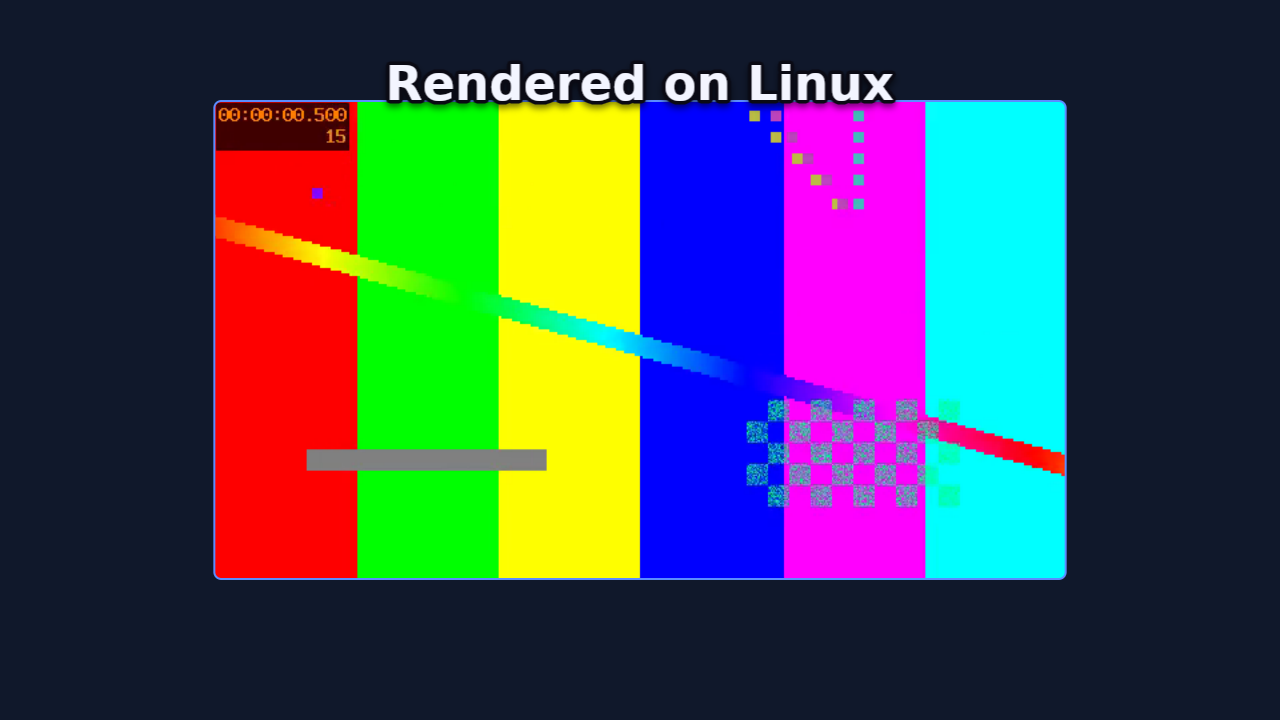
What a session looks like — three requests in, a validated project and a
rendered frame out (the frame at the top of this page was made exactly this
way):
```json
{"jsonrpc":"2.0","id":1,"method":"initialize","params":{"protocolVersion":"2025-06-18"}}
{"jsonrpc":"2.0","method":"notifications/initialized"}
{"jsonrpc":"2.0","id":2,"method":"tools/call","params":{"name":"promo_validate","arguments":{"project":"examples/LinuxSmoke.promo"}}}
{"jsonrpc":"2.0","id":3,"method":"tools/call","params":{"name":"promo_render_still","arguments":{"project":"examples/LinuxSmoke.promo","time":5.5}}}
```
```json
{"id":2,"result":{"content":[{"type":"text","text":"ok — nothing the renderer would quietly correct"}]}}
{"id":3,"result":{"content":[{"type":"text","text":"wrote examples/LinuxSmoke.promo/Exports/still-5.5s.png (1280x720 at 5.50s)"}]}}
```
## One engine, every platform
The same project rendered on macOS (Metal, VideoToolbox) and on a bare
Linux container (lavapipe software Vulkan, no GPU; ffmpeg) — SSIM 0.983
over the full 240-frame video. The visible difference is the font: the
caption asks the question, the two frames answer it.
Try it yourself — [examples/](https://github.com/GarAlex/promoshot/blob/HEAD/examples/) holds one runnable project per
`promo_schema` recipe (each metadata.json IS its recipe, pinned by a
test), from the device-framed product card to the 9:16 re-stamp — plus
the kitchen-sink [LinuxSmoke.promo](https://github.com/GarAlex/promoshot/blob/HEAD/examples/LinuxSmoke.promo):
```
promo video examples/ProductCard.promo --out card.mp4
```
## Authoring a project
Start with `promo schema`. The short version: a project folder holds
`metadata.json` and `Resources/`; ids are unique strings (short mnemonics
are fine — apps mint UUIDs on adoption); layers place resources
on a timeline with keyframes (hold-then-ease), placement rules, transitions
and palette-named colours (`@accent`). Validate before rendering — the
validator names what the renderer would silently correct, undefined colour
names included.
```
mkdir -p Demo.promo/Resources
# write Demo.promo/metadata.json, copy media into Resources/
promo validate Demo.promo && promo still Demo.promo --out look.png --time 1
```
Or let the MCP server spend the boilerplate (`promo_init`,
`promo_upsert_layer`), and give your editor autocomplete by pointing
`"$schema"` at [docs/promo.schema.json](https://github.com/GarAlex/promoshot/blob/HEAD/docs/promo.schema.json).
## Invariants and plans
- `SPECS.md` — the invariants the tests pin.
## License
Apache-2.0. The PromoShot applications built on this engine are separate,
proprietary products.
## Proxies for long sources
`promo proxy ` builds a tier-1 proxy (960 px long edge, every
frame a keyframe) for each video resource, in a cache outside the
package (`$PROMO_PROXY_DIR`, else the platform cache directory under
`promoshot/proxies`). `still`, `frames`, `gif` and `video` take
`--proxy auto|on|off`: `auto` (default) reads a built proxy when the
output's long edge fits it, `on` builds missing proxies first, `off`
reads the source — and a full-size render always does. The MCP tools
take the same `proxy` argument; `promo_proxy` builds them.
## Markers and chapters
A project may carry `markers` — named moments on the output timeline.
`kind: "chapter"` markers are written into an exported mp4's chapter
list (a player's chapter menu); `inspect` lists them all.
## Audio effects
A video or audio resource may carry `audioEffects` — `normalize`
(loudness to a target LUFS), `compressor` and one-band `eq` entries,
applied in order before the mix in every render the core makes. The
apps' exports take the same mix; their live preview plays the resource
dry.
## Chroma key
A video or image layer may carry `chromaKey` — a colour, a tolerance
and a softness: the plate becomes transparent before the layer's grade,
border and mask, in the compositor, so a green-screen clip composes
over anything on every host alike.
## Models
A resource of kind `model` is a glTF 2.0 binary (`.glb`) in `Resources/`;
a layer of kind `model` draws it through a PBR-lite pass into a texture
at the layer's size, and from there it is a picture like any other:
placement, opacity, transitions, masks, effects and the contact shadow
all apply. Keyframes carry a `camera` (yaw, pitch, roll, distance in
bounds radii, fov) and a `light`; `materials` on the resource bind a
slot name to a colour — a palette name works, so `@accent` re-skins the
body with the theme — and, in the object form, to a finish: `metallic`
and `roughness` (each 0…1) over the file's own, so one body is chrome in
this project and matte in the next (rung 32) — or, better, to a finish
WORD (rung 44): `chrome`, `brushed`, `anodized`, `gloss`, `satin`,
`matte`, `rubber`, `ceramic`, `lacquer`, `paper`, `glass`, `frosted`,
each expanded by the engine into the numbers, the coat, the grain, the
transmission and the refraction it stands for, so nobody levels a
reflection by hand; on a screen the word is the coat over the picture,
and glass on a stage bends the bodies behind it. Lighting defaults come
from the theme; a scene `environment` (studio, sunset, night; rung
35 — or, rung 46, a `resourceID` naming a panorama in the project, a
picture of the world the bodies mirror) is what metals mirror; a file's
normal map and metallic-roughness
texture are honoured. Rung 29. Built-in device bodies
(phone, tablet, laptop; `promo device`) ship as generated `.glb` files
with `Body` and `Screen` slots, so the device shot is a model too. A
model can also be a `recipe` the engine builds at load instead of a file
— text as a body first: real type in the 3D world with `Face` and `Side`
slots, lit and finished like any body (rung 34); a device body; and a
body of PARTS — boxes, spheres, cylinders, tori, a lathe, an extrude,
each under a slot, placed by position, rotation and scale — the 3D
counterpart of a drawing, authored the way an SVG is (rung 37).
Layers naming the same `stage` draw through one camera into one depth
buffer, models at their `depth` and pictures as billboards, the first
member's placement carrying the whole scene (rung 30). A stage can also
be one layer of kind `stage` holding its `members`, the camera and light
on its own keyframes (rung 33) — the same picture, with the stage's
ownership written down. A stage's `floor` word (rung 45) — `matte`,
`satin`, `glossy`, `mirror` — puts a plane under the lowest body that
catches the key light's shadow, the darkening where a body touches, and
the stage mirrored in it, blurred less and less; whatever lies beneath
the stage layer shows through, so the table is the project's own
background. The light's keyframes move the shadow; the floor stays.
## A picture worn by a body
A slot's picture is a screen by default: unlit, fitted, what a
screenshot on a phone wants. `"mode": "surface"` on the binding wears
it instead — the image or video becomes the slot's colour under the
light and the finish, tiled by `repeat` and shifted by `offset`, the
slot's own colour showing through where the picture is transparent — so
a label sits on a vase, a print on a box, and a video plays on a glossy
wall that the key light and the environment still shade. Rung 38.
## Particles
A resource of kind `particles` is a recipe, not a file — an emitter, a
rate or a burst, life, speed, gravity, wind, drag, turbulence, size and
colour over life, a shape — played by a drawing layer. Every particle is
a closed-form function of its birth time and the seed, so any frame
renders alone and identically on every host. Rung 36.
A path resource can carry a route in the stage (rung 40): 3D points in
stage radii that a member's or a camera's `motionPath` follows, fitted
between two keyframes exactly as the 2D motion path is, with a camera
`target` — the centre, ahead, a member or a point — saying where it
looks on the way. A spiral that keeps looking inward is one route and
one keyframe.
Particles in a stage are a morph (rung 39): the recipe names two bodies,
samples the first's surface, and as a drawing member's `progress`
keyframe ramps from 0 to 1 the points fly out and gather on the second
body — a cube bursts into points that settle into a word. A parts box
with `faces: true` has six slots, one picture per side, which is what
such a cube is made of.
## Text with a side
Legacy: the caption `depth` below is the flat compositor's 2.5D. A title
with a real side is a text body (rung 34) standing in a stage; the
validator names the old form. It still renders.
A caption style may carry `depth`: copies of the words stacked under the
face, each a little further along and darker, so the type reads as
solid letters with a side — the classic extrusion, pure 2D, lit by
choosing the offset. A reveal extrudes each arriving piece the same way.
`tiltX` / `tiltY` keyframes on a caption lean it in perspective, on the
same camera the device frames use, and the side leans with the face.
A reveal's `flip`, `tumble` and `slide` modes bring each word in on its
own axes — kinetic type from one rule, no keyframes.
## Follow the pointer
A video the Mac recorder made carries `pointer`, where the pointer went
and where it clicked, in the recording's own time and coordinates. A
layer showing it may say `follow`: its viewport becomes a window
`1/zoom` of the source that follows the smoothed pointer, and each click
draws a ring that grows and fades. A rule, not keyframes: re-trim the
recording and it stays true, on every host alike.
## Image effects
A layer may carry `effects`: a `blur` (round, or directional along a
`blurAngle`), a `glow` of its bright parts, a `vignette` toward its own
corners, film `grain` and an unsharp `sharpen`, each on the layer's own
pixels in the compositor. Blur, glow and vignette are keyframe tracks
too, so a focus pull or a glow that pulses ramps like the grade does.
Five transitions ride the same passes — `blurDissolve`, `zoom`, `flash`,
`glitch` and `dip` — beside the fade, wipe, slide, push and scale that
were there, at a layer's edges and at a resource swap alike. A video
layer's swap may name a composition (rung 47): the takeover, the next
film arriving through any of those cuts where its `sourceTime` says, or
where its clock already is. The same keyframes carry the consumer's
transport for anything with a clock — a video, an audio, a composition,
a sprite: `sourceTime` seeks it, `playback` pauses and resumes it, and
its sound follows.
## Looks from a `.cube`
A resource of kind `lut` is a `.cube` file in `Resources/`; a layer's
`adjustments.lutResourceID` (with `lutAmount`) applies it in the
compositor after the layer's own grade — a trilinear lookup on every
host alike.
## ProRes and alpha
`promo video … --codec prores422|prores4444 --out x.mov` writes ProRes;
`--alpha` renders the project over nothing and keeps the frames' alpha
in a ProRes 4444 (`--alpha` on `still`/`frames` gives transparent PNGs).
Sources that carry alpha (ProRes 4444, WebM with alpha, PNG sequences)
decode premultiplied and compose with their transparency.