# pipepie/pipepie [Health: Active]
**Category:** 💬 Communication
**Repository:** https://github.com/pipepie/pipepie
**GitHub Stars:** 8
**Views:** 2
**Installs:** 0
**Upvotes:** 0
**Directory Page:** https://allmcps.com/mcp/pipepie-pipepie
## Description
Self-hosted webhook relay and tunnel with Noise NK encryption. 13 MCP tools to inspect requests, replay webhooks, trace AI pipelines, connect/disconnect tunnels, and manage subdomains. No tokens or passwords — the cryptographic handshake is the auth.
## Claude Desktop Quick Installation
Heuristic fallback — verify the package name and runner against the repository README before running it. Uses `npx` (confidence: low):
```json
"mcpServers": {
"pipepie": {
"command": "npx",
"args": ["-y","pipepie-pipepie"]
}
}
```
## Documentation & README
# Pipepie
**Self-hosted, encrypted tunnel for webhooks, AI pipelines, and local development.**
**End-to-end Noise encryption, pipeline tracing, web dashboard.**
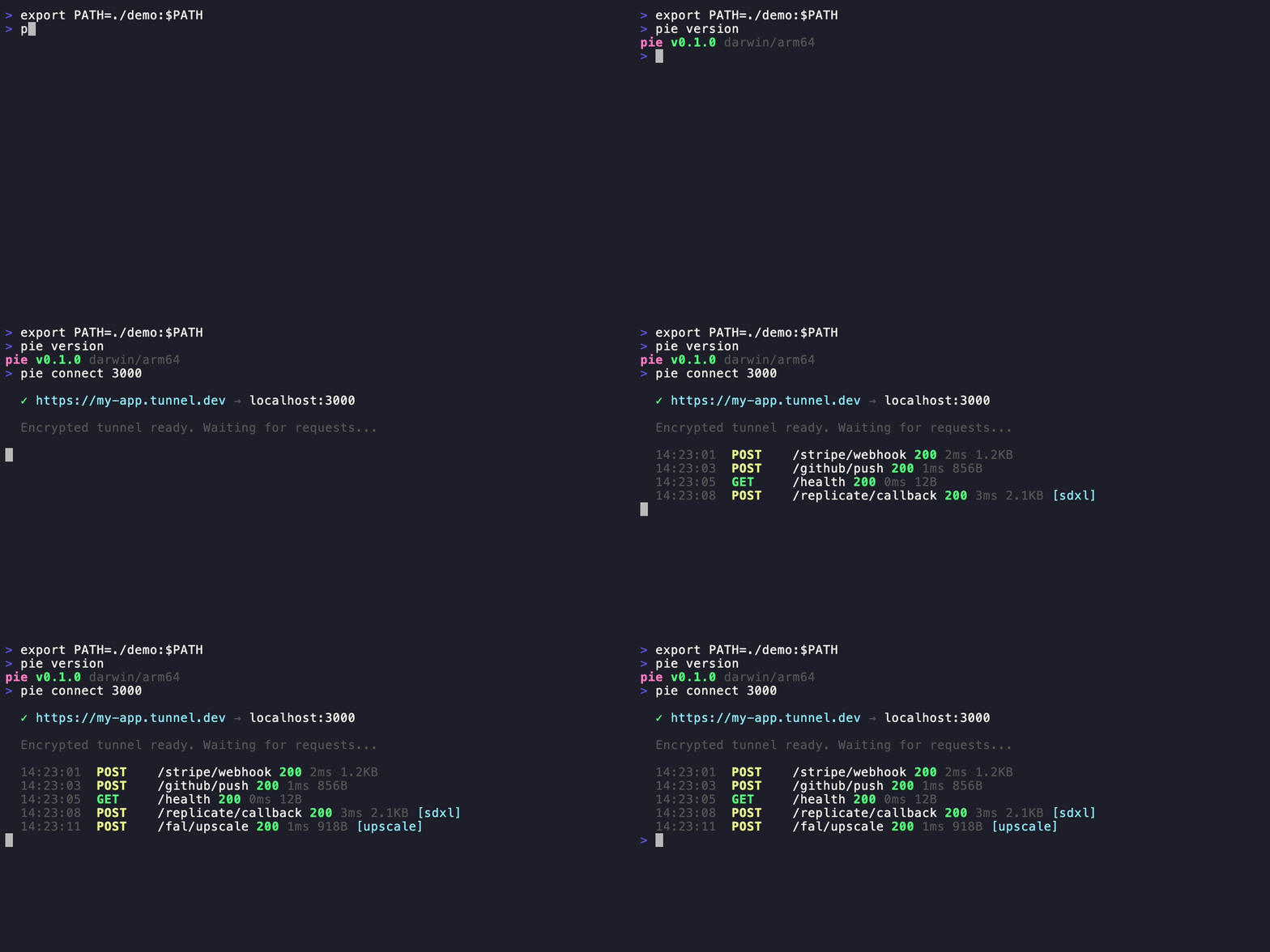
```bash
pie connect 3000
# ✓ https://my-app.tunnel.dev → localhost:3000
```
## Why Pipepie?
- **End-to-end encrypted** — Noise NK protocol. The relay server never sees your data.
- **AI-first** — auto-detects Replicate, fal.ai, RunPod, Modal, OpenAI webhooks. Pipeline tracing with timeline visualization.
- **Self-hosted** — your server, your domain, your data. No vendor lock-in.
- **Fast** — 577 req/s parallel, 2ms overhead. Protobuf + zstd + yamux.
- **MCP server built-in** — `pie mcp` gives Claude, Cursor, and AI tools direct access to tunnels, requests, and pipeline traces.
- **Beautiful CLI** — Dracula theme, interactive forms, 17 commands.
- **Zero-config start** — `pie setup` on server, `pie login` on client, done.
## Install
```bash
# Homebrew
brew install pipepie/tap/pipepie
# Script
curl -sSL https://raw.githubusercontent.com/pipepie/pipepie/main/install.sh | sh
# Or build from source
git clone https://github.com/pipepie/pipepie && cd pipepie && make build
```
## Quick Start
### Server (your VPS, one time)
```bash
pie setup
```
Interactive wizard handles DNS, firewall, TLS (Let's Encrypt auto or Cloudflare), nginx detection, systemd service — everything.
### Client (your dev machine)
```bash
# Save server connection (key from pie setup)
pie login --server tunnel.mysite.com:9443 --key a7f3bc21...
# Tunnel any local port
pie connect 3000
```
## AI Tool Presets
```bash
pie connect --ollama # Ollama (port 11434, auth enabled)
pie connect --comfyui # ComfyUI (port 8188, WebSocket)
pie connect --n8n # n8n workflows (port 5678)
pie connect --tma # Telegram Mini App (port 5173)
```
## Features
### Tunneling
```bash
pie connect 3000 # HTTP tunnel
pie connect 3000 --name my-app # Stable subdomain
pie connect --tcp 5432 # TCP (databases, gRPC)
pie connect 3000 --auth secret # Password-protected URL
pie up # Multi-tunnel from pipepie.yaml
```
### Webhook Inspection
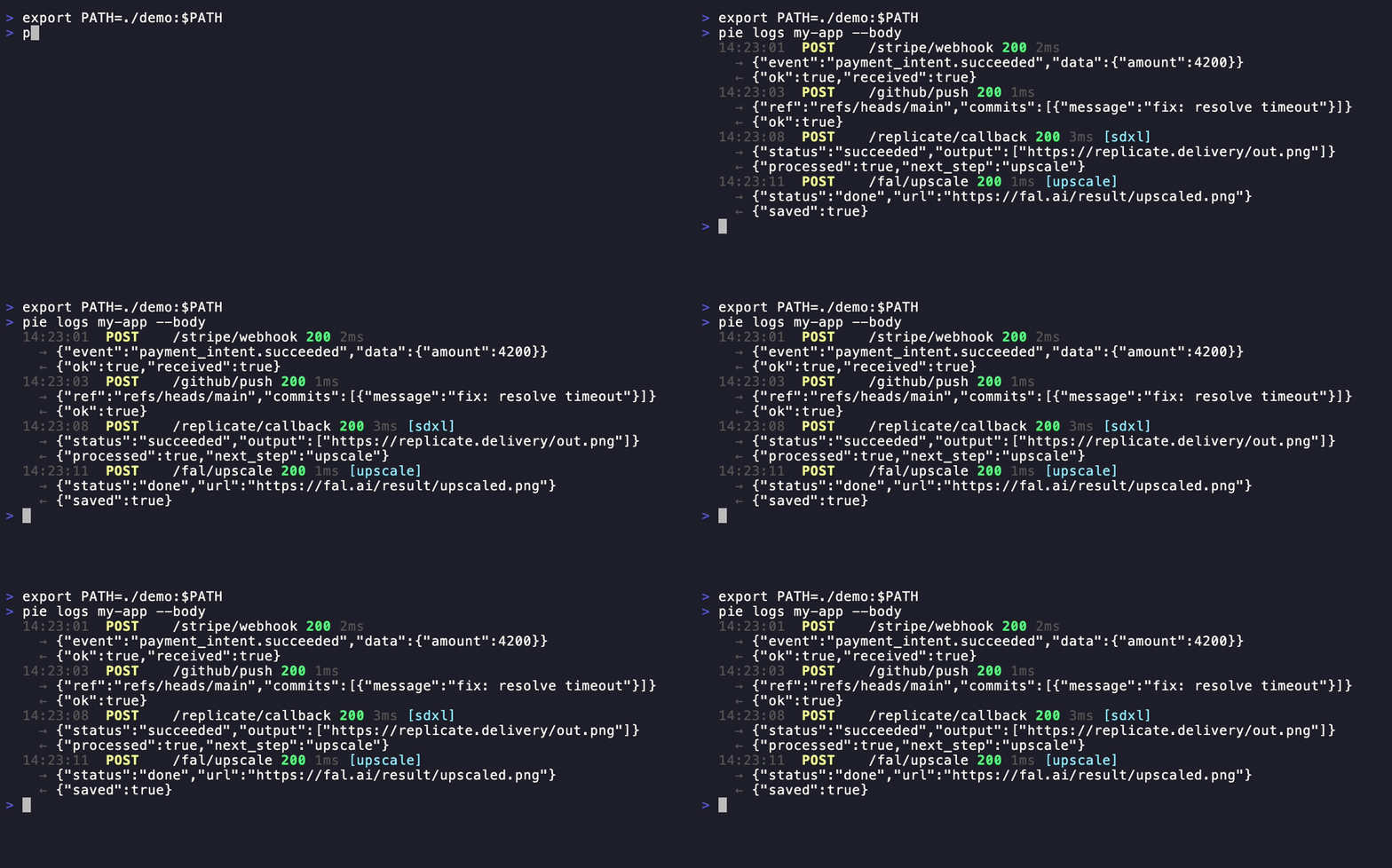
```bash
pie logs my-app --follow --body # Stream with request/response bodies
pie inspect # Full headers, body, metadata
pie replay # Re-send a captured webhook
pie dashboard # Open web UI in browser
```
### AI Pipeline Tracing
Pipepie auto-detects webhooks from AI providers — no configuration needed:
| Provider | Detection | What's extracted |
|----------|-----------|-----------------|
| Replicate | `webhook-id` header + payload | Job ID, status, predict_time |
| fal.ai | `x-fal-signature` header | Request ID, status |
| RunPod | UPPERCASE status in payload | Run ID, execution time |
| Modal | `call_id` in payload | Call ID, status |
| OpenAI | `batch_` prefix in ID | Batch ID, model |
| MCP | JSON-RPC 2.0 `method` field | Tool name, call ID |
Webhooks from the same pipeline are auto-correlated into traces:
```bash
pie traces my-app # Terminal timeline view
pie dashboard # Web UI with Jaeger-style bars
```
Or use headers for manual correlation:
```bash
curl -X POST https://my-app.tunnel.dev/webhook \
-H "X-Pipepie-Pipeline: image-gen" \
-H "X-Pipepie-Step: generate" \
-H "X-Pipepie-Trace-ID: trace-001"
```
### Multi-Service Config
```yaml
# pipepie.yaml
server: tunnel.mysite.com:9443
key: a7f3bc21...
tunnels:
api:
subdomain: my-api
forward: http://localhost:3000
frontend:
subdomain: my-app
port: 5173
pipeline:
name: image-gen
steps:
- name: replicate-sdxl
webhook: /replicate
forward: localhost:3000/on-image
- name: fal-upscale
webhook: /fal
forward: localhost:3000/on-upscale
```
```bash
pie up
```
### Multi-Account
```bash
pie login --server work.example.com:9443 --key abc...
pie login --server personal.example.com:9443 --key def...
pie account # List all, see active
pie account use work.example.com # Switch
pie logout personal.example.com # Remove
```
### Server Management

```bash
pie setup # Interactive setup wizard
pie server --config pipepie.yaml # Start server
pie doctor --config pipepie.yaml # Diagnose configuration
pie status # Tunnel overview
pie status --json # JSON output for scripts
```
## Architecture
```
Client (pie connect) Server (pie server)
│ │
│◄──── Noise NK handshake ────►│
│ (ChaChaPoly + BLAKE2b) │
│ │
│◄──── yamux multiplexing ────►│
│ (parallel streams) │
│ │
│◄──── Protobuf + zstd ──────►│
│ (binary, compressed) │
│ │
localhost:3000 https://sub.domain.com
```
**Noise NK** — server authenticated by public key. Know the key = have access.
**yamux** — multiplexed streams, no head-of-line blocking.
**Protobuf** — binary wire format, ~10x smaller than JSON.
**zstd** — bodies >1KB auto-compressed.
**SSE/streaming** — pass-through without buffering (Vercel AI SDK, Ollama compatible).
## MCP Server (Claude, Cursor, AI tools)
 Pipepie includes a built-in [Model Context Protocol](https://modelcontextprotocol.io) server. Your AI tools can inspect webhooks, replay requests, manage tunnels, and debug pipelines — directly from the chat.
```bash
# Claude Code (one command)
claude mcp add --transport stdio pipepie -- pie mcp
```
Pipepie includes a built-in [Model Context Protocol](https://modelcontextprotocol.io) server. Your AI tools can inspect webhooks, replay requests, manage tunnels, and debug pipelines — directly from the chat.
```bash
# Claude Code (one command)
claude mcp add --transport stdio pipepie -- pie mcp
```
Claude Desktop / Cursor config
Add to `claude_desktop_config.json` or Cursor MCP settings:
```json
{
"mcpServers": {
"pipepie": {
"command": "pie",
"args": ["mcp"]
}
}
}
```
**13 tools available:**
| Tool | What it does |
|------|-------------|
| `overview` | Dashboard with all tunnels, stats, success rates |
| `list_tunnels` | All registered tunnels with online/offline status |
| `tunnel_status` | Check if a specific tunnel is online |
| `connect` | Start a tunnel (e.g. port 3000 → public URL) |
| `disconnect` | Stop a running tunnel |
| `active_tunnels` | List tunnels running in this session |
| `list_requests` | Recent webhook requests for a tunnel |
| `inspect_request` | Full request details: headers, body, response |
| `replay_request` | Re-send a captured webhook |
| `pipeline_traces` | AI pipeline execution traces |
| `trace_timeline` | Step-by-step timeline for a trace |
| `create_tunnel` | Register a new subdomain |
| `delete_tunnel` | Remove a tunnel and its data |
## CLI Reference
| Command | Description |
|---------|-------------|
| `pie connect [port]` | Create a tunnel |
| `pie connect --tcp [port]` | TCP tunnel |
| `pie connect --ollama` | Ollama preset |
| `pie connect --comfyui` | ComfyUI preset |
| `pie connect --n8n` | n8n preset |
| `pie connect --tma` | Telegram Mini App preset |
| `pie login` | Add server connection |
| `pie logout` | Remove account |
| `pie account` | List & switch accounts |
| `pie dashboard` | Open web UI in browser |
| `pie status` | Show tunnels and activity |
| `pie logs [name]` | Stream requests |
| `pie inspect [id]` | Full request details |
| `pie replay [id]` | Replay a webhook |
| `pie traces [name]` | Pipeline trace timelines |
| `pie up` | Multi-tunnel from pipepie.yaml |
| `pie setup` | Server setup wizard |
| `pie server` | Start relay server |
| `pie doctor` | Diagnose server config |
| `pie mcp` | Start MCP server for AI tools |
| `pie update` | Self-update to latest |
| `pie version` | Version + update check |
## Performance
| Metric | Result |
|--------|--------|
| Latency | 2ms overhead |
| Sequential | 119 req/s |
| Parallel (20 workers) | 577 req/s |
| 1MB body | 16ms |
## What makes Pipepie different
- **Self-hosted & open source** — your infrastructure, your data, no third-party traffic inspection
- **End-to-end encrypted** — Noise NK protocol, the relay server never sees plaintext
- **AI-native** — auto-detects 6 providers, pipeline tracing, MCP support
- **Complete toolkit** — tunneling + inspection + replay + dashboard in one binary
- **Free forever** — no bandwidth limits, no session timeouts, no paid tiers for core features
## License
AGPL-3.0 — free to use, modify, and self-host. If you modify and offer as a service, you must open-source your changes.