# openshorts [Health: Active]
**Category:** 🌐 Social Media
**Repository:** https://github.com/mutonby/openshorts
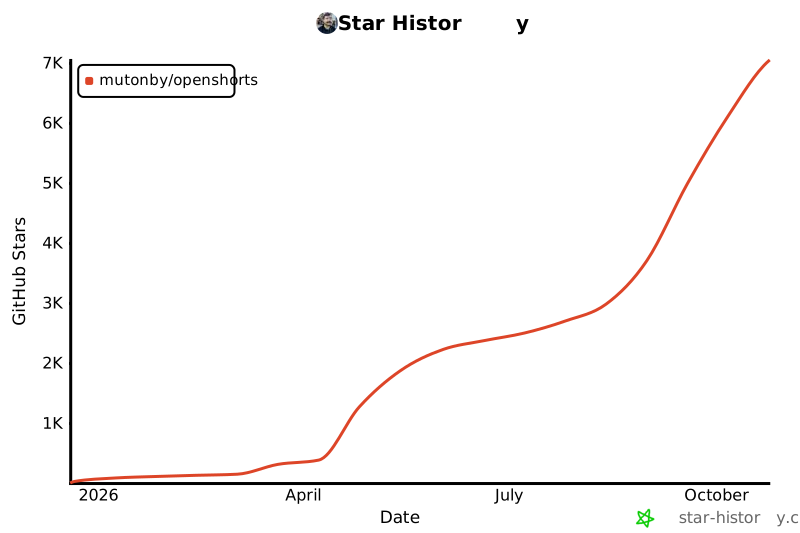
**GitHub Stars:** 7047
**Views:** 2
**Installs:** 0
**Upvotes:** 0
**Directory Page:** https://allmcps.com/mcp/openshorts
## Description
Turn long videos into viral vertical shorts and publish them to TikTok, Instagram and YouTube.
## Claude Desktop Quick Installation
Install path detected from listing signals. Uses `uvx` (confidence: high):
```json
"mcpServers": {
"openshorts": {
"command": "uvx",
"args": ["openshorts"]
}
}
```
## Documentation & README
# OpenShorts.app
[](https://opensource.org/licenses/MIT)
[](https://opensource.org/)
[](http://makeapullrequest.com)
[](https://docs.docker.com/compose/)
[](https://github.com/mutonby/openshorts)
[](https://github.com/mutonby/openshorts/commits/main)
**Open source AI video platform** with 3 tools in one: **Clip Generator**, **AI Shorts (UGC videos with AI actors)**, and **YouTube Studio**.
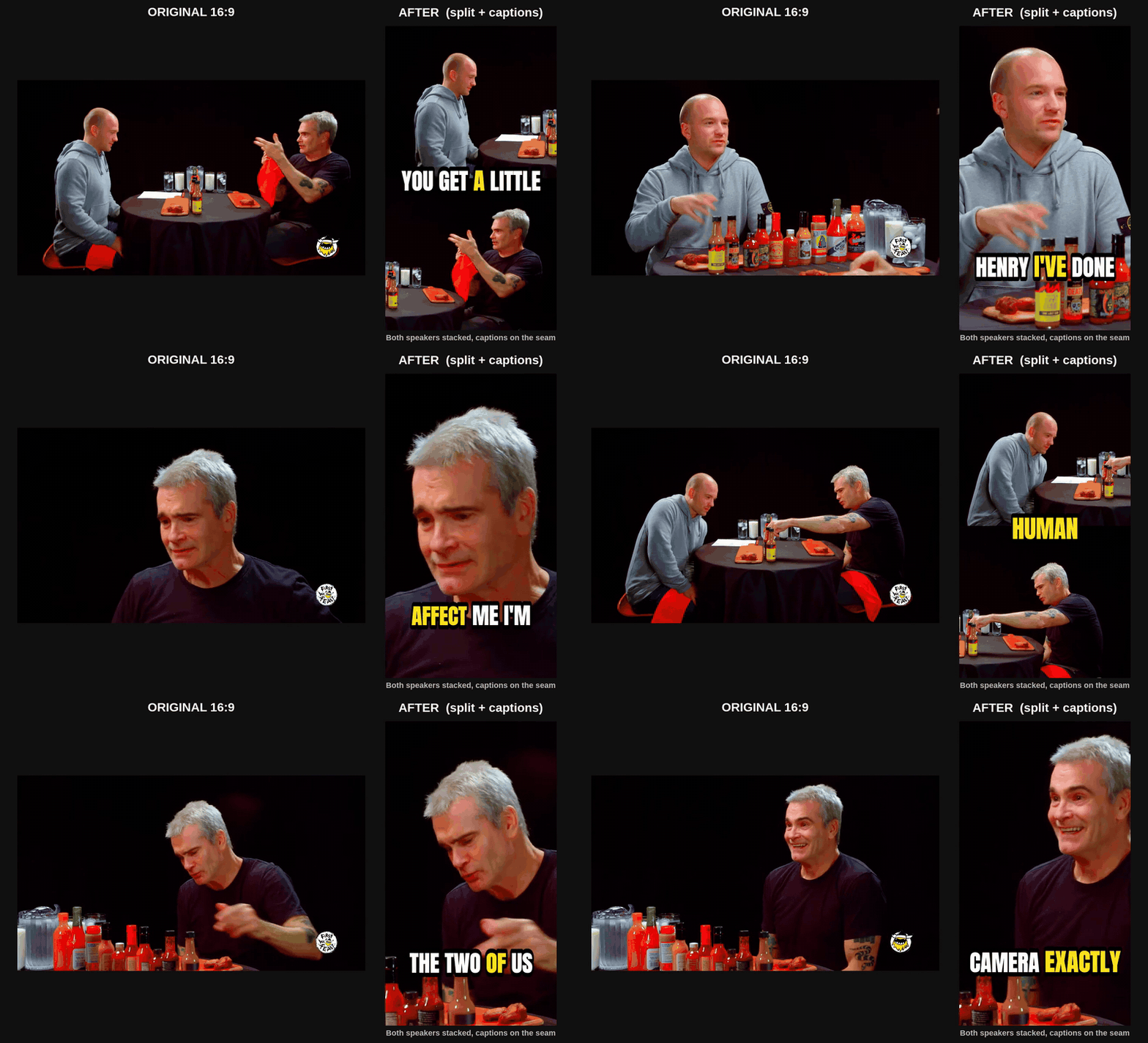
Real OpenShorts output, not a mock-up. Source: [Turn the Tables with Dan and Shoshana Jordan](https://www.youtube.com/watch?v=-KbQj_vboOU), Heritage of Faith, licensed CC BY.
Two people on camera? OpenShorts stacks them instead of shrinking the wide shot, puts the captions on the seam where they cover nobody, and switches back to a face-tracked crop when the cut goes to one person. The AI picks the layout per video; nothing to configure.
**Two ways to run it, same software either way:**
| | Self-hosted (this repo) | Hosted on [openshorts.app](https://www.openshorts.app/) |
|---|---|---|
| **Price** | Free forever, MIT | Free plan, paid from $12/mo |
| **Speed** | 5 to 8 min per 8-min video on CPU | About 50s on our NVIDIA GPU |
| **API keys** | Bring your own Gemini, ElevenLabs, fal.ai | Gemini included, nothing to set up |
| **Watermark / limits** | None, ever | Watermark and 20 min/mo on the free plan, neither on paid |
| **Setup** | Docker, 8GB+ RAM, model downloads | Sign in and paste a link |
| **MCP / API for agents** | Same `/mcp` endpoint, but only while your machine is on | Always-on endpoint at [mcp.openshorts.app](https://www.openshorts.app/mcp), API keys in one click |
| **Your data** | Your server | Ours |
Self-hosting is genuinely free and always will be. It costs you a machine, your own API keys and the time to keep it running. The hosted plans exist to cover that hardware and those keys, not to unlock features.
https://github.com/user-attachments/assets/b45fa983-16b4-48b5-ac5b-a267836b9ad9
### Video Tutorial: How it works
[](https://www.youtube.com/watch?v=xlyjD1qCaX0 "Click to watch the video on YouTube")
*Click the image above to watch the full walkthrough.*
---
## 3 Tools in 1 Platform
### 1. Clip Generator
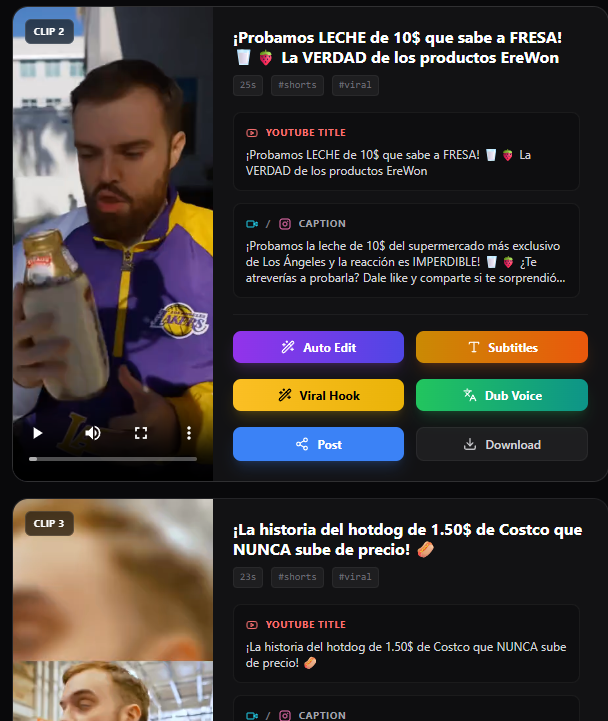
Turn your long-form videos — podcasts, webinars, livestreams, vlogs, interviews — into viral-ready 9:16 shorts for TikTok, Instagram Reels, and YouTube Shorts.
### 2. AI Shorts (UGC Video Creator)
Generate marketing videos with AI actors for **any product or business**. No camera, no studio, no influencer budget. Just describe your product or paste a URL.
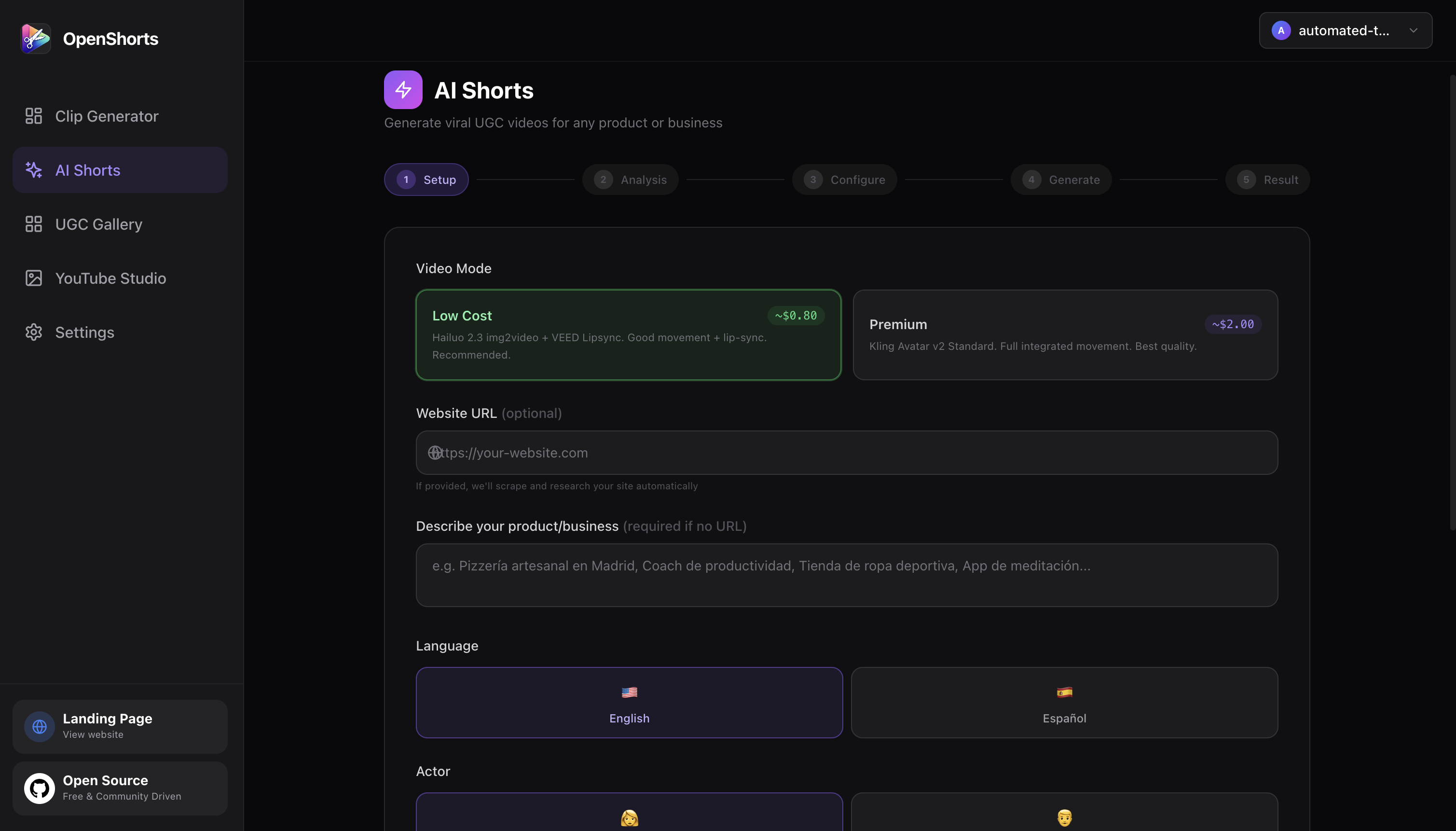
- **Two cost modes**: Low Cost (~$0.65/video) and Premium (~$2/video)
- Works for any business: SaaS, restaurants, e-commerce, coaching, local businesses
- AI-generated actors with lip-sync, voiceover, b-roll, and TikTok-style subtitles
- Choose from a shared avatar gallery or upload your own photo
- Publish directly to TikTok, Instagram, and YouTube
### 3. YouTube Studio
Complete free AI YouTube toolkit: thumbnails, titles, descriptions, and direct publishing.
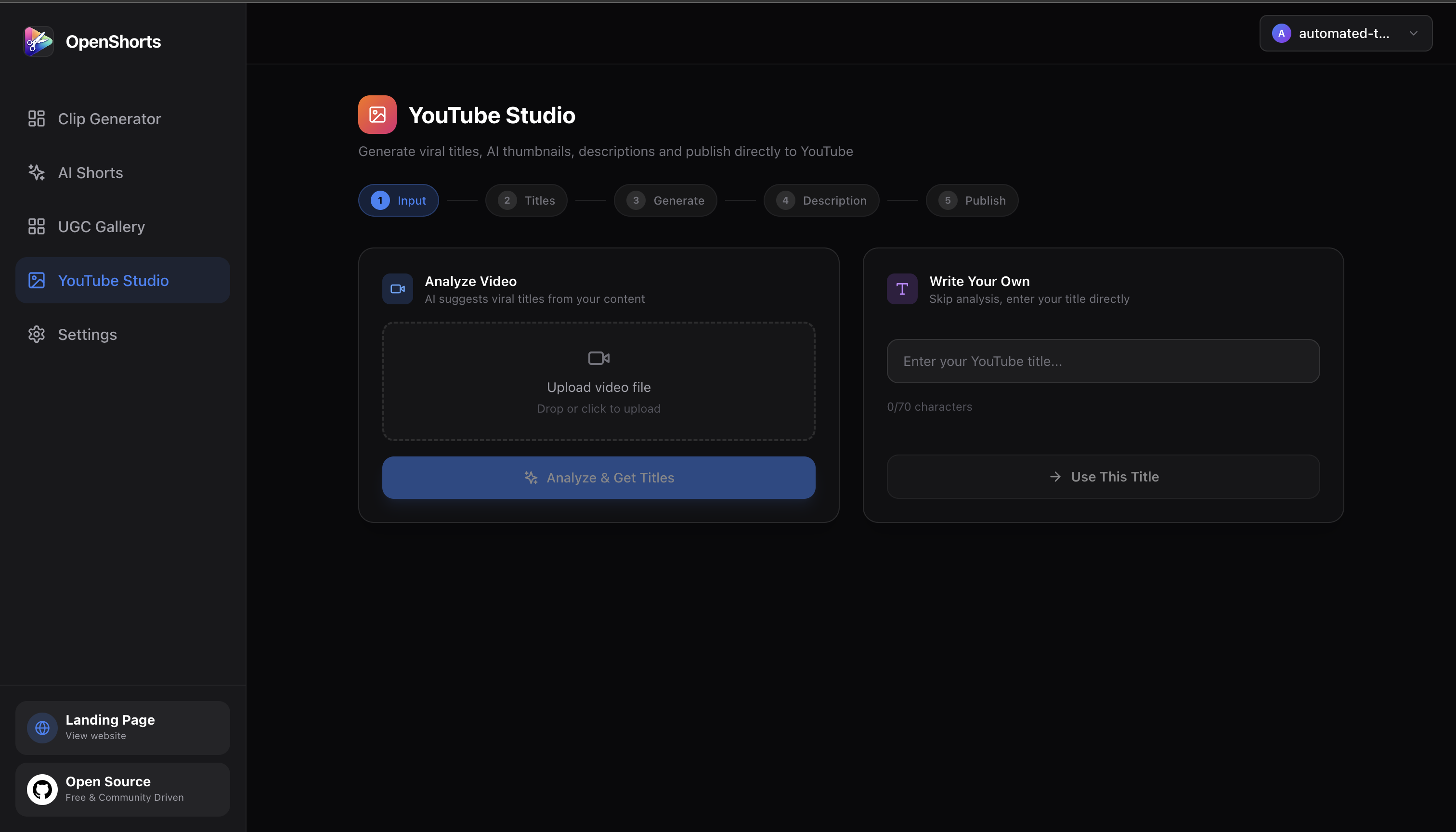
- AI thumbnail generator with face overlay
- 10 viral title suggestions with refinement chat
- Auto-generated descriptions with chapter timestamps
- One-click publish to YouTube
### UGC Video Gallery
All generated videos and avatars are saved to a public gallery with SEO pages for each video.
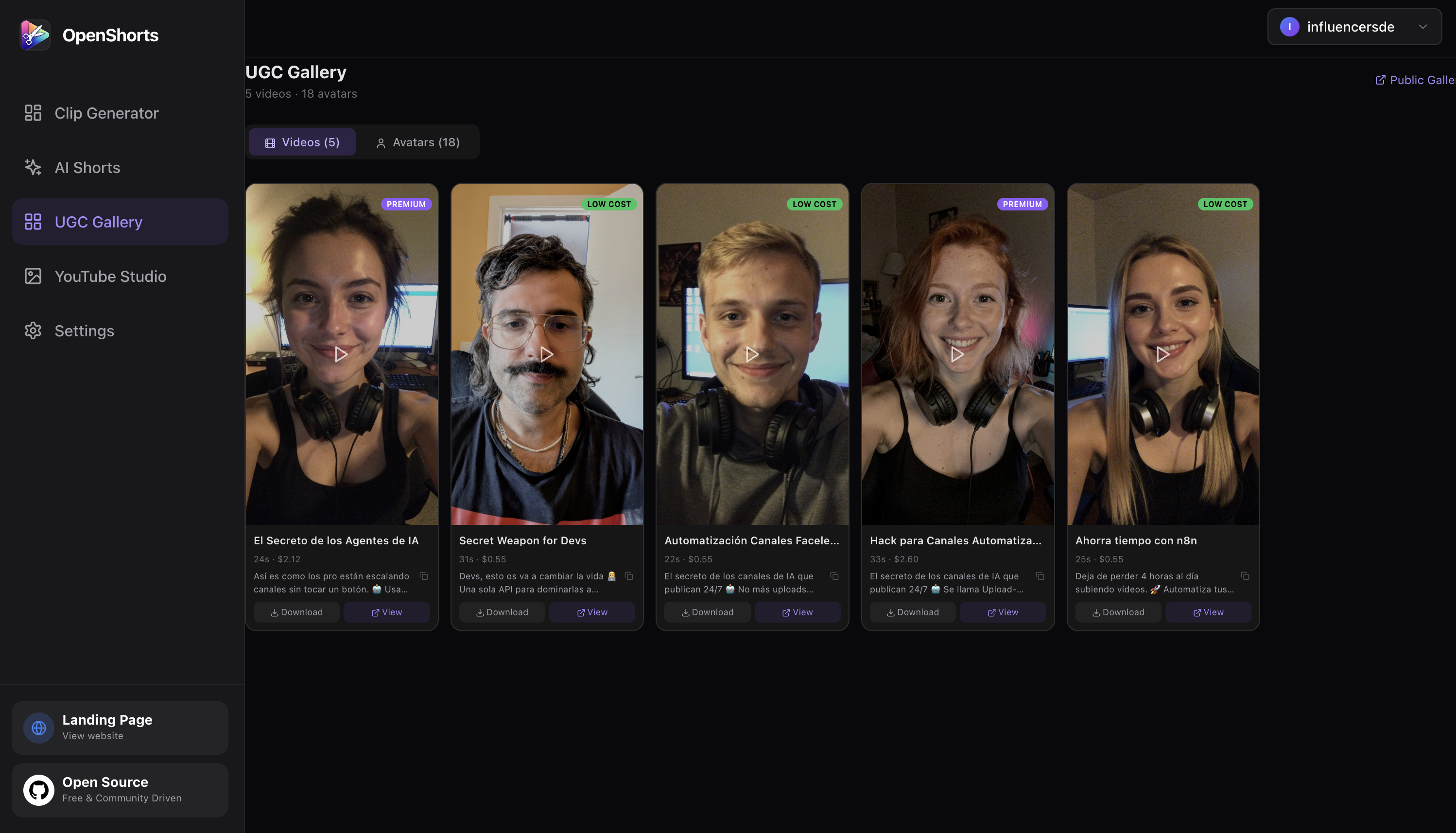
- Public gallery page with hover-to-play (`/gallery`)
- Individual SEO video pages with og:video meta tags (`/video/{id}`)
- JSON-LD structured data for search engines
- Avatar gallery with prompt history
---
## Key Features
### Clip Generator
- **Viral Moment Detection**: Google Gemini 3.1 Flash-Lite analyzes transcripts and scene boundaries to detect 3-15 high-potential moments
- **Runs fully local if you want**: point `LLM_BASE_URL` at Ollama, LM Studio, vLLM or any OpenAI-compatible server and the moment picker runs on your own model, no Google key needed (see [Run without a Google key](#6-run-without-a-google-key-local-llm-optional))
- **Smart 9:16 Cropping**: AI reframing per scene — TRACK mode (MediaPipe + YOLOv8 face tracking), GENERAL mode (blurred background), SPLIT mode (two speakers stacked, captions on the seam) and SCREENCAST mode (screen over presenter); the layout is picked per video by Gemini or forced from the dashboard
- **Auto Subtitles**: faster-whisper with word-level timestamps, styled and burned into clips
- **AI Voice Dubbing**: ElevenLabs integration for 30+ languages with voice cloning (bring your own ElevenLabs key, on the cloud too)
- **Hook Text Overlays**: AI-generated attention-grabbing text overlays
- **AI Video Effects**: Gemini-generated FFmpeg filters for professional effects
### AI Shorts Pipeline
1. **Analyze**: Scrape website URL + web research, or generate from manual description
2. **Script**: AI writes viral scripts (hook - problem - solution - CTA format)
3. **Actor**: Generate AI actors with Flux 2 Pro or select from shared gallery
4. **Voice**: ElevenLabs TTS voiceover (English/Spanish, male/female)
5. **Video**: Talking head generation (Hailuo 2.3 Fast img2video + VEED Lipsync)
6. **B-roll**: AI-generated visuals with Ken Burns effect
7. **Composite**: FFmpeg final assembly with subtitles and hook overlays
8. **Publish**: Direct posting to TikTok, Instagram Reels, YouTube Shorts via Upload-Post
### YouTube Studio
- AI-powered title generation with 10 viral options
- Interactive refinement chat for titles
- AI thumbnail generation with custom face + background
- Auto descriptions with chapter timestamps from Whisper transcript
- Direct YouTube publishing via Upload-Post
### Social Auto-Publishing
- **One-click posting** to TikTok, Instagram Reels, and YouTube Shorts simultaneously
- **Schedule uploads** for any date and time — plan your content calendar and let OpenShorts publish automatically
- **Multi-platform distribution** — publish to all your social networks at once from a single interface
- Upload-Post integration with async uploads
### Infrastructure
- S3 cloud backup (private bucket for clips, public bucket for gallery/avatars)
- SEO gallery pages served by FastAPI with JSON-LD structured data
- Shared avatar gallery across all users
- Async job queue with configurable concurrency
---
## Who Is This For?
- **Content creators** — Turn long videos into shorts automatically, publish to all platforms at once
- **Marketing agencies** — Generate UGC videos for clients at scale, no actors or studios needed
- **SaaS founders** — Create product demos and marketing shorts from just a URL
- **E-commerce brands** — Product videos with AI actors for TikTok Shop, Instagram, YouTube
- **Local businesses** — Restaurants, gyms, real estate, coaching — affordable video marketing
- **Developers** — Self-host, customize the pipeline, integrate via API
---
## AI Shorts Showcase
Videos generated with OpenShorts AI Shorts — no camera, no studio, no actors:
| | | |
|:---:|:---:|:---:|
| [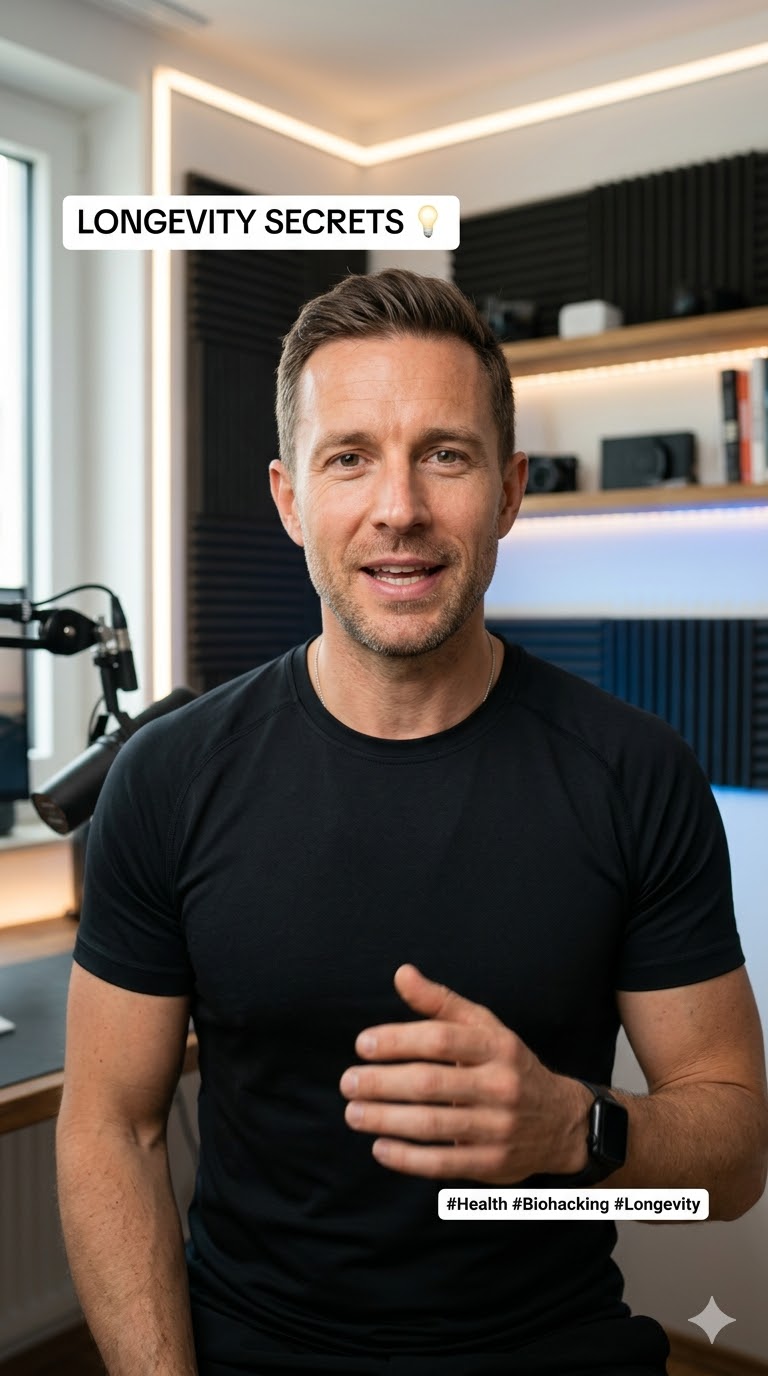](https://openshorts.app/video/cdceec1b) | [](https://openshorts.app/video/d3a80b6b) | [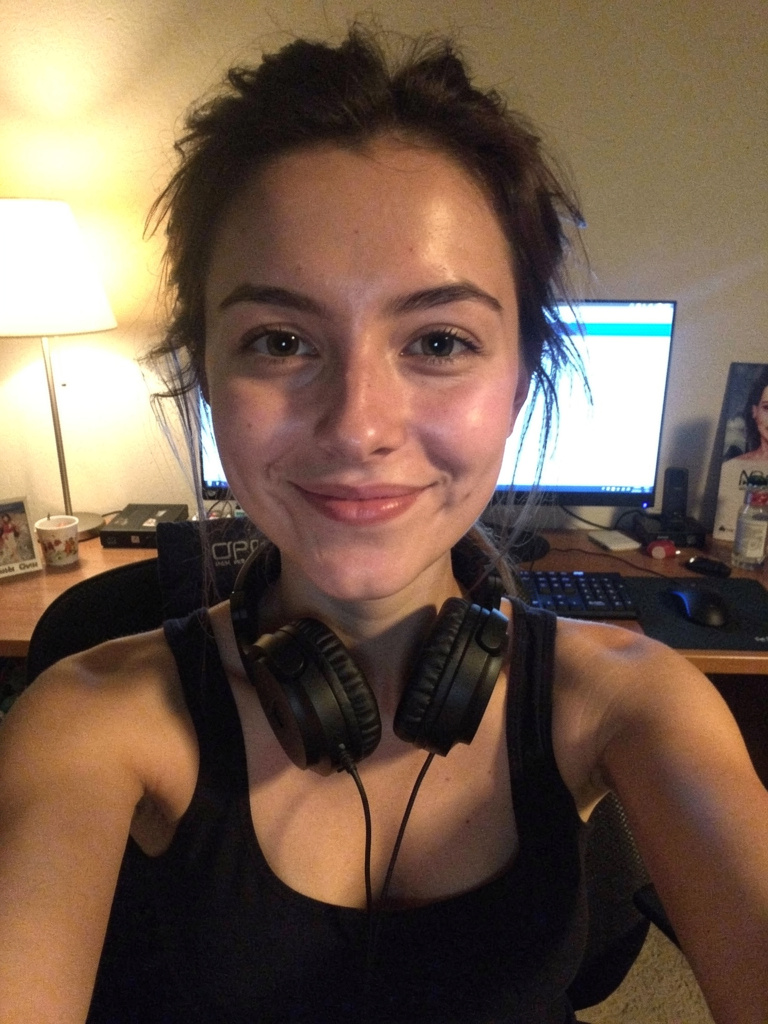](https://openshorts.app/video/8ab7de92) |
| **Biohacking for Investors** · LOW COST | **Secret Weapon for Devs** · LOW COST | **El Secreto de los Agentes de IA** · PREMIUM |
> Browse all videos at [openshorts.app/gallery](https://openshorts.app/gallery)
---
## OpenShorts vs Competitors
| Feature | OpenShorts | Opus Clip | CapCut | Vizard | Klap | Descript |
|---------|:---:|:---:|:---:|:---:|:---:|:---:|
| **Price** | **Free self-hosted**
from $12/mo hosted | $15-29/mo | $8/mo | $15-20/mo | $23-63/mo | $24-65/mo |
| **Self-hosted** | **Yes** | No | No | No | No | No |
| **Open source** | **Yes** | No | No | No | No | No |
| **Watermark** | **Never self-hosted**
free plan only when hosted | Free tier | Some | Free tier | Free tier | Free tier |
| **Upload limits** | **None self-hosted**
by plan when hosted | 10-30GB | Credit-based | 60min-10hr | 10-100 vids/mo | 60min-40hr |
| **AI clip detection** | Yes | Yes | Yes | Yes | Yes | Yes |
| **Smart 9:16 reframing** | Yes | Yes | Yes | Yes | Yes | No |
| **Auto subtitles** | Yes | Yes | Yes | Yes | Yes | Yes |
| **Voice dubbing (30+ langs)** | Yes, with your ElevenLabs key | No | Pro only | No | Pro only | Business only |
| **AI UGC actors** | **Yes** | No | No | No | No | No |
| **AI video effects** | Yes | No | Yes | No | No | No |
| **Hook text overlays** | Yes | No | No | No | No | No |
| **YouTube Studio (titles, thumbnails)** | **Yes** | No | No | No | No | No |
| **Social auto-publishing** | Yes | Pro only | TikTok only | Paid only | Paid only | No |
| **Schedule uploads** | Yes | Pro only | No | Paid only | Paid only | No |
| **Data privacy** | **Your server** | Their cloud | Their cloud | Their cloud | Their cloud | Their cloud |
| **Works with a local LLM (Ollama)** | **Yes** | No | No | No | No | No |
---
## How Much Does It Cost?
Self-hosting OpenShorts is free. You provide the machine and you only pay for the AI APIs you use, and most have generous free tiers:
| Service | Free Tier | Paid Cost | Used For |
|---------|-----------|-----------|----------|
| **Google Gemini** | Free trial with generous limits | < $0.01 per 10-min video | Viral moment detection, script generation, web research |
| **Local LLM (Ollama, LM Studio, vLLM...)** | **Free, your hardware** | $0 | Viral moment detection instead of Gemini (`LLM_BASE_URL`) |
| **fal.ai** | Pay-per-use | ~$0.50-1.50 per AI Short | Actor generation, talking head video, lip-sync |
| **ElevenLabs** | Free tier available | Pay-per-use | Voiceover, voice dubbing |
| **Upload-Post** | **10 free uploads/month** to all networks (no credit card) | Pay-per-use | Auto-publishing to TikTok, Instagram, YouTube |
| **AWS S3** | Optional | ~$0.023/GB | Cloud backup for clips and gallery |
**Bottom line:** You can clip videos for practically free with Gemini, and publish 10 videos/month to all social networks at zero cost with Upload-Post.
**Don't want to run any of that?** [openshorts.app](https://www.openshorts.app/) is the same software on our hardware: our NVIDIA GPU clips an 8-minute video in about 50 seconds instead of the 5 to 8 minutes it takes on a typical CPU, the Gemini key is included, and auto-publishing is already wired up. Free plan is 20 minutes a month with a watermark and no credit card; paid plans start at $12/mo for 100 minutes without watermark.
---
## Requirements
- **Docker & Docker Compose**
- **Google Gemini API Key** ([Free — get it here](https://aistudio.google.com/app/apikey)) — required for all AI features
- **fal.ai API Key** ([Pay-per-use](https://fal.ai)) — required for AI Shorts (actor generation, video, lip-sync)
- **ElevenLabs API Key** ([Free tier](https://elevenlabs.io)) — required for voiceover/dubbing
- **Upload-Post API Key** ([free tier](https://upload-post.com)) — required for direct social posting
---
## Getting Started
### 1. Clone
```bash
git clone https://github.com/mutonby/openshorts.git
cd openshorts
```
### 2. Configure (optional)
```bash
cp .env.example .env
# Edit .env with your AWS keys for S3 backup
```
### 3. Launch
```bash
docker compose up --build
```
### 4. Open Dashboard
Navigate to **`http://localhost:5175`**
1. Go to **Settings** and enter your API keys (Gemini, fal.ai, ElevenLabs, Upload-Post)
2. **Clip Generator**: Upload a long-form video to generate viral shorts
3. **AI Shorts**: Describe your product or paste a URL to generate UGC marketing videos
4. **YouTube Studio**: Generate thumbnails, titles, and descriptions for YouTube
5. **UGC Gallery**: Browse all generated videos and avatars
### 5. GPU acceleration (optional, NVIDIA)
The default image is CPU-only. With an NVIDIA card (any card with NVENC, e.g. RTX 4060) an 8-minute video clips in about a minute instead of 5 to 8. Nothing is passed through in the VM sense — the container just gets access to the host GPU.
**Host:** install the NVIDIA driver (`nvidia-smi` must work) and the [NVIDIA Container Toolkit](https://docs.nvidia.com/datacenter/cloud-native/container-toolkit/latest/install-guide.html):
```bash
sudo nvidia-ctk runtime configure --runtime=docker && sudo systemctl restart docker
docker run --rm --gpus all nvidia/cuda:12.4.0-base-ubuntu22.04 nvidia-smi # sanity check
```
On Windows use Docker Desktop with the WSL2 backend and the Windows NVIDIA driver; no driver inside WSL.
**Compose:** create `docker-compose.override.yml` next to `docker-compose.yml` (picked up automatically). `GPU: "1"` adds cuBLAS/cuDNN and onnxruntime-gpu to the image (~2 GB); `video` is required for NVENC.
```yaml
services:
backend:
build:
context: .
args:
GPU: "1"
deploy:
resources:
reservations:
devices:
- driver: nvidia
count: all
capabilities: [gpu, video]
```
**`.env`:**
```
WHISPER_MODEL=large-v3-turbo
WHISPER_DEVICE=cuda
WHISPER_COMPUTE=float16
FFMPEG_ENCODER=auto # probes h264_nvenc at startup, falls back to x264
TRANSCRIBE_BACKEND=parakeet # optional: ~2x faster than whisper, 25 European languages, auto-falls back to whisper
ASR_GPU_CONCURRENCY=1
```
**Verify:**
```bash
docker compose up --build -d
docker exec openshorts-backend nvidia-smi -L
docker exec openshorts-backend ffmpeg -hide_banner -f lavfi -i testsrc=size=256x256:rate=1 -frames:v 1 -c:v h264_nvenc -f null -
```
The backend log on the first job reports the chosen encoder and transcription device. A CUDA error in whisper (e.g. VRAM exhausted) retries once on CPU automatically. 8 GB of VRAM is enough for `large-v3-turbo` fp16 plus the detection models.
---
### 6. Run without a Google key (local LLM, optional)
The only cloud call in the clip pipeline is the moment picker: it sends the
transcript (never the video) to Gemini. Point it at any OpenAI-compatible
server instead and the whole pipeline stays on your box:
```bash
# .env
LLM_BASE_URL=http://host.docker.internal:11434/v1 # Ollama on the host
LLM_MODEL=qwen2.5:14b # any chat model that follows instructions
# LLM_API_KEY=... # only if your server checks one (vLLM --api-key, OpenRouter)
```
Works with Ollama, LM Studio, vLLM, llama.cpp server, LocalAI and OpenRouter.
The dashboard stops asking for a Gemini key when this is set. Two things to
know:
- **Context length.** A scoring call carries three transcript windows
(~2-3k tokens) and the detail call up to ten (~5k on a long podcast).
Ollama defaults to a 4096-token context and truncates silently, so run it
with `OLLAMA_CONTEXT_LENGTH=16384` (or set `num_ctx` in a Modelfile); raise
`LLM_SCORE_BATCH` above 3 only if your context allows it. 7-8B models
return valid JSON reliably, 3B ones do not.
- **What still needs Gemini.** Anything that has to look at frames: the
automatic layout picker (`AUTO_LAYOUT`), the on-screen content detector
and silent videos (no speech to clip by). Without a Gemini key those fall
back to the plain face-tracking crop, and a silent video fails with a
message that says so. Add a key alongside `LLM_BASE_URL` and you get both.
## Technical Pipeline
### Clip Generator
1. **Ingest** — Local video upload (or self-hosted URL ingest via yt-dlp)
2. **Transcribe** — faster-whisper with word-level timestamps
3. **Detect** — PySceneDetect for scene boundaries
4. **Analyze** — Gemini identifies 3-15 viral moments (15-60s each)
5. **Extract** — FFmpeg precise clip cutting
6. **Reframe** — AI vertical cropping with subject tracking
7. **Effects** — Subtitles, hooks, AI video effects
8. **Publish** — S3 backup + Upload-Post social distribution
### AI Shorts
1. **Analyze** — Website scraping + Gemini web research (or manual description)
2. **Script** — Gemini generates viral scripts with segments
3. **Actor** — Flux 2 Pro portrait generation (or gallery/upload)
4. **Voice** — ElevenLabs TTS voiceover
5. **Video** — Hailuo 2.3 Fast img2video + VEED Lipsync (Low Cost) or Kling Avatar v2 (Premium)
6. **B-roll** — Flux 2 Pro image generation + Ken Burns effect
7. **Composite** — FFmpeg assembly with ASS subtitles and hook overlays
8. **Gallery** — Upload to public S3 with metadata for SEO pages
9. **Publish** — Upload-Post to TikTok, Instagram, YouTube
---
## Automate It: MCP Server, REST API and Webhooks
You don't need the dashboard. The whole pipeline is callable by AI agents and scripts.
### MCP server (`/mcp`)
OpenShorts ships a built-in [MCP](https://modelcontextprotocol.io) server, so Claude, ChatGPT, Cursor or any MCP client can clip and publish videos for you:
**claude.ai and ChatGPT**: paste `https://mcp.openshorts.app/mcp` as a custom connector (Settings → Connectors) and approve the access on openshorts.app. The server does OAuth 2.1 with dynamic client registration, so there is no key to copy; the connection shows up under Account → API keys, where revoking it disconnects the app.
```bash
# Claude Code / Cursor / n8n (hosted): create an API key in your account page
claude mcp add --transport http openshorts https://mcp.openshorts.app/mcp \
--header "Authorization: Bearer osk_..."
# Self-hosted (no key needed, BYOK rules apply):
claude mcp add --transport http openshorts http://localhost:8000/mcp
# Self-hosted without running the web server: same tools over stdio
claude mcp add openshorts -- python mcp_stdio.py
```
Tools: `process_video` (URL or `upload_id`; `captions: false` when the source already has subtitles, `auto_hook: false` to skip the hook line, burned by default like the dashboard), `create_upload` (hand the agent a local file: PUT the bytes, then process), `get_job_status`, `list_clips`, `get_quota`, `add_subtitles`, `recut_clip`, `publish_clip`. A prompt like *"clip this podcast and schedule the best 3 to TikTok"* is now a one-liner in your agent of choice.
### REST API + API keys
Hosted accounts can mint `osk_...` API keys (account page). A key authenticates as you everywhere — same plan, same minutes, same job ownership:
```bash
curl -X POST https://api.openshorts.app/api/process \
-H "Authorization: Bearer osk_..." -H "Content-Type: application/json" \
-d '{"url": "https://youtube.com/watch?v=...", "acknowledged": true,
"webhook_url": "https://your-server.com/hooks/openshorts"}'
```
Interactive docs at `/docs` (OpenAPI) on any instance.
### Completion webhooks
Pass `webhook_url` (and optionally `webhook_secret`) to `POST /api/process` and you get exactly one `POST` when the job reaches a terminal state — no polling loops in your n8n / Zapier / cron pipelines:
```json
{"event": "job.completed", "job_id": "…",
"clips": [{"index": 0, "title": "…", "video_url": "…", "download_url": "…"}]}
```
With a secret, the body is signed: `X-OpenShorts-Signature: sha256=`.
### CLI
The same API from the terminal, zero dependencies (`cli/`):
```bash
pip install openshorts # or: uvx openshorts
export OPENSHORTS_API_KEY=osk_... # hosted
# export OPENSHORTS_API_URL=http://localhost:8000 # self-hosted, no key
openshorts process "https://youtube.com/watch?v=..." --wait
openshorts clips
openshorts publish 0 --platforms tiktok,youtube
```
### Agent skill
`skills/openshorts/SKILL.md` follows the open
[Agent Skills](https://agentskills.io) standard, so it works in any
skill-capable agent:
```bash
# Claude Code (and most agents): copy the folder into the skills directory
cp -r skills/openshorts ~/.claude/skills/
# Hermes Agent: install straight from this repo
hermes skills install mutonby/openshorts/skills/openshorts
# OpenClaw: from ClawHub
openclaw skills install @mutonby/openshorts
```
### n8n
An importable workflow (video URL in, published-ready clips out, no polling)
lives in [`examples/n8n/`](https://github.com/mutonby/openshorts/blob/HEAD/examples/n8n/).
---
## Tech Stack
| Layer | Technology |
|-------|-----------|
| Backend | Python 3.11, FastAPI, google-genai, faster-whisper, ultralytics (YOLOv8), mediapipe, opencv-python, yt-dlp, FFmpeg, httpx |
| Frontend | React 18, Vite 4, Tailwind CSS 3.4 |
| AI APIs | Google Gemini, fal.ai (Flux, Hailuo, VEED, Kling), ElevenLabs |
| Infrastructure | Docker + Docker Compose, AWS S3 |
| Publishing | Upload-Post API (TikTok, Instagram, YouTube) |
---
## Environment Variables
**Server-side (.env):**
| Variable | Description |
|----------|------------|
| `AWS_ACCESS_KEY_ID` | AWS access key for S3 |
| `AWS_SECRET_ACCESS_KEY` | AWS secret key |
| `AWS_REGION` | AWS region (default: us-east-1) |
| `AWS_S3_BUCKET` | Private bucket for clip backup |
| `AWS_S3_PUBLIC_BUCKET` | Public bucket for gallery/avatars |
| `MAX_CONCURRENT_JOBS` | Concurrent processing limit (default: 5) |
| `LLM_BASE_URL` | OpenAI-compatible server for the moment picker (Ollama, vLLM, LM Studio...). Set it and the Gemini key becomes optional |
| `LLM_MODEL` | Model name on that server (default `llama3.1:8b`) |
| `LLM_API_KEY` | Bearer token for that server, if it checks one |
| `LLM_SCORE_BATCH` | Transcript windows per scoring call (default 3 local, 8 Gemini) |
**Client-side (encrypted in localStorage):**
| Key | Description |
|-----|------------|
| `GEMINI_API_KEY` | Google Gemini — required unless `LLM_BASE_URL` is set (then only for layout picking and silent videos) |
| `FAL_KEY` | fal.ai — required for AI Shorts |
| `ELEVENLABS_API_KEY` | ElevenLabs — required for voiceover/dubbing |
| `UPLOAD_POST_API_KEY` | Upload-Post — required, for social posting |
---
## Security & Performance
- **Non-Root Execution**: Containers run as dedicated `appuser`
- **Concurrency Control**: Semaphore-based job queue (`MAX_CONCURRENT_JOBS`)
- **Auto-Cleanup**: Automatic purging of old jobs (1h retention)
- **Encrypted Keys**: API keys encrypted client-side, never stored server-side
- **Upload Validation**: Image uploads validated for format and minimum size
- **File Limits**: 2GB upload limit protection
---
## Social Media Setup (Upload-Post)
1. **Register**: [app.upload-post.com/login](https://app.upload-post.com/login)
2. **Create Profile**: Go to [Manage Users](https://app.upload-post.com/manage-users)
3. **Connect Accounts**: Link TikTok, Instagram, and/or YouTube
4. **Get API Key**: Navigate to [API Keys](https://app.upload-post.com/api-keys)
5. **Use in OpenShorts**: Paste the key in Settings
---
## Star History
[](https://star-history.com/#mutonby/openshorts&Date)
## Contributions
Contributions are welcome! Whether it's adding new AI models, improving the lip-sync pipeline, or building new features — feel free to open a PR.
## License
MIT License for the core application — OpenShorts is yours to use, modify, and scale.
**Exception:** the [`cloud/`](https://github.com/mutonby/openshorts/blob/HEAD/cloud/LICENSE) directory (billing, managed keys, and the hosted-service infrastructure behind the optional `BILLING_ENABLED` flag) is source-available under the OpenShorts Commercial License. You can read it, modify it, and self-host it for personal or internal use, but you can't offer it to third parties as a paid/hosted service. Self-hosting the core app never requires this directory.