# no-crd [Health: Active]
**Category:** ☁️ Cloud Platforms
**Repository:** https://github.com/nogoo9/no-crd
**GitHub Stars:** 2
**npm Downloads (last month):** 273
**Views:** 1
**Installs:** 0
**Upvotes:** 0
**Directory Page:** https://allmcps.com/mcp/no-crd
## Description
Dynamic pod spawner & proxy for ephemeral AI agent workspaces on Kubernetes without CRDs
## Claude Desktop Quick Installation
Install path detected from listing signals. Uses `npx` (confidence: high):
```json
"mcpServers": {
"no-crd": {
"command": "npx",
"args": ["-y","@nogoo9/no-crd"]
}
}
```
## Documentation & README
# @nogoo9/no-crd
> **Agent-Driven, On-Demand Pod Orchestration in Kubernetes — Without Custom Resource Definitions.**
[](https://www.npmjs.com/package/@nogoo9/no-crd) [](https://www.npmjs.com/package/@nogoo9/no-crd) [](https://nogoo9.github.io/no-crd/) [](https://github.com/nogoo9/no-crd/blob/main/LICENSE) [](https://coveralls.io/github/nogoo9/no-crd?branch=main) [](https://securityscorecards.dev/viewer/?uri=github.com/nogoo9/no-crd) [](https://semgrep.dev/)
[](https://modelcontextprotocol.io) [](https://antigravity.google) [](https://deepmind.google/technologies/gemini/)
[](https://bun.sh) [](https://deno.land) [](https://nodejs.org)
`@nogoo9/no-crd` is a lightweight, cross-runtime Model Context Protocol (MCP) server that empowers AI agents and APIs to dynamically spawn, route to, and manage ephemeral containerized sandboxes on standard Kubernetes (k8s/k3s) clusters — **without requiring Custom Resource Definitions (CRDs)**, cluster-level operators, or elevated RBAC permissions.
It provides JupyterHub-like dynamic pod lifecycle management but is completely agnostic to actual workloads and supports multi-runtime execution under **Bun**, **Deno**, and **Node.js**.
📚 **For detailed guides, API reference, and configuration options, visit the public [Documentation Website](https://nogoo9.github.io/no-crd/) or access the built-in documentation served directly at `/docs/` (e.g. `http://localhost:3000/docs/`) when running the server.**
---
## 🗺️ Choose Your Path
To get started with `@nogoo9/no-crd`, select the track that matches your goals:
* **Track A: AI Agent & MCP Users** $\rightarrow$ [MCP Client Setup Guide](https://nogoo9.github.io/no-crd/mcp/guide.html)
* *Best for:* Connecting `no-crd` to **Cursor**, **Claude Desktop**, **Cline**, or **Roo Code** to let your agent manage pods.
* **Track B: Platform & Service Deployers** $\rightarrow$ [SSO & Routing Deployment Guide](https://nogoo9.github.io/no-crd/deploy/architecture.html)
* *Best for:* Deploying a multi-tenant sandbox service in your Kubernetes cluster with **Keycloak OIDC**, **stateless cookies**, and **reverse proxy routing**.
* **Track C: SDK & Code Contributors** $\rightarrow$ [SDK & Contributor Guide](https://nogoo9.github.io/no-crd/developer/contributing.html)
* *Best for:* Programmatically controlling pods via the **TypeScript SDK** or contributing to the core runtime codebase.
---
## 🚀 Key Features
- **No CRDs Required:** Runs directly against core Kubernetes resources (Pods, ConfigMaps, ServiceAccounts). Highly portable, secure, and compatible with restricted/managed environments (EKS, GKE, K3s).
- **Agent Sandbox Spawner:** Specialized spawner tools that automate workspace provisioning with context validation, init containers, IAM roles, pre-stop hooks, and lifecycle sync.
- **ConfigMap-Based Templates:** Store, version, and load reusable pod templates stored as standard Kubernetes ConfigMaps.
- **Local Filesystem Templates:** Bake YAML/JSON pod templates into Docker images or mount them from host paths — with built-in defaults shipped in the package.
- **Isomorphic Multi-Runtime SDK:** Imports seamlessly as a composable programmatic SDK or MCP server running under Node.js, Bun, or Deno.
- **Workspace Routing Proxy (Experimental):** Built-in reverse proxy routing that dynamically pipes traffic to running container IPs with secure user token ownership verification, path-scoped session cookies (`nocr_token` and `nocr_sess`), and automatic HMAC-signed session management for short-lived token resilience.
- **Experimental JWT Authentication:** Built-in OAuth token validation engine supporting HS256, RS256, ES256, JWKS endpoints, and OAuth 2.0 Token Introspection (RFC 7662).
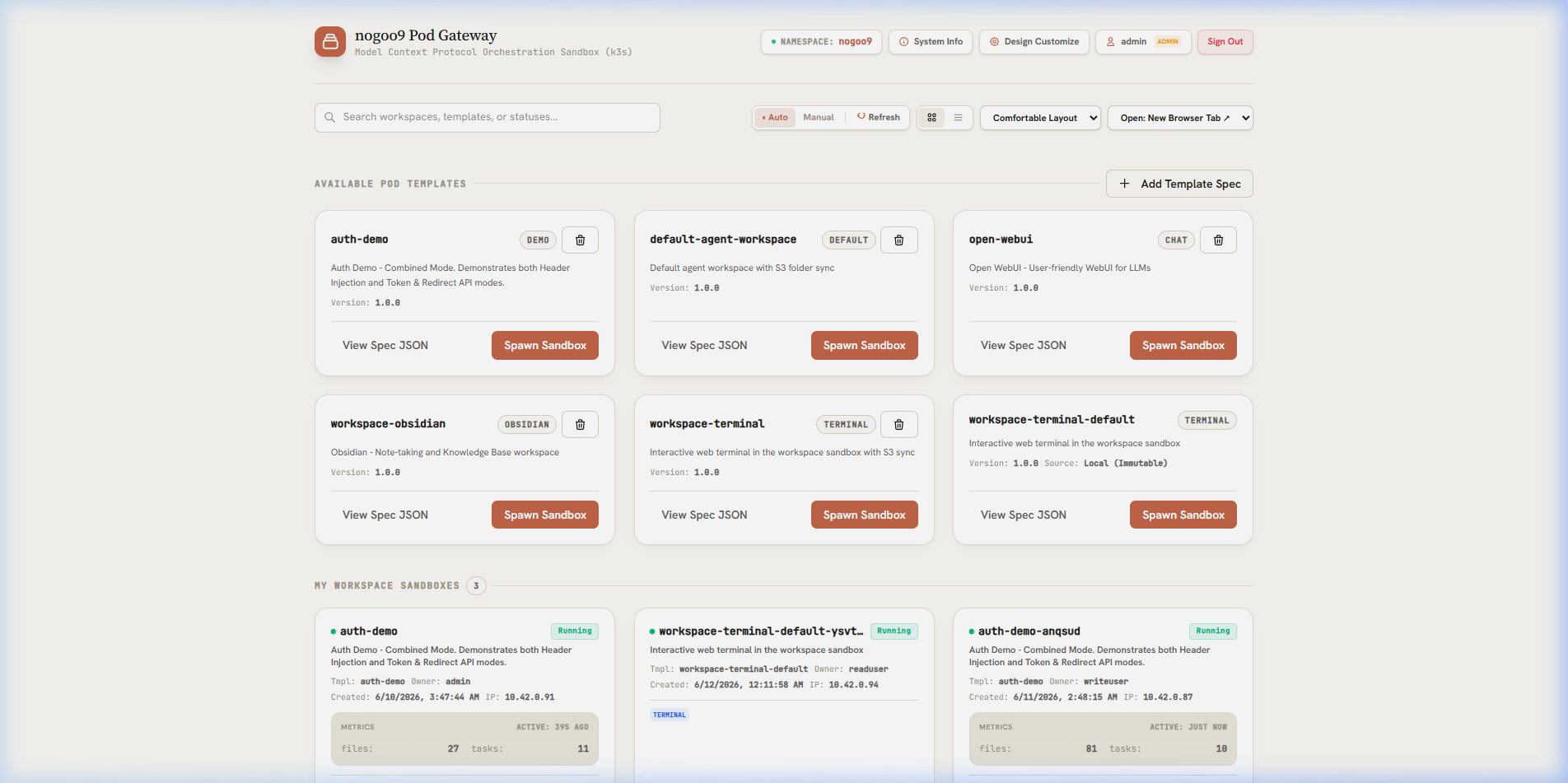
- **Embedded Web UI App:** Exposes an interactive web-based Pod Manager interface featuring a light/dark theme toggle, client-side PKCE OIDC login with proactive silent token refresh, and workspace file preview rendering (supporting HTML sandboxed iframes and custom Markdown rendering).
---
## ⚡ Quick Start
### Run Standalone via NPX (No Installation)
```bash
# Option 1: Start HTTP/SSE server on port 3000
npx @nogoo9/no-crd --transport http --port 3000
# Option 2: Run over standard input/output (stdio) for local IDE agents
npx @nogoo9/no-crd --transport stdio --mode cluster
```
### Install Globally
```bash
npm install -g @nogoo9/no-crd
nocrd9 --transport stdio --mode cluster
```
### Run via Docker
```bash
docker run -d -p 3000:3000 \
-v "$HOME/.kube/config:/app/.kube/config:ro" \
-e KUBECONFIG=/app/.kube/config \
ghcr.io/nogoo9/no-crd:latest
```
---
## ⚙️ Configuration & Environment Variables
The server and command-line utility are configurable using CLI options or environment variables. Below is the quick reference table of all settings:
### 🔌 Server Configuration
| CLI Option | Environment Variable | Default | Allowed Values | Description |
|---|---|---|---|---|
| `-t, --transport` | `TRANSPORT` | `http` | `http`, `stdio`, `both` | Server transport mode. `both` fires up both transports simultaneously. |
| `-p, --port` | `PORT` | `3000` | Number | HTTP server port for SSE transport. |
| `-H, --host` | `HOST` | `0.0.0.0` | String | Host interface to bind the HTTP/SSE server to. |
| `--base-url` | `BASE_URL` | `""` | Path string | Base URL path prefix for hosting behind a reverse proxy (e.g. `/gateway/no-crd`). |
| - | `STATELESS` | `false` | `true`, `false` | Enable stateless request handling (no session affinity). |
| `-l, --log-level` | `LOG_LEVEL` | `info` | `debug`, `info`, `warning`, `error`, `fatal` | Logging verbosity filter. |
| - | `LOG_FILE` | `nogoo9-mcp.log` | String | Output file path for file logging. |
| - | `RATE_LIMIT_MAX` | `100` | Number | Maximum requests allowed per window for rate limited routes. |
| - | `RATE_LIMIT_WINDOW` | `60000` | Number | Time window in milliseconds for rate limited routes. |
| `--proxy-timeout` | `PROXY_TIMEOUT` | `120000` | Number | Timeout in milliseconds for the routing proxy upstream requests. |
| `--proxy-keep-alive` | `PROXY_KEEP_ALIVE` | `true` | `true`, `false` | Enable TCP keep-alive for the routing proxy upstream requests. |
### 🔒 TLS Configuration
| CLI Option | Environment Variable | Default | Allowed Values | Description |
|---|---|---|---|---|
| `--tls-cert` | `TLS_CERT` | - | Path string | Path to TLS certificate file to enable HTTPS. |
| `--tls-key` | `TLS_KEY` | - | Path string | Path to TLS private key file to enable HTTPS. |
| `--tls-ca` | `TLS_CA` | - | Path string | Path to TLS CA certificate file for HTTPS client/verification. |
| - | `NODE_TLS_REJECT_UNAUTHORIZED` | `true` | `0 (false)`, `1 (true)` | Set to `0` to bypass TLS verification (for development/testing only). |
### 🌐 CORS Configuration
| CLI Option | Environment Variable | Default | Allowed Values | Description |
|---|---|---|---|---|
| `--cors-origin` | `CORS_ALLOWED_ORIGIN`, `CORS_ORIGIN` | `*` | String | CORS Allowed Origin header. |
| `--cors-methods` | `CORS_ALLOWED_METHODS`, `CORS_METHODS` | `GET, POST, OPTIONS` | String | CORS Allowed Methods header. |
| `--cors-headers` | `CORS_ALLOWED_HEADERS`, `CORS_HEADERS` | `Content-Type, Authorization, mcp-protocol-version, mcp-session-id` | String | CORS Allowed Headers header. |
| `--cors-allow-credentials` | `CORS_ALLOW_CREDENTIALS`, `CORS_CREDENTIALS` | `false` | `true`, `false` | Enable CORS Access-Control-Allow-Credentials header. |
| `--cors-expose-headers` | `CORS_EXPOSED_HEADERS`, `CORS_EXPOSED` | `mcp-session-id, x-refreshed-token` | String | Custom CORS Access-Control-Expose-Headers header. |
| `--cors-max-age` | `CORS_MAX_AGE` | - | Number | Custom CORS Access-Control-Max-Age header in seconds. |
### ☸️ Kubernetes Configuration
| CLI Option | Environment Variable | Default | Allowed Values | Description |
|---|---|---|---|---|
| `-m, --mode` | `MODE` | `cluster` | `cluster`, `namespaced` | Kubernetes access scope. `namespaced` locks operations to a single namespace. |
| `-n, --namespace` | `NAMESPACE`, `DEFAULT_NAMESPACE` | `nogoo9` | String | Default Kubernetes namespace for operations. |
| `--disable-permission-checks` | `DISABLE_PERMISSION_CHECKS` | `false` | `true`, `false` | Disable Kubernetes RBAC permission checks and assume all tools are enabled. |
| `--managed-only` | `MANAGED_ONLY` | `true` | `true`, `false` | When true, pod tools only operate on pods managed by this server (`nogoo9/managed-by` label). No one bypasses this, not even admins. See [ADR-008](https://github.com/nogoo9/no-crd/blob/HEAD/docs/decisions/ADR-008-managed-only-pod-access-control.md). |
| `--default-workspace-port` | `DEFAULT_WORKSPACE_PORT` | - | Number | Default target port inside the workspace pods to proxy traffic to. |
| - | `REGISTRY_URL` | - | URL string | Target container registry URL to query for images (e.g. `http://localhost:5001`). |
| - | `TEMPLATES_DIR` | - | Path string | Path to local directory containing pod template files (YAML/JSON). See [ADR-001](https://github.com/nogoo9/no-crd/blob/HEAD/docs/decisions/ADR-001-template-file-format.md). |
| - | `BUILTIN_TEMPLATES` | `true` | `true`, `false` | Set to `false` to disable built-in templates shipped with the package. |
### 🔑 Authentication Configuration
| CLI Option | Environment Variable | Default | Allowed Values | Description |
|---|---|---|---|---|
| `--auth-enabled` | `AUTH_ENABLED` | `false` | `true`, `false` | Enables JWT token authentication on MCP tools and route proxy. |
| - | `JWT_VERIFICATION_REQUIRED` | `true` | `true`, `false` | Enable/disable JWT signature verification (signature checks). |
| - | `JWT_SECRET` | - | String | Symmetric HMAC-SHA256 secret for token verification. |
| - | `JWT_PUBLIC_KEY` | - | String | PEM encoded RSA/ECDSA public key for asymmetric token verification. |
| - | `JWKS_URI` | - | URL string | Remote JWKS endpoint URL to dynamically retrieve verification keys. |
| - | `INTROSPECTION_ENDPOINT`, `JWT_INTROSPECTION_ENDPOINT` | - | URL string | Endpoint for token introspection/validation. |
| - | `OAUTH_CLIENT_ID` | - | String | OAuth client ID for auth configuration. |
| - | `OAUTH_CLIENT_SECRET` | - | String | OAuth client secret for auth configuration. |
| - | `JWT_AUDIENCE` | - | String | Expected token audience. Falls back to `OAUTH_CLIENT_ID` if set. |
| - | `AUTH_ISSUER`, `JWT_ISSUER` | `""` | URL string | Identifier URL for the Authorization Server advertised in metadata discovery. |
| - | `AUTH_SUB_JSONPATH` | `$.sub` | JSONPath | Payload path to extract unique user identity from JWT payload. |
| `--auth-scope-jsonpath` | `AUTH_SCOPE_JSONPATH` | `$.scope` | JSONPath | Payload path to extract scopes claim from JWT payload. |
| `--auth-roles-jsonpath` | `AUTH_ROLES_JSONPATH`, `AUTH_ADMIN_JSONPATH` | `$.realm_access.roles` | JSONPath | Payload path to extract user roles from JWT payload. |
| - | `AUTH_ADMIN_ROLE` | `admin` | String | Role name signifying administrator access. |
| `--auth-required-read-scope` | `AUTH_REQUIRED_READ_SCOPE` | `nogoo9:read` | String | OAuth scope required for read operations. If not set, read scope check is bypassed. |
| `--auth-required-write-scope` | `AUTH_REQUIRED_WRITE_SCOPE` | `nogoo9:write` | String | OAuth scope required for write/mutation operations. If not set, write scope check is bypassed. |
| `--auth-required-admin-scope` | `AUTH_REQUIRED_ADMIN_SCOPE` | `nogoo9:admin` | String | OAuth scope required for administrator operations. If not set, admin scope check is bypassed. |
| - | `AUTH_ADMIN_USERS` | `` | Comma-separated list of user subject IDs (sub) | Comma-separated list of user subject IDs (sub) granted admin privileges without requiring OIDC scope/role claims (workaround fallback). |
| `--auth-required-read-role` | `AUTH_REQUIRED_READ_ROLE` | `viewer` | String | User role required for read operations. If not set, read role check is bypassed. |
| `--auth-required-write-role` | `AUTH_REQUIRED_WRITE_ROLE` | `user` | String | User role required for write/mutation operations. If not set, write role check is bypassed. |
| - | `PROXY_SESSION_TTL` | `1800` | Number | Session cookie expiration lifetime in seconds (sliding window duration). |
| - | `PROXY_REFRESH_COOKIE_TTL` | `604800` | Number | Default Max-Age for the encrypted refresh token cookie (nocr_refresh). Overridden by the IdP's refresh_expires_in when available. |
| - | `PROXY_TOKEN_COOKIE_TTL` | `86400` | Number | Default Max-Age for the access token cookie (nocr_token). Overridden by the JWT exp claim when available. |
| - | `PROXY_SESSION_SECRET` | `""` | String | HMAC secret key used to sign stateless session cookies. Falls back to `JWT_SECRET` if not configured. |
| - | `OAUTH_SCOPES` | `openid profile email offline_access` | Space-separated scope string | OAuth scopes to request during authorization. Include 'offline_access' for refresh tokens. |
| - | `OAUTH_AUTHORIZATION_URL` | - | URL string | Direct OAuth authorization URL. |
| - | `OAUTH_SERVER_DISCOVERY_URL`, `OAUTH_DISCOVERY_URL` | - | URL string | Discovery URL for the OAuth server used by the backend gateway. Falls back to OAUTH_DISCOVERY_URL. |
| - | `OAUTH_TOKEN_URL`, `OAUTH_SERVER_TOKEN_URL` | - | URL string | Direct OAuth token exchange endpoint for the backend server. |
| - | `OAUTH_END_SESSION_URL` | - | URL string | Direct OAuth logout endpoint. |
| `--auth-inject-workspace-jwt` | `AUTH_INJECT_WORKSPACE_JWT` | `true` | `true`, `false` | Determines if the custom 'x-workspace-jwt' header containing the raw token is injected into proxy requests. |
| - | `AUTH_DEFAULT_ROLE` | `viewer` | String | Fallback role if the token does not provide scopes/roles. |
| `--max-workspaces-per-user` | `MAX_WORKSPACES_PER_USER` | `0` | Number | Maximum number of concurrent active workspaces a non-admin user can own (0 for unlimited). |
### 🖥️ UI & Themes Configuration
| CLI Option | Environment Variable | Default | Allowed Values | Description |
|---|---|---|---|---|
| - | `UI_ENABLED` | `true` | `true`, `false` | Enables the embedded HTML Pod Manager UI resource. |
| - | `THEMES_DIR` | `themes` | Path string | Local directory path containing custom CSS UI themes. |
| - | `THEMES_CONFIGMAP` | - | String | Name of Kubernetes ConfigMap containing custom UI theme configurations. |
| - | `DOCS_DIR` | `/app/docs (Docker) or docs/.vitepress/dist (Local)` | Path string | Base directory from which static documentation files are served. |
| - | `OAUTH_DISCOVERY_URL` | `""` | URL string | Discovery URL for the OAuth authorization server used by the UI client. |
| - | `OAUTH_CLIENT_ID` | `""` | String | OAuth client ID for UI authorization. |
| - | `OAUTH_LOGIN_METHOD` | `redirect` | `redirect`, `popup` | Login interaction mode for UI OAuth client. |
| - | `UI_TITLE` | `nogoo9 Pod Manager` | String | Custom title shown in the dashboard header. |
| - | `UI_SUBTITLE` | `On-demand Kubernetes pod orchestration and agent-sandbox management without CRDs.` | String | Custom subtitle shown below the dashboard title. |
---
## ☸️ Kubernetes Setup & RBAC Permissions
For the `@nogoo9/no-crd` MCP server to interact with Kubernetes, it must run with appropriate RBAC permissions. Depending on your configuration, you can deploy it with **Cluster-Wide (ClusterRole)** access or **Namespace-Scoped (Role)** access.
### Tool-to-Permission Mapping
Below is the mapping showing which Kubernetes API resources and verbs each MCP tool requires. The server dynamically checks these permissions at startup (via `SelfSubjectAccessReview`) and only registers tools that the active identity is authorized to use.
### Resource: `configmaps`
| Required Verb | Associated MCP Tools | Description / Purpose |
|---|---|---|
| `create` | `create_template` | Save a new pod template definition as a ConfigMap. |
| `delete` | `delete_template` | Delete a stored pod template ConfigMap. |
| `get` | `create_pod_from_template` | Read template pod specifications stored in ConfigMaps. |
| `update` | `update_template` | Modify metadata, annotations, or specifications of an existing template. |
### Resource: `events`
| Required Verb | Associated MCP Tools | Description / Purpose |
|---|---|---|
| `list` | `get_workspace_events` | |
### Resource: `namespaces`
| Required Verb | Associated MCP Tools | Description / Purpose |
|---|---|---|
| `list` | `list_namespaces` | Discover namespaces in the cluster (only required in cluster access mode). |
### Resource: `pods`
| Required Verb | Associated MCP Tools | Description / Purpose |
|---|---|---|
| `create` | `create_pod`, `create_pod_from_template`, `spawn_workspace`, `upgrade_all_workspaces`, `upgrade_workspace` | Provision and deploy new pods or workspace sandboxes. |
| `delete` | `delete_pod`, `stop_workspace`, `upgrade_all_workspaces`, `upgrade_workspace` | Terminate and clean up pods or workspace sandboxes. |
| `get` | `get_pod`, `get_workspace`, `upgrade_workspace` | Retrieve detailed JSON spec for a specific pod. |
| `list` | `list_pods`, `list_workspaces`, `upgrade_all_workspaces` | Retrieve lists of pods or agent workspace pods. |
| `patch` | `patch_pod` | Strategic merge patch labels, annotations, or resource requests/limits. |
### Resource: `pods/log`
| Required Verb | Associated MCP Tools | Description / Purpose |
|---|---|---|
| `get` | `get_pod_logs` | Retrieve standard output/error logs from pod containers. |
### 1. Cluster-Wide Mode (`MODE=cluster`)
Use this mode if you want the MCP server to manage sandboxes across any namespace in the cluster.
Create a `ClusterRole` and `ClusterRoleBinding`:
```yaml
apiVersion: rbac.authorization.k8s.io/v1
kind: ClusterRole
metadata:
name: nogoo-mcp
rules:
- apiGroups: [""]
resources: ["pods"]
verbs: ["get", "list", "watch", "create", "delete", "patch", "update"]
- apiGroups: [""]
resources: ["pods/log"]
verbs: ["get"]
- apiGroups: [""]
resources: ["namespaces"]
verbs: ["get", "list"]
- apiGroups: [""]
resources: ["configmaps"]
verbs: ["get", "list", "create", "update", "patch", "delete"]
- apiGroups: [""]
resources: ["serviceaccounts"]
verbs: ["get", "list", "create", "update", "patch", "delete"]
---
apiVersion: rbac.authorization.k8s.io/v1
kind: ClusterRoleBinding
metadata:
name: nogoo-mcp
roleRef:
apiGroup: rbac.authorization.k8s.io
kind: ClusterRole
name: nogoo-mcp
subjects:
- kind: ServiceAccount
name: nogoo-mcp
namespace: nogoo9 # Change to the namespace where your MCP server runs
```
### 2. Namespace-Scoped Mode (`MODE=namespaced`)
Use this mode if the MCP server should be restricted to a single namespace (e.g. `nogoo9`). In this mode, no cluster-level or administrative permissions are needed.
Create a `Role` and `RoleBinding` in the target namespace:
```yaml
apiVersion: rbac.authorization.k8s.io/v1
kind: Role
metadata:
name: nogoo-mcp
namespace: nogoo9
rules:
- apiGroups: [""]
resources: ["pods"]
verbs: ["get", "list", "watch", "create", "delete", "patch", "update"]
- apiGroups: [""]
resources: ["pods/log"]
verbs: ["get"]
- apiGroups: [""]
resources: ["configmaps"]
verbs: ["get", "list", "create", "update", "patch", "delete"]
- apiGroups: [""]
resources: ["serviceaccounts"]
verbs: ["get", "list", "create", "update", "patch", "delete"]
---
apiVersion: rbac.authorization.k8s.io/v1
kind: RoleBinding
metadata:
name: nogoo-mcp
namespace: nogoo9
roleRef:
apiGroup: rbac.authorization.k8s.io
kind: Role
name: nogoo-mcp
subjects:
- kind: ServiceAccount
name: nogoo-mcp
namespace: nogoo9
```
*(Note: In namespace-scoped mode, the `list_namespaces` tool will only return the target namespace, and namespace parameter inputs to all tools will default to the target namespace.)*
---
## 📑 Workspace Templates & Spawner Annotations
Templates in `@nogoo9/no-crd` can be loaded from **three sources** (highest to lowest priority):
1. **Kubernetes ConfigMaps** — labeled with `nogoo9/pod-template: "true"` (original mechanism)
2. **Custom local directory** — set via `TEMPLATES_DIR` env var (YAML or JSON files)
3. **Built-in templates** — shipped with the npm package (disable with `BUILTIN_TEMPLATES=false`)
See [ADR-001](https://github.com/nogoo9/no-crd/blob/HEAD/docs/decisions/ADR-001-template-file-format.md) for format details.
### 1. How to Define a Template
To register a template with the spawner, create a `ConfigMap` meeting the following requirements:
1. **Discovery Label**: Must be labeled with `nogoo9/pod-template: "true"`.
2. **Spec Key**: The `data` block must contain a key named `spec` whose value is a JSON string conforming to the `PodSpecSchema` (e.g. `containers`, `volumes`, `restartPolicy`).
3. **Behavior Customization**: Set `annotations` on the `ConfigMap` metadata to configure advanced spawner integrations (like IAM role binding, init containers, and pre-stop lifecycle hooks).
#### Example Template Definition:
```yaml
apiVersion: v1
kind: ConfigMap
metadata:
name: node-workspace-template
namespace: nogoo9
labels:
nogoo9/pod-template: "true"
annotations:
nogoo9/description: "A standard Node.js development sandbox with S3 storage sync"
nogoo9/tag: "node-20"
nogoo9/required-context: "PROJECT_NAME,REPO_URL"
nogoo9/iam-role-arn: "arn:aws:iam::123456789012:role/workspace-s3-access"
nogoo9/init-image: "alpine/git"
nogoo9/init-command: "git clone $REPO_URL /workspace/$PROJECT_NAME"
nogoo9/pre-stop-command: "aws s3 sync /workspace s3://my-workspace-backups/$PROJECT_NAME"
nogoo9/default-grace-period: "120"
data:
spec: |
{
"containers": [
{
"name": "workspace",
"image": "node:20-alpine",
"command": ["sleep", "infinity"],
"volumeMounts": [
{
"name": "workspace-storage",
"mountPath": "/workspace"
}
]
}
],
"volumes": [
{
"name": "workspace-storage",
"emptyDir": {}
}
]
}
```
### 2. Supported Spawner Annotations
The spawner inspects `ConfigMap` metadata annotations (and custom inline annotations passed during `spawn_workspace`) to customize the workspace lifecycle:
| Annotation / Label Key | Type | Description |
|---|---|---|
| `nogoo9/workspace-auth-mode` | Annotation (Comma-separated) | Configures authorization modes for the workspace proxy. Comma-separated list of: `token-api` (exposes token retrieval endpoints at `_auth/token` & `_auth/authorize` for SPAs), `inject-headers` (rewrites headers to forward user identity like `x-user-sub` and JWTs to container; enabled by default if `AUTH_ENABLED=true`), `no-auth` (bypasses all auth/owner checks for public workspaces). *(Available from v0.6.0, no-auth from v0.8.0)* |
| `nogoo9/auth-require-token` | Annotation ("true" | "false") | Determines if the workspace strictly requires a valid, raw OIDC access/refresh token to function. If set to `true`, session cookie authentication via `nocr_sess` alone is treated as unauthorized for routing proxy access, forcing a redirection to the dashboard login page to authenticate and retrieve a new JWT token. *(Available from v0.9.0)* |
| `nogoo9/template-version` | Annotation (String) | Specifies the version of the pod template. Used to track if workspaces are outdated. *(Available from v0.8.0)* |
| `nogoo9/workspace-name` | Annotation (String) | Stores the user-defined display name of the workspace. *(Available from v0.4.0)* |
| `nogoo9/template-ref` | Annotation (String) | The reference to the pod template used to spawn the workspace (e.g. `default/workspace-terminal`). *(Available from v0.4.0)* |
| `nogoo9/managed-by` | Label (String) | Used to label workspace pods created by this MCP server to restrict operational scope. *(Available from v0.5.0)* |
| `nogoo9/pod-template` | Label (`"true"`) | Identifies a Kubernetes `ConfigMap` as a reusable pod template. |
| `nogoo9/type` | Label (`"workspace"`) | Applied automatically by the spawner to identify running agent workspace pods. |
| `nogoo9/workspace-id` | Label | Identifies the unique agent session / workspace ID associated with the running pod. |
| `nogoo9/user-sub` | Label / Annotation | Represents the authenticated user subject (owner) of the workspace pod, used for access control validation and ServiceAccount labeling. |
| `nogoo9/description` | Annotation (String) | A friendly, human-readable summary of the template's purpose and contents. |
| `nogoo9/tag` | Annotation (String) | A version or tag associated with the template environment (e.g. `node-20`). |
| `nogoo9/required-context` | Annotation (Comma-separated) | Validates that target environment variables are provided in the tool call's `context` parameter (e.g. `GITHUB_TOKEN,DATABASE_URL`). |
| `nogoo9/iam-role-arn` | Annotation (AWS Role ARN) | Instructs the spawner to provision a dedicated Kubernetes `ServiceAccount` annotated for EKS IAM Role mapping (IRSA). |
| `nogoo9/init-image` | Annotation (Image string) | The container image to run in the dynamic `spawner-init` init-container. |
| `nogoo9/init-command` | Annotation (Shell command) | The shell command to run in the init-container. It automatically shares the main container's volume mounts. |
| `nogoo9/init-share-volumes` | Annotation ("true" | "false") | Determines if the dynamic init-container shares the main container's volume mounts. Defaults to `true`. *(Available from v0.5.5)* |
| `nogoo9/pre-stop-command` | Annotation (Shell command) | A shell command executed in a Kubernetes `preStop` lifecycle exec hook when the workspace is terminated (e.g. to save/push state). |
| `nogoo9/pre-stop-sidecar-image` | Annotation (Image string) | If specified alongside `pre-stop-command`, runs the pre-stop command inside a dedicated sidecar container instead of the main container. |
| `nogoo9/default-grace-period` | Annotation (Number in seconds) | Overrides the Pod's `terminationGracePeriodSeconds` (defaults to `60` if a pre-stop command is defined) to give cleanup commands time to finish. |
| `nogoo9/workspace-port` | Annotation (Number) | The port inside the container to proxy traffic to. Defaults to `DEFAULT_WORKSPACE_PORT` or `3000`. |
| `nogoo9/workspace-path` | Annotation (String) | The default URL subpath mapping for the workspace web interface (defaults to `/`). |
| `nogoo9/workspace-type` | Annotation (String) | The format specification of the main entry point (e.g. `iframe`, `novnc`). |
| `nogoo9/preview-path` | Annotation (String) | The default folder or file subpath to render in the UI files preview tab. |
| `nogoo9/preview-type` | Annotation (String) | Fallback preview rendering mode for the preview tab (e.g. `markdown`, `html`). |
| `nogoo9/api..port` | Annotation (Number) | Defines an additional HTTP service port exposed by the workspace. |
| `nogoo9/api..visibility` | Annotation (String) | Specifies access visibility for the custom API endpoint. Supported values: `private` (accessible only by the workspace owner), `internal` (accessible by any logged-in user), `admin` (accessible by the owner or users with the admin scope and role), `scope:` (accessible by users possessing the specified OIDC scope), `role:` (accessible by users possessing the specified user role), or a comma-separated list of allowed user subjects. |
| `nogoo9/api..path` | Annotation (String) | Defines the subpath routing prefix for this specific API (e.g. `/terminal`). |
| `nogoo9/api..desc` | Annotation (String) | A short description of this additional API, shown in the UI interface. |
| `nogoo9/api..method` | Annotation (String) | Comma-separated list of supported HTTP methods (e.g. `GET,POST`, `*`, defaults to any method). |
| `nogoo9/api..refresh` | Annotation (Duration) | Sets the refresh frequency for custom stats/activity or other mini API views in the dashboard cards (e.g. `10s`, `1m`, or `init` to query only once on startup). |
| `nogoo9/api.stats.refresh` | Annotation (Duration) | Explicitly configures the reload frequency for the reserved `stats` API metrics on the workspace dashboard card (e.g., `10s`, `30s`, `init`). |
| `nogoo9/api.last_activity.refresh` | Annotation (Duration) | Explicitly configures the reload frequency for the reserved `last_activity` epoch timestamp API on the workspace dashboard card (e.g., `30s`, `1m`, `init`). |
| `nogoo9/allowed-roles` | Annotation (Comma-separated) | Comma-separated list of user roles allowed to spawn workspaces from this template (e.g., `developer,lead-dev`). Admins always bypass role restrictions. |
| `nogoo9/allowed-scopes` | Annotation (Comma-separated) | Comma-separated list of OAuth scopes allowed to spawn workspaces from this template (e.g., `nogoo9:write`). Admins always bypass scope restrictions. |
---
## 📦 Programmatic SDK & API Proxy Services
`@nogoo9/no-crd` provides a complete programmatic SDK and dynamic cluster routing proxy to allow developers to build custom pod orchestrators and route workspace traffic natively.
### 1. Composable Programmatic SDK
You can import `@nogoo9/no-crd` in your Bun, Deno, or Node.js codebase to control pod sandboxes and templates programmatically, bypassing the MCP HTTP server.
```typescript
import { KubeConfig } from "@kubernetes/client-node";
import {
initK8sContext,
spawnWorkspace,
stopWorkspace,
listWorkspaces
} from "@nogoo9/no-crd";
// 1. Initialize Kubernetes API Context (optionally pass custom configuration)
const kc = new KubeConfig();
kc.loadFromDefault();
const ctx = initK8sContext(kc);
// 2. Spawn a workspace sandbox from a template
const spawnResult = await spawnWorkspace(ctx, {
id: "agent-session-42",
templateRef: "nogoo9/default-agent-workspace",
context: {
"S3_BUCKET": "my-bucket",
"S3_FOLDER": "session-42"
}
});
console.log(`Spawned pod: ${spawnResult.podName}`);
// 3. List active workspaces running in the namespace
const list = await listWorkspaces(ctx, {
namespace: "nogoo9"
});
console.log(`Active workspaces count: ${list.workspaces.length}`);
// 4. Terminate the workspace sandbox
await stopWorkspace(ctx, {
id: "agent-session-42"
});
```
### 2. Workspace Routing Proxy (Experimental)
> [!WARNING]
> The workspace routing proxy and JWT authentication engine are experimental and likely to change in the next version.
The server includes a built-in reverse proxy routing service. HTTP requests targeting:
`http:///route//`
are dynamically proxied directly to the running workspace pod's IP address inside the cluster.
If `AUTH_ENABLED` is true:
- **Token Bootstrapping & Path-Scoped Cookies**: Since standard browser navigations (links, iframes) cannot transmit custom HTTP headers, the client passes the active JWT via a `?token=` query parameter on initial redirect. The proxy validates it and issues a secure, path-scoped cookie (`nocr_token`), allowing subsequent resource requests (JS, CSS, images, WebSockets) to authenticate seamlessly without URL parameters.
- **Direct Access Redirect (SSO)**: Accessing a workspace URL directly without active credentials redirects you to the main dashboard's login screen. Once logged in, the dashboard automatically routes you back to the target workspace URL with a fresh bootstrap token.
- **Resource Ownership Verification**: The workspace pod's `nogoo9/user-sub` label must match the JWT's subject claim, preventing unauthorized access to other users' workspaces.
- **Proxy target port**: Inside the workspace pod defaults to `3000` or can be overridden via pod annotation `nogoo9/workspace-port` or the `DEFAULT_WORKSPACE_PORT` environment variable.
- **Multi-Port / Custom API Routing**: You can expose and route additional APIs inside the pod (e.g., a web terminal or secondary service) by defining custom annotations in the template (e.g., `nogoo9/api.terminal.port: "7681"`, `nogoo9/api.terminal.path: "/terminal"`). The proxy will dynamically handle subpath routing and method checks.
- A **stateless signed session cookie** (`nocr_sess`) is minted on first successful JWT validation, enabling workspace traffic to survive short-lived token expiry. *(Available from v0.4.0)* See [ADR-002](https://github.com/nogoo9/no-crd/blob/HEAD/docs/decisions/ADR-002-stateless-session-cookies.md) and [ADR-003](https://github.com/nogoo9/no-crd/blob/HEAD/docs/decisions/ADR-003-peer-discovery-session-key.md) for design details.
For a detailed breakdown of the redirection lifecycle, Keycloak configuration, and JWT claims, see the [SSO & OIDC Integration Guide](https://github.com/nogoo9/no-crd/blob/HEAD/docs/deploy/sso-identity.md).
### 3. OAuth Resource Discovery (RFC 9728)
Exposes the standardized metadata endpoint `GET /.well-known/oauth-protected-resource` returning:
- Supported authorization servers.
- Token format specifications.
- Required scopes.
This allows client interfaces (and MCP clients) to automatically discover security requirements and handle dynamic OAuth authentication flows.
### 4. Embedded Web UI & Dashboard Themes
When the server runs in HTTP/SSE transport mode, the visual **React Pod Manager UI Dashboard** is served directly at root `/` (e.g. `http://localhost:3000/`).
- **Dashboard Themes**: The UI includes a system/light/dark toggle and supports custom visual themes.
- **Three-Source Theme Merge Engine**: CSS stylesheets are dynamically scanned and merged from:
1. **Kubernetes ConfigMap** (`THEMES_CONFIGMAP` environment variable).
2. **Custom Local Directory** (`THEMES_DIR` environment variable, defaults to `themes/`).
3. **Built-In Catalog** (pre-baked styles: Dracula, Nord, Stripe, Slack, Vercel, Apple, Superhuman, Notion, and Antigravity).
Duplicate theme IDs are resolved according to priority: ConfigMap > Local Directory > Built-In Catalog. For detailed customization guidelines and CSS templates, see the [Dashboard Themes & Branding Guide](https://github.com/nogoo9/no-crd/blob/HEAD/docs/deploy/themes-branding.md).
---
## 🔌 API Reference (MCP Tools & Resources)
### Pod Tools
- **`list_pods`**: Retrieve a summary of pods in the namespace. Filters by `labelSelector`, `fieldSelector`, and `limit`.
- **`get_pod`**: Fetch full Kubernetes API JSON payload for a target pod name.
- **`create_pod`**: Create a custom pod with direct container/volume specifications.
- **`patch_pod`**: Apply a Strategic Merge Patch to modify labels, annotations, or container resource limits dynamically.
- **`delete_pod`**: Terminate a pod with optional `gracePeriodSeconds`.
- **`get_pod_logs`**: Fetch logs for a container with options like `tailLines`, `sinceSeconds`, `timestamps`, `limitBytes`, and `previous`.
- **`list_namespaces`**: List all namespaces accessible with current credentials.
- **`list_registry_images`**: List catalog images from the configured `REGISTRY_URL`.
### Pod Template Tools
Manage preconfigured pod specifications stored as standard Kubernetes ConfigMaps (labeled `nogoo9/pod-template=true`).
- **`list_templates`**: Show available templates.
- **`get_template`**: Get the raw pod template spec.
- **`create_template`**: Store a new pod template spec.
- **`update_template`**: Update labels, annotations, or specs on an existing template.
- **`delete_template`**: Delete a template.
- **`create_pod_from_template`**: Spawn a pod using a template, applying container overrides (environment variables, commands, resources) and top-level overrides.
### Agent Workspace (Spawner) Tools
Specially designed for AI agents to safely spawn and clean up their own workspace sandboxes.
- **`list_workspaces`**: List active agent workspaces (with JWT/owner mapping support).
- **`spawn_workspace`**: Spawn a workspace sandbox pod. Features:
- **Context Validation (`nogoo9/required-context`)**: Requires the caller to supply critical env variables (e.g. API keys) before spawning.
- **Init Containers (`nogoo9/init-image` / `nogoo9/init-command`)**: Initialize workspace directories/files before main containers start.
- **Pre-Stop Hooks (`nogoo9/pre-stop-command`)**: Run custom cleanup commands (e.g., commit/sync code to git or S3) upon termination.
- **IAM Role Mapping (`nogoo9/iam-role-arn`)**: Dynamically provisions AWS EKS IAM Role service accounts.
- **`stop_workspace`**: Clean up and terminate the workspace pod.
### Utilities
- **`current_namespace`**: Returns active namespace and access mode.
### MCP Resources
- **`pod-template://{namespace}/{name}`**: Exposes stored pod templates directly as read-only MCP resources.
- **`ui://nogoo9/app`**: Exposes the embedded React/web UI app (if `UI_ENABLED=true` and built). When the server runs in HTTP/SSE transport mode, the UI is also served directly at `/` or `/ui` (e.g. `http://localhost:3000/`) and automatically falls back to standard HTTP JSON-RPC calls when loaded outside a postMessage-compatible MCP host (such as in a standard browser tab or the MCP Inspector).
---
## 🏗️ Architecture
```
┌───────────────────────┐
│ AI Agent / Client │
└───────────┬───────────┘
│ (Stdio or SSE Transport)
▼
┌───────────────────────┐
│ MCP Server │ <── (Queries ConfigMaps for specs)
└───────────┬───────────┘
│ (Kubernetes API - CoreV1)
▼
┌──────────────────────────────────────────┐
│ Kubernetes Cluster │
│ ┌────────────────────────────────────┐ │
│ │ Target Namespace │ │
│ │ ┌──────────┐ ┌──────────┐ ┌────┐ │ │
│ │ │ Agent │ │ Custom │ │ │ │ │
│ │ │ Sandbox │ │ Workload │ │... │ │ │
│ │ │ Pod │ │ Pod │ │ │ │ │
│ │ └──────────┘ └──────────┘ └────┘ │ │
│ └────────────────────────────────────┘ │
└──────────────────────────────────────────┘
```
The server interacts directly with the Kubernetes API using `@kubernetes/client-node`. By using standard `Pod` and `ConfigMap` resources, the setup is highly scalable, requires no cluster operator installs, and easily adheres to strict enterprise namespace-level security policies.
---
## 🛠️ Development
We use [Moon](https://moonrepo.dev/moon) for toolchain management and task running, and [Biome](https://biomejs.dev) for formatting and linting.
### Prerequisites
- Bun `1.3.11`+
- Node.js `22.14.0`+
- Moon `2.1.3`+
- k3d (for local Kubernetes cluster)
### Setup Environment
```bash
# Install dependencies
bun install
# Auto-fix code formatting and linting via Biome
bun run format
# Run TypeScript compilation checks
bun run typecheck
```
### Running Tests
```bash
# Run unit tests
moon run mcp:test
# Run full spawner workspace lifecycle tests (requires local k3d)
bun run test:lifecycle
```
### Local Cluster Testing (k3d)
Bootstrap a local `k3d` Kubernetes cluster complete with a local registry, built-in mock S3, and Traefik:
```bash
# Spin up development cluster
moon run k3d:bootstrap
# Rebuild, push, and deploy MCP server to the cluster
moon run mcp:deploy
# Tear down the cluster
moon run k3d:teardown
```
---
## 📄 License
This project is licensed under the Apache License 2.0. See [LICENSE](https://github.com/nogoo9/no-crd/blob/HEAD/LICENSE) for details.