# nikicat/mcp-wallet-signer [Health: Active]
**Category:** 💰 Finance & Fintech
**Repository:** https://github.com/nikicat/mcp-wallet-signer
**GitHub Stars:** 3
**npm Downloads (last month):** 347
**Views:** 1
**Installs:** 0
**Upvotes:** 0
**Directory Page:** https://allmcps.com/mcp/nikicat-mcp-wallet-signer
## Description
Non-custodial EVM wallet MCP — routes transactions to browser wallets (MetaMask, etc.) for signing. Private keys never leave the browser; every action requires explicit user approval via EIP-6963.
## Tools
Capabilities this server exposes over MCP:
- **connect_wallet** — Connect wallet, return address
- **send_transaction** — Send ETH/tokens, call contracts
- **sign_message** — Sign arbitrary message (personal_sign)
- **sign_typed_data** — Sign EIP-712 typed data
- **get_balance** — Read ETH balance (via RPC)
- **get_token_balance** — Read ERC-20 balance (`balanceOf`/`decimals`/`symbol`)
- **tron_connect_wallet** — Connect TronLink, return Base58 (T…) address
- **tron_send_transaction** — Native TRX transfer
- **tron_trigger_contract** — TRC-20 / smart-contract call via `triggerSmartContract
- **tron_sign_message** — Sign arbitrary message (`signMessageV2`)
- **tron_sign_typed_data** — Sign TIP-712 typed data
- **tron_get_balance** — Read TRX balance (via TronGrid)
- **tron_get_token_balance** — Read TRC-20 balance (`balanceOf`/`decimals`/`symbol`)
## Claude Desktop Quick Installation
Install path detected from listing signals. Uses `npx` (confidence: high):
```json
"mcpServers": {
"mcp-wallet-signer": {
"command": "npx",
"args": ["-y","mcp-wallet-signer"]
}
}
```
## Documentation & README
# MCP Wallet Signer
[](https://www.npmjs.com/package/mcp-wallet-signer)
[](https://opensource.org/licenses/MIT)
[](https://lobehub.com/mcp/user-mcp-wallet-signer)
> [!WARNING]
> **Superseded by [browser-web3-signer](https://github.com/nikicat/browser-web3-signer)** — the same browser-wallet signing flow, reimplemented in Rust with a CLI plus Rust/TypeScript/Go libraries. mcp-wallet-signer still works, but new development happens there.
**Your private keys never leave your browser.** Every transaction requires explicit user approval in your wallet.
Most blockchain MCPs require you to paste a private key into a config file — giving the AI agent full, unsupervised access to your
funds. MCP Wallet Signer takes a different approach: it routes every transaction to your actual browser wallet — EVM wallets
(MetaMask, Rabby, …) via [EIP-6963](https://eips.ethereum.org/EIPS/eip-6963), and TRON via TronLink — so you review and approve
each action just like any other dapp interaction. No keys in config files, no risk of silent transactions.
### Compatible With



 Works with any MCP-compatible client via stdio transport.
## Installation
### Claude Code CLI
```bash
claude mcp add wallet-signer -- npx -y mcp-wallet-signer
```
(The name `wallet-signer` is just the MCP server identifier — pick anything you like. Legacy `evm-wallet` still works for users who installed before TRON support landed.)
### Claude Desktop
Add to your `claude_desktop_config.json`:
```json
{
"mcpServers": {
"wallet-signer": {
"command": "npx",
"args": ["-y", "mcp-wallet-signer"]
}
}
}
```
### Run directly
```bash
npx -y mcp-wallet-signer
pnpx mcp-wallet-signer
bunx mcp-wallet-signer
```
## MCP Tools
### EVM (MetaMask / Rabby / any EIP-6963 wallet)
| Tool | Description | Browser Required |
| ------------------ | -------------------------------------- | ---------------- |
| `connect_wallet` | Connect wallet, return address | Yes |
| `send_transaction` | Send ETH/tokens, call contracts | Yes |
| `sign_message` | Sign arbitrary message (personal_sign) | Yes |
| `sign_typed_data` | Sign EIP-712 typed data | Yes |
| `get_balance` | Read ETH balance (via RPC) | No |
| `get_token_balance`| Read ERC-20 balance (`balanceOf`/`decimals`/`symbol`) | No |
### TRON (TronLink)
| Tool | Description | Browser Required |
| ----------------------- | ------------------------------------------------------ | ---------------- |
| `tron_connect_wallet` | Connect TronLink, return Base58 (T…) address | Yes |
| `tron_send_transaction` | Native TRX transfer | Yes |
| `tron_trigger_contract` | TRC-20 / smart-contract call via `triggerSmartContract`| Yes |
| `tron_sign_message` | Sign arbitrary message (`signMessageV2`) | Yes |
| `tron_sign_typed_data` | Sign TIP-712 typed data | Yes |
| `tron_get_balance` | Read TRX balance (via TronGrid) | No |
| `tron_get_token_balance`| Read TRC-20 balance (`balanceOf`/`decimals`/`symbol`) | No |
## How It Works
1. Agent calls an MCP tool (e.g., `send_transaction` or `tron_send_transaction`)
2. Server opens browser to a local signing page (EVM and TRON each run their own HTTP bridge on a separate port)
3. User connects wallet and approves the action — in MetaMask/Rabby/etc. for EVM, in TronLink for TRON
4. Result (address, tx hash, signature) returned to agent
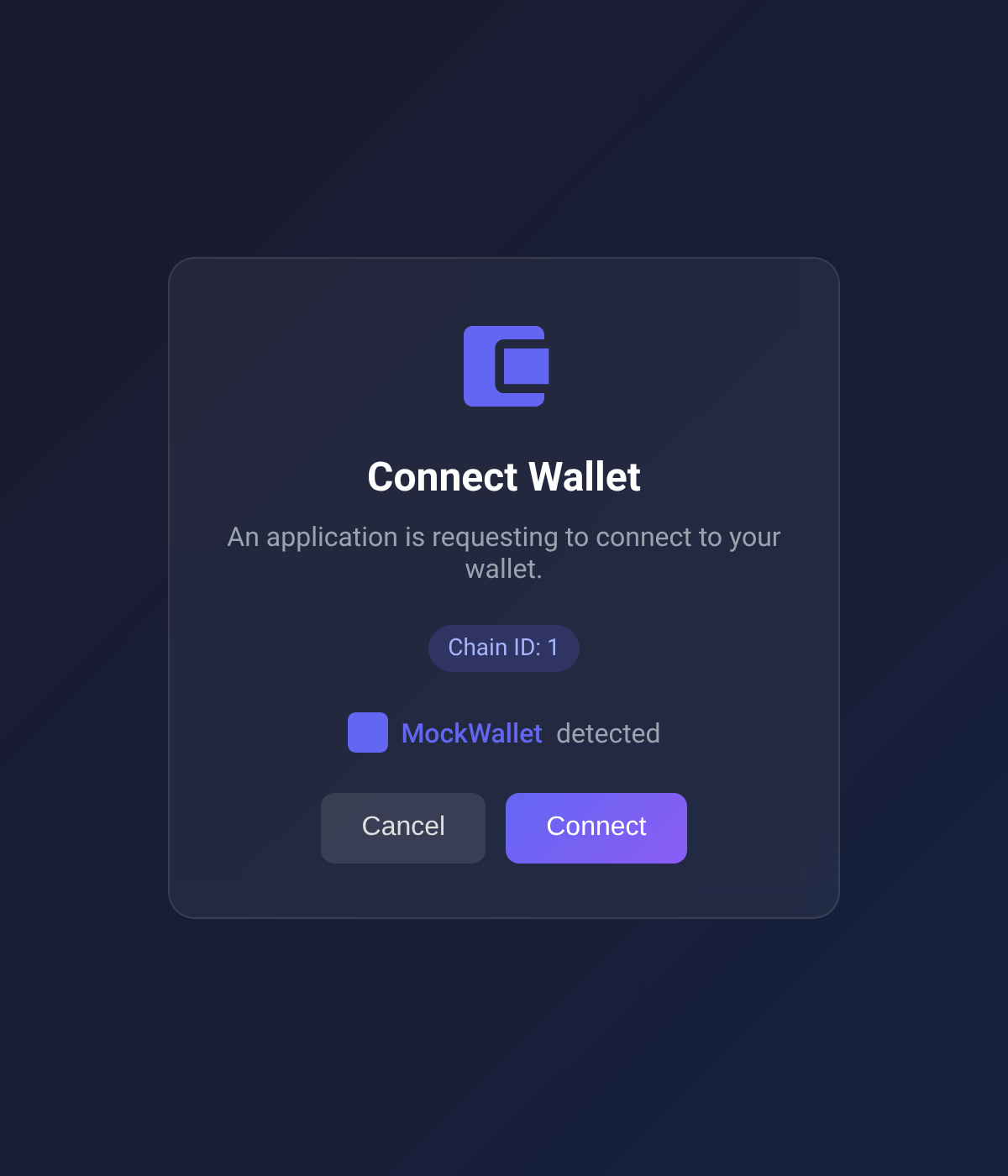
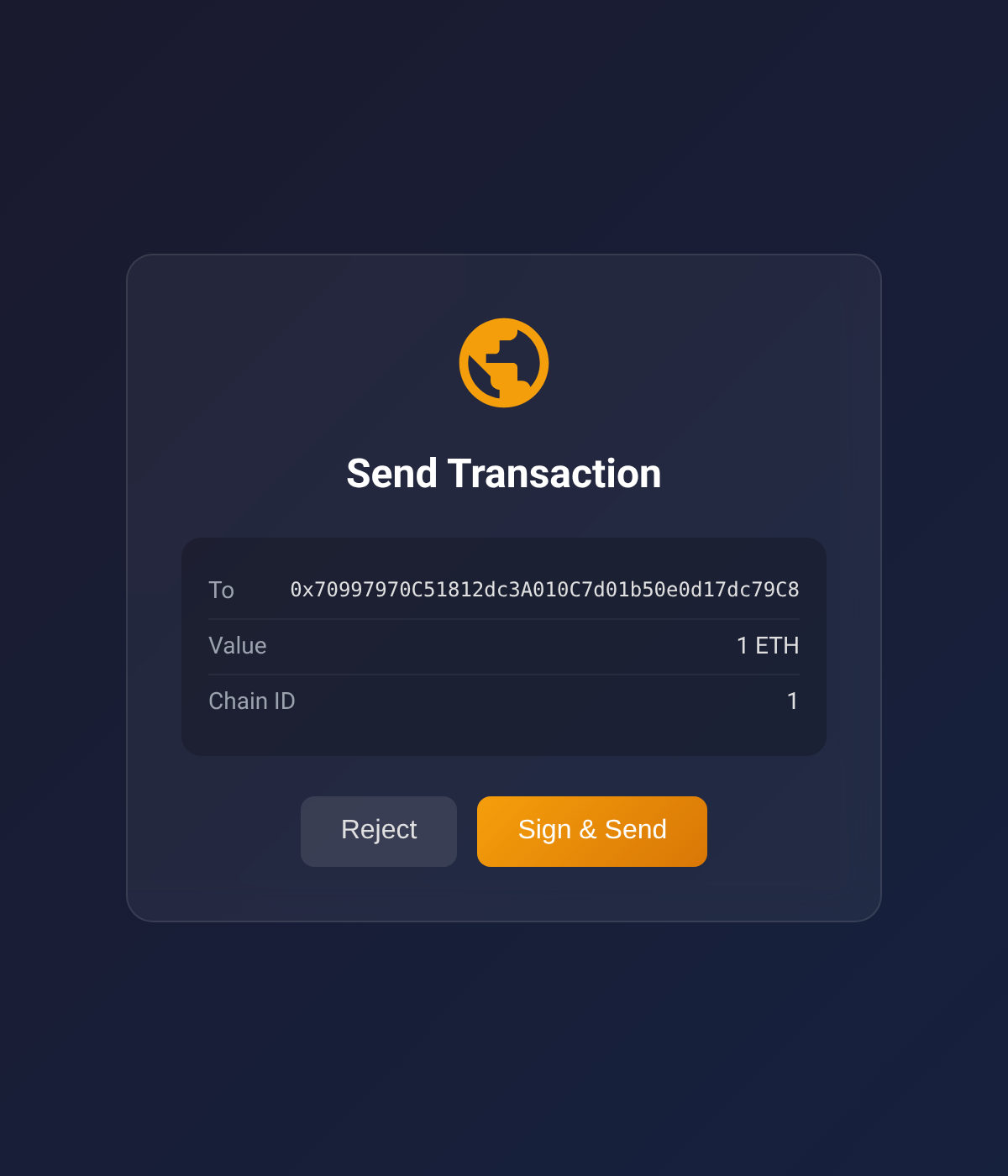
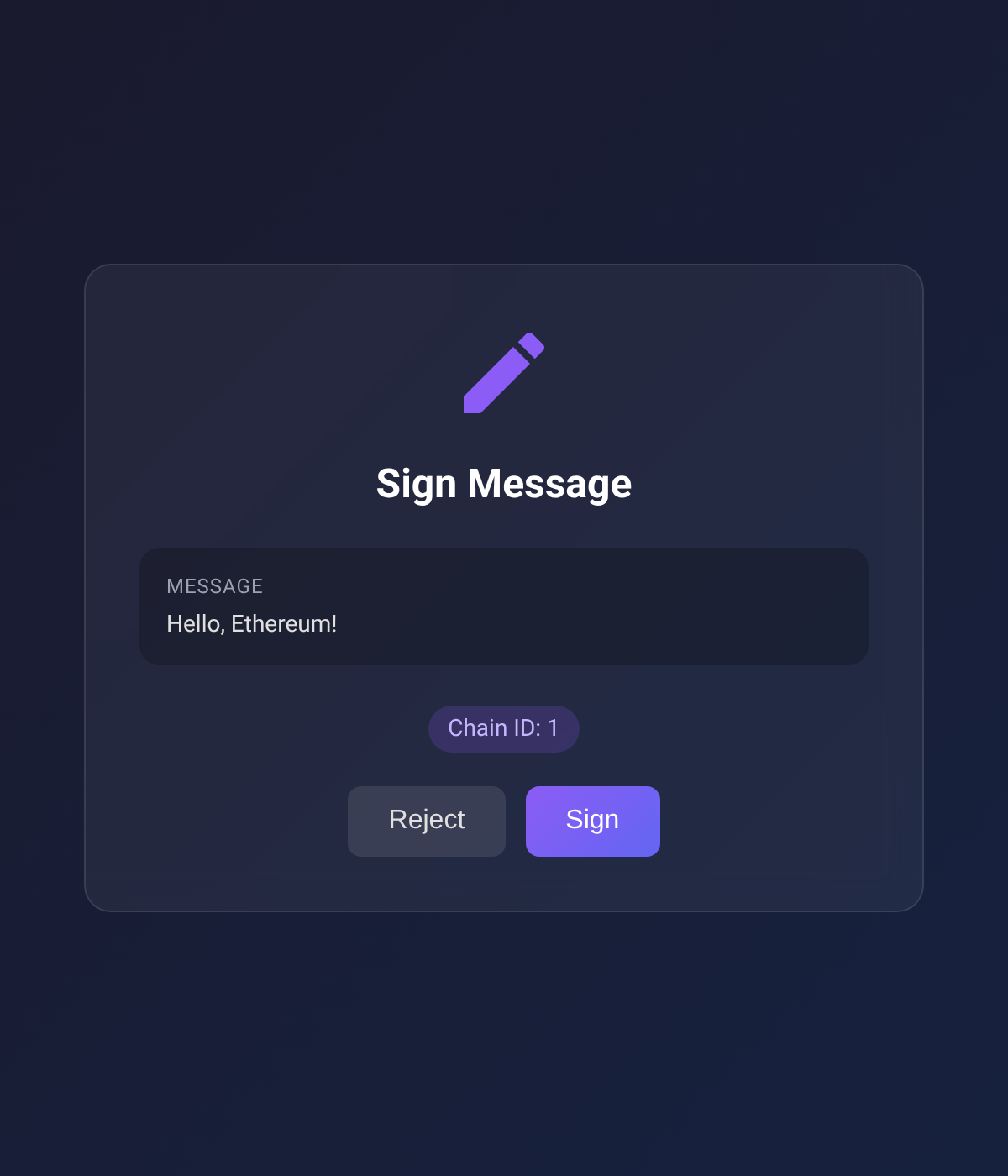
Screenshots below show the EVM approval UI; the TRON UI mirrors the same card layout with TronLink-specific copy and TRX denomination.
| Connect Wallet | Send Transaction | Sign Message |
|:-:|:-:|:-:|
|  |  |  |
## Supported Chains
Built-in RPC URLs for:
- Ethereum (1)
- Sepolia (11155111)
- Polygon (137)
- Arbitrum One (42161)
- Optimism (10)
- Base (8453)
- Avalanche (43114)
- BNB Smart Chain (56)
## Supported TRON Networks
- Tron Mainnet
- Shasta Testnet
- Nile Testnet
## Configuration
Environment variables (optional):
| Variable | Description | Default |
| --------------------------- | ------------------------------------ | --------- |
| `EVM_MCP_PORT` | EVM HTTP server port | 3847 |
| `EVM_MCP_DEFAULT_CHAIN` | Default EVM chain ID | 1 |
| `TRON_MCP_PORT` | TRON HTTP server port | 3848 |
| `TRON_MCP_DEFAULT_NETWORK` | Default TRON network (mainnet/shasta/nile) | mainnet |
## Packages
This is a monorepo with three published packages plus one internal one:
| Package | Published | Description |
| ------- | --------- | ----------- |
| [`wallet-signer-core`](https://github.com/nikicat/mcp-wallet-signer/blob/HEAD/packages/wallet-signer-core) | internal | Chain-agnostic primitives (PendingStore, HTTP bridge, errors). Bundled into each chain package at build time — never installed directly. |
| [`browser-evm-signer`](https://github.com/nikicat/mcp-wallet-signer/blob/HEAD/packages/browser-evm-signer) | npm + JSR | Standalone library — sign EVM transactions via MetaMask/Rabby/any EIP-6963 wallet |
| [`browser-tron-signer`](https://github.com/nikicat/mcp-wallet-signer/blob/HEAD/packages/browser-tron-signer) | npm + JSR | Standalone library — sign TRON transactions via TronLink |
| [`mcp-wallet-signer`](https://github.com/nikicat/mcp-wallet-signer/blob/HEAD/packages/mcp-wallet-signer) | npm | MCP server — exposes the EVM and TRON signers as MCP tools for AI agents |
Use the chain-specific packages directly if you want browser-based signing in your own Node.js/Deno app without MCP.
## Development
Requires [Deno](https://deno.land/) v2.0+.
```bash
# Install all dependencies
deno task install:all
# Type check + lint + format check (all packages)
deno task check:all
# Run tests
deno task test:all
# Build all npm packages
deno task build:all
# Format code
deno task fmt
```
### Manual signing CLI
A `signer-cli` script triggers the same flows that the MCP tools do, but from your shell —
useful for smoke-testing against a real wallet without going through an MCP client.
```bash
# Discover subcommands
deno task cli # top-level help
deno task cli evm help # EVM subcommands
deno task cli tron help # TRON subcommands
deno task cli evm send-transaction --help # subcommand flags
# Examples (each opens a browser; sign in MetaMask / TronLink)
deno task cli evm connect --chain 1
deno task cli evm send-transaction --to 0x... --value 1000000000000000000
deno task cli evm sign-message --message "hello"
deno task cli tron connect --network mainnet
deno task cli tron send-trx --to T... --amount 1000000
deno task cli tron trigger-contract --contract T... \
--selector 'transfer(address,uint256)' \
--params '[{"type":"address","value":"T..."},{"type":"uint256","value":"1000000"}]'
deno task cli tron get-balance --address T... # no browser
```
The approval URL is always printed up-front, and **every browser-interacting subcommand** (both chains, every flow except `get-balance` which doesn't open a browser) accepts `--browser ` and `--print`:
```bash
# Pick a specific browser (the one that has TronLink / MetaMask installed)
deno task cli evm connect --browser firefox
deno task cli evm sign-message --message "hi" --browser chrome
deno task cli tron send-trx --to T... --amount 1000000 --browser edge
deno task cli tron trigger-contract --contract T... --selector 'transfer(address,uint256)' \
--params '[...]' --browser /usr/bin/brave-browser
# Print the URL only — don't auto-open anything. Open it manually wherever you like
deno task cli evm send-transaction --to 0x... --value 1000 --print
deno task cli evm sign-typed-data --json typed.json --print
deno task cli tron connect --network shasta --print
deno task cli tron sign-message --message "hello" --print
```
`--browser ` accepts `chrome`, `firefox`, `edge`, `safari`, or a binary path. Useful when your system default doesn't have the wallet extension installed.
Per-package `deno task trigger ...` works too if you're already inside `packages/browser-evm-signer/` or `packages/browser-tron-signer/`.
### Project Structure
```
tools/
└── signer-cli.ts # Root dispatcher → per-package trigger CLIs
packages/
├── wallet-signer-core/ # Chain-agnostic primitives (npm: wallet-signer-core)
│ ├── src/ # PendingStore, HTTP bridge, errors, browser opener
│ ├── tests/ # Core unit tests
│ └── scripts/build-npm.ts
│
├── browser-evm-signer/ # EVM signing library (npm: browser-evm-signer)
│ ├── src/ # EVM types, viem transport, EIP-6963 approval UI
│ ├── tools/trigger.ts # Manual-trigger CLI
│ ├── tests/ # Unit, e2e (HTTP), and e2e-browser (Playwright) tests
│ └── scripts/build-npm.ts
│
├── browser-tron-signer/ # TRON signing library (npm: browser-tron-signer)
│ ├── src/ # TRON types, TronLink approval UI, TronGrid balance fetch
│ ├── tools/trigger.ts # Manual-trigger CLI
│ ├── tests/ # Unit, e2e (HTTP), and e2e-browser (Playwright) tests
│ └── scripts/build-npm.ts
│
└── mcp-wallet-signer/ # MCP server layer (npm: mcp-wallet-signer)
├── src/ # MCP tool definitions + CLI entry
└── scripts/build-npm.ts
```
A Deno [workspace](https://docs.deno.com/runtime/fundamentals/workspaces/) declaration at the root makes each member's import map visible to root-level scripts (notably `tools/signer-cli.ts` resolving `wallet-signer-core`).
All packages are built with [dnt](https://github.com/denoland/dnt) and use `node:` builtins (no Deno-specific APIs) so the npm bundles run under Node.js.
## License
MIT
Works with any MCP-compatible client via stdio transport.
## Installation
### Claude Code CLI
```bash
claude mcp add wallet-signer -- npx -y mcp-wallet-signer
```
(The name `wallet-signer` is just the MCP server identifier — pick anything you like. Legacy `evm-wallet` still works for users who installed before TRON support landed.)
### Claude Desktop
Add to your `claude_desktop_config.json`:
```json
{
"mcpServers": {
"wallet-signer": {
"command": "npx",
"args": ["-y", "mcp-wallet-signer"]
}
}
}
```
### Run directly
```bash
npx -y mcp-wallet-signer
pnpx mcp-wallet-signer
bunx mcp-wallet-signer
```
## MCP Tools
### EVM (MetaMask / Rabby / any EIP-6963 wallet)
| Tool | Description | Browser Required |
| ------------------ | -------------------------------------- | ---------------- |
| `connect_wallet` | Connect wallet, return address | Yes |
| `send_transaction` | Send ETH/tokens, call contracts | Yes |
| `sign_message` | Sign arbitrary message (personal_sign) | Yes |
| `sign_typed_data` | Sign EIP-712 typed data | Yes |
| `get_balance` | Read ETH balance (via RPC) | No |
| `get_token_balance`| Read ERC-20 balance (`balanceOf`/`decimals`/`symbol`) | No |
### TRON (TronLink)
| Tool | Description | Browser Required |
| ----------------------- | ------------------------------------------------------ | ---------------- |
| `tron_connect_wallet` | Connect TronLink, return Base58 (T…) address | Yes |
| `tron_send_transaction` | Native TRX transfer | Yes |
| `tron_trigger_contract` | TRC-20 / smart-contract call via `triggerSmartContract`| Yes |
| `tron_sign_message` | Sign arbitrary message (`signMessageV2`) | Yes |
| `tron_sign_typed_data` | Sign TIP-712 typed data | Yes |
| `tron_get_balance` | Read TRX balance (via TronGrid) | No |
| `tron_get_token_balance`| Read TRC-20 balance (`balanceOf`/`decimals`/`symbol`) | No |
## How It Works
1. Agent calls an MCP tool (e.g., `send_transaction` or `tron_send_transaction`)
2. Server opens browser to a local signing page (EVM and TRON each run their own HTTP bridge on a separate port)
3. User connects wallet and approves the action — in MetaMask/Rabby/etc. for EVM, in TronLink for TRON
4. Result (address, tx hash, signature) returned to agent
Screenshots below show the EVM approval UI; the TRON UI mirrors the same card layout with TronLink-specific copy and TRX denomination.
| Connect Wallet | Send Transaction | Sign Message |
|:-:|:-:|:-:|
|  |  |  |
## Supported Chains
Built-in RPC URLs for:
- Ethereum (1)
- Sepolia (11155111)
- Polygon (137)
- Arbitrum One (42161)
- Optimism (10)
- Base (8453)
- Avalanche (43114)
- BNB Smart Chain (56)
## Supported TRON Networks
- Tron Mainnet
- Shasta Testnet
- Nile Testnet
## Configuration
Environment variables (optional):
| Variable | Description | Default |
| --------------------------- | ------------------------------------ | --------- |
| `EVM_MCP_PORT` | EVM HTTP server port | 3847 |
| `EVM_MCP_DEFAULT_CHAIN` | Default EVM chain ID | 1 |
| `TRON_MCP_PORT` | TRON HTTP server port | 3848 |
| `TRON_MCP_DEFAULT_NETWORK` | Default TRON network (mainnet/shasta/nile) | mainnet |
## Packages
This is a monorepo with three published packages plus one internal one:
| Package | Published | Description |
| ------- | --------- | ----------- |
| [`wallet-signer-core`](https://github.com/nikicat/mcp-wallet-signer/blob/HEAD/packages/wallet-signer-core) | internal | Chain-agnostic primitives (PendingStore, HTTP bridge, errors). Bundled into each chain package at build time — never installed directly. |
| [`browser-evm-signer`](https://github.com/nikicat/mcp-wallet-signer/blob/HEAD/packages/browser-evm-signer) | npm + JSR | Standalone library — sign EVM transactions via MetaMask/Rabby/any EIP-6963 wallet |
| [`browser-tron-signer`](https://github.com/nikicat/mcp-wallet-signer/blob/HEAD/packages/browser-tron-signer) | npm + JSR | Standalone library — sign TRON transactions via TronLink |
| [`mcp-wallet-signer`](https://github.com/nikicat/mcp-wallet-signer/blob/HEAD/packages/mcp-wallet-signer) | npm | MCP server — exposes the EVM and TRON signers as MCP tools for AI agents |
Use the chain-specific packages directly if you want browser-based signing in your own Node.js/Deno app without MCP.
## Development
Requires [Deno](https://deno.land/) v2.0+.
```bash
# Install all dependencies
deno task install:all
# Type check + lint + format check (all packages)
deno task check:all
# Run tests
deno task test:all
# Build all npm packages
deno task build:all
# Format code
deno task fmt
```
### Manual signing CLI
A `signer-cli` script triggers the same flows that the MCP tools do, but from your shell —
useful for smoke-testing against a real wallet without going through an MCP client.
```bash
# Discover subcommands
deno task cli # top-level help
deno task cli evm help # EVM subcommands
deno task cli tron help # TRON subcommands
deno task cli evm send-transaction --help # subcommand flags
# Examples (each opens a browser; sign in MetaMask / TronLink)
deno task cli evm connect --chain 1
deno task cli evm send-transaction --to 0x... --value 1000000000000000000
deno task cli evm sign-message --message "hello"
deno task cli tron connect --network mainnet
deno task cli tron send-trx --to T... --amount 1000000
deno task cli tron trigger-contract --contract T... \
--selector 'transfer(address,uint256)' \
--params '[{"type":"address","value":"T..."},{"type":"uint256","value":"1000000"}]'
deno task cli tron get-balance --address T... # no browser
```
The approval URL is always printed up-front, and **every browser-interacting subcommand** (both chains, every flow except `get-balance` which doesn't open a browser) accepts `--browser ` and `--print`:
```bash
# Pick a specific browser (the one that has TronLink / MetaMask installed)
deno task cli evm connect --browser firefox
deno task cli evm sign-message --message "hi" --browser chrome
deno task cli tron send-trx --to T... --amount 1000000 --browser edge
deno task cli tron trigger-contract --contract T... --selector 'transfer(address,uint256)' \
--params '[...]' --browser /usr/bin/brave-browser
# Print the URL only — don't auto-open anything. Open it manually wherever you like
deno task cli evm send-transaction --to 0x... --value 1000 --print
deno task cli evm sign-typed-data --json typed.json --print
deno task cli tron connect --network shasta --print
deno task cli tron sign-message --message "hello" --print
```
`--browser ` accepts `chrome`, `firefox`, `edge`, `safari`, or a binary path. Useful when your system default doesn't have the wallet extension installed.
Per-package `deno task trigger ...` works too if you're already inside `packages/browser-evm-signer/` or `packages/browser-tron-signer/`.
### Project Structure
```
tools/
└── signer-cli.ts # Root dispatcher → per-package trigger CLIs
packages/
├── wallet-signer-core/ # Chain-agnostic primitives (npm: wallet-signer-core)
│ ├── src/ # PendingStore, HTTP bridge, errors, browser opener
│ ├── tests/ # Core unit tests
│ └── scripts/build-npm.ts
│
├── browser-evm-signer/ # EVM signing library (npm: browser-evm-signer)
│ ├── src/ # EVM types, viem transport, EIP-6963 approval UI
│ ├── tools/trigger.ts # Manual-trigger CLI
│ ├── tests/ # Unit, e2e (HTTP), and e2e-browser (Playwright) tests
│ └── scripts/build-npm.ts
│
├── browser-tron-signer/ # TRON signing library (npm: browser-tron-signer)
│ ├── src/ # TRON types, TronLink approval UI, TronGrid balance fetch
│ ├── tools/trigger.ts # Manual-trigger CLI
│ ├── tests/ # Unit, e2e (HTTP), and e2e-browser (Playwright) tests
│ └── scripts/build-npm.ts
│
└── mcp-wallet-signer/ # MCP server layer (npm: mcp-wallet-signer)
├── src/ # MCP tool definitions + CLI entry
└── scripts/build-npm.ts
```
A Deno [workspace](https://docs.deno.com/runtime/fundamentals/workspaces/) declaration at the root makes each member's import map visible to root-level scripts (notably `tools/signer-cli.ts` resolving `wallet-signer-core`).
All packages are built with [dnt](https://github.com/denoland/dnt) and use `node:` builtins (no Deno-specific APIs) so the npm bundles run under Node.js.
## License
MIT