# NeuroStack
**Category:** 💰 Finance & Fintech
**Repository:** https://github.com/raphasouthall/neurostack
**Views:** 0
**Installs:** 0
**Upvotes:** 0
**Directory Page:** https://allmcps.com/mcp/neurostack
## Description
Token-efficient MCP memory for Markdown vaults. Tiered search, GraphRAG, AI memories.
## Claude Desktop Quick Installation
Heuristic fallback — verify the package name and runner against the repository README before running it. Uses `npx` (confidence: low):
```json
"mcpServers": {
"neurostack": {
"command": "npx",
"args": ["-y","neurostack"]
}
}
```
## Documentation & README
[](https://pypi.org/project/neurostack/)
[](https://www.npmjs.com/package/neurostack)
[](LICENSE)
[](https://github.com/raphasouthall/neurostack/actions/workflows/ci.yml)
[](https://modelcontextprotocol.io)
**A local RAG layer and optimizer for the Markdown knowledge base you already have.**
NeuroStack indexes a folder of `.md` files (Obsidian, Logseq, Notion exports, plain Markdown) into SQLite with FTS5, embeddings and a wiki-link graph, and exposes it to any MCP client as search, RAG answers with citations, graph queries and agent memories. It then keeps the base accurate: it flags notes that have gone stale, harvests decisions and root causes from AI sessions into memories, synthesises recurring memories into learnings, and queues proven ones for promotion into notes. Indexing never modifies your files. Optional MCP write tools let a client author or edit notes through your git history.
```bash
npm install -g neurostack && neurostack init
```
Works with Claude, Cursor, Windsurf, Gemini CLI, VS Code, Codex and any other client that supports MCP.
---
## Your notes, in your control
By default, NeuroStack is a read-only indexing layer:
- Indexing, search, summaries, and graph analysis **never modify your Markdown files**
- All index data lives in NeuroStack's own separate database
- To remove it completely, run `neurostack uninstall`. Your notes stay untouched.
- Nothing ever leaves your machine, unless you configure a third-party LLM provider for summaries and embeddings
If your vault is a git repo, four **opt-in MCP write tools** let an AI client author and edit notes for you: `vault_write_file`, `vault_delete_file`, plus `vault_read_file` / `vault_list_files`. Every write commits and pushes to your git remote with a descriptive message, so every change is visible in `git log`, revertable with `git revert`, and serialised under a per-vault lock. Writes hard-reject invalid frontmatter, paths outside the vault, and hidden directories (`.git`, `.obsidian`, …). Because the tools are exposed to any client talking to `neurostack serve`, gate them at the transport (auth, tunnel, LAN only) if you put the MCP endpoint on the public internet.
---
## Who this is for
You do not need to be a developer. If you take notes in Markdown, or can export your notes as Markdown from Obsidian, Notion, Bear, or Roam, NeuroStack works for you.
| If you are... | NeuroStack helps you... |
|--------------|------------------------|
| **A researcher** | Ask your AI "what do my notes say about X?" across hundreds of papers. Get warned when a note references a retracted finding or superseded paper before your AI cites it confidently. |
| **A fiction writer** | Your AI knows your world-building bible, character histories, and chapter decisions. It remembers that you agreed in session 4 that Elena's backstory changes in act 2. |
| **A student** | Ask your AI to explain connections across all your course notes. When a syllabus topic changes, stale revision notes are flagged automatically. |
| **A professional** | Your AI remembers client context, project decisions, and meeting notes session-to-session. No more re-pasting the same background every time. |
| **A developer or DevOps engineer** | Notes that reference deprecated APIs or reversed architecture decisions get flagged before your AI cites them as current. |
---
## Get started in three steps
You will need [Node.js](https://nodejs.org) installed (most computers already have it). The npm package handles the Python setup for you.
**Step 1. Install**
```
npm install -g neurostack
```
**Step 2. Set up** (takes about two minutes)
```
neurostack init
```
The setup wizard asks which vault folder to index, which mode to run (Lite or Full), and which profession pack to apply. It does everything else automatically.
**Step 3. Connect to your AI**
For Claude Desktop:
```
neurostack setup-desktop
```
For Claude Code:
```
claude mcp add neurostack -- neurostack serve
```
For Cursor, Windsurf, Gemini CLI, or VS Code:
```
neurostack setup-client cursor # or: windsurf, gemini, vscode
```
Done. Open a new conversation and ask your AI about something from your notes.
Lite and Full modes
Everything runs on your machine. Choose a tier during `neurostack init`:
- **Lite** (~130 MB) gives you keyword search, link-based connections between notes, stale detection and the MCP server. No GPU or Ollama required.
- **Full** (~560 MB) adds semantic search by meaning, AI-generated summaries, connections between notes, and topic clustering via local [Ollama](https://ollama.ai). GPU or 6+ core CPU recommended.
Non-interactive setup:
```bash
neurostack init --mode lite ~/my-notes # lite mode
neurostack init --mode full ~/my-notes # full mode
```
Alternative install methods (PyPI, pip, curl)
```bash
# PyPI
pipx install neurostack
pip install neurostack # inside a venv
uv tool install neurostack
# One-line script
curl -fsSL https://raw.githubusercontent.com/raphasouthall/neurostack/main/install.sh | bash
# Lite mode (no ML deps)
curl -fsSL https://raw.githubusercontent.com/raphasouthall/neurostack/main/install.sh | NEUROSTACK_MODE=lite bash
```
On Ubuntu 23.04+, Debian 12+, and Fedora 38+, bare `pip install` outside a virtual environment is blocked by the operating system. Use `npm`, `pipx`, or `uv tool install` instead.
To uninstall: `neurostack uninstall`
---
## What it does
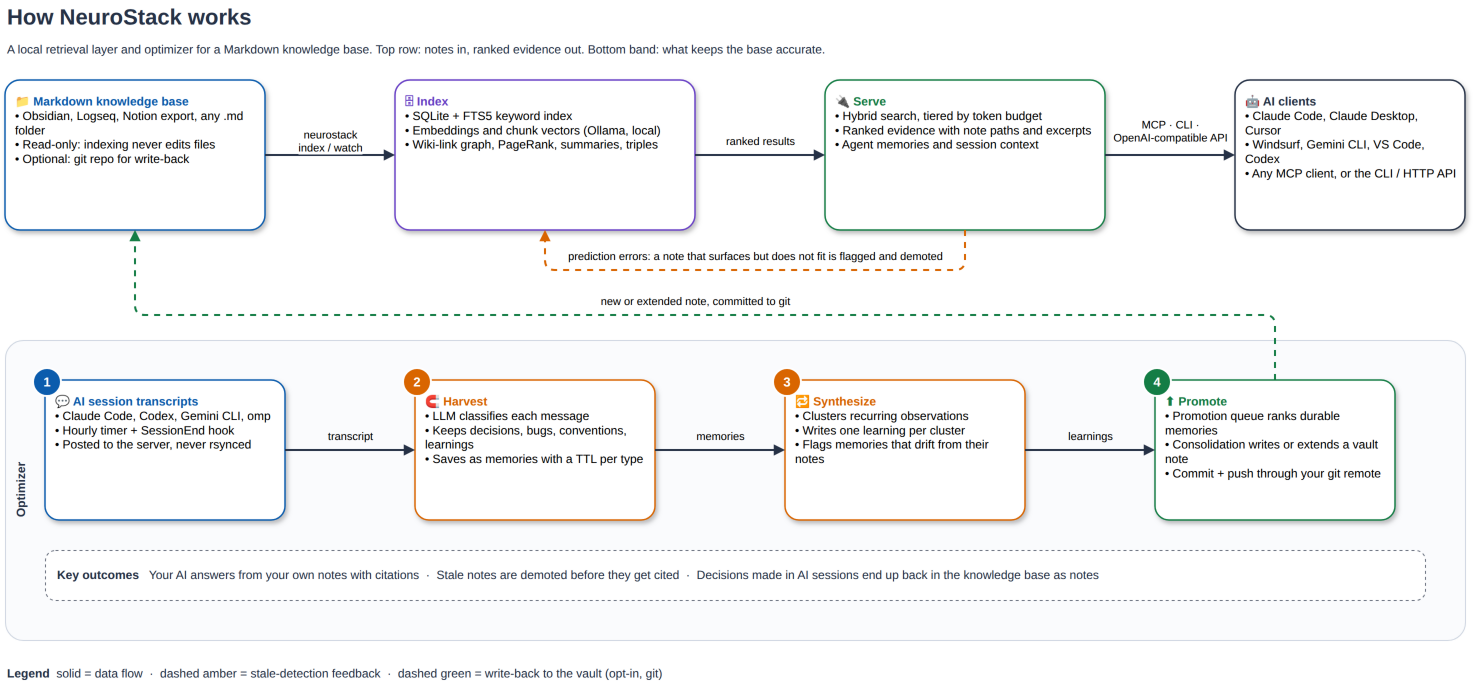
- Hybrid search (FTS5 keyword + semantic) with tiered depth, so a client can fetch triples, summaries or full notes by token budget.
- RAG answers with inline `[[citations]]` over the CLI, MCP, or an OpenAI-compatible API.
- Stale detection. A note that keeps surfacing in contexts where it no longer fits is flagged and demoted in later results.
- Session harvest. A timer scans Claude Code, Codex, Gemini and omp transcripts and saves decisions, bugs, conventions and learnings as memories with TTLs.
- Synthesis and promotion. Recurring memories become learnings; a promotion queue lists which ones are ready to become notes.
- Wiki-link graph with PageRank, community detection, gap and bridge analysis.
- Read-only by default. Opt-in write tools commit and push every change to your git remote.
Technical pipeline (module by module)
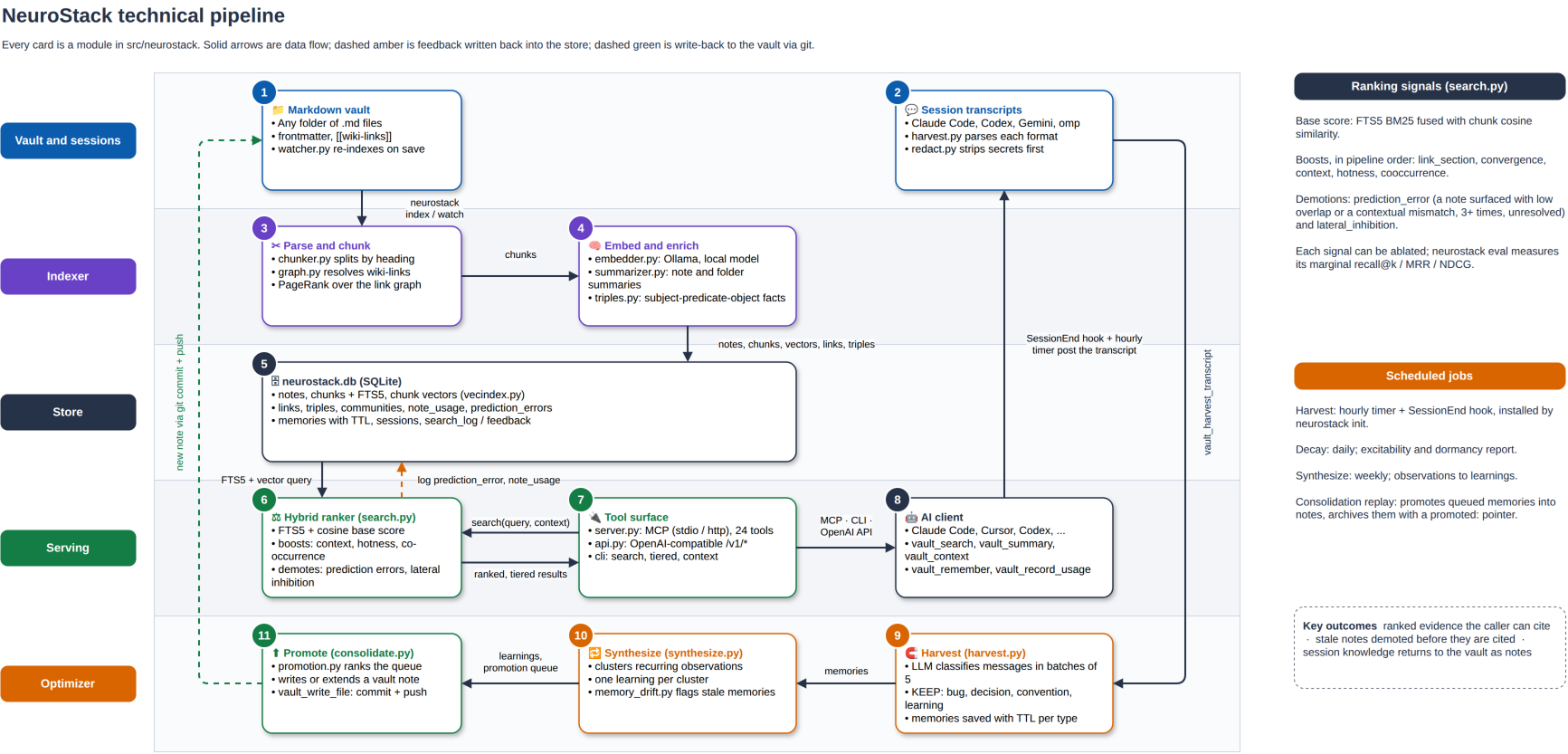
Editable sources live in the `.drawio` files next to the images.
---
## What makes it different
NeuroStack is not a replacement for Obsidian, Notion, or any note-taking app. It sits on top of what you already use and adds what they don't have.
| Capability | Note apps | Basic RAG | NeuroStack |
|-----------|-----------|-----------|------------|
| Stores your notes | Yes | No | No (read-only by default; opt-in git-backed write tools) |
| AI can search your notes | Some | Yes | Yes |
| Detects stale/outdated notes | No | No | Yes |
| AI memories persist across sessions | No | No | Yes |
| Works with any MCP-compatible AI | No | Varies | Yes |
| Tiered retrieval (saves 80-95% tokens) | No | No | Yes |
| Profession-specific workflows | No | No | Yes |
| Open source, self-hostable | Varies | Varies | Yes (Apache 2.0) |
Stale detection is the part other tools lack. When a note keeps appearing in contexts where it no longer fits, such as a deprecated API or a superseded paper, NeuroStack flags it and demotes it in later results.
---
## Profession packs
When you run `neurostack init`, you choose a profession pack. Each one configures NeuroStack with templates, folder structures, and AI guidance suited to how your profession actually uses notes.
| Pack | Built for |
|------|-----------|
| `researcher` | Literature review, citation tracking, evolving arguments, stale paper detection |
| `writer` | Character sheets, world-building, chapter outlines, continuity tracking |
| `student` | Course notes, spaced repetition, exam prep, syllabus change detection |
| `developer` | Code decisions, architecture notes, runbooks, deprecated API detection |
| `devops` | Infrastructure runbooks, incident notes, change logs |
| `data-scientist` | Experiment tracking, model notes, dataset documentation |
Apply a pack to an existing vault without losing any notes:
```bash
neurostack scaffold researcher ~/my-notes # or: writer, student, developer, devops, data-scientist
```
You can also import an existing Markdown directory:
```bash
neurostack onboard ~/my-notes
```
---
## How retrieval works
Most memory tools give your AI a wall of text and let it figure out what's relevant. NeuroStack is tiered. It starts with the cheapest retrieval that answers the question and escalates only when it needs to.
| Level | Tokens | What your AI gets |
|-------|--------|-------------------|
| Quick facts | ~15 | Structured facts extracted from your notes: `experiment-3 used learning-rate 0.001` |
| Summaries | ~75 | AI-generated overview of a note |
| Full content | ~300 | Actual Markdown content |
| Auto (default) | Varies | Starts at quick facts, escalates only if the answer isn't there |
Simple factual questions resolve at ~15 tokens. Deep dives get full context. Your AI spends its attention budget where it matters.
---
## Your AI remembers decisions
Across sessions, your AI can save and retrieve typed memories: observations, decisions, conventions, learnings, bugs. When you start a new session, those memories are surfaced automatically.
> "We decided to keep authentication stateless."
> "The thesis framing shifted from consolidation to complementary learning systems."
> "Elena's surname changed from Vasquez to Reyes in the chapter 7 revision."
These aren't just notes. They're things your AI remembers you decided together. They survive `/clear`. They survive closing the terminal. They survive switching machines.
```bash
neurostack memories add "revised thesis framing to CLS, not just consolidation" --type decision --tags "thesis,neuroscience"
neurostack memories search "thesis direction"
```
---
## Learns from your AI sessions
NeuroStack scans your past AI conversations on a timer, extracts the decisions, observations and learnings, and saves them as memories. You do not have to write them down yourself.
```bash
neurostack harvest --sessions 5 # extract insights from last 5 sessions
neurostack hooks install # set up hourly auto-harvest
```
Supports Claude Code, VS Code, Codex CLI, Aider, and Gemini CLI session formats.
---
## Keeps itself current
Your vault changes. NeuroStack watches it.
```bash
neurostack watch # auto-index on vault changes
```
The index updates as you write and stale detection runs continuously, so you do not maintain it by hand.
---
## What changes day-to-day
| Without NeuroStack | With NeuroStack |
|-------------------|-----------------|
| AI answers from training data | AI answers from your actual notes |
| Cites the runbook you deprecated | Flags it as stale, demotes it automatically |
| No memory of yesterday's session | `session_brief` reconstructs working context |
| Reading 10 notes to find one fact | Tiered retrieval: ~15 tokens for a structured fact |
| Decisions lost after `/clear` | Typed memories persist indefinitely |
---
## How your vault is stored
```
~/your-vault/ # your Markdown files (not modified by indexing; AI clients can edit via opt-in MCP write tools)
~/.config/neurostack/config.toml # configuration
~/.local/share/neurostack/
neurostack.db # SQLite + FTS5 knowledge graph
sessions.db # session transcript index
```
NeuroStack reads your vault. By default it writes nothing back, and all index data lives in its own SQLite databases. The opt-in MCP write tools (`vault_write_file` / `vault_delete_file`) are the one exception: they create or edit `.md` files in the vault and commit + push the change to your git remote on the spot.
### Memory write-back (opt-in)
Memories live in SQLite by default, so they're invisible in Obsidian and vanish if the database is lost. Turn on write-back to persist qualifying memories as markdown files you own:
```toml
[writeback]
enabled = true # opt-in; default false
path = ".neurostack" # quarantine dir, relative to vault_root
include_observations = false # also write the noisier observation/context types
```
- Files land under `{vault_root}/.neurostack/memories///.md`. NeuroStack only ever writes inside that one directory, so your own notes stay untouched.
- Only persistent (no-TTL) `decision` / `convention` / `learning` / `bug` memories are written; ephemeral (TTL) memories never are.
- The database stays the source of truth; files are readable exports. `vault_remember` / `vault_update_memory` / `vault_forget` / `vault_merge` keep the files in step automatically.
- The directory self-ignores via its own `.gitignore` so memories stay out of git until you opt in (delete that file to version them). NeuroStack never commits on your behalf.
- `neurostack migrate write-back [--dry-run]` exports existing memories; `neurostack sync` reconciles files against the DB (the DB wins on conflict).
---
All 24 MCP tools
**Search & retrieval**
| Tool | Description |
|------|-------------|
| `vault_search` | Hybrid search with tiered depth (`triples`, `summaries`, `full`, `auto`) |
| `vault_ask` | RAG Q&A with inline citations |
| `vault_summary` | Pre-computed note summary |
| `vault_graph` | Wiki-link neighborhood with PageRank scores |
| `vault_related` | Semantically similar notes by embedding distance |
| `vault_triples` | Knowledge graph facts (subject-predicate-object) |
| `vault_communities` | GraphRAG queries across topic clusters |
| `vault_context` | Task-scoped context assembly within token budget |
**Context & insights**
| Tool | Description |
|------|-------------|
| `session_brief` | Compact session briefing |
| `vault_stats` | Index health, excitability breakdown, memory stats |
| `vault_record_usage` | Track note hotness |
| `vault_prediction_errors` | Surface stale notes |
**Memories**
| Tool | Description |
|------|-------------|
| `vault_remember` | Store a memory (returns duplicate warnings + tag suggestions) |
| `vault_update_memory` | Update a memory in place |
| `vault_merge` | Merge two memories (unions tags, audit trail) |
| `vault_forget` | Delete a memory |
| `vault_memories` | List or search memories |
| `vault_harvest` | Extract insights from session transcripts |
| `vault_harvest_transcript` | Extract insights from a transcript posted by the client (no server filesystem access) |
**Sessions**
| Tool | Description |
|------|-------------|
| `vault_session_start` | Begin a memory session |
| `vault_session_end` | End session with optional summary and auto-harvest |
**Vault files** (opt-in write surface — git-backed)
| Tool | Description |
|------|-------------|
| `vault_read_file` | Read a `.md` file under your vault root |
| `vault_list_files` | List `.md` files; hidden segments (`.git`, `.obsidian`, …) always excluded |
| `vault_write_file` | Create or overwrite a `.md` file; commits + pushes `origin/main`. Hard-rejects writes without required frontmatter (`date`, `tags`, `type`). On push conflict: `git pull --rebase --autostash` + retry once, then rollback. |
| `vault_delete_file` | Delete a `.md` file; commits + pushes `origin/main` |
Full CLI reference
```
# Setup
neurostack init # one-command setup: deps, vault, index
neurostack init --mode full ~/brain # non-interactive full mode
neurostack onboard ~/my-notes # import existing Markdown notes
neurostack scaffold researcher # apply a profession pack
neurostack scaffold --list # see all packs
neurostack update # pull latest source + re-sync deps
neurostack uninstall # complete removal
# Search & retrieval
neurostack search "query" # hybrid search
neurostack ask "question" # RAG Q&A with citations
neurostack tiered "query" # tiered: triples -> summaries -> full
neurostack triples "query" # knowledge graph triples
neurostack summary "note.md" # AI-generated note summary
neurostack related "note.md" # semantically similar notes
neurostack graph "note.md" # wiki-link neighborhood
neurostack communities query "topic" # GraphRAG across topic clusters
neurostack context "task" --budget 2000 # task-scoped context recovery
neurostack brief # session briefing
# Maintenance
neurostack index # build/rebuild knowledge graph
neurostack watch # auto-index on vault changes
neurostack decay # excitability report
neurostack prediction-errors # stale note detection
neurostack backfill [summaries|triples|all]
neurostack communities build # rebuild topic clusters
neurostack reembed-chunks # re-embed all chunks
neurostack export --include triples -o dump.json # dump index data as JSON
# Memories
neurostack memories add "text" --type observation
neurostack memories search "query"
neurostack memories list
neurostack memories update --content "revised"
neurostack memories merge
neurostack memories forget
neurostack memories prune --expired
# Sessions
neurostack harvest --sessions 5 # extract session insights
neurostack sessions search "query" # search transcripts
neurostack hooks install # hourly harvest timer
# Client setup
neurostack setup-client cursor # or: windsurf, gemini, vscode, claude-code
neurostack setup-client --list
neurostack setup-desktop # Claude Desktop
# Diagnostics
neurostack stats # index health
neurostack doctor # validate all subsystems
neurostack demo # interactive demo with sample vault
```
Neuroscience basis
Each feature models a specific mechanism from memory neuroscience:
| Feature | Mechanism | Citation |
|---------|-----------|----------|
| Stale detection + demotion | Prediction error signals trigger reconsolidation | Sinclair & Bhatt 2022 |
| Excitability decay | CREB-elevated neurons preferentially join new memories | Han et al. 2007 |
| Co-occurrence learning | Hebbian "fire together, wire together" plasticity | Hebb 1949 |
| Topic clusters | Hopfield attractor basin dynamics, inverse temperature | Ramsauer et al. 2020 |
| Convergence confidence | Energy landscape retrieval, basin width = robustness | Krotov & Hopfield 2016 |
| Lateral inhibition | PV+/SOM+ interneuron winner-take-all competition | Rashid et al. 2016 |
| Tiered retrieval | Complementary learning systems | McClelland et al. 1995 |
Full citations: [docs/neuroscience-appendix.md](https://github.com/raphasouthall/neurostack/blob/HEAD/docs/neuroscience-appendix.md)
---
## FAQ
**Does it modify my vault files?** Not by default. Indexing, search, summaries, and every read tool leave your files untouched, and all index data lives in NeuroStack's own SQLite databases. Four opt-in MCP write tools (`vault_write_file`, `vault_delete_file`, plus `vault_read_file` / `vault_list_files`) let an AI client author and edit notes; every write commits and pushes to your git remote, so changes are tracked and revertable. If your vault is not a git repo, the file is still written to disk but the commit step is skipped. Separately, opt-in [memory write-back](#memory-write-back-opt-in) persists memories as markdown, but only inside the quarantined `.neurostack/` directory, away from your own notes.
**Do I need a GPU?** No. Lite mode has zero ML dependencies. Full mode runs on CPU but summarization is slow without a GPU.
**Do I need to know Python?** No. The npm package handles everything. You never touch a virtualenv.
**How large a vault can it handle?** Tested with ~5,000 notes. FTS5 search stays fast at any size.
**Can I use it without an AI client?** Yes. The CLI works standalone and pipes into any LLM.
**Is my vault private?** Yes. Nothing leaves your machine, unless you point Full mode at a third-party LLM provider instead of local Ollama. In that case the text you index goes to that provider under its own policy.
**What AI clients does it work with?** Claude Code, Claude Desktop, Cursor, Windsurf, Gemini CLI, VS Code, Codex and any other client that supports MCP.
---
## Requirements
- Linux or macOS
- **Lite mode:** Node.js + Python 3.11+. No GPU or Ollama required.
- **Full mode:** [Ollama](https://ollama.ai) with `nomic-embed-text` and a summary model. GPU or 6+ core CPU recommended.
---
## Get started
```bash
npm install -g neurostack
neurostack init
```
`neurostack init` picks a tier, installs dependencies, indexes the vault and configures your MCP client.
- **Contributing:** [CONTRIBUTING.md](https://github.com/raphasouthall/neurostack/blob/HEAD/CONTRIBUTING.md)
- **GitHub:** [github.com/raphasouthall/neurostack](https://github.com/raphasouthall/neurostack)
- **Sponsor:** [GitHub Sponsors](https://github.com/sponsors/raphasouthall) | [Buy me a coffee](https://buymeacoffee.com/raphasouthall)
---
Apache-2.0, see [LICENSE](https://github.com/raphasouthall/neurostack/blob/HEAD/LICENSE). No GPL dependencies.
 [](https://pypi.org/project/neurostack/)
[](https://www.npmjs.com/package/neurostack)
[](LICENSE)
[](https://github.com/raphasouthall/neurostack/actions/workflows/ci.yml)
[](https://modelcontextprotocol.io)
**A local RAG layer and optimizer for the Markdown knowledge base you already have.**
NeuroStack indexes a folder of `.md` files (Obsidian, Logseq, Notion exports, plain Markdown) into SQLite with FTS5, embeddings and a wiki-link graph, and exposes it to any MCP client as search, RAG answers with citations, graph queries and agent memories. It then keeps the base accurate: it flags notes that have gone stale, harvests decisions and root causes from AI sessions into memories, synthesises recurring memories into learnings, and queues proven ones for promotion into notes. Indexing never modifies your files. Optional MCP write tools let a client author or edit notes through your git history.
```bash
npm install -g neurostack && neurostack init
```
Works with Claude, Cursor, Windsurf, Gemini CLI, VS Code, Codex and any other client that supports MCP.
---
## Your notes, in your control
By default, NeuroStack is a read-only indexing layer:
- Indexing, search, summaries, and graph analysis **never modify your Markdown files**
- All index data lives in NeuroStack's own separate database
- To remove it completely, run `neurostack uninstall`. Your notes stay untouched.
- Nothing ever leaves your machine, unless you configure a third-party LLM provider for summaries and embeddings
If your vault is a git repo, four **opt-in MCP write tools** let an AI client author and edit notes for you: `vault_write_file`, `vault_delete_file`, plus `vault_read_file` / `vault_list_files`. Every write commits and pushes to your git remote with a descriptive message, so every change is visible in `git log`, revertable with `git revert`, and serialised under a per-vault lock. Writes hard-reject invalid frontmatter, paths outside the vault, and hidden directories (`.git`, `.obsidian`, …). Because the tools are exposed to any client talking to `neurostack serve`, gate them at the transport (auth, tunnel, LAN only) if you put the MCP endpoint on the public internet.
---
## Who this is for
You do not need to be a developer. If you take notes in Markdown, or can export your notes as Markdown from Obsidian, Notion, Bear, or Roam, NeuroStack works for you.
| If you are... | NeuroStack helps you... |
|--------------|------------------------|
| **A researcher** | Ask your AI "what do my notes say about X?" across hundreds of papers. Get warned when a note references a retracted finding or superseded paper before your AI cites it confidently. |
| **A fiction writer** | Your AI knows your world-building bible, character histories, and chapter decisions. It remembers that you agreed in session 4 that Elena's backstory changes in act 2. |
| **A student** | Ask your AI to explain connections across all your course notes. When a syllabus topic changes, stale revision notes are flagged automatically. |
| **A professional** | Your AI remembers client context, project decisions, and meeting notes session-to-session. No more re-pasting the same background every time. |
| **A developer or DevOps engineer** | Notes that reference deprecated APIs or reversed architecture decisions get flagged before your AI cites them as current. |
---
## Get started in three steps
You will need [Node.js](https://nodejs.org) installed (most computers already have it). The npm package handles the Python setup for you.
**Step 1. Install**
```
npm install -g neurostack
```
**Step 2. Set up** (takes about two minutes)
```
neurostack init
```
The setup wizard asks which vault folder to index, which mode to run (Lite or Full), and which profession pack to apply. It does everything else automatically.
**Step 3. Connect to your AI**
For Claude Desktop:
```
neurostack setup-desktop
```
For Claude Code:
```
claude mcp add neurostack -- neurostack serve
```
For Cursor, Windsurf, Gemini CLI, or VS Code:
```
neurostack setup-client cursor # or: windsurf, gemini, vscode
```
Done. Open a new conversation and ask your AI about something from your notes.
[](https://pypi.org/project/neurostack/)
[](https://www.npmjs.com/package/neurostack)
[](LICENSE)
[](https://github.com/raphasouthall/neurostack/actions/workflows/ci.yml)
[](https://modelcontextprotocol.io)
**A local RAG layer and optimizer for the Markdown knowledge base you already have.**
NeuroStack indexes a folder of `.md` files (Obsidian, Logseq, Notion exports, plain Markdown) into SQLite with FTS5, embeddings and a wiki-link graph, and exposes it to any MCP client as search, RAG answers with citations, graph queries and agent memories. It then keeps the base accurate: it flags notes that have gone stale, harvests decisions and root causes from AI sessions into memories, synthesises recurring memories into learnings, and queues proven ones for promotion into notes. Indexing never modifies your files. Optional MCP write tools let a client author or edit notes through your git history.
```bash
npm install -g neurostack && neurostack init
```
Works with Claude, Cursor, Windsurf, Gemini CLI, VS Code, Codex and any other client that supports MCP.
---
## Your notes, in your control
By default, NeuroStack is a read-only indexing layer:
- Indexing, search, summaries, and graph analysis **never modify your Markdown files**
- All index data lives in NeuroStack's own separate database
- To remove it completely, run `neurostack uninstall`. Your notes stay untouched.
- Nothing ever leaves your machine, unless you configure a third-party LLM provider for summaries and embeddings
If your vault is a git repo, four **opt-in MCP write tools** let an AI client author and edit notes for you: `vault_write_file`, `vault_delete_file`, plus `vault_read_file` / `vault_list_files`. Every write commits and pushes to your git remote with a descriptive message, so every change is visible in `git log`, revertable with `git revert`, and serialised under a per-vault lock. Writes hard-reject invalid frontmatter, paths outside the vault, and hidden directories (`.git`, `.obsidian`, …). Because the tools are exposed to any client talking to `neurostack serve`, gate them at the transport (auth, tunnel, LAN only) if you put the MCP endpoint on the public internet.
---
## Who this is for
You do not need to be a developer. If you take notes in Markdown, or can export your notes as Markdown from Obsidian, Notion, Bear, or Roam, NeuroStack works for you.
| If you are... | NeuroStack helps you... |
|--------------|------------------------|
| **A researcher** | Ask your AI "what do my notes say about X?" across hundreds of papers. Get warned when a note references a retracted finding or superseded paper before your AI cites it confidently. |
| **A fiction writer** | Your AI knows your world-building bible, character histories, and chapter decisions. It remembers that you agreed in session 4 that Elena's backstory changes in act 2. |
| **A student** | Ask your AI to explain connections across all your course notes. When a syllabus topic changes, stale revision notes are flagged automatically. |
| **A professional** | Your AI remembers client context, project decisions, and meeting notes session-to-session. No more re-pasting the same background every time. |
| **A developer or DevOps engineer** | Notes that reference deprecated APIs or reversed architecture decisions get flagged before your AI cites them as current. |
---
## Get started in three steps
You will need [Node.js](https://nodejs.org) installed (most computers already have it). The npm package handles the Python setup for you.
**Step 1. Install**
```
npm install -g neurostack
```
**Step 2. Set up** (takes about two minutes)
```
neurostack init
```
The setup wizard asks which vault folder to index, which mode to run (Lite or Full), and which profession pack to apply. It does everything else automatically.
**Step 3. Connect to your AI**
For Claude Desktop:
```
neurostack setup-desktop
```
For Claude Code:
```
claude mcp add neurostack -- neurostack serve
```
For Cursor, Windsurf, Gemini CLI, or VS Code:
```
neurostack setup-client cursor # or: windsurf, gemini, vscode
```
Done. Open a new conversation and ask your AI about something from your notes.