# micl2e2/code-to-tree [Health: Active]
**Category:** 🤖 Coding Agents
**Repository:** https://github.com/micl2e2/code-to-tree
**GitHub Stars:** 86
**Views:** 2
**Installs:** 0
**Upvotes:** 0
**Directory Page:** https://allmcps.com/mcp/micl2e2-code-to-tree
## Description
A single-binary MCP server that converts source code into AST, regardless of language.
## Claude Desktop Quick Installation
Heuristic fallback — verify the package name and runner against the repository README before running it. Uses `npx` (confidence: low):
```json
"mcpServers": {
"code-to-tree": {
"command": "npx",
"args": ["-y","micl2e2-code-to-tree"]
}
}
```
## Documentation & README
# Table of Contents
- [MCP Server: code-to-tree](#orgf542482)
- [Using code-to-tree](#org862e7dc)
- [Configure MCP Clients](#orge54fa87)
- [Building (Windows)](#org48a8180)
- [Building (macOS)](#orgbaa740e)
# MCP Server: code-to-tree
The code-to-tree server's goals are:
1. Give LLMs the capability of **accurately** converting source code into
AST(Abstract Syntax Tree), regardless of language.
2. One **standalone** binary should be everything the MCP client needs.
These goals imply:
1. The underlying syntax parser should be **versatile** enough. Here we
choose [tree-sitter](https://github.com/tree-sitter/tree-sitter), and languages are: C, C++, Rust, Ruby, Go, Java, Python.
2. The server should be able to carry all capabilities within
itself, imposing **minimum** software dependencies on the end user's
machine. Here we choose [mcpc](https://github.com/micl2e2/mcpc).
**Screenshots:**
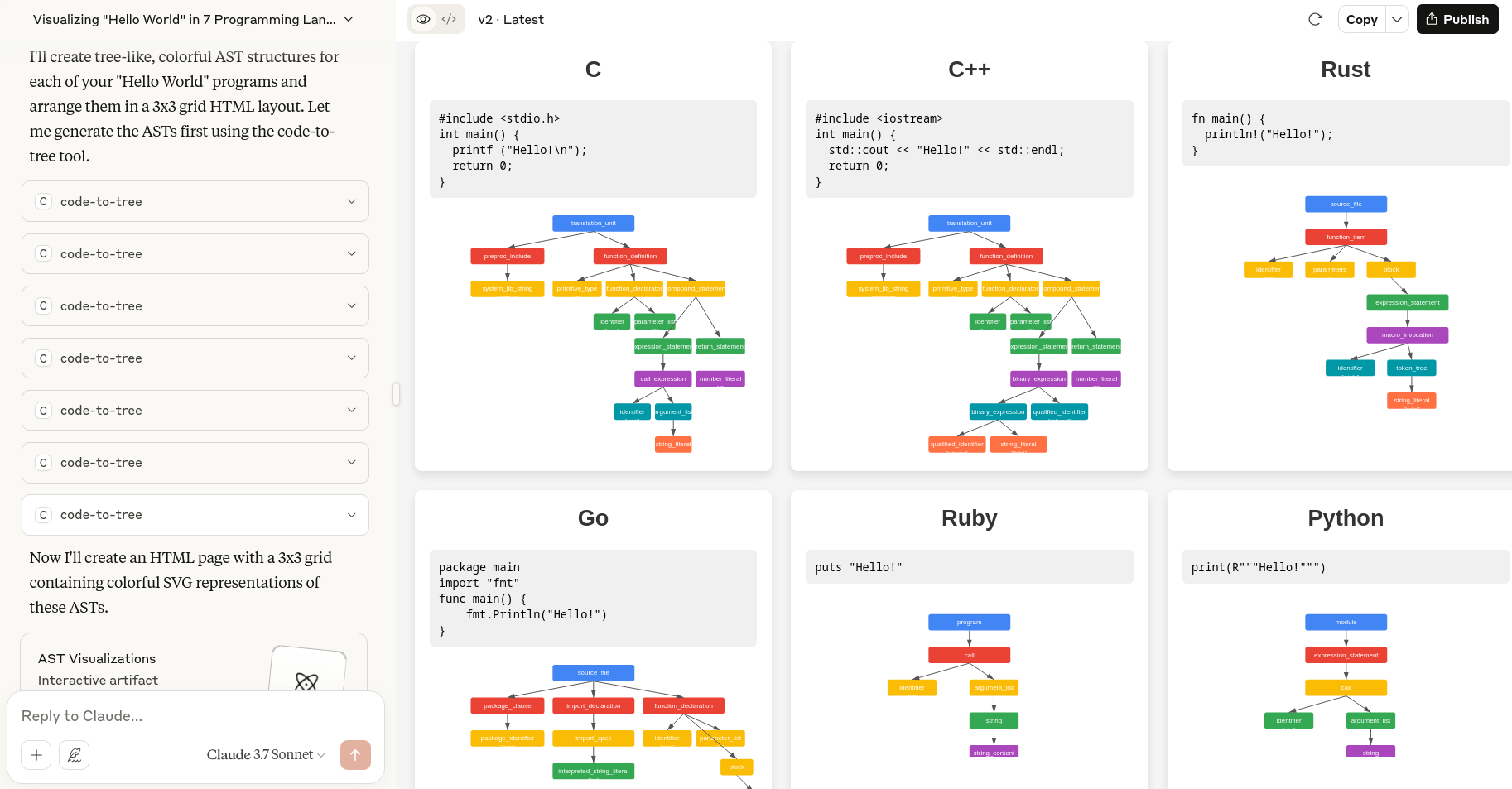
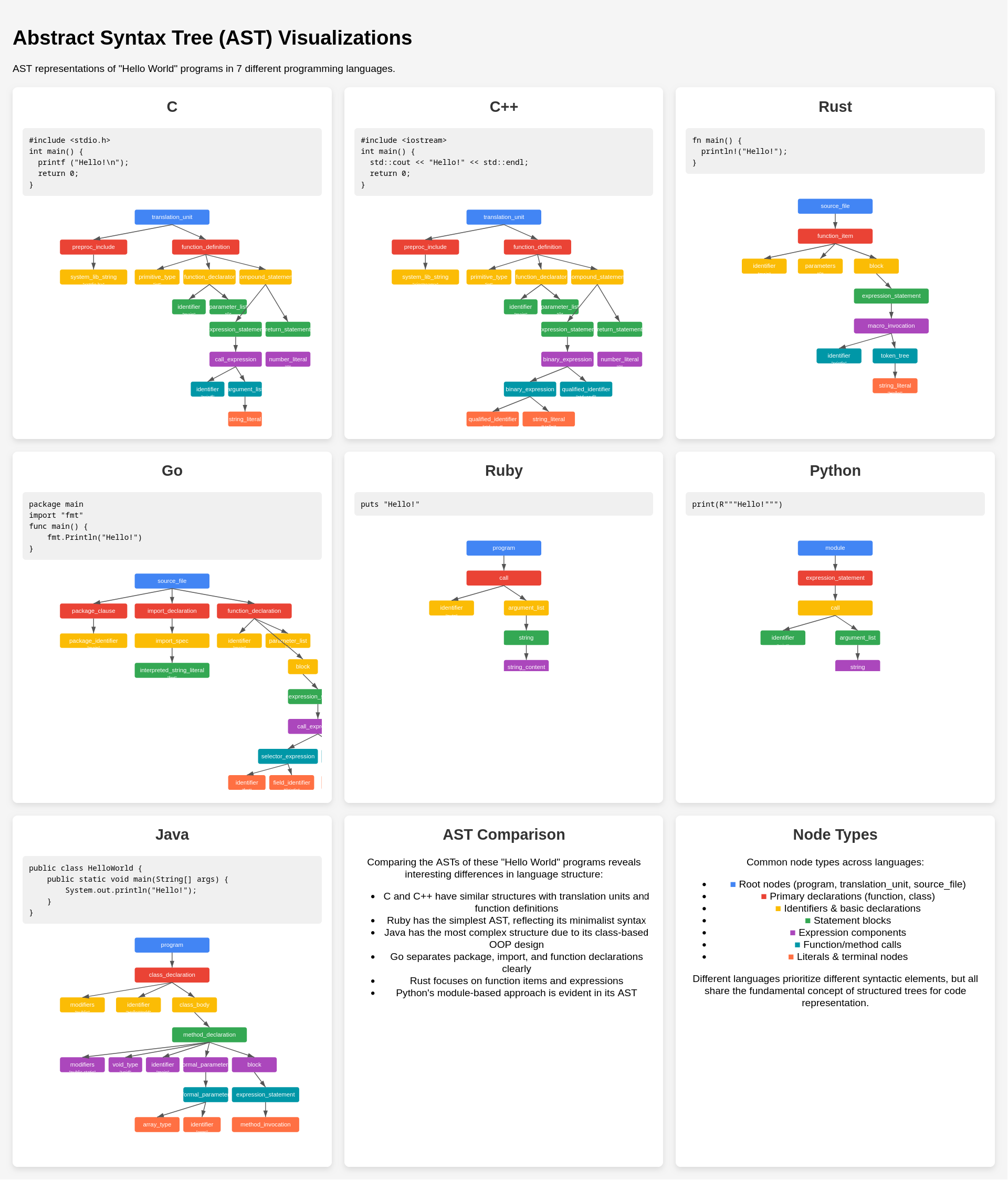 The above screenshots are obtained by asking the question specified
in `q.md`.
(**IMPORTANT NOTE**: LLMs have no responsibility of generating the identical
result for the same question, you will likely get a completely different
style or content. The screenshots or questions provided here are just for the reference)
The above screenshots are obtained by asking the question specified
in `q.md`.
(**IMPORTANT NOTE**: LLMs have no responsibility of generating the identical
result for the same question, you will likely get a completely different
style or content. The screenshots or questions provided here are just for the reference)
 # Using code-to-tree
Before everthing, you need to have the code-to-tree executable on your
machine (`code-to-tree.exe` for Windows, `code-to-tree` for macOS),
you can download at GitHub release [page](https://github.com/micl2e2/code-to-tree/releases) or build it yourself. Once
downloaded, you configure your MCP clients to install it, check the section
*"Configure MCP Clients"* for more details.
# Configure MCP Clients
Here we use Claude as the example.
## Windows
In your Claude configuration
(`C:\Users\YOUR_NAME\AppData\Roaming\Claude\claude_desktop_config.json`),
specify the location of `code-to-tree.exe`:
{
"mcpServers": {
"code-to-tree": { "command": "C:\\path\\to\\code-to-tree.exe" }
}
}
## macOS
In your Claude configuration,
(`~/Library/Application Support/Claude/claude_desktop_config.json`)
specify the location of `code-to-tree`
{
"mcpServers": {
"code-to-tree": { "command": "/path/to/code-to-tree" }
}
}
# Building (Windows)
## 1. Prepare environment
1. download & install MSYS2.
2. open application "MSYS2 MINGW64"
3. run `pacman -S make gcc git`
## 2. Prepare tree-sitter libraries
Here we need to compile and install tree-sitter and all related grammars.
Clone them:
git clone https://github.com/tree-sitter/tree-sitter
git clone https://github.com/tree-sitter/tree-sitter-c
git clone https://github.com/tree-sitter/tree-sitter-cpp
git clone https://github.com/tree-sitter/tree-sitter-rust
git clone https://github.com/tree-sitter/tree-sitter-ruby
git clone https://github.com/tree-sitter/tree-sitter-go
git clone https://github.com/tree-sitter/tree-sitter-java
Compile and install them:
cd tree-sitter && OS=1 make install
cd tree-sitter-c && OS=1 make install
cd tree-sitter-cpp && OS=1 make install
cd tree-sitter-rust && OS=1 make install
cd tree-sitter-ruby && OS=1 make install
cd tree-sitter-go && OS=1 make install
cd tree-sitter-java && OS=1 make install
## 3. Build code-to-tree
Install mcpc:
git clone https://github.com/micl2e2/mcpc
cd mcpc && make install
Compile code-to-tree:
cd mcpc/example/code-to-tree
CFLAGS="-I/usr/local/include -L/usr/local/lib" make
# Check the binary
file code-to-tree.exe
# Remember the binary's location
pwd
# Assume the output is: /c/path/to/code-to-tree.exe
# Building (macOS)
## 1. Prepare environment
1. Xcode Command Line Tools
## 2. Prepare tree-sitter libraries
Here we need to compile and install tree-sitter and all related grammars.
Clone them:
git clone https://github.com/tree-sitter/tree-sitter
git clone https://github.com/tree-sitter/tree-sitter-c
git clone https://github.com/tree-sitter/tree-sitter-cpp
git clone https://github.com/tree-sitter/tree-sitter-rust
git clone https://github.com/tree-sitter/tree-sitter-ruby
git clone https://github.com/tree-sitter/tree-sitter-go
git clone https://github.com/tree-sitter/tree-sitter-java
Compile and install them:
cd tree-sitter && make install
cd tree-sitter-c && make install
cd tree-sitter-cpp && make install
cd tree-sitter-rust && make install
cd tree-sitter-ruby && make install
cd tree-sitter-go && make install
cd tree-sitter-java && make install
## 3. Build code-to-tree
Install mcpc:
git clone https://github.com/micl2e2/mcpc
cd mcpc && make install
Compile code-to-tree:
cd mcpc/example/code-to-tree
make
# Check the binary
file ./code-to-tree
# Remember the binary's location
pwd
# Assume the output is: /path/to/code-to-tree
# Using code-to-tree
Before everthing, you need to have the code-to-tree executable on your
machine (`code-to-tree.exe` for Windows, `code-to-tree` for macOS),
you can download at GitHub release [page](https://github.com/micl2e2/code-to-tree/releases) or build it yourself. Once
downloaded, you configure your MCP clients to install it, check the section
*"Configure MCP Clients"* for more details.
# Configure MCP Clients
Here we use Claude as the example.
## Windows
In your Claude configuration
(`C:\Users\YOUR_NAME\AppData\Roaming\Claude\claude_desktop_config.json`),
specify the location of `code-to-tree.exe`:
{
"mcpServers": {
"code-to-tree": { "command": "C:\\path\\to\\code-to-tree.exe" }
}
}
## macOS
In your Claude configuration,
(`~/Library/Application Support/Claude/claude_desktop_config.json`)
specify the location of `code-to-tree`
{
"mcpServers": {
"code-to-tree": { "command": "/path/to/code-to-tree" }
}
}
# Building (Windows)
## 1. Prepare environment
1. download & install MSYS2.
2. open application "MSYS2 MINGW64"
3. run `pacman -S make gcc git`
## 2. Prepare tree-sitter libraries
Here we need to compile and install tree-sitter and all related grammars.
Clone them:
git clone https://github.com/tree-sitter/tree-sitter
git clone https://github.com/tree-sitter/tree-sitter-c
git clone https://github.com/tree-sitter/tree-sitter-cpp
git clone https://github.com/tree-sitter/tree-sitter-rust
git clone https://github.com/tree-sitter/tree-sitter-ruby
git clone https://github.com/tree-sitter/tree-sitter-go
git clone https://github.com/tree-sitter/tree-sitter-java
Compile and install them:
cd tree-sitter && OS=1 make install
cd tree-sitter-c && OS=1 make install
cd tree-sitter-cpp && OS=1 make install
cd tree-sitter-rust && OS=1 make install
cd tree-sitter-ruby && OS=1 make install
cd tree-sitter-go && OS=1 make install
cd tree-sitter-java && OS=1 make install
## 3. Build code-to-tree
Install mcpc:
git clone https://github.com/micl2e2/mcpc
cd mcpc && make install
Compile code-to-tree:
cd mcpc/example/code-to-tree
CFLAGS="-I/usr/local/include -L/usr/local/lib" make
# Check the binary
file code-to-tree.exe
# Remember the binary's location
pwd
# Assume the output is: /c/path/to/code-to-tree.exe
# Building (macOS)
## 1. Prepare environment
1. Xcode Command Line Tools
## 2. Prepare tree-sitter libraries
Here we need to compile and install tree-sitter and all related grammars.
Clone them:
git clone https://github.com/tree-sitter/tree-sitter
git clone https://github.com/tree-sitter/tree-sitter-c
git clone https://github.com/tree-sitter/tree-sitter-cpp
git clone https://github.com/tree-sitter/tree-sitter-rust
git clone https://github.com/tree-sitter/tree-sitter-ruby
git clone https://github.com/tree-sitter/tree-sitter-go
git clone https://github.com/tree-sitter/tree-sitter-java
Compile and install them:
cd tree-sitter && make install
cd tree-sitter-c && make install
cd tree-sitter-cpp && make install
cd tree-sitter-rust && make install
cd tree-sitter-ruby && make install
cd tree-sitter-go && make install
cd tree-sitter-java && make install
## 3. Build code-to-tree
Install mcpc:
git clone https://github.com/micl2e2/mcpc
cd mcpc && make install
Compile code-to-tree:
cd mcpc/example/code-to-tree
make
# Check the binary
file ./code-to-tree
# Remember the binary's location
pwd
# Assume the output is: /path/to/code-to-tree