# Memory Engine MCP [Health: Active]
**Category:** 🗄️ Databases
**Repository:** https://github.com/SimoneB79/memory-engine-mcp
**GitHub Stars:** 1
**Views:** 0
**Installs:** 0
**Upvotes:** 0
**Directory Page:** https://allmcps.com/mcp/memory-engine-mcp
## Description
Local-first graph memory for AI assistants with SQLite, semantic search, and MCP tools.
## Tools
Capabilities this server exposes over MCP:
- **remember** — Create or update an atom
- **recall** — Smart hybrid recall with graph expansion
- **working_set** — Build a task-oriented context pack
- **semantic_search** — Pure semantic search
- **get_atom** — Read one atom with bonds
- **list_atoms** — Browse atoms by domain/type/status
- **merge_atoms** — Merge duplicate atoms
- **export_atom** — Export one atom as markdown
- **link** — Create or remove typed bonds
- **search_graph** — Traverse the graph from one atom
- **suggest_bonds** — Suggest bonds for one atom
- **suggest_bonds_all** — Suggest or create bonds in bulk
- **curator_run** — Conservative curation pass
- **cognitive_status** — Graph and memory health metrics
- **learning_run** — Detect contradictions, weak atoms, merge candidates, gaps
- **ask_pending** — Human-in-the-loop clarification
- **decay_run** — Run decay cycle
- **cleanup_sessions** — Remove expired session atoms
- **cleanup_duplicates** — Remove duplicate session atoms
- **reindex_embeddings** — Rebuild embeddings
- **error_check** — Check past failures before doing a task
- **error_log** — Record a mistake and the correction
- **error_list** — Browse unresolved/resolved errors
- **preference_search** — Search structured preferences
- **import_markdown** — Import markdown notes into atoms
- **memory_summary** — 3-level summary: global → domain → detail
- **stats** — Database statistics
- **version** — Server version
- **recall_session** — Search one OpenClaw session
- **session_summary** — Summarize one OpenClaw session
- **memory_contradict** — Supersede an old atom with a newer contradictory one
- **list_contradictions** — List explicit contradiction/supersession records
- **classify_memory_tier** — Infer the 3-tier class (episodic/semantic/procedural)
- **memory_impact** — Impact analysis: what depends on this atom
- **backup_database** — Create, list, verify, or clean up SQLite snapshots
- **restore_database** — Restore from a backup (with automatic safety backup)
- **export_all** — Export all memory data as portable JSON
- **import_data** — Import from JSON (merge or replace mode)
## Claude Desktop Quick Installation
Heuristic fallback — verify the package name and runner against the repository README before running it. Uses `npx` (confidence: low):
```json
"mcpServers": {
"memory-engine-mcp": {
"command": "npx",
"args": ["-y","memory-engine-mcp"]
}
}
```
## Documentation & README





🧠 Memory Engine MCP
Local-first, graph-aware long-term memory for AI assistants.
SQLite + semantic search + knowledge graph + MCP tools for agents that need continuity.
Works with Claude Desktop · Claude Code · Cursor · Cline · Windsurf · OpenClaw · any MCP client
---
## Why Memory Engine?
Most MCP memory servers are either simple key-value stores or plain text search wrappers.
Memory Engine is different: it models memory as **typed atoms** connected by **typed bonds**, then retrieves context with a hybrid ranking pipeline that combines:
- full-text search (SQLite FTS5)
- semantic similarity via local Ollama embeddings
- confidence, recency, and weight
- graph expansion from related memories
The goal is not just storage. The goal is a memory system that can **recall, connect, decay, curate, and learn** over time.
## Highlights
- **Local-first** — SQLite database, optional local embeddings via Ollama, no required cloud API.
- **MCP-native** — exposes 35 tools through FastMCP.
- **Graph-aware recall** — expands top hits through bidirectional bonds for richer context.
- **Semantic search** — meaning-based retrieval with `nomic-embed-text`.
- **Markdown coexistence** — import existing notes one-way without replacing your human-readable memory.
- **Error memory** — remembers mistakes and corrections, with auto-promotion to preferences after repeated failures.
- **Cognitive curator** — non-destructive maintenance pass for compaction, bond suggestions, duplicate detection, and isolated atom classification.
- **Session watcher** — canonical OpenClaw SQLite ingestion (schema 17), reset-aware digests, and JSONL legacy fallback.
- **Backup & restore** — full SQLite snapshots, JSON export/import, verified restores with automatic safety backups.
- **Auth & hardening** — optional API token, secure bind, input validation, rate limiting.
- **Test suite** — 144 tests covering CRUD, ranking, migrations, auth, backup, concurrency, and transcript ingestion.
- **Benchmark** — CLI recall quality suite with Precision@K, MRR, latency percentiles.
## Architecture
```text
AI assistant / MCP client
│
▼
FastMCP server — 35 tools
│
▼
Memory engine — hybrid ranking, graph recall, decay, learning
│
├── SQLite — atoms, bonds, FTS5, JSON metadata, versions
├── Ollama — optional local embeddings
├── Curator — conservative maintenance
└── Session watcher — OpenClaw SQLite + JSONL fallback
```
## MCP Tools
### Memory
| Tool | Purpose |
|---|---|
| `remember` | Create or update an atom |
| `recall` | Smart hybrid recall with graph expansion |
| `working_set` | Build a task-oriented context pack |
| `semantic_search` | Pure semantic search |
| `get_atom` | Read one atom with bonds |
| `list_atoms` | Browse atoms by domain/type/status |
| `merge_atoms` | Merge duplicate atoms |
| `export_atom` | Export one atom as markdown |
### Knowledge graph
| Tool | Purpose |
|---|---|
| `link` / `unlink` | Create or remove typed bonds |
| `search_graph` | Traverse the graph from one atom |
| `suggest_bonds` | Suggest bonds for one atom |
| `suggest_bonds_all` | Suggest or create bonds in bulk |
### Learning and maintenance
| Tool | Purpose |
|---|---|
| `curator_run` | Conservative curation pass |
| `cognitive_status` | Graph and memory health metrics |
| `learning_run` | Detect contradictions, weak atoms, merge candidates, gaps |
| `ask_pending` / `answer_human` | Human-in-the-loop clarification |
| `decay_run` | Run decay cycle |
| `cleanup_sessions` | Remove expired session atoms |
| `cleanup_duplicates` | Remove duplicate session atoms |
| `reindex_embeddings` | Rebuild embeddings |
### Error memory and preferences
| Tool | Purpose |
|---|---|
| `error_check` | Check past failures before doing a task |
| `error_log` | Record a mistake and the correction |
| `error_list` | Browse unresolved/resolved errors |
| `preference_search` | Search structured preferences |
### Import and introspection
| Tool | Purpose |
|---|---|
| `import_markdown` | Import markdown notes into atoms |
| `memory_summary` | 3-level summary: global → domain → detail |
| `stats` | Database statistics |
| `version` | Server version |
| `recall_session` | Search one OpenClaw session |
| `session_summary` | Summarize one OpenClaw session |
| `memory_contradict` | Supersede an old atom with a newer contradictory one |
| `list_contradictions` | List explicit contradiction/supersession records |
| `classify_memory_tier` | Infer the 3-tier class (episodic/semantic/procedural) |
| `memory_impact` | Impact analysis: what depends on this atom |
### Backup, restore & export
| Tool | Purpose |
|---|---|
| `backup_database` | Create, list, verify, or clean up SQLite snapshots |
| `restore_database` | Restore from a backup (with automatic safety backup) |
| `export_all` | Export all memory data as portable JSON |
| `import_data` | Import from JSON (merge or replace mode) |
## Web UI (optional)
Memory Engine includes an optional web UI for graph exploration, atom
inspection, contradiction browsing, and impact analysis.
```bash
# In docker-compose.yml, add:
# environment:
# - MEM_UI_PORT=6000
# expose:
# - "6000"
```
Or run standalone:
```bash
python3 web_ui.py
# Open http://localhost:6000
```
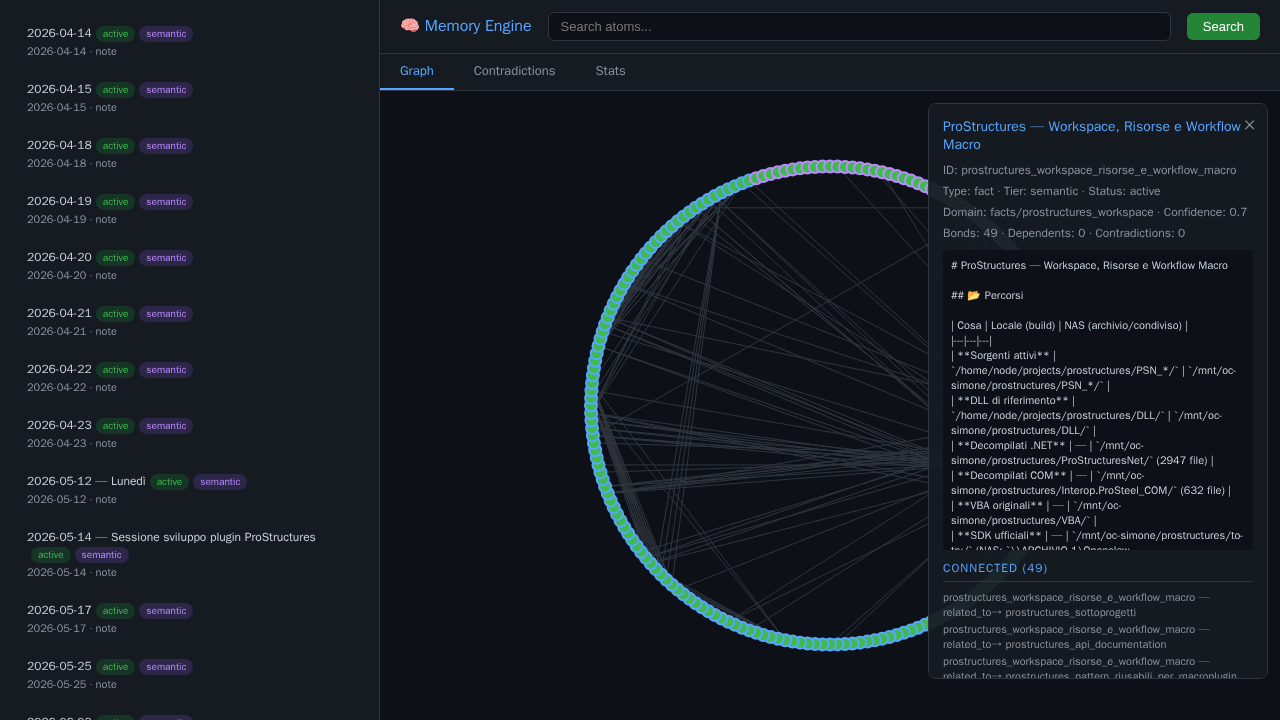
Web UI: interactive graph, atom details, contradiction browser, stats dashboard
## Quick start with Docker
### Option A — Use the pre-built image (recommended)
```yaml
# docker-compose.yml
services:
memory-engine:
image: ghcr.io/simoneb79/memory-engine-mcp:1.9.0
ports:
- "8085:8085"
volumes:
- memory-data:/data
restart: unless-stopped
volumes:
memory-data:
```
```bash
docker compose up -d
```
> **Pin the version.** Use an explicit tag like `:1.7.0` in production.
> Avoid `:latest` — it can change without notice.
### Option B — Build from source
```bash
git clone https://github.com/SimoneB79/memory-engine-mcp.git
cd memory-engine-mcp
cp docker-compose.yml docker-compose.local.yml
# Edit volume paths in docker-compose.local.yml if needed
docker compose -f docker-compose.local.yml up -d --build
```
Default endpoint:
```text
http://localhost:8085/sse
```
Example MCP client config:
```json
{
"mcpServers": {
"memory-engine": {
"url": "http://localhost:8085/sse",
"transport": "sse"
}
}
}
```
See [`docs/INSTALL.md`](https://github.com/SimoneB79/memory-engine-mcp/blob/HEAD/docs/INSTALL.md) for Docker, local Python, Claude Desktop, Cursor, and OpenClaw examples.
## Local Python
```bash
python -m venv .venv
source .venv/bin/activate
pip install -r requirements.txt
python server.py
```
## Configuration
Main configuration file: [`config.json`](https://github.com/SimoneB79/memory-engine-mcp/blob/HEAD/config.json)
Important environment variables:
| Variable | Default | Purpose |
|---|---:|---|
| `MEMORY_DB_PATH` | `/data/memory.db` | SQLite database path |
| `MARKDOWN_SOURCE` | `/workspace/memory` | Markdown directory for import |
| `MEMORY_HOST` | `127.0.0.1` | Server bind address (secure default) |
| `MEMORY_PORT` | `8085` | SSE port |
| `MEMORY_API_TOKEN` | _(none)_ | Optional API token for auth (see Security) |
| `OPENCLAW_AGENT_DB` | _(none)_ | Preferred per-agent OpenClaw SQLite DB (schema 17) |
| `OPENCLAW_SESSIONS_DIR` | `/sessions` | Legacy JSONL fallback when no agent DB is configured |
| `SESSION_DIGEST_DIR` | `/data/session_digests` | Optional session digest output |
For the SQLite mount, WAL/SHM handling, filtering, and security boundary, see
[OpenClaw transcript ingestion](https://github.com/SimoneB79/memory-engine-mcp/blob/HEAD/OPENCLAW_TRANSCRIPTS.md).
Semantic search requires Ollama reachable from the container or host. Default:
```json
{
"ollama": {
"enabled": true,
"host": "http://ollama:11434",
"model": "nomic-embed-text"
}
}
```
If you do not use Ollama, set `ollama.enabled` to `false`; FTS recall still works.
## Memory model
Atoms have:
- `title`
- `body`
- `type`: `fact`, `decision`, `event`, `preference`, `log`, `procedure`, `note`, etc.
- `domain`: project or topic namespace
- `confidence`
- `weight`
- `tags`
- optional TTL
Bonds connect atoms with relation types:
```text
is_a · part_of · depends_on · contradicts · refines · derived_from · detail_of · related_to
```
## Example usage
```python
remember(
title="Use PostgreSQL for analytics",
body="SQLite is kept for local memory, PostgreSQL is used for multi-user analytics.",
type="decision",
domain="project:analytics",
confidence=0.9,
tags=["database", "architecture"]
)
```
```python
recall(query="what database did we choose for analytics?", limit=5)
```
```python
working_set(
query="continue the analytics backend work",
domain="project:analytics",
limit=8,
graph_depth=1
)
```
## Security
By default, Memory Engine runs in **open mode** (no auth) — safe for stdio
or trusted local environments.
To enable API token auth:
```json
// config.json
{
"security": {
"api_token": "your-secret-token",
"allow_remote": false
}
}
```
Or via environment variable:
```bash
MEMORY_API_TOKEN=your-secret-token
```
When auth is enabled:
- MCP SSE requests must include `Authorization: Bearer `
- Web UI API endpoints require `?token=` or Bearer header
- Server binds to `127.0.0.1` unless `allow_remote: true`
- Input validation (title/body size limits) and rate limiting are always active
See [`CHANGELOG.md`](https://github.com/SimoneB79/memory-engine-mcp/blob/HEAD/CHANGELOG.md) for the full list of security features.
## Publishing and registries
This repository is prepared for MCP discovery:
- MCP Registry name: `io.github.simoneb79/memory-engine-mcp`
- Registry metadata: [`server.json`](https://github.com/SimoneB79/memory-engine-mcp/blob/HEAD/server.json)
- Docker/OCI verification label: included in [`Dockerfile`](https://github.com/SimoneB79/memory-engine-mcp/blob/HEAD/Dockerfile)
- Client config example: [`mcp.json`](https://github.com/SimoneB79/memory-engine-mcp/blob/HEAD/mcp.json)
See [`docs/PUBLISHING.md`](https://github.com/SimoneB79/memory-engine-mcp/blob/HEAD/docs/PUBLISHING.md) for the publication checklist.
## Repository status
- Public GitHub repository: https://github.com/SimoneB79/memory-engine-mcp
- Existing listing: https://mcpmarket.com/server/memory-engine
- License: MIT
## License
MIT — see [`LICENSE`](https://github.com/SimoneB79/memory-engine-mcp/blob/HEAD/LICENSE).
---
Made with 🧠 by SimoneB79