# mcp-osascript

**Category:** 💻 Developer Tools  
**Repository:** https://github.com/m0rvayne/mcp-osascript  
**Views:** 0  
**Installs:** 0  
**Upvotes:** 0  
**Directory Page:** https://allmcps.com/mcp/mcp-osascript

## Description
macOS automation: 17 typed tools for windows, menus, keyboard, clipboard, tabs, screenshots

## Claude Desktop Quick Installation
Heuristic fallback — verify the package name and runner against the repository README before running it. Uses `npx` (confidence: low):

```json
"mcpServers": {
  "mcp-osascript": {
    "command": "npx",
    "args": ["-y","mcp-osascript"]
  }
}
```

## Documentation & README

<div align="center">

<img src="https://raw.githubusercontent.com/m0rvayne/mcp-osascript/HEAD/assets/banner.png" alt="mcp-osascript" width="100%">

**Let Claude control your Mac.** Move windows, click menus, type text, read clipboard, manage browser tabs, take screenshots, run Shortcuts — 18 typed tools with input validation and security guardrails.

[![npm version](https://img.shields.io/npm/v/mcp-osascript)](https://www.npmjs.com/package/mcp-osascript)
[![macOS 13+](https://img.shields.io/badge/macOS-13%2B-blue)](https://support.apple.com/macos)
[![Node 18+](https://img.shields.io/badge/node-18%2B-green)](https://nodejs.org)
[![License: MIT](https://img.shields.io/badge/license-MIT-yellow)](LICENSE)
[![Tests: 84 passed](https://img.shields.io/badge/tests-84%20passed-brightgreen)](#testing)
[![Tests](https://github.com/m0rvayne/mcp-osascript/actions/workflows/test.yml/badge.svg)](https://github.com/m0rvayne/mcp-osascript/actions/workflows/test.yml)
[![m0rvayne/mcp-osascript MCP server](https://glama.ai/mcp/servers/m0rvayne/mcp-osascript/badges/score.svg)](https://glama.ai/mcp/servers/m0rvayne/mcp-osascript)

Listed in the [official MCP Registry](https://registry.modelcontextprotocol.io) as `io.github.m0rvayne/mcp-osascript`

</div>

---

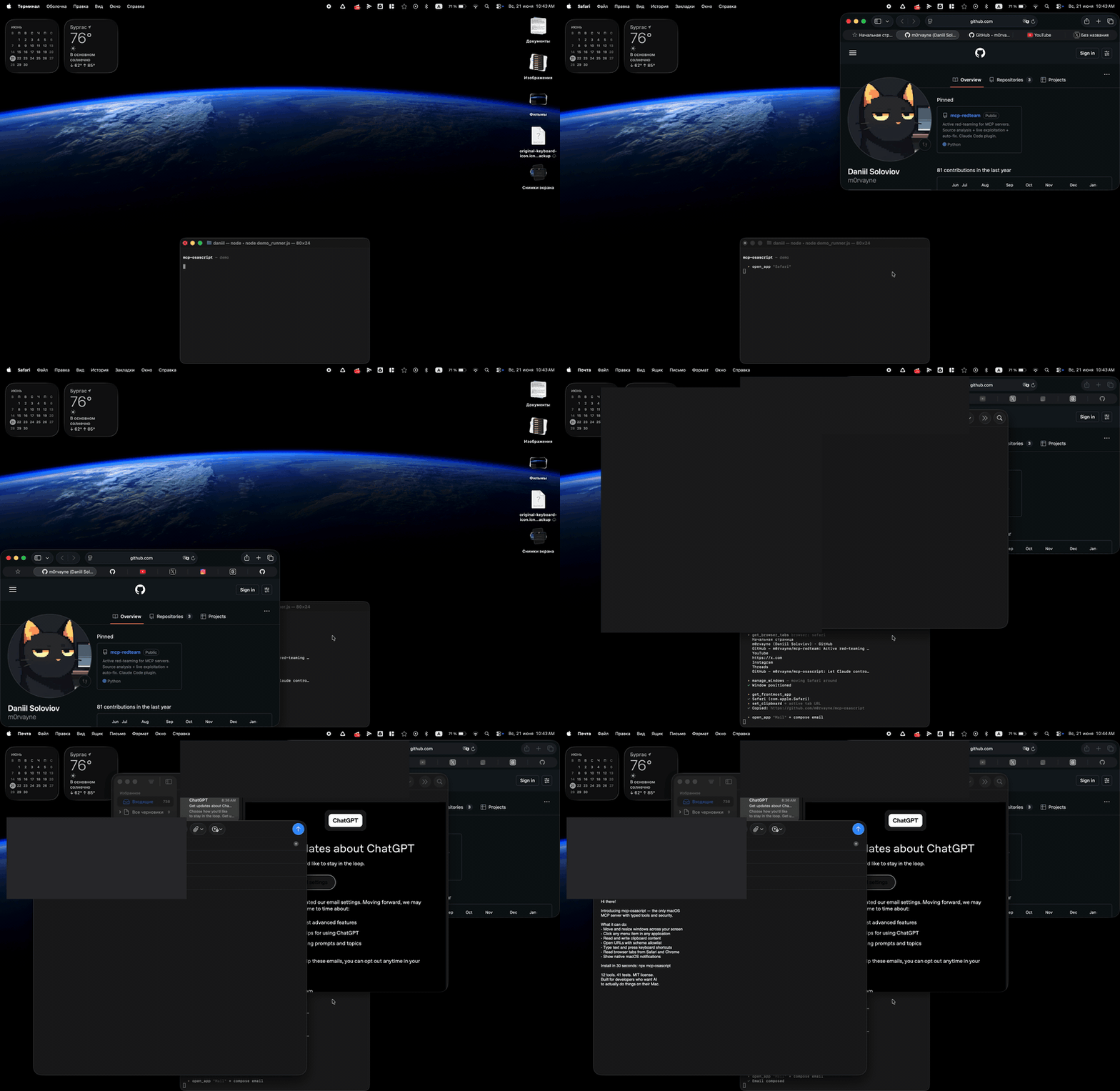
![Demo](https://raw.githubusercontent.com/m0rvayne/mcp-osascript/HEAD/assets/demo.gif)

## Quick Start

**Claude Desktop — one click.** Download [`mcp-osascript-1.1.3.mcpb`](https://github.com/m0rvayne/mcp-osascript/releases/latest) from the latest release and double-click it. Claude Desktop installs the extension itself.

**Or add it to the config manually:**

```json
{
  "mcpServers": {
    "osascript": {
      "command": "npx",
      "args": ["-y", "mcp-osascript"]
    }
  }
}
```

Add this to your Claude Desktop config (`Settings → Developer → Edit Config`), restart Claude, and you're ready.

<details>
<summary>Config for other clients (Cursor, VS Code, Claude Code)</summary>

**Cursor / VS Code (Copilot)**
```json
{
  "mcpServers": {
    "osascript": {
      "command": "npx",
      "args": ["-y", "mcp-osascript"]
    }
  }
}
```

**Claude Code**
```bash
claude mcp add osascript -- npx -y mcp-osascript
```

**From source (development)**
```bash
git clone https://github.com/m0rvayne/mcp-osascript.git
cd mcp-osascript && npm install
# then use: "command": "node", "args": ["/path/to/mcp-osascript/server/index.js"]
```
</details>

## Try These Prompts

Once installed, ask Claude:

| Prompt | What happens |
|--------|-------------|
| *"Open Safari and show me what tabs I have"* | Launches Safari, reads all tab titles and URLs |
| *"Move the Finder window to the left half of my screen"* | Resizes and positions the window |
| *"Click File → Export as PDF in Keynote"* | Navigates the menu bar and clicks the item |
| *"Copy the URL from my active Chrome tab"* | Reads browser tabs, finds the active one |
| *"Type 'Hello World' into the active text field"* | Simulates keyboard input |
| *"Show a notification when you're done"* | Displays a native macOS banner |
| *"What app am I using right now?"* | Returns the frontmost app name and bundle ID |
| *"Press Cmd+Shift+4"* | Triggers the screenshot shortcut |
| *"List all items in the Edit menu of VS Code"* | Introspects the menu bar |
| *"Close the second window of Terminal"* | Targets a specific window by index |
| *"Screenshot the Safari window and save it to my Desktop"* | Captures just that window, not the whole screen |
| *"Which monitor is my Slack window on?"* | Reads display geometry and window positions |
| *"Hide everything except my editor"* | Hides apps without quitting them |
| *"Run my 'Daily Standup' shortcut"* | Invokes an Apple Shortcut by name |

## Tools

18 typed tools, each with input validation, error classification, and permission-aware error messages.

| Tool | What it does | Permission |
|------|-------------|------------|
| `check_permissions` | Report which permissions are granted and what each unlocks | None |
| `run_osascript` | Execute any AppleScript or JXA script | None |
| `get_clipboard` | Read clipboard as text | None |
| `set_clipboard` | Write text to clipboard | None |
| `send_notification` | Show macOS notification banner | None |
| `open_url` | Open URL in browser (http/https/mailto only) | None |
| `open_app` | Launch or bring app to front | None |
| `get_frontmost_app` | Get active app name + bundle ID | Automation |
| `get_browser_tabs` | List tabs in Safari, Chrome, or Arc | Automation |
| `type_text` | Type text into active app (max 500 chars) | Accessibility |
| `press_key` | Press key with modifiers (cmd+c, return, f5) | Accessibility |
| `manage_windows` | List / move / resize / minimize / fullscreen / close | Accessibility |
| `get_displays` | List monitors — position, size, which is main | None |
| `app_menu` | List or click menu items in any app | Accessibility |
| `screenshot` | Capture full screen, a region, or an app window | Screen Recording |
| `app_visibility` | Hide, unhide, or quit an application | Accessibility |
| `file_open` | Open a file or folder, optionally in a given app | None |
| `run_shortcut` | List or run Apple Shortcuts | None |

## Self-Correcting Menus

When Claude tries to click a menu item that doesn't exist, the server automatically returns the list of available items at that level — so Claude can retry with the correct name. No other MCP server does this.

```
User:   "Click File → Export as PDF in Preview"
Claude: calls app_menu click ["File", "Export as PDF"]
Server: "Menu item 'Export as PDF' not found in 'File'.
         Available: ['New from Clipboard', 'Open...', 'Close', 'Save',
         'Duplicate', 'Rename...', 'Export...', 'Export as PDF...']"
Claude: calls app_menu click ["File", "Export as PDF..."]
Server: "Clicked: File > Export as PDF..."
```

## Why mcp-osascript?

| | mcp-osascript | steipete (880★) | peakmojo (464★) |
|---|:---:|:---:|:---:|
| Typed tools with validation | **18** | 2 (generic) | 1 (generic) |
| URL scheme allowlist | **http/https/mailto** | No | No |
| Env isolation (child process) | **PATH+HOME+LANG only** | Full process.env | Full process.env |
| Process group kill (no orphans) | **SIGTERM→SIGKILL** | No | No |
| Error sanitization (paths, tokens) | **Yes** | No | No |
| Prototype pollution protection | **Object.create(null)** | No | No |
| Self-correcting menu click | **Yes** | No | No |
| Integration tests | **84** | 0 | 0 |
| Runs tests in CI | **Yes** | No | No |
| Red-team audit passes | **4** | 0 | 0 |
| Untrusted-output fencing | **Yes** | No | No |
| Stdin piping (no temp files) | **Yes** | Temp files | Temp files |

Star counts are a popularity measure, not a quality one — both alternatives predate this
project by months. The rows above are the things that differ in practice.

### Security audits

Four red-team audit passes (adversarial agents run against the source, commissioned by the author — not a third-party certification), the most recent against v1.1.2 with three parallel agents
covering the shell surface, AppleScript escaping, and information disclosure. It found six real
defects, including a tool that silently annulled another tool's scheme allowlist and a
concurrency slot that could leak until the server deadlocked. Every finding is fixed and carries
a regression test. `escapeAS` was verified against 13 string-breakout candidates through real
`osascript` — none escape.

## Permissions

Tools work in three tiers:

- **No permission needed** — clipboard, notifications, URLs, apps, files, displays, Shortcuts. Works immediately.
- **Automation** — browser tabs, frontmost app. macOS prompts once per browser.
- **Accessibility** — keyboard, windows, menus, hide/unhide. Grant once in **System Settings → Privacy & Security → Accessibility**.
- **Screen Recording** — screenshots only. Grant in **System Settings → Privacy & Security → Screen Recording**.

Ask Claude to run `check_permissions` and it will tell you which of these are already
granted, which tools each one unlocks, and exactly which settings pane to open for the
rest. The probes are read-only and never trigger a permission prompt.

When a permission is missing, the server tells you exactly what to do:

```
"Accessibility permission required. Grant access to 'osascript'
in System Settings > Privacy & Security > Accessibility."
```

## Testing

```bash
npm test
```

84 integration tests covering all 18 tools — input validation, security boundaries (URL scheme blocking, prototype pollution, script size limits), timeout enforcement, permission error handling, and regressions for every finding of the security audit.

<details>
<summary>Security & Architecture</summary>

### Security

- `run_osascript` executes arbitrary code — this is by design. The MCP client (Claude) is the trust boundary.
- Scripts piped via stdin to `/usr/bin/osascript` — no temp files, no TOCTOU race conditions.
- Script size: 50 KB max. Output: 50K chars max, truncated on a UTF-8 character boundary (no mojibake in non-Latin output).
- Error messages sanitized — filesystem paths, tokens, and passwords are stripped.
- Child processes get minimal env: `PATH`, `HOME`, `LANG` only — no API keys or secrets leak.
- URL scheme allowlist — `file://`, `smb://`, `vnc://`, `javascript:` all blocked.
- Handler dispatch uses `Object.create(null)` — no prototype pollution.
- Externally-sourced text (browser tab titles, window titles, menu items, clipboard) is returned inside an explicit `<untrusted-data>` envelope, so a web page that renames itself cannot smuggle instructions into the model's context.
- `file_open` refuses anything that parses as a URL — `open(1)` resolves URLs as well as paths, so without that check it would quietly annul `open_url`'s scheme allowlist.
- `screenshot` never overwrites an existing file unless `overwrite: true`, and the extension must match the format.
- Every list-building tool strips `|`, CR and LF from app-supplied names, so a crafted window or tab title cannot forge a record.

### Reliability

- Process group kill on timeout — SIGTERM → 2s grace → SIGKILL. No orphaned processes.
- Concurrency semaphore — max 5 simultaneous osascript processes.
- Graceful shutdown — `server.close()` with 10s force-exit safety net.
- Error classification — parses macOS error codes (-1728, -1743, -25211) into actionable messages. Supports English and Russian locales.

</details>

## Requirements

- macOS 13+ (Ventura or later)
- Node.js 18+

## License

MIT