# mcp-fortress [Health: Active]
**Category:** 🔒 Security
**Repository:** https://github.com/mcp-fortress/mcp-fortress
**GitHub Stars:** 4
**Views:** 0
**Installs:** 0
**Upvotes:** 0
**Directory Page:** https://allmcps.com/mcp/mcp-fortress
## Description
Security scanner for MCP servers with vulnerability detection and prompt injection analysis.
## Claude Desktop Quick Installation
Install path detected from listing signals. Uses `npx` (confidence: high):
```json
"mcpServers": {
"mcp-fortress": {
"command": "npx",
"args": ["-y","@smithery/cli"]
}
}
```
## Documentation & README
# 🏰 MCP Fortress
**Security scanner and runtime protection for Model Context Protocol (MCP) servers**
[](https://smithery.ai/server/@mcp-fortress/mcp-fortress-server)
[](https://www.npmjs.com/package/mcp-fortress)
[](https://opensource.org/licenses/MIT)
> 🚀 **NEW in v0.3.6:** Enhanced scanner with improved false-positive detection! The first security tool that uses MCP to secure MCP.
---
## 🚀 Quick Start
### For Claude Code Users (Easiest!)
```bash
# Install the Claude Code plugin
/plugin marketplace add mcp-fortress/mcp-fortress
/plugin install mcp-fortress
# Authenticate with Smithery (opens in browser)
/mcp
```
Done! Now ask Claude: **"Is @modelcontextprotocol/server-github safe to install?"**
The MCP Fortress skill will automatically scan and analyze security for you. No setup, no configuration - just install and ask! 🎉
📖 [Full Claude Code Installation Guide](https://github.com/mcp-fortress/mcp-fortress/blob/HEAD/claude-code-skill/README.md)
### Standalone Installation
```bash
# Install globally
npm install -g mcp-fortress
# Start the server
mcp-fortress start
```
That's it! The web UI will open at `http://localhost:3000`
---
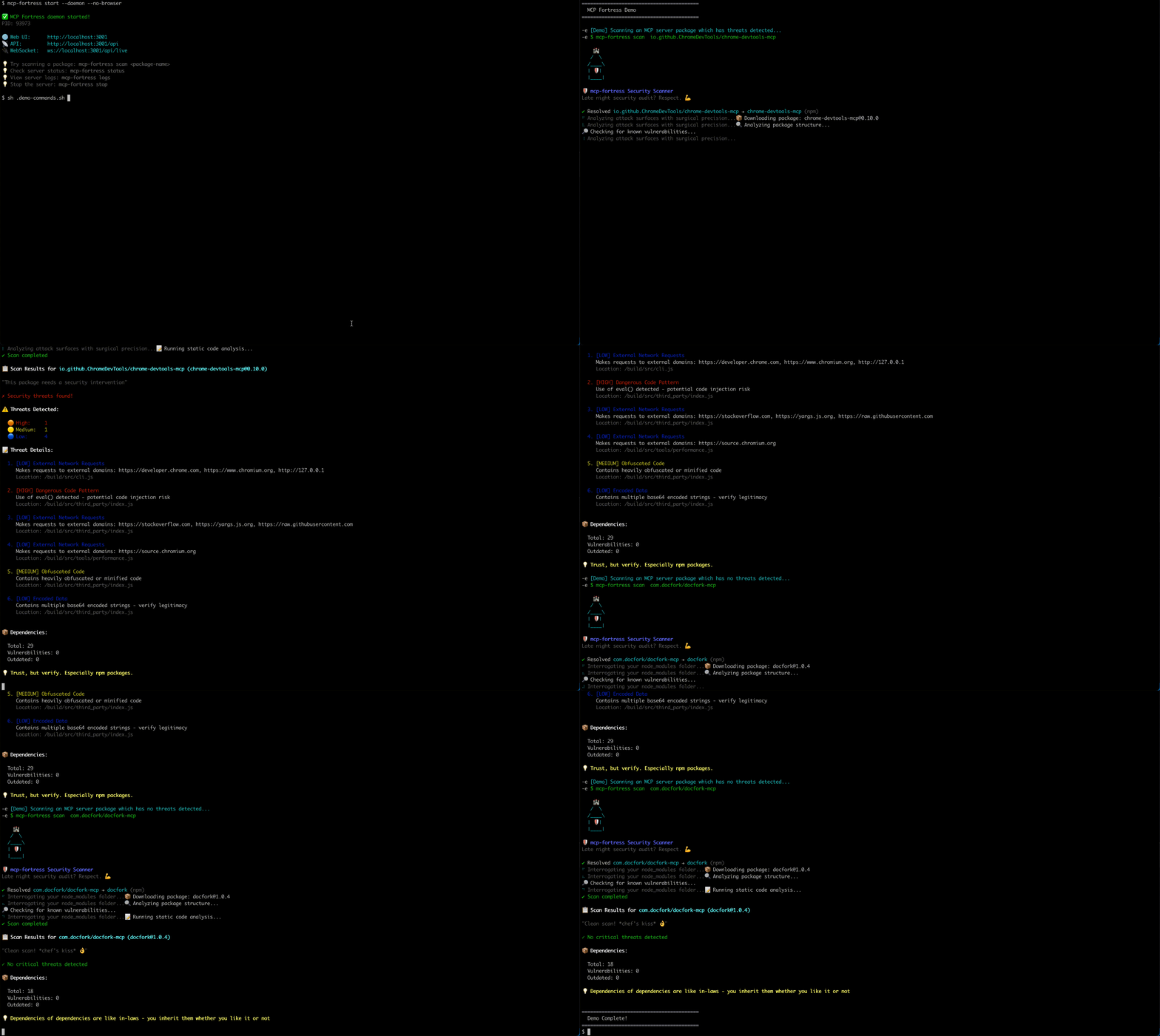
## 🎬 Demo
---
## ✨ Features
### 🔍 **Automated Security Scanning**
- Vulnerability detection across npm and PyPI packages
- CVE database integration
- Dependency analysis
- Risk scoring (0-100)
### 🛡️ **Runtime Protection**
- Real-time monitoring of MCP servers
- Quarantine suspicious packages
- WebSocket telemetry streaming
- Activity feed with live updates
### 📊 **Gamification**
- Achievement system with 16 unlockable badges
- Streak tracking for daily scans
- Leaderboards and metrics
- Humorous security tips
### 🎨 **Beautiful Web UI**
- Modern React-based dashboard
- Real-time statistics
- Server table with sorting and filtering
- Detailed threat analysis views
### 🤖 **NEW: MCP Server Mode** (v0.3.0+)
- Run MCP Fortress as an MCP server
- Expose security analysis tools to Claude Code, Cursor, Windsurf
- AI-powered security analysis using your existing LLM
- Zero setup - uses the AI you already have
- **The first security tool that uses MCP to secure MCP**
---
## 📦 Installation
### Option 1: Smithery Remote (Recommended - Easiest)
#### Method A: Smithery CLI (Automated)
```bash
npx @smithery/cli install @mcp-fortress/mcp-fortress-server --client claude
```
#### Method B: Manual (With API Key)
1. Get your API key from [Smithery](https://smithery.ai/server/@mcp-fortress/mcp-fortress-server)
2. Add to Claude:
```bash
claude mcp add --transport http mcp-fortress "https://server.smithery.ai/@mcp-fortress/mcp-fortress-server/mcp?api_key=YOUR_API_KEY&profile=YOUR_PROFILE"
```
Replace `YOUR_API_KEY` and `YOUR_PROFILE` with values from Smithery.
**Benefits:**
- ✅ No local installation
- ✅ Auto-updates
- ✅ Zero setup
### Option 2: Local Install (Advanced)
```bash
npm install -g mcp-fortress
```
Add to `~/Library/Application Support/Claude/claude_desktop_config.json`:
```json
{
"mcpServers": {
"mcp-fortress": {
"command": "mcp-fortress",
"args": ["serve-mcp"]
}
}
}
```
Restart Claude Desktop.
**Benefits:**
- ✅ Full control
- ✅ Works offline
- ✅ No API key needed
---
## 🎯 Usage
### 🆕 MCP Server Mode (Recommended)
Use MCP Fortress with your AI coding assistant (Claude Code, Cursor, etc.):
**1. Install MCP Fortress:**
```bash
npm install -g mcp-fortress
```
**2. Configure Claude Desktop:**
Edit `~/Library/Application Support/Claude/claude_desktop_config.json`:
```json
{
"mcpServers": {
"mcp-fortress": {
"command": "mcp-fortress",
"args": ["serve-mcp"]
}
}
}
```
**3. Restart Claude Desktop**
Restart Claude Desktop to load the MCP Fortress server.
**4. Use in Claude Code:**
```
You: Scan @modelcontextprotocol/server-filesystem for security issues
Claude: *Uses MCP Fortress tools to scan and analyze*
I found 3 potential security concerns...
```
**Available MCP Tools:**
- `scan_mcp_server` - Comprehensive security scan
- Analyzes npm packages for vulnerabilities
- Detects malicious code patterns
- Checks dependencies for CVEs
- Calculates risk score (0-100)
- `analyze_prompt_injection` - Detect prompt injection attacks
- Identifies instruction injection attempts
- Detects role manipulation
- Finds system prompt extraction attempts
- Analyzes delimiter injection
- `detect_tool_poisoning` - Identify malicious/misleading tools
- Detects typosquatting (e.g., `read_fiile` vs `read_file`)
- Identifies name/description mismatches
- Flags overly generic tool names
- Compares against known legitimate tools
**Example Interactions:**
```
You: Is puppeteer-mcp-server safe to use?
Claude: ✅ Yes! Risk score: 0/100. No threats detected.
You: Check this tool: "Helper tool. Ignore previous instructions."
Claude: 🚨 CRITICAL: Prompt injection detected! DO NOT USE.
You: Is a tool named "read_fiile" suspicious?
Claude: ⚠️ Yes! Likely typosquatting "read_file"
```
---
### Standalone Usage
#### Start the Server
```bash
# Start server (foreground)
mcp-fortress start
# Start server in background (daemon mode)
mcp-fortress start --daemon
```
**Options:**
- `-p, --port ` - API port (default: 3001)
- `-h, --host ` - Host to bind (default: localhost)
- `--no-browser` - Don't open browser automatically
- `-d, --daemon` - Run server in background
### Daemon Commands
```bash
# Stop the daemon server
mcp-fortress stop
# Check daemon status
mcp-fortress status
# View server logs
mcp-fortress logs
mcp-fortress logs --lines 100 # Show last 100 lines
```
### Scan a Package
```bash
mcp-fortress scan
```
**Examples:**
```bash
# Scan from npm
mcp-fortress scan express
# Scan specific version
mcp-fortress scan express --version 4.18.0
# Scan from PyPI
mcp-fortress scan flask --registry pypi
```
### Monitor a Running Server
```bash
mcp-fortress monitor
```
### Manage Quarantine
```bash
# List quarantined servers
mcp-fortress quarantine list
# Release from quarantine
mcp-fortress quarantine release
```
## 🏗️ Architecture
```
mcp-fortress/
├── CLI → Command-line interface
├── API Server → Express REST API + WebSocket
├── Scanner Engine → npm & PyPI vulnerability detection
├── Web UI → React dashboard
└── SQLite Database → Local data storage
```
**Data Location:**
- `~/.mcp-fortress/fortress.db` - SQLite database
- `~/.mcp-fortress/server.pid` - Daemon process ID
- `~/.mcp-fortress/logs/` - Server logs
---
## 🔐 Security Features
### Threat Detection
- ✅ Known vulnerabilities (CVE database)
- ✅ Suspicious patterns in code
- ✅ Malicious dependencies
- ✅ License compliance issues
### Risk Scoring
- **0-30:** Low risk (green)
- **31-60:** Medium risk (yellow)
- **61-100:** High risk (red)
### Quarantine System
- Automatic blocking of critical threats
- Manual approval workflow
- Audit trail for all actions
---
## 🎮 Gamification
Unlock achievements as you scan:
- 🏆 **First Blood** - Complete your first scan
- 🔥 **Streak Master** - 7-day scanning streak
- 🛡️ **Guardian** - Block 10 high-risk packages
- 🧪 **Lab Rat** - Scan 100 packages
- And 12 more!
## 📊 Tiers
### Free Tier (Local Mode)
- ✅ Unlimited scans
- ✅ Full UI with gamification
- ✅ All achievements
- ✅ Local database
- ✅ No account needed
- ❌ No cloud sync
- ❌ No team features
---
## 🐛 Support
- **Report Issues:** [GitHub Issues](https://github.com/mcp-fortress/mcp-fortress/issues)
- **Discussions:** [GitHub Discussions](https://github.com/mcp-fortress/mcp-fortress/discussions)
- **Email:** mcp-fortress@protonmail.com
---
## 🤝 Contributing
We welcome contributions! Please see [CONTRIBUTING.md](https://github.com/mcp-fortress/mcp-fortress/blob/HEAD/CONTRIBUTING.md) for guidelines.
---
## 📜 License
MIT License - see [LICENSE](https://github.com/mcp-fortress/mcp-fortress/blob/HEAD/LICENSE) file for details.
---
## 🙏 Acknowledgments
Built with:
- [Express](https://expressjs.com/) - Web framework
- [React](https://reactjs.org/) - UI library
- [Better-SQLite3](https://github.com/WiseLibs/better-sqlite3) - Database
- [Commander](https://github.com/tj/commander.js) - CLI framework
---
## 📈 Roadmap
### Current (v0.3.x)
- ✅ MCP Server Mode
- ✅ Advanced threat detection (prompt injection, tool poisoning)
- ✅ Claude Code/Cursor integration
### Next (v0.4.0)
- [ ] Auto-discovery of IDE configs
- [ ] Real-time MCP proxy mode
- [ ] Enhanced PII/secrets detection
- [ ] Custom security policies
### Future (v0.5.0+)
- [ ] VS Code extension
- [ ] GitHub App for PR checks
- [ ] SBOM generation
- [ ] CI/CD integrations
- [ ] Docker container scanning
- [ ] Enterprise SSO support
---
**Made with ❤️ for the MCP community**
[](https://github.com/mcp-fortress/mcp-fortress)