# MarkLayer
**Category:** 💻 Developer Tools
**Repository:** https://github.com/thevrus/MarkLayer
**Views:** 0
**Installs:** 0
**Upvotes:** 0
**Directory Page:** https://allmcps.com/mcp/marklayer
## Description
Work visual annotations left on a live webpage: watch, acknowledge, resolve, reply.
## Claude Desktop Quick Installation
Heuristic fallback — verify the package name and runner against the repository README before running it. Uses `npx` (confidence: low):
```json
"mcpServers": {
"marklayer": {
"command": "npx",
"args": ["-y","marklayer"]
}
}
```
## Documentation & README

MarkLayer
Website feedback your AI agent can act on.
Draw, highlight, and comment on any live webpage, then share one link. A human reviews it in real time, or an AI agent connects over MCP and works it like a to-do list: acknowledge, fix, resolve, reply.
Try MarkLayer ·
Add to Chrome ·
Connect an agent ·
Build from source




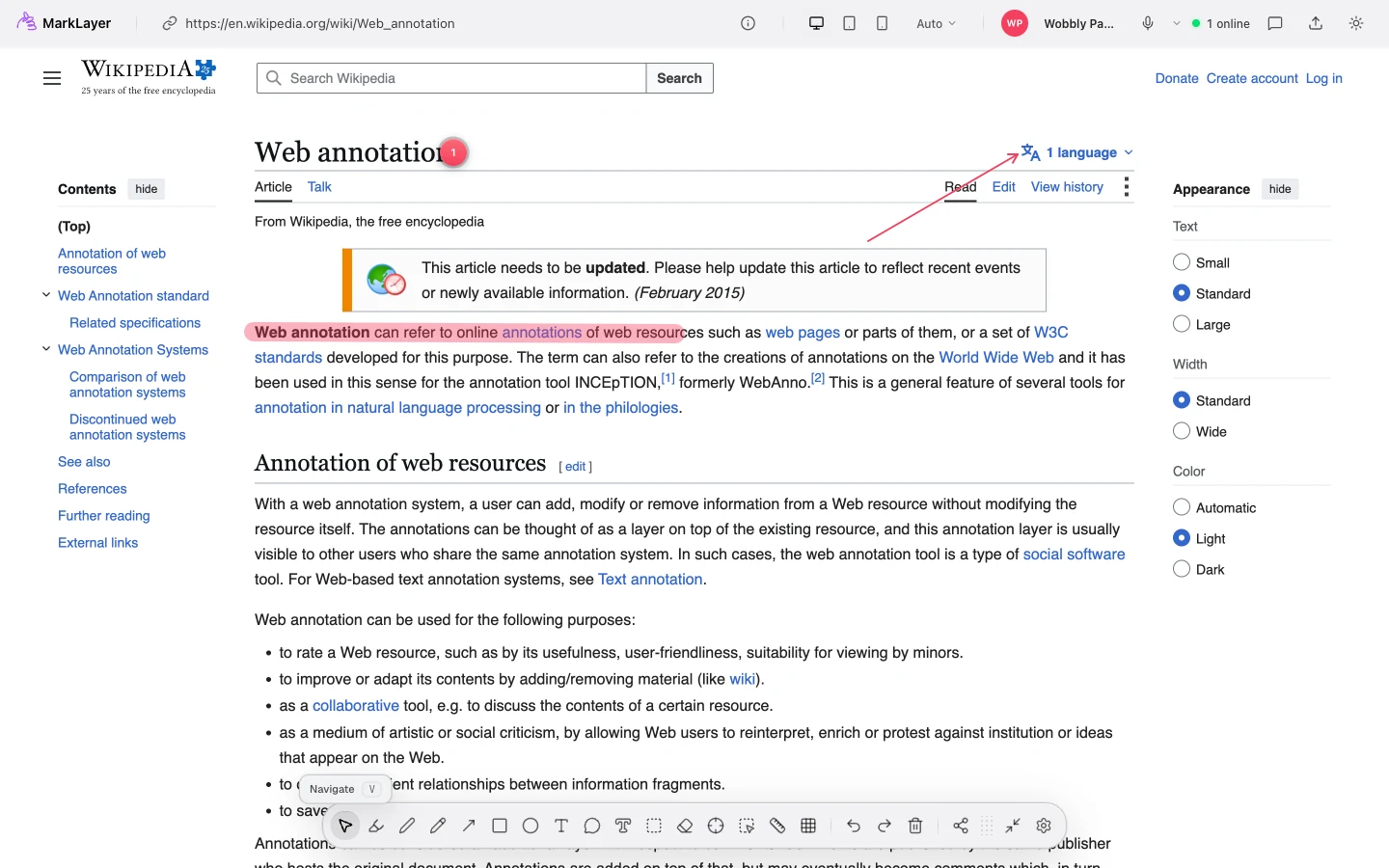
## One URL. A shared board. A faster decision.
MarkLayer turns any webpage into a collaborative review surface. Instead of passing screenshots back and forth, send a link. Teammates or clients can open the original page in their own browser, leave feedback where it belongs, and see changes land live. So can an AI agent: each comment arrives with the exact element it refers to already attached.
- **For AI-assisted work**: connect [`marklayer-mcp`](https://github.com/thevrus/MarkLayer/blob/HEAD/apps/mcp) and hand an agent a live queue of annotations to acknowledge, fix, and resolve. Or inspect an element yourself for a stable selector and an AI-ready markdown snapshot.
- **For client feedback**: let clients point to exactly what they mean, without an account or extension.
- **For design review**: sketch ideas, highlight details, and keep the conversation attached to the page.
- **For QA**: pin reproducible issues to the actual UI, then share a clean link with the team.
## How it works
1. **Open a page**: paste any public URL at [marklayer.app](https://marklayer.app), or use the Chrome extension on the page you are already viewing — including a page on your own `localhost` dev server, which never has to be reachable from the internet.
2. **Make the feedback visible**: draw, highlight text, measure space, pin a threaded comment, or inspect an element.
3. **Share one link**: collaborators join the same board and see cursors, marks, replies, and calls in real time. Point an AI agent at it instead, and `marklayer-mcp` turns the thread into a work queue.
No sign-up. No trial clock. No client install.
## What you can do
| | |
|---|---|
| **Send an agent to work the page** | Connect `marklayer-mcp`, a standard MCP server, so an AI agent can watch annotations and acknowledge, fix, and resolve them live. |
| **Annotate freely** | Pen, highlighter, eraser, shapes, arrows, text, and text-selection highlights. |
| **Keep feedback in context** | Pin threaded comments to the page, reply inline, and track status. |
| **Review live** | Real-time cursors, drawings, and comments via WebSocket, plus peer-to-peer voice and video chat. |
| **Hand off agent-ready context** | Inspect an element for a stable selector, computed styles, parent layout, viewport details, and framework component info, packaged as markdown built for a coding agent's prompt. |
| **Measure the UI** | Check element dimensions and edge-to-edge gaps between two elements. |
| **Share or export** | Create shareable links with preview cards, or export annotations to PNG. |
| **Make it yours** | Reorder toolbar tools; drafts persist locally and restore when you return. |
## Built for AI agents
Every annotation is part of a structured queue: an agent can read it, act on it, and report back, the same way a human would.
**Connect over MCP.** [`marklayer-mcp`](https://github.com/thevrus/MarkLayer/blob/HEAD/apps/mcp) is a standard stdio MCP server: no Claude-specific wiring, works with Claude Code, Cursor, Windsurf, VS Code, Codex CLI, or any MCP client.
~~~bash
claude mcp add marklayer -- npx -y marklayer-mcp
~~~
Then just ask: *"Watch my MarkLayer annotations. For each one, acknowledge it, make the fix, then resolve it with a summary."* The agent calls `marklayer_watch_annotations` in a loop, and the human watches every status change land live. The full toolset (`connect_room`, `list_annotations`, `watch_annotations`, `acknowledge`, `resolve`, `dismiss`, `reply`, `create_annotation`, `suggest_edit`) is documented in [apps/mcp](https://github.com/thevrus/MarkLayer/blob/HEAD/apps/mcp/README.md).
**Every mark carries the context an agent needs.** Inspecting an element captures its CSS selector, computed styles, parent layout, and framework component info as a markdown snapshot, so a comment arrives with the exact node attached instead of a vague description.
**No install, no server.** On a browser agent with WebMCP support, the same list, acknowledge, resolve, and reply actions are exposed straight from the page via `document.modelContext`. Nothing to configure.
**Agents can open their own boards, too.** The share id is the access token, so minting a room is one unauthenticated POST, handy for seeding a review per URL ahead of time:
~~~bash
curl -X POST https://marklayer.app/api/$ID \
-H 'Content-Type: application/json' \
-d '{"ops":[],"url":"https://example.com","width":1440}'
~~~
**Discoverable machine-first.** [`/llms.txt`](https://marklayer.app/llms.txt), [`/llms-full.txt`](https://marklayer.app/llms-full.txt), [`/.well-known/api-catalog`](https://marklayer.app/.well-known/api-catalog), and a full [OpenAPI spec](https://marklayer.app/api/openapi.json) describe the whole surface for an agent that's never seen MarkLayer before.
## Built to respect the reviewer's time and privacy
- **No accounts or tracking**: start reviewing immediately.
- **Links expire thoughtfully**: shared boards expire 90 days after their last view.
- **Open source and self-hostable**: MarkLayer is released under [Apache-2.0](https://github.com/thevrus/MarkLayer/blob/HEAD/LICENSE), so your workflow is not tied to a pricing change.
Want the non-technical version? Read [How MarkLayer works](https://marklayer.app/guides/how-marklayer-works).
## Self-hosting & development
~~~bash
git clone https://github.com/thevrus/MarkLayer.git
cd MarkLayer
bun install
bun run dev
~~~
For the Chrome extension in development:
1. Build or run the extension app.
2. Open chrome://extensions/ and turn on **Developer mode**.
3. Choose **Load unpacked** and select apps/extension/.output/chrome-mv3-dev.
### Repository layout
~~~
├── apps/extension/ Chrome extension (WXT + Preact)
├── apps/worker/ Cloudflare Worker, API, real-time rooms, proxy, OG generator
├── apps/site/ Static marketing site (Astro)
├── apps/mcp/ MCP server for AI agents (published as marklayer-mcp)
├── packages/types/ Shared TypeScript types
└── packages/agent-tools/ Agent tool contract shared by the MCP server
~~~
### Stack
| Area | Technologies |
|---|---|
| Frontend | Preact, Signals, Tailwind CSS, Vite |
| Extension | WXT, Chrome APIs |
| Backend | Cloudflare Workers, Hono, Durable Objects |
| Storage | D1 (SQLite), R2 |
| Real-time | WebSockets, WebRTC |
| Agent integration | MCP (stdio server), WebMCP, OpenAPI |
### Scripts
| Command | What it does |
|---|---|
| bun run dev | Run the workspace in development mode |
| bun run build | Build all apps |
| bun run check | Type-check the workspace |
| bun run lint | Lint and format-check with Biome |
| bun run lint:fix | Apply lint and formatting fixes |
| cd apps/worker && bun run deploy | Deploy the Worker to Cloudflare |
| cd apps/mcp && bun run build | Build the MCP server (marklayer-mcp) to dist/cli.js |
| cd apps/site && bun run indexnow:submit | Ping IndexNow (Bing and friends) after a deploy that changed pages |
## Contributing
Found a bug or have an idea? [Open an issue](https://github.com/thevrus/MarkLayer/issues). Contributions are welcome.
## License
[Apache License 2.0](https://github.com/thevrus/MarkLayer/blob/HEAD/LICENSE) © [Dean Rusin](https://github.com/thevrus)
---
Try MarkLayer ·
Connect an agent ·
Add to Chrome ·
Report a bug ·
Request a feature