 Mako
Mako
Mako
Mako
The AI-native SQL Client.
> **The Cursor for Data.** Connect to any database, query with AI, and build live dashboards -- all from your browser. Stop wrestling with complex SQL and slow, bloated database tools. Write queries in plain English, get instant results, and turn them into interactive dashboards with cross-filtering and scheduled refresh. 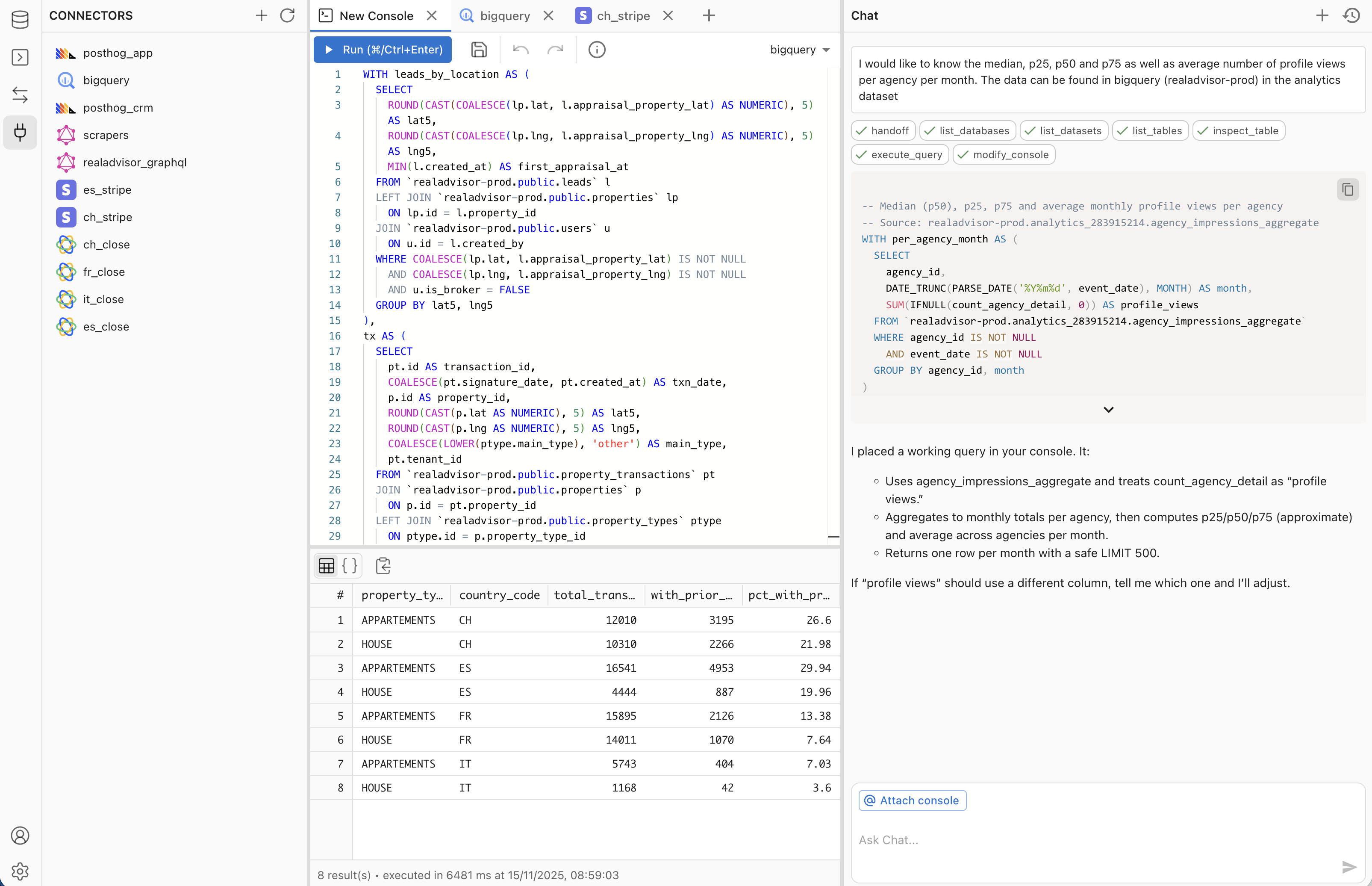 ## 🚀 Why Mako? A modern SQL client built for the AI era, replacing slow desktop tools with a fast, collaborative, AI-powered experience. - **✨ AI Query Generation**: Write queries in natural language. Our schema-aware AI generates optimized SQL instantly. - _Replaces: DataGrip, DBeaver, Postico_ - **📊 AI Dashboards**: Build interactive dashboards from conversation. Cross-filtering, scheduled data refresh, Parquet materialization -- powered by DuckDB in the browser. - _Replaces: Metabase, Looker, manual BI pipelines_ - **🧱 dbt Transforms**: Build, run, and schedule dbt Core projects in-app -- file IDE, jobs, run history, lineage, and GitHub sync. - _Replaces: dbt Cloud_ - **⚛️ React Apps**: Ask the agent to build live React apps wired to your data through secure, credential-free bindings. - _Replaces: Lovable, v0, internal-tool builders_ - **🕓 Version History**: Every console and dashboard save is an immutable snapshot you can browse and restore. - _Replaces: Lost SQL files, manual backups_ - **🖥️ Mako Desktop**: Native app that bundles a local agent so `localhost` databases work out of the box. - _Replaces: SSH tunnels and bastion hops for local DBs_ - **👥 Team Collaboration**: Share connections, version-control queries, and work together in real-time. - _Replaces: Passing credentials around, lost SQL files_ - **⚡ Blazing Fast**: No Java or Electron bloat. Opens instantly in your browser and runs smooth. - _Replaces: Slow desktop database tools_ ## 📸 Screenshots **AI-powered console** — ask in plain English, get a verified query and live results. 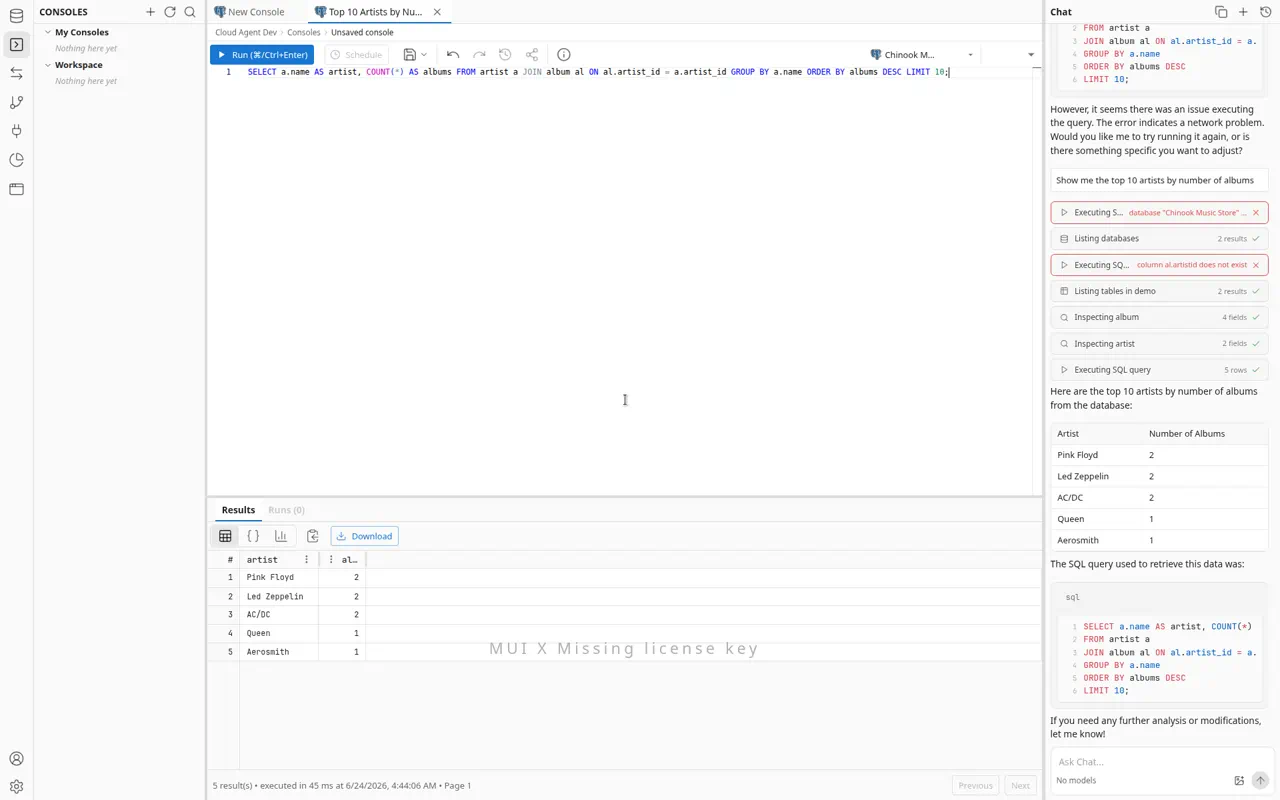 **Transforms (dbt)** — build, run, and schedule dbt Core projects with a file IDE, jobs, run history, and lineage. 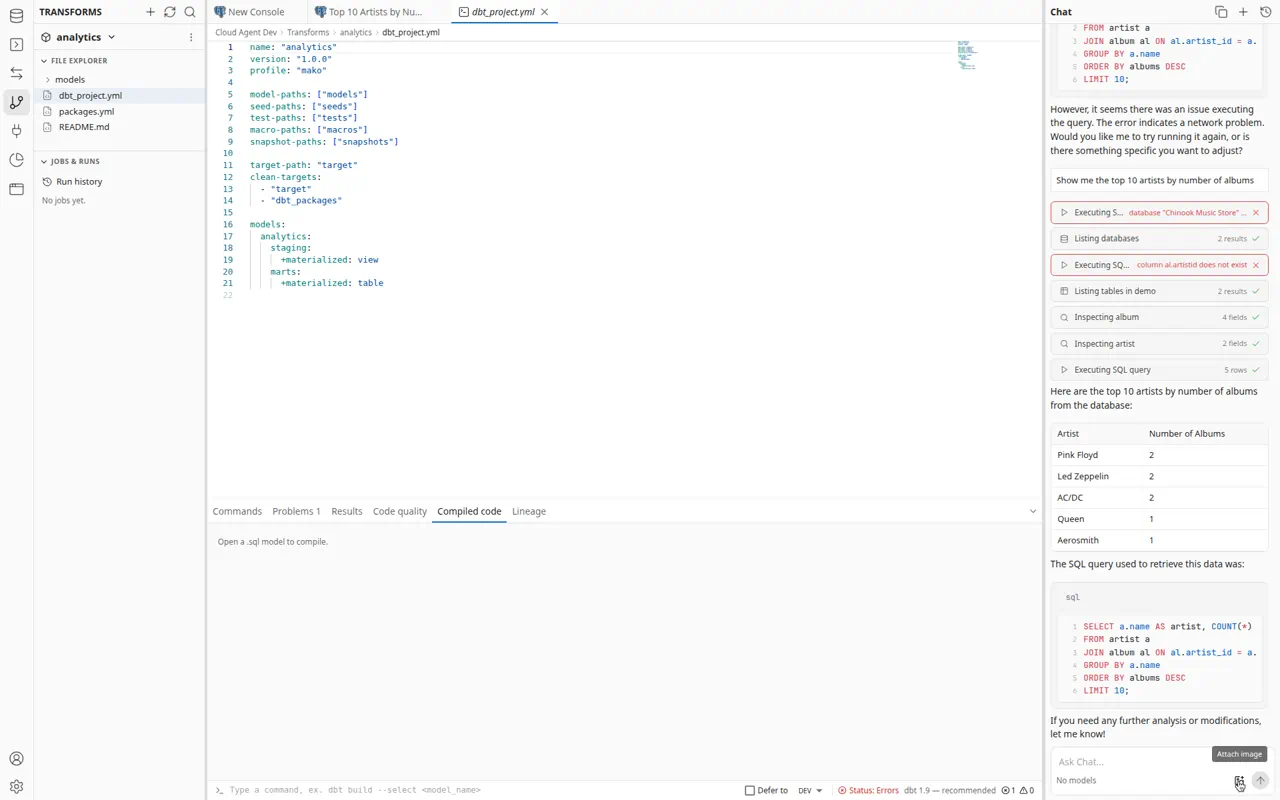 **Apps** — build live React apps wired to your data, rendered in a sandboxed preview. 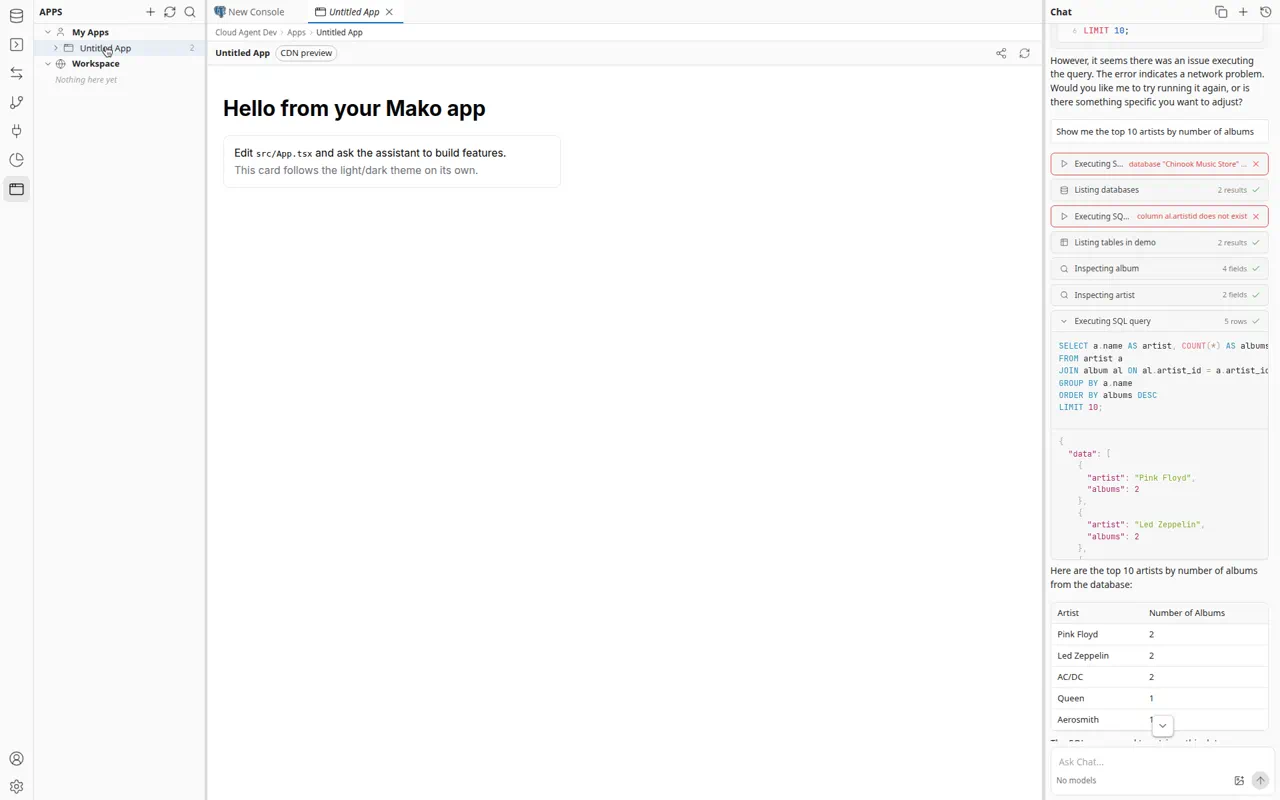 ## 🔌 Integrations ### Databases | Integration | Status | Description | | --------------------- | ------- | ---------------------------------------------------- | | **PostgreSQL** | ✅ Live | Connect to PostgreSQL for relational data queries | | **MongoDB** | ✅ Live | Connect to MongoDB for flexible document-based data | | **BigQuery** | ✅ Live | Analyze large datasets with Google BigQuery | | **ClickHouse** | ✅ Live | Fast OLAP queries on ClickHouse | | **MySQL** | ✅ Live | Query MySQL databases with natural language | | **Redshift** | ✅ Live | Query Amazon Redshift data warehouses | | **Cloud SQL** | ✅ Live | Connect to Google Cloud SQL (Postgres) | | **Cloudflare D1** | ✅ Live | Query Cloudflare D1 SQLite databases | | **Cloudflare KV** | ✅ Live | Browse and query Cloudflare Workers KV | ### Data Connectors Sync external SaaS data into Mako's data warehouse for querying and dashboards. | Integration | Status | Description | | -------------- | ------- | ------------------------------------------------ | | **Stripe** | ✅ Live | Track payments, subscriptions, and billing data | | **PostHog** | ✅ Live | Analyze product analytics and user behavior | | **Close.com** | ✅ Live | Sync CRM data (leads, opportunities, activities) | | **Claap** | ✅ Live | Sync recordings and workspace data | | **Calendly** | ✅ Live | Sync events, invitees, and event types | | **GraphQL** | ✅ Live | Query any GraphQL API with custom endpoints | | **REST** | ✅ Live | Query any REST API with custom endpoints | | **BigQuery** | ✅ Live | Sync BigQuery datasets into the warehouse | ## 🏗️ Architecture ``` ┌─────────────────────────────────────────────────────────┐ │ Frontend (React + Vite) │ │ ┌──────────┐ ┌──────────────┐ ┌─────────────────────┐ │ │ │ Console │ │ Dashboards │ │ AI Chat (Vercel │ │ │ │ (Monaco) │ │ (DuckDB + │ │ AI SDK) │ │ │ │ │ │ Mosaic) │ │ │ │ │ └──────────┘ └──────────────┘ └─────────────────────┘ │ │ ▲ ▲ ▲ │ │ │ Parquet/Arrow │ │ │ │ via OPFS cache │ │ └───────────┼──────────┼──────────────────┼──────────────┘ │ │ │ ┌───────────┼──────────┼──────────────────┼──────────────┐ │ API (Hono + Node.js) │ │ ┌──────────────────────────────────────────────────┐ │ │ │ Unified Agent (expertise modes: Query / │ │ │ │ Dashboard / Sync Flow / React App / Transforms │ │ │ │ / Explore, switched via enable_mode) │ │ │ └──────────────────────────────────────────────────┘ │ │ ┌──────────────┐ ┌───────────────┐ ┌──────────────┐ │ │ │ DB Drivers │ │ Connectors │ │ Dashboard │ │ │ │ (9 drivers) │ │ (8 sources) │ │ Engine │ │ │ │ │ │ │ │ (DuckDB │ │ │ │ │ │ │ │ + Parquet) │ │ │ └──────────────┘ └───────────────┘ └──────────────┘ │ │ ▲ │ │ ┌─────┴──────┐ │ │ │ Inngest │ (scheduled refresh, │ │ │ │ incremental sync) │ │ └────────────┘ │ └────────────────────────────────────────────────────────┘ │ │ ┌──────┴──────┐ ┌─────┴──────────┐ │ MongoDB │ │ User DBs │ │ (metadata, │ │ (PG, BQ, CH, │ │ warehouse)│ │ MySQL, etc.) │ └─────────────┘ └────────────────┘ ``` **Key technology choices:** - **DuckDB** (both server-side via `@duckdb/node-api` and browser-side via `@duckdb/duckdb-wasm`): powers dashboard SQL execution, Parquet artifact generation, and in-browser cross-filtering with OPFS caching - **Mosaic** (`@uwdata/mosaic-core`): coordinates cross-filtering across dashboard widgets - **Apache Arrow / Parquet**: server materializes query results into Parquet, served to browser as Arrow IPC for zero-copy rendering - **Inngest**: event-driven job queues for scheduled dashboard refresh and incremental data sync - **Hono**: lightweight, fast HTTP framework for the API - **Monaco Editor**: VS Code's editor for the SQL console - **Vercel AI SDK**: multi-provider LLM abstraction (OpenAI, Anthropic, Google) ## 📊 Dashboard Engine Dashboards are a core feature. The AI agent creates interactive dashboards from natural language: 1. **Agent creates a dashboard spec** with widgets, layouts, and SQL queries 2. **Server materializes** query results into Parquet artifacts (stored on filesystem, GCS, or S3) 3. **Browser loads** Parquet data into DuckDB-WASM, cached in OPFS for instant reloads 4. **Mosaic cross-filtering** lets users click on one chart to filter all others 5. **Inngest cron** keeps data fresh with scheduled re-materialization and stale-run detection ### Dashboard Artifact Storage Dashboard materialization stores Parquet artifacts on the backend. Three storage backends: - `filesystem` -- default; stores files on local disk - `gcs` -- Google Cloud Storage - `s3` -- S3-compatible bucket ```env DASHBOARD_ARTIFACT_STORE=filesystem # Optional shared settings DASHBOARD_ARTIFACT_PREFIX=dashboards DASHBOARD_ARTIFACT_DIR=/absolute/path/to/artifacts # filesystem only ``` #### Google Cloud Storage ```env DASHBOARD_ARTIFACT_STORE=gcs GCS_DASHBOARD_BUCKET=your-bucket-name DASHBOARD_ARTIFACT_PREFIX=dashboard-artifacts/prod ``` See the [docs](https://docs.mako.ai) for full GCS/S3 provisioning instructions. ## 🛠️ Quick Start 1. **Clone & Install** ```bash git clone https://github.com/mako-ai/mako.git cd mako pnpm install ``` 2. **Configure Environment** Copy `.env.example` (if available) or create `.env`: ```env # Local development connects to the shared `dev` database, an Atlas DB that is # refreshed nightly from production. Grab the `dev` connection string from the # team vault. (`staging` backs non-migration PR previews; never point local at # `production`.) DATABASE_URL=mongodb+srv://Built with ❤️ by the Mako Team. Open Source and self-hostable.