
# Lexicon

**Category:** 🎙️ Speech-to-Text  
**Repository:** https://github.com/ashlrai/lexicon  
**Views:** 0  
**Installs:** 0  
**Upvotes:** 0  
**Directory Page:** https://allmcps.com/mcp/lexicon-2

## Description
Fixes the names and jargon speech-to-text gets wrong before your agent acts on a dictated prompt.

## Claude Desktop Quick Installation
Heuristic fallback — verify the package name and runner against the repository README before running it. Uses `npx` (confidence: low):

```json
"mcpServers": {
  "lexicon": {
    "command": "npx",
    "args": ["-y","lexicon-2"]
  }
}
```

## Documentation & README

<div align="center">

<img src="https://raw.githubusercontent.com/ashlrai/lexicon/HEAD/docs/assets/logo-400.png" alt="" width="88" height="88">

# Lexicon

**A personal lexicon for voice-to-agents.**

One YAML file of the words speech-to-text gets wrong, applied everywhere your voice
lands: MCP, Claude Code, the browser, macOS.

[![CI](https://github.com/ashlrai/lexicon/actions/workflows/ci.yml/badge.svg)](https://github.com/ashlrai/lexicon/actions/workflows/ci.yml)
[![npm](https://img.shields.io/npm/v/%40ashlr%2Flexicon)](https://www.npmjs.com/package/@ashlr/lexicon)
[![license: MIT](https://img.shields.io/badge/license-MIT-blue.svg)](LICENSE)
[![node >=20](https://img.shields.io/node/v/%40ashlr%2Flexicon)](package.json)

[**Live demo**](https://ashlrai.github.io/lexicon/) &nbsp;·&nbsp; [**Quickstart**](https://github.com/ashlrai/lexicon/blob/HEAD/docs/QUICKSTART.md) &nbsp;·&nbsp; [**Docs**](https://github.com/ashlrai/lexicon/blob/HEAD/docs/README.md) &nbsp;·&nbsp; [**lexicon.ashlr.ai**](https://lexicon.ashlr.ai)

</div>

```text
You said:        "tell Ashlr.AI to deploy the Kubernetes auth service"
STT heard:       "tell Ashler to deploy the Cooper Nettie's off service"
Agent received:  "tell Ashlr.AI to deploy the Kubernetes auth service"
```
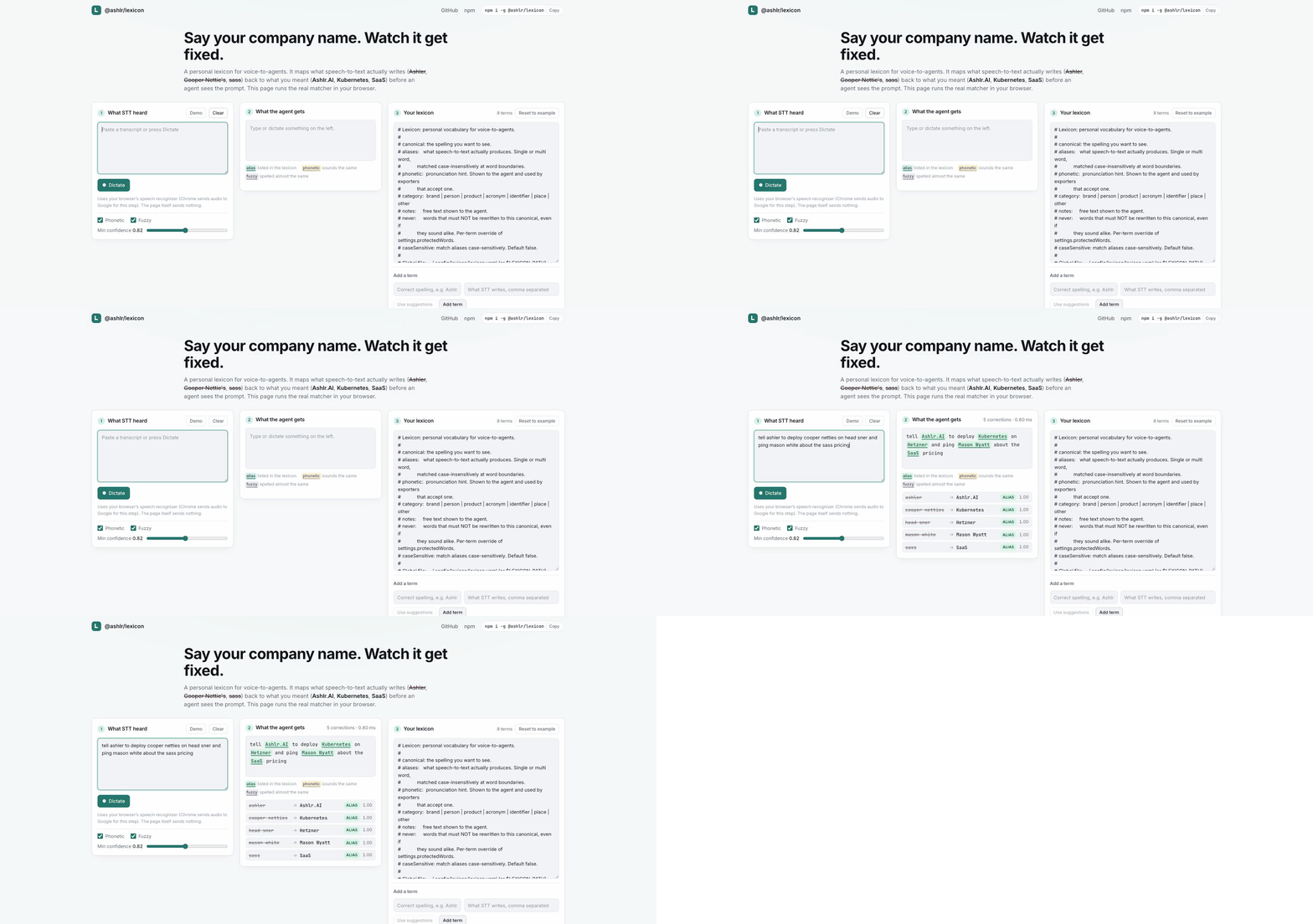
![The browser demo, three panels. Left, what STT heard: "tell ashler to deploy cooper netties on head sner and ping mason white about the sass pricing". Middle, what the agent gets: "tell Ashlr.AI to deploy Kubernetes on Hetzner and ping Mason Wyatt about the SaaS pricing", labelled 5 corrections in 0.80 ms, above a table giving each replacement its tier and confidence. Right, the lexicon YAML driving it.](https://raw.githubusercontent.com/ashlrai/lexicon/HEAD/docs/assets/demo.gif)

That is the [live demo](https://ashlrai.github.io/lexicon/) running this repo's real matcher on your text, in your browser, with nothing installed. (Its Dictate button uses your browser's own speech recognizer, which in Chrome sends audio to Google.)

## Measured

Method, full tables and every failing case are in [docs/BENCHMARK.md](https://github.com/ashlrai/lexicon/blob/HEAD/docs/BENCHMARK.md). Reproduce with `npm run bench` (no setup beyond a clone), or `npm run bench:audio && npm run bench:compare` (needs macOS and whisper.cpp).

**Against the alternatives.** 330 clips of real audio through whisper.cpp `small.en`, three voices. Same audio, same recognizer, same 70-term lexicon in every row; the only thing that changes is how the proper nouns get fixed.

| how the words get fixed | proper nouns recovered | clean prose wrongly changed |
| --- | --- | --- |
| nothing, raw whisper.cpp | 45.9% | n/a, nothing runs |
| exact-string substitution, the macOS Text Replacement approach | 62.0% | 0 of 72 |
| the same, plus a casing rule per term | 71.3% | 0 of 72 |
| whisper.cpp's own `--prompt` hint list | 76.0% | n/a, nothing runs |
| **Lexicon** | **91.0%** | **0 of 72** |

Every row uses the same curated seventy-term lexicon (`bench/lexicon.yaml`). The prose column is a property of the terms in the file as much as of the matcher, so a lexicon assembled some other way is a different measurement.

Exact substitution recovers the spellings someone already wrote down, and nothing else. It cannot reach `Versal`, `Superbase`, `CloudFloor` or `pedantic`, because no table written by hand contains the mistake you have not heard yet. The phonetic and fuzzy tiers exist for that gap and recover 31 of the 279 term slots on their own, which is 11 points. The remaining 9 points over the casing-aware row come from the alias tier's tolerance for how the recognizer breaks a name into words, since that row already matches case. `--prompt` is a complement rather than a rival: stacked with the lexicon it reaches **95.7%**.

Two honest notes about that table. Raw whisper.cpp cannot wrongly change prose because nothing runs, which is the absence of the feature rather than an advantage. `--prompt` is not the same case: it biases the recognizer itself, so whatever it changes is already in the transcript before scoring begins, while the metric counts sentences a post-pass altered. That cell is unmeasured rather than zero. Telling which way it goes would mean diffing prompted transcripts against unprompted ones, which this harness does not do.

**Before and after.**

| corpus | proper nouns recovered, raw STT | after lexicon | clean prose wrongly changed |
| --- | --- | --- | --- |
| real audio, whisper.cpp base.en (330 clips) | 41.9% | 82.8% | 0 of 72 |
| real audio, whisper.cpp small.en with prompt hints | 76.0% | 95.7% | 0 of 72 |
| synthetic STT errors (402 sentences, 70 terms) | 5.1% | 96.5% | 0 of 95 |

Latency is about 0.3 ms per sentence. The real-audio rows use macOS text-to-speech read into whisper.cpp, so they are cleaner than a phone microphone.

The synthetic 5.1% is not a claim that speech-to-text gets 5% of proper nouns right in general. Every sentence in that corpus was written to contain a mis-hearing, so 5.1% is only the handful that came out right anyway. The honest "before" number is the real-audio one, 41.9%.

The last column counts ordinary prose only. Each corpus also contains sentences deliberately built to trip the matcher (a bare "llama" next to an Ollama term, sound-alikes, code spans), marked `expected-hard`; with those included the false-positive rate is 15.3% (19 of 124) synthetic and 16.7% (15 of 90) on audio. Both numbers, and every failing case, are in [docs/BENCHMARK.md](https://github.com/ashlrai/lexicon/blob/HEAD/docs/BENCHMARK.md).

## Install

The package is [`@ashlr/lexicon`](https://www.npmjs.com/package/@ashlr/lexicon); the command is `lexicon`.

```bash
curl -fsSL https://ashlrai.github.io/lexicon/install.sh | sh   # CLI + the setup wizard
brew install ashlrai/tap/lexicon                               # or Homebrew (macOS, Linux)
npm i -g @ashlr/lexicon                                        # or npm (Node 20+)
```

Then open Claude Code and say a sentence with your company name in it. Done.

The install script runs `lexicon setup` for you (`LEXICON_NO_SETUP=1` skips it); after a Homebrew or npm install, run it yourself. Every step is optional and safe to rerun, and `lexicon setup --dry-run` writes nothing while describing the run you would get from the same command without it: the steps it would perform, and the ones it would stop and ask about, with the answer pressing Enter gives each.

With Homebrew, always use the full tap name `ashlrai/tap/lexicon`. Plain `brew install lexicon` installs [dns-lexicon](https://github.com/dns-lexicon/dns-lexicon), an unrelated DNS tool in homebrew-core.

<details>
<summary>What <code>lexicon setup</code> does, in seven numbered steps</summary>

1. Seeds the lexicon with your name and your company, with the misspellings STT will produce for each.
2. Offers the starter packs as a checklist.
3. Harvests the current repo for names already in your code.
4. Registers the MCP server and hooks in every agent client it detects.
5. Installs the local API as a login service.
6. Exports to your dictation app.
7. Dictates a sentence built from the terms it just seeded, and shows you the correction.

The full walkthrough, with the real terminal output, is in [docs/QUICKSTART.md](https://github.com/ashlrai/lexicon/blob/HEAD/docs/QUICKSTART.md).

</details>

Or skip the wizard and add one term by hand. The first argument is the canonical spelling, the rest are what STT actually produces:

```bash
lexicon add Ashlr.AI Ashler Ashlar "Ashler AI" --phonetic ASH-ler
lexicon normalize "tell Ashler to ship it"
# tell Ashlr.AI to ship it
```

**Claude Code plugin**, if you would rather not install a CLI at all. No Node install step, no build:

```bash
claude plugin marketplace add ashlrai/lexicon
claude plugin install lexicon@ashlrai
```

`lexicon doctor` checks the install. There is no telemetry and all state is local files: the CLI, hooks, MCP server, local API and extension make no request beyond loopback. The one outbound request in the codebase is `lexicon voice` fetching a whisper model on first use. The install script, npm and Homebrew fetch the package itself. See [SECURITY.md](https://github.com/ashlrai/lexicon/blob/HEAD/SECURITY.md).

## Why

Speech-to-text is about 95% accurate on ordinary English and much worse on invented names. In the benchmark above, raw whisper.cpp base.en transcribed 117 of 279 dictated proper nouns correctly. "Ashlr.AI" becomes "Ashler", "Kubernetes" becomes "Cooper Nettie's", "SaaS" becomes "sauce", "auth" becomes "off". Those are exactly the words an agent needs to get right.

Dictation apps (Wispr Flow, Superwhisper, Aqua) each keep their own dictionary and none of them share it. Agents (Claude Code `/voice`, ChatGPT voice, Codex, local Whisper) run their own recognizer with no user vocabulary at all. This is the portable layer in between: corrections happen after STT and before the model, wherever the text passes through.

This is not a dictation app. It sits between whatever dictation you already use and whatever agent you talk to. The research behind that call, including the kill criteria, is in [docs/RESEARCH.md](https://github.com/ashlrai/lexicon/blob/HEAD/docs/RESEARCH.md).

## What you get

- **Nineteen MCP tools**, two resources and two prompts, for Claude Code, Codex, Cursor, Windsurf, Gemini CLI, VS Code and Claude Desktop. Your agent can run its own setup: `setup_lexicon`, `lexicon_doctor`, `install_client`, `trust_project`, `import_dictionary` and `suggest_terms` mean "set up my lexicon" works without a terminal. The tools that change your machine preview first: `setup_lexicon` and `install_client` return a plan and write nothing until the agent passes `apply: true`, `trust_project` shows the file's terms before pinning it, and `import_dictionary` takes `dryRun`.
- **A Claude Code plugin**: MCP server, `SessionStart` and `UserPromptSubmit` hooks, a `lexicon` skill and a `/lexicon` command. Installs from this repo's marketplace with no build step.
- **A CLI with 25 commands**, from `lexicon add` to `lexicon voice`.
- **155 starter terms** in four packs (developer, AI, business, voice tools), one command each.
- **Fifteen export formats** (Wispr Flow, Superwhisper, macOS Text Replacement, espanso, Whisper and OpenAI prompts, Deepgram, AssemblyAI, Azure, Google, CLAUDE.md, markdown, text, CSV, JSON) and **seven importers** for the dictionary you already trained.
- **Repo harvesting**, correction learning ("it's Ashlr.AI not Ashler"), usage stats, suggestions mined from your voice history, and a trust gate for project lexicons.
- **A plain library.** `normalize()` is a pure function: text plus lexicon in, corrected text and a replacement list out.

## Where it applies

| Surface | How | Docs |
|---|---|---|
| Claude Code | Plugin, or MCP server plus two hooks that correct the prompt before the model reads it | [CLIENTS.md](https://github.com/ashlrai/lexicon/blob/HEAD/docs/CLIENTS.md) |
| Codex, Cursor, Windsurf, Gemini CLI, VS Code, Claude Desktop | `lexicon install <client> --apply` registers the MCP server | [CLIENTS.md](https://github.com/ashlrai/lexicon/blob/HEAD/docs/CLIENTS.md) |
| Any MCP client | stdio server, nineteen tools | [MCP.md](https://github.com/ashlrai/lexicon/blob/HEAD/docs/MCP.md) |
| ChatGPT, Claude.ai, Grok, Gemini, Perplexity, Poe, Copilot | Browser extension: rewrites the composer when you press send | [EXTENSION.md](https://github.com/ashlrai/lexicon/blob/HEAD/docs/EXTENSION.md) |
| Any macOS app, any dictation tool | LexiconBar menu bar app: rewrites dictated text in the focused field through Accessibility, with an undo bubble | [MACOS-APP.md](https://github.com/ashlrai/lexicon/blob/HEAD/docs/MACOS-APP.md) |
| Shortcuts, Raycast, scripts, your own app | `lexicon serve`: loopback HTTP API on `127.0.0.1:41733` behind a bearer token | [LOCAL-API.md](https://github.com/ashlrai/lexicon/blob/HEAD/docs/LOCAL-API.md) |
| Dictation without a dictation app | `lexicon voice`: ffmpeg records, whisper.cpp transcribes with your canonicals as prompt hints, the lexicon corrects | [VOICE.md](https://github.com/ashlrai/lexicon/blob/HEAD/docs/VOICE.md) |
| Any text field, any OS | `lexicon daemon --once --paste` on a hotkey | [DAEMON.md](https://github.com/ashlrai/lexicon/blob/HEAD/docs/DAEMON.md) |
| Wispr Flow, Superwhisper, macOS Text Replacement, espanso, Deepgram, Azure, Google | Export into their own dictionaries and biasing parameters | [EXPORTS.md](https://github.com/ashlrai/lexicon/blob/HEAD/docs/EXPORTS.md) |
| Your own STT pipeline | `npm i @ashlr/lexicon`, call `normalize()` between transcription and the model | [LIBRARY.md](https://github.com/ashlrai/lexicon/blob/HEAD/docs/LIBRARY.md) |
| Any of the above, on Windows or Linux | Which surfaces are tested in CI on each OS, which work but have never been run on real hardware, and which are not there at all | [PLATFORMS.md](https://github.com/ashlrai/lexicon/blob/HEAD/docs/PLATFORMS.md) |

## How it works

Three tiers over token windows: exact alias first, then double-metaphone phonetic, then Damerau-Levenshtein fuzzy above a confidence floor. Exact hits win the span; matches never overlap. A stoplist of about 3400 common English words, per-term `never` lists, and (with the default `skipCode`) code spans, URLs, emails, paths and glued identifiers are all off limits. That is why zero clean sentences changed in the benchmark. Every replacement reports its `reason` and `confidence`.

```bash
lexicon normalize --diff "deploy to head sner with cuban eatties"
# stderr:  "head sner" -> "Hetzner" (alias, 1.00)
#          "cuban eatties" -> "Kubernetes" (phonetic, 0.86)
# stdout:  deploy to Hetzner with Kubernetes
```

The rules in full, including every guard, are in [docs/MATCHING.md](https://github.com/ashlrai/lexicon/blob/HEAD/docs/MATCHING.md).

## Documentation

**[The full index is in `docs/`](https://github.com/ashlrai/lexicon/blob/HEAD/docs/README.md)**, grouped by task: get started, use it
with your client, understand how it works, contribute, internals. The three pages most
people need:

| Page | What it covers |
|---|---|
| [QUICKSTART.md](https://github.com/ashlrai/lexicon/blob/HEAD/docs/QUICKSTART.md) | Five minutes from nothing to corrections in Claude Code, with what each setup step writes |
| [CLIENTS.md](https://github.com/ashlrai/lexicon/blob/HEAD/docs/CLIENTS.md) | Installing into Claude Code (plugin, hooks, headless) and every other agent client |
| [FAQ.md](https://github.com/ashlrai/lexicon/blob/HEAD/docs/FAQ.md) | The questions people ask before installing |

Writing an agent that installs this for someone? [docs/AGENTS.md](https://github.com/ashlrai/lexicon/blob/HEAD/docs/AGENTS.md) is written
to you. Changing the code? Start at [CONTRIBUTING.md](https://github.com/ashlrai/lexicon/blob/HEAD/CONTRIBUTING.md) and
[docs/ARCHITECTURE.md](https://github.com/ashlrai/lexicon/blob/HEAD/docs/ARCHITECTURE.md).

Also at the root: [SECURITY.md](https://github.com/ashlrai/lexicon/blob/HEAD/SECURITY.md), [CODE_OF_CONDUCT.md](https://github.com/ashlrai/lexicon/blob/HEAD/CODE_OF_CONDUCT.md), [CHANGELOG.md](https://github.com/ashlrai/lexicon/blob/HEAD/CHANGELOG.md).

## Downloads

Every [GitHub release](https://github.com/ashlrai/lexicon/releases/latest) attaches the browser extension for Chrome/Edge/Brave and for Firefox, `LexiconBar.app.zip` for macOS, the npm tarball for offline installs, and `SHA256SUMS`. The Homebrew formula lives in [ashlrai/homebrew-tap](https://github.com/ashlrai/homebrew-tap); `npm i -g github:ashlrai/lexicon#v0.5.4` installs a tag straight from GitHub and builds on install.

## Roadmap and non-goals

Non-goals: this is not a dictation app, and there are no hosted accounts and no sync service. It is a file.

- Chrome Web Store and Firefox AMO listings for the extension. Today it installs from the release zip.
- Notarized macOS app. LexiconBar is ad-hoc signed, so the first launch needs right-click and Open.
- Linux tray app with the same push-to-talk and fix-clipboard actions. The Windows one is built: see [docs/WINDOWS-APP.md](https://github.com/ashlrai/lexicon/blob/HEAD/docs/WINDOWS-APP.md).
- Non-English phonetics. Double metaphone is tuned for English; names in other languages fall back to fuzzy matching.
- Real-microphone benchmark. The audio corpus is macOS text-to-speech read into whisper.cpp, not recorded speech.

## Contributing

Good first issues are [labelled and scoped](https://github.com/ashlrai/lexicon/labels/good%20first%20issue): a new starter pack, an exporter, an importer, a harvester source. [CONTRIBUTING.md](https://github.com/ashlrai/lexicon/blob/HEAD/CONTRIBUTING.md) has the setup, the test layout and a recipe for each.

Found a name it gets wrong? [Open a misheard term issue](https://github.com/ashlrai/lexicon/issues/new?template=misheard_term.yml).

## License

MIT. Copyright 2026 AshlrAI, Inc.

