# legacy2mcp [Health: Active]
**Category:** 💻 Developer Tools
**Repository:** https://github.com/bvenkata/legacy2mcp
**GitHub Stars:** 2
**Views:** 0
**Installs:** 0
**Upvotes:** 0
**Directory Page:** https://allmcps.com/mcp/legacy2mcp
## Description
Turn a legacy SOAP/WSDL service into a safe, typed, schema-validated, audit-logged MCP server
## Claude Desktop Quick Installation
Install path detected from listing signals. Uses `uvx` (confidence: high):
```json
"mcpServers": {
"legacy2mcp": {
"command": "uvx",
"args": ["legacy2mcp"]
}
}
```
## Documentation & README
# legacy2mcp
**Turn a legacy SOAP/WSDL system into a safe, typed [MCP](https://modelcontextprotocol.io/) server in minutes — so an AI agent can call it without a hand-written adapter.**
[](https://github.com/bvenkata/legacy2mcp/actions/workflows/ci.yml)
[](https://pypi.org/project/legacy2mcp/)
[](LICENSE)
[](pyproject.toml)
[](https://registry.modelcontextprotocol.io/v0.1/servers?search=io.github.bvenkata/legacy2mcp)
[](#contributing)
Point `legacy2mcp` at a WSDL URL. It introspects every operation, generates a real
JSON Schema for each one from the WSDL's own XSD types, and exposes them as MCP
tools that any MCP client (Claude Desktop, an agent framework, your own code) can
call — with **every call schema-validated before it reaches your SOAP endpoint**,
**write-like operations excluded by default**, and **every call audit-logged**.
No hand-written adapter code. No hand-maintained tool schemas that drift from the
WSDL. No arbitrary calls the WSDL itself doesn't define.
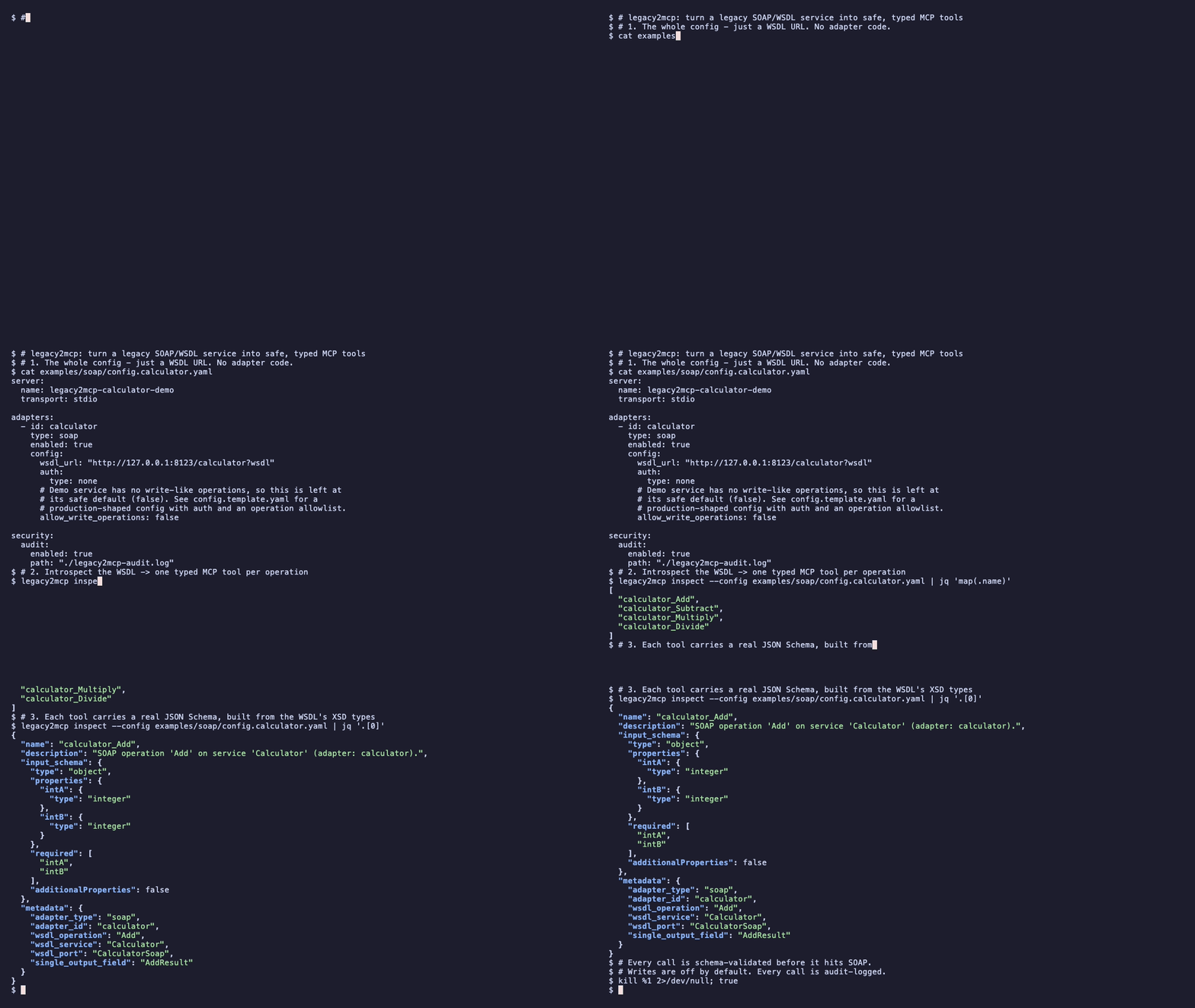
Regenerate this clip with `vhs demo/demo.tape` — see [`demo/`](https://github.com/bvenkata/legacy2mcp/blob/HEAD/demo/).
---
## Why this exists
Organizations run 10–20 year old SOAP services that aren't going away — systems
of record, middleware, back-office and line-of-business platforms. More and more
teams now want to point an AI agent at these systems.
Today that means, per WSDL:
- hand-writing a bespoke adapter,
- guessing at input validation,
- hand-copying tool schemas that immediately start drifting from the service,
- and hoping nobody points an LLM at `DeleteRecord`.
`legacy2mcp` generates the adapter **from the WSDL itself**, so the tool schema
can never drift from what the service actually accepts, and ships a
**safe-by-default posture** (no writes without an explicit opt-in, no unvalidated
arguments, every call logged) instead of leaving that to whoever wrote the last
adapter.
## Features
- **Zero adapter code** — one MCP tool per WSDL operation, named `_`.
- **Real schemas from the WSDL's XSD** — simple types, nested complex types, enums,
and repeated elements (arrays) are all handled recursively, depth-limited for
pathological WSDLs.
- **Safety net #1: validation** — every call runs through `jsonschema.validate`
(with `additionalProperties: false`) before any network call.
- **Safety net #2: read-only by default** — operations whose names look like
writes (`Create*`, `Update*`, `Delete*`, `Cancel*`, `Submit*`, `Pay*`, …) are
not exposed unless you set `allow_write_operations: true`.
- **Explicit allow/deny lists** — `include_operations` / `exclude_operations` on
top of the heuristic.
- **Audit log** — one JSON line per call: tool, arguments, timestamp, outcome.
- **Secrets stay out of config** — passwords are read from named environment
variables, never written into the YAML.
- **CI-friendly dry run** — `legacy2mcp inspect` lists the generated tools and
exits, so a broken WSDL fails your pipeline instead of your production agent.
See [docs/security.md](https://github.com/bvenkata/legacy2mcp/blob/HEAD/docs/security.md) for the full, honest security model —
what's covered today and what isn't yet.
## Install
```bash
pip install legacy2mcp # or: uv tool install legacy2mcp / pipx install legacy2mcp
```
Also on the [MCP Registry](https://registry.modelcontextprotocol.io/v0.1/servers?search=io.github.bvenkata/legacy2mcp)
as `io.github.bvenkata/legacy2mcp`, so MCP-aware clients that read the registry
can discover it directly.
## Quick start
```bash
git clone https://github.com/bvenkata/legacy2mcp.git
cd legacy2mcp
pip install -e ".[dev]"
# 1. Start the bundled demo SOAP service (no external network needed)
python examples/soap/run_mock_calculator.py &
# 2. See the MCP tools generated from its WSDL
legacy2mcp inspect --config examples/soap/config.calculator.yaml
```
Or with Docker:
```bash
docker compose up demo-soap-service -d
docker compose run --rm legacy2mcp legacy2mcp inspect \
--config examples/soap/config.calculator.docker.yaml
```
### Point it at your own WSDL
```yaml
# config.yaml
server:
name: my-legacy-mcp
adapters:
- id: legacy
type: soap
config:
wsdl_url: "https://service.example.com/LegacyService?wsdl"
auth:
type: basic
username: "svc-account"
password_env: "SERVICE_PASSWORD"
# Safe by default: Create*/Update*/Delete*/Cancel*/Submit*/... are
# excluded unless you opt in explicitly.
allow_write_operations: false
# Recommended for production: enumerate exactly what the agent may call.
include_operations: ["GetRecord", "GetRecordDetails", "SearchRecords"]
security:
audit:
enabled: true
path: "./legacy-mcp-audit.log"
```
```bash
export SERVICE_PASSWORD=...
legacy2mcp inspect --config config.yaml # review the generated tools
legacy2mcp run --config config.yaml # start the MCP server (stdio)
```
A full production-shaped template lives at
[`examples/soap/config.template.yaml`](https://github.com/bvenkata/legacy2mcp/blob/HEAD/examples/soap/config.template.yaml).
### Use it from Claude Desktop (or any MCP client)
```json
{
"mcpServers": {
"legacy": {
"command": "legacy2mcp",
"args": ["run", "--config", "/absolute/path/to/config.yaml"]
}
}
}
```
## Use cases
- **Systems of record** — let an agent read status and detail records from a
legacy back-office platform, read-only, with every lookup audit-logged.
- **Financial services** — expose account and transaction *reads* to an agent
without exposing transfers or adjustments.
- **Supply chain / ERP** — surface order status, inventory, and shipment tracking
from an old SOAP middleware layer.
- **Internal support tooling** — give a support copilot safe, typed access to the
system of record instead of a scraped UI.
- **Migration & modernization** — put an MCP layer in front of a legacy service
now, and swap the backend later without touching the agent.
## Real-world usage
### In CI/CD — catch WSDL drift before it reaches production
`legacy2mcp inspect` loads the config, contacts the WSDL, builds every tool
schema, and exits non-zero if anything fails. Run it as a pipeline gate:
```yaml
# .github/workflows/contract-check.yml
- name: Check the WSDL still generates valid MCP tools
env:
SERVICE_PASSWORD: ${{ secrets.SERVICE_PASSWORD }}
run: |
pip install legacy2mcp
legacy2mcp inspect --config config/legacy.yaml > tools.json
# optionally: diff tools.json against a committed snapshot to catch
# a backend team changing an operation's contract out from under you
git diff --exit-code --no-index tools/legacy.snapshot.json tools.json
```
### As a sidecar / long-running MCP server
`legacy2mcp run` speaks MCP over stdio — the transport Claude Desktop and most
agent frameworks spawn servers over. Package it with your config in the provided
`Dockerfile` and let your MCP client launch it.
### In a data pipeline
Use the same generated, validated tools from your own Python (via any MCP client
library) to pull records from the legacy system on a schedule, with the audit log
giving you a record of exactly what was fetched.
## What it actually does, precisely
1. Loads the WSDL with [`zeep`](https://docs.python-zeep.org/), a mature, widely
used Python SOAP client.
2. For every operation on every port/binding, converts the WSDL's XSD input type
into a JSON Schema
([`src/legacy2mcp/schema/xsd_to_jsonschema.py`](https://github.com/bvenkata/legacy2mcp/blob/HEAD/src/legacy2mcp/schema/xsd_to_jsonschema.py)) —
simple types, nested complex types, enums, and arrays, recursively.
3. Registers one MCP tool per operation, named `_`.
4. On a tool call: validates arguments against that operation's JSON Schema,
calls the SOAP operation via `zeep`, serializes the response back to plain
JSON, and writes an audit log entry.
5. Operations whose names look like writes are excluded unless
`allow_write_operations: true` — see [docs/security.md](https://github.com/bvenkata/legacy2mcp/blob/HEAD/docs/security.md) for
exactly what this heuristic does and doesn't catch.
## Status
**v0.1** — the SOAP/WSDL adapter is implemented and tested (`pytest tests/` runs
against an in-process mock SOAP service, no network needed). A database adapter
(safe, parameterized-query-only, table/operation allowlists) and a queue adapter
(Kafka/RabbitMQ/SQS) are on the [roadmap](https://github.com/bvenkata/legacy2mcp/blob/HEAD/docs/roadmap.md) but **not implemented
yet** — the `BaseAdapter` interface
([`src/legacy2mcp/adapters/base.py`](https://github.com/bvenkata/legacy2mcp/blob/HEAD/src/legacy2mcp/adapters/base.py)) is the
extension point if you want to build one.
## Development
```bash
pip install -e ".[dev]"
pytest tests/ -v
```
CI runs the suite on Python 3.10–3.12 ([`.github/workflows/ci.yml`](https://github.com/bvenkata/legacy2mcp/blob/HEAD/.github/workflows/ci.yml)).
Releases to PyPI and the MCP Registry are tag-triggered — see
[docs/releasing.md](https://github.com/bvenkata/legacy2mcp/blob/HEAD/docs/releasing.md).
## Contributing
Adapters for new legacy systems are the highest-value contribution — implement
`BaseAdapter` (`discover_tools()` + `invoke()`) and the MCP server core handles
validation, dispatch, and audit logging for you automatically. Issues and PRs
welcome.
## License
Apache 2.0 — see [LICENSE](https://github.com/bvenkata/legacy2mcp/blob/HEAD/LICENSE).