# incomeos [Health: Active]
**Category:** 💰 Finance & Fintech
**Repository:** https://github.com/Perufitlife/incomeos
**GitHub Stars:** 1
**Views:** 1
**Installs:** 0
**Upvotes:** 0
**Directory Page:** https://allmcps.com/mcp/incomeos
## Description
Ask what you earn across every income stream: Stripe, affiliates, app stores, ads, manual.
## Claude Desktop Quick Installation
Install path detected from listing signals. Uses `npx` (confidence: high):
```json
"mcpServers": {
"incomeos": {
"command": "npx",
"args": ["-y","incomeos-mcp"]
}
}
```
## Documentation & README
# 💰 IncomeOS — one screen for every dollar you make
Most revenue dashboards assume you have one product on one Stripe account.
IncomeOS assumes what's actually true for an indie hacker: a SaaS on Stripe, an
Amazon affiliate link, a marketplace actor, a mobile app, a sponsorship — I track
**25 sources, and most of them make under $10 a month**. Nothing adds them up.
**→ [See it running on my real numbers](https://app.incomeos.dev/p/renzo)** —
my own income, live, not demo data.
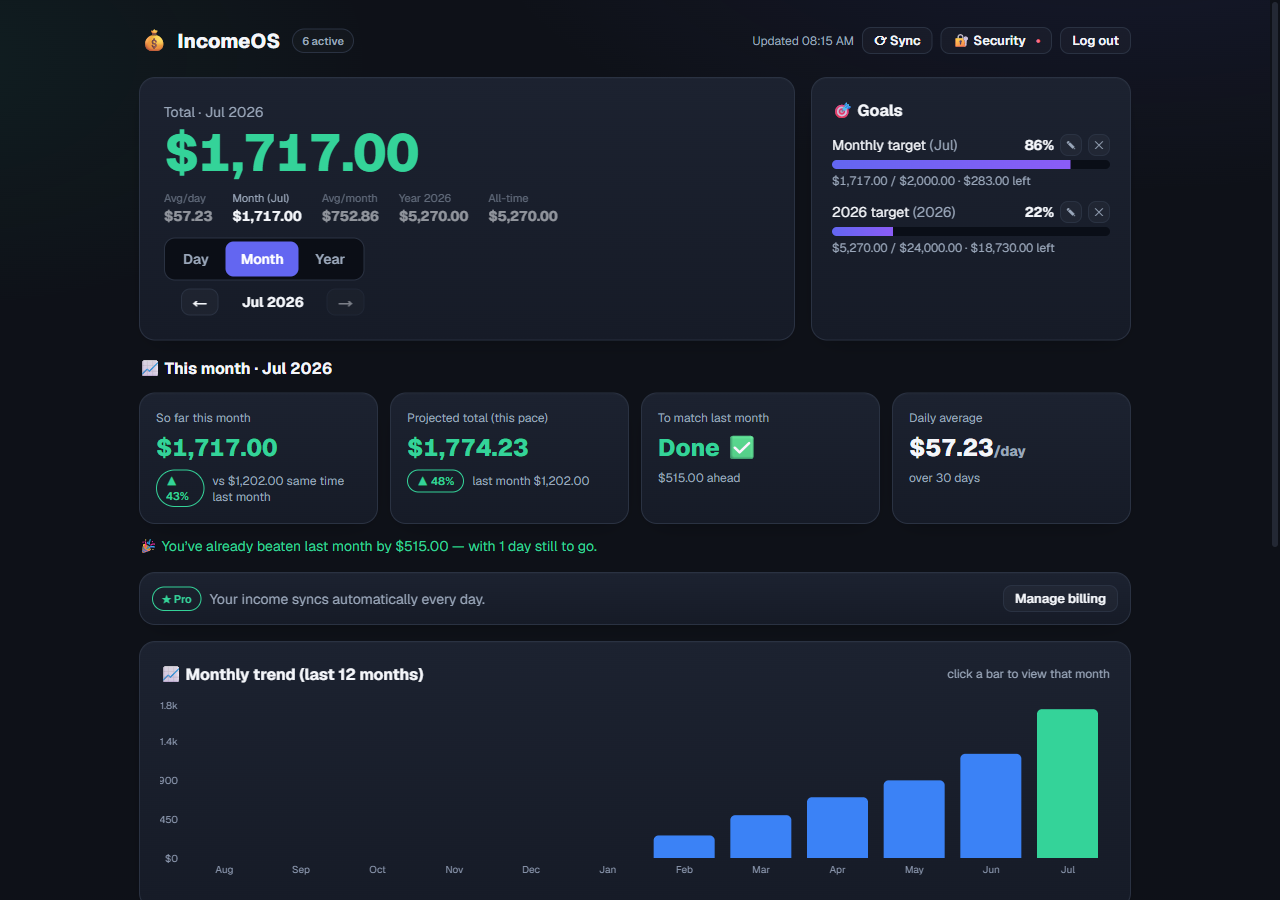
Self-hosted and MIT. Your revenue lives in **your** Supabase project — no third
party ever sees your numbers. Deploy free on Vercel in about five minutes, or
use the [hosted version](https://app.incomeos.dev) if you'd rather not maintain
infrastructure.
## Ask your AI how much you made
This is the part nothing else does. IncomeOS ships an **MCP server**, so Claude,
Cursor, or any MCP client can read your income on demand:
> *"How much did I make this month across everything?"*
> *"Which source grew the most since May?"*
> *"Log $180 for Amazon affiliates in July."*
```json
{
"mcpServers": {
"incomeos": {
"command": "npx",
"args": ["-y", "incomeos-mcp"],
"env": { "INCOMEOS_URL": "https://your-incomeos.vercel.app", "INCOMEOS_TOKEN": "your-token" }
}
}
}
```
Tools: `get_income_summary`, `get_sources`, `get_month`, `log_monthly_income`.
See [`mcp/`](https://github.com/Perufitlife/incomeos/blob/HEAD/mcp). The MCP talks to *your* instance with *your* token — the
data never leaves it.
## What it does
- 🔢 **Numbered sources** — `#1 SaaS`, `#2 Amazon`, `#3 Sponsorship`…
- ⚡ **Stripe on autopilot** — net revenue after fees, auto-grouped per product.
- ✍️ **Everything else in 10 seconds** — one monthly total per source. The long
tail has no API and never will; typing it beats not tracking it.
- 📅 **Day / month / year**, with pro-rated averages so monthly-only sources
still show an honest "avg per day".
- 📈 **Month-over-month trend** per stream, and 🎯 **goals** with live progress.
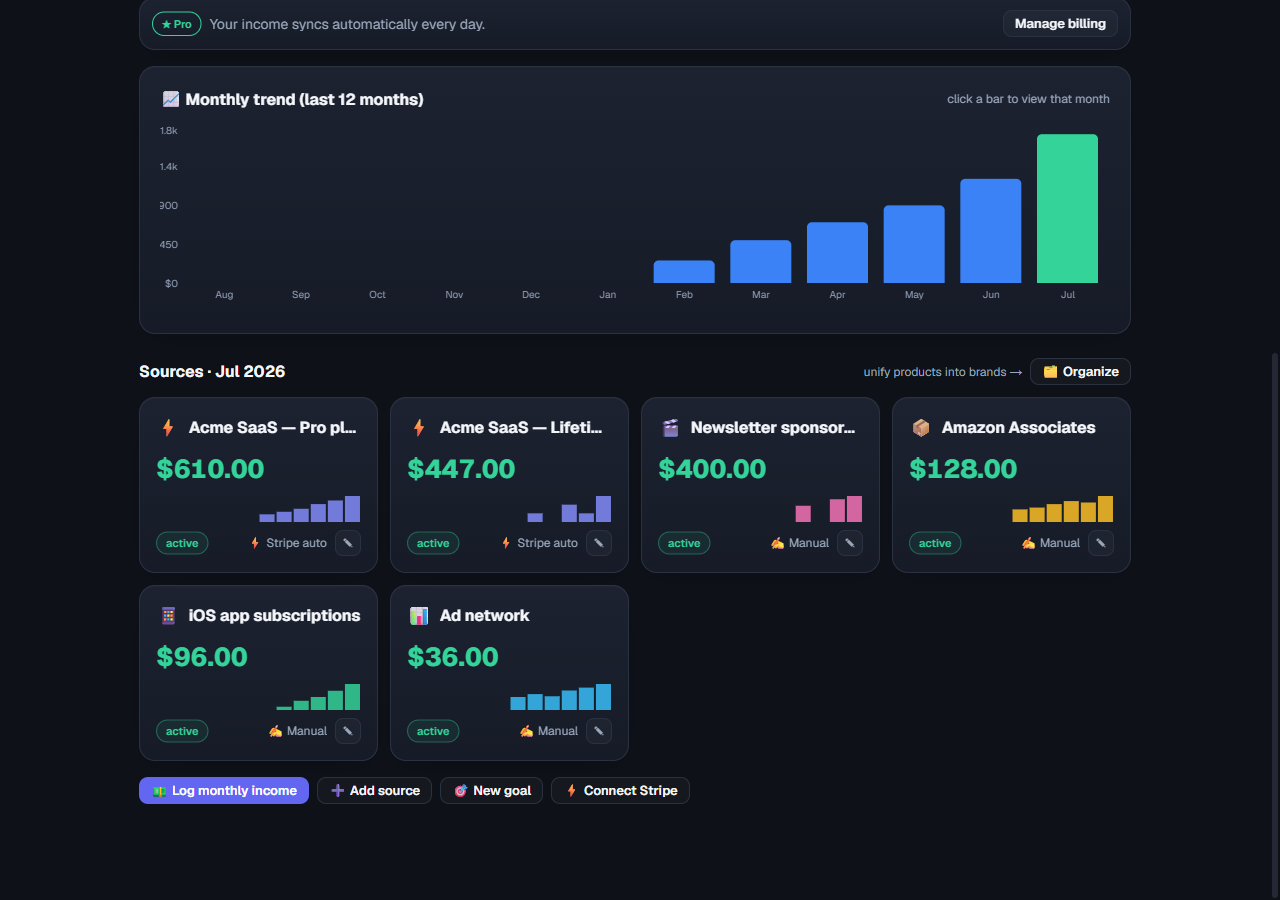
Dashboard screenshots use demo data. The public page above is real.
## Quickstart (~5 min)
1. **Create a Supabase project** (free) and run `supabase/migrations/0001_init.sql`
in the SQL editor.
2. **Deploy to Vercel** (or `npm run dev`) with the env vars from
[`.env.example`](https://github.com/Perufitlife/incomeos/blob/HEAD/.env.example): `SUPABASE_URL`,
`SUPABASE_SERVICE_ROLE_KEY`, `DASHBOARD_TOKEN` (your password), `CRON_SECRET`,
and optionally `STRIPE_SECRET_KEY` (a read-only restricted key is plenty).
3. **Open it, sign in, hit Sync.** Stripe products show up as sources on their
own; add the rest with **➕ Add source**.
A daily Vercel Cron keeps Stripe fresh; the **Sync** button pulls on demand.
## Connectors
| Source | Status | How |
| --- | --- | --- |
| **Stripe** | ✅ automatic | Net revenue, grouped per product, zero config |
| Amazon / affiliates | ✍️ manual | Monthly total, one click — no API exists |
| Marketplaces, ads, sponsorships | ✍️ manual | Same, as numbered sources |
| Gumroad, Lemon Squeezy, Paddle, Ko-fi, RevenueCat | 🛠️ roadmap | PRs welcome |
Every source can hold a link to its own dashboard — clicking the card opens it.
## Self-hosted vs hosted
This repo is the self-hosted build: Stripe, manual sources, all the charts, goals,
and the MCP. Free forever, no feature held back to sell you something.
[app.incomeos.dev](https://app.incomeos.dev) is the hosted build, and it's ahead
of this repo on a few things I run for myself: RevenueCat sync, a weekly email
digest, the public page linked at the top, and email-link sign-in instead of a
shared password. Free tier covers unlimited manual sources, every chart, and sync
on demand; **Pro is $9/mo** and adds automatic daily sync.
If you'd rather not maintain infrastructure, use the hosted one. If you'd rather
own your database, clone this. Both are the same dashboard.
## Tech
Next.js 16 (App Router) · Supabase (Postgres) · Recharts · Tailwind v4 · Vercel.
## Roadmap
- [x] Income MCP — ask your agent what you made
- [ ] More connectors (Gumroad, Lemon Squeezy, Paddle, Ko-fi, RevenueCat)
- [ ] Port the hosted extras back here (digest, public page)
- [ ] CSV import / export
## License
MIT — see [LICENSE](https://github.com/Perufitlife/incomeos/blob/HEAD/LICENSE).
---
If you track income across more than one place, a ⭐ helps other people find this.