[](https://npmjs.com/package/@toolprint/hypertool-mcp)
[](https://npmjs.com/package/@toolprint/hypertool-mcp)
[](https://discord.gg/MbvndnJ45W)
[](https://www.typescriptlang.org/)
[](https://modelcontextprotocol.io)
[](LICENSE)
## ⚡ Features
### 🔓 **Break Free from Tool Limits**
Connect unlimited MCP servers. Use 10, 50, or 500+ tools total - your AI only sees what it needs.
### 🎯 **Task-Specific Toolsets**
Build "git-essentials" with 5 tools instead of drowning in 47 Git commands. Switch contexts instantly.
### 🧠 **Smart Tool Descriptions**
Enhance tools with examples and context. Watch your AI pick the right tool 89% more often.
## 🚀 Quick Start
### Step 1: Copy Your Existing Config
```bash
# In your project directory
cp .mcp.json .mcp.hypertool.json
```
### Step 2: Point Your AI to HyperTool
Replace your `.mcp.json` with:
```json
{
"mcpServers": {
"hypertool": {
"command": "npx",
"args": ["-y", "@toolprint/hypertool-mcp", "mcp", "run", "--mcp-config", ".mcp.hypertool.json"]
}
}
}
```
### Step 3: Create Your First Toolset
Restart your AI and try:
```
You: "Create a toolset called 'coding' with git and docker tools"
AI: "Created 'coding' toolset with 15 focused tools"
You: "Switch to coding toolset"
AI: "Equipped! I now have just the tools needed for development"
```
**That's it!** Your AI is now focused and effective. 🎉
💡 **Want automated setup?** Try our interactive `setup` command - see [Advanced Guide](https://github.com/toolprint/hypertool-mcp/blob/HEAD/guides/ADVANCED.md#setup-command) for details.
📚 **Configuration Mode:** HyperTool uses a smart Configuration Mode to keep toolset management separate from your operational tools. Learn more in the [Configuration Mode Guide](https://github.com/toolprint/hypertool-mcp/blob/HEAD/guides/CONFIGURATION_MODE.md).
## 🎭 Personas: Pre-configured Tool Bundles (NEW!)
Don't want to configure from scratch? Use personas - ready-to-use MCP server bundles with pre-built toolsets.
### What are Personas?
Think of personas as "app bundles" for your AI - they come with:
- ✅ Pre-configured MCP servers
- ✅ Curated toolsets for specific workflows
- ✅ Everything you need to get started instantly
### Quick Start with Personas
```bash
# 1. Clone the persona collection
git clone https://github.com/toolprint/awesome-mcp-personas
# 2. Add a persona (e.g., web-dev persona)
hypertool-mcp persona add awesome-mcp-personas/personas/web-dev
# 3. Run with the persona
npx -y @toolprint/hypertool-mcp mcp run --persona web-dev
```
That's it! No server configuration needed. The persona brings its own servers and toolsets.
📦 **Browse all available personas**: [awesome-mcp-personas](https://github.com/toolprint/awesome-mcp-personas)
### Available Personas
| Persona | Included Servers | Best For |
|---------|-----------------|----------|
| **web-dev** | Git, Docker, Filesystem, Browser, Testing | Full-stack web development |
| **data-scientist** | Python, Jupyter, Database, Filesystem, Plotting | Data analysis & ML workflows |
| **devops** | Docker, Kubernetes, AWS, Terraform, Monitoring | Infrastructure & deployment |
| **content-creator** | Notion, Slack, Grammar, SEO, Social | Writing & content management |
| **researcher** | Perplexity, Arxiv, Wikipedia, Filesystem | Research & knowledge work |
### Persona vs Standard Mode
```bash
# Standard Mode (use your existing MCP servers):
npx -y @toolprint/hypertool-mcp mcp run --mcp-config .mcp.hypertool.json
# Persona Mode (bundled servers + pre-built toolsets):
npx -y @toolprint/hypertool-mcp mcp run --persona web-dev
# Persona Mode with specific toolset:
npx -y @toolprint/hypertool-mcp mcp run --persona web-dev --equip-toolset frontend
```
💡 **Pro tip**: Personas can be mixed with your existing servers! Add `--mcp-config` to include your custom servers alongside the persona's servers.
📚 **Learn more**: See the complete [Personas Guide](https://github.com/toolprint/hypertool-mcp/blob/HEAD/guides/PERSONAS.md) for detailed instructions, creating custom personas, and troubleshooting.
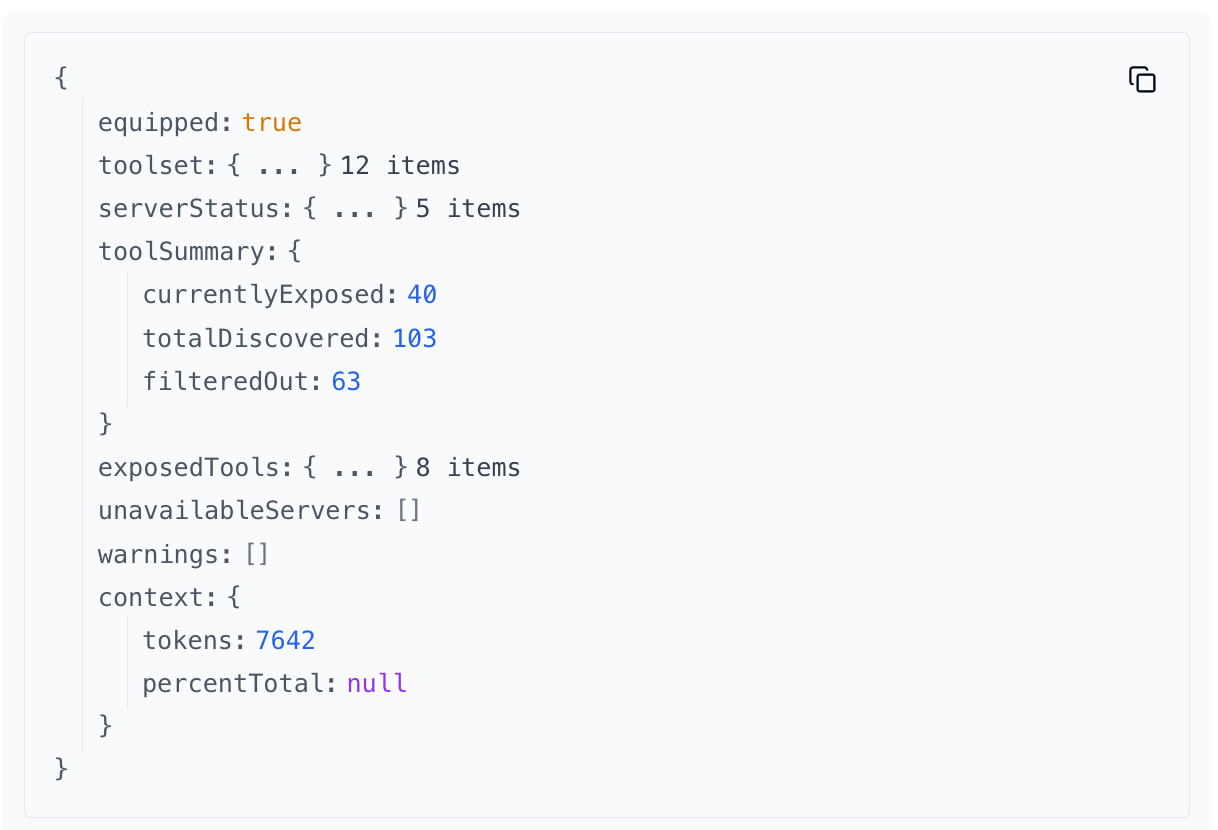
## 📊 Context Measurement (NEW!)
See exactly how much context each tool consumes. Optimize your toolsets with token estimates for every tool.
Active toolset showing token usage per tool
**Why it matters:**
- 🎯 **Optimize context usage** - Identify heavyweight tools consuming your context window
- 📉 **Make informed decisions** - See token costs before adding tools to toolsets
- 🔍 **Compare alternatives** - Find lighter tools that do the same job
- 💡 **Budget your context** - Understand exactly what you're exposing to your AI
**How to use:**
Ask your AI to use these MCP tools to see context information:
- `list-available-tools` - Shows token estimates for all available tools
- `get-active-toolset` - Shows token usage for your currently equipped toolset
Each tool displays estimated tokens and percentage of total context consumed. Perfect for building lean, efficient toolsets!
## 🎬 Demo
### Hotswap toolsets across 100+ tools
_Targeted toolsets across any number of MCPs. Swap to the best toolset for a goal with a tool call. Dynamic tool registration._
## 🏗️ How It Works
```
Before: Tool Chaos 😵
┌─────────────┐ ┌─────────────────────────────┐
│ Claude/ │──▶│ 50+ tools from 8 servers │
│ Cursor │ │ ❌ Wrong picks │
│ │ │ ❌ Slow decisions │
│ │ │ ❌ Confused context │
└─────────────┘ └─────────────────────────────┘
After: Expert Mode 🎯
┌─────────────┐ ┌──────────────┐ ┌─────────────────┐
│ Claude/ │──▶│ HyperTool │──▶│ ALL Your Tools │
│ Cursor │ │ (Local) │ │ (Same servers) │
└─────────────┘ └──────────────┘ └─────────────────┘
│
▼
┌─────────────────┐
│ Smart Toolsets │
│ 🔨 coding (5) │ ← "I'm coding now"
│ 📝 writing (3) │ ← "I'm writing now"
│ 📊 analysis (4) │ ← "I'm analyzing now"
└─────────────────┘
✅ Expert picks every time
```
### What's a "Toolset"? Think Playlists for Your AI
Just like Spotify playlists organize your music, toolsets organize your AI tools:
```
ALL YOUR TOOLS (64 total) YOUR TOOLSETS
┌────────────────────────────┐ ┌──────────────────┐
│ 🐳 Docker (19 tools) │ │ 🔨 "coding" │
│ • build_image │ ┌───▶ │ • git.status │
│ • create_container │ │ │ • git.commit │
│ • run_container │ │ │ • docker.build │
│ • stop_container │ │ │ • docker.run │
│ • [... 15 more] │ │ │ • github.pr │
├────────────────────────────┤ │ └──────────────────┘
│ 🔀 Git (12 tools) │───┤
│ • status │ │ ┌──────────────────┐
│ • commit │ │ │ 📝 "writing" │
│ • push │ └───▶ │ • notion.create │
│ • [... 9 more] │ │ • slack.send │
├────────────────────────────┤ │ • grammarly.fix │
│ 📝 Notion (8 tools) │─────┐ └──────────────────┘
│ 💬 Slack (6 tools) │ │
│ 📊 Linear (10 tools) │ │ ┌──────────────────┐
│ 🧪 Testing (9 tools) │ └─▶ │ 🐛 "debugging" │
└────────────────────────────┘ │ • logs.search │
│ • docker.logs │
AI sees ALL 64 tools = confused 😵 │ • traces.view │
└──────────────────┘
AI sees 3-5 tools = focused 🎯
```
## 💼 Real-World Toolsets
Create focused toolsets for different workflows:
### 🔨 Development Mode
```
"deep-coding": git + docker + filesystem (12 tools)
→ Everything you need for feature development
"code-review": git + github + linear (10 tools)
→ Review PRs, update tickets, merge with confidence
"debugging": logs + docker + traces + alerts (8 tools)
→ Find and fix issues fast
```
### 📝 Content Creation
```
"writing": notion + grammarly + slack (6 tools)
→ Blog posts, docs, and team updates
"research": perplexity + notion + filesystem (7 tools)
→ Deep dives with organized notes
```
### 🎬 Real Chat Example
```
You: "I need to debug our API"
AI: "I'll switch to the debugging toolset for better focus"
[Now has: logs, traces, curl, docker]
You: "Actually, let's write the incident report"
AI: "Switching to writing toolset"
[Now has: notion, slack, templates]
```
💡 **Pro tip**: Start with 3-5 tools per toolset. Your AI will thank you!
## 📋 All Features
Explore everything HyperTool can do:
| Feature | Description | Guide |
|---------|-------------|-------|
| **🎭 Personas** | Pre-configured MCP server bundles with curated toolsets. Get started instantly with ready-to-use workflows for web-dev, data science, DevOps, and more. | [Personas Guide](https://github.com/toolprint/hypertool-mcp/blob/HEAD/guides/PERSONAS.md) |
| **📁 Server Groups** | Organize MCP servers into logical groups. Launch related servers together, switch between projects, and maintain focused contexts. | [Advanced Guide](https://github.com/toolprint/hypertool-mcp/blob/HEAD/guides/ADVANCED.md) |
| **📊 Context Measurement** | See token estimates for every tool. Optimize your toolsets by understanding exactly how much context each tool consumes. | [Context Measurement](https://github.com/toolprint/hypertool-mcp/blob/HEAD/docs/features/context-measurement.md) |
| **🔧 Configuration Mode** | Smart separation of toolset management from operational tools. Keep your AI focused on work, not configuration. | [Configuration Mode Guide](https://github.com/toolprint/hypertool-mcp/blob/HEAD/guides/CONFIGURATION_MODE.md) |
| **🎯 Dynamic Toolsets** | Build, modify, and switch between toolsets on the fly. Adapt your AI's capabilities to match your current task. | [Examples & Recipes](https://github.com/toolprint/hypertool-mcp/blob/HEAD/guides/EXAMPLES.md) |
| **🧠 Tool Annotations** | Enhance tools with custom descriptions, examples, and context. Improve your AI's tool selection accuracy by 89%. | [Advanced Guide](https://github.com/toolprint/hypertool-mcp/blob/HEAD/guides/ADVANCED.md) |
| **🚀 HTTP Mode** | Run HyperTool as a long-lived HTTP server for persistent connections and faster response times. | [Advanced Guide](https://github.com/toolprint/hypertool-mcp/blob/HEAD/guides/ADVANCED.md) |
| **🔌 Unlimited Servers** | Connect as many MCP servers as you need. Break free from the 100-tool limit without sacrificing performance. | [Quick Start](#-quick-start) |
## ❓ FAQ
### General Questions
**Q: How is this different from just using MCP servers directly?**
A: HyperTool lets you use unlimited MCP servers without hitting the 100-tool limit, and dynamically switches between focused toolsets for better AI performance.
**Q: What's the difference between Personas and Standard Mode?**
A: Standard Mode uses your existing MCP server configurations. Personas are pre-packaged bundles that include both MCP servers AND curated toolsets - perfect for getting started quickly or trying new workflows.
**Q: Can I use multiple toolsets at once?**
A: In stdio mode (default), use `--equip-toolset ` when launching. HTTP mode supports one active toolset but you can switch anytime.
**Q: Where are my toolsets and configurations stored?**
A: Everything is stored locally in `~/.toolprint/hypertool-mcp/`:
- Personas: `~/.toolprint/hypertool-mcp/personas/`
- Toolsets: `~/.toolprint/hypertool-mcp/toolsets/`
- Preferences: `~/.toolprint/hypertool-mcp/config/`
You can directly edit these files when HyperTool is not running.
### Setup & Compatibility
**Q: Does this work with Claude Desktop / Cursor / Claude Code?**
A: Yes! Cursor has full hot-swapping support. Claude Desktop works with restart. Claude Code [hot-swap coming soon](https://github.com/anthropics/claude-code/issues/411).
**Q: What if an MCP server goes down?**
A: HyperTool monitors health and automatically reconnects when servers come back. Your toolsets stay intact.
**Q: Can I share toolsets with my team?**
A: Import/export is coming soon! For now, you can copy and share toolset files - they'll work if your team has the same MCP servers configured.
**Q: How accurate are the token estimates in context measurement?**
A: The estimates use BPE-based approximation for consistent relative comparisons between tools. They're perfect for understanding which tools consume more context, but not exact counts since different LLMs use different tokenizers.
**Q: Does context measurement slow down my toolsets?**
A: No! Token counts are cached and add less than 10ms overhead. You won't notice any performance impact.
### Technical Questions
**Q: How do I add tools from a new MCP server?**
A: Just add the server to your `.mcp.hypertool.json` config. It's automatically available for toolsets.
**Q: Can I use this in production?**
A: Yes! For enterprise support, [contact us](mailto:support@onegrep.dev?subject=HyperTool%20Production%20Use&body=Hi%20team%2C%0A%0AI'm%20interested%20in%20using%20HyperTool%20in%20production.%0A%0ACompany%3A%20%0AUse%20case%3A%20%0AScale%3A%20%0A%0AThanks!).
## 🎮 App Compatibility
**Works with ANY MCP-compatible app!** HyperTool is a standard MCP server, so if your app supports MCP, it supports HyperTool.
### Hot-swap Toolsets Without Restarts
| App | Status | How to Switch Toolsets |
|-----|---------|------------------------|
| **Cursor/VSCode** | ✅ Full support | Switch toolsets instantly - no restart needed! |
| **Claude Code** | ⏳ Coming soon | Use `--equip-toolset ` flag ([track progress](https://github.com/anthropics/claude-code/issues/4118)) |
| **Claude Desktop** | ⏳ In progress | Restart app after switching toolsets |
---
📚 **Learn More**
- 🎭 [Personas Guide](https://github.com/toolprint/hypertool-mcp/blob/HEAD/guides/PERSONAS.md) - Complete guide to using and creating personas
- 🔬 [Research & Performance](https://github.com/toolprint/hypertool-mcp/blob/HEAD/guides/RESEARCH.md) - Why focused toolsets work
- 🚀 [Advanced Features](https://github.com/toolprint/hypertool-mcp/blob/HEAD/guides/ADVANCED.md) - Tool annotations, HTTP mode, CLI
- 🔧 [Troubleshooting](https://github.com/toolprint/hypertool-mcp/blob/HEAD/guides/TROUBLESHOOTING.md) - Common issues and solutions
- 📖 [Examples & Recipes](https://github.com/toolprint/hypertool-mcp/blob/HEAD/guides/EXAMPLES.md) - Toolset patterns for every workflow
## 🛠️ Development Setup
### Prerequisites
- Node.js 18+
- Python 3.8+ (for pre-commit hooks)
### Quick Setup
```bash
# Clone and install
git clone https://github.com/toolprint/hypertool-mcp.git
cd hypertool-mcp
just setup-dev # Installs dependencies and pre-commit hooks
```
### Pre-commit Hooks
This project uses pre-commit hooks to ensure code quality:
```bash
# Install pre-commit hooks (included in setup-dev)
just setup-pre-commit
# Run hooks manually
just pre-commit-check # On staged files
just pre-commit-check-all # On all files
# Skip hooks for emergency commits (use sparingly)
SKIP=eslint,typescript git commit -m "emergency fix"
```
### Available Commands
```bash
just build # Build the project
just test # Run tests
just lint # Run linting
just format # Format code
just typecheck # Check types
just pre-publish-checks # Run all quality checks
```
### Service command
The `hypertool-mcp service` subcommand is currently disabled and will exit with a
notification when invoked.
## 🤝 Contributing
Found a bug? Have an idea? We'd love your help!
- 🐛 [Report issues](https://github.com/toolprint/hypertool-mcp/issues)
- 💡 [Share ideas](https://github.com/toolprint/hypertool-mcp/discussions)
- 🔧 [Submit PRs](https://github.com/toolprint/hypertool-mcp/pulls)
## 📄 License
MIT License - see [LICENSE](https://github.com/toolprint/hypertool-mcp/blob/HEAD/LICENSE) file for details.
---
**Built by developers who got tired of watching AI pick the wrong tools** 🎯