
Give your AI long-term memory.
Note-taking app with a built-in MCP server.
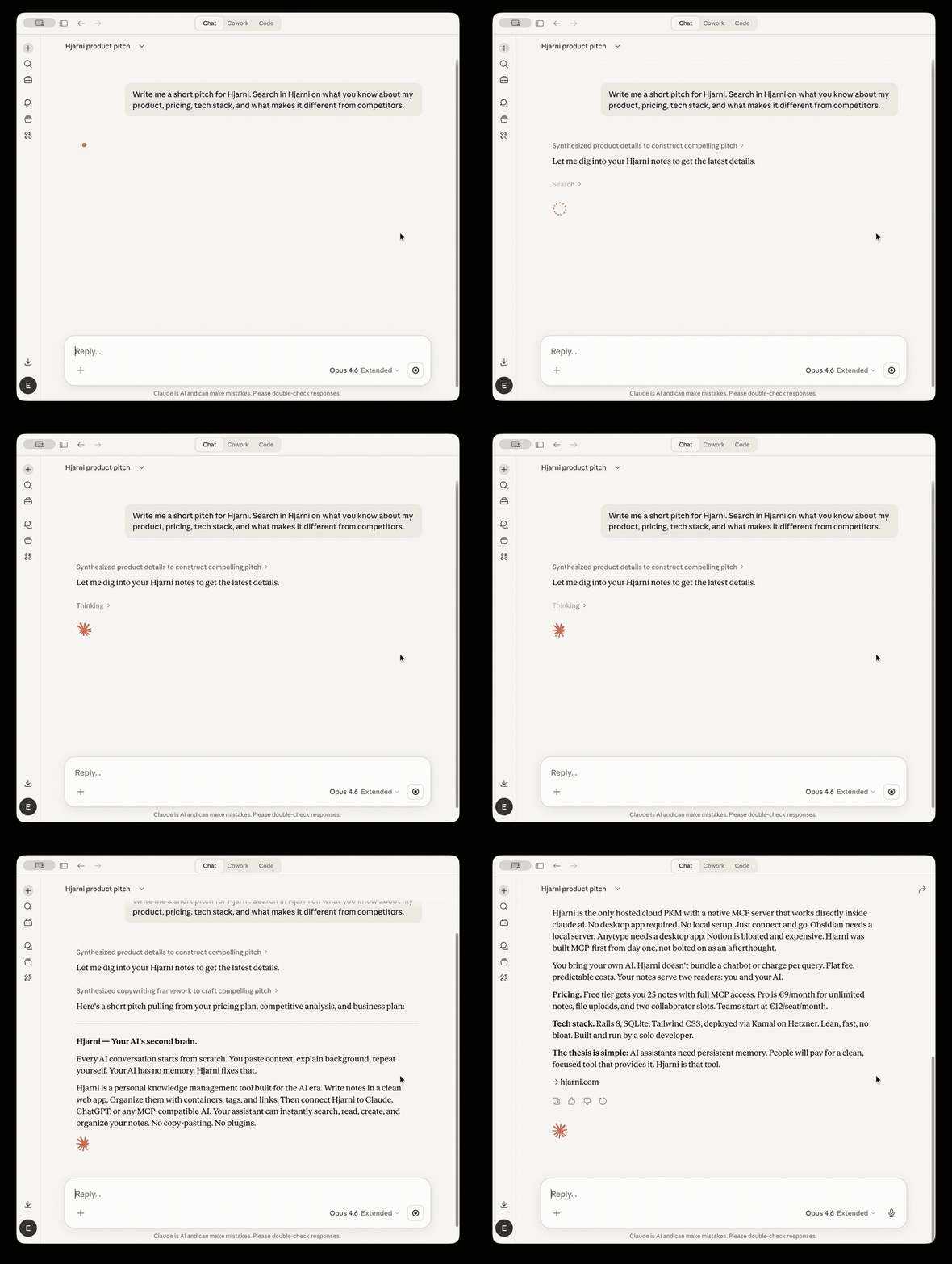
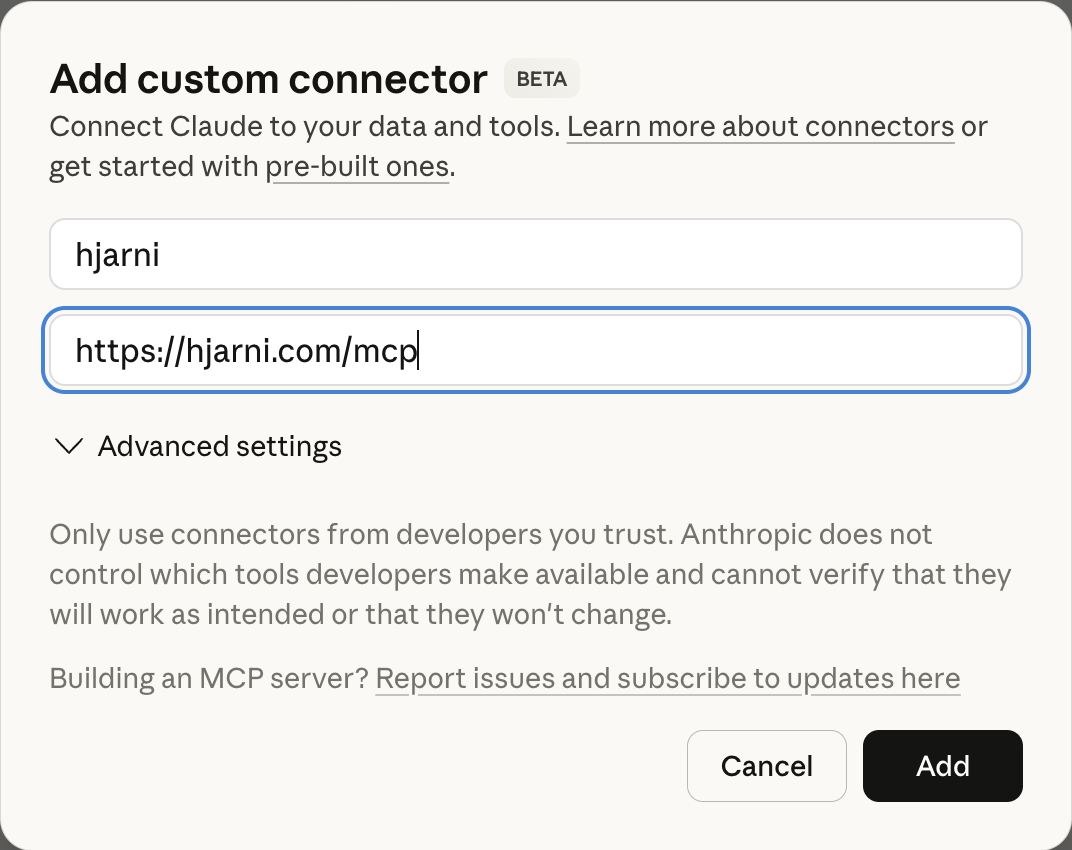 > Connectors are available on all Claude plans (Free is limited to one). On Team and Enterprise, a workspace owner adds the connector first.
### Claude Code
```sh
claude mcp add --transport http hjarni https://hjarni.com/mcp
```
Add `--scope user` to make it available in every project. Then run `/mcp` inside Claude Code to complete the OAuth sign-in.
### ChatGPT
Hjarni is in the ChatGPT Apps Directory: [open the app page](https://chatgpt.com/plugins/plugin_asdk_app_69c3058914bc81919b807c176a7c106c), click **Connect**, and sign in.
Or add it by URL via developer mode:
1. Go to **Settings > Apps > Advanced settings** and enable **Developer mode**
2. Click **Create app**
3. Set the MCP Server URL to `https://hjarni.com/mcp` and authentication to **OAuth**
4. Click **Create** and log in to Hjarni when redirected
> Connectors are available on all Claude plans (Free is limited to one). On Team and Enterprise, a workspace owner adds the connector first.
### Claude Code
```sh
claude mcp add --transport http hjarni https://hjarni.com/mcp
```
Add `--scope user` to make it available in every project. Then run `/mcp` inside Claude Code to complete the OAuth sign-in.
### ChatGPT
Hjarni is in the ChatGPT Apps Directory: [open the app page](https://chatgpt.com/plugins/plugin_asdk_app_69c3058914bc81919b807c176a7c106c), click **Connect**, and sign in.
Or add it by URL via developer mode:
1. Go to **Settings > Apps > Advanced settings** and enable **Developer mode**
2. Click **Create app**
3. Set the MCP Server URL to `https://hjarni.com/mcp` and authentication to **OAuth**
4. Click **Create** and log in to Hjarni when redirected
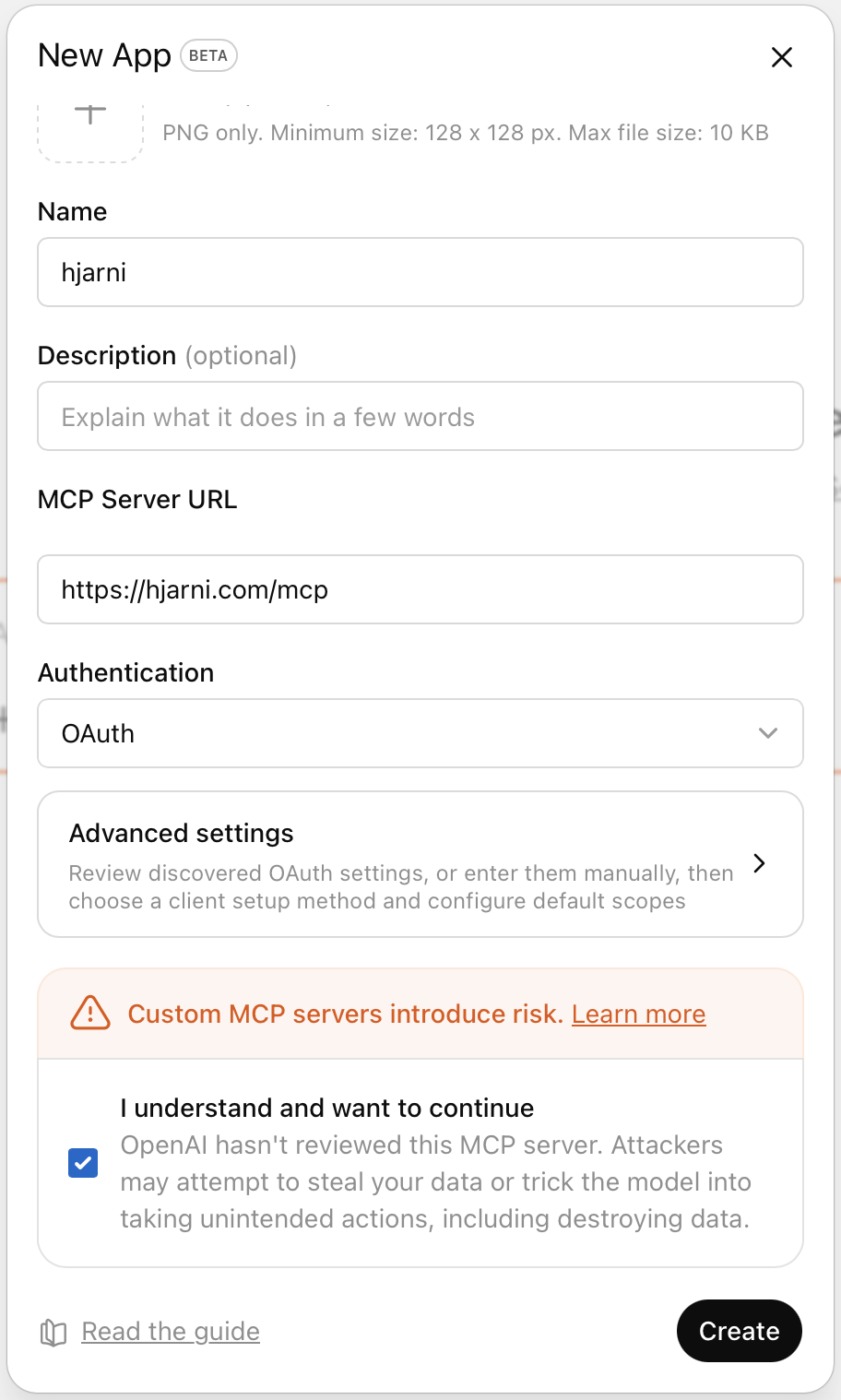 > Requires a paid ChatGPT plan (Plus, Pro, Business, Enterprise, or Education).
### Other MCP clients
Any client that supports streamable HTTP transport can connect. The endpoint is `https://hjarni.com/mcp`. Authentication uses OAuth 2.0 with PKCE. Discovery metadata is at `/.well-known/oauth-authorization-server`.
Setup guides: [Cursor](https://hjarni.com/docs/connect-cursor-mcp) · [Copilot](https://hjarni.com/docs/connect-copilot-mcp) · [Copilot Studio](https://hjarni.com/docs/connect-copilot-studio-mcp) · [Perplexity](https://hjarni.com/docs/connect-perplexity-mcp) · [Raycast](https://hjarni.com/docs/connect-raycast-mcp)
## Available tools
| Tool | Description |
|------|-------------|
| `me` | The connected user's profile, plan, teams, note quota, and onboarding state |
| `dashboard-get` | Overview of the account: counts, recent notes, and recent changes across all spaces |
| `search` | Full-text search across notes, containers, and tags |
| `notes-list` | List notes with filtering by container, tags, and sorting |
| `notes-get` | Read a single note: full body, tags, links, backlinks, files, and inherited AI instructions |
| `notes-create` | Create a new note with title, body, summary, tags, and container placement |
| `notes-update` | Update content, move notes, change tags, archive or favorite |
| `notes-delete` | Move a note to Trash (recoverable for 30 days) |
| `notes-restore` | Restore a note from Trash |
| `notes-history` | Read a note's revision history: who wrote each version, when, and what changed |
| `notes-revert` | Revert a note's body to an earlier revision (appends a new revision, so it can be undone) |
| `containers-list` | List folders for organizing notes |
| `containers-get` | Get a single container with its description and AI instructions |
| `containers-create` | Create new folders |
| `containers-update` | Update a container (rename, move, change description, archive) |
| `containers-permissions` | Set or clear a team member's role on a team container |
| `containers-delete` | Move a folder, its sub-folders, and their notes to Trash (recoverable for 30 days) |
| `containers-restore` | Restore a deleted folder and everything deleted with it |
| `tags-list` | List all tags |
| `tags-create` | Create new tags |
| `tags-manage` | Rename, merge, or delete a tag |
| `links-manage` | Create or remove bidirectional links between notes |
| `instructions-get` | Read AI instructions at brain, personal root, container, or team level |
| `instructions-update` | Update AI instructions at any level (replace or append) |
| `files-attach` | Attach a file to a note (base64) |
| `files-attach_from_url` | Fetch a file from a URL and attach it to a note |
| `files-create_upload_url` | Generate a one-time upload link so the user uploads straight from the browser |
| `files-check_upload` | Check the status of an upload link |
| `files-get_download_url` | Get a temporary download URL for a file |
| `files-remove` | Remove a file attachment |
| `email-addresses-list` | List email capture addresses (Pro) |
| `email-addresses-create` | Create an email capture address: mail sent to it becomes a note (Pro) |
| `teams-list` | List all teams the user is a member of |
| `teams-get` | Get team details including recent notes |
| `teams-create` | Create a new team |
| `teams-invite` | Invite a teammate by email or get a shareable join link |
| `feedback-submit` | Send feedback about Hjarni to the maintainers |
| `nudges-dismiss` | Dismiss a product suggestion the user declined |
### Built-in prompts
The server also exposes MCP prompts for clients that support prompt discovery:
| Prompt | Description |
|--------|-------------|
| `summarize_note` | Summarize a note and suggest tags and related links |
| `weekly_review` | Review recent activity and suggest organization improvements |
| `research_topic` | Synthesize everything in the knowledge base related to a topic |
### MCP Apps
On hosts that support MCP Apps (the `io.modelcontextprotocol/ui` extension, e.g. Claude and ChatGPT), `files-create_upload_url` renders an inline drop-zone so files upload straight into a note from the chat. Other clients get the plain upload link.
## Usage examples
### Research assistant
> "What decisions have I made about the tech stack?"
Claude searches your notes, follows wiki-links between related notes, and synthesizes a summary from multiple sources.
### Quick capture
> "Save this as a note in my Projects folder and tag it"
Claude finds the right container, creates the note with Markdown formatting, adds tags, and links it to related notes.
### Weekly review
> "Help me triage my inbox"
Claude lists unfiled notes, suggests where each belongs based on your folder structure, and moves them with your approval.
### Writing with context
> "Draft a project update using my recent meeting notes"
Claude pulls relevant notes and uses them as source material.
## Features
- **Markdown notes** with full formatting support
- **Wiki-links** (`[[id:Note Title]]`) for cross-referencing
- **Folders** with custom AI instructions per folder
- **Full-text search** across all content
- **Bidirectional linking** between notes
- **Tags** for cross-cutting categorization
- **AI instructions** at brain, folder, and team level
- **Note history** with per-revision attribution (you or which AI client) and revert
- **Trash** with 30-day restore for notes and folders
- **File attachments** on every plan (unlimited on Pro and Teams)
- **Email capture**: give a folder its own email address (Pro)
- **Public sharing**: publish a folder as a read-only page (Pro)
- **Team collaboration** with shared knowledge bases and per-folder roles
- **iPhone, iPad, Mac & Android apps**
- **REST API** for custom integrations
- **Export** your data as Markdown at any time
## MCP server details
| | |
|---|---|
| **Endpoint** | `https://hjarni.com/mcp` |
| **Transport** | Streamable HTTP with JSON-RPC 2.0 |
| **Protocol versions** | `2025-11-25`, `2025-06-18`, `2025-03-26`, and `2024-11-05` |
| **Authentication** | OAuth 2.0 (PKCE) or Bearer token |
| **Capabilities** | Tools, prompts, and UI resources (MCP Apps) |
For the full protocol reference, see the [MCP server docs](https://hjarni.com/docs/mcp).
## Pricing
| Plan | Price | What you get |
|------|-------|--------------|
| **Free** | $0 | 25 notes, containers, tags, search, full MCP & API access, 20 MB across 5 file attachments |
| **Pro** | $12/mo or $120/yr | Unlimited notes and file attachments, email capture, public sharing, share with 2 collaborators |
| **Teams** | $20/seat/mo or $200/seat/yr | Shared knowledge base, team MCP & API, member management, per-folder roles |
Also available in EUR and GBP. [See pricing](https://hjarni.com/pricing).
## Links
- [Website](https://hjarni.com)
- [Docs](https://hjarni.com/docs)
- [Getting started](https://hjarni.com/docs/getting-started)
- [MCP server reference](https://hjarni.com/docs/mcp)
- [REST API reference](https://hjarni.com/docs/api)
- [Claude setup guide](https://hjarni.com/docs/claude)
- [ChatGPT setup guide](https://hjarni.com/docs/chatgpt)
- [Blog](https://hjarni.com/blog)
- [Privacy](https://hjarni.com/privacy)
- [Terms](https://hjarni.com/terms)
## Support
Email [evert@hjarni.com](mailto:evert@hjarni.com).
---
[](https://lobehub.com/mcp/hjarni-hjarni-mcp)
[](https://glama.ai/mcp/connectors/com.hjarni/hjarni)
> Requires a paid ChatGPT plan (Plus, Pro, Business, Enterprise, or Education).
### Other MCP clients
Any client that supports streamable HTTP transport can connect. The endpoint is `https://hjarni.com/mcp`. Authentication uses OAuth 2.0 with PKCE. Discovery metadata is at `/.well-known/oauth-authorization-server`.
Setup guides: [Cursor](https://hjarni.com/docs/connect-cursor-mcp) · [Copilot](https://hjarni.com/docs/connect-copilot-mcp) · [Copilot Studio](https://hjarni.com/docs/connect-copilot-studio-mcp) · [Perplexity](https://hjarni.com/docs/connect-perplexity-mcp) · [Raycast](https://hjarni.com/docs/connect-raycast-mcp)
## Available tools
| Tool | Description |
|------|-------------|
| `me` | The connected user's profile, plan, teams, note quota, and onboarding state |
| `dashboard-get` | Overview of the account: counts, recent notes, and recent changes across all spaces |
| `search` | Full-text search across notes, containers, and tags |
| `notes-list` | List notes with filtering by container, tags, and sorting |
| `notes-get` | Read a single note: full body, tags, links, backlinks, files, and inherited AI instructions |
| `notes-create` | Create a new note with title, body, summary, tags, and container placement |
| `notes-update` | Update content, move notes, change tags, archive or favorite |
| `notes-delete` | Move a note to Trash (recoverable for 30 days) |
| `notes-restore` | Restore a note from Trash |
| `notes-history` | Read a note's revision history: who wrote each version, when, and what changed |
| `notes-revert` | Revert a note's body to an earlier revision (appends a new revision, so it can be undone) |
| `containers-list` | List folders for organizing notes |
| `containers-get` | Get a single container with its description and AI instructions |
| `containers-create` | Create new folders |
| `containers-update` | Update a container (rename, move, change description, archive) |
| `containers-permissions` | Set or clear a team member's role on a team container |
| `containers-delete` | Move a folder, its sub-folders, and their notes to Trash (recoverable for 30 days) |
| `containers-restore` | Restore a deleted folder and everything deleted with it |
| `tags-list` | List all tags |
| `tags-create` | Create new tags |
| `tags-manage` | Rename, merge, or delete a tag |
| `links-manage` | Create or remove bidirectional links between notes |
| `instructions-get` | Read AI instructions at brain, personal root, container, or team level |
| `instructions-update` | Update AI instructions at any level (replace or append) |
| `files-attach` | Attach a file to a note (base64) |
| `files-attach_from_url` | Fetch a file from a URL and attach it to a note |
| `files-create_upload_url` | Generate a one-time upload link so the user uploads straight from the browser |
| `files-check_upload` | Check the status of an upload link |
| `files-get_download_url` | Get a temporary download URL for a file |
| `files-remove` | Remove a file attachment |
| `email-addresses-list` | List email capture addresses (Pro) |
| `email-addresses-create` | Create an email capture address: mail sent to it becomes a note (Pro) |
| `teams-list` | List all teams the user is a member of |
| `teams-get` | Get team details including recent notes |
| `teams-create` | Create a new team |
| `teams-invite` | Invite a teammate by email or get a shareable join link |
| `feedback-submit` | Send feedback about Hjarni to the maintainers |
| `nudges-dismiss` | Dismiss a product suggestion the user declined |
### Built-in prompts
The server also exposes MCP prompts for clients that support prompt discovery:
| Prompt | Description |
|--------|-------------|
| `summarize_note` | Summarize a note and suggest tags and related links |
| `weekly_review` | Review recent activity and suggest organization improvements |
| `research_topic` | Synthesize everything in the knowledge base related to a topic |
### MCP Apps
On hosts that support MCP Apps (the `io.modelcontextprotocol/ui` extension, e.g. Claude and ChatGPT), `files-create_upload_url` renders an inline drop-zone so files upload straight into a note from the chat. Other clients get the plain upload link.
## Usage examples
### Research assistant
> "What decisions have I made about the tech stack?"
Claude searches your notes, follows wiki-links between related notes, and synthesizes a summary from multiple sources.
### Quick capture
> "Save this as a note in my Projects folder and tag it"
Claude finds the right container, creates the note with Markdown formatting, adds tags, and links it to related notes.
### Weekly review
> "Help me triage my inbox"
Claude lists unfiled notes, suggests where each belongs based on your folder structure, and moves them with your approval.
### Writing with context
> "Draft a project update using my recent meeting notes"
Claude pulls relevant notes and uses them as source material.
## Features
- **Markdown notes** with full formatting support
- **Wiki-links** (`[[id:Note Title]]`) for cross-referencing
- **Folders** with custom AI instructions per folder
- **Full-text search** across all content
- **Bidirectional linking** between notes
- **Tags** for cross-cutting categorization
- **AI instructions** at brain, folder, and team level
- **Note history** with per-revision attribution (you or which AI client) and revert
- **Trash** with 30-day restore for notes and folders
- **File attachments** on every plan (unlimited on Pro and Teams)
- **Email capture**: give a folder its own email address (Pro)
- **Public sharing**: publish a folder as a read-only page (Pro)
- **Team collaboration** with shared knowledge bases and per-folder roles
- **iPhone, iPad, Mac & Android apps**
- **REST API** for custom integrations
- **Export** your data as Markdown at any time
## MCP server details
| | |
|---|---|
| **Endpoint** | `https://hjarni.com/mcp` |
| **Transport** | Streamable HTTP with JSON-RPC 2.0 |
| **Protocol versions** | `2025-11-25`, `2025-06-18`, `2025-03-26`, and `2024-11-05` |
| **Authentication** | OAuth 2.0 (PKCE) or Bearer token |
| **Capabilities** | Tools, prompts, and UI resources (MCP Apps) |
For the full protocol reference, see the [MCP server docs](https://hjarni.com/docs/mcp).
## Pricing
| Plan | Price | What you get |
|------|-------|--------------|
| **Free** | $0 | 25 notes, containers, tags, search, full MCP & API access, 20 MB across 5 file attachments |
| **Pro** | $12/mo or $120/yr | Unlimited notes and file attachments, email capture, public sharing, share with 2 collaborators |
| **Teams** | $20/seat/mo or $200/seat/yr | Shared knowledge base, team MCP & API, member management, per-folder roles |
Also available in EUR and GBP. [See pricing](https://hjarni.com/pricing).
## Links
- [Website](https://hjarni.com)
- [Docs](https://hjarni.com/docs)
- [Getting started](https://hjarni.com/docs/getting-started)
- [MCP server reference](https://hjarni.com/docs/mcp)
- [REST API reference](https://hjarni.com/docs/api)
- [Claude setup guide](https://hjarni.com/docs/claude)
- [ChatGPT setup guide](https://hjarni.com/docs/chatgpt)
- [Blog](https://hjarni.com/blog)
- [Privacy](https://hjarni.com/privacy)
- [Terms](https://hjarni.com/terms)
## Support
Email [evert@hjarni.com](mailto:evert@hjarni.com).
---
[](https://lobehub.com/mcp/hjarni-hjarni-mcp)
[](https://glama.ai/mcp/connectors/com.hjarni/hjarni)