# Heroku Code MCP [Health: Active]
**Category:** ☁️ Cloud Platforms
**Repository:** https://github.com/dsouzaAnush/heroku-code-mcp
**GitHub Stars:** 1
**Views:** 0
**Installs:** 0
**Upvotes:** 0
**Directory Page:** https://allmcps.com/mcp/heroku-code-mcp
## Description
Search and execute Heroku Platform API operations
## Claude Desktop Quick Installation
Install path detected from listing signals. Uses `npx` (confidence: high):
```json
"mcpServers": {
"heroku-code-mcp": {
"command": "npx",
"args": ["-y","github"]
}
}
```
## Documentation & README

# Heroku Code MCP
> A compact MCP server for the Heroku Platform API using a Code Mode pattern: `search` + `execute` + `auth_status`.
Heroku Code MCP gives agent clients a small, token-efficient control surface for Heroku operations. Pair it with [Heroku Skills](https://github.com/dsouzaAnush/heroku-skills) when you want workflow guidance, safety checks, and Heroku product context alongside live API tools.
Design references:
- [Cloudflare Code Mode MCP](https://blog.cloudflare.com/code-mode-mcp/)
- [Anthropic: Building Effective Agents](https://www.anthropic.com/engineering/building-effective-agents)
## Quick Start
Default MCP URL: `http://127.0.0.1:3000/mcp`
```bash
git clone https://github.com/dsouzaAnush/heroku-code-mcp.git
cd heroku-code-mcp
npm install
npm run build
npm test
```
Seed auth from the Heroku CLI:
```bash
heroku auth:whoami
npm run seed:token
```
Start the server:
```bash
TOKEN_STORE_PATH=./data/tokens.integration.json \
TOKEN_ENCRYPTION_KEY_BASE64="" \
PORT=3000 HOST=127.0.0.1 npm run dev
```
Smoke test:
```bash
curl -sS http://127.0.0.1:3000/healthz
MCP_URL=http://127.0.0.1:3000/mcp USER_ID=default npm run smoke:mcp
```
Before npm publication, the package can also run from GitHub:
```bash
HOST=127.0.0.1 PORT=3333 \
TOKEN_STORE_PATH="$HOME/.heroku-code-mcp/tokens.json" \
TOKEN_ENCRYPTION_KEY_BASE64="" \
WRITE_CONFIRMATION_SECRET="" \
npx -y github:dsouzaAnush/heroku-code-mcp
```
## Install in Agent Clients
###  Claude Code
Install the companion plugin for skills plus MCP wiring:
```bash
claude plugin marketplace add dsouzaAnush/heroku-plugin
claude plugin install heroku@heroku-plugin
claude plugin enable heroku@heroku-plugin
```
Or add the running MCP server directly:
```bash
claude mcp add \
--transport http \
--scope local \
heroku-code-mcp \
http://127.0.0.1:3000/mcp \
--header "x-user-id: default"
```
### Claude Desktop
Use the HTTP endpoint directly when supported:
```json
{
"mcpServers": {
"heroku-code-mcp": {
"type": "http",
"url": "http://127.0.0.1:3000/mcp",
"headers": {
"x-user-id": "default"
}
}
}
}
```
For Desktop builds that expect stdio servers, bridge through `mcp-remote`:
```json
{
"mcpServers": {
"heroku-code-mcp": {
"command": "npx",
"args": ["-y", "mcp-remote", "http://127.0.0.1:3000/mcp", "--allow-http", "--header", "x-user-id:default"]
}
}
}
```
Build a `.mcpb` bundle with:
```bash
npm run build:mcpb
```
###
Claude Code
Install the companion plugin for skills plus MCP wiring:
```bash
claude plugin marketplace add dsouzaAnush/heroku-plugin
claude plugin install heroku@heroku-plugin
claude plugin enable heroku@heroku-plugin
```
Or add the running MCP server directly:
```bash
claude mcp add \
--transport http \
--scope local \
heroku-code-mcp \
http://127.0.0.1:3000/mcp \
--header "x-user-id: default"
```
### Claude Desktop
Use the HTTP endpoint directly when supported:
```json
{
"mcpServers": {
"heroku-code-mcp": {
"type": "http",
"url": "http://127.0.0.1:3000/mcp",
"headers": {
"x-user-id": "default"
}
}
}
}
```
For Desktop builds that expect stdio servers, bridge through `mcp-remote`:
```json
{
"mcpServers": {
"heroku-code-mcp": {
"command": "npx",
"args": ["-y", "mcp-remote", "http://127.0.0.1:3000/mcp", "--allow-http", "--header", "x-user-id:default"]
}
}
}
```
Build a `.mcpb` bundle with:
```bash
npm run build:mcpb
```
###  Codex
Codex uses [Heroku Plugin](https://github.com/dsouzaAnush/heroku-plugin) for skills and optional MCP wiring:
```bash
codex plugin marketplace add dsouzaAnush/heroku-plugin --ref main
```
Enable `heroku-plugin@heroku-plugin` in the Codex Plugins tab, or add:
```toml
[plugins."heroku-plugin@heroku-plugin"]
enabled = true
```
Run this MCP server on `http://127.0.0.1:3333/mcp` when you want live Heroku API tools through the plugin.
###
Codex
Codex uses [Heroku Plugin](https://github.com/dsouzaAnush/heroku-plugin) for skills and optional MCP wiring:
```bash
codex plugin marketplace add dsouzaAnush/heroku-plugin --ref main
```
Enable `heroku-plugin@heroku-plugin` in the Codex Plugins tab, or add:
```toml
[plugins."heroku-plugin@heroku-plugin"]
enabled = true
```
Run this MCP server on `http://127.0.0.1:3333/mcp` when you want live Heroku API tools through the plugin.
###  Cursor
```bash
git clone https://github.com/dsouzaAnush/heroku-plugin.git
cursor agent --plugin-dir heroku-plugin
```
Add the MCP server to `~/.cursor/mcp.json` or project-local `.cursor/mcp.json`:
```json
{
"mcpServers": {
"heroku-code-mcp": {
"type": "streamable-http",
"url": "http://127.0.0.1:3333/mcp",
"headers": {
"x-user-id": "default"
}
}
}
}
```
### Other MCP Clients
Use streamable HTTP:
```json
{
"mcpServers": {
"heroku-code-mcp": {
"transport": "streamable_http",
"url": "http://127.0.0.1:3000/mcp",
"headers": {
"x-user-id": "default"
}
}
}
}
```
Or bridge to stdio:
```json
{
"mcpServers": {
"heroku-code-mcp": {
"command": "npx",
"args": ["-y", "mcp-remote", "http://127.0.0.1:3000/mcp", "--allow-http", "--header", "x-user-id:default"]
}
}
}
```
## How It Works
| Tool | What it does | Why it exists |
| --- | --- | --- |
| `auth_status` | Reports whether the caller is authenticated with Heroku | Lets agents branch cleanly before API work |
| `search` | Ranks Heroku operations from schema and docs context | Avoids exposing dozens of endpoint-shaped tools up front |
| `execute` | Validates params/body and calls the selected Heroku operation | Gives one deterministic execution path |
Typical flow:
1. Call `auth_status`.
2. Call `search` with natural language intent.
3. Choose one `operation_id`.
4. Call `execute` with `path_params`, `query_params`, and `body`.
5. For writes, run `dry_run=true`, then replay with `confirm_write_token` and `ALLOW_WRITES=true`.
Examples:
```json
{
"query": "list apps",
"limit": 5
}
```
```json
{
"operation_id": "GET /apps"
}
```
```json
{
"operation_id": "PATCH /apps/{app_identity}",
"path_params": {
"app_identity": "my-app"
},
"body": {
"maintenance": true
},
"dry_run": true
}
```
## Safety and Configuration
Mutations (`POST`, `PATCH`, `PUT`, `DELETE`) are blocked by default. To allow a write, set `ALLOW_WRITES=true`, request a dry run, and replay with the returned `confirm_write_token`. Sensitive headers and body fields are redacted.
Key env vars:
- `ALLOW_WRITES`
- `REQUEST_TIMEOUT_MS`
- `MAX_RETRIES`
- `CATALOG_CACHE_PATH`
- `READ_CACHE_TTL_MS`
- `EXECUTE_MAX_BODY_BYTES`
- `EXECUTE_BODY_PREVIEW_CHARS`
Full example: `.env.example`
## Benchmarks
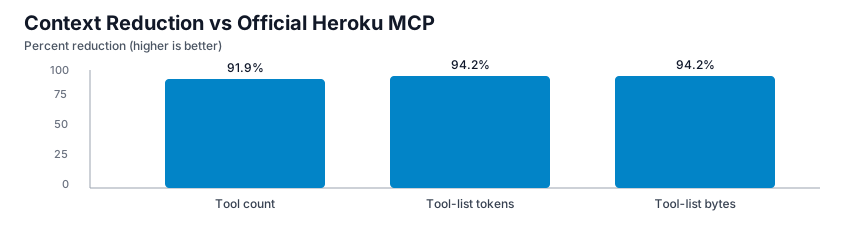
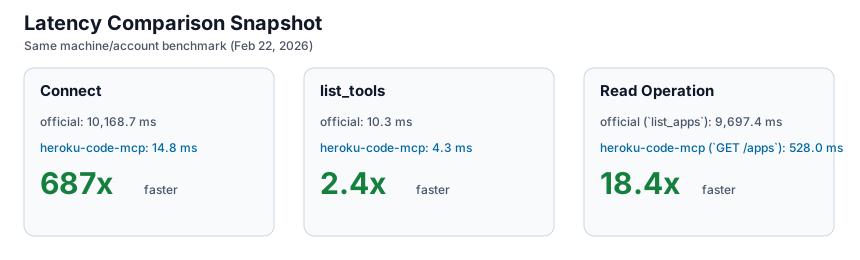
Benchmarks were captured on February 22, 2026 on the same machine and account for both implementations.
| Metric | `heroku-code-mcp` | official Heroku MCP | Delta |
| --- | ---: | ---: | ---: |
| Tool count | 3 | 37 | 91.9% lower |
| Tool-list payload bytes | 1,469 | 25,500 | 94.2% lower |
| Tool-list approx tokens | 368 | 6,375 | 94.2% lower |
| Connect avg | 14.8 ms | 10,168.7 ms | 687x faster |
| `list_tools` avg | 4.3 ms | 10.3 ms | 2.4x faster |
| Read op avg | 528.0 ms (`execute GET /apps`) | 9,697.4 ms (`list_apps`) | 18.4x faster |
Charts:
- 
- 
Full methodology and artifacts live in [`BENCHMARKS.md`](https://github.com/dsouzaAnush/heroku-code-mcp/blob/HEAD/BENCHMARKS.md) and `benchmarks/results/`.
## Development and Release
Validate locally:
```bash
npm run build
npm test
npm run validate:server
npm run publish:dry-run
```
This repo uses free GitHub Actions:
- `validate.yml` runs build, tests, `server.json` validation, and npm pack dry-run on PRs and pushes to `main`.
- `release.yml` runs on `v*` tags, builds the `.mcpb`, updates release `server.json`, creates or updates the GitHub Release, and publishes to the MCP Registry through GitHub OIDC.
- Dependabot checks npm and GitHub Actions dependencies weekly.
Publish manually when needed:
```bash
npm publish --access public
mcp-publisher login github
mcp-publisher publish server.json
```
For CI-based npm publishing, configure npm trusted publishing for repo `dsouzaAnush/heroku-code-mcp` and workflow `release.yml`, then run the release workflow with `publish_npm=true`.
## Repository Layout
- `src/schema/*`: ingestion, operation normalization, and cache
- `src/search/*`: search index and ranking
- `src/execute/*`: validation and Heroku API execution
- `src/auth/*`: OAuth and encrypted token storage
- `tests/*`: catalog, search, and execute tests
- `benchmarks/results/*`: benchmark artifacts
- `server.json`: MCP Registry metadata
## Brand and Troubleshooting
This repo includes the official Heroku wordmark and mark under [`assets`](https://github.com/dsouzaAnush/heroku-code-mcp/blob/HEAD/assets). Use them according to the [Heroku Brand Guidelines](https://devcenter.heroku.com/articles/heroku-brand-guidelines).
Common fixes:
- MCP Inspector connection error: confirm URL `http://127.0.0.1:3000/mcp` and server health.
- `AUTH_REQUIRED`: seed a token or complete OAuth.
- Write blocked: confirm `ALLOW_WRITES=true` and send the dry-run confirmation token.
- Large response body: narrow query scope or lower output caps.
Cursor
```bash
git clone https://github.com/dsouzaAnush/heroku-plugin.git
cursor agent --plugin-dir heroku-plugin
```
Add the MCP server to `~/.cursor/mcp.json` or project-local `.cursor/mcp.json`:
```json
{
"mcpServers": {
"heroku-code-mcp": {
"type": "streamable-http",
"url": "http://127.0.0.1:3333/mcp",
"headers": {
"x-user-id": "default"
}
}
}
}
```
### Other MCP Clients
Use streamable HTTP:
```json
{
"mcpServers": {
"heroku-code-mcp": {
"transport": "streamable_http",
"url": "http://127.0.0.1:3000/mcp",
"headers": {
"x-user-id": "default"
}
}
}
}
```
Or bridge to stdio:
```json
{
"mcpServers": {
"heroku-code-mcp": {
"command": "npx",
"args": ["-y", "mcp-remote", "http://127.0.0.1:3000/mcp", "--allow-http", "--header", "x-user-id:default"]
}
}
}
```
## How It Works
| Tool | What it does | Why it exists |
| --- | --- | --- |
| `auth_status` | Reports whether the caller is authenticated with Heroku | Lets agents branch cleanly before API work |
| `search` | Ranks Heroku operations from schema and docs context | Avoids exposing dozens of endpoint-shaped tools up front |
| `execute` | Validates params/body and calls the selected Heroku operation | Gives one deterministic execution path |
Typical flow:
1. Call `auth_status`.
2. Call `search` with natural language intent.
3. Choose one `operation_id`.
4. Call `execute` with `path_params`, `query_params`, and `body`.
5. For writes, run `dry_run=true`, then replay with `confirm_write_token` and `ALLOW_WRITES=true`.
Examples:
```json
{
"query": "list apps",
"limit": 5
}
```
```json
{
"operation_id": "GET /apps"
}
```
```json
{
"operation_id": "PATCH /apps/{app_identity}",
"path_params": {
"app_identity": "my-app"
},
"body": {
"maintenance": true
},
"dry_run": true
}
```
## Safety and Configuration
Mutations (`POST`, `PATCH`, `PUT`, `DELETE`) are blocked by default. To allow a write, set `ALLOW_WRITES=true`, request a dry run, and replay with the returned `confirm_write_token`. Sensitive headers and body fields are redacted.
Key env vars:
- `ALLOW_WRITES`
- `REQUEST_TIMEOUT_MS`
- `MAX_RETRIES`
- `CATALOG_CACHE_PATH`
- `READ_CACHE_TTL_MS`
- `EXECUTE_MAX_BODY_BYTES`
- `EXECUTE_BODY_PREVIEW_CHARS`
Full example: `.env.example`
## Benchmarks
Benchmarks were captured on February 22, 2026 on the same machine and account for both implementations.
| Metric | `heroku-code-mcp` | official Heroku MCP | Delta |
| --- | ---: | ---: | ---: |
| Tool count | 3 | 37 | 91.9% lower |
| Tool-list payload bytes | 1,469 | 25,500 | 94.2% lower |
| Tool-list approx tokens | 368 | 6,375 | 94.2% lower |
| Connect avg | 14.8 ms | 10,168.7 ms | 687x faster |
| `list_tools` avg | 4.3 ms | 10.3 ms | 2.4x faster |
| Read op avg | 528.0 ms (`execute GET /apps`) | 9,697.4 ms (`list_apps`) | 18.4x faster |
Charts:
- 
- 
Full methodology and artifacts live in [`BENCHMARKS.md`](https://github.com/dsouzaAnush/heroku-code-mcp/blob/HEAD/BENCHMARKS.md) and `benchmarks/results/`.
## Development and Release
Validate locally:
```bash
npm run build
npm test
npm run validate:server
npm run publish:dry-run
```
This repo uses free GitHub Actions:
- `validate.yml` runs build, tests, `server.json` validation, and npm pack dry-run on PRs and pushes to `main`.
- `release.yml` runs on `v*` tags, builds the `.mcpb`, updates release `server.json`, creates or updates the GitHub Release, and publishes to the MCP Registry through GitHub OIDC.
- Dependabot checks npm and GitHub Actions dependencies weekly.
Publish manually when needed:
```bash
npm publish --access public
mcp-publisher login github
mcp-publisher publish server.json
```
For CI-based npm publishing, configure npm trusted publishing for repo `dsouzaAnush/heroku-code-mcp` and workflow `release.yml`, then run the release workflow with `publish_npm=true`.
## Repository Layout
- `src/schema/*`: ingestion, operation normalization, and cache
- `src/search/*`: search index and ranking
- `src/execute/*`: validation and Heroku API execution
- `src/auth/*`: OAuth and encrypted token storage
- `tests/*`: catalog, search, and execute tests
- `benchmarks/results/*`: benchmark artifacts
- `server.json`: MCP Registry metadata
## Brand and Troubleshooting
This repo includes the official Heroku wordmark and mark under [`assets`](https://github.com/dsouzaAnush/heroku-code-mcp/blob/HEAD/assets). Use them according to the [Heroku Brand Guidelines](https://devcenter.heroku.com/articles/heroku-brand-guidelines).
Common fixes:
- MCP Inspector connection error: confirm URL `http://127.0.0.1:3000/mcp` and server health.
- `AUTH_REQUIRED`: seed a token or complete OAuth.
- Write blocked: confirm `ALLOW_WRITES=true` and send the dry-run confirmation token.
- Large response body: narrow query scope or lower output caps.