# HasanJahidul/terminal-history-mcp [Health: Active]
**Category:** 🖥️ Command Line
**Repository:** https://github.com/HasanJahidul/terminal-history-mcp
**GitHub Stars:** 4
**npm Downloads (last month):** 447
**Views:** 1
**Installs:** 0
**Upvotes:** 0
**Directory Page:** https://allmcps.com/mcp/hasanjahidul-terminal-history-mcp
## Description
Full-text search over your shell history (zsh / bash / fish) via SQLite FTS5. Local-only. 11-pattern secret redaction runs BEFORE insert. Captures cwd / exit code / duration via opt-in shell hook. Tools: searchhistory, recentindir, failedcommands, commandchains, reindex.
## Tools
Capabilities this server exposes over MCP:
- **reindex** — Re-parses the local shell history files (`~/.zsh_history`, `~/.bash_history`) and the hook's extended log into the SQLite index. Idempotent — already-indexed commands are skipped by hash, so it is safe to call repeatedly. Run it after a burst of shell activity to make recent commands searchable. Reads only local files; writes only to `~/.terminal-history-mcp/`. Takes no arguments. Returns counts of parsed / inserted / skipped entries.
- **search_history** — Read-only. Full-text search (SQLite FTS5, stemmed, Unicode-aware) over all indexed shell commands. Supports keyword and prefix queries — e.g. `docker build`, `git reb*`. Returns the most recent matches first, each with timestamp, shell, cwd, and exit code when available. Local index only; nothing is sent anywhere. If a query returns nothing you may need `reindex` first.
- **recent_in_dir** — Read-only. Lists the most recent commands that were run with a given working directory — answers "what was I doing in this project?". Requires the shell hook to have been installed (legacy entries have no cwd and won't appear). Returns newest first with timestamps and exit codes. Local index only.
- **failed_commands** — Read-only. Lists recent commands that exited non-zero — a quick "what just broke?" feed. Optionally restrict to commands after a given epoch-millisecond timestamp. Requires the shell hook for exit-code capture (legacy entries have no exit code). Newest first. Local index only.
- **command_chains** — Read-only. For each command matching `query`, returns the commands run within a time window around it (default ±5 min) — surfacing multi-step sequences like `cd → npm run build → deploy`. Useful for reconstructing "how did I do X last time?". Returns up to `limit` chains, each a time-ordered list of command rows. Local index only.
## Claude Desktop Quick Installation
Install path detected from listing signals. Uses `npx` (confidence: high):
```json
"mcpServers": {
"terminal-history-mcp": {
"command": "npx",
"args": ["-y","mcpize"]
}
}
```
## Documentation & README
# terminal-history-mcp
[](https://mcpize.com/mcp/terminal-history)
[](https://mcp.so/server/terminal-history-mcp/HasanJahidul)
[](https://glama.ai/mcp/servers/HasanJahidul/terminal-history-mcp)
[](https://github.com/HasanJahidul/terminal-history-mcp/actions/workflows/ci.yml)
[](https://www.npmjs.com/package/terminal-history-mcp)
[](LICENSE)
Search your shell history (zsh / bash / fish) from Claude Code, Cline, Cursor, Zed, or any MCP client. Local-only. SQLite FTS5. Secret-redacted before storage.
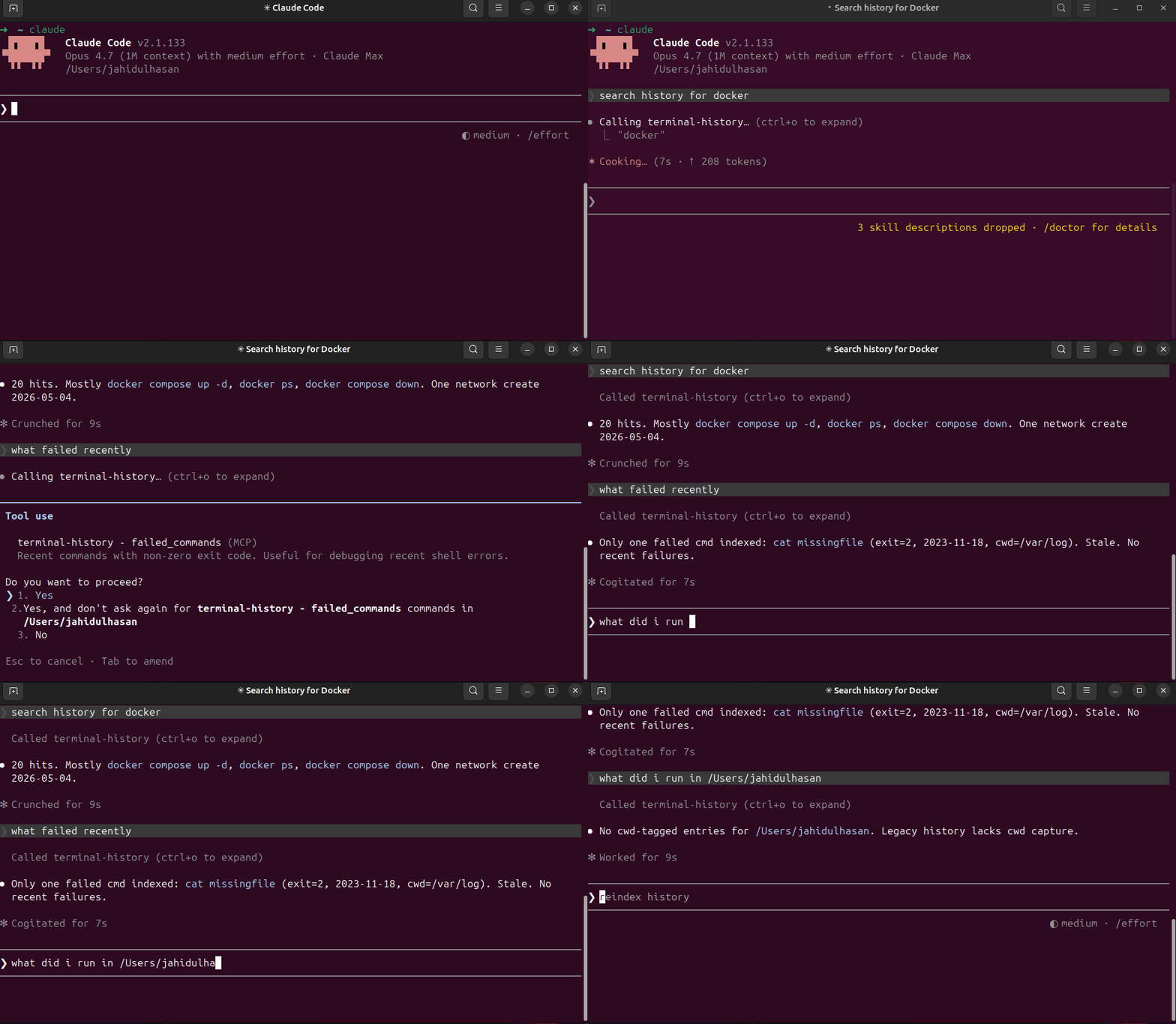
## What you can ask
- *"When did I last ssh into the staging server?"*
- *"Show recent failed commands."*
- *"What did I run yesterday in `/etc/nginx`?"*
- *"What's that long docker compose flag I used 3 weeks ago?"*
- *"Show command chains around `kubectl apply`."*
## Install
```bash
npm install -g terminal-history-mcp
terminal-history-mcp index # one-time backfill from existing history
```
(Or run from a clone: `git clone … && npm install && npm run build && npm link`.)
### Wire to Claude Code
```bash
claude mcp add --scope user terminal-history -- terminal-history-mcp
claude mcp list
```
### Wire to other MCP clients
Anywhere that takes a stdio MCP server config:
```json
{
"mcpServers": {
"terminal-history": {
"command": "terminal-history-mcp"
}
}
}
```
## Connect via MCPize
Use this MCP server instantly with no local installation:
```bash
npx -y mcpize connect @HasanJahidul/terminal-history --client claude
```
Or connect at: **https://mcpize.com/mcp/terminal-history**
## Capture cwd + exit code (recommended)
By default zsh/bash history files store only the command. To unlock `recent_in_dir` and `failed_commands`, install the shell hook:
```bash
terminal-history-mcp install-hook zsh # or bash, or fish
exec $SHELL # reload
```
The hook appends pipe-delimited lines to `~/.terminal-history-mcp/extended.log`. Reindex picks them up.
To inspect the snippet first:
```bash
terminal-history-mcp print-hook zsh
```
To remove:
```bash
terminal-history-mcp uninstall-hook zsh
```
## Tools
| Tool | What it does |
|------|--------------|
| `search_history(query, limit)` | FTS5 keyword + prefix match across all history |
| `recent_in_dir(cwd, limit)` | Last N commands in a working dir (needs hook) |
| `failed_commands(since_ts_ms, limit)` | Commands with non-zero exit (needs hook) |
| `command_chains(query, window_ms, limit)` | For each match, list commands within ±5 min |
| `reindex` | Re-parse history files + extended log |
## Privacy
Everything is local. The DB lives at `~/.terminal-history-mcp/history.db`. Nothing is uploaded.
Secrets are scrubbed **before** insert. Detected patterns:
- GitHub PATs (`ghp_*`, `gho_*`, …)
- OpenAI keys (`sk-*`)
- Slack tokens (`xox[baprs]-*`)
- AWS access keys (`AKIA…`)
- `Authorization: Bearer/Basic `
- `X-*-Token: …`, `X-*-Key: …`, `X-*-Secret: …` headers
- Env vars containing `TOKEN` / `KEY` / `SECRET` / `PASSWORD` / `API_KEY`
- CLI flags `--token=…`, `--api-key …`, `-k …`
- URL basic-auth `https://user:pass@host`
- JWTs (`eyJ.*.*`)
If you find a leak, please open an issue. To wipe and re-index after upgrading patterns:
```bash
rm ~/.terminal-history-mcp/history.db*
terminal-history-mcp index
```
## Development
```bash
git clone https://github.com/hasanjahidul/terminal-history-mcp
cd terminal-history-mcp
npm install
npm run build
npm test
```
## License
MIT — see [LICENSE](https://github.com/HasanJahidul/terminal-history-mcp/blob/HEAD/LICENSE).