# gaoharimran29-glitch/Cybersecurity-MCP-Server [Health: Active]
**Category:** 🔒 Security
**Repository:** https://github.com/gaoharimran29-glitch/Cybersecurity-MCP-Server
**GitHub Stars:** 25
**Views:** 2
**Installs:** 0
**Upvotes:** 0
**Directory Page:** https://allmcps.com/mcp/gaoharimran29-glitch-cybersecurity-mcp-server
## Description
Cybersecurity reconnaissance server for Claude. WHOIS lookup, DNS enumeration with subdomain brute-forcing, Nmap port scanning with service detection, SSL/TLS certificate inspection, technology stack fingerprinting, CVE lookup, and IP reputation checking. Runs fully locally via FastMCP.
## Tools
Capabilities this server exposes over MCP:
- **ssl_inspect** — SSL/TLS certificate — issuer, expiry, cipher strength, SANs, TLS version
- **email_security_check** — Checks SPF, DKIM, and DMARC DNS records — returns a security_score, rating, and actionable recommendations for missing or weak configurations
- **tech_stack_detect** — Web server, CMS, JS frameworks, CDN, and analytics
- **cert_transparency** — Query crt.sh Certificate Transparency logs for a domain and extract certificate, subdomain, and wildcard information
- **asn_lookup** — Autonomous System Number (ASN) and network ownership lookup via Team Cymru WHOIS — identifies ASN, BGP prefix, organization, registry, country, and allocation date for domains or IP addresses (no API key required)
- **ip_reputation** — Check if an IP is flagged as malicious via AbuseIPDB (api key requied)
- **headers_analyzer** — Analyzes HTTP security headers — checks HSTS, CSP, X-Frame-Options, and more with severity ratings and misconfiguration details
- **full_recon** — Runs all core tools in parallel and returns combined result
- **cve_lookup** — Search NVD for known CVEs by software name and version (no API key required)
- **cloud_exposure_check** — Checks for publicly accessible AWS S3, Azure Blob Storage, and Google Cloud Storage buckets using common bucket naming patterns derived from the target domain
- **trace_redirects** — Traces the full HTTP redirect chain hop by hop — flags TLS downgrades, private-IP leaks, redirect loops, cross-domain hops, and overly long chains
- **robots_txt_inspect** — Fetch and parse robots.txt to reveal hidden directories and sitemaps
- **hibp_check** — Check if an email or domain appears in Have I Been Pwned breaches (HIBP_API_KEY required)
- **subdomain_takeover** — Detect dangling DNS records that may leave subdomains vulnerable to takeover across supported cloud and SaaS providers
## Claude Desktop Quick Installation
Heuristic fallback — verify the package name and runner against the repository README before running it. Uses `npx` (confidence: low):
```json
"mcpServers": {
"cybersecurity-mcp-server": {
"command": "npx",
"args": ["-y","gaoharimran29-glitch-cybersecurity-mcp-server"],
"env": {
"ABUSEIPDB_API_KEY": "",
"HIBP_API_KEY": ""
}
}
}
```
**Requires environment variables:** `ABUSEIPDB_API_KEY`, `HIBP_API_KEY` — the values above are empty placeholders; fill in real credentials before running (see the repository for what each one is for).
## Documentation & README
A high-performance Model Context Protocol (MCP) server that brings real-time cybersecurity reconnaissance, attack surface mapping, and automated OSINT telemetry directly to AI agents.
---
## 📚 Table of Contents
- [Overview](#-overview)
- [Features](#-features)
- [Tools & Prompts](#️-tools--prompts)
- [Demo](#-demo)
- [Prerequisites](#-prerequisites)
- [Installation](#️-installation)
- [Usage](#-usage)
- [Examples](#-examples)
- [Registries & Ecosystem](#-registries--ecosystem)
- [LLM Client Behavior & Security Considerations](#-llm-client-behavior--security-considerations)
- [Legal & Ethical Usage](#️-legal--ethical-usage)
- [Known Limitations](#-known-limitations)
- [Project Structure](#️-project-structure)
- [Roadmap & Discussions](#️-roadmap--discussions)
- [Contributing](#-contributing)
- [License](#-license)
- [Author](#-author)
---
## 🌐 Overview
Modern Large Language Models (LLMs) operate in sandboxed, non-deterministic execution environments devoid of native raw-socket access, packet crafting abilities, and live network reconnaissance primitives. When tasked with auditing an attack surface, AI agents are fundamentally constrained by static training cutoff boundaries and an inability to query live network interfaces.
**AynOps bridges this operational divide.** Built on top of the **Model Context Protocol (MCP)** specification using the `FastMCP` framework, AynOps exposes an extensible suite of deterministic cybersecurity reconnaissance tools directly to LLM agents (such as Cursor, VS Code, Claude Desktop, and custom MCP clients) over a standard JSON-RPC 2.0 `stdio` transport.
```
┌───────────────────────────┐ JSON-RPC 2.0 (stdio) ┌────────────────────────────────────────────────────────┐
│ AI / LLM Client │ ◄──────────────────────────────────► │ AynOps MCP Server │
│ (Cursor, VS Code, Claude) │ │ (Local Daemon) │
└───────────────────────────┘ └──────────────────────────┬─────────────────────────────┘
│
┌───────────────────────────────────────────────────────────┴──────────────────────────────┐
▼ ▼ ▼
┌──────────────────────────┐ ┌──────────────────────────┐ ┌──────────────────────────┐
│ Active Network │ │ DNS & OSINT │ │ Web & Cloud Audits │
│ • Nmap Port Scanner │ │ • Authoritative WHOIS │ │ • SSL/TLS X.509 Parser │
│ • Team Cymru ASN BGP │ │ • dnspython Resolver │ │ • HTTP Headers Linting │
│ • AbuseIPDB Threat Intel│ │ • crt.sh CT Log Parser │ │ • Multi-Cloud Storage │
└──────────────────────────┘ │ • Subdomain Takeover │ │ • Redirect Hop Tracer │
└──────────────────────────┘ └──────────────────────────┘
```
### Architectural Highlights
- **🔒 Local-First & Zero-Telemetry Egress**: AynOps runs entirely as a local daemon on your host or isolated container. Target queries, raw IP telemetry, and internal host details never transit through external telemetry collectors.
- **⚡ Wave-Based Concurrent Pipeline**: Orchestrates complex reconnaissance tasks through an intelligent 3-wave async execution model, resolving foundational network primitives in parallel before dispatching dependent service, web, and threat intelligence probes.
- **🧠 Unified Heuristic Signal Extraction**: Raw outputs from heterogeneous utilities (Nmap, dnspython, cryptography, socket APIs) are parsed and normalized into structured threat signals (`tools/signals/`) designed for direct ingestion by LLM reasoning layers.
- **🛠️ Standardized MCP Tool & Prompt Primitives**: Fully compliant with the official Model Context Protocol standard, packaging ready-to-use tool declarations and meta-prompts (`threat_analysis`) for automated threat modeling workflows.
---
## ⚡ Features
AynOps is engineered from the ground up for cybersecurity engineers, red/blue teams, and security researchers seeking deterministic automation:
- 🔒 **100% Local-First Execution**: Self-hosted local daemon with zero telemetry leaks, preserving target confidentiality.
- ⚡ **3-Wave Asynchronous Recon Engine**: Parallelized execution pipeline reducing end-to-end full recon duration by up to 70%.
- 🧠 **Structured Heuristic Signal Extraction**: Translates raw terminal outputs into normalized, machine-readable threat telemetry.
- 🌐 **Comprehensive Perimeter Mapping**: Authoritative WHOIS (RFC 3912), comprehensive DNS RR resolution, and multi-threaded dictionary subdomain brute-forcing.
- 📜 **Certificate Transparency Log Extraction**: Real-time querying of `crt.sh` append-only Merkle trees for passive subdomain and wildcard SSL discovery.
- 🛡️ **Dangling DNS & Subdomain Takeover Detection**: Resolves CNAME pointers against signatures for 8+ cloud providers (AWS S3, Azure, GitHub Pages, Heroku, Shopify, Fastly, Ghost, Pantheon) with active HTTP verification probing.
- ☁️ **Multi-Cloud Storage Bucket Auditing**: Generates domain keyword permutations and checks for unauthenticated public access across AWS S3, Azure Blob Storage, and Google Cloud Storage.
- 📧 **RFC-Compliant Email Security Assessment**: Audits SPF (`v=spf1`), DKIM selectors, and DMARC enforcement policies (`p=reject`/`quarantine`/`none`) with quantitative scoring (0–100).
- 🔍 **Multi-Layer Web Technology Fingerprinting**: 4-layer non-intrusive technology identification engine — HTTP response headers (`Server`, `X-Powered-By`, CDN markers), `Set-Cookie` cookie names, `` tag parsing, and HTML/asset-path substring matching — returning structured detections with confidence scores (0–100) and evidence strings.
- 🔀 **Deep HTTP Redirect Chain & TLS Downgrade Tracer**: Hop-by-hop 3xx status analysis detecting SSL stripping, RFC 1918 internal IP address leaks, redirect loops, and cross-domain hops.
- 🎯 **Real-Time NIST NVD v2 CVE Querying**: Direct REST API integration with NIST National Vulnerability Database for CVSS v3.1/v2 base scores, CWE vectors, and exploit references without requiring API keys.
- 🤖 **Cognitive Threat Analysis Meta-Prompt**: Native MCP prompt template converting raw scan telemetry into prioritized vulnerability matrices and remediation roadmaps.
- 📦 **Container-Ready Architecture**: Bundles a production-ready `Dockerfile` with pre-installed Nmap and Python 3.12 for zero-dependency stdio deployment.
---
## 🛠️ Tools & Prompts
AynOps provides **17 specialized reconnaissance tools** alongside structured MCP prompt templates.
### 1. Multi-Wave Automated Reconnaissance Pipeline (`full_recon`)
The `full_recon` tool orchestrates a 3-wave concurrent pipeline designed to minimize scan latency while preserving dependency order across tools:
```
Target Domain
│
├──► [Wave 1: Base Perimeter] ──► whois_lookup + dns_enumeration + ssl_inspect + email_security_check + asn_lookup
│
├──► [Wave 2: Service & Web] ──► port_scan (service) + tech_stack_detect + headers_analyzer + cert_transparency
│
└──► [Wave 3: Threat Feeds] ──► ip_reputation (AbuseIPDB - dynamically bound to resolved IP address)
│
▼
Signal Aggregator (tools/signals/) ──► Unified Heuristic Security Telemetry Payload
```
### 2. Core Reconnaissance Tool Inventory (Included in `full_recon`)
> **Documentation status:** Detailed reference pages are currently available for tools marked **Available**. Tools marked **Pending** are implemented and included in the inventory, but their dedicated documentation pages are not yet available.
| Tool | Parameters | Underlying Mechanics / Standards | Telemetry Output | Docs |
|---|---|---|---|:---:|
| [`whois_lookup`](https://github.com/gaoharimran29-glitch/Cybersecurity-MCP-Server/blob/HEAD/docs/tools/whois_lookup.md) | `domain: str` | RFC 3912 socket lookup via `python-whois` | Registrar metadata, registration/update/expiry timestamps, nameservers, registrant organization, and ICANN domain status codes. | [Available](https://github.com/gaoharimran29-glitch/Cybersecurity-MCP-Server/blob/HEAD/docs/tools/whois_lookup.md) |
| [`dns_enumeration`](https://github.com/gaoharimran29-glitch/Cybersecurity-MCP-Server/blob/HEAD/docs/tools/dns_enumeration.md) | `domain: str` | Multi-record DNS resolver (`dnspython`) + concurrent dictionary brute-forcing | Core Resource Records (`A`, `AAAA`, `MX`, `NS`, `TXT`, `CNAME`, `SOA`, `CAA`), enterprise SRV records (`_sip`, `_ldap`, `_xmpp-server`, `_kerberos`, `_autodiscover`), and active subdomains. | [Available](https://github.com/gaoharimran29-glitch/Cybersecurity-MCP-Server/blob/HEAD/docs/tools/dns_enumeration.md) |
| [`port_scan`](https://github.com/gaoharimran29-glitch/Cybersecurity-MCP-Server/blob/HEAD/docs/tools/port_scan.md) | `target: str`
`scan_type: str`
`timeout: int` | Nmap integration via `python-nmap` with configurable profiles | Port state (`open`/`filtered`), service banner detection (`-sV`), OS fingerprinting (`-O`), full-port scanning (`-p-`), and Nmap Scripting Engine vulnerability checks (`--script vuln`). | [Available](https://github.com/gaoharimran29-glitch/Cybersecurity-MCP-Server/blob/HEAD/docs/tools/port_scan.md) |
| [`ssl_inspect`](https://github.com/gaoharimran29-glitch/Cybersecurity-MCP-Server/blob/HEAD/docs/tools/ssl_inspect.md) | `domain: str`
`port: int = 443` | Direct TLS handshake & X.509 certificate parsing via `cryptography` | Certificate subject, issuer, serial number, validity window, days to expiration, Subject Alternative Names (SANs), negotiated cipher suite, and TLS protocol version; wildcard and self-signed detection, public key algorithm (`RSA`, `ECDSA`, `Ed25519`, …), TLS and cipher strength classification (`Strong`/`Good`/`Weak`), weak-version and weak-cipher flags, certificate status (`Healthy`/`Expiring Soon`/`Expired`), an overall security rating (`Excellent`/`Good`/`Fair`/`Poor`) with point-based scoring, and certificate extension URLs (OCSP, CA Issuer, CRL). | [Available](https://github.com/gaoharimran29-glitch/Cybersecurity-MCP-Server/blob/HEAD/docs/tools/ssl_inspect.md) |
| [`email_security_check`](https://github.com/gaoharimran29-glitch/Cybersecurity-MCP-Server/blob/HEAD/docs/tools/email_security_check.md) | `domain: str` | DNS record validation against RFC 7208, RFC 6376, and RFC 7489 | SPF record parsing (`v=spf1`), DKIM selector probing, DMARC enforcement policy evaluation (`p=reject`/`quarantine`/`none`), anti-spoofing score (0–100), and remediation guidance. | [Available](https://github.com/gaoharimran29-glitch/Cybersecurity-MCP-Server/blob/HEAD/docs/tools/email_security_check.md) |
| `tech_stack_detect` | `domain: str` | 4-layer engine: HTTP headers · `Set-Cookie` cookies · `` · HTML/asset-path substrings — with HTTPS → HTTP fallback and 512 KB body cap | Structured detections with confidence scores and evidence strings across 6 categories: web servers (nginx, Apache, IIS, Caddy), programming languages (PHP, Python, Ruby, Java, ASP.NET), CMS platforms (WordPress, Drupal, Joomla, Shopify, Wix, Ghost, Webflow, Magento), JS frameworks (React, Vue, Angular, Next.js, Nuxt.js, Svelte, jQuery, Bootstrap, Tailwind), CDN/hosting (Cloudflare, Fastly, Akamai, Vercel, Netlify, AWS CloudFront, Azure, GCP), and analytics (GA, GTM, Hotjar, Mixpanel, Segment, Facebook Pixel, Plausible, Matomo). | Pending |
| `cert_transparency` | `domain: str` | Append-only public Merkle tree log querying via `crt.sh` | Discovered subdomains, wildcard certificates, historical TLS certificate issuance records, and Certificate Authority log metadata without active target scanning. | Pending |
| `asn_lookup` | `target: str` | Team Cymru IP-to-ASN WHOIS service over TCP port 43 | Autonomous System Number (ASN), BGP routing prefix, AS organization name, allocation registry (ARIN, RIPE, APNIC, LACNIC, AFRINIC), country code, and allocation date. | Pending |
| `ip_reputation` | `ip_address: str` | AbuseIPDB v2 REST API integration *(Requires API Key)* | Abuse confidence score (0–100%), total distinct abuse reports, usage classification (Data Center, ISP, Commercial), ISP metadata, and malicious activity classifications. | Pending |
| `headers_analyzer` | `domain: str` | HTTP/HTTPS response header linting against modern web security standards | Evaluation of `Strict-Transport-Security` (HSTS), `Content-Security-Policy` (CSP), `X-Frame-Options`, `X-Content-Type-Options`, `Referrer-Policy`, `Permissions-Policy`, and Cross-Origin isolation headers with severity ratings. | Pending |
| `full_recon` | `domain: str` | Multi-wave async execution of all 10 core reconnaissance engines | Aggregated, structured telemetry payload cross-correlating domain ownership, network infrastructure, host services, TLS configurations, and security headers. | Pending |
### 3. Standalone Offensive Tools
| Tool | Parameters | Underlying Mechanics / Standards | Telemetry Output | Docs |
|---|---|---|---|:---:|
| `cve_lookup` | `software: str`
`version: str` | NIST National Vulnerability Database (NVD) v2 REST API interface | Known CVE IDs, CVSS v3.1 / v2 base severity scores, vector strings, CWE classifications, vulnerability summaries, and official exploit/advisory references. *(No API key required)* | Pending |
| `cloud_exposure_check` | `domain: str` | Keyword permutation & unauthenticated HTTP bucket probing | Publicly accessible AWS S3 buckets (`s3.amazonaws.com`), Azure Blob Storage containers (`blob.core.windows.net`), and Google Cloud Storage buckets (`storage.googleapis.com`). | Pending |
| `trace_redirects` | `url: str` | Hop-by-hop HTTP 3xx redirect chain tracer (RFC 7231) | Complete redirect trajectory, status codes (301, 302, 307, 308), TLS protocol downgrades (HTTPS → HTTP), RFC 1918 private IP address leaks, redirect loops, and cross-domain hops. | Pending |
| `robots_txt_inspect` | `domain: str` | HTTP retrieval & standards-compliant `robots.txt` directive parsing | Disallowed endpoints, administrative consoles, hidden staging/API routes, crawl-delay parameters, and declared XML sitemap paths. | Pending |
| `subdomain_takeover` | `domain: str` | Bounded CNAME-chain resolution + cloud provider fingerprint matching + HTTP probe confirmation | Identifies dangling DNS pointers mapped to de-provisioned cloud infrastructure (GitHub Pages, Heroku, AWS S3, Azure App Services, Ghost, Shopify, Fastly, Pantheon), with each traversed chain returned in `cname_chains`. | Pending |
| `hibp_check` | `query: str` | Have I Been Pwned (HIBP) API v3 integration *(Requires API Key)* | Compromised domain and email accounts across public data breaches, paste-site exposures, compromised data classes, and breach timeline statistics. | Pending |
### 4. Specialized AI Prompt Templates
| Prompt | Context Tool | Description |
|---|---|---|
| `threat_analysis` | `full_recon` | Injects an expert threat analyst cognitive frame into the LLM agent to correlate raw `full_recon` telemetry into an actionable threat intelligence report with vulnerability prioritization, attack vector analysis, and defensive hardening roadmaps. |
---
## 📸 Demo
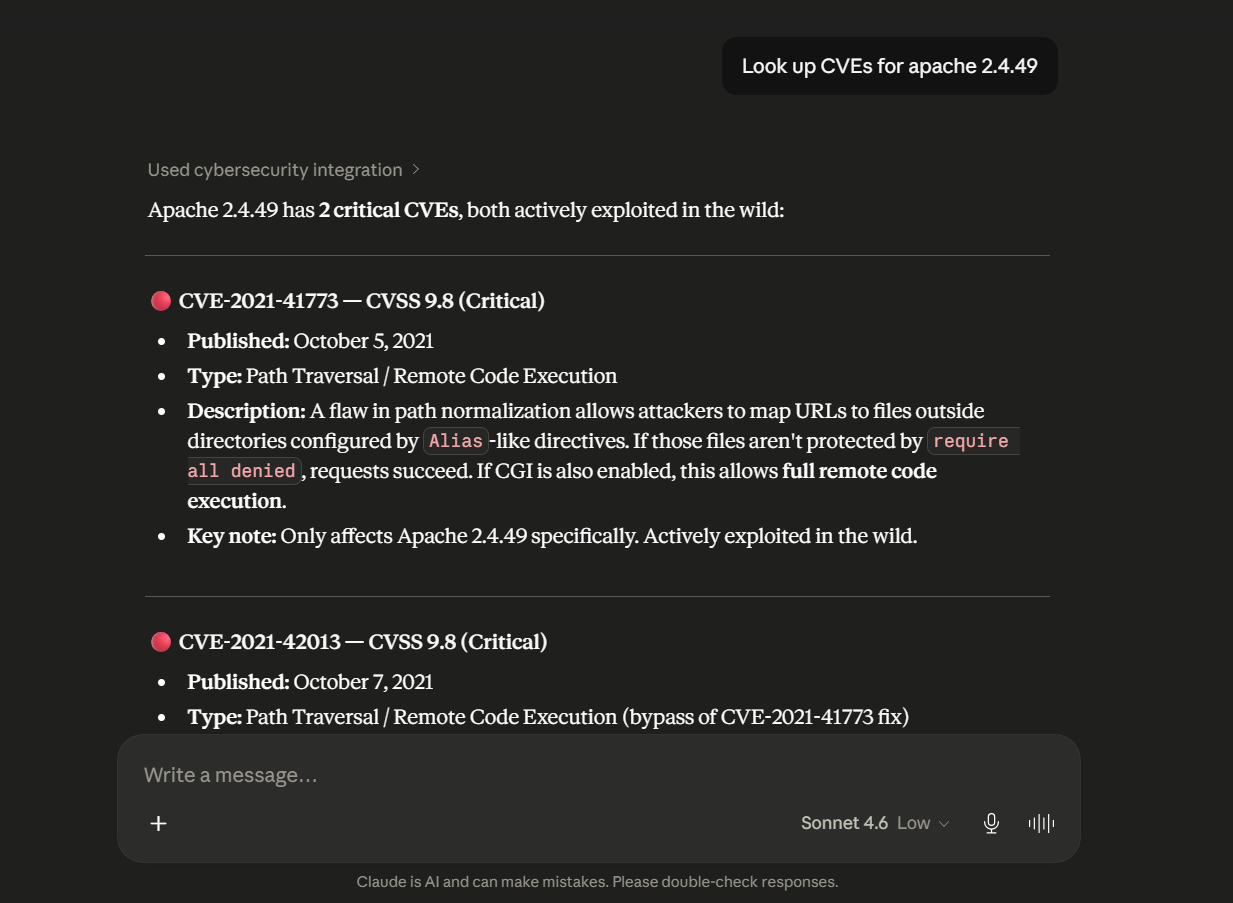
### Single Tool Execution — CVE Vulnerability Lookup
Query known Common Vulnerabilities and Exposures (CVEs) directly against the NIST National Vulnerability Database (NVD) v2 API for specific software components and patch revisions without requiring API authentication:
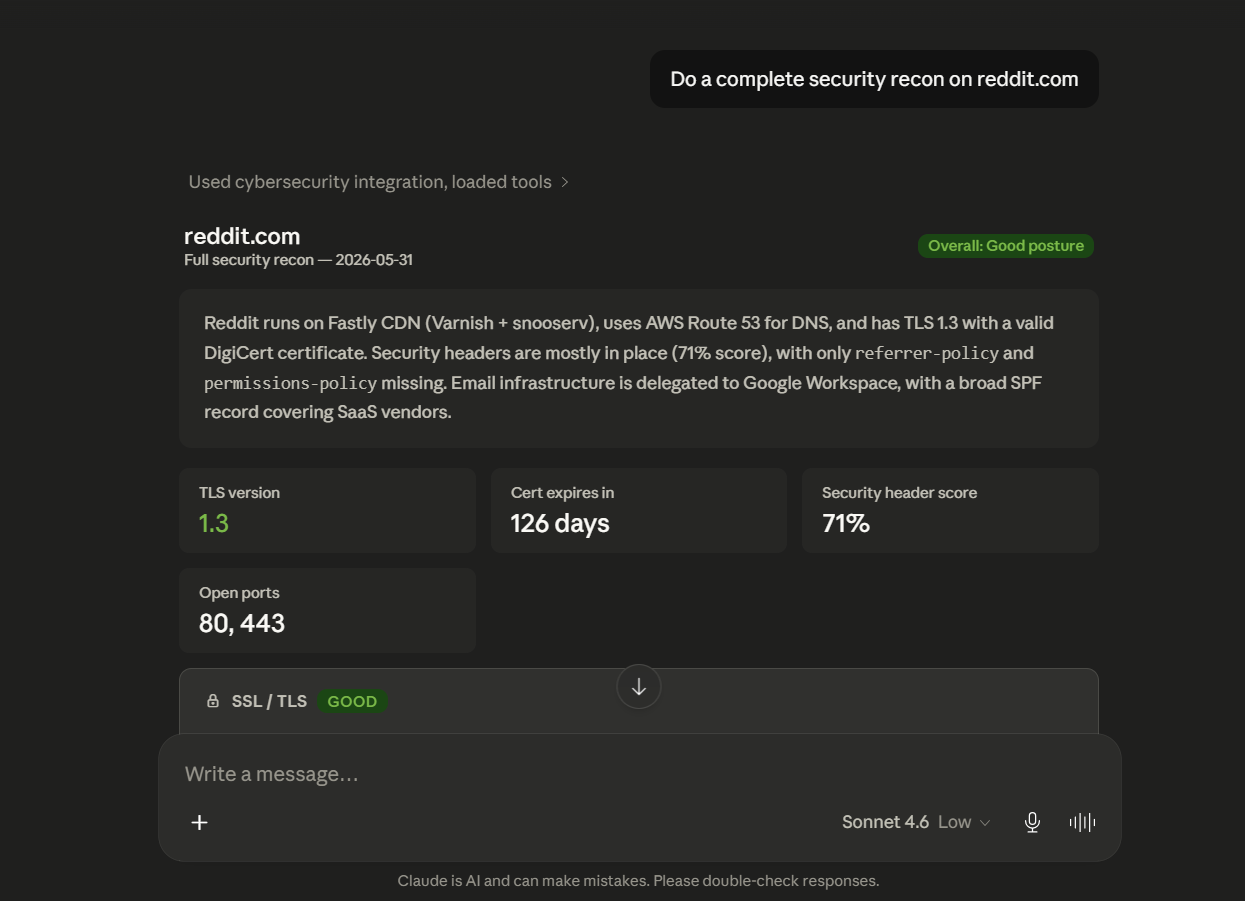
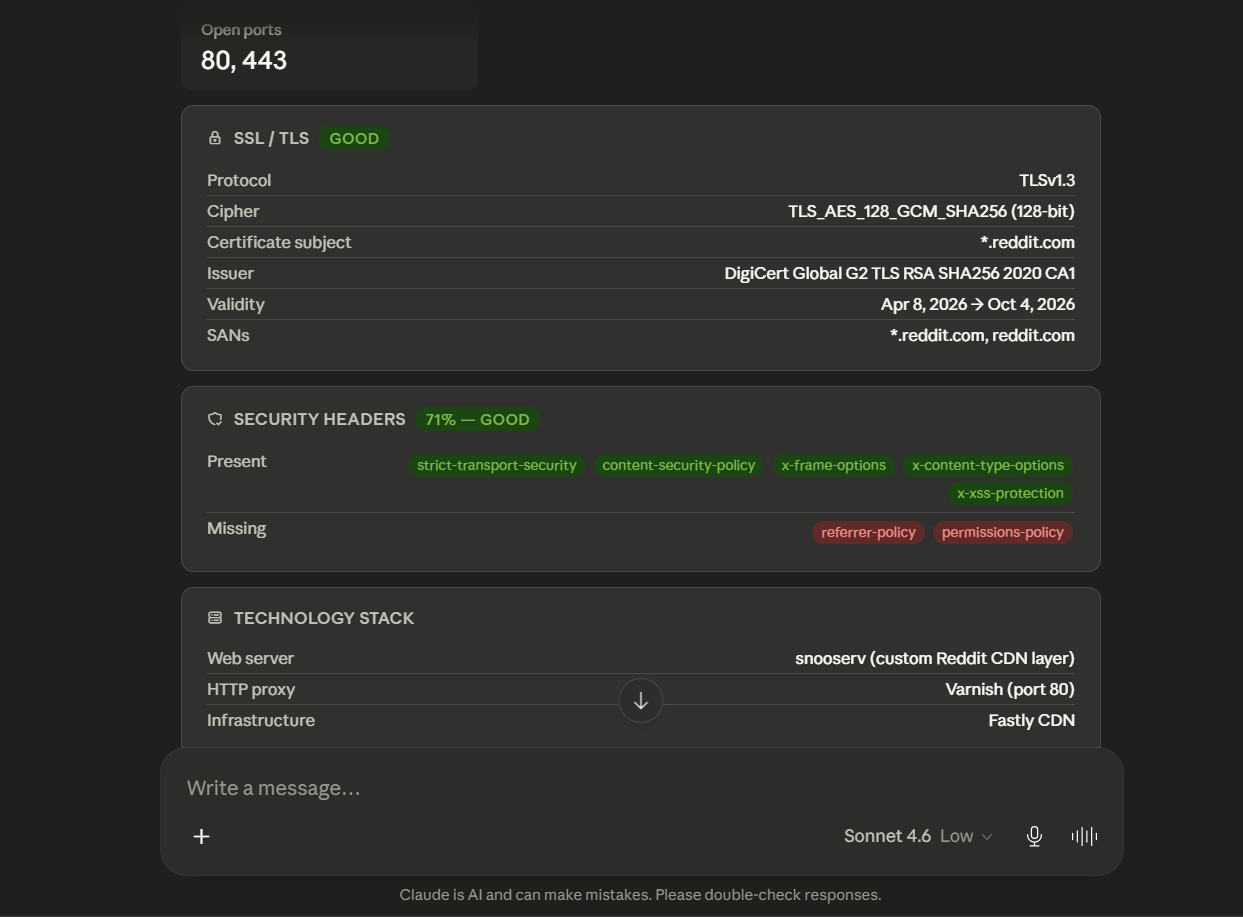
### Full Reconnaissance Pipeline — Parallelized Security Assessment
Trigger the 3-wave parallel execution engine to synthesize network perimeter state, DNS resource records, SSL/TLS posture, email anti-spoofing enforcement, HTTP headers, and software stack fingerprints into a single structured report:
---
## 📋 Prerequisites
Ensure your host environment meets the following runtime requirements before starting the server:
- **Python Runtime**: Python `>= 3.12` ([Download Python](https://www.python.org/downloads/))
- **Network Scanner**: **Nmap** binary installed and accessible in the system `PATH` ([Download Nmap](https://nmap.org/download.html))
- **Environment & Package Manager**: `uv` (Recommended for high-performance virtual environments, [Install uv](https://docs.astral.sh/uv/getting-started/installation)) or `pip`
- **Version Control**: Git ([Download Git](https://git-scm.com/))
- **MCP Client**: Cursor, VS Code (MCP extension), Claude Desktop, Continue.dev, Zed, or any client implementing the MCP JSON-RPC protocol.
- **Container Runtime (Optional)**: Docker Engine / Docker Desktop ([Download Docker](https://www.docker.com/))
---
## ⚙️ Installation
### Method 1: Local Virtual Environment Setup (Recommended)
#### Step 1: Clone the Repository
```bash
git clone https://github.com/AynOps/AynOps.git
cd AynOps
```
#### Step 2: Provision Virtual Environment and Install Dependencies
Using `uv` (Fastest):
```bash
uv sync
```
*Alternatively, using standard Python tooling:*
```bash
python -m venv .venv
# On Linux/macOS:
source .venv/bin/activate
# On Windows (PowerShell):
.venv\Scripts\Activate.ps1
pip install -e .
```
#### Step 3: Install and Configure Nmap
Nmap must be installed locally and registered in your system `PATH` for the `port_scan` tool:
Windows Installation Instructions
1. Download and run the setup installer from [nmap.org/download.html](https://nmap.org/download.html).
2. Add Nmap to your System `PATH`:
- Open **Start** → Search **Environment Variables** → Click **Edit the system environment variables**.
- Under **System Variables**, select **Path** → Click **Edit** → Click **New**.
- Add the installation path: `C:\Program Files (x86)\Nmap` (or `C:\Program Files\Nmap`).
- Confirm all dialogs by clicking **OK**.
3. Open a new PowerShell terminal and verify:
```powershell
nmap --version
```
macOS Installation Instructions
Install via Homebrew:
```bash
brew install nmap
nmap --version
```
Linux Installation Instructions
Install via your system package manager:
```bash
# Debian / Ubuntu / Kali
sudo apt update && sudo apt install -y nmap
# Fedora / RHEL
sudo dnf install -y nmap
# Arch Linux
sudo pacman -S nmap
```
#### Step 4: Configure Your MCP Client
Locate and edit your client's MCP configuration file (e.g., Claude Desktop, Cursor, or VS Code):
| Operating System | Configuration File Path (Claude Desktop) |
|---|---|
| **Windows** | `%APPDATA%\Claude\claude_desktop_config.json` |
| **macOS** | `~/Library/Application Support/Claude/claude_desktop_config.json` |
| **Linux** | `~/.config/Claude/claude_desktop_config.json` |
Insert the AynOps server stanza:
**Windows (`claude_desktop_config.json`):**
```json
{
"mcpServers": {
"AynOps": {
"command": "C:\\full\\path\\to\\AynOps\\.venv\\Scripts\\python.exe",
"args": ["C:\\full\\path\\to\\AynOps\\server.py"],
"env": {
"ABUSEIPDB_API_KEY": "your-abuseipdb-api-key-here",
"HIBP_API_KEY": "your-hibp-api-key-here"
}
}
}
}
```
**macOS / Linux (`claude_desktop_config.json`):**
```json
{
"mcpServers": {
"AynOps": {
"command": "/full/path/to/AynOps/.venv/bin/python3",
"args": ["/full/path/to/AynOps/server.py"],
"env": {
"ABUSEIPDB_API_KEY": "your-abuseipdb-api-key-here",
"HIBP_API_KEY": "your-hibp-api-key-here"
}
}
}
}
```
> [!IMPORTANT]
> Always supply the **absolute filesystem path** to your `.venv` Python binary and `server.py` file to prevent the client from binding to a mismatched global Python runtime.
> [!NOTE]
> `ABUSEIPDB_API_KEY` is optional and only required for `ip_reputation` (Obtain free at [abuseipdb.com](https://www.abuseipdb.com)). `HIBP_API_KEY` is optional and only required for `hibp_check` (Obtain at [haveibeenpwned.com/API/Key](https://haveibeenpwned.com/API/Key)). All other tools operate with zero API keys.
#### Step 5: Launch Client and Validate Registration
1. Terminate all running client processes completely (ensure no background instances remain in Task Manager / Activity Monitor).
2. Re-open your MCP client.
3. Verify tool availability by querying:
```text
What cybersecurity tools do you have available?
```
---
### Method 2: Containerized Deployment via Docker
AynOps ships a production-ready `Dockerfile` bundling Python 3.12, `uv`, and `nmap`, eliminating host dependency requirements.
#### Step 1: Build the Image
```bash
git clone https://github.com/AynOps/AynOps.git
cd AynOps
docker build -t aynops:latest .
```
#### Step 2: Verify Stdio Transport
Run a one-shot container execution. The container will initialize and listen for MCP JSON-RPC messages on `stdin`:
```bash
docker run --rm -i aynops:latest
# Press Ctrl+C to exit
```
#### Step 3: Configure Client for Docker Execution
Configure your client to spawn the container directly:
```json
{
"mcpServers": {
"AynOps": {
"command": "docker",
"args": [
"run",
"--rm",
"-i",
"-e", "ABUSEIPDB_API_KEY=your-abuseipdb-api-key-here",
"-e", "HIBP_API_KEY=your-hibp-api-key-here",
"aynops:latest"
]
}
}
}
```
> [!TIP]
> The container must run in interactive mode (`-i`) without detached flags (`-d`) to preserve the standard I/O communication pipe required by the MCP protocol.
---
## 🚀 Usage
### Natural Language Tool Invocations
Once connected, you can interact with individual reconnaissance tools or prompt compound analytical queries:
```text
# Domain & DNS Reconnaissance
"Perform a WHOIS query on target-organization.com"
"Enumerate all DNS resource records and brute-force common subdomains for example.com"
"Query Certificate Transparency logs for *.internal.corp.com"
# Network & Host Fingerprinting
"Run a service version port scan on scanme.nmap.org"
"Execute an ASN lookup for IP 1.1.1.1 and identify the BGP prefix"
"Analyze the IP reputation of 198.51.100.42"
# Web Application & Perimeter Security
"Inspect the SSL/TLS certificate of payment.gateway.io on port 443"
"Audit the HTTP security headers of enterprise-app.com and report misconfigurations"
"Fingerprint the CMS, JavaScript frameworks, and CDNs running on target.com"
"Trace the HTTP redirect chain for http://insecure-portal.com"
"Inspect robots.txt on admin.target.com for unindexed endpoints"
# Vulnerability & Threat Audits
"Look up known CVEs for OpenSSH version 8.2p1"
"Check if cloud storage buckets exist for domain fincorp-assets.com"
"Detect dangling CNAME records susceptible to subdomain takeover on cloudapp.net"
"Query Have I Been Pwned for breaches associated with security@enterprise.com"
```
### Port Scan Profiles
The `port_scan` tool supports multiple scanning strategies tailored to operational velocity and assessment depth:
| Profile (`scan_type`) | Nmap Flag Equivalent | Execution Scope |
|---|---|:---:|
| `basic` | `-F` | Scans top 100 most common TCP ports |
| `service` | `-sV --version-light` | Top ports + banner grabbing & version identification |
| `os` | `-O` | TCP/IP stack fingerprinting *(Requires elevated privileges)* |
| `full` | `-p-` | Full transmission audit across all 65,535 TCP ports |
| `vuln` | `--script vuln` | NSE vulnerability detection scripts against open services |
*Example invocation:*
```text
Scan target scanme.nmap.org using the 'service' profile.
```
### End-to-End Threat Modeling with `threat_analysis` Prompt
For optimal threat intelligence synthesis in supported MCP clients:
1. In your MCP client (e.g. Claude Desktop), click the **`+`** icon in the prompt input area.
2. Select **Connectors** → **Add from AynOps**.
3. Choose the **`threat_analysis`** prompt template.
4. Execute your target reconnaissance prompt:
```text
Do a complete security recon on scanme.nmap.org
```
5. The LLM will invoke `full_recon`, process the normalized signals, and generate a correlated matrix mapping open ports to potential CVEs, missing headers, email spoofability, and infrastructure risk factors.
---
## 💡 Examples
### Scenario 1: CVE Patch Validation and Vulnerability Correlation
```text
User: Run a service scan on our perimeter host and cross-reference detected software with NVD for CVEs.
Agent: [Invokes port_scan with scan_type="service"]
Discovered Open Services:
• Port 80/tcp: Apache httpd 2.4.49
• Port 22/tcp: OpenSSH 7.4
[Invokes cve_lookup for software="apache", version="2.4.49"]
Critical Findings:
• CVE-2021-41773 (CVSS 9.8) — Remote Code Execution via Path Traversal.
Remediation: Upgrade Apache to >= 2.4.51 immediately.
```
### Scenario 2: Dangling DNS Subdomain Takeover Triaging
```text
User: Check our domain company.com for dangling DNS records pointing to abandoned cloud services.
Agent: [Invokes subdomain_takeover for "company.com"]
Resolved CNAME: blog.company.com -> company-blog.ghost.io
HTTP Verification Probe: HTTP 404 - "Fastly error: unknown domain company-blog.ghost.io"
Status: HIGH RISK — Dangling CNAME pointer detected for Ghost/Fastly infrastructure.
Remediation: Remove the orphaned CNAME DNS record from your authoritative nameservers.
```
### Scenario 3: Unauthenticated Multi-Cloud Storage Exposure
```text
User: Does our company domain 'megacorp.io' expose any unauthenticated cloud storage containers?
Agent: [Invokes cloud_exposure_check for "megacorp.io"]
Probing Permutations across AWS S3, Azure Blob, GCS...
• https://megacorp-data.s3.amazonaws.com — AccessDenied (Secured)
• https://megacorp-backup.s3.amazonaws.com — HTTP 200 OK (PUBLIC LISTING ENABLED)
Found XML object keys: /db_dump_2025.sql.gz, /employee_records.csv
• https://megacorp.blob.core.windows.net/public — HTTP 404 (Not Found)
```
### Scenario 4: HTTP Redirect Chain & TLS Downgrade Analysis
```text
User: Trace the redirect chain for http://legacy.portal.org
Agent: [Invokes trace_redirects for "http://legacy.portal.org"]
Hop 1: http://legacy.portal.org (301 Moved Permanently)
Hop 2: https://auth.portal.org/login (302 Found)
Hop 3: http://internal-sso.portal.org/auth (302 Found) ⚠️ TLS DOWNGRADE DETECTED
Hop 4: http://192.168.1.50/dashboard ⚠️ PRIVATE IP LEAK (RFC 1918)
```
---
## 📦 Registries & Ecosystem
AynOps is indexed and distributed across the following official registries:
| Registry | Identifier / Link |
|---|---|
| **Official MCP Registry** | [`io.github.AynOps/AynOps`](https://registry.modelcontextprotocol.io/v0.1/servers?search=io.github.AynOps/AynOps) |
| **PyPI Package Index** | [`pypi.org/project/AynOps/`](https://pypi.org/project/AynOps/) |
| **Glama MCP Registry** | [`glama.ai/mcp/servers/AynOps/AynOps`](https://glama.ai/mcp/servers/AynOps/AynOps) |
---
## 🤖 LLM Client Behavior & Security Considerations
AynOps acts strictly as an **execution server** over MCP. Tool invocation decisions, parameter synthesis, and prompt chaining are governed by the connected **LLM client**:
- **Model Guardrails & Safety Filters**: Certain LLM providers (e.g., Anthropic, OpenAI) enforce heuristic safety filters. Queries like *"Attack example.com"* or even standard phrases like *"Port scan example.com"* can occasionally be declined by commercial frontends.
- *Workaround 1*: Phrase prompts defensively (e.g., *"Audit the defensive security posture of our infrastructure at example.com"*).
- *Workaround 2*: Connect AynOps to developer-centric or unconstrained MCP clients (e.g., Cursor, Continue.dev with local models via Ollama, or our upcoming AynOps Dedicated Client).
- **Execution Timeouts**: Large operations (such as `full` port scans across all 65,535 ports) may exceed default client JSON-RPC timeout thresholds (typically 60–120s). Configure tool timeouts appropriately or use the `basic` and `service` profiles.
- **Parameter Extraction Fidelity**: Ensure your prompts provide fully qualified domain names (FQDNs) or valid IPv4/IPv6 addresses to prevent client-side schema validation errors.
---
## ⚖️ Legal & Ethical Usage
> [!CAUTION]
> **Only perform active network scans and vulnerability evaluations against infrastructure you own or have explicit, documented authorization to test.**
- **Passive OSINT Tools** (`whois_lookup`, `dns_enumeration`, `asn_lookup`, `cert_transparency`, `headers_analyzer`, `cve_lookup`, `robots_txt_inspect`): Operate purely against publicly advertised records and standard web responses.
- **Active Scanning Tools** (`port_scan`, `cloud_exposure_check`, `subdomain_takeover`): Send active network traffic. Unauthorized scanning may violate the Computer Fraud and Abuse Act (CFAA), GDPR, and local cyber regulations.
- **Authorized Testing Host**: For testing and demonstration purposes without production risk, use the officially designated Nmap test host: `scanme.nmap.org`.
---
## ⚠️ Known Limitations
- **OS Detection Privileges**: Nmap OS fingerprinting (`scan_type="os"`) relies on raw TCP/IP socket crafting (`-O`) and requires elevated root / Administrator privileges on the host system.
- **Upstream OSINT Rate Limiting**: Tools interfacing with third-party endpoints (e.g., `crt.sh` Certificate Transparency logs, NIST NVD v2 REST API) are subject to upstream service availability and rate limits.
- **API Key Dependencies**: `ip_reputation` and `hibp_check` require valid API keys configured in environment variables to return live telemetry.
- **Container Stdio Lifecycle**: When deploying via Docker, the container must maintain an attached interactive `stdio` stream; running in detached daemon mode (`-d`) will terminate the MCP pipe.
---
## 🗂️ Project Structure
```
AynOps/
├── .github/ # GitHub workflows, templates, and assets
│ ├── images/ # Documentation and demo media
│ ├── ISSUE_TEMPLATE/ # Issue templates
│ └── workflows/ # CI/CD workflows
├── docs/ # Extended documentation
│ └── tools/ # Per-tool documentation
├── tests/ # Unit and integration tests
├── tools/ # MCP reconnaissance tools
│ ├── fingerprint/ # Web technology fingerprinting engine
│ ├── prompts/ # MCP prompt templates
│ └── signals/ # Signal extraction framework
├── utils/ # Shared utilities and helpers
├── .env.example # Environment variable template
├── .gitignore # Git ignored files and directories
├── .python-version # Mentions the Python version
├── CONTRIBUTING.md # Contribution guidelines
├── Dockerfile # Container configuration
├── glama.json # Glama MCP configuration
├── LICENSE # MIT License
├── mcp.json # MCP metadata and tool manifests
├── pyproject.toml # Project metadata and dependencies
├── README.md # Project documentation
├── SECURITY.md # Security policy
├── server.json # MCP server package schema
├── server.py # FastMCP server entrypoint
└── uv.lock # Dependency lockfile
```
---
## 🗺️ Roadmap & Discussions
We have active **[GitHub Discussions](https://github.com/AynOps/AynOps/discussions)** set up for community ideas, RFCs, tool requests, and roadmap planning.
Check the current planned **[Roadmap](https://github.com/orgs/AynOps/discussions/125)**
💬 **Join the conversation**: Share your feedback, suggest new tools, or vote on roadmap features in **[AynOps GitHub Discussions](https://github.com/AynOps/AynOps/discussions)**!
---
## 🤝 Contributing
Contributions, issues, and feature requests are welcome! See [CONTRIBUTING.md](https://github.com/gaoharimran29-glitch/Cybersecurity-MCP-Server/blob/HEAD/CONTRIBUTING.md) for the development setup, project structure, and a guide to adding support for a new tool — that's currently the highest-value place to contribute. All participants are expected to follow [Code of Conduct](https://github.com/gaoharimran29-glitch/Cybersecurity-MCP-Server/blob/HEAD/CODE_OF_CONDUCT.md).
Quick version:
1. Fork the repository
2. Create a feature branch (`git checkout -b feature/amazing-feature`)
3. Commit your changes
4. Push to the branch and open a Pull Request
If you find a bug or a security vulnerability, please report it directly to the developer.
---
## 📜 License
This project is licensed under the **MIT License** — see the [LICENSE](https://github.com/gaoharimran29-glitch/Cybersecurity-MCP-Server/blob/HEAD/LICENSE) file for details. You are free to use, modify, distribute, and integrate this software in commercial and open-source environments.
---
## 👤 Author
**Gaohar Imran**
* GitHub: [@gaoharimran29-glitch](https://github.com/gaoharimran29-glitch)
* LinkedIn: [Gaohar Imran](https://www.linkedin.com/in/gaohar-imran-5a4063379/)
> **Special thanks to [@SemTiOne](https://github.com/SemTiOne)**, one of the early contributors to AynOps, for his valuable contributions, reviews, feedback, and continued support throughout the project. His help, especially during the early stages, is genuinely appreciated. ❤️
>
> **Special thanks to [@Nitjsefnie](https://github.com/Nitjsefnie)** for their continued and active involvement in AynOps through multiple contributions across the project. Their consistent effort, initiative, and willingness to improve the project are greatly appreciated. ❤️
>
> **With gratitude to all our contributors** who have helped improve AynOps through code, documentation, testing, ideas, reviews, and feedback. Your contributions are genuinely appreciated. ❤️
---
⭐ If AynOps accelerates your security workflows, consider starring the repository on GitHub!