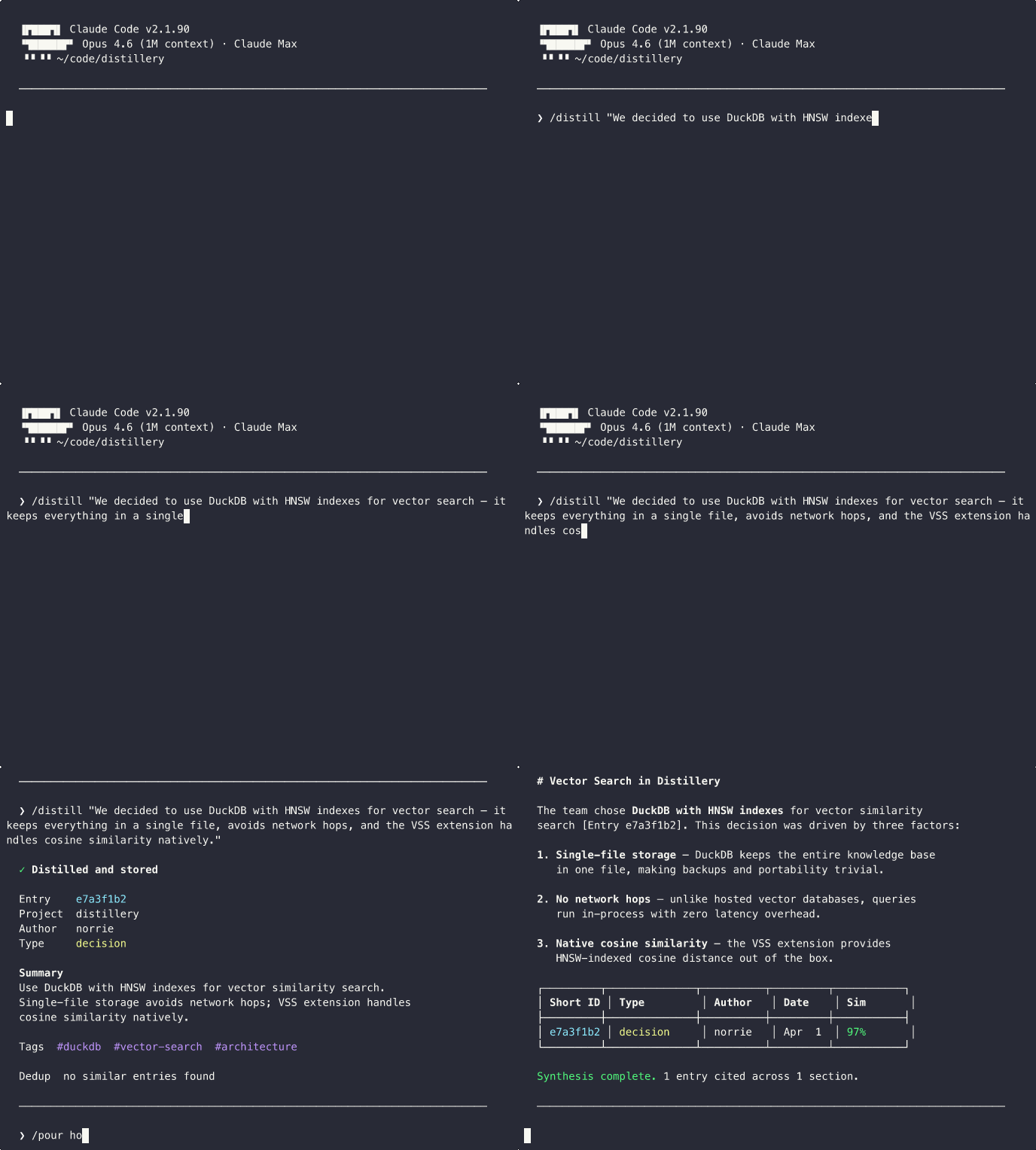
---
## What is Distillery?
Distillery is a team knowledge base accessed through Claude Code skills. It refines raw information from working sessions, meetings, bookmarks, and conversations into concentrated, searchable knowledge — stored as vector embeddings in DuckDB and retrieved through natural language. Runs locally over stdio or as a hosted HTTP service with GitHub OAuth for team access.
Distillery captures the highest-value transformation — from noise to signal — and makes it a tool the whole team can use.
> **Full documentation:** [norrietaylor.github.io/distillery](https://norrietaylor.github.io/distillery/)
## Skills
Distillery provides 15 Claude Code slash commands:
| Skill | Purpose | Example |
|-------|---------|---------|
| `/distill` | Capture session knowledge with dedup detection | `/distill "We decided to use DuckDB for local storage"` |
| `/recall` | Semantic search with provenance | `/recall distributed caching strategies` |
| `/pour` | Multi-entry synthesis with citations | `/pour how does our auth system work?` |
| `/compass` | Contrast internal knowledge vs. ambient intelligence for a directional assessment | `/compass our caching strategy` |
| `/bookmark` | Store URLs with auto-generated summaries | `/bookmark https://example.com/article #caching` |
| `/minutes` | Meeting notes with append updates | `/minutes --update standup-2026-03-22` |
| `/classify` | Classify entries and triage review queue | `/classify --inbox` |
| `/watch` | Manage monitored feed sources | `/watch add github:duckdb/duckdb` |
| `/radar` | Ambient feed digest with source suggestions | `/radar --days 7` |
| `/tune` | Adjust feed relevance thresholds | `/tune relevance 0.4` |
| `/digest` | Team activity summary from internal entries | `/digest --days 7 --project myapp` |
| `/gh-sync` | Sync GitHub issues/PRs into the knowledge base | `/gh-sync owner/repo --issues` |
| `/investigate` | Deep context builder with relationship traversal | `/investigate distributed caching` |
| `/briefing` | Team knowledge dashboard with metrics | `/briefing --days 7` |
| `/setup` | Onboarding wizard for MCP connectivity and config | `/setup` |
## Quick Start
### Step 1: Install the Plugin
```bash
claude plugin marketplace add norrietaylor/distillery
claude plugin install distillery
```
This installs all 15 skills. The plugin **does not configure an MCP server automatically** — run `/setup` (below) to add one. The recommended setup runs **locally** via `uvx --from 'distillery-mcp[fastembed]>=0.6.0' distillery-mcp` — a private, self-contained knowledge base on your machine, with on-device `fastembed` embeddings (no API key required). Requires Python 3.11+ and [`uv`](https://docs.astral.sh/uv/) (install: `curl -LsSf https://astral.sh/uv/install.sh | sh`).
### Step 2 (Optional): Use Jina or OpenAI Instead
The default `fastembed` provider runs offline with no API key. If you'd rather use a hosted embedding service, set `DISTILLERY_EMBEDDING_PROVIDER` and provide the matching API key:
```bash
# Jina (free tier at jina.ai)
export DISTILLERY_EMBEDDING_PROVIDER=jina
export JINA_API_KEY=jina_...
# Or OpenAI
export DISTILLERY_EMBEDDING_PROVIDER=openai
export OPENAI_API_KEY=sk-...
```
`uvx` inherits these from your shell environment. See [`distillery.yaml.example`](https://github.com/norrietaylor/distillery/blob/HEAD/distillery.yaml.example) for the full provider configuration block (including Option C for fastembed model selection).
Restart Claude Code and run the onboarding wizard:
```text
/setup
```
### Try the Hosted Demo (Opt-In)
Want to evaluate without installing anything locally? Configure the hosted demo at `distillery-mcp.fly.dev` instead of a local server:
```bash
claude mcp add distillery --scope user --transport http --url https://distillery-mcp.fly.dev/mcp
```
> **Demo Server:** `distillery-mcp.fly.dev` is for evaluation only. Do not store sensitive or confidential data.
See the [Local Setup Guide](https://norrietaylor.github.io/distillery/getting-started/local-setup/) for full configuration options, or [deploy your own instance](https://norrietaylor.github.io/distillery/team/deployment/) for team use.
## Development
```bash
uv pip install -e ".[dev]"
# or
pip install -e ".[dev]"
pytest # run tests
mypy --strict src/distillery/ # type check
ruff check src/ tests/ # lint
```
See [Contributing](https://norrietaylor.github.io/distillery/contributing/) for the full guide.
## License
Apache 2.0 — see [LICENSE](https://github.com/norrietaylor/distillery/blob/HEAD/LICENSE) for details.