# DBConvert Streams (Federated SQL) [Health: Active]
**Category:** 🗄️ Databases
**Repository:** https://github.com/slotix/dbconvert-streams-public
**GitHub Stars:** 24
**Views:** 0
**Installs:** 0
**Upvotes:** 0
**Directory Page:** https://allmcps.com/mcp/dbconvert-streams-federated-sql
## Description
Read-only SQL across your PostgreSQL, MySQL, S3 buckets and local data files, in one query.
## Tools
Capabilities this server exposes over MCP:
- **dbconvert_list_connections** — list workspace connections
- **dbconvert_get_connection** — inspect one connection
- **dbconvert_list_databases** — list databases
- **dbconvert_list_schemas** — list schemas
- **dbconvert_list_tables** — list tables
- **dbconvert_list_views** — list views
- **dbconvert_describe_table** — inspect table columns and keys
- **dbconvert_preview_table** — preview table rows
- **dbconvert_describe_view** — inspect a view
- **dbconvert_preview_view** — preview view rows
- **dbconvert_run_select** — run a SELECT query
- **dbconvert_explain_select** — explain a SELECT query
- **dbconvert_compare_schemas** — compare schemas
- **dbconvert_compare_data_sample** — compare data samples
- **dbconvert_list_streams** — list streams
- **dbconvert_get_stream** — inspect a stream
- **dbconvert_get_stream_status** — get stream status
- **dbconvert_get_stream_stats** — get stream throughput and statistics
- **dbconvert_get_stream_recent_errors** — inspect recent stream errors
- **dbconvert_get_stream_recent_logs** — inspect recent stream logs
- **dbconvert_list_files** — list workspace files
- **dbconvert_get_file_schema** — inspect a file schema
- **dbconvert_preview_file** — preview file rows
- **dbconvert_list_s3_buckets** — list S3 buckets
- **dbconvert_list_s3_objects** — list S3 objects
- **dbconvert_run_federated_select** — run a read-only query across sources
- **dbconvert_explain_federated_select** — explain a federated SELECT query
## Claude Desktop Quick Installation
Remote MCP endpoint (confidence: high). Install path detected from listing signals. Add as a URL/SSE server in your client:
```json
"mcpServers": {
"dbconvert-streams-federated-sql": {
"url": "https://streams.dbconvert.com/install"
}
}
```
## Documentation & README
#  DBConvert Streams
Database IDE + migration + real-time CDC — in one workflow.
Query data,
DBConvert Streams
Database IDE + migration + real-time CDC — in one workflow.
Query data,
move it,
keep it in sync,
and let your AI assistant see it all
without switching between tools.
If this looks useful, consider giving it a ⭐
---
### Why this exists
Most setups look like this:
- a DB client for queries
- scripts or tools for migration
- a separate CDC pipeline
It works, but it's fragmented.
DBConvert Streams combines these into one workspace.
---
### What it feels like
Think of it as:
DBeaver / DataGrip
+ migration tool
+ CDC
but without switching tools every time
---
### Example
Run queries across databases and files:
```sql
SELECT *
FROM read_parquet('orders.parquet') o
JOIN postgres.public.customers c
ON o.customer_id = c.id
LIMIT 10;
```
Then use the same query as a data source — and stream it anywhere.
---
### What you can do
- explore databases, files, and S3
- run SQL across multiple sources
- move data between systems
- keep it in sync with CDC
- connect Claude, Cursor, or Copilot — the AI reads your live schemas, data, and streams (read-only, via MCP)
All in the same workflow.
> **Note:** This is the public home of DBConvert Streams — example configurations, documentation, issue tracking, and release notes. The product itself is proprietary.
## Quick Start
Runs anywhere — your laptop, a VPS, or your own infra. No cloud dependency, no vendor lock-in.
### Desktop App
[Download](https://streams.dbconvert.com/install) for Windows, macOS, or Linux — no account required.
### AI client extension
Grab `dbconvert-streams-.mcpb` from [Releases](https://github.com/slotix/dbconvert-streams-public/releases) and drop it into **Claude → Settings → Extensions**. It asks for connection strings and folders, and nothing else has to be installed — no DBConvert Streams, no toolchain, no server to run.
```
postgres://user:password@host:5432/dbname
mysql://user:password@host:3306/dbname
s3://bucket/folder?region=us-east-1
```
Several sources go in the one field, separated by spaces — `shop=postgres://… orders=mysql://…` — and a single question can join across all of them.
Add folders of Parquet, CSV or JSON files with the folder picker. Every source becomes read-only tools in your chat, and one question can span several of them at once.
One file covers Windows and Linux — the bundle carries a binary for each and picks the right one. macOS is planned for a later release.
**Not a Claude user?** The same server runs as a container, and every MCP client
that can launch one can use it:
```bash
docker run -i --rm slotix/stream-mcp "shop=postgres://user:password@host:5432/shop"
```
Cursor and VS Code can set that up in one click — [Add to Cursor](https://github.com/slotix/dbconvert-streams-public/blob/HEAD/cursor://anysphere.cursor-deeplink/mcp/install?name=dbconvert-streams&config=eyJjb21tYW5kIjoiZG9ja2VyIiwiYXJncyI6WyJydW4iLCItaSIsIi0tcm0iLCItZSIsIkRCQ09OVkVSVF9NQ1BfU09VUkNFUyIsInNsb3RpeC9zdHJlYW0tbWNwIl0sImVudiI6eyJEQkNPTlZFUlRfTUNQX1NPVVJDRVMiOiJwb3N0Z3JlczovL3VzZXI6cGFzc3dvcmRAaG9zdDo1NDMyL2RibmFtZSJ9fQ==) · [Add to VS Code](https://github.com/slotix/dbconvert-streams-public/blob/HEAD/vscode:mcp/install?%7B%22name%22%3A%22dbconvert-streams%22%2C%22command%22%3A%22docker%22%2C%22args%22%3A%5B%22run%22%2C%22-i%22%2C%22--rm%22%2C%22-e%22%2C%22DBCONVERT_MCP_SOURCES%22%2C%22slotix/stream-mcp%22%5D%2C%22env%22%3A%7B%22DBCONVERT_MCP_SOURCES%22%3A%22%24%7Binput%3Adbconvert_sources%7D%22%7D%2C%22inputs%22%3A%5B%7B%22type%22%3A%22promptString%22%2C%22id%22%3A%22dbconvert_sources%22%2C%22description%22%3A%22Connection%20strings%2C%20separated%20by%20spaces%3A%20postgres%3A//user%3Apass%40host%3A5432/db%2C%20s3%3A//bucket/path%2C%20or%20a%20folder%22%7D%5D%7D) — VS Code asks for the connection string as you install it; in Cursor you replace the sample one. Folders, S3 keys and the rest: [standalone server](https://streams.dbconvert.com/docs/mcp/standalone).
The bundled server is proprietary software, distributed under the DBConvert Streams licence. The MIT licence in this repository covers the examples, docs and assets here, not that binary.
### Self-Hosted (Docker)
Deploy on any machine with Docker — a local server, a VPS (DigitalOcean, Hetzner, AWS EC2, etc.), or your own infrastructure:
```bash
curl -fsSL https://dbconvert.nyc3.digitaloceanspaces.com/downloads/streams/latest/docker-install.sh | sh
```
## What is DBConvert Streams?
[DBConvert Streams](https://streams.dbconvert.com) is a database IDE with built-in migration and real-time CDC.
Browse databases, local files, and S3 storage. Edit data directly. Run federated SQL queries that join tables across different database engines — no intermediate exports needed.
## Key Features
In practice, it comes down to this:
### Database IDE & Workspace (Free)
- **Data Explorer** — Browse databases, files, and S3 in one place
- **ER Diagrams** — Visualize database relationships
- **Schema Comparison** — Compare schemas and data across databases
- **Schema Navigation** — Persistent state and search across connections
### Federated SQL
- Execute SQL queries across multiple databases and file sources simultaneously
- Join live PostgreSQL and MySQL tables using connection aliases
- Query CSV, JSON, Parquet files and S3 storage alongside databases
### Built-in AI Chat — new in 2.5.0
Ask about the database work already open in the **desktop app**: a table, view,
file, SQL console, connection, or migration/CDC stream. AI Chat starts with that
live workspace context, so it can inspect schemas and data, explain or repair a
failed query, and diagnose stream status without asking you to paste DDL into a
separate chat.
Use your own installed agent CLI — Claude Code, Codex, GitHub Copilot CLI, or
OpenCode. AI Chat automatically supplies the relevant scoped subset of
DBConvert's read-only tools and shows tool activity while it works; it cannot
change connections, configuration, streams, or data.
[Docs: AI Chat →](https://streams.dbconvert.com/docs/ai-chat)
### AI Assistants via MCP — new in 2.4
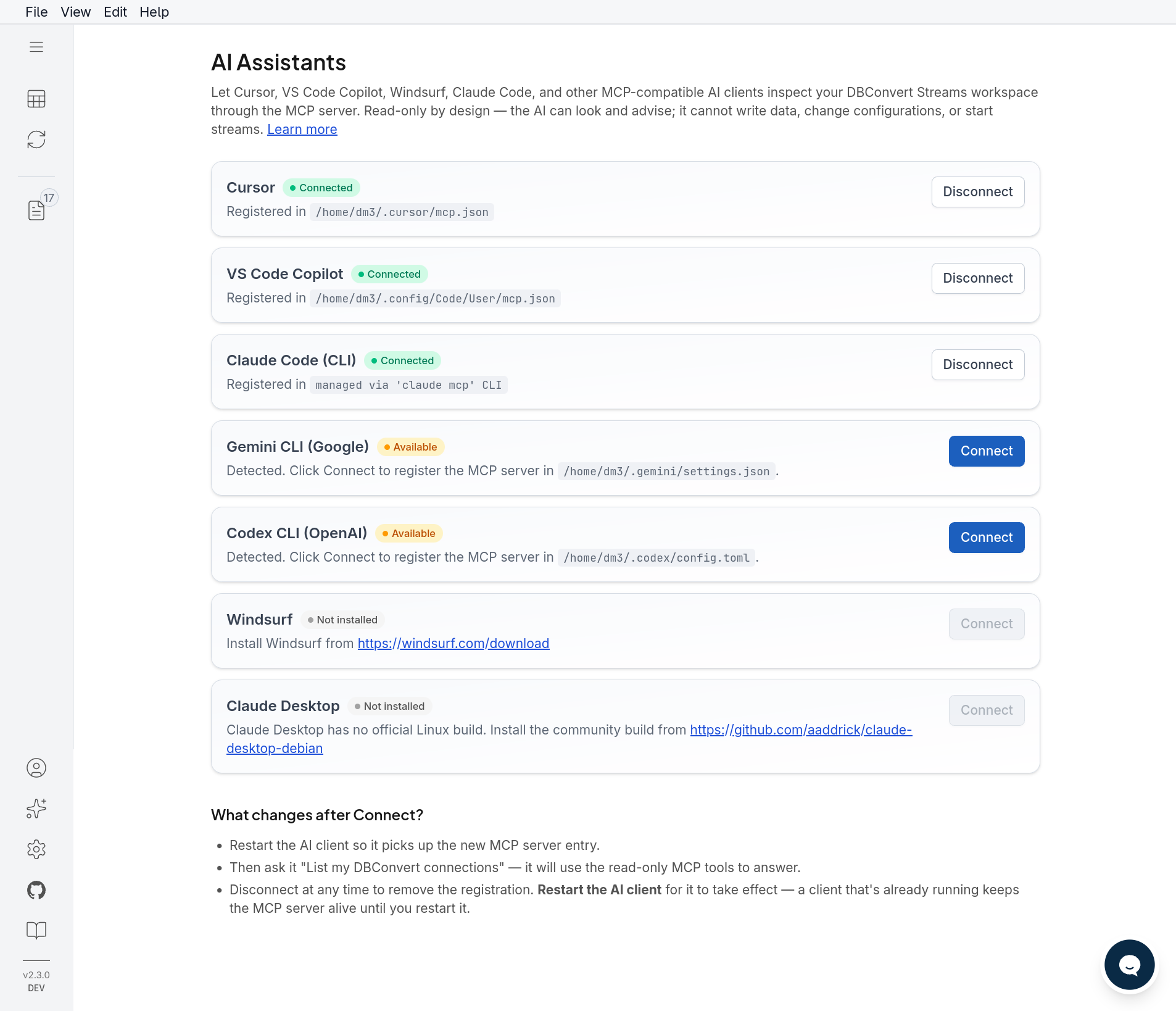
- Built-in MCP server: Claude, Cursor, VS Code Copilot, Windsurf, Gemini CLI, and Codex read live schemas, data, and stream state — no more pasting DDL into chat
- **27 read-only tools**: inspect workspace connections, schemas, tables and views; run read-only SQL and federated queries; compare schemas and samples; diagnose streams; browse files and S3
- One-click setup from the ✨ AI Assistants panel; Docker deployments expose `/mcp` over HTTP(S)
- Read-only by design: only `SELECT` passes the server-side filter — the AI can look and advise, never write
[Docs: AI Assistants via MCP →](https://streams.dbconvert.com/docs/mcp)
## Tools
DBConvert Streams exposes these **27 read-only MCP tools**. The names below
match the live MCP server.
### Connections and schema
- `dbconvert_list_connections` — list workspace connections
- `dbconvert_get_connection` — inspect one connection
- `dbconvert_list_databases` — list databases
- `dbconvert_list_schemas` — list schemas
- `dbconvert_list_tables` — list tables
- `dbconvert_list_views` — list views
### Table and view inspection
- `dbconvert_describe_table` — inspect table columns and keys
- `dbconvert_preview_table` — preview table rows
- `dbconvert_describe_view` — inspect a view
- `dbconvert_preview_view` — preview view rows
### Read-only SQL
- `dbconvert_run_select` — run a SELECT query
- `dbconvert_explain_select` — explain a SELECT query
### Schema and data comparison
- `dbconvert_compare_schemas` — compare schemas
- `dbconvert_compare_data_sample` — compare data samples
### Stream diagnostics
- `dbconvert_list_streams` — list streams
- `dbconvert_get_stream` — inspect a stream
- `dbconvert_get_stream_status` — get stream status
- `dbconvert_get_stream_stats` — get stream throughput and statistics
- `dbconvert_get_stream_recent_errors` — inspect recent stream errors
- `dbconvert_get_stream_recent_logs` — inspect recent stream logs
### Files and S3
- `dbconvert_list_files` — list workspace files
- `dbconvert_get_file_schema` — inspect a file schema
- `dbconvert_preview_file` — preview file rows
- `dbconvert_list_s3_buckets` — list S3 buckets
- `dbconvert_list_s3_objects` — list S3 objects
### Federated SQL
- `dbconvert_run_federated_select` — run a read-only query across sources
- `dbconvert_explain_federated_select` — explain a federated SELECT query
Only read-only operations are exposed: the server-side filter permits
`SELECT`, so an AI client cannot alter connections, configuration, streams, or
data. For client setup, see the [MCP setup guide](https://streams.dbconvert.com/docs/mcp/setup).
### Data Migration (Load Mode)
Rapidly move large datasets between databases with automatic schema conversion and validation.
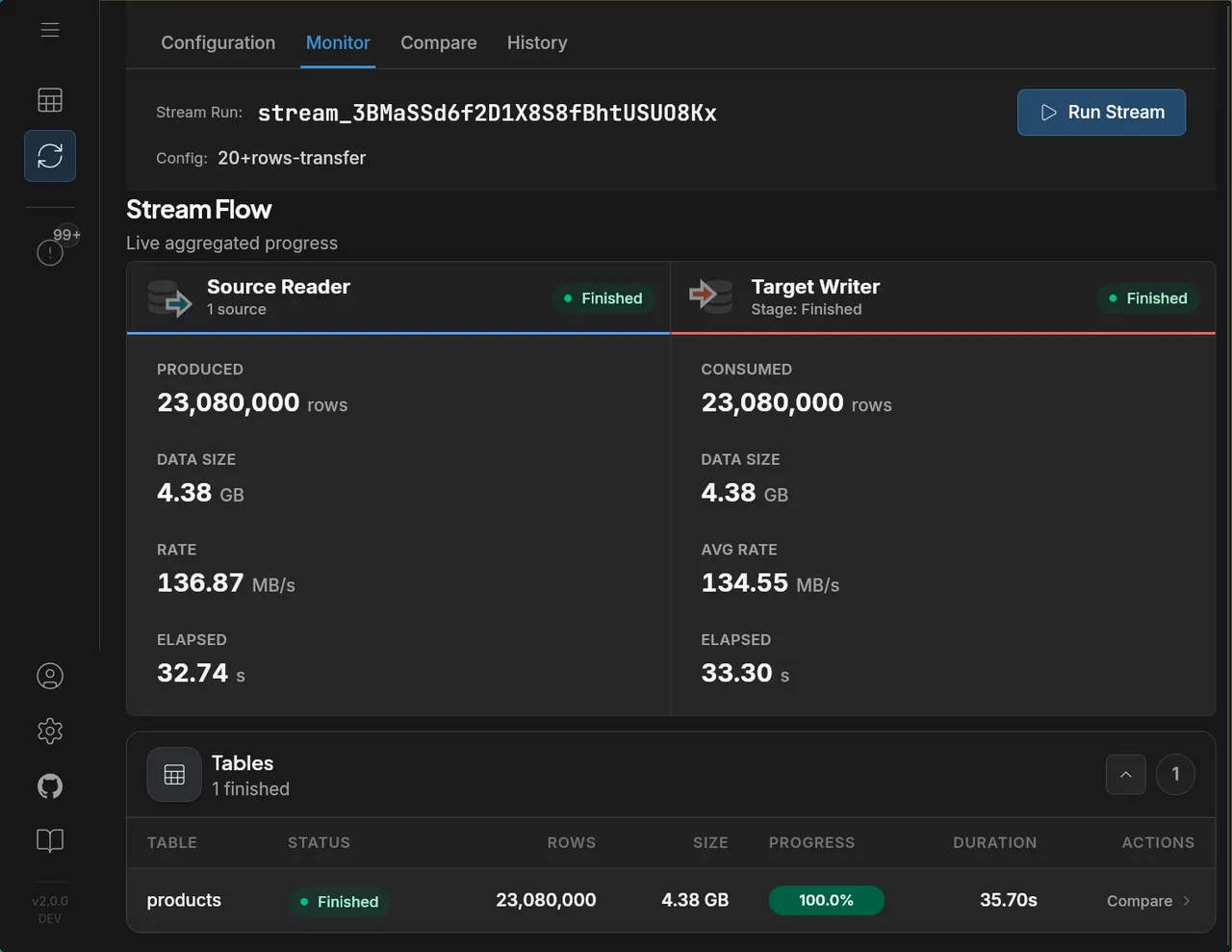
> **Performance:** 23 million rows (4.38 GB) migrated from MySQL to Parquet in 35.7 seconds at 136 MB/s.
### Real-time CDC (Change Data Capture)
Stream `INSERT`, `UPDATE`, and `DELETE` operations from source to target in real-time with minimal latency. Supports CDC to databases, files, and S3 storage.
## When this is probably not for you
- you need 100+ connectors (SaaS, APIs, etc.)
- you already run Kafka pipelines at scale
- you need complex ETL / transformations
## Screenshots
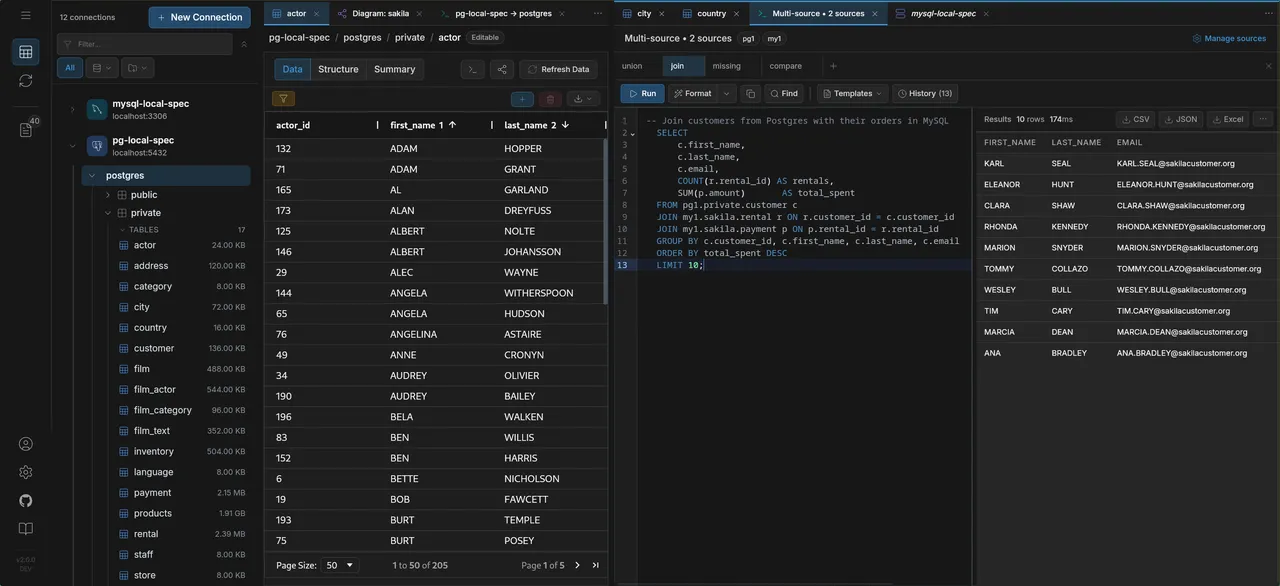
### Data Explorer
Browse schemas, view and edit data across multiple database connections with a unified tree navigation:
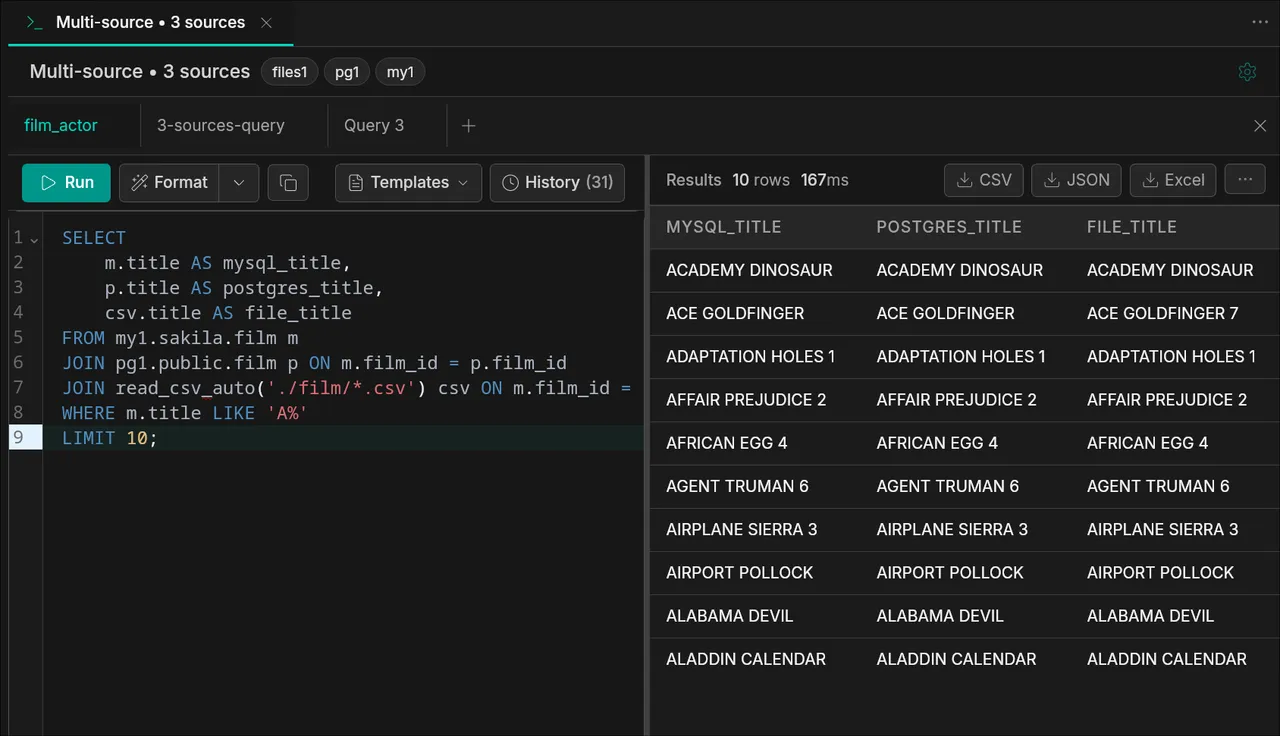
### Federated SQL
Join tables across MySQL, PostgreSQL, and file sources (CSV, Parquet) in a single query:
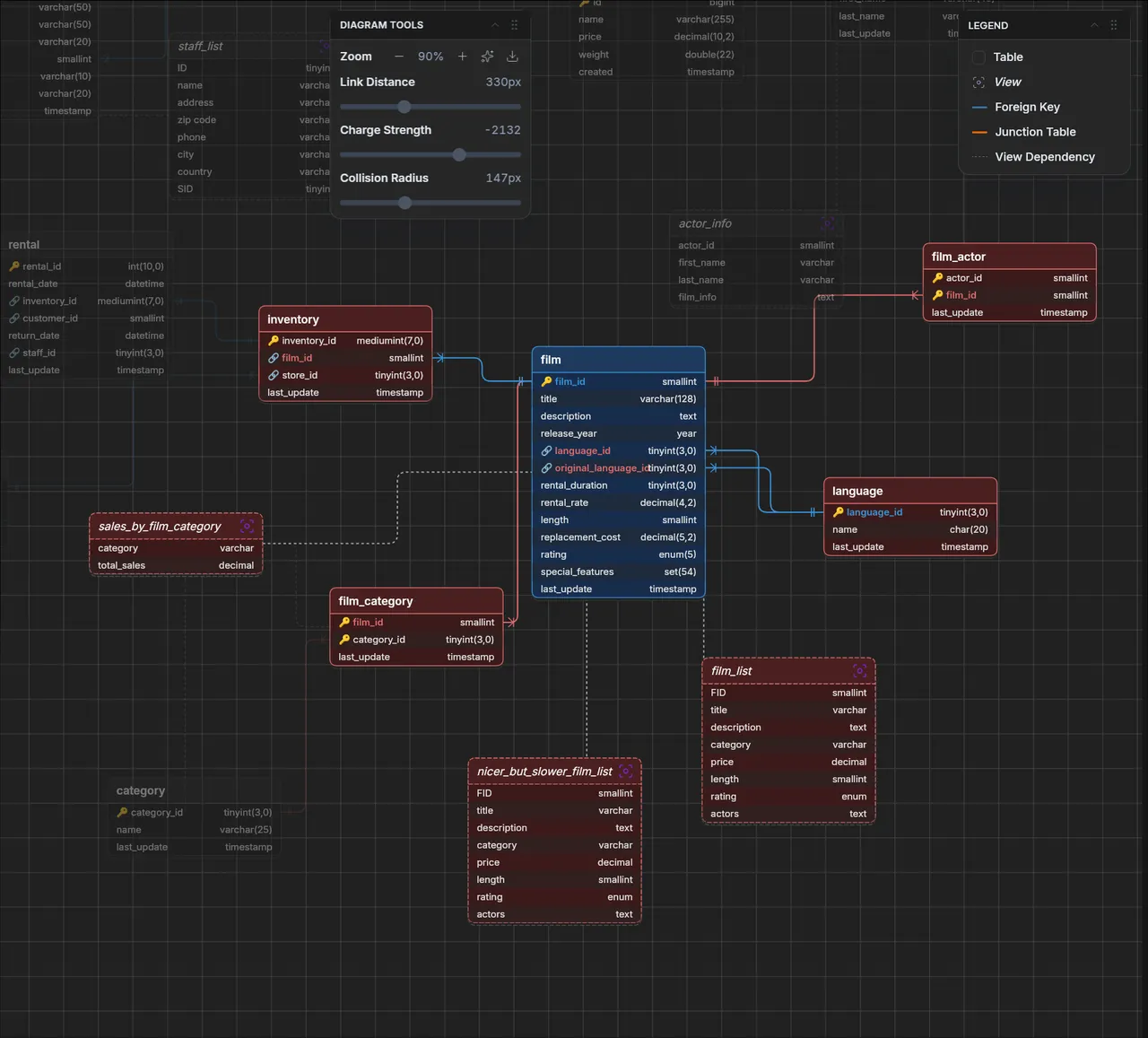
### ER Diagrams
Visualize database relationships with interactive entity-relationship diagrams:
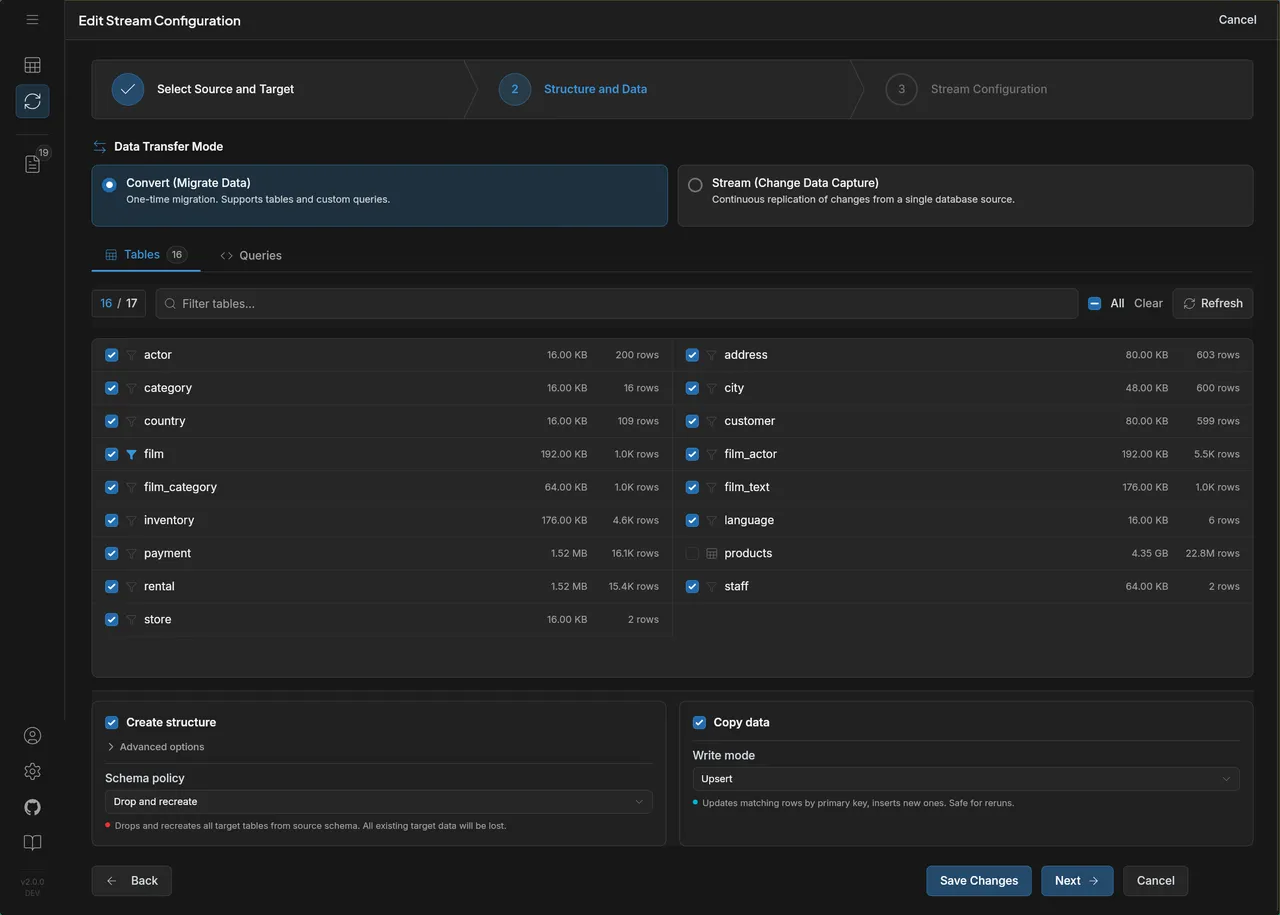
### Stream Configuration
Configure data migration and CDC streams with table selection, custom queries, and transfer settings:
### Stream Monitoring
Track data streams with real-time metrics — rows, data size, transfer rates, and per-table progress:
### AI Assistants
Connect your AI client with one click — it reads the same workspace you see, read-only:
## Supported Sources & Targets
### Sources
- MySQL / MariaDB / Percona
- PostgreSQL / CockroachDB
- Amazon RDS, Aurora, Google Cloud SQL, Azure Database
- Local files (CSV, JSONL, Parquet)
- S3-compatible storage (AWS S3, MinIO, DigitalOcean Spaces, Wasabi)
### Targets
- MySQL / PostgreSQL
- Snowflake
- CSV / JSONL / Parquet (local files)
- Amazon S3 / MinIO / S3-compatible storage
- Google Cloud Storage (GCS)
- Azure Blob Storage
## Deployment Options
Run it anywhere — no cloud account required, no vendor lock-in.
| Method | Description |
|--------|-------------|
| **Desktop** | Windows, macOS, Linux — local setup, no account required |
| **Self-hosted** | Docker / Docker Compose on any machine — local server, VPS, or your own infra |
## Pricing
The Database IDE is **free forever**. For data migration and CDC streaming, see [pricing details](https://streams.dbconvert.com/pricing).
## Examples
> **Most people never touch the API.** The UI covers connections, table selection, federated SQL, stream configuration, and monitoring end-to-end. The `curl` examples below are for users who want to script deployments, wire DBConvert Streams into CI/CD, or drive it from another service — not a required workflow.
Connections are managed separately and stream configs reference them by ID. Here are typical workflows via the API.
### 1. Create connections
```bash
# Create a MySQL source connection
curl -X POST http://localhost:8020/api/v1/connections \
-H "Content-Type: application/json" \
-d '{
"name": "mysql-source",
"type": "mysql",
"host": "localhost",
"port": 3306,
"username": "root",
"password": "password"
}'
# Create a PostgreSQL target connection
curl -X POST http://localhost:8020/api/v1/connections \
-H "Content-Type: application/json" \
-d '{
"name": "pg-target",
"type": "postgresql",
"host": "localhost",
"port": 5432,
"username": "postgres",
"password": "password"
}'
```
### 2. MySQL → PostgreSQL (load)
One-time migration with table selection:
```json
{
"name": "mysql-to-postgres-migration",
"mode": "load",
"source": {
"connections": [{
"connectionId": "",
"database": "sakila",
"tables": [
{ "name": "actor" },
{ "name": "film" },
{ "name": "customer" }
]
}]
},
"target": {
"id": "",
"spec": {
"db": {
"database": "target_db",
"schema": "public",
"schemaPolicy": "drop_and_recreate"
}
}
}
}
```
### 3. MySQL → PostgreSQL (CDC)
Real-time replication capturing inserts, updates, and deletes:
```json
{
"name": "mysql-to-postgres-cdc",
"mode": "cdc",
"source": {
"connections": [{
"connectionId": "",
"database": "sakila",
"tables": [
{ "name": "actor" },
{ "name": "film" }
]
}],
"options": {
"operations": ["insert", "update", "delete"]
}
},
"target": {
"id": "",
"spec": {
"db": {
"database": "target_db",
"writeMode": "upsert"
}
}
}
}
```
### 4. PostgreSQL → S3 Parquet (load)
Export database tables to Parquet files on S3:
```json
{
"name": "pg-to-s3-parquet",
"mode": "load",
"source": {
"connections": [{
"connectionId": "",
"database": "analytics",
"tables": [
{ "name": "orders" },
{ "name": "customers" }
]
}]
},
"target": {
"id": "",
"spec": {
"s3": {
"fileFormat": "parquet",
"upload": {
"bucket": "my-data-lake",
"prefix": "exports/"
}
}
}
}
}
```
### 5. Multi-source federated query (load)
Join data from MySQL and PostgreSQL into one target:
```json
{
"name": "federated-migration",
"mode": "load",
"source": {
"connections": [
{
"alias": "my1",
"connectionId": "",
"database": "sakila"
},
{
"alias": "pg1",
"connectionId": "",
"database": "dvdrental"
}
]
},
"target": {
"id": "",
"spec": {
"db": { "database": "warehouse" }
}
}
}
```
### 6. Start a stream
```bash
curl -X POST http://localhost:8020/api/v1/stream-configs//start
```
### 7. Monitor progress
```bash
curl http://localhost:8020/api/v1/streams//stats
```
> See the full [API documentation](https://streams.dbconvert.com/docs/) for all endpoints and options. Standalone stream-config files live in [`examples/api/`](https://github.com/slotix/dbconvert-streams-public/blob/HEAD/examples/api/), and reproducible benchmarks (including a side-by-side vs Debezium) are in [`examples/benchmarks/`](https://github.com/slotix/dbconvert-streams-public/blob/HEAD/examples/benchmarks/).
## Learn More
- [Documentation](https://streams.dbconvert.com/docs/)
- [What's New](https://streams.dbconvert.com/whats-new)
## Feedback and Support
Have questions or feedback? Use [Discussions](https://github.com/slotix/dbconvert-streams-public/discussions) or open an [Issue](https://github.com/slotix/dbconvert-streams-public/issues).