# darktw/usecortex-mcp [Health: Active]
**Category:** 🧠 Knowledge & Memory
**Repository:** https://github.com/darktw/usecortex-mcp
**GitHub Stars:** 1
**Views:** 2
**Installs:** 0
**Upvotes:** 0
**Directory Page:** https://allmcps.com/mcp/darktw-usecortex-mcp
## Description
Persistent knowledge memory for AI agents. Two-way flow: read context into projects and write discoveries back. Structured by topic with AES-256 encryption.
## Tools
Capabilities this server exposes over MCP:
- **query_knowledge** — Ask a natural language question and get an AI-powered answer based on your stored knowledge.
- **list_topics** — List all knowledge topics. Takes no parameters.
- **add_knowledge** — Write new knowledge to your base. Your agent can store discoveries, decisions, or patterns it finds.
- **get_topic** — Retrieve all knowledge entries for a specific topic.
- **search_knowledge** — Search knowledge entries by keyword (text match).
## Claude Desktop Quick Installation
Remote MCP endpoint (confidence: high). Install path detected from listing signals. Add as a URL/SSE server in your client:
```json
"mcpServers": {
"usecortex-mcp": {
"url": "https://api.usecortex.net/mcp"
}
}
```
## Documentation & README

UseCortex MCP Server
Give your AI coding agent a persistent memory — read and write knowledge from any tool.

Website ·
Quick Start ·
Tools ·
Pricing
---
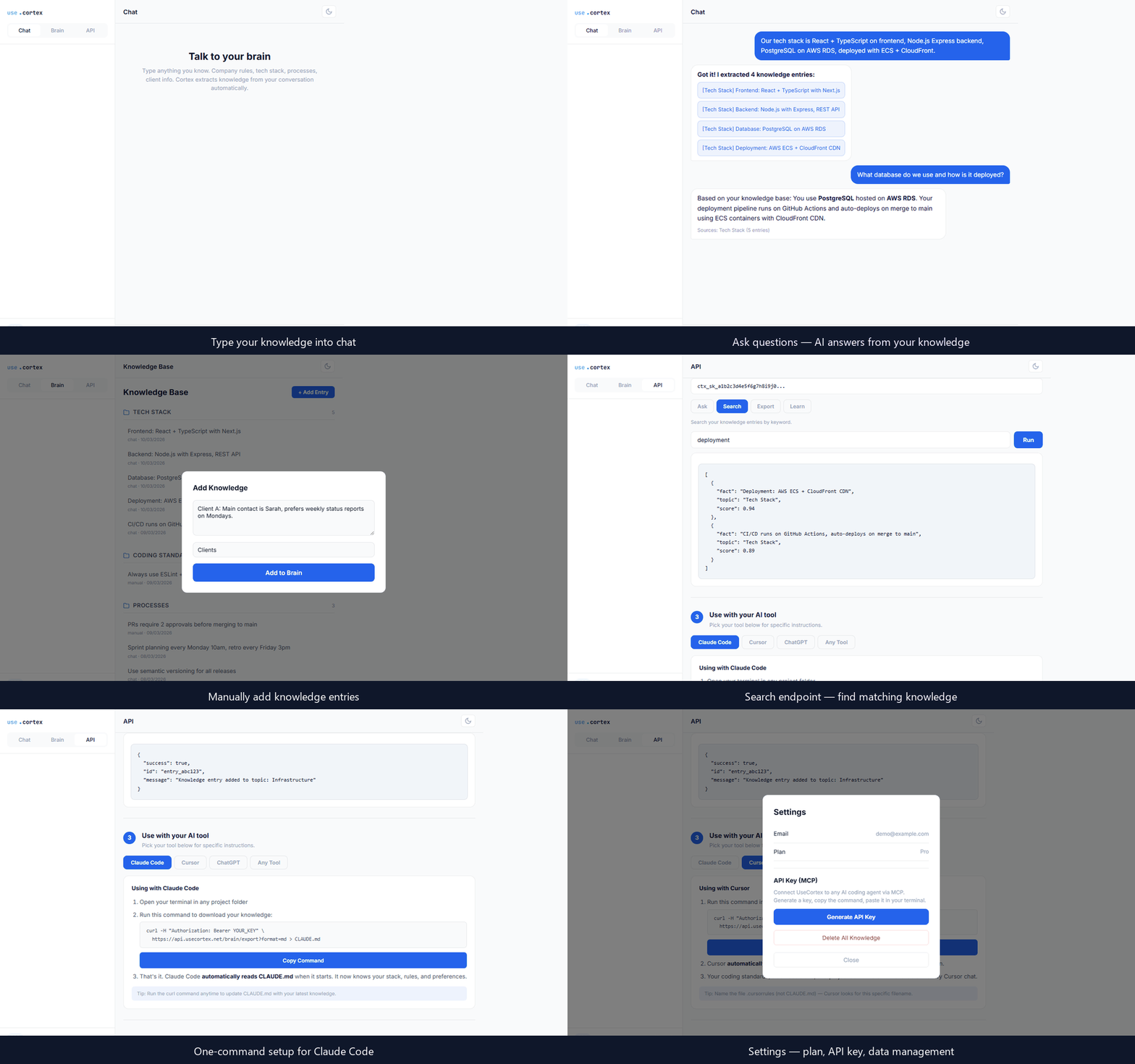
UseCortex MCP is a [Model Context Protocol](https://modelcontextprotocol.io) server that gives AI coding agents persistent memory. Your agent can read knowledge you've stored and write new discoveries back — all through a single encrypted endpoint.
No context window limits. No copy-pasting. No outdated docs. Your AI remembers everything.
## How It Works
1. **You chat** — describe your coding standards, architecture decisions, client requirements, anything
2. **UseCortex extracts** — AI automatically organizes facts into structured topics
3. **Your agent recalls** — any MCP-compatible tool can query your knowledge instantly
4. **Knowledge grows** — your agent can push new discoveries back, so your knowledge base stays current
## Features
- **Two-way knowledge flow** — read context into projects, write discoveries back
- **Works with any MCP client** — compatible with any AI coding agent that supports the Model Context Protocol
- **Encrypted at rest** — AES-256 encryption with per-user keys
- **No vendor lock-in** — your knowledge works across every AI tool
- **Structured by topic** — knowledge auto-organized, not dumped in one pile
## Quick Start
### Prerequisites
- A free [UseCortex](https://usecortex.net) account
- An MCP-compatible AI coding agent
### 1. Generate an API key
Sign up at [usecortex.net](https://usecortex.net), then navigate to **Settings → API Keys → Generate**.
> **Note:** Copy the key immediately after generation. It will not be shown again.
### 2. Install (one command)
Run this in your terminal — replace `YOUR_API_KEY` with the key from step 1:
```bash
claude mcp add usecortex --transport url https://api.usecortex.net/mcp --header "Authorization: Bearer YOUR_API_KEY"
```
That's it. Restart your AI coding agent and UseCortex tools are ready.
Manual setup (alternative)
If you prefer to configure manually, add this to your MCP client config file:
```json
{
"mcpServers": {
"usecortex": {
"type": "url",
"url": "https://api.usecortex.net/mcp",
"headers": {
"Authorization": "Bearer YOUR_API_KEY"
}
}
}
}
```
Replace `YOUR_API_KEY` with the key generated in step 1.
## Available Tools
### `query_knowledge`
Ask a natural language question and get an AI-powered answer based on your stored knowledge.
| Parameter | Type | Required | Description |
|-----------|----------|----------|------------------------------------------------|
| `query` | `string` | Yes | Natural language question |
| `topic` | `string` | No | Filter by specific topic |
### `list_topics`
List all knowledge topics. Takes no parameters.
### `add_knowledge`
Write new knowledge to your base. Your agent can store discoveries, decisions, or patterns it finds.
| Parameter | Type | Required | Description |
|-----------|----------|----------|------------------------------------------------|
| `content` | `string` | Yes | The knowledge to store |
| `topic` | `string` | No | Topic to file under (auto-detected if omitted) |
### `get_topic`
Retrieve all knowledge entries for a specific topic.
| Parameter | Type | Required | Description |
|-----------|----------|----------|------------------------------------|
| `topic` | `string` | Yes | Topic name to retrieve |
### `search_knowledge`
Search knowledge entries by keyword (text match).
| Parameter | Type | Required | Description |
|-----------|----------|----------|------------------------------------|
| `query` | `string` | Yes | Search term |
### `capture_session` *(Memory plan)*
Capture an AI session summary into persistent memory. Store what you learned, decided, or built.
| Parameter | Type | Required | Description |
|----------------|------------|----------|------------------------------------------------|
| `summary` | `string` | Yes | Compressed summary of the session |
| `tool` | `string` | No | AI tool used (claude-code, cursor, chatgpt) |
| `project` | `string` | No | Project name or path |
| `tags` | `string[]` | No | Tags for categorization |
| `observations` | `string` | No | Detailed observations as JSON string |
### `recall_memory` *(Memory plan)*
Search across all captured session memories using AI. Ask what you worked on or what decisions were made.
| Parameter | Type | Required | Description |
|-----------|----------|----------|------------------------------------------------|
| `query` | `string` | Yes | Natural language question about past sessions |
| `tool` | `string` | No | Filter by AI tool |
| `project` | `string` | No | Filter by project |
| `limit` | `number` | No | Max results (default 20) |
### `list_sessions` *(Memory plan)*
List recent captured session memories.
| Parameter | Type | Required | Description |
|-----------|----------|----------|------------------------------------|
| `tool` | `string` | No | Filter by AI tool |
| `project` | `string` | No | Filter by project |
| `limit` | `number` | No | Max results (default 10) |
## Use Cases
| Who | What |
|-------------------|-----------------------------------------------------------------------|
| **Developers** | Your coding standards, architecture decisions, and project context — automatically available to your AI agent |
| **Support teams** | Feed real policies and procedures to any support bot — it answers with facts, not guesses |
| **Sales teams** | Store client history, pricing, and objections — pull everything before meetings |
| **Individuals** | Your personal brain backup — everything you know, encrypted and accessible from any AI tool |
| **HR & Onboarding** | Your company playbook — processes, tools, culture — available to new hires instantly |
## Pricing
| | Free | Pro ($9/mo) | Memory ($19/mo) | Team ($39/mo) |
|--------------------------|------------|--------------|-----------------|---------------|
| Knowledge entries | 100 | Unlimited | Unlimited | Unlimited |
| Topics | 3 | Unlimited | Unlimited | Unlimited |
| API calls/month | 500 | 10,000 | 50,000 | 200,000 |
| Two-way API | Read only | Yes | Yes | Yes |
| AI session capture | — | — | Yes | Yes |
| Memory recall | — | — | Yes | Yes |
| Markdown sync | — | — | Yes | Yes |
| Session history | — | — | 90 days | Unlimited |
| API keys | 1 | 5 | 10 | 50 |
| Team members | — | — | — | 25 |
| Audit logs | — | — | — | Yes |
Manage your plan at [usecortex.net](https://usecortex.net).
## Security
- All communication encrypted over HTTPS
- Knowledge encrypted at rest with AES-256
- Per-user encryption keys — even we can't read your data
- API keys scoped per user with instant revocation
## Contributing
Found a bug or have a feature request? [Open an issue](https://github.com/usecortex-official/cortex-mcp/issues).
## Links
- [UseCortex](https://usecortex.net) — Create your account and manage knowledge
- [cortex-cli](https://github.com/usecortex-official/cortex-cli) — CLI for markdown sync & terminal usage
- [Model Context Protocol](https://modelcontextprotocol.io) — Learn about MCP
## License
[MIT](https://github.com/darktw/usecortex-mcp/blob/HEAD/LICENSE)
---
© 2026 Altazi Labs, Inc. All rights reserved. · [contact@altazilabs.com](mailto:contact@altazilabs.com)