# Cronicorn

**Category:** 💻 Developer Tools  
**Repository:** https://github.com/weskerllc/cronicorn  
**Views:** 0  
**Installs:** 0  
**Upvotes:** 0  
**Directory Page:** https://allmcps.com/mcp/cronicorn

## Description
Manage adaptive cron jobs and HTTP endpoint scheduling via AI assistants.

## Claude Desktop Quick Installation
Heuristic fallback — verify the package name and runner against the repository README before running it. Uses `npx` (confidence: low):

```json
"mcpServers": {
  "cronicorn": {
    "command": "npx",
    "args": ["-y","cronicorn"]
  }
}
```

## Documentation & README

<div align="center">

# <img src="https://raw.githubusercontent.com/weskerllc/cronicorn/HEAD/packages/content/assets/logo.svg" alt="Cronicorn" height="40" align="center"> Cronicorn

**HTTP jobs that understand their own responses**

<p align="center">
Add endpoints, describe what matters in plain English, and the AI reads response bodies to adapt —
<br/>
adjusting frequency, coordinating siblings, and recovering from failures automatically

</p>

<p align="center">
  <a href="https://cronicorn.com">
    <img src="https://raw.githubusercontent.com/weskerllc/cronicorn/HEAD/.github/images/button-start-now.png" alt="Start Now (Free)" width="250" />
  </a>
</p>


<p align="center">
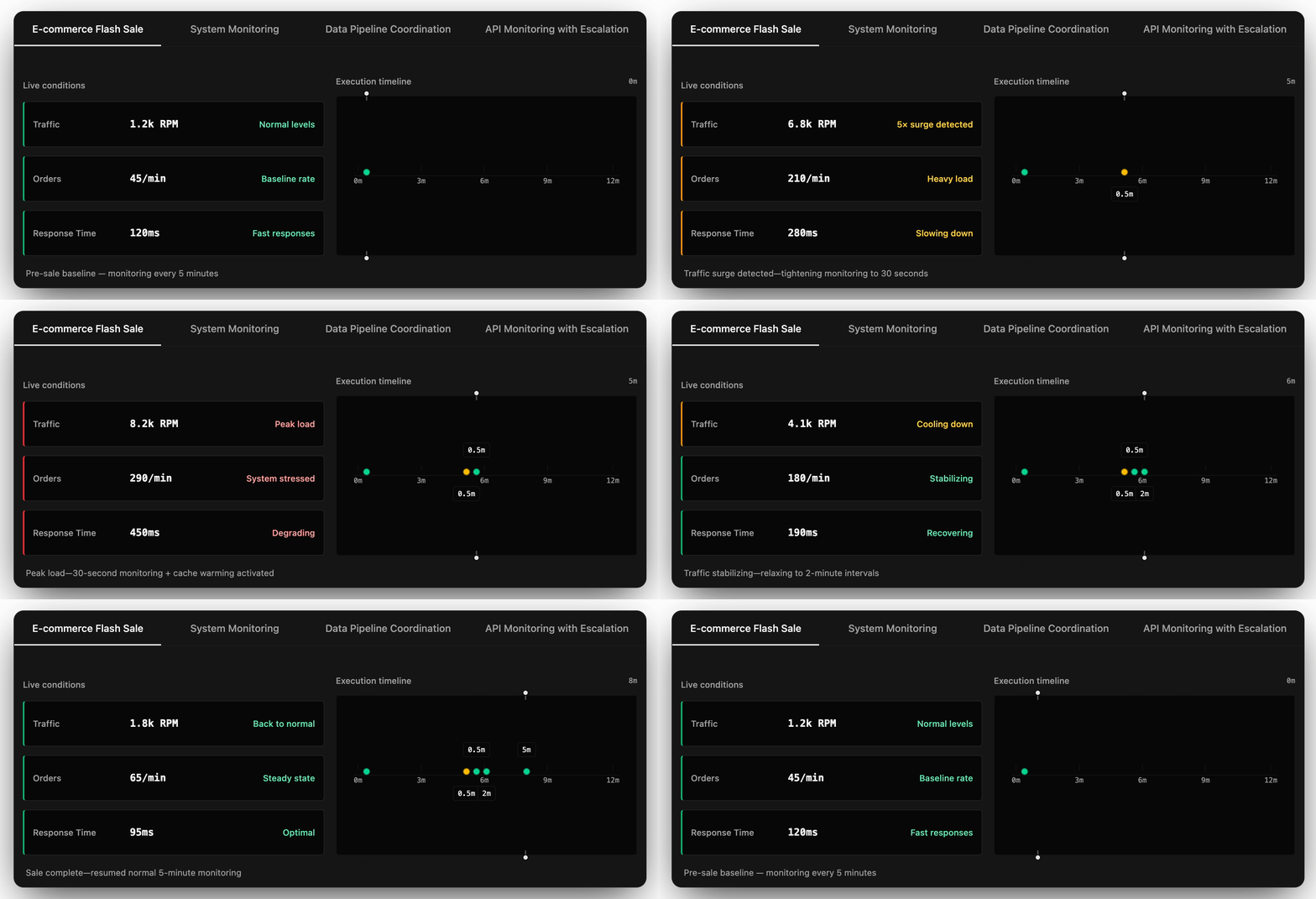
  <img src="https://raw.githubusercontent.com/weskerllc/cronicorn/HEAD/.github/images/timeline-animation.gif" alt="Cronicorn AI Adaptation" width="640">
  <br>
  <em>Activity surge → AI tightens to 30s + triggers recovery actions → stabilizes → back to baseline</em>
</p>

</div>

<table align="center"><tr><td>

## Features

- **Adaptive scheduling** — AI adjusts polling frequency based on real response data
- **Plain English descriptions** — no config files, no SDK required
- **Safety constraints** — min/max intervals and TTL-based hints that auto-expire
- **Multi-endpoint coordination** — endpoints are aware of siblings and adapt together
- **Automatic error recovery** — backoff, retry, and recovery actions out of the box
- **Works without AI** — traditional cron and interval scheduling as a fallback

## How It Works

1. **Add an HTTP endpoint** and set a baseline schedule (cron or interval)
2. **Describe what matters** in plain English — thresholds, coordination logic, response structure
3. **AI monitors responses** and adapts frequency, triggers actions, and recovers from failures automatically

## Getting Started

| Path | Link |
|------|------|
| **Web UI** — create and manage jobs visually | [cronicorn.com](https://cronicorn.com) |
| **MCP Server** — manage jobs from Claude, Cursor, or any MCP client | [MCP Server docs](https://docs.cronicorn.com/mcp-server) |
| **API** — integrate programmatically with the REST API | [API Playground](https://cronicorn.com/api/reference) |

</td></tr></table>

<p align="center">
  <a href="https://docs.cronicorn.com">Docs</a> ·
  <a href="https://docs.cronicorn.com/mcp-server">MCP Server</a> ·
  <a href="https://cronicorn.com/api/reference">API</a> ·
  <a href="https://docs.cronicorn.com/self-hosting">Self-Host</a> ·
  <a href="https://github.com/weskerllc/cronicorn/issues/new">Support</a>
</p>

<p align="center">
  <a href="https://github.com/weskerllc/cronicorn/blob/HEAD/LICENSE"><img src="https://img.shields.io/badge/License-FSL--1.1--MIT-blue" alt="License: FSL-1.1-MIT"></a>
  <a href="https://www.typescriptlang.org/"><img src="https://img.shields.io/badge/TypeScript-5.7-3178C6?logo=typescript&logoColor=white" alt="TypeScript"></a>
  <a href="https://docs.cronicorn.com"><img src="https://img.shields.io/badge/Docs-docs.cronicorn.com-green" alt="Docs"></a>
  <a href="https://codecov.io/gh/weskerllc/cronicorn" >  <img src="https://codecov.io/gh/weskerllc/cronicorn/branch/main/graph/badge.svg?token=Z19FSCW1RM"/></a>
  <a href="https://context7.com/weskerllc/cronicorn"><img src="https://img.shields.io/badge/Context7-Verified-059669?logo=data:image/svg+xml;base64,PHN2ZyB3aWR0aD0iMjgiIGhlaWdodD0iMjgiIHZpZXdCb3g9IjAgMCAyOCAyOCIgZmlsbD0ibm9uZSIgeG1sbnM9Imh0dHA6Ly93d3cudzMub3JnLzIwMDAvc3ZnIj48cGF0aCBkPSJNMTAuNTcyNCAxNS4yNTY1QzEwLjU3MjQgMTcuNTAyNSA5LjY2MTMgMTkuMzc3OCA4LjE3ODA1IDIxLjEwNDdIMTEuNjMxOUwxMS42MzE5IDIyLjc3ODZINi4zMzQ1OVYyMS4xODk1QzcuOTU1NTcgMTkuMzU2NiA4LjU4MDY1IDE3Ljg2MjggOC41ODA2NSAxNS4yNTY1TDEwLjU3MjQgMTUuMjU2NVoiIGZpbGw9IndoaXRlIi8+PHBhdGggZD0iTTE3LjQyNzYgMTUuMjU2NUMxNy40Mjc2IDE3LjUwMjUgMTguMzM4NyAxOS4zNzc4IDE5LjgyMiAyMS4xMDQ3SDE2LjM2ODFWMjIuNzc4NkgyMS42NjU0VjIxLjE4OTVDMjAuMDQ0NCAxOS4zNTY2IDE5LjQxOTQgMTcuODYyOCAxOS40MTk0IDE1LjI1NjVIMTcuNDI3NloiIGZpbGw9IndoaXRlIi8+PHBhdGggZD0iTTEwLjU3MjQgMTIuNzQzNUMxMC41NzI0IDEwLjQ5NzUgOS42NjEzMSA4LjYyMjI0IDguMTc4MDcgNi44OTUzMkwxMS42MzE5IDYuODk1MzJWNS4yMjEzN0w2LjMzNDYxIDUuMjIxMzdWNi44MTA1NkM3Ljk1NTU4IDguNjQzNDMgOC41ODA2NiAxMC4xMzczIDguNTgwNjYgMTIuNzQzNUwxMC41NzI0IDEyLjc0MzVaIiBmaWxsPSJ3aGl0ZSIvPjxwYXRoIGQ9Ik0xNy40Mjc2IDEyLjc0MzVDMTcuNDI3NiAxMC40OTc1IDE4LjMzODcgOC42MjIyNCAxOS44MjIgNi44OTUzMkwxNi4zNjgxIDYuODk1MzJMMTYuMzY4MSA1LjIyMTM4TDIxLjY2NTQgNS4yMjEzOFY2LjgxMDU2QzIwLjA0NDUgOC42NDM0MyAxOS40MTk0IDEwLjEzNzMgMTkuNDE5NCAxMi43NDM1SDE3LjQyNzZaIiBmaWxsPSJ3aGl0ZSIvPjwvc3ZnPg==" alt="Context7 Verified"></a>
</p>