# cli
**Category:** 💻 Developer Tools
**Repository:** https://github.com/getmcpm/cli
**Views:** 0
**Installs:** 0
**Upvotes:** 0
**Directory Page:** https://allmcps.com/mcp/cli-3
## Description
MCP package manager with trust scoring. Search, install, and audit MCP servers.
## Claude Desktop Quick Installation
Heuristic fallback — verify the package name and runner against the repository README before running it. Uses `npx` (confidence: low):
```json
"mcpServers": {
"cli": {
"command": "npx",
"args": ["-y","cli-3"]
}
}
```
## Documentation & README
# mcpm
**A runtime security guard for your AI's tools -- and the package manager to install them.** Blocks prompt injection, tool poisoning, and credential exfiltration in live MCP traffic. Local-first, deterministic, no LLM in the enforcement path.
[](https://www.npmjs.com/package/@getmcpm/cli)
[](./LICENSE)
[](https://github.com/getmcpm/cli/actions)
[](https://snyk.io/advisor/npm-package/@getmcpm/cli)
---
The risky part of an MCP server doesn't show up at install -- it shows up while your agent is running: prompt injection hidden in a tool's output, a server that quietly rewrites its tools after you approved them, a sampling request that smuggles instructions into your model. Being listed in a registry is not a safety signal -- in 2026 a proof-of-concept poisoned server was [accepted by 9 of 11 public registries and marketplaces](https://www.ox.security/blog/mcp-supply-chain-advisory-rce-vulnerabilities-across-the-ai-ecosystem/). So mcpm scores every install for hardcoded secrets, prompt injection, and typosquatting -- then runs a live guard between your AI client and each server, pinning tool definitions against rug-pulls and blocking injection before it reaches the model.
**You don't have to take our word for any of that.** Guards are easy to claim and hard to check, so the measuring stick is public: [**mcp-guardbench**](https://github.com/getmcpm/mcp-guardbench) is a guard-agnostic benchmark -- versioned attack and benign cases, an open schema, and a runner that scores *any* MCP guard through its own published CLI. mcpm is scored the same way as everyone else, by shelling out to `mcpm guard inspect`, never by importing its own engine.
mcpm currently scores 100% recall at a 0% false-positive rate on that corpus -- which is **by construction**, since the corpus was extracted from mcpm's own test fixtures. That is a baseline, not a boast. It gets interesting when someone scores a second guard, or contributes a case mcpm misses.
## Quick start
Install with the package manager you already use:
| Method | Command |
|---|---|
| **npm** (global) | `npm install -g @getmcpm/cli` |
| **npx** (no install) | `npx @getmcpm/cli ` |
| **pnpm** | `pnpm add -g @getmcpm/cli` |
| **mise** | `mise use -g npm:@getmcpm/cli` |
**Requires Node `^22.22.2 || ^24.15.0 || >=26.0.0`** — that is **22.22.2+, 24.15.0+ or
26+**, the intersection of what every runtime dependency itself supports. Everything
else is excluded, 23.x and 25.x included. npm warns `EBADENGINE` and fails outright
under `--engine-strict`; pnpm installs silently and exits 0 unless you set
`engine-strict=true`, so there an unsupported Node surfaces as a runtime error rather
than an install one.
The binary is `mcpm`. **Heads up:** the `mcpm` Homebrew formula is a *different,
unrelated* project ([mcpm.sh](https://mcpm.sh)) — install this mcpm via
npm/npx/pnpm/mise above (all resolve the scoped `@getmcpm/cli` package, so there's
no name collision). A dedicated Homebrew tap is deferred; see
[`docs/DISTRIBUTION.md`](https://github.com/getmcpm/cli/blob/HEAD/docs/DISTRIBUTION.md).
```bash
mcpm search filesystem
mcpm info io.github.domdomegg/filesystem-mcp
mcpm install io.github.domdomegg/filesystem-mcp
```
## Features
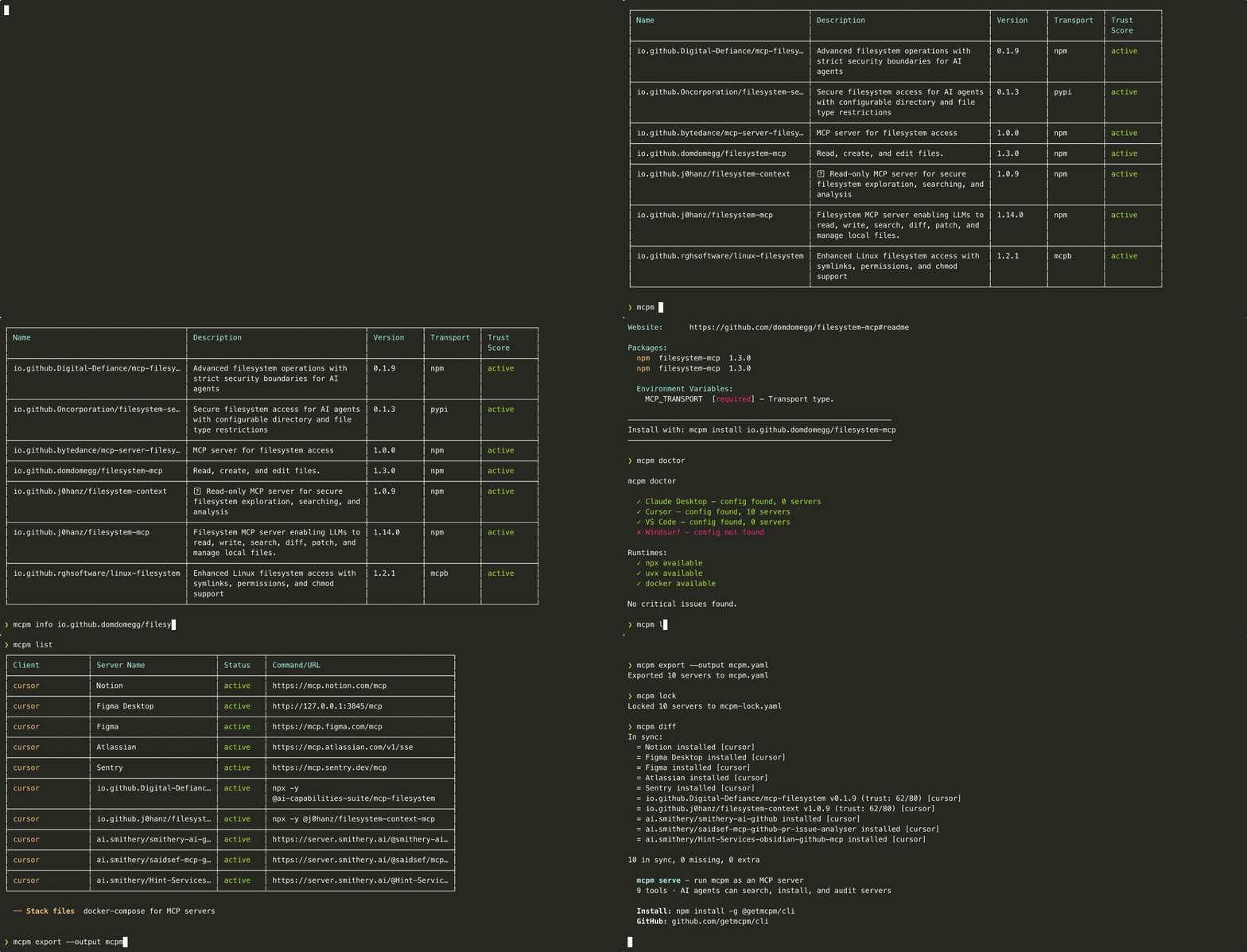
### Search the MCP registry
Query the official MCP Registry and see results with trust indicators.
```
$ mcpm search filesystem
Name Description Version Transport Status
io.github.domdomegg/filesystem-mcp File system access via MCP 1.4.0 stdio active
io.github.Digital-Defiance/mcp-filesystem Read-only filesystem server 0.9.2 stdio active
...
```
Search shows registry lifecycle status, not a trust score -- it is a fast discovery list and does not run the scanner per result. Computed trust lives in `mcpm why`, `info`, `install`, and `audit`.
### Install with trust assessment
Every install runs a metadata-based trust assessment before writing config.
```
$ mcpm install io.github.domdomegg/filesystem-mcp
███████████████░░░░░ 57/80 CAUTION
├─ Health check: not yet run
├─ Tool descriptions: score 32/40
├─ Package: publisher verification passed
└─ External scan: not available (set MCPM_EXTERNAL_SCANNER for deeper analysis)
Install to Claude Desktop? (Y/n)
```
### Audit installed servers
Scan everything you have installed. Get a trust report.
```
$ mcpm audit
Server Score Level Findings
servers-filesystem 72/80 safe 0
servers-github 52/80 caution 2
some-sketchy-server 24/80 risky 5
```
### Cross-IDE support
One tool for all your AI clients. mcpm reads and writes the correct config format for each.
```
$ mcpm list
Client Server Name Status Command/URL
Claude Desktop servers-filesystem active npx -y servers-filesystem
Claude Desktop servers-github active npx -y servers-github
Cursor servers-fetch disabled npx -y servers-fetch
```
### Doctor: check your MCP setup health
Find misconfigurations, missing runtimes, broken servers, and plaintext secrets pasted into client config.
```
$ mcpm doctor
Checking MCP setup...
[pass] Claude Desktop config found
[pass] npx runtime available
[warn] Cursor config not found
[pass] 3 servers installed, 0 with errors
[warn] plaintext secret (advisory): github-mcp · env 'GITHUB_TOKEN' — GitHub token
Move it to the encrypted store: mcpm secrets set
```
The plaintext-secret scan reports the key name and label only — never the value — and skips values already stored as `mcpm:keychain:` placeholders. It's advisory (never fails `doctor`).
### Stack files: docker-compose for MCP
Declare your project's MCP servers in `mcpm.yaml`, lock versions with trust snapshots, and let every team member replicate the setup with one command.
```bash
mcpm export > mcpm.yaml # dump current setup
mcpm lock # resolve versions + trust snapshot
mcpm up # install everything from mcpm.yaml
mcpm diff # compare installed vs declared state
```
Stack files include a trust policy. If a server's trust score drops below the threshold, `mcpm up` blocks it.
```yaml
version: "1"
policy:
minTrustScore: 60
blockOnScoreDrop: true
servers:
io.github.domdomegg/filesystem-mcp:
version: "^1.0.0"
io.github.modelcontextprotocol/servers-github:
version: "1.2.3"
env:
GITHUB_TOKEN: { required: true, secret: true }
```
### Scaffold a stack file
Start a new project's MCP setup in one command. `mcpm init` writes a starter `mcpm.yaml` you fill in with servers from `mcpm search`.
```
$ mcpm init
Created mcpm.yaml.
Next steps:
mcpm search find MCP servers in the registry
edit mcpm.yaml add them under `servers:`
mcpm lock resolve and lock versions
mcpm up install from the stack file
```
It refuses to clobber an existing `mcpm.yaml` (pass `--force` to overwrite). mcpm deliberately doesn't ship curated packs — blessing specific community servers is a trust decision a security tool shouldn't bake in.
## Trust score
The trust score is a 0-100 assessment based on publicly available metadata. It is **not** a source code audit.
What it checks:
| Component | Points | What it measures |
|---|---|---|
| Health check | 0-30 | Can the server start and respond to `list_tools`? |
| Static scan | 0-40 | Regex-based detection of hardcoded secrets, prompt injection patterns in tool descriptions, typosquatting in package names, suspicious argument schemas |
| External scanner | 0-20 | Results from a third-party scanner you have installed, opt-in via `MCPM_EXTERNAL_SCANNER` (off by default) |
| Registry metadata | 0-10 | Verified publisher, publish date, download count (capped to 0 when critical findings present) |
Levels are a **ratio** of the points available, not absolute: **safe** at 80% of `maxPossible` or better, **caution** at 50-79%, **risky** below 50%. With no external scanner (`maxPossible` 80) that puts safe at 64 points, not 80.
`mcpm audit` shows **`clean · not run`** where the server cleared every check that actually ran and the only unmeasured component is the health check — audit never executes servers, so that bucket scores a flat 15/30 and would otherwise drag every flawless server into **caution**. It is a statement about what mcpm did (found nothing, ran nothing), deliberately weaker than **safe**, which is reserved for servers whose health check really ran.
Without an external scanner, the maximum possible score is 80/100 and the bucket is dropped from the total rather than counted as a failure. The static scan catches common patterns but cannot detect all vulnerabilities. Treat the score as a signal, not a guarantee.
**External scanning is opt-in and mcpm never downloads a scanner.** Set `MCPM_EXTERNAL_SCANNER` to the path or name of a scanner you have already installed. mcpm probes it with ` --version` and, if that exits 0, scans each server with ` --json `, expecting `{"findings": [...]}` on stdout. A scanner whose output cannot be read is treated as **absent** rather than as a clean pass, so the bucket leaves the total instead of silently earning 20/20 — otherwise any binary that exits 0 would raise trust scores.
Package runners (`npx`, `uvx`, `pipx`, `docker`, shells, …) are refused, including via symlink or a runner's `-cli.js` entrypoint. Be clear about what that is worth: it is a **footgun guard**, not a security boundary. Anyone who can set this variable can usually set `PATH` or drop a file too. What it buys is that a pasted `npx …` recipe — or a future mcpm default drifting back toward one — cannot quietly re-create the fetch-and-execute vector this seam was rebuilt to remove.
No scanner is recommended here because none evaluated so far fits: `snyk/agent-scan` (the actively maintained successor to Invariant Labs' mcp-scan) scans local agent config files and machine-wide installs — including starting each MCP server to inspect it live — rather than accepting a single registry server name, and its JSON output isn't the flat `{"findings": [...]}` shape above. See `src/scanner/tier2.ts`'s header comment for the full evaluation.
Those 20 points **inform the score but cannot clear a safety floor.** The MCP server surface (`mcpm_install`, `mcpm_up`) enforces a hard trust floor of 25 that no caller-supplied value may lower — and since `MCPM_EXTERNAL_SCANNER` names an arbitrary executable, a two-line script printing `{"findings": []}` is caller-supplied input too. So the floor is compared against mcpm's own evidence only: health check + static scan + registry metadata, out of 80. The exclusion is one-directional — a scanner reporting a critical finding still drags a server *down* through the floor (via the registry-metadata cap), it just can't push one up through it. Your own `--min-trust` threshold, a stack file's `policy.minTrustScore`, and `mcpm audit --fix` are unaffected: there the same person picks both the threshold and the scanner. `audit --fix` is also the one score gate that *deletes* rather than refuses, so subtracting the bucket there would remove more servers, not fewer.
## Commands
| Command | Description |
|---|---|
| `mcpm search ` | Search the MCP registry for servers |
| `mcpm install ` | Install an MCP server from the registry |
| `mcpm info ` | Show full details for an MCP server |
| `mcpm list` | List all installed MCP servers across detected AI clients |
| `mcpm remove ` | Remove an MCP server from client config(s) |
| `mcpm audit` | Scan all installed servers and produce a trust report (`--json`, `--sarif` for GitHub code-scanning) |
| `mcpm update` | Check for newer versions and update installed servers |
| `mcpm outdated` | Show version drift for installed servers (use `mcpm audit` for current security findings) |
| `mcpm secrets` | Manage MCP server credentials (AES-GCM encrypted at rest; key held in the OS keychain — macOS Keychain / libsecret / Windows DPAPI — so a copied store can't be decrypted off-machine, with a machine-derived-key fallback where no keychain is available). `mcpm secrets migrate` upgrades older entries |
| `mcpm publish scaffold` | Create a .mcpm-publish.yaml manifest interactively |
| `mcpm publish check` | Dry-run: show trust score and what would be submitted |
| `mcpm publish` | Submit to the official MCP registry (requires GITHUB_TOKEN) |
| `mcpm doctor` | Check MCP setup health and report issues (`--json` structured model, `--report` redacted paste-for-bug-reports snapshot) |
| `mcpm init` | Scaffold a starter `mcpm.yaml` stack file in the current directory |
| `mcpm disable ` | Disable an MCP server without removing it from config |
| `mcpm enable ` | Re-enable a previously disabled MCP server |
| `mcpm import` | Import existing MCP servers from client config files |
| `mcpm alias` | Create short aliases for long MCP server names |
| `mcpm export` | Export installed servers as an mcpm.yaml stack file |
| `mcpm lock` | Resolve versions and create mcpm-lock.yaml with trust snapshots (+ npm provenance identity, WARNs on drift) |
| `mcpm up` | Install all servers from mcpm.yaml with trust verification |
| `mcpm verify` | Repo-only CI gate: verify lockfile integrity + re-verify Sigstore provenance vs npm's published record (`--json`) |
| `mcpm diff` | Compare installed servers against mcpm.yaml and lock file |
| `mcpm sync` | Show cross-client config drift across all detected clients (`--check` gates CI with exit 2, `--json`) |
| `mcpm completions ` | Generate shell completion scripts (bash, zsh, fish) |
| `mcpm why ` | Explain a server's trust score (breakdown of all components) |
| `mcpm serve` | Start mcpm as an MCP server (stdio transport) |
| `mcpm guard enable` | Wrap detected client configs with the inspection relay |
| `mcpm guard disable` | Restore original client configs |
| `mcpm guard status` | Show what's wrapped and the per-server pin state |
| `mcpm guard demo` | Run the synthetic prompt-injection scenario (visible block) |
| `mcpm guard accept-drift ` | Re-pin a tool's schema after a legitimate upgrade |
| `mcpm guard mute ` | Disable a signature with optional `--for ` |
| `mcpm guard unmute ` | Re-enable a muted signature |
| `mcpm guard pause` | Pause all guard inspection (debugging escape hatch) |
| `mcpm guard cleanup` | Prune pin entries for uninstalled servers |
| `mcpm guard inspect [file]` | Run the signature catalog over MCP JSON-RPC frame(s), offline — no relay, no server |
| `mcpm guard list-signatures` | Show the shipped OWASP MCP Top 10 signature catalog |
| `mcpm guard reset-integrity` | Regenerate the pins.json or guard-policy.yaml integrity sidecar |
Run `mcpm --help` for options and flags.
## CI: verify your lockfile
`mcpm verify` is a repo-only, **client-free** gate: it checks your committed
`mcpm-lock.yaml` against npm's **published** `dist.integrity` record and exits
non-zero on integrity drift, an unverifiable record, a format mismatch, or a
suspicious missing baseline. Because it needs no AI clients installed, it runs on a
hosted CI runner (where `mcpm up` cannot).
It also checks that the lock **covers** what `mcpm.yaml` declares. The other gates
read only the lock, so they pass over a lock that is missing servers — the coverage
check is what stops a truncated lock from verifying green while enforcing less than
you asked for. A lock holding no servers at all never passes unless an `mcpm.yaml`
beside it confirms nothing was declared. Correspondingly, `mcpm lock` is
all-or-nothing: if any server fails to resolve it reports every failure and writes
**nothing**, leaving the previous lock intact.
It **also re-verifies Sigstore provenance** for every npm server whose lock recorded
a cryptographically `verified` baseline: it re-runs the offline crypto verification
against npm's current record and fails closed if the attestation regressed — the
signer identity changed, it no longer verifies, or it can't be re-checked. This is
evidence-gated, so a lock with no `verified` baselines (the common case) is
unaffected. `mcpm up --frozen` runs the same integrity + provenance freeze before
installing.
`mcpm lock` also records each npm server's **published provenance identity** (the
source repo + immutable GitHub repo/owner ids behind the build) and WARNs when it
drifts across versions — a repo/owner change or a signed→unsigned drop, the shape
of a hijacked-publish (Postmark) attack.
`mcpm lock` and `mcpm why` additionally **cryptographically verify** the provenance
**offline** — the attestation's Sigstore bundle is checked against a vendored trust
root (no network at verify time), and the attested subject digest is bound to the
package's `dist.integrity`, so a valid attestation for a *different* tarball can't
pass. When it holds, the record reads `verified`; otherwise `attested` — an
*unverified* registry record — or `unsigned` (neutral). Report-only, and honest
about scope: `verified` means the **build identity** is cryptographically attested
by the CI's OIDC token — **not** that the code is safe (a same-repo CI compromise
mints a valid attestation).
```yaml
# .github/workflows/mcpm.yml
jobs:
verify:
runs-on: ubuntu-latest
steps:
- uses: actions/checkout@v4
- uses: getmcpm/cli/.github/actions/mcpm-verify@v0.26.0 # or: run: npx @getmcpm/cli verify
```
The Action writes a job step summary from `--json`; the same verb works as a
pre-commit hook. See [`.github/actions/mcpm-verify`](https://github.com/getmcpm/cli/blob/HEAD/.github/actions/mcpm-verify).
**Code scanning:** `mcpm audit --sarif` emits a SARIF 2.1.0 report (one rule per
finding type, findings anchored file-level to `mcpm.yaml`) that GitHub ingests as
code-scanning alerts:
```yaml
- run: npx @getmcpm/cli audit --sarif > mcpm.sarif
continue-on-error: true # audit exits 1 when a server is risky
- uses: github/codeql-action/upload-sarif@v3
if: always() # upload even if the audit flagged a risk
with:
sarif_file: mcpm.sarif
```
`mcpm audit` exits `1` when a server is risky and `2` when the invocation itself
cannot be satisfied — an impossible `--min-trust`, or a flag combination mcpm
refuses (`--sarif` is report-only and cannot be combined with `--fix`). A script
that treats every non-zero exit as "a server is risky" will misread the second.
> Honesty boundary: a failure means npm's *published record* diverged from your
> lock — not that mcpm caught malicious bytes; npx/uvx fetch the artifact
> independently at server launch.
## Runtime defense (mcpm-guard)
Install-time trust scoring catches most poisoned servers before they ship. But what about **rug-pulls** — a server that changes its tool definitions after you've already approved them? Or **prompt-injection in tool responses** — adversarial text embedded in a Slack message, web page, or calendar invite that the agent reads through your trusted MCP server?
`mcpm guard` adds a runtime inspection layer. It wraps every installed MCP server with a stdio relay, scans tool descriptions / responses / arguments for OWASP MCP Top 10 attack patterns, pins each tool's schema at install time, and blocks calls when the live response drifts from the pin (rug-pull defense).
### What happens on every tool call
The guard sits inline on the stdio channel between your AI client and each MCP server, so it sees **both halves of every tool call** and inspects them as they pass:
- **The request your agent sends** — the tool name and arguments, checked for sensitive-path exfil and injection smuggled into call parameters.
- **The response the server returns** — checked for instruction injection hidden in the tool's output (the Slack message, web page, or calendar invite your agent is about to read).
- **The tool's own definition** — `tools/list` descriptions, schemas, and annotations, checked against the schema pinned at approval time, so a server can't quietly rewrite a tool you already trusted.
When a frame trips a signature, drift check, or policy rule, the guard **drops it and hands your agent a JSON-RPC error in its place** — carrying the signature id and a `remediation` string — so the poisoned content never reaches your model. Clean calls pass straight through (p99 ~0.065 ms on small frames). Server-initiated `sampling` / `elicitation` requests are inspected the same way, with the error routed back to the server rather than to your agent.
### Quick start
```bash
npm install -g @getmcpm/cli@latest
mcpm guard enable # wrap detected client configs (Claude Desktop / Claude Code / Cursor / VS Code / Windsurf / Gemini CLI)
# → restart your IDE so it re-spawns the wrapped server processes
mcpm guard demo # synthetic prompt-injection scenario — see a live block in your terminal
mcpm guard status # what's protected, what's still in first-session-pin mode
```
The `demo` command boots an in-process synthetic malicious server that returns a canned prompt-injection payload; the relay blocks it. Total time from `npm install` to a screenshot-worthy block: ~5 minutes (most of which is the IDE restart).
### What it catches
| Category | Attack class | Action |
|---|---|---|
| OWASP-MCP-1 | Tool-description injection (poisoning) | block |
| OWASP-MCP-1 | Schema / annotation drift since install (rug-pull) | block |
| OWASP-MCP-1 | Description-only drift (cosmetic tier) | warn |
| OWASP-MCP-1 | Injection in `initialize` instructions | block |
| OWASP-MCP-2 | Instruction injection in tool responses | block |
| OWASP-MCP-2 | Instruction injection in resource / prompt content | warn (forward) |
| OWASP-MCP-7 | Sensitive-path exfil in tool arguments | warn (promote to block via policy) |
| OWASP-MCP-1 | Exfil-named parameter in a tool's input schema (`_system_prompt_`, …) | block (list-time) |
| Credential phishing | Server solicits a wallet seed phrase / private key / card CVV / SSN / PIN | block (to the server) |
| Credential egress | High-confidence secret returned in a tool response | warn (secret redacted in the log) |
| Hidden chars | Zero-width / bidi / non-printable / Unicode TAG block in tool metadata | high (warn) |
| Unicode TAG block | Payload concealed in U+E0000–U+E007F on any carrier ("ASCII smuggling") | decoded and re-scanned — the recovered signature decides |
| Sampling | Injection in a server-initiated `sampling` prompt | block (to the server) |
Detection is regex + structural; NFKC + zero-width-char stripping defeats the common Unicode evasions, and a separate hidden-character *presence* check flags evasion carriers before they're normalized away. ["ASCII smuggling"](https://arxiv.org/abs/2607.05744) -- hiding a payload in the Unicode TAG block (U+E0000-U+E007F), which renders as nothing but is readable by a model -- gets two dedicated passes, because that stripping ERASES a fully encoded payload rather than revealing it. The guard decodes TAG runs back to ASCII and re-runs the carrier's own signatures, so a concealed payload is judged by what it says: a TAG-encoded wallet-seed solicitation is blocked by the credential-phishing signature, not merely noted as suspicious. Beneath that sits a presence floor for payloads that are concealed but match nothing. Emoji subdivision flags are built from the same codepoints, so the three a client actually renders (England, Scotland, Wales) are carved out by whole-sequence validation; another well-formed subdivision flag still warns. Base64 / base64url payloads inside server responses are also decoded and re-scanned, so an injection or credential hidden behind an encoding can't slip past the regex floor (base64-decoded hits warn, never hard-block; TAG-decoded hits keep their native severity, since concealment on that plane is not something benign content does). See `mcpm guard list-signatures` for the current shipped set.
### Confinement (opt-in enforcement)
Everything above is *detection* — the relay reasons about the JSON-RPC bytes and warns or blocks. But a server that decides to read `~/.ssh` or write a `~/Library/LaunchAgents` persistence hook never expresses that through inspectable traffic. `mcpm guard enable --confine` complements detection with *enforcement*: it wraps each relayed stdio server in an OS sandbox that physically denies reads of a secret-file denylist and writes outside caches/scratch, so the server can't exfil credentials or persist regardless of the JSON-RPC it emits. `mcpm guard doctor-confine` reports backend availability and which servers are enrolled. **macOS only** for now (Seatbelt/`sandbox-exec`); on other platforms it warns and runs unconfined rather than giving a false sense of protection. See `docs/GUARD.md` for the tier details and caveats.
### Day-1 commands
```bash
mcpm guard enable [--client ] [--server ] [--dry-run] # wrap detected configs
mcpm guard disable [--client ] [--server ] # unwrap
mcpm guard status # what's wrapped + pin state
mcpm guard demo # synthetic attack-block demo
mcpm guard list-signatures [--json] # show shipped signatures
mcpm guard inspect frames.ndjson # verdicts for captured traffic, offline
mcpm guard enable --confine # also OS-sandbox wrapped stdio servers (macOS)
mcpm guard doctor-confine [--json] # confine backend availability + enrolled servers
```
### Inspect frames without a server
`mcpm guard inspect` runs the same signature catalog the relay uses over MCP JSON-RPC frames you already have — a captured response, a suspicious `tools/list`, a payload from a writeup — with no wrapped server, no relay, and no network:
```bash
# one frame, human-readable
mcpm guard inspect suspicious-response.json
# a capture, machine-readable — one verdict line per input frame, in input order
cat frames.ndjson | mcpm guard inspect --json
```
Exit status makes it a CI gate over recorded traffic: `0` all clear, `1` something warns (or a frame wouldn't parse), `2` something would be blocked.
Verdicts are the signature catalog's default actions, including the warn-only carrier clamp — so an injection in a `resources/read` body reports `warn` here exactly as it would inline. Your local policy overrides (mutes, `log_only`) are deliberately *not* applied: this answers "what do the signatures see", not "what would my config do".
It is also the seam [mcp-guardbench](https://github.com/getmcpm/mcp-guardbench) uses to score mcpm's guard — through this published binary, never by importing the engine, so mcpm is measured on exactly the same footing as any other guard. [**mcp-guardbench**](https://github.com/getmcpm/mcp-guardbench) is the reference consumer: a guard-agnostic corpus + runner that scores any MCP guard this way.
### When a block fires
The relay returns a JSON-RPC error response to your IDE with the signature id + a `remediation` string telling you exactly which command to run. Two typical cases:
```bash
# False positive on a legitimate signature
mcpm guard mute owasp-mcp-2-instruction-injection-in-response --for 5m
# Schema drift on a legitimate server upgrade
mcpm guard accept-drift slack-mcp --tool send_message --new-hash sha256:abc... --yes
```
### Audit the log
Every block / warn is appended to `~/.mcpm/guard-events.jsonl`. Inspect with `jq`:
```bash
# Last hour's blocks
tail -n 1000 ~/.mcpm/guard-events.jsonl | jq 'select(.action == "block")'
# Group by signature id
jq -s 'group_by(.findings[0].signature_id) | map({sig: .[0].findings[0].signature_id, n: length})' \
< ~/.mcpm/guard-events.jsonl
# Top-N most-blocked servers
jq -s 'group_by(.server_name) | map({server: .[0].server_name, n: length}) | sort_by(-.n) | .[:10]' \
< ~/.mcpm/guard-events.jsonl
```
### When you're debugging and need to turn it off briefly
```bash
mcpm guard pause --for 10m # disables all inspection for 10 minutes
mcpm guard pause --off # cancel an active pause
```
### Why this exists
Independent 2026 evidence for each thing the guard does, so you can check the premise rather than trust the pitch:
- **[NSA AI Security Center, "MCP: Security Design Considerations"](https://media.defense.gov/2026/Jun/02/2003943289/-1/-1/0/CSI_MCP_SECURITY.PDF)** — recommends filtering outbound proxies, data-loss prevention, sandboxing, and local MCP scanning. That is the guard relay, the credential-egress detectors, `--confine`, and `mcpm audit`, in one government document.
- **[OX Security, "Mother of All AI Supply Chains"](https://www.ox.security/blog/mcp-supply-chain-advisory-rce-vulnerabilities-across-the-ai-ecosystem/)** (2026-04-15) — 10 assigned critical/high CVEs from the config-to-process-spawn design, and a proof-of-concept poisoned server accepted by 9 of 11 public registries and marketplaces. Registry listing is not a safety signal.
- **Microsoft's tool-poisoning warning** (2026-06-30, [reported here](https://thehackernews.com/2026/06/microsoft-warns-poisoned-mcp-tool.html)) — poisoned tool descriptions steer an agent about as effectively as rewriting its system prompt; the recommended mitigation is code-review-style diffing of description changes. Schema pinning plus drift detection covers the detection half: mcpm tells you a description changed since you approved it, and blocks on schema or annotation drift. It does not render a before/after diff of the text.
- **[SmartLoader](https://www.straiker.ai/blog/smartloader-clones-oura-ring-mcp-to-deploy-supply-chain-attack)** (disclosed Feb 2026) — a trojanized Oura Ring MCP server, backed by fake GitHub accounts with manufactured social proof, seeded into legitimate registries to drop an infostealer. Stars and listings are forgeable, which is why `mcpm lock`, `why` and `verify` check build provenance instead (it is reported and gated there, not folded into the trust score). Note the honest limit: provenance attests *who built a package*, not that the code is safe — an attacker publishing their own trojanized package from their own CI gets valid provenance. It raises the cost of impersonating someone else; it would not by itself have stopped SmartLoader.
- **[The official registry's own moderation policy](https://modelcontextprotocol.io/registry/moderation-policy)** — consumers "should assume minimal-to-no moderation", with security scanning explicitly delegated to package registries and downstream subregistries. mcpm is one of those downstream layers.
### Read more
- `docs/GUARD.md` — full command reference
- `docs/SIGNATURES.md` — signature catalog + how to contribute new ones
- `docs/POLICY.md` — `~/.mcpm/guard-policy.yaml` reference
- `docs/owasp-mcp-mapping.md` — every mcpm mechanism mapped to an OWASP MCP Top 10 (beta) category, with an honest gap list for what's not covered
- `docs/VISION.md` — where the project is going (thesis, horizons, doctrine)
## Agent mode
mcpm can run as an MCP server itself, letting AI agents search, install, and audit MCP servers programmatically.
```json
{
"mcpServers": {
"mcpm": {
"command": "npx",
"args": ["-y", "@getmcpm/cli", "serve"]
}
}
}
```
This exposes 9 tools: `mcpm_search`, `mcpm_install`, `mcpm_info`, `mcpm_list`, `mcpm_remove`, `mcpm_audit`, `mcpm_doctor`, `mcpm_setup`, and `mcpm_up`.
The `mcpm_setup` tool takes a natural language description like "filesystem and GitHub" and handles everything: search, trust scoring, install. One tool call to assemble a working MCP toolchain.
**Try it** -- add the config above to your MCP client, restart, then ask your agent:
> You have mcpm tools available (from @getmcpm/cli, the MCP package manager, not the Minecraft one). Use them to find MCP servers for filesystem access and GitHub. Check their trust scores and install anything above 60.
## Supported clients
| Client | Config path (macOS) |
|---|---|
| Claude Desktop | `~/Library/Application Support/Claude/claude_desktop_config.json` |
| Claude Code | `~/.claude.json` (user-global `mcpServers`) |
| Cursor | `~/.cursor/mcp.json` |
| VS Code | `~/Library/Application Support/Code/User/mcp.json` |
| Windsurf | `~/.codeium/windsurf/mcp_config.json` |
| Gemini CLI | `~/.gemini/settings.json` (user-global `mcpServers`) |
Linux and Windows paths are also supported. See `mcpm doctor` to verify which clients are detected on your system.
## How it works
mcpm is a local-first CLI. There is no mcpm backend or account system.
```mermaid
flowchart TD
subgraph user["User / Terminal"]
CLI["mcpm CLI Commander entry point"]
end
subgraph commands["Commands (src/commands/)"]
SEARCH["search"]
INSTALL["install"]
AUDIT["audit"]
GUARD["guard enable/disable/status"]
end
subgraph registry["Registry API (Only Remote)"]
REGAPI["https://registry. modelcontextprotocol.io v0.1"]
end
subgraph scanning["Local Scanning & Trust (src/scanner/)"]
HEALTH["Health Check (0-30): spawn + verify response"]
TIER1["Tier 1: Static Patterns (0-40): secrets, injection, typosquatting, exfil"]
TIER2["Tier 2: External Scan (0-20): opt-in via MCPM_EXTERNAL_SCANNER"]
META["Registry Metadata (0-10): publisher, age, downloads"]
SCORE["Trust Score (max 80; 100 with external scan)"]
end
subgraph config["Config Management (src/config/adapters/)"]
DETECT["Detect AI clients Claude Desktop / Claude Code / Cursor VS Code / Windsurf / Gemini CLI"]
ATOMIC["Atomic writes 0o600 + symlink-safe .tmp/.bak"]
end
subgraph guard_runtime["Guard Runtime (src/guard/)"]
WRAP["Config entry wrap via run --inner"]
RELAY["Stdio MITM Relay per-server"]
PATTERNS["Pattern Engine OWASP MCP Top 10"]
PINS["Schema Pins + Drift Detection"]
FAILCLOSED["Fail-closed on pins.json error"]
EVENTS["Event Log guard-events.jsonl"]
end
subgraph local_state["Local State (~/.mcpm/)"]
SERVERS["servers.json"]
CACHE["cache/"]
PINS_STORE["pins.json"]
POLICY["guard-policy.yaml"]
end
subgraph clients["Native AI Clients"]
CD["Claude Desktop"]
CC["Claude Code"]
CURSOR["Cursor"]
VSCODE["VS Code"]
WINDSURF["Windsurf"]
GEMINI["Gemini CLI"]
end
CLI --> commands
commands -->|searchServers| REGAPI
commands -->|scan| HEALTH
commands -->|scan| TIER1
commands -->|if available| TIER2
commands -->|registry meta| META
HEALTH --> SCORE
TIER1 --> SCORE
TIER2 --> SCORE
META --> SCORE
commands -->|detect| DETECT
commands -->|merge & write| ATOMIC
DETECT -->|config paths| clients
ATOMIC -->|config| clients
GUARD -->|wrap| WRAP
WRAP -->|modifies config to invoke| clients
WRAP -->|setup| RELAY
RELAY -->|parse frames inspect msg| PATTERNS
PATTERNS -->|check pins| PINS
PINS -->|read| PINS_STORE
PATTERNS -->|read policy| POLICY
PINS -->|fail-closed| FAILCLOSED
RELAY -->|record| EVENTS
commands -->|store| SERVERS
commands -->|cache| CACHE
```
1. **Search and install** query the [official MCP Registry API](https://registry.modelcontextprotocol.io) (v0.1) maintained by the Model Context Protocol project.
2. **Trust assessment** runs locally using built-in scanners (regex-based pattern detection), and can additionally shell out to a third-party scanner you have installed and named via `MCPM_EXTERNAL_SCANNER`.
3. **Config management** reads and writes the native config file for each AI client. All writes use atomic file operations with restricted permissions (0o600 files, 0o700 directories).
4. **Local state** lives in `~/.mcpm/` (installed server registry, scan results, response cache).
No telemetry. No analytics. No account required.
## Contributing
Contributions are welcome.
```bash
git clone https://github.com/getmcpm/cli.git
cd cli
pnpm install
pnpm test
pnpm build
```
Before submitting a PR:
- Run `pnpm test` and ensure all tests pass
- Run `pnpm lint` to check types
- Keep commits focused -- one change per commit
- Follow [conventional commit](https://www.conventionalcommits.org/) format
This project is MIT licensed. See [LICENSE](https://github.com/getmcpm/cli/blob/HEAD/LICENSE).
## Security
If you discover a security vulnerability, please use [GitHub's private vulnerability reporting](https://github.com/getmcpm/cli/security/advisories/new) instead of opening a public issue. We will respond within 48 hours.
For trust assessment issues (false positives/negatives in the scanner), regular GitHub issues are fine.
## License
[MIT](https://github.com/getmcpm/cli/blob/HEAD/LICENSE)