# canicode [Health: Active]
**Category:** 📐 Architecture & Design
**Repository:** https://github.com/let-sunny/canicode
**GitHub Stars:** 10
**npm Downloads (last month):** 307
**Views:** 2
**Installs:** 0
**Upvotes:** 0
**Directory Page:** https://allmcps.com/mcp/canicode
## Description
Analyze Figma designs for dev & AI readiness. 39 rules, scoring, HTML reports.
## Claude Desktop Quick Installation
Install path detected from listing signals. Uses `npx` (confidence: high):
```json
"mcpServers": {
"canicode": {
"command": "npx",
"args": ["-y","canicode"]
}
}
```
## Documentation & README
CanICode




Ship your Figma design exactly as you intended — without learning CSS.
Try it in your browser — no install needed.
---
## What canicode does
You designed it in Figma. You know exactly how it should look and behave — but the AI codegen guesses, and half the time it guesses wrong. The cards don't stack on mobile. The hover state disappears. The padding gets normalised. *That's not what I designed.*
canicode is the **pre-implementation interview** between your Figma file and AI codegen. It asks the questions a developer would ask before they implement — in plain language you can answer:
> *"The three cards are side-by-side at desktop width — what should happen when the screen is narrow?"*
You answer in plain words ("좁아지면 한 줄에 하나씩" / "stack them vertically"). canicode translates that into the exact technical spec the codegen needs, and writes it back into your Figma file as a structured annotation so the next run no longer has to guess.
You stay in Figma. You never type a CSS selector. The intent ships.
→ Full thesis: [docs/POSITIONING.md](https://github.com/let-sunny/canicode/blob/HEAD/docs/POSITIONING.md)
### The three layers
1. **Linter** — 17 rules surface the gaps your craft instinct senses but can't name. *"Something's off with this spacing."* → it finds the one card with 14px padding while the rest are 16px.
2. **Q&A scaffolding** — for every gap, canicode asks in your vocabulary, not the developer's. You answer, it spec'ifies.
3. **Roundtrip persistence** — answers live in the Figma file as Dev Mode annotations. Next run, next person, next codegen — they all see the intent.
The linter is deterministic (no LLM tokens consumed for the analysis itself), [ablation-validated](https://github.com/let-sunny/canicode/wiki) at 94% pixel accuracy with 5× fewer tokens than raw JSON, and [calibrated](https://github.com/let-sunny/canicode/wiki/Calibration) against real Figma designs.
---
## Why canicode (vs Claude Design)
[Claude Design](https://www.anthropic.com/news/claude-design) launched in April 2026 and covers the **prompt → app** path beautifully — AI designs from your prompt and hands the result to Claude Code. canicode covers a different workflow:
| | Claude Design | canicode |
|---|---|---|
| Who designs | AI (from a prompt) | The designer (in Figma) |
If you want the AI to design for you, use Claude Design. If you already designed it and want it implemented exactly the way you intended, canicode is for you. The two are not in competition — they assume different things about who owns the design.
See [docs/POSITIONING.md](https://github.com/let-sunny/canicode/blob/HEAD/docs/POSITIONING.md) for the full thesis (target persona, the workflow assumption, and what canicode is **not** for).
---
## The Roundtrip Workflow
**Skills:** **`canicode-gotchas`** = survey answers saved **locally** in SKILL.md only (memo). **`canicode-roundtrip`** = same analysis path plus **writes to Figma** (annotations / properties). Pick gotchas for capture-only; pick roundtrip when the design file should change.
1. **Analyze** — run the 17 rules against the Figma design (report includes grade).
2. **Surface gotchas** — the analyzer emits questions for design information it can't infer (missing states, unclear variants, responsive intent).
3. **Apply fixes to Figma** — the `/canicode-roundtrip` skill writes answers back via `use_figma`. Each write shows up in the summary with one of three outcome markers:
- ✅ **scene write succeeded** — the property was written directly to the scene node or instance override.
- 📝 **annotated the scene node** — the skill left a structured annotation instead of writing the property. This is the default for instance-child layout writes, because propagating a property to the component definition (and therefore every instance of it) is almost never what the user wants. **A summary full of 📝 markers is correct behavior, not failure.**
- 🌐 **definition write propagated** — the property was written to the component definition and every instance inherited it. Only happens when the user opted in up front with `allowDefinitionWrite`.
4. **Re-analyze** — verify gotchas were captured (annotations / acks); repeat step 2 if new gotchas surface.
5. **Hand off** to `figma-implement-design` — canicode's scope ends at design augmentation. Figma's official code-generation skill takes the now-clean design and produces code.
6. **Close out with a Code Connect mapping** — after `figma-implement-design` returns, the roundtrip asks whether the generated code is satisfactory. On `y`, canicode registers a [Code Connect](https://www.figma.com/code-connect-docs/) mapping pointing the Figma component at the just-generated code so future roundtrips on screens containing this component reuse the implementation instead of regenerating markup. **Skipped if Code Connect is not set up in your repo** — the roundtrip warns about this up front, before the gotcha survey, so you can decide whether to install prerequisites first or proceed without mapping.
---
## Try it in 30 seconds
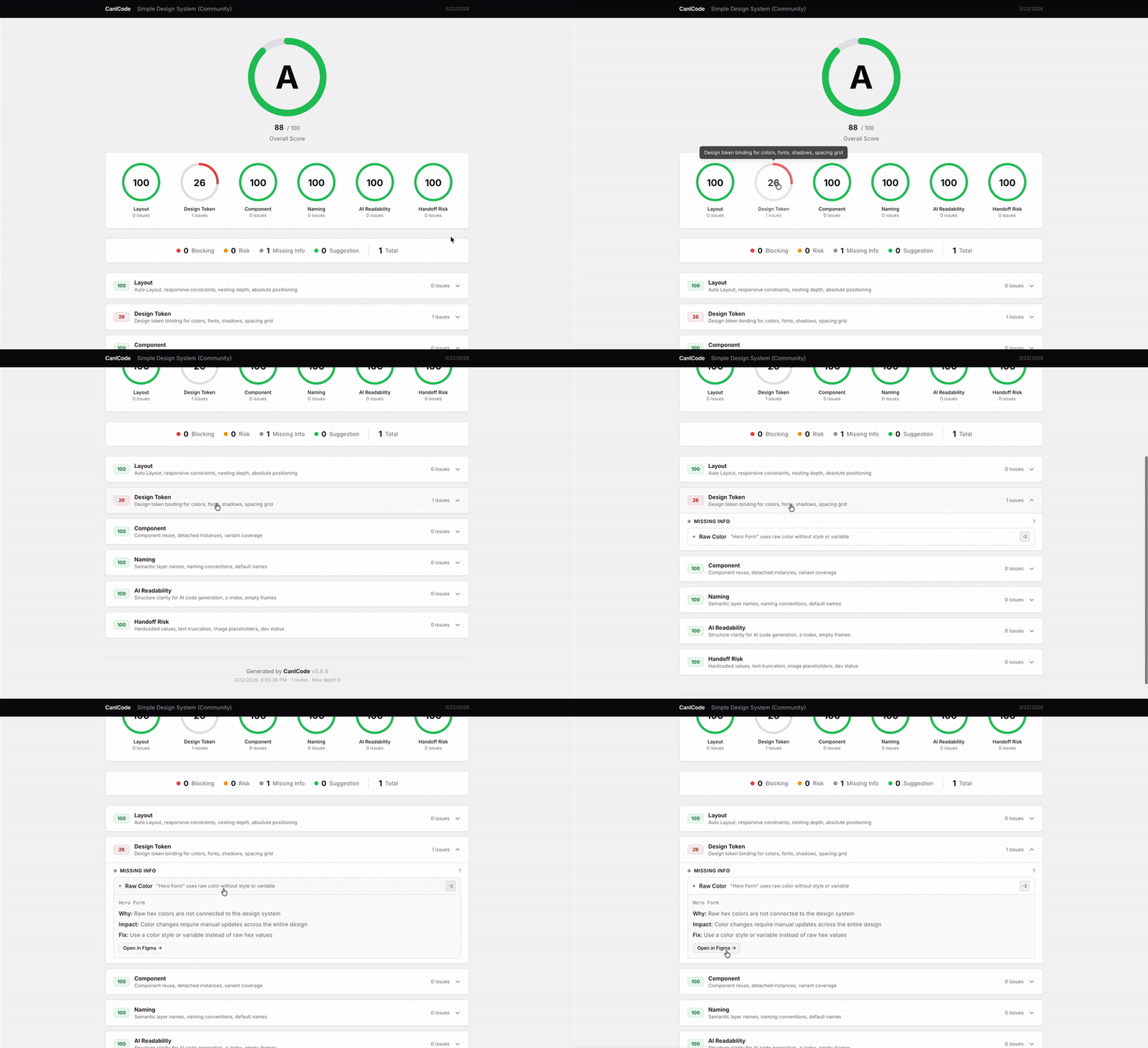
1. **[Open the web app](https://let-sunny.github.io/canicode/)** — paste any Figma URL, get a report. No install, no token, no AI cost. This is the linter view (Layer 1) — useful by itself.
2. Then if you want the full Q&A roundtrip, install the Claude Code skill below.
## Run the full roundtrip (Claude Code)
```bash
npx canicode init
# saves your Figma token + installs /canicode-roundtrip
# (the prompt asks for the token; never paste it into agent chat)
/canicode-roundtrip https://www.figma.com/design/ABC123/MyDesign?node-id=1-234
# in your Claude Code session
```
The roundtrip calls the **Figma MCP server** to read and write your design — install it once with `claude mcp add -s project -t http figma https://mcp.figma.com/mcp` and restart Claude Code.
> **Cursor / Claude Desktop / other MCP host:** also supported. CLI install path (`npx canicode init --cursor-skills`), bare MCP server install, GitHub Action for CI gates, and other channels are listed in the **Installation** matrix below.
> **Optional — Code Connect** (for the closing Step 6 mapping): install `@figma/code-connect` and create `figma.config.json` at your repo root per [Figma's setup guide](https://www.figma.com/code-connect-docs/), then run `canicode doctor`. If you skip this, the roundtrip still works — it just does not register the mapping. It warns you up front so you can decide.
---
## What It Checks
| Category | Rules | What it measures |
|----------|:-----:|------------------|
| **Pixel Critical** | 3 | Can AI read the layout? (Auto Layout, absolute positioning, groups) |
| **Responsive Critical** | 2 | Will it work at different viewports? (fixed sizing, size constraints) |
| **Code Quality** | 5 | Is the design efficient for AI context? (components, variants, nesting, Code Connect coverage) |
| **Token Management** | 2 | Can AI reproduce exact values? (raw values, spacing grid) |
| **Interaction** | 2 | Can AI know what happens? (state variants, prototypes) |
| **Semantic** | 3 | Can AI infer meaning? (semantic names, conventions) |
Each issue is classified: **Blocking** > **Risk** > **Missing Info** > **Suggestion**.
---
## Installation — pick one
> **Token safety:** never paste your Figma token into Claude / Cursor / agent chat — session logs can retain it. Use the CLI prompt (`npx canicode init`), `--token`, or the `FIGMA_TOKEN=…` env var.
Each row below is a **complete** install. Don't run more than one — they cover overlapping use cases.
| If you use… | Install |
|-------------|---------|
| **Claude Code** (recommended for the roundtrip workflow) | `npx canicode init` (interactive prompt for the token in a TTY) or `npx canicode init --token figd_xxxxxxxxxxxxx` (CI / non-TTY) — saves the token AND drops `/canicode`, `/canicode-gotchas`, `/canicode-roundtrip` skills into `./.claude/skills/`. The skills already know how to call canicode via `npx canicode …`, so no **canicode** MCP install is needed; the **Figma** MCP is still required for the `/canicode-roundtrip` apply step — see the prereq below. To rotate the token later without reinstalling skills: `npx canicode config set-token`. |
| **Cursor / Claude Desktop / other MCP host** | Add canicode to the host’s MCP config — see [`docs/CUSTOMIZATION.md`](https://github.com/let-sunny/canicode/blob/HEAD/docs/CUSTOMIZATION.md#cursor-mcp-canicode). Example (Cursor project file): `npx` + `canicode-mcp` via `--package=canicode`. |
| **OpenClaw / other AgentSkills-compatible host** | Manual skill copy — see [Other agents (manual install)](https://github.com/let-sunny/canicode/blob/HEAD/docs/CUSTOMIZATION.md#other-agents-manual-install). Best-effort docs, not a support commitment. |
| **Just the CLI** (CI, scripts) | Nothing. `npx canicode analyze ""` works directly. Run `canicode init --token …` once if you want the token persisted to `~/.canicode/config.json`. To rotate the token later, use `canicode config set-token` (no skill reinstall). |
> **Get your token:** Figma → Settings → Security → Personal access tokens → Generate new token. [Figma's PAT docs](https://help.figma.com/hc/en-us/articles/8085703771159-Manage-personal-access-tokens)
> **Scope:** Read-only is sufficient for canicode.
> **Expiry:** Tokens default to 90 days; check the dropdown when generating.
> **Roundtrip prerequisite:** the `/canicode-roundtrip` skill calls the Figma MCP server to read and write the design. Install it once with `claude mcp add -s project -t http figma https://mcp.figma.com/mcp` and restart Claude Code so the new MCP tools load.
Claude Code Skills — install details
```bash
# Interactive (TTY) — prompts for the token, never paste it into agent chat
npx canicode init
# Non-interactive (CI / non-TTY) — token via env or --token only
FIGMA_TOKEN=figd_xxxxxxxxxxxxx npx canicode init
npx canicode init --token figd_xxxxxxxxxxxxx
```
Drops three skills into `./.claude/skills/`:
- **canicode** — lightweight CLI wrapper (use `/canicode `)
- **canicode-gotchas** — standalone gotcha survey (use `/canicode-gotchas `)
- **canicode-roundtrip** — full analyze → gotcha → apply roundtrip (use `/canicode-roundtrip `)
> The install copies 7 files total — the three SKILL.md files above plus four canicode-roundtrip helper files (`helpers.js`, `helpers-bootstrap.js`, `helpers-installer.js`, `canicode-roundtrip-helpers.d.ts`) used by the roundtrip Step 4 apply path. The CLI summary's `files installed: 7` reflects this file count.
> **Explicit invocation:** the SKILL.md `description` fields advertise TRIGGER conditions so the model auto-routes Figma-URL prompts to the right skill, but routing is non-deterministic. For deterministic invocation, type `/canicode `, `/canicode-gotchas `, or `/canicode-roundtrip ` directly — the slash command bypasses model-based routing.
The skills shell out to `npx canicode …` for analyze / gotcha-survey, so installing the **canicode** MCP server is optional (both paths produce the same JSON shape). The **Figma** MCP server, however, is required for the apply step (Step 4 in `/canicode-roundtrip`); see the prereq note above.
Flags: `--global` installs into `~/.claude/skills/` instead. `--cursor-skills` also installs Cursor copies under `.cursor/skills/`. `--force` overwrites existing skill files without prompting. Run `canicode docs setup` for the full setup guide.
To manage saved configuration without reinstalling skills:
```bash
canicode config set-token # rotate Figma token (interactive on TTY; --token for CI)
canicode config show # masked token + config + reports paths
canicode config path # absolute path to ~/.canicode/config.json
```
MCP Server — install details
```bash
claude mcp add canicode -- npx --yes --package=canicode canicode-mcp
```
Restart Claude Code or reload MCP (Cursor) so canicode MCP tools appear in a fresh session.
Then ask: *"Analyze this Figma design: https://www.figma.com/design/..."*
canicode's rule engine analyzes the design data — the AI assistant just orchestrates the calls. The MCP server reads `FIGMA_TOKEN` from `~/.canicode/config.json` (set via `canicode init --token …`) or from the host's environment, so passing `-e FIGMA_TOKEN=…` to `claude mcp add` is **not** required and the current parser rejects it anyway.
If you genuinely need a per-server token without using `canicode init`, export it on the calling shell instead: `export FIGMA_TOKEN=figd_xxxxxxxxxxxxx`.
For Cursor / Claude Desktop config, see [`docs/CUSTOMIZATION.md`](https://github.com/let-sunny/canicode/blob/HEAD/docs/CUSTOMIZATION.md) — especially [Cursor MCP (canicode)](https://github.com/let-sunny/canicode/blob/HEAD/docs/CUSTOMIZATION.md#cursor-mcp-canicode) and the **Manual test checklist** for verifying `gotcha-survey` end-to-end.
CLI — install details
```bash
npx canicode analyze "https://www.figma.com/design/ABC123/MyDesign?node-id=1-234"
```
> Pass `--ready-min-grade ` to override the codegen-readiness threshold (default: A).
Setup: `npx canicode init` (interactive prompt; TTY) or `npx canicode init --token figd_xxxxxxxxxxxxx` (CI / non-TTY) saves the token and installs the Claude Code skills into `./.claude/skills/`. Rotate later with `npx canicode config set-token`.
**Figma API Rate Limits** — Rate limits depend on **where the file lives**, not just your plan.
| Seat | File in Starter plan | File in Pro/Org/Enterprise |
|------|---------------------|---------------------------|
| View, Collab | 6 req/month | 6 req/month |
| Dev, Full | 6 req/month | 10–20 req/min |
Hitting 429 errors? Make sure the file is in a paid workspace. Or save a fixture once and analyze locally. [Full details](https://developers.figma.com/docs/rest-api/rate-limits/)
GitHub Action
```yaml
- uses: let-sunny/canicode-action@v0.1.0
with:
figma_url: 'https://www.figma.com/design/ABC123/MyDesign?node-id=1-234'
figma_token: ${{ secrets.FIGMA_TOKEN }}
min_score: 70
```
Posts analysis as a PR comment. Fails if score is below threshold. See [**canicode-action**](https://github.com/marketplace/actions/canicode-action) on Marketplace.
---
## Customization
| What | How |
|------|-----|
| **Presets** | `--preset relaxed \| dev-friendly \| ai-ready \| strict` |
| **Config overrides** | `--config ./config.json` — adjust scores, severity, exclude nodes |
| **Analysis scope** | `--scope page \| component` — override auto-detection when a `COMPONENT`-rooted design should be analyzed as a page (or vice versa) |
See [`docs/CUSTOMIZATION.md`](https://github.com/let-sunny/canicode/blob/HEAD/docs/CUSTOMIZATION.md) for the full guide, examples, and all available options.
---
## Development
```bash
git clone https://github.com/let-sunny/canicode.git && cd canicode
pnpm install && pnpm build
```
```bash
pnpm dev # watch mode
pnpm test # run tests
pnpm lint # type check
```
For architecture details, see [`CLAUDE.md`](https://github.com/let-sunny/canicode/blob/HEAD/CLAUDE.md). For calibration pipeline, see the [Calibration wiki](https://github.com/let-sunny/canicode/wiki/Calibration).
## Contributing
**[Share your Figma design](https://github.com/let-sunny/canicode/discussions/new?category=share-your-figma)** to help calibrate scores against real-world designs.
## Support
- **Bugs and questions:** [GitHub Issues](https://github.com/let-sunny/canicode/issues)
- **Privacy:** See [PRIVACY.md](https://github.com/let-sunny/canicode/blob/HEAD/PRIVACY.md) for details on data collection and how to opt out
## License
MIT