# Calibre-Web [Health: Active]
**Category:** 💻 Developer Tools
**Repository:** https://github.com/ni-c/calibreweb-mcp
**GitHub Stars:** 0
**Views:** 0
**Installs:** 0
**Upvotes:** 0
**Directory Page:** https://allmcps.com/mcp/calibre-web
## Description
Read-only MCP server for Calibre-Web: library search, browsing and covers via the OPDS feed
## Tools
Capabilities this server exposes over MCP:
- **search_books** — Search by title, author, series, publisher and tags. Calibre-Web returns every match at once; the result is capped client-side (`limit`, default 50) and reports the real match count.
- **list_books** — Book listings by view: `new` (default), `hot`, `rated`, `discover` (random), `read`, `unread`, or `all` (optionally narrowed to an initial letter).
- **list_shelves** — Public shelves plus the configured user's own shelves.
- **get_shelf_books** — The books on a shelf, in shelf order.
- **get_cover** — A book's cover, returned as an image the client can display.
- **get_stats** — Total books, authors, categories and series.
## Claude Desktop Quick Installation
Install path detected from listing signals. Uses `npx` (confidence: high):
```json
"mcpServers": {
"calibre-web": {
"command": "npx",
"args": ["-y","calibreweb-mcp"]
}
}
```
## Documentation & README
# calibreweb-mcp
[](https://github.com/ni-c/calibreweb-mcp/actions/workflows/ci.yml)
[](https://scorecard.dev/viewer/?uri=github.com/ni-c/calibreweb-mcp)
 [](https://glama.ai/mcp/servers/ni-c/calibreweb-mcp)
[](https://glama.ai/mcp/servers/ni-c/calibreweb-mcp)
[](https://www.npmjs.com/package/calibreweb-mcp)
[](https://github.com/ni-c/calibreweb-mcp/pkgs/container/calibreweb-mcp)
[](https://mcp-hub.ni-c.de)
[](https://calibreweb-mcp.ni-c.de)
[](https://github.com/sponsors/ni-c)
A read-only [Model Context Protocol](https://modelcontextprotocol.io) (MCP) server for
[Calibre-Web](https://github.com/janeczku/calibre-web) (and
[Calibre-Web Automated](https://github.com/crocodilestick/Calibre-Web-Automated)),
the self-hosted ebook library web UI.
Lets MCP clients like Claude Code, Claude Desktop or Codex search your library,
browse the curated views and shelves, follow per-format download links and pull cover
images straight into the conversation. It never writes anything: every tool is a GET.
Six tools is the ceiling, not the floor: `CALIBRE_WEB_ALLOW_TOOLS=essential`
registers a curated five instead, and a model picks the right tool far more
reliably from five than from six — see
[choosing which tools load](#choosing-which-tools-load).
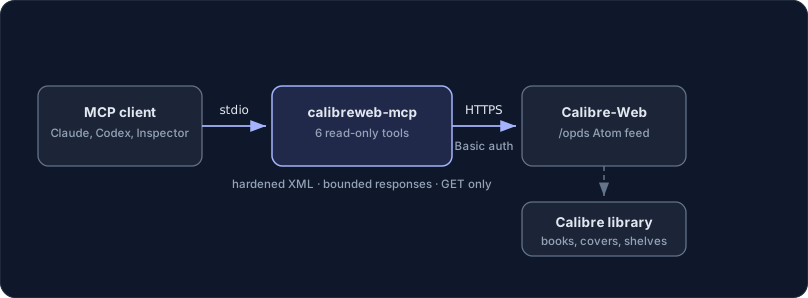
Calibre-Web has no REST API — its only stable machine-readable interface is the OPDS
catalog feed it serves for e-reader apps. This server speaks that feed: Atom XML with
HTTP Basic auth in, structured book data out.
## What makes it different
**The API Calibre-Web never had.** Calibre-Web exposes no REST API — its only
stable machine interface is the OPDS Atom feed built for e-reader apps. These
tools parse that feed into structured book data with numeric ids, per-format
download URLs and bounded summaries.
**Read-only by construction.** All six tools are GETs. Redirects are refused so
Basic credentials never travel, XML carrying a DOCTYPE is rejected outright,
hrefs are locked to the configured origin, and metadata is marked as the
untrusted data it is.
## Requirements
- Node.js 22 or newer
- A Calibre-Web instance (developed against the current
`linuxserver/calibre-web` image; Calibre-Web Automated works the same way)
- A Calibre-Web user for the server. The OPDS feed authenticates with the
normal web login — use a **dedicated account with only the View and Download
roles**, not your admin account. If the instance allows anonymous browsing,
the server can also run without credentials.
## Configuration
| Variable | Required | Description |
| -------------------------- | -------- | ------------------------------------------------------------------------------------------------------- |
| `CALIBRE_WEB_URL` | yes | Root URL of the instance, e.g. `https://books.example.com`. The `/opds` path is appended automatically. |
| `CALIBRE_WEB_USERNAME` | yes¹ | Username of the Calibre-Web account. |
| `CALIBRE_WEB_PASSWORD` | yes¹ | Password of that account (the web login password). |
| `CALIBRE_WEB_INSECURE_TLS` | no | `true` to accept self-signed certificates — scoped to the configured host only. |
| `CALIBRE_WEB_ALLOW_TOOLS` | no | Comma-separated tool names, `list_*` prefixes, or `essential` for a curated preset |
| `CALIBRE_WEB_DENY_TOOLS` | no | Same syntax; removed from whatever `CALIBRE_WEB_ALLOW_TOOLS` left |
¹ Leave **both** unset for an instance that allows anonymous browsing; setting
only one of them is a configuration error.
### Choosing which tools load
`CALIBRE_WEB_ALLOW_TOOLS` and `CALIBRE_WEB_DENY_TOOLS` take comma-separated tool names;
a trailing `*` matches a whole family. `essential` is a curated preset of
five: `search_books`, `list_books`, `list_shelves`, `get_shelf_books`, `get_stats`.
```sh
CALIBRE_WEB_ALLOW_TOOLS=essential
CALIBRE_WEB_ALLOW_TOOLS=search_books,list_shelves
CALIBRE_WEB_DENY_TOOLS=get_cover
```
An entry that matches no tool aborts startup and names it, so a typo cannot
silently hide a tool — an absent tool is not something anyone traces back to an
environment variable. A filtered tool is never registered, so it is absent from
`tools/list` and unknown to `tools/call` alike.
If you run several of these servers at once, [mcp-hub](https://mcp-hub.ni-c.de)
is the other answer — its `/hub` endpoint replaces every server's tools with six
meta-tools.
## Installation
### Claude Code
```sh
claude mcp add calibreweb \
-e CALIBRE_WEB_URL=https://books.example.com \
-e CALIBRE_WEB_USERNAME=reader \
-e CALIBRE_WEB_PASSWORD=... \
-- npx calibreweb-mcp
```
### Claude Desktop
```json
{
"mcpServers": {
"calibreweb": {
"command": "npx",
"args": ["calibreweb-mcp"],
"env": {
"CALIBRE_WEB_URL": "https://books.example.com",
"CALIBRE_WEB_USERNAME": "reader",
"CALIBRE_WEB_PASSWORD": "..."
}
}
}
}
```
### Codex
```toml
[mcp_servers.calibreweb]
command = "npx"
args = ["calibreweb-mcp"]
env = { CALIBRE_WEB_URL = "https://books.example.com", CALIBRE_WEB_USERNAME = "reader", CALIBRE_WEB_PASSWORD = "..." }
```
### Docker
```sh
docker run -i --rm \
-e CALIBRE_WEB_URL=https://books.example.com \
-e CALIBRE_WEB_USERNAME=reader \
-e CALIBRE_WEB_PASSWORD=... \
ghcr.io/ni-c/calibreweb-mcp
```
### Through mcp-hub
A client that cannot spawn a local process — ChatGPT connectors, Claude on the web,
Cursor, LibreChat — reaches calibreweb-mcp through [mcp-hub](https://mcp-hub.ni-c.de): one
container serves many stdio MCP servers over Streamable HTTP, with an OAuth 2.1 login
behind a single password and long-lived tokens for the clients that cannot do OAuth. Its
`/hub` endpoint puts every server behind six meta-tools, so one connector reaches all of
them without N×tool schemas in the model's context, and it speaks both protocol revisions
— a question this server asks travels through it to the person at the far end.
Its `/config/mcp.json` uses Claude Code's format, so the entry is the one you already
have:
```json
{
"mcpServers": {
"calibreweb": {
"command": "npx",
"args": ["-y", "calibreweb-mcp"],
"env": { "CALIBRE_WEB_ALLOW_TOOLS": "essential" },
"denyTools": ["get_cover"]
}
}
}
```
`allowTools` and `denyTools` there are the hub's **own** per-server filter, which is not
the same thing as `*_ALLOW_TOOLS` in `env` — the difference, and the mistake it invites,
are in the [client guide](https://calibreweb-mcp.ni-c.de/guide/clients#through-mcp-hub).
## Tools
All tools are read-only (`readOnlyHint: true`).
| Tool | Description |
| ----------------- | -------------------------------------------------------------------------------------------------------------------------------------------------------------------------------------- |
| `search_books` | Search by title, author, series, publisher and tags. Calibre-Web returns every match at once; the result is capped client-side (`limit`, default 50) and reports the real match count. |
| `list_books` | Book listings by view: `new` (default), `hot`, `rated`, `discover` (random), `read`, `unread`, or `all` (optionally narrowed to an initial letter). |
| `list_shelves` | Public shelves plus the configured user's own shelves. |
| `get_shelf_books` | The books on a shelf, in shelf order. |
| `get_cover` | A book's cover, returned as an image the client can display. |
| `get_stats` | Total books, authors, categories and series. |
Book entries include authors, tags, series (with index), rating, a bounded
summary, a cover URL and per-format download URLs — ready-made links a human can
open, since the model itself has no reason to download an EPUB.
### Structured output
Every tool declares an `outputSchema` and answers with `structuredContent`
alongside the text block, so a client can use the result without parsing prose:
```jsonc
{
"untrusted": true,
"source": "calibre-web",
"totalFound": 2,
"truncated": false,
"books": [{ "id": 7, "title": "Dune", "authors": ["Frank Herbert"] }],
"notes": ["Book titles, authors, tags, series and summaries come from …"],
}
```
The `untrusted` marker is a field and not only a line in `notes`, because a
client that reads the structured half would otherwise have to find the warning
in a list of sentences. The two tools without it are `get_stats`, which is four
counters this server has checked are numbers, and `get_cover`, which reports an
id, a media type from a four-entry allowlist and a byte count — the image itself
stays in the content block where a client renders it.
An over-budget result drops book summaries as before. Where that is still not
enough it is now an **error** rather than JSON cut at the ceiling: unparseable
text was tolerable in a text block and is not something `structuredContent` can
carry, and the two channels have to hold the same value.
### Pagination
Feeds are paginated by the instance's _books per page_ setting (default 60); the
page size is not client-controllable. Every listing returns
`pagination.nextOffset` when more pages exist — pass it as `offset` in the next
call. The `discover` view is a random selection and not paginated.
## Not exposed, on purpose
- **No writes.** The OPDS feed has none, and this server would not add any.
- **No file downloads.** Tools return download URLs, not ebook payloads.
- **No facet browsing** (authors/series/tags/publishers/languages/formats as
their own index feeds). `search_books` covers those lookups; the routes exist
and tools for them can be added if there is a real use case.
## Safety
- The server is read-only by construction — GET requests only, no state anywhere.
- Book metadata is untrusted third-party data; every result says so, control
characters are stripped, and XML entity processing is disabled (documents
declaring a DOCTYPE or entities are refused outright).
- Responses are bounded before parsing (8 MB feeds, 1 MB covers) and again
before they reach the model (per-book and per-response budgets).
- Feed hrefs are only passed through when they resolve to the configured
origin over http(s) — a hostile feed cannot plant `javascript:`, `file:` or
cross-origin URLs into the results.
- Redirects are refused so the Basic credentials can never be replayed to
another host; covers are only passed through for real image content types.
- The password is scrubbed from the process environment at startup, and URLs
are credential-redacted before they appear in any log or result.
## Documentation
The full guide, tool reference and security notes live at
**[calibreweb-mcp.ni-c.de](https://calibreweb-mcp.ni-c.de)** (source in [`docs/`](https://github.com/ni-c/calibreweb-mcp/blob/HEAD/docs/)).
## Development
```sh
npm install
npm test # unit tests against a stubbed OPDS feed, no instance needed
npm run lint
npm run build
```
See [CONTRIBUTING.md](https://github.com/ni-c/calibreweb-mcp/blob/HEAD/CONTRIBUTING.md).
## Releasing
1. Update `CHANGELOG.md` and bump the version in `package.json` (+ lockfile).
2. `npm run lint && npm run test:coverage && npm run build`
3. Tag the release: `git tag -s vX.Y.Z -m "vX.Y.Z" && git push origin vX.Y.Z`
## Contributing
Issues, discussions and pull requests are welcome — see
[CONTRIBUTING.md](https://github.com/ni-c/calibreweb-mcp/blob/HEAD/CONTRIBUTING.md). For vulnerabilities please use
[private reporting](https://github.com/ni-c/calibreweb-mcp/security/advisories/new)
rather than a public issue; the policy is in [SECURITY.md](https://github.com/ni-c/calibreweb-mcp/blob/HEAD/SECURITY.md).
## License
[MIT](https://github.com/ni-c/calibreweb-mcp/blob/HEAD/LICENSE) © Willi Thiel

## What makes it different
**The API Calibre-Web never had.** Calibre-Web exposes no REST API — its only
stable machine interface is the OPDS Atom feed built for e-reader apps. These
tools parse that feed into structured book data with numeric ids, per-format
download URLs and bounded summaries.
**Read-only by construction.** All six tools are GETs. Redirects are refused so
Basic credentials never travel, XML carrying a DOCTYPE is rejected outright,
hrefs are locked to the configured origin, and metadata is marked as the
untrusted data it is.
## Requirements
- Node.js 22 or newer
- A Calibre-Web instance (developed against the current
`linuxserver/calibre-web` image; Calibre-Web Automated works the same way)
- A Calibre-Web user for the server. The OPDS feed authenticates with the
normal web login — use a **dedicated account with only the View and Download
roles**, not your admin account. If the instance allows anonymous browsing,
the server can also run without credentials.
## Configuration
| Variable | Required | Description |
| -------------------------- | -------- | ------------------------------------------------------------------------------------------------------- |
| `CALIBRE_WEB_URL` | yes | Root URL of the instance, e.g. `https://books.example.com`. The `/opds` path is appended automatically. |
| `CALIBRE_WEB_USERNAME` | yes¹ | Username of the Calibre-Web account. |
| `CALIBRE_WEB_PASSWORD` | yes¹ | Password of that account (the web login password). |
| `CALIBRE_WEB_INSECURE_TLS` | no | `true` to accept self-signed certificates — scoped to the configured host only. |
| `CALIBRE_WEB_ALLOW_TOOLS` | no | Comma-separated tool names, `list_*` prefixes, or `essential` for a curated preset |
| `CALIBRE_WEB_DENY_TOOLS` | no | Same syntax; removed from whatever `CALIBRE_WEB_ALLOW_TOOLS` left |
¹ Leave **both** unset for an instance that allows anonymous browsing; setting
only one of them is a configuration error.
### Choosing which tools load
`CALIBRE_WEB_ALLOW_TOOLS` and `CALIBRE_WEB_DENY_TOOLS` take comma-separated tool names;
a trailing `*` matches a whole family. `essential` is a curated preset of
five: `search_books`, `list_books`, `list_shelves`, `get_shelf_books`, `get_stats`.
```sh
CALIBRE_WEB_ALLOW_TOOLS=essential
CALIBRE_WEB_ALLOW_TOOLS=search_books,list_shelves
CALIBRE_WEB_DENY_TOOLS=get_cover
```
An entry that matches no tool aborts startup and names it, so a typo cannot
silently hide a tool — an absent tool is not something anyone traces back to an
environment variable. A filtered tool is never registered, so it is absent from
`tools/list` and unknown to `tools/call` alike.
If you run several of these servers at once, [mcp-hub](https://mcp-hub.ni-c.de)
is the other answer — its `/hub` endpoint replaces every server's tools with six
meta-tools.
## Installation
### Claude Code
```sh
claude mcp add calibreweb \
-e CALIBRE_WEB_URL=https://books.example.com \
-e CALIBRE_WEB_USERNAME=reader \
-e CALIBRE_WEB_PASSWORD=... \
-- npx calibreweb-mcp
```
### Claude Desktop
```json
{
"mcpServers": {
"calibreweb": {
"command": "npx",
"args": ["calibreweb-mcp"],
"env": {
"CALIBRE_WEB_URL": "https://books.example.com",
"CALIBRE_WEB_USERNAME": "reader",
"CALIBRE_WEB_PASSWORD": "..."
}
}
}
}
```
### Codex
```toml
[mcp_servers.calibreweb]
command = "npx"
args = ["calibreweb-mcp"]
env = { CALIBRE_WEB_URL = "https://books.example.com", CALIBRE_WEB_USERNAME = "reader", CALIBRE_WEB_PASSWORD = "..." }
```
### Docker
```sh
docker run -i --rm \
-e CALIBRE_WEB_URL=https://books.example.com \
-e CALIBRE_WEB_USERNAME=reader \
-e CALIBRE_WEB_PASSWORD=... \
ghcr.io/ni-c/calibreweb-mcp
```
### Through mcp-hub
A client that cannot spawn a local process — ChatGPT connectors, Claude on the web,
Cursor, LibreChat — reaches calibreweb-mcp through [mcp-hub](https://mcp-hub.ni-c.de): one
container serves many stdio MCP servers over Streamable HTTP, with an OAuth 2.1 login
behind a single password and long-lived tokens for the clients that cannot do OAuth. Its
`/hub` endpoint puts every server behind six meta-tools, so one connector reaches all of
them without N×tool schemas in the model's context, and it speaks both protocol revisions
— a question this server asks travels through it to the person at the far end.
Its `/config/mcp.json` uses Claude Code's format, so the entry is the one you already
have:
```json
{
"mcpServers": {
"calibreweb": {
"command": "npx",
"args": ["-y", "calibreweb-mcp"],
"env": { "CALIBRE_WEB_ALLOW_TOOLS": "essential" },
"denyTools": ["get_cover"]
}
}
}
```
`allowTools` and `denyTools` there are the hub's **own** per-server filter, which is not
the same thing as `*_ALLOW_TOOLS` in `env` — the difference, and the mistake it invites,
are in the [client guide](https://calibreweb-mcp.ni-c.de/guide/clients#through-mcp-hub).
## Tools
All tools are read-only (`readOnlyHint: true`).
| Tool | Description |
| ----------------- | -------------------------------------------------------------------------------------------------------------------------------------------------------------------------------------- |
| `search_books` | Search by title, author, series, publisher and tags. Calibre-Web returns every match at once; the result is capped client-side (`limit`, default 50) and reports the real match count. |
| `list_books` | Book listings by view: `new` (default), `hot`, `rated`, `discover` (random), `read`, `unread`, or `all` (optionally narrowed to an initial letter). |
| `list_shelves` | Public shelves plus the configured user's own shelves. |
| `get_shelf_books` | The books on a shelf, in shelf order. |
| `get_cover` | A book's cover, returned as an image the client can display. |
| `get_stats` | Total books, authors, categories and series. |
Book entries include authors, tags, series (with index), rating, a bounded
summary, a cover URL and per-format download URLs — ready-made links a human can
open, since the model itself has no reason to download an EPUB.
### Structured output
Every tool declares an `outputSchema` and answers with `structuredContent`
alongside the text block, so a client can use the result without parsing prose:
```jsonc
{
"untrusted": true,
"source": "calibre-web",
"totalFound": 2,
"truncated": false,
"books": [{ "id": 7, "title": "Dune", "authors": ["Frank Herbert"] }],
"notes": ["Book titles, authors, tags, series and summaries come from …"],
}
```
The `untrusted` marker is a field and not only a line in `notes`, because a
client that reads the structured half would otherwise have to find the warning
in a list of sentences. The two tools without it are `get_stats`, which is four
counters this server has checked are numbers, and `get_cover`, which reports an
id, a media type from a four-entry allowlist and a byte count — the image itself
stays in the content block where a client renders it.
An over-budget result drops book summaries as before. Where that is still not
enough it is now an **error** rather than JSON cut at the ceiling: unparseable
text was tolerable in a text block and is not something `structuredContent` can
carry, and the two channels have to hold the same value.
### Pagination
Feeds are paginated by the instance's _books per page_ setting (default 60); the
page size is not client-controllable. Every listing returns
`pagination.nextOffset` when more pages exist — pass it as `offset` in the next
call. The `discover` view is a random selection and not paginated.
## Not exposed, on purpose
- **No writes.** The OPDS feed has none, and this server would not add any.
- **No file downloads.** Tools return download URLs, not ebook payloads.
- **No facet browsing** (authors/series/tags/publishers/languages/formats as
their own index feeds). `search_books` covers those lookups; the routes exist
and tools for them can be added if there is a real use case.
## Safety
- The server is read-only by construction — GET requests only, no state anywhere.
- Book metadata is untrusted third-party data; every result says so, control
characters are stripped, and XML entity processing is disabled (documents
declaring a DOCTYPE or entities are refused outright).
- Responses are bounded before parsing (8 MB feeds, 1 MB covers) and again
before they reach the model (per-book and per-response budgets).
- Feed hrefs are only passed through when they resolve to the configured
origin over http(s) — a hostile feed cannot plant `javascript:`, `file:` or
cross-origin URLs into the results.
- Redirects are refused so the Basic credentials can never be replayed to
another host; covers are only passed through for real image content types.
- The password is scrubbed from the process environment at startup, and URLs
are credential-redacted before they appear in any log or result.
## Documentation
The full guide, tool reference and security notes live at
**[calibreweb-mcp.ni-c.de](https://calibreweb-mcp.ni-c.de)** (source in [`docs/`](https://github.com/ni-c/calibreweb-mcp/blob/HEAD/docs/)).
## Development
```sh
npm install
npm test # unit tests against a stubbed OPDS feed, no instance needed
npm run lint
npm run build
```
See [CONTRIBUTING.md](https://github.com/ni-c/calibreweb-mcp/blob/HEAD/CONTRIBUTING.md).
## Releasing
1. Update `CHANGELOG.md` and bump the version in `package.json` (+ lockfile).
2. `npm run lint && npm run test:coverage && npm run build`
3. Tag the release: `git tag -s vX.Y.Z -m "vX.Y.Z" && git push origin vX.Y.Z`
## Contributing
Issues, discussions and pull requests are welcome — see
[CONTRIBUTING.md](https://github.com/ni-c/calibreweb-mcp/blob/HEAD/CONTRIBUTING.md). For vulnerabilities please use
[private reporting](https://github.com/ni-c/calibreweb-mcp/security/advisories/new)
rather than a public issue; the policy is in [SECURITY.md](https://github.com/ni-c/calibreweb-mcp/blob/HEAD/SECURITY.md).
## License
[MIT](https://github.com/ni-c/calibreweb-mcp/blob/HEAD/LICENSE) © Willi Thiel