# browser-gateway [Health: Active]
**Category:** 📂 Browser Automation
**Repository:** https://github.com/browser-gateway/browser-gateway
**GitHub Stars:** 18
**npm Downloads (last month):** 4088
**Views:** 0
**Installs:** 0
**Upvotes:** 0
**Directory Page:** https://allmcps.com/mcp/browser-gateway
## Description
AI browser tools with Chrome CDP. Navigate, screenshot, interact. Multi-provider failover.
## Claude Desktop Quick Installation
Install path detected from listing signals. Uses `npx` (confidence: high):
```json
"mcpServers": {
"browser-gateway": {
"command": "npx",
"args": ["browser-gateway"]
}
}
```
## Documentation & README
browser-gateway
The open router for cloud browsers.
One endpoint that routes across every browser provider you use: automatic failover, persistent profiles, session replay, REST API, MCP server, dashboard.
Works unchanged with Puppeteer, Playwright, Stagehand, browser-use, and any MCP client.










Website
·
Quick start
·
MCP
·
Profiles
·
Replays
·
REST API
·
Dashboard
·
Discord
---
## Overview
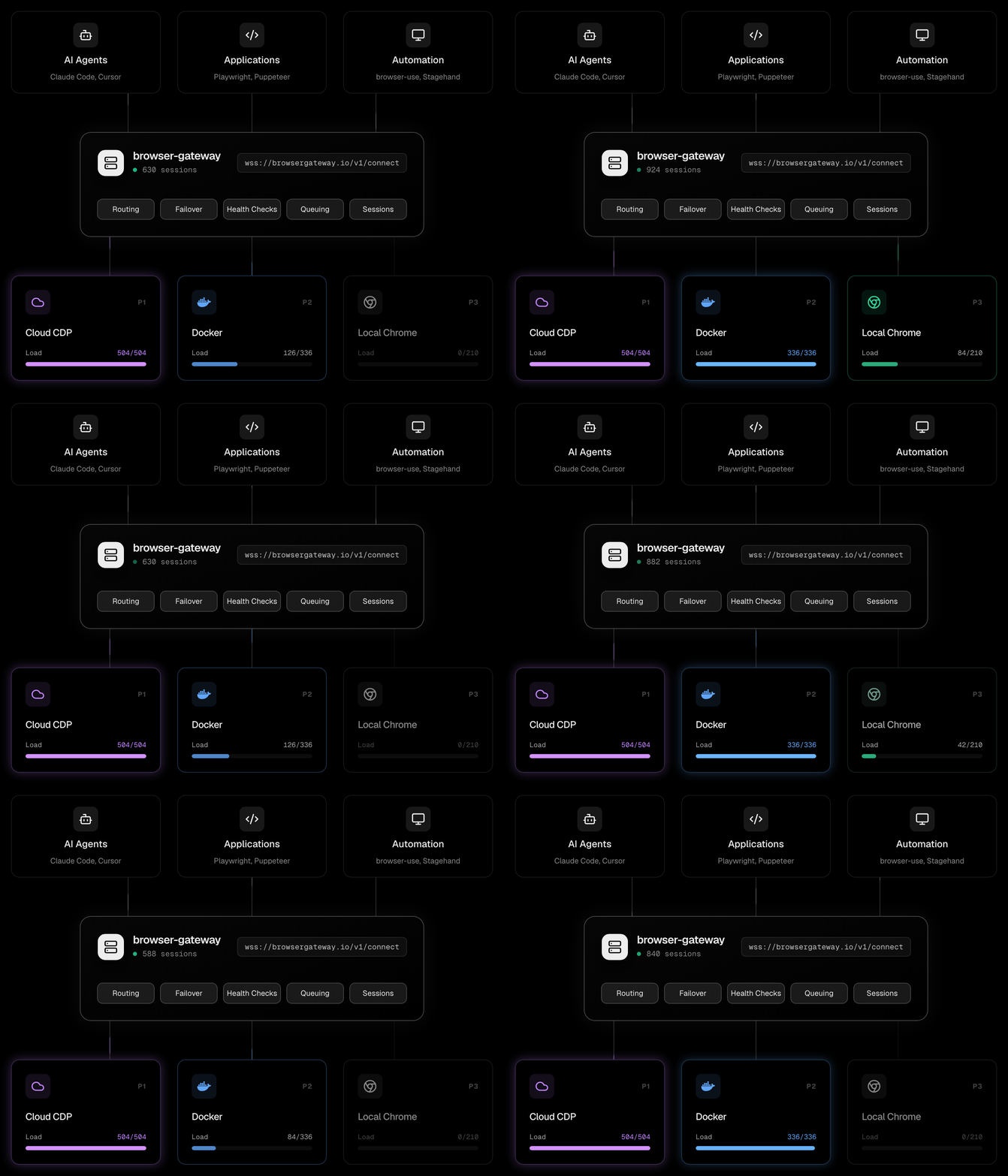
One endpoint. Multiple providers. Automatic failover when one is saturated or goes down.
Your app connects to `ws://gateway:9500/v1/connect`. The gateway picks the best available provider based on health, capacity, and your routing strategy. Providers can be cloud CDP services, Docker containers, or local Chrome instances.
---
## Dashboard
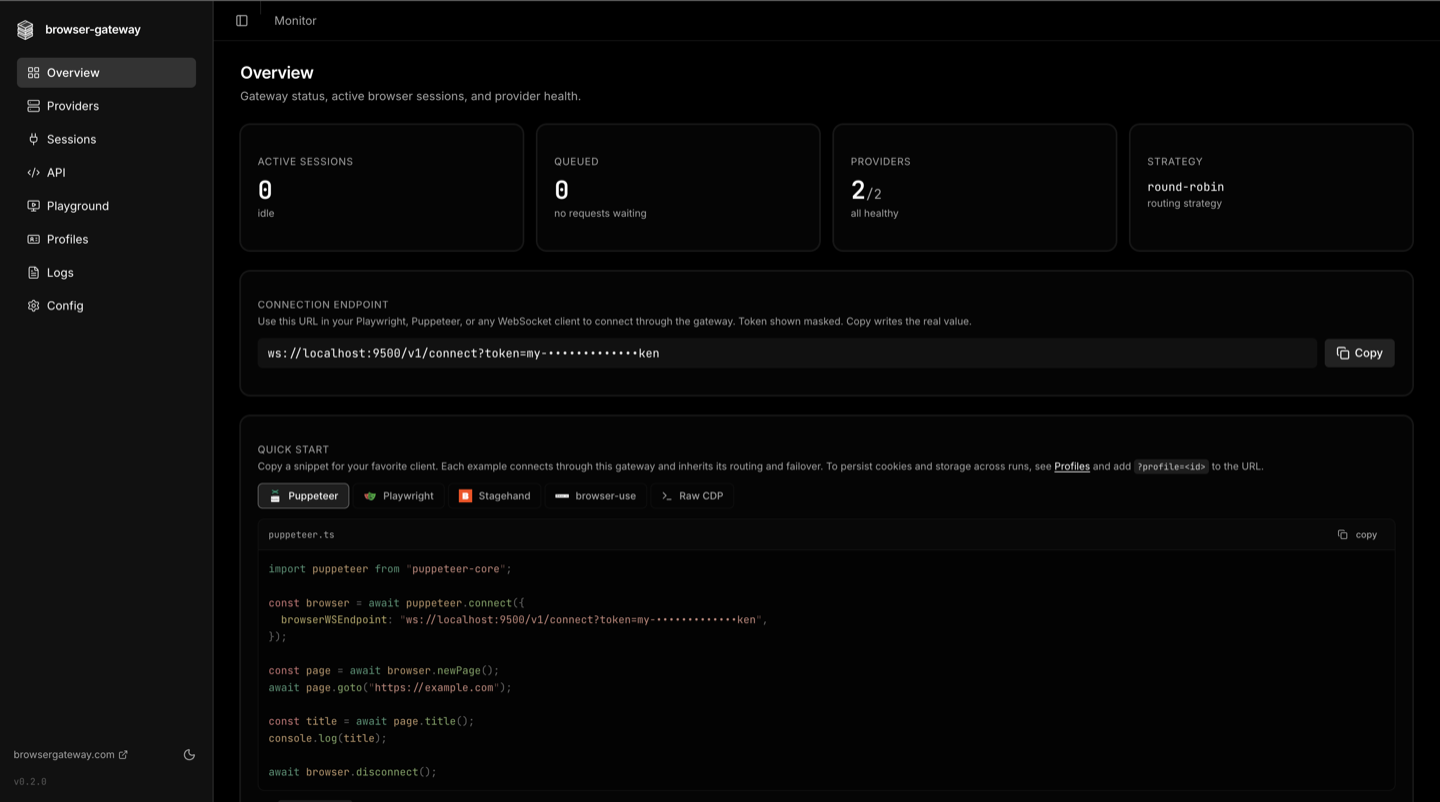
A web dashboard ships with every install. Open `http://localhost:9500/web` after starting the gateway.
**Overview.** Active sessions, queue depth, provider health, connection endpoint, and a copy-paste quickstart for Puppeteer, Playwright, Stagehand, browser-use, and raw CDP.
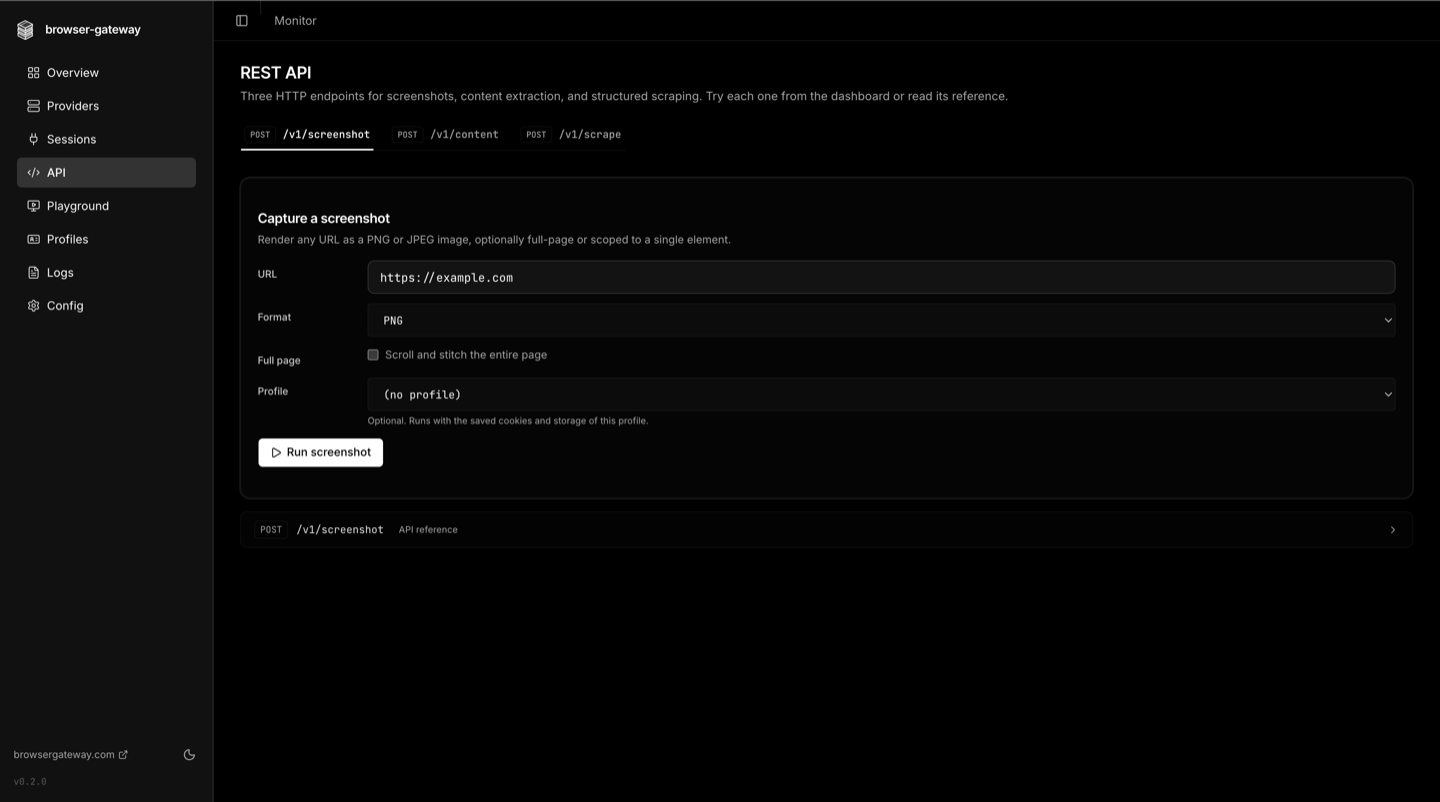
**REST API.** Run screenshot, content extraction, and structured scraping endpoints from a form-driven UI, with profile selection and parameter reference inline.
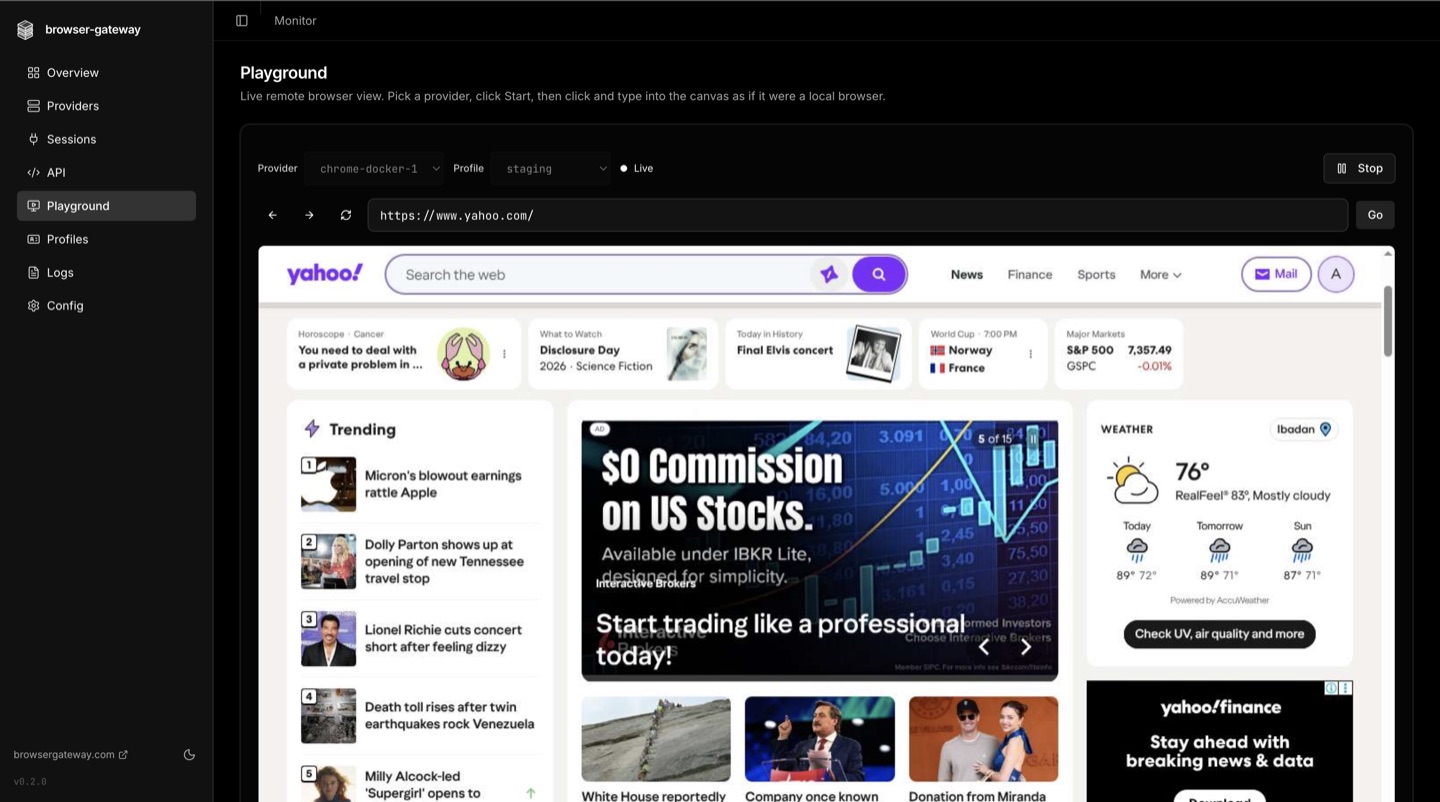
**Playground.** Drive any provider live from the browser. Pick a provider and profile, type into the canvas as if it were a local browser, and watch the remote session in real time.
---
## Features
### Routing & reliability
- **Automatic failover** - the next provider takes over the instant one fails, no client changes
- **Five load-balancing strategies** - priority chain, round-robin, least-connections, latency-optimized, weighted
- **Per-provider concurrency limits** - the gateway enforces `maxConcurrent` on every backend
- **Request queue** - connections wait when every provider is saturated instead of failing immediately
- **Cooldown** - failing providers are skipped and recover automatically after a TTL
- **Health checks** - periodic connectivity probes mark providers unhealthy before clients hit them
- **Graceful shutdown** - active sessions drain cleanly on SIGTERM and SIGINT
- **Session reconnect** - a dropped client reconnects with `?sessionId=`; on a provider that issues a resume token (browserserve with its resume window on) it gets the same browser back with its pages, cookies and storage, otherwise a new browser on the same provider
- **Webhooks** - fire on provider down, recover, and queue-overflow events
### REST API
- **Screenshot** - `POST /v1/screenshot` returns any URL as PNG or JPEG, full-page or scoped to a selector
- **Content extraction** - `POST /v1/content` returns markdown, plain text, HTML, or a cleaned article
- **Scrape** - `POST /v1/scrape` extracts structured data via CSS selectors or full-page formats
- **Pooled sessions** - browser connections are reused across requests, like a database pool
- **Automatic retry** - failed requests retry against a fresh page
### Profiles — persistent browser state
- **Survive across sessions** - cookies and `localStorage` are captured as you leave each page and on disconnect, and replayed on the next connect with the same id (`IndexedDB` too on browserserve)
- **Saved on any provider** - every provider can load and save any profile; pin a provider to one profile only to route that profile's sessions there
- **Profiles never mix** - a browser that still holds a different profile is refused. Anything else already in a reused browser (from sessions without a profile) is saved with the profile
- **One-line opt-in** - add `?profile=acme` to the WebSocket URL, the rest is automatic
- **Encrypted at rest** - AES-256-GCM with envelope encryption, anti-swap binding, and a scrypt-derived KEK
- **Provider-agnostic** - state is captured at the CDP level, so it replays against any provider
- **Per-profile locking** - concurrent connects to the same id return HTTP 409 to prevent corruption
- **Export and import** - encrypted `.bgp` blobs are portable between gateway installs
- **One-click enable** - the dashboard wizard generates a strong key in your browser and writes it to config
See the [Profiles docs](https://docs.browsergateway.com/profiles) for the full guide, security model, REST endpoints, and limitations.
### Session replay — see what the agent saw
- **Frame-accurate visual record** of every routed session, captured via CDP `Page.startScreencast`
- **Zero injection** - no script runs inside the customer page, capture is fully out-of-band
- **Provider-agnostic** - works with any backend that supports page screencast
- **Dashboard player** - scrub through the recorded frames, switch between captured browser targets
- **Retention controls** - configurable horizon, per-session byte cap, daily cleanup
See the [Replays docs](https://docs.browsergateway.com/replays) for the storage layout, REST endpoints, and tuning knobs.
### MCP server for AI agents
- **One-call tools** - `fetch_page` reads any url as markdown and `screenshot_page` captures it, each in a single call that opens and closes its own browser
- **Session tools** - `browser_session`, `browser_navigate`, `browser_snapshot`, `browser_act`, `browser_extract`, `browser_screenshot`, `browser_wait`, `browser_tabs`, `browser_evaluate`, `browser_observe` for logins, forms and multi-step work
- **Fallback for coding agents** - a Claude Code plugin sends Claude to `fetch_page` when its built-in web fetch is blocked, empty or needs JavaScript (`/plugin marketplace add browser-gateway/browser-gateway`); setup for Codex, Cursor and Gemini CLI in [plugins/browser-gateway](https://github.com/browser-gateway/browser-gateway/blob/HEAD/plugins/browser-gateway/README.md)
- **Zero config** - auto-detects Chrome and launches it on first tool use
- **Concurrent sessions** - every agent gets its own browser, no shared state
- **Raw CDP** - no Playwright or Puppeteer dependency
- **Compatible** - Claude Code, Cursor, and any MCP-compatible client
### Computer use for Claude and Gemini
- **Any browser for the model's own browser tool** - runs Claude's browser and computer use tools and Gemini computer use on any provider behind the gateway
- **About ten lines** - `runClaudeLoop` / `runGeminiLoop` take your own model call and handle actions, screenshots and results
- **Safe defaults** - http and https only, private networks blocked, optional site allowlist, Gemini's confirm step for risky actions
- **No extra dependencies** - `browser-gateway/agent-tools/computer-use`, tested on Node.js, Bun, Deno and the Cloudflare Workers runtime
### Management
- **Dashboard** - manage providers, watch sessions, and edit config from the browser
- **Provider CRUD** - add, edit, delete, and test providers from the dashboard or API
- **Config editor** - edit `gateway.yml` in-browser with syntax highlighting and validation
- **Auth** - token-based, with a secure HttpOnly cookie for the dashboard
- **Protocol-agnostic** - works with Playwright, Puppeteer, and any WebSocket protocol
---
## Quick Start
### As a WebSocket Proxy (for applications)
```bash
npm install -g browser-gateway
```
Create `gateway.yml`:
```yaml
version: 1
providers:
primary:
url: wss://provider.example.com?token=${PROVIDER_TOKEN}
limits:
maxConcurrent: 5
priority: 1
fallback:
url: ws://my-playwright-server:4000
limits:
maxConcurrent: 10
priority: 2
```
```bash
browser-gateway serve
```
Connect from your app:
```typescript
// For CDP providers
const browser = await chromium.connectOverCDP('ws://localhost:9500/v1/connect');
// For Playwright run-server providers
const browser = await chromium.connect('ws://localhost:9500/v1/connect');
```
Or use the REST API — no WebSocket management needed:
```bash
# Screenshot
curl -X POST http://localhost:9500/v1/screenshot \
-H "Content-Type: application/json" \
-d '{"url": "https://example.com"}' --output screenshot.png
# Extract content as markdown
curl -X POST http://localhost:9500/v1/content \
-H "Content-Type: application/json" \
-d '{"url": "https://example.com", "formats": ["markdown"]}'
```
These endpoints accept `http` and `https` URLs on public hosts only. Loopback,
link-local and private-range addresses are refused, and hostnames are resolved and
re-checked. To reach an internal host, list it under `rest.allowedPrivateHosts` in
`gateway.yml`.
Dashboard at `http://localhost:9500/web`.
### As an MCP Server (for AI agents)
Add to your Claude Code or Cursor config:
```json
{
"mcpServers": {
"browser-gateway": {
"command": "npx",
"args": ["browser-gateway", "mcp"]
}
}
}
```
No config files needed. The agent gets navigate, snapshot, screenshot, click, type, and evaluate tools through the gateway's routing layer.
See the [MCP docs](https://docs.browsergateway.com/mcp) for all options.
---
## Authentication
Set `BG_TOKEN` to require a token (or put it in a `.env` file):
```bash
BG_TOKEN=my-secret-token browser-gateway serve
```
- **WebSocket clients** pass the token as `?token=` query param
- **API clients** use `Authorization: Bearer ` header
- **Dashboard** shows a login form, sets a secure HttpOnly cookie
- **Health endpoint** (`/health`) is always public
Without `BG_TOKEN` every `/v1/*` route is unauthenticated, so the gateway binds to
`127.0.0.1` instead of all interfaces. Set a token (or set `HOST` explicitly) to
serve other machines. `BG_ALLOWED_HOSTS` allows extra `Host` values on `/mcp`
when no token is set.
---
## CLI
```bash
# Proxy server
browser-gateway serve # Start the gateway + dashboard
browser-gateway serve --port 8080 # Custom port
browser-gateway serve --config path.yml # Custom config
# MCP server for AI agents
browser-gateway mcp # Auto-detect Chrome, zero config
browser-gateway mcp --headless # Headless mode (for CI/Docker)
browser-gateway mcp --cdp-endpoint ws:// # Connect to existing browser
browser-gateway mcp --config gateway.yml # Multi-provider with failover
# Utilities
browser-gateway check # Test provider connectivity
browser-gateway version # Print version
browser-gateway help # Show help
```
---
## API
| Endpoint | Method | Description |
|----------|--------|-------------|
| `/v1/connect` | WebSocket | Connect to a browser (the core feature) |
| `/v1/screenshot` | POST | Take a screenshot of any URL ([docs](https://docs.browsergateway.com/rest-api)) |
| `/v1/content` | POST | Extract page content as markdown, text, or HTML ([docs](https://docs.browsergateway.com/rest-api)) |
| `/v1/scrape` | POST | Extract data via CSS selectors or full-page formats ([docs](https://docs.browsergateway.com/rest-api)) |
| `/v1/status` | GET | Gateway health + provider status + pool status |
| `/v1/sessions` | GET | Active sessions |
| `/v1/providers` | GET/POST | List or add providers |
| `/v1/providers/:id` | PUT/DELETE | Update or remove a provider |
| `/v1/providers/:id/test` | POST | Test provider connectivity |
| `/v1/config` | GET/PUT | Read or save config |
| `/v1/config/validate` | POST | Validate YAML without saving |
| `/mcp` | POST | MCP Streamable HTTP endpoint |
| `/json/version` | GET | CDP discovery (for browser-use, Playwright, Stagehand) |
| `/health` | GET | Health check |
---
## Docker
Recommended: Docker Compose. The bundled `docker-compose.yml` mounts a named volume for state and a read-only `gateway.yml` from the host.
```bash
# Drop your gateway.yml next to docker-compose.yml, then:
docker compose up -d
```
Plain `docker run`:
```bash
docker run -d \
-p 9500:9500 \
-v bg_data:/data \
-v ./gateway.yml:/app/gateway.yml:ro \
-e PROVIDER_TOKEN=xxx \
ghcr.io/browser-gateway/server:latest
```
### Persistence
Everything the gateway writes to disk lives under a single directory, `BG_DATA_DIR` (defaults to `/data` inside the image). Mount that as a named volume or a bind mount and all state survives container restarts and image upgrades. Today it contains:
- `profiles/` — encrypted profile blobs (when profiles are enabled)
Future versions may add more subdirectories under the same root (cooldown state, session snapshots, captures). Mounting `BG_DATA_DIR` as one volume keeps every subsystem persistent without follow-up config changes.
### Upgrades
State lives in the volume, code lives in the image. Pull the new image, recreate the container — no data lost:
```bash
docker compose pull
docker compose up -d
```
The container reads the same `BG_DATA_DIR` and the same `gateway.yml`. Profile blobs are versioned and the gateway reads older formats transparently.
### Image tags
| Tag | Updated on |
|---|---|
| `:0.3.0` (and every subsequent version) | published manually after a release |
| `:latest` | always points at the newest version |
Images are multi-arch (`linux/amd64`, `linux/arm64`), signed with [Sigstore](https://www.sigstore.dev/) build provenance, and ship an SBOM. Verify with the [GitHub CLI](https://cli.github.com/):
```bash
gh attestation verify oci://ghcr.io/browser-gateway/server:0.3.0 \
--repo browser-gateway/browser-gateway
```
---
## How It Works
**Sessions without profile / recording / observability** (the default) take the byte-pipe fast lane:
1. Client connects to `ws://gateway:9500/v1/connect`
2. Gateway selects a provider using your [routing strategy](https://docs.browsergateway.com/operating/load-balancing)
3. Gateway opens a raw TCP connection to the provider
4. HTTP upgrade forwarded, provider responds with `101 Switching Protocols`
5. Bidirectional TCP pipe: `client <-> gateway <-> provider`
6. All WebSocket messages forwarded transparently (never parsed or modified)
7. On disconnect: session cleaned up, slot released, metrics updated
8. If all providers full: connection [waits in a queue](https://docs.browsergateway.com/operating/queue) until a slot opens
**Sessions with profile inject, session recording, live view, or observability** (e.g. `?profile=X`, `?session_record=true`, `/v1/live`) run through a CDP-aware pipeline instead — one WebSocket per session, N plugins observing the wire. Same routing + failover, byte-perfect passthrough at rest, plugins only fire when their feature is requested. Architecture + plugin-authoring guide: [`docs/PIPELINE.md`](https://github.com/browser-gateway/browser-gateway/blob/HEAD/docs/PIPELINE.md).
---
## Self-hosted provider: browserserve
[browserserve](https://github.com/browser-gateway/browserserve) is the stack's own self-hosted browser server: one container that hands out isolated Chrome sessions over CDP. Add it like any other provider:
```yaml
providers:
browserserve:
url: ws://your-host:9222
cloud-provider:
url:
priority: 2
```
Because the gateway controls that runtime, a browserserve provider is **auto-detected** and unlocks two things no external provider gets:
- **Auto capacity.** You do not set `maxConcurrent`. browserserve measures its host (memory, thread, and CPU limits) and advertises a safe ceiling, which the gateway adopts. The dashboard shows it as `(auto)`.
- **Complete profiles.** Every session is a fresh browser, and a saved profile carries the whole browser state, including IndexedDB and service workers. Other providers save cookies and site storage.
A common shape: browserserve as the primary provider on your own hardware, with a cloud provider at a lower priority for failover.
---
## Works With
browser-gateway is compatible with existing browser tools. Just pass the gateway URL — it auto-resolves via `/json/version`.
**AI Agent Frameworks:**
```python
# browser-use (Python) — HTTP URL auto-resolves
BrowserSession(cdp_url="http://localhost:9500")
```
```typescript
// Stagehand (TypeScript)
new Stagehand({ env: "LOCAL", localBrowserLaunchOptions: { cdpUrl: "http://localhost:9500" } })
```
**Playwright MCP** (all 70 Playwright tools through gateway routing):
```json
{
"mcpServers": {
"playwright": {
"command": "npx",
"args": ["@playwright/mcp@latest", "--cdp-endpoint", "http://localhost:9500"]
}
}
}
```
**Puppeteer / Playwright:**
```typescript
// Playwright — HTTP or WebSocket
const browser = await chromium.connectOverCDP("http://localhost:9500");
// Puppeteer — WebSocket
const browser = await puppeteer.connect({ browserWSEndpoint: "ws://localhost:9500/v1/connect" });
```
---
## Documentation
Full docs live at **[docs.browsergateway.com](https://docs.browsergateway.com)**.
- [Getting Started](https://docs.browsergateway.com/quickstart)
- [Configuration Reference](https://docs.browsergateway.com/configuration)
- [Supported Providers](https://docs.browsergateway.com/providers)
- [Profiles — Persistent Browser State](https://docs.browsergateway.com/profiles)
- [Session Replays](https://docs.browsergateway.com/replays)
- [Session Lifecycle](https://docs.browsergateway.com/sessions)
- [REST API](https://docs.browsergateway.com/rest-api)
- [MCP Server for AI Agents](https://docs.browsergateway.com/mcp)
- [Computer Use (Claude and Gemini)](https://docs.browsergateway.com/computer-use)
- [CLI Reference](https://docs.browsergateway.com/cli)
- [Web Dashboard](https://docs.browsergateway.com/dashboard)
- [How Failover Works](https://docs.browsergateway.com/operating/failover)
- [Load Balancing Strategies](https://docs.browsergateway.com/operating/load-balancing)
- [Request Queue](https://docs.browsergateway.com/operating/queue)
- [Webhooks](https://docs.browsergateway.com/operating/webhooks)
- [Docker Deployment](https://docs.browsergateway.com/operating/docker)
- [Integrations](https://docs.browsergateway.com/operating/integrations) — Playwright, Puppeteer, browser-use, Stagehand, Playwright MCP
---
## Contributing
Contributions welcome. See [CONTRIBUTING.md](https://github.com/browser-gateway/browser-gateway/blob/HEAD/CONTRIBUTING.md) for guidelines.
## License
MIT - see [LICENSE](https://github.com/browser-gateway/browser-gateway/blob/HEAD/LICENSE).
## Links
- [browsergateway.com](https://browsergateway.com)
- [docs.browsergateway.com](https://docs.browsergateway.com)
- [GitHub](https://github.com/browser-gateway/browser-gateway)
- [npm](https://www.npmjs.com/package/browser-gateway)
## Contact
Questions, security reports, or partnership inquiries: `hello@browsergateway.com`.